 Problems? See this thread at archive.org.
If the image is any indication of the actual product then no, it won't work. And I think the battery is unique for the W110ER compared with W170ER:
W110ER:
![[IMG]](images/storyImages/vEsIK.jpg)
W170ER:
![[IMG]](images/storyImages/HktU8.jpg)
-
What are the best nVidia drivers to use? I hear the most recent 304.79 are not very good for gaming....
-
Thanks! Thankfully I didn't order it...
Almost thought I found a cheap solution for increasing the battery life...
-
The recent 304.79 are perfect for gaming. But they have slightly buggy Optimus behavior, so your Windows will become a little laggy, thatswhy me and others stick with stock for the moment.
-
I stopped using 304.79 altogether because with overclocks on both my NP9150 and NP6110 it would give me random crashes. Went back to 302.77 and it works great. You lose a little bit of performance, but not much.
-
I recall that drivers other than stock have a habit of activating the 650m when they're not supposed to, thus lowering battery life. Is this still the case?
Sent from my Tricorder using Tapatalk -
Yep, that's still the case. It's taking nVidia forever to provide a working driver, which is just terrible fail, as I find it. I mean how long has the 650M been available now?
-
Did you use a modified INF or just installed the stock Dell driver and it works perfectly out of the box? -
I don't know if anyone else is having this issue, but I can't see the battery discharge rate from batterycare. I installed all the sager drivers, and I don't think i missed anything.
-
Try another battery program, it isn't a big deal
-
Nope. For whatever reason battery discharge isn't reported. HWInfo64 doesn't report it either. Only way I've been able to get it is using estimated discharge with BatteryBar.
-
Hey guys,
Im thinking of ordering the W110ER next month. This will be a replacement for my trusty 13 UL30Vt with about 80K air miles on her. I added the lighted keyboard; Baby Hemi supplied the Intel 6300 WiFi in 2010. All this weighs 5 lbs including 60W brick..um, well maybe candy bar?
We are getting hit with travel weight so the 11 Clevo is borderline with the stock 120W brick. I would be giving up 6 hours of battery life while staring at the dark keyboard..but the power of the i7-3610QM/650M!
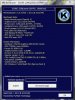
Anyway, I sent a screen shot of the MSI Kombustor bench mark of my vanilla X-775, SB i5 with the 560M. All at default settings.
Could someone with the i5 or i7 post theirs with the 650M? Im trying to get a handle on what to expect with a 650M. I know that the i7-3610QM will hurt the SB i5 but curious.
Thanks for your time!
-
Hopefully my benchmarks are enough for comparison in my review. But here's my results all stock settings with i7-3610qm. You might want to run with the latest Kombustor as things might have changed. You're using 2.0.0 and it's up to 2.3.0.
stock:
![[IMG]](images/storyImages/Xwtkk.jpg)
overclock 1150/1150MHz:
![[IMG]](images/storyImages/nEmaj.jpg)
Plus you can always get a 90 or 120W slim AC adapter. There's lots out there that you can use that are smaller and lighter than the stock 120W one. Look for the Kensington 120W. -
this was a while back but anyone tried the msi wind l2700 9 cell battery for the clevo yet??? MSI Wind L2700 Battery - 9cell MSI L2700 Battery Replacement CLEVO W110ER gaming laptop
7800 mAh 9 Cell MSI Wind L2500 L2700 Battery Black -
Thanks HT.
I'll update and run again. I noticed that my version refuses to acknowledge the 560M specs and AA was set to 4. I installed it with the HD3000 active.
I'll have to start reading though both of the threads. Good info
with your aux fan and taking the time to post.
Cheers
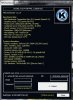
Updated bench;
-
Some people said, a few weeks ago, there was a bug with the bios who made the 650M always working (could not switch to HD 3/4000). Is it still true? if yes, does an answer has been found?
-
There is no such bug that I'm aware of. You can switch to HD 4000 no problem.
-
I think it was the NVIDIA beta driver...
-
After my tape mods to the cooling system (simple) and a re-paste I now have max load temps of 66 for the GPU (skyrim and Just Cause 2 for 4+ hours each!)
-
Does anyone know if it is possible to overclock the CPU yet? Perhaps with Throttlestop? I have Turbo Moded it already with Throttlestop and I seem to be very close to being able to adequately emulate certain games, but not quite there yet. A little boost would do it I think.
-
You can't overclock a non-unlocked Sandy or Ivy Bridge chip. Can't be done on desktops either.
-
Nice temps, could you elaborate on those mods and how much cpu (which one ?) reached please.
-
Can you post picture of the mod? I think i'm not alone who's interested in lowering temps
-
Just use some aluminum or flu tape to seal off the gaps between the fan and the heatsink.
-
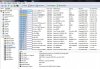
Cover just RED zone, or GREEN till the end?
-
Just cover the whole green zone in foil tape. Also, tape 2 of the CPU vents underneath on the cover to create more static pressure and more flow from the other vents. (this also keeps your lap cooler)
Your mileage may vary but this worked for me. -
Hi guys im new to the forum. Im getting ready to order this laptop at Xotic. I had one quick question. Should I spring for the 5.1 pro THX sound card or is the stock card good enough?
-
Red zone. Just want to prevent hot air from recirculating back into the fan.
-
This does exist? How is it possible? The Audio is onboard.
-
I just received my W110ER, specs in sig. I'm amazed at the power of this little beast! I used the final version of Throttlestop 5 and locked the CPU to turbo and I got results in 3Dbench and CPU that are very close to my 150HM. Now should I keep the 150HM and get a 680M for it, or just keep the W110ER. I'm starting my master this fall, and boy is this the right machine for that!
-
Don't get confused.
He says if he should keep the stock audio or get a external sound card to connect to the audio on-board to produce better sound as he plugs something in the jack plug
-
The last dedicated sound card I had was on my Athlon 64 desktop frpm 2002, and even that might have been a leftover from an older PC, so I don't even remember if it was necessary back then.
Sent from my Tricorder using Tapatalk -
could you provide a diagram of which two vents to cover up? Do you mean taping up the vent of the laptop shell on the bottom or is it also crack between the copper?
-
and I think there is a lot of potential that could be done about the battery life for the sager 6110. The review for the new lenovo y580 was recently released Lenovo IdeaPad Y580-20994BU Laptop Review - Notebookcheck.net Reviews
and it had 4.5 hours of battery under normal usage, and thats with 15 inch screen and gtx660. I love the portability and the speed of this laptop, but the lack of a bigger battery or a way for longer battery life is making it difficult for school. -
anyone playing maxpayne3 on the np6110? i notice it would only play on dx9, how come we cannot play on dx11? is this a videocard problem?
-
I cant use the latest drivers from geforce.com as they say my card doesnt have any drivers. If i do install the beta ones, everything on my computer has a 6 second delay before it starts opening (on an ssd it should be instant) it is an optimus bug.
I had to force my games into playing dx11.
Otherwise, im not going to worry about it, im sure the driver has dx11. -
Ah ok, get it. I have a 5.1 System sitting here, but the W110ER doesn't support 5.1 whatsoever. Not even with HDMI. So if there was an external 5.1 card, why not?
I also only used the onboard until I got my Logitech Z5500 Sound System. It had such a bad sound, that I almost sent it back. But then I figured out, it was my sound codec. So I bought an X-FI Sound Card and it sounded on billion times better than the crappy onboard chip. I wouldn't want to miss it.
For Optimus systems you have to start May Payne via shortcut with the following parameters: "X:\Max Payne 3\PlayMaxPayne3.exe" -dx11 -adapter 1 -
I was planning to overcome that problem by getting this little thing with an optical out. Behringer's products are very trustworthy, but I'm very usure whether it supports 5.1 through its S/PDIF.
[EDIT]: ok, and according to the internets it doesn't, since it sends a stereo only signal through the optical port. -
You are looking for something that supports Dolby Digital Live, or DTS Neo PC. A device supporting either of those will allow 5.1 surround from it's SPDIF port. -
What is the best drivers to use ATM? Latest Beta? Original ones? I just re-installed because I upgraded my SSD to a Vertex 4 256GB so Id like to install the best ones out of the gate.
Thanks!
Edit: Facepalm .. and I am referring to display drivers from Nvidia of course...
-
I've modded the new Clevo GTX680M 302.77 driver to work with W110ER and it works great.
-
Works great what? Lower temps or greater performance or better optimus handling or etc...? TY.
-
I keep on hearing the i7-3610qm runs too hot in these and to just go with a Dual Core. Does anyone have a reasonably cool running i7-3610qm?
-
I never hit 80, I am always around 70s under full load.
-
Where did you hear that? MOST of the people in this thread have the 3610QM, and it runs fine.
-
Depends on what you consider as "hot" I get about 80 degrees after 1.5 hrs of Shogun 2 and thats fully unlocked with Throttlestop (i.e. 3.1ghz across all cores) plus the GPU OC to 1200mhz.
If you are talking about Idle temperatures then the dual core is no different to the quadcore since the fan won't actually start spinning until the temps hit 60 degrees. Temps I expect to be about the same for light work.
Where I expect a difference is that the dualcore might have a lower peak temperature (70-75ish) due to a 35W TDP rating. -
Prop it up and you'll drop temps a decent amount. With my cooling mod removed (after frying my board due to other reasons
), and propping the back it rarely ever exceeds 80C, likely 82-83C at times with BF3.
-
I've been experiencing a delay when browsing in Chrome lately. I will type in the webpage, hit enter, and it will take a second or two for the loading to kick in and fully load the page.
-
It may be your ISP's DNS is slow or this: How to Fix Google Chrome Slow Loading Problem | ZENVERSE
-
Hi,i will be getting my sager np6110 on a week or two
RAM: 8GB @ 1600mhz
CPU: i5-3210M
Hybrid HD: 500GB - 7200rpm
GPU: GT 650M 2GB
IC Thermal Compound
But i opt for the no operating system.Can i install win 7 ultimate 64bit with external dvd drive?Any tips,guides or suggestions would be apprciated as I never deal with a freedos or a no os laptop.
Sorry for the noob question.
*** Official Clevo W110ER / Sager NP6110 Owner's Lounge ***
Discussion in 'Sager/Clevo Reviews & Owners' Lounges' started by Ryan, Apr 7, 2012.


