 Problems? See this thread at archive.org.
Am I correctr in assuming it would not keep the 650m active 100% of the time?
EDIT: I cannot find this driver on nVidia.com. Where are you getting it from?
Sent from my Tricorder using Tapatalk
-
v305.53 Windows 7/Vista 64bit | nvidia - 30x Series GeForce Driver release - LaptopVideo2Go Forums
EDIT: This is the latest but the gpu again doesn't return to idle clocks...v305.53 still the better choice:
http://us.download.nvidia.com/openg...ok_win8_winvista_win7_64bit_international.exe -
Thank you very much for that, i'll take a look :] A picture showing the general front compartment depth for the charger etc would be great if possible. -
Just tried running Shadow of Colossus and Silent Hill Shattered Memories through PCSX2 both of which are considered the more CPU demanding PS2 games.
After tinkering with configurations for about an hour got both games to run at 45-60 FPS - so sometimes they do get jittery, but I think Shadow of Colossus gets jittery even on my PS2 itself. %) I suspect that overclocking through Prema's Bios might improve performance even more.
Also very importantly - the sound is almost good most of the time, even in Silent Hill, something a lot of people from the emulator community seemed to complain about.
[EDIT] - Ok it turned out something was off with my Throttle Stop setup, so after shutting it off Shadow of Colossus runs almost perfectly. -
for those who O/c'ed their GT650M, how much did u push it? for now got +130Mhz (965Mhz/Boost 1080Mhz)
-
edit: oops....
-
heya Prema
Looking at the Samsung vRAM specs, it mentions programmable timings.
I was wondering, is it possible to loosen the primary timings on the gDDR3 modules to allow a bit more headroom for OC? I think it would definitely yield a significant performance boost since the GT650m is so memory bottlenecked anyway -
On driver 302.71 I've got +100Mhz base clock and +200Mhz Memory Clock. In Batman Arkham City it gave me a +4 average FPS in benchmark.PS: weird thing about 302.71 is that when I open either nVidia Inspector or Throttle Stop their windows will alternate between working for 3 seconds and then freezing for three seconds, which I find very weird.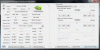
I tried installing driver 305.53, which fixed the above issue, but my average FPS in the same Batman AC went down from 45 to 30 both with default and +100/+200 OC. I rolled back to 302.71 only to realize that the problem was with my Throttle Stop, which brings me to my question to the wise men of this forum:
When I try using Throttle Stop with Turbo my multiplier falls down to 8x and never goes up. When launching the famous Batman AC HWiNFO64 shows my CPU usage jump to 35% and Core 3 Thread #0 will go to 100%, although the multiplier remains at 8x and Batman average FPS drops by around 15 to 20. I'm sure I'm doing something wrong but I can't figure it out what for some reason.
Here is Throttle Stop before I turn it on:And after I turn it on: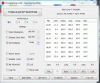
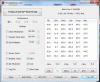
Thanks! -
Finally ordered an Intel 6230 wireless card from Amazon, as I've read that it is compatible with my W110ER. Finally I won't have to use a USB dongle anymore!
Sent from my Tricorder using Tapatalk -
So does anyone have high hopes for the ULV dual core Ivy Bridge mobile processors in regards to extending battery life for this machine?
-
I may be mistaken, but ULV processors come in BGA (Ball Grid Array) chips that need to be soldered onto the motherboard whereas the w110ER uses a standard PGA (Pin Grid Array) processor.
-
For anyone interested in maximum battery life while playing a modern game on the W110ER, with the modded UV bios, Hyper Threading disabled, CPU set to 800mhz through throttle-stop, the GPU @ 405/600mhz and the frame rate capped at 30, I was able to play Max Payne 3 at 1024x600 resolution with medium details for about one hour and fifty minutes (1:50) using the battery.
The frame rate did dip in several instances yet the game looked great and was very playable throughout. A less demanding game like fallout 3 and New Vegas should give even more battery life. -
I'm pretty sure you should be using ThrottleStop 5.00 with Ivy Bridge. It's out of beta and has no expiring time limit now. It's worked flawlessly for me, and I recall unclewebb specifically stating that older versions didn't work right all the time with IVB.
EDIT: I am trying to install the 305.53 drivers linked previously either in this topic or another, and I can't get them to install. It keeps telling me that no compatible hardware is detected, even when I force the installer to run on the 650m. -
Thanks, I'll try that.
For 305.53 you need to use a modified ini: http://laptopvideo2go.com/infs/305series/30553_win7x64/nv_disp.inf
Find a file nv_disp.inf in one of the folders of the unpacked 305.53 installer and replace all of its text with the text from the link. Or just save the link as nv_disp.inf and Replace that file in your installer folder. -
You are using the wrong version of Throttlestop. It has to be version 5.00+
-
Any reason why you used the modded inf?
I installed these from the Nvidia Beta download area and they installed without modification.
Edit: Nevermind, just noticed 305.53 are Desktop Drivers. -
You will also want to make sure that the MTVU (Multi-threaded micro VU1) is enabled. This allows the emulator to use Quad Core. I noticed big performance increases in GOW 1/2 and Shadow of Colossus with this enabled. I don't think it has been implemented in the official builds yet though.
-
Yep, got that working. Also increasing EE Cyclerate and VU Cycle Stealing helps a lot with more demanding games.
That helped! I can feel a very nice boost in ARMA 2. Added +3 FPS in the most demanding benchmark level and around +6 FPS during less "explosive" levels! Thanks! -
[DEL] sorry double post
-
I do remember that the ULV CPUs used in the Alienware M11x were this way. I don't know any of the fine details about the Ivy ULVs to come though so I was hoping they would be compatible with the w110er. I don't see how else you're supposed to get that purported 6hrs of battery life out of it.
-
So I just purchased a W110ER barebones, and when I first received it I slapped in my Corsair Vengeance 1866 memory and my 240gb SSD, it wouldn't even post so I threw in my 1333 sticks from my old rig and it booted right up, I decided to install the modded bios and see if I could get it to work with my 1866 memory, but so far I have been unable to, I saw earlier in the thread that someone was using PNP 1866 memory and was wondering if anybody knew how to get it working properly?
Also, I have an i7 3610QM, and OCZ Vertex 4 240gb -
The integrated memory controller on the w110er has a max RAM clock rate of 1600Mhz. I am confused as to why the system would reject your 1866Mhz RAM instead of automatically underclocking it to 1600MHz to work, though.
-
I was under the impression that the IMC is in the processor with Sandy Bridge and above CPUs?
-
Yeah, I slipped and meant to say the i7-3610QM, not the w110er. I believe all processors being offered with the w110er by builders use a DDR3(L)-1600 Memory Controller.
-
Anyone run an i5 Ivy Bridge dual core in their system? What are performance results with stock "HIGH" settings? Either my i5-3320m is faulty or it just sucks for BF3. With i7-3610QM I was getting 65FPS average in BF3 with quad core. With the i5-3320m, it's like half that, 25-35 typically.
-
Not ivy, but I've had a 2540m in mine for several months. On high in BF3 fraps reports min of 28, max of 60 (vsync) and average of 44 on caspian. I swapped in a 3610 from my p150em and it was more snappy for sure, but I didn't think it was that drastic. I didn't benchmark BF3 with the quad ivy so I don't have anything directly to compare it to, but I really didn't think it was that big of a difference.
-
I have to turn off hyperthreading otherwise it skips/stalls.
-
I reported this previously, on an i5-3320:
"weird thing happened. I switched from 302.59 to 302.77 (modded inf from laptop2go), which seems to be everyone's favorite. then the cpu never worked higher than 1200 mhz, which is its lowest clock. and everything seemed pretty laggy as well, though certainly not for lack of cpu power (1.2GHz should be enough for basic stuff).
then I switched back to .59 and everything is back to normal... this is on the UV bios, but this should not matter."
Could this be the cause? Can you monitor the CPU speed? -
Question, I have the 3610 setup and when I try to play games like Godfather I and II and Assassin's Creed, the games run slow. Play games like Modern Warfare III with no problem. Any possible reason why?
-
Check to make sure those games are using the right GPU and not integrated and make sure the settings aren't too much.
-
They are on the right GPU and I should be able to run old games like those flawlessly on the highest setting, correct?
-
That's correct, especially considering this laptop can run some 2012 games at high settings, for example Sleeping Dogs, Prototype 2 and Saints Row 3.
Maybe it is a Driver issue since the other game you mentioned runs fine. -
well i fixed by broken lcd that i posted about on pg 293. i bought my replacement lcd off amazon. it is the glossy one for $90. aybe i should have shelled out $25 more for the matte, but i use it indoors so i dont mind glare too much.
it was a easy installation. the hardest part was getting the connector attaached. luckily there was a piece of tape already on the cable which kind of gave some leverage to connect it. took about 15 mins altogether.
Anyway what are some must have accessories for my laptop? Laptop cooler ? case for laptop (any soft or hard shell)? -
@ brokemysagern6110
I think this is a 'must have' accessory. It is the 'Thermaltake Toughpower Slim 95W Notebook Adapter' and was confirmed working by someone earlier in this thread (can't find the exact post).
I have also found my old Zalman NC2000 cooler very useful but I am sure you can get a smaller one than that.
I think these fluorescent keyboard stickers are a must too!
I have ordered some and may put some on my P170HM as well. -
They have them in the states too, unfortunately more expensive ($65 vs £20): Amazon.com: Thermaltake Toughpower Ultra Slim 95 Watts Universal Laptop Power Adapter High-Efficiency USB Charging Port ADP95W0003 (Black): Electronics
-
Yeah, I'm trying to figure a way to monitor CPU speed and see it in game, unfortunately Afterburner doesn't show CPU speed only GPU. If I run Throttlestop at Turbo it seems to fair much better, but still occasional skips. I reverted back to stock drivers since that's what I used to test with my quad core, but I should try 302.59 and see if it helps.
-
I am thinking you are right about the drivers, because I just switched and played the old games with the Integrated graphics enabled and they worked perfectly! How do I check my drivers and where do I get new ones?
But I want to be sure. Are there any other possible reasons the old games might run slowly on the nvidea and not the new? -
If you run HWiNFO & Afterburner (Riva OSD Enabled) all together, basically you should be able to see all the sensory information from HWiNFO on Afterbuner ingame OSD that includes CPU speed. Here is how:
In HWiNFO sensors config, just enable Riva OSD
![[IMG]](images/storyImages/zA2TX.jpg)
In game
![[IMG]](images/storyImages/qrlm4.jpg)
-
I let HWinfo run in the background, and the CPU did not budge from 1197.3MHz no matter what I did. All readings - current, min, max - indicated the same figure. That's how I realized why 3DM11 scored poorly with the new drivers.
-
throttlestop allows cpu freq. logging as long as other infos.
-
Thanks guys. I recall using HWInfo before and forgot that it works with Riva. Will run that and see how it goes. Thanks for refreshing my goldfish 3 second memory.

edit: just tried it and CPU is pegged at 2600MHz with 90-99% utilization. -
W110ER/NP6110 Prema Mod updated to v1.3 (UV):
http://forum.notebookreview.com/sag...ies-prema-bios-mod-review-22.html#post8793771) -
Nice Prema, thank you. Love the feature.
-
Time for some Fn+1 + UV GPU + clearance hole game testing for temps.
-
Strange, then, that BF3 scores should be so low. Can you also run the test - perhaps on a different machine - with a dual-core Sandy?
I don't have BF3 or I would have tested it already. Maybe I can grab it one of these days and put it to the test (I have the exact same 3320M). -
Well, I'm exchanging the i5-3320m for i5-3360m and they're doing it free of charge. The CPU I got wobbled a little bit when I put it in the socket, I'm thinking it was a little warped. Pushing down slightly in the corners when I turned the screw to secure it worked ok, and it clearly was working fine, otherwise it wouldn't even boot up, but I can't help but thinking that the slight warp might cause some issues. When I get the new chip, I'm going to test it in my NP6110 and my NP9150 (with GTX 680m) to see if there's any affect with a much faster GPU.
Kudos to LPC for sourcing a CPU for me cheaply and managing an exchange for a newer part without issue. -
Well, maybe it's just because BF3 is optimized for quad cores and it sucks with just two?
-
BF3 will make use of all 8 threads on my i7 so it clearly performs better on quads. It appears to need at least 4 logical cores; if I limit it to 2 cores on my 2500k, I get a stuttering mess as low as 20 fps frequently, but on an i3 2330m (lower clocks but 4 logical cores), I almost got something playable.
I also see a loss of about 5 fps when hyperthreading is turned off on the i7.
Sent from my Tricorder using Tapatalk -
How do I record a video on the webcam?
What program?? -
Guys, just played Counter-Strike GO Beta for a-few hours, graphics and gameplay are superb
I maxed out all gfx settings and my baby handled it with ease lol
*** Official Clevo W110ER / Sager NP6110 Owner's Lounge ***
Discussion in 'Sager/Clevo Reviews & Owners' Lounges' started by Ryan, Apr 7, 2012.


