Problems? See this thread at archive.org.
I ordered from LPC digital with money order, and it worked great. I think a few other people in the forum have ordered from them with no problem. There will be a slight delay in the building and shipping of your laptop since it takes a few days to receive the money, but just email them and tell them you sent out the payment and they can put in the order to start the build process.
-
-
I have not had any issues with LPC-Digital or XoticPC. I can personally vouch both companies are reputable and will provide your merchandise.
-
But like others said, I can certainly vouch for LPC-Digital and also Reflex Notebook in Canada.
-
All this means is you need to re-enter your key and have it activate online. If you right click on my computer and goto properties, and then scroll all the way to the bottom, there will be a link to 'activate now'
-
My laptop just randomly shut down on me. I had just finished reinstalling DCUO, surfed NBR probably for like 5 sec, and shut off the full fan. Laptop screen froze for like 2 sec then shut down.
Any suggestions on why this might have happened? Temps for all cores were around 40-50C. -
Hi all,
I just recently received my NP6110 in the mail, but I'm having a not-so-slight problem.
The built-in card reader isn't working (Error Code 31), and I desperately need to load some photos for my graphics project by this Thursday night...The project is due on Friday morning...
Anyone have any ideas? I've already tried updating and reinstalling my drivers, and I can't afford or spend the time to send the notebook back to the retailer for repairs... -
Go here: CLEVO - Download
Choose W110ER from the download list, select under drivers: ALL. Download the card reader driver there. If that doesn't work then make sure you've downloaded and installed the latest USB 3.0 drivers. -
Thanks for the suggestion HTWingNut, but it isn't working...
Anything else I should try?
I'm starting to panic just a little bit... -
This is worth a shot: Hardware devices are not working or are not detected in Windows
Run the "fix-it" program on the right.
What is the hardware ID? Perhaps we can find a drive from the manufacturer of the card reader. -
if you really need to get the photos out of the card and you're willing to deal with the card reader problem later, just try and buy an external card reader or transfer it directly from a camera, thats assuming you dont have problems with the usb ports.
-
HTWingNut,
Even that failed; it couldn't even finish running the diagnostic.
Said there was some sort of error that prevented the scan from completing.
As for the hardware ID, it's a PCIE Realtek Card Reader, model number PCIE RTL8411.
I already attempted to download and install the drivers to no avail.
And gary, I honestly would if I could, but I go to a boarding high school and there are no trips out until the weekend... -
is there anyone there with any type of digital camera with usb cable? if you're using a sd card, you can just plug it into most of the camera nowadays and use it has a card reader to transfer files.
-
Well, ordered my w110er today, with the support of everyone here. I will be working with linux, and attempt to bring somewhat of a better battery life with it (though not sure how much tuning that'll require,or if i can do so).
I plan on having 2 hard drives, 1 for school, which will be running linux for web browsing and such, occasionally typing the notes, and obviously, as with any college student, occasionally actually paying attention to the class.
That said, the 2nd hard drive will run windows for games, in case i ever decide to do so which i more than likely will.
I've toyed around with a few laptops around to see how much of a time difference in battery life i could get, and, with a minimal install, plus some kernel configurations, i was able to get the laptop that i had on hand (some hp dv something, its not really mine), and got some 30 minutes extra or so out of it. So hopefully, i can reproduce something similar with the w110er, and, have the second hard drive strictly for gaming as stated. -
Has anyone 'upgraded' to Windows 8 yet? I am wondering if that will make any difference to power consumption at all... maybe with less processes running, better power management etc..
For the record, I do not want this to turn into a debate about W7 vs W8 - I am just wondering if power consumption improves or not. -
I ran the consumer preview on my Acer convertible tablet and I lost over an hour of battery life. Things might have improved since then, though.
-
Don't know what to tell you. Contact your reseller. Detail what you've tried, they may have to replace it for you. In the meantime pick up a cheap USB card reader.
-
Prema 1.3 + UV makes mirracles on this machine!
3610QM@ 3Ghz - 8Gb RAM@ 1866Mhz - GT650M 2Gb 1140(Turbo)/1180 - Ambient +25С - Fn+1 ON
![[IMG]](images/storyImages/van_650mOC-1_500.jpg)
![[IMG]](images/storyImages/i.gif)
![[IMG]](images/storyImages/11_650mOC-3_500.jpg)
Maasive overclock on the undervolted GPU + 3.0Ghz 4 cores using throttle stop! It's just unstoppable) -
and a few more benches...
Sleeping Dogs
Stock GPU - 950(Turbo)/900
![[IMG]](images/storyImages/SD_stock_500.jpg)
Overclocked GPU - 1115(Turbo)/1100
![[IMG]](images/storyImages/SD_OC_500.jpg)
Metro 2033
Stock GPU - 950(Turbo)/900
![[IMG]](images/storyImages/Metro_Stock_500.jpg)
Overclocked GPU - 1115(Turbo)/1100
![[IMG]](images/storyImages/metro_OC_500.jpg)
completely playable) -
Hey guys just got my w110. I had a quick question in my Nvidia control panel i dont have the section for display, is it due to the stock drivers or is that normal.
-
don't have it either, using beta 306.02 right now
-
It's a pain. However nVidia Graphics will apply all the settings you do in the Intel HD Graphics Menu.
-
Ok. One more question, i know its been answered before but i can't find it. What can i use to see if the Nvidia card is being used while gaming?
-
i launch msi kombustor before i start benching or gaming in order to turn on the dGPU
-
Nvidia control panel > desktop > display gpu activity
or
donwload the following tools
Optimus tools 64bits -
now thats a handy tool. thankx
-
edit: nvm figured it out.
Attached Files:
-
-
So I'm planning to buy one. There are a few things that I'm uncertain of.
-Exactly how hot does it run under some load? Is it unbearable? That's the impression I got. Is it hot when idle or browsing web or playing some very light games?
-The battery life, how bad is it? From what I gather, it's really bad. Aside from gaming, I'm planning to use it in school, so how long does it last with Wi-Fi on? I'm only doing C++ stuff, so that shouldn't be very taxing. -
See my review...
http://forum.notebookreview.com/sag...er-np6110-clevo-w110er-first-look-review.html
That's worse case scenario. With propping up the back of the laptop with bottle caps or whatever you choose, it drops temps a good 5C. Add holes in the bottom cover over the fan intakes and drop temps another 3-5C. With Prema's latest BIOS updates I can achieve about 5 hours using wi-fi, minimum brightness, power saver mode, that last battery test was with an i5-3360m. Will try again with i7-3610QM when I put it back in my machine, but I can imagine it will be similar since in power saver mode it never really goes past 1.2GHz and consumes similar power. -
Well I'm thinking I might try and order another motherboard to see if it makes as much noise as mine does. I really want to love this machine I just can't stand the processor whine.
Was the motherboard swap difficult wingnut? -
Just keep track of your screws and it won't be too hard.
 Maybe an hour from start to finish. I get no processor whine, then again I'm an old man and can't hear the high frequency whines any more, well except those from my kids.
-
You might get lucky. The noise can vary from batch to batch. If you can expose the motherboard enough while the system is working and making the whine, another alternative would be to track down the part that's making the noise. Sometimes it's pretty obvious, but if you have trouble to pin-point the noise, you can use a small piece of flexible rubber or plastic tubing (or drinking straw). You stick one end in your ear and move the other end as close as you can to (or even touch) the various motherboard components. You will likely converge on one or a few surface mount power chokes. If it has a value label or you have the schematic you may be able to source a good quality replacement part.
Ordering another motherboard is just feeding the problem IMHO. -
I had a laptop where it was just a matter of placing a small bit of hot melt glue on a capacitor to stop the high pitch whine.
-
I have been having a problem that keeps coming back at me for some reason.
The i5-3320 on my w100er occasionally will not go above the minimum 1200MHz no matter what I throw at it (stress & such). It happens from time to time, and is not always cured by a reboot / shotdown.
It has occurred
- with the stock and UV bioses
- with and without the Clevo hotkey software
- on 'balanced' and 'high performance' power plans
I also occasionally sense, in these situations, a slight lag in usual usage (which should not be a problem for an Ivy even at 1.2GHz).
Any idea where this might come from?
PS I never touched Throttlestop.
-
what about your temps ?
-
absolutely regular; 50*C CPU (idle, 1.4 UV), about 75*C PCH
EDIT: Yep, it does the same with a Sandy Bridge i5-2410. (Only now it's more aggravating, given the 800MHz CPU frequency...)
ALSO, I cannot change the frequency / multiplier with Throttlestop.
LATER EDIT: Back to the Ivy. Operating normally, for now. -
This happened a few times on my P170HM when I had a fan in the process of failing. I though maybe it was an EC failsafe protocol kicking in or something. And once the failsafe is triggered, only a reboot can reset it. But it could have been a coincidence.
Other things I've thought, is that the EC goes haywire. I couldn't see that anything was out of place.
Another thing to try if the problem recurs from time-to-time, is to use regedit.exe to export the following key when everything works well:
HKEY_LOCAL_MACHINE\SYSTEM\CurrentControlSet\Control\Power\PowerSettings\54533251-82be-4824-96c1-47b60b740d00
When the problem occurs, export the key again and compare the two so see if some power settings get mysteriously mucked up somehow... -
The next time this happens, put a load on your CPU, 1 thread of the TS Bench is enough, and then post a screen shot of how you have ThrottleStop set-up and what it is reporting. Clear the BD PROCHOT box.
BD PROCHOT stands for bi-directional Processor Hot which in English means that your GPU or something else on the motherboard can send a signal to your CPU telling it that it is too hot. This will force the CPU to use the lowest multiplier. Turning off the BD PROCHOT function should block this signal so your CPU can run at its rated speed.
If your CPU gets too hot with BD PROCHOT disabled, it will still throttle just like Intel intended. It just prevents other things from throttling your CPU. This problem has happened with a variety of motherboards from a variety of manufacturers. -
@arg8 @unclewebb
OK, guys, thanks. Will do (already exported the reg file). -
Ivy doesn't do magic tricks. A dual core Ivy at 1.2Ghz will be a bit faster than an Atom CPU, but not a ton. It will be slow. That is normal.
As far as it being locked down to 1.2Ghz, use Throttlestop. -
Has anyone been able to record with the integrated webcam?
-
uhh maybe as fast as a quad core atom
-
CPU @ 1.2GHz should be idle speed. If it won't go faster than that under load then something else is wrong. And a quad @ 1.2GHz will be much faster than any Atom. Atom ≠ i7
-
Yeah I know the difference, durr, but seriously, lock your machine down to 1.2Ghz and tell me it is not VERY noticeably slower. Yes faster than an atom but not by a super huge margin. Some people have unrealistic expectations that a modern cpu even at 1.2Ghz is going to be just as smooth as at full speed. It's not. That's what I was saying.
-
Compared to atom, ivy does do magic tricks. Going from pentium m to sandy bridge (in its maturity), clock for clock sandy was 50% faster. Atom, clock for clock, is half as fast as Pentium M. So it doesn't take much math to say that ivy bridge would mop the floors with an atom processor with same clocks. Theres more than just clocks. Instructional sets, memory controllers, etc etc. I know that you know, but I think that you should also know that ivy at 1.2ghz is much faster than atom at 1.2ghz.
Edit. If interested I'll find those links sourcing my numbers. The pentium vs sb was information I found last year whilst researching my laptop. I found atom vs pentium during same time. I'll have to dig, but Google never fails
Sent from my EVO using Tapatalk 2 -
But it's STILL SLOW!!!!!!
Are you guys just DETERMINED to argue with me?? Can't you just leave something be?
Here is the original comment:
Yes it should! Some slight lag with even an Ivy bridge quad at 1.2Ghz is normal. This is not a false statement. Period!!!! -
Just fyi an Ivy dual core at 1.2ghz is still like 3x as fast as the latest Atom at ~1.8ghz. Atom is sloooooooooooooooooooooooooooooooooow.
But yeah, if you notice a slight lag when your IVB CPU downclocks to 1.2ghz, then obviously it is a problem for IVB at 1.2ghz. Just make sure it's your processor and not other things though (e.g. slow HDD access times). -
Agreed. To consider an IVB @1.2ghz to be slow, you must have NEVER used a computer before 4 years ago.
I used to play games on my throttling sandy bridge @1.2Ghz (without any lag), try to do the same with an atom and then you'll know the difference is HUGE, and it shouldn't lag if it's not stressed too much, so definitely not in usual usage. -
Hi Guys
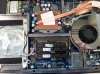
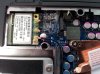
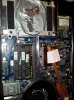
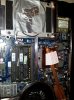
For all interested, I ditched my old Intel 6230 WIFI card and upgraded to an Atheros AR9380, i.e. the same card in the bigfoot N-1102 series to improve my reception and peak speed.
The problem facing me was this laptop only has 2 antennae built in so only 2 of the possible 3 band capability was possible.
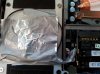
I pulled an extra antenna from an old Dell Latitude machine and coiled it around the Drive bay. Voila! triple band capable
To be fair, its pretty damn difficult to maintain a triple band connection when you are next to the bloody router but its nice to have the oomph when needed.
-
You are wrong, a 1.2GHZ ivy architecture is far more complex then a silly ATOM.
Anyone can prove this using passmark and seeing the scores they get.
You can force downclock an IVY cpu down to 1.0ghz and I am sure it will pass all the ATOMs on the market.
I own way too many laptops.... I know this for sure, the ATOM are efficient but no where as powerful as the i5/i7 architecture.
*** Official Clevo W110ER / Sager NP6110 Owner's Lounge ***
Discussion in 'Sager/Clevo Reviews & Owners' Lounges' started by Ryan, Apr 7, 2012.