Problems? See this thread at archive.org.
I updated, it seems to be better on Battlefield 3. The older drivers were pretty bad from Sager... When I had the laptop plugged into an external monitor it had issues running BF3 in window mode.
It seems to have fixed many of the memory leak issues that cause me to drop FPS under huge explosions.
But this is from my personal test only... From my experience, newer drivers has always been good to me on this laptop so far.
If you do go ahead with the Nvidia drivers then do this:
I would suggest you when you install the drivers click CUSTOM INSTALL -> tick mark "CLEAN INSTALL" :thumbsup:
-
Yeah BF3 runs a lot better for me too. Must smoother framerates and they do not dip during an explosion either.
-
I've been lurking here for awhile (looking to buy pretty soon) and I had a quick question that I don't think has been answered definitively. Does anyone know whether the new Ivy Bridge dual cores run much cooler than the quad options? Theoretically it's a no-brainer, but I've heard there isn't an appreciable decrease in heat output/overall temps between dual and quad (maybe just due to higher clock speeds?). Thanks in advance for the help! Looking to put a i5-3360M in if it's at least somewhat cooler...
-
The run at about the same temps due to the smaller die size of the dual, but the dual should put out less heat overall.
-
1 *C maybe, we've busted this several times, no reason to buy a Dual Core... no reason what so ever, better off paying slightly more and being much more future proof. The amount of money saved does not improve anything really, except a little bit less heat
EDIT: Okay R3d beat me to it -
Just saw the second response--quad core then I suppose!
Significant temp increases over the 3610QM if I upgraded to the 3720QM? -
just my opinion, but laptops with keyboards that go edge to edge seem to look a bit stupid.
-
Hmm, CSs is has its FPS limited to 31 fps.. Im going to roll back the Nvidia drivers.
-
Oh, so you switched to it from the Acer 1810 series? I have the same switch to do and am still torn between this and the Sony Vaio S.. I appreciate the Acer's smaller size which I think is ideal, but wish the Clevo W110ER had more expensive body materials, hence why I'm drawn to Sony. Clevo also had a bad battery life, but it seems those problems were fixed with that custom BIOS recently.
So the keys are smaller than on the Acer? That's a shame. The 1810TZ was almost perfect for me size-wise, I guess it only needed a refresh with a new CPU, a better matt screen and a backlighted keyboard. Too bad Acer gave up on this line (and only used it with Atoms and low power AMDs). -
I'm surprised you can compare Acer build to a Clevo.
Acer make garbage. Everything I had from them died in a few months time.
If you didn't know, Celvo makes the laptops for Samsung also.
The keyboard isn't that small, not sure why people keep saying that. It's fine in my opinion, come on its a 11" notebook... What were people expecting? a 15.4"!?
If people are complaining about the size then maybe they shouldn't have bought a 11" notebook!
Sony vaio has some serious cooling issues, don't expect it to run great under heavy load and gaming.. -
11" doesn't mean small keyboard.
It's smaller than my 10" netbook, and key response is worst.
Also, it's unique in its category, and people don't buy a laptop just for its keyboard you know
-
Maybe you bought the cheapest models and not the Timeline series? The Timeline and Travelmate are usually rather decently made (excluding the screens)..
What good is that if they don't use the same high quality materials on their laptops? Obviously, the W110ER is rather plasticky and bland looking compared to the competition.
Maybe the same sized keys as on the Acer 1810T which has the same dimensions case (albeit a thinner one) and has almost full sized keys.
Not what I've read in the tests, though I expect it to heat up considerably and I'm especially concerned about the fan noise on Sonys (they don't seem to invest a lot of thought into this). -
I scratched the matte screen (AUO) on my Monster last week so I ordered a new one from a seller on eBay (listed as a B116XW03 V.1). They sent me a ChiMei InnoLux N116BGE-L42, which is a glossy screen. I decided to try it out anyways and it seems much brighter than the AUO screen with much whiter whites and better viewing angles. Does anyone else know anything about this screen, or know where to find specs on it? I am considering keeping it since it seems to look much better to my eyes when there are no light sources behind me.
-
If the screen looks better then the last one I'd go ahead an keep it. After all the appearance is more important then the specs. I did find this page though CHIMEI INNOLUX N116BGE-L42 Overview - Panelook.com
-
Vertical viewing angles seem better.
Regarding the brightness, glossy are always brighter, I guess that's what you noticed.
I wish there was a quality matte panel out there ! -
NEED HELP!!!! No overclocking program will work with my w110er. Each one will freeze in intervals of 5 seconds, and when tested with unigine or any game it will downclock to 405Mhz on the gpu and memory, and will stay there till restart. Also if I leave the program open too long, for example, msi afterburner it will hang my computer (Even with stock clocks). I have tested with 3 different Nvidia drivers and stock and prema bios. My thermals are always under 70C. As a side note, my gpu never idles at 135Mhz no matter what I do.
-
I also always get the freezes with msi afterburner and such.
Never understood how people are using them =) -
How do you test this? I am asking because I thought so myself until I discovered that it did actually idle the right way. Start 3DMark11, do not advance beyond the welcoming / first screen, then start HWInfo and monitor the 650m temps. See what happens.
-
Hi,
I found this but i doubt its compatible, can you confirm please?
A116XW02 V0 Datasheet download - Panelook.com -
was so tempting !!
![[IMG]](images/storyImages/633885connectors.png)
Attached Files:
-
-
Same way but i monitor temp and watts, they never go down from the 835mhz reference. That doesn't bother me, it's the not being able to run any overclock programs that i'm asking about.
-
Apparently all FPS is capped to 30-31 when on power save mode, but uncapped on performance. I recalled FPS capping having to be done manually per game, so is this a new feature from NVIDIA?
Edit: also, can't wait to install new Crucial M4 256Gb. $135 at Staples after price match to Amazon's $159, then used a $25 off $100 coupon.
Using Macrium Reflect, has anyone booted from a recovery disc off a small flash drive, then selected your image source from a larger external drive? -
You lose power getting more FPS than you actually need. Not a new feature, always been there
-
Hey all, I'm in the possession of a W110ER for a few months now and been loving it so far. Though I've been having an extremely weird issue since I installed 'Orcs Must Die 2'. A few days ago I was playing the game at a friends house, all fun and games being hooked up to a 1680*1050 res. monitor.
No lag or excessive temps (CPU ~80 centigrade max, GPU ~75 centigrade max). When all of a sudden my W110ER had a hard shutdown right from the textbook, I didn't like it at all but figured I got warranty and would boot up again and see how long it would take to reproduce the problem. It took about an hour before I experienced another serious issue, this time it didn't hard shutdown but to my surprise I had green artifacts all over and the well-known sound-buzz from a total freeze was shouting out of the tiny speakers. At this point I declared the Nvidia GPU dead (am SURE optimus was using the Nvidia all the time as I configged the application to ONLY use the dedicated GPU.)
I basicly gave up, chilled some and went home with the device. Before claiming warranty I wanted to see when exactly this occured and ran some benchmarks (being skeptical as usual as why this happened all of a sudden with normal temps.) By now I have ran:
-continuous 3DMark Vantage loop runs
-continuous PCMark 7 loop runs
-Prime95 for 60mins+
-Furmark for 60mins+ (on both the intel AND nvidia to switch it up a bit.)
-ran Memtest86 for 5+ passes overnight
NONE of above tests have made the device hang, crash, have artifacts or hard shutdown. At this stage I was pretty puzzled, I still cannot believe that this ONE game made the device hardshutdown/generate artifacts.
I ran Orcs Must Die2 and just let a level run, after around an hour the artifacts appeared.
TLDR: W110ER crashes running Orcs Must Die 2 (artifacts OR hard shutdown), runs PERFECT on any stress-test or benchmark for many many hours straight.
P.S.: Apologies for my possible bad english, not my native tongue but I try. I know this isn't a hardware-troubleshoot topic either but I'm posting this as a W110ER owner that wants to know any ideas from other owners on what is happening and if ANYONE has experienced something similar running any sort of program/whatever.
Thanks for reading. -
have you tried switching driver versions ?
-
Yes I did, at first the used driver was 296.xx (sorry can't remember exact build) and after the first crash I have updated to the current Nvidia driver (306.23) and the crash still appears.
-
Is there any test for video memory around ? This is strange indeed..
Does it also happen with lowest and maximum graphical settings ingame ? -
I indeed lowered graphics the second time (details to low, resolution to 1366*768 on notebook monitor, unplugged the external monitor). Was running fine as usual but the same thing happened. I have a UBCD lying around somewhere that has a tool that should test out NVRAM (this is a VERY OLD DOS-tool and I seriously doubt that this will work as intented for one and I'm pretty sure it won't be able to know whats happening with Optimus and all, it will stick to the HD4000 most probably).
I actually worked in retail PC/notebook repair and I just can't put my finger on this one (as usual my own device has the most exotic, impossible to pinpoint issues.) Hence why I posted, I'm just out of ideas by now. -
you want to be careful of video memory overheating, there are 4 memory chips which wont be very well cooled since they are beneath the keyboard with a black paper pad on top.
-
Maingear PC | The Pulse 11 Laptop
Have any of you seen this? Does that look like a backlit keyboard? I havent seen any mention of it. Strange huh (look under galleries) -
No, it looks like a light
@Suzaku6: I assume your cpu is not a ES/QS ? My best bet would be the vRAM then, or a really strange game behavior (maybe it's the only one to use some part of vRAM or an unhandled instruction set.. ahem.)
You might want to try that exact game copy on another computer, ideally another w110er, or even better, stop playing it =D -
No backlit.
Sorry to disappoint you -
That last picture does look like its backlit but I'd contact them to be sure. I've never seen it on one of these but you never know.
-
the maingear doesnt have backlit, they are all the same, The picture is a little misleading from the lighting.. for example it looks like the laptop might have a slightly orange exterior but if you just look closesly you realize its the same chasis as every other w110er laptop.
-
how does one go about cleaning the laptop, though? the top part seems to draw a lot of oil to it...
-
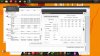
Im having idle issues with the cpu. it seems to got to turbo for no reason, even with turbo shut off in the bios,hyperthread off, and on power saver on D: . Im sitting in class right now and its in turbo. By the way im using Prema Bios UV edition.
-
well, throttlestop is turned on, with "set multiplier" to turbo, and the cpu is loaded.
Looks like a valid reason to me, you should look through your processes why it's not idling =) -
well, throttlestop is turned on, with "set multiplier" to turbo, and the cpu is loaded.
Looks like a valid reason to me, although maybe not while powersaver is on...
anyway you should look through your processes why it's not idling =) -
oops added wrong pic. When throttlestop is off its still on turbo.
-
ThrottleStop shows that you have a significant load running on your CPU. You need to kill all the useless background tasks to get your CPU to idle down.
ThrottleStop in monitoring mode will not put a significant load on your CPU. Use it to eliminate junk on your computer. Keep a close eye on the average C0% number and do what you can to minimize that. It is a very accurate average of exactly how much load is on your CPU.
RealTemp 3.70
Download Real Temp 3.70 | techPowerUp
That's another good app that will accurately show you the true load on your CPU. RealTemp might also be able to turn Turbo Boost on and off but I haven't had any W110ER feedback about that yet. Go into the Settings window to toggle that.
When you exit ThrottleStop, it is up to you to disable Turbo Boost before exiting. You can set up a second profile with Disable Turbo selected and switch to that before exiting. -
Ok thanx. Figured i probably need to do that.
-
You will also need to switch back to a low power Windows profile. Something with the Minimum processor state set to a low number like 5% or ....
Control Panel -> Power Options - Balanced -
Hi guys, just put F1 2012 (Steam purchase) on my W110ER,i7-3610QM,16gb ddr1600,2gb GT650m,OCZ A3 240gb.
Will not boot, dumps back to desktop after first splash screen. Yet boots fine on my desktop PC.
Running the latest nVidia drivers (non-beta) that self installed earlier this week.
No idea what is causing this? Anyone else able to try? -
Weird. I installed the demo two days ago off Steam and it ran with no issues whatsoever. I'm using nVidia driver 302.71.
-
Just tried it with latest drivers.. nice game =)
But I'm getting random crashes with some other games (despite the driver updates), sleeping dogs, nfs the run, and others, that I didn't have from day one. Also, GTA won't run well anymore, while it looks like it's still running on the 650M :-/
I assume some strange behaviors are still to be expected... a fresh win install may solve it though. -
on my side, got crash (freeze after 10-30min) with 326.23 and BF3 (nvwgf2um.dll appcrash).... did roll back to 305.53 and everything works fine.
-
Hi,
Long time lurker, first time poster.
Soon to be new owner of this amazing laptop, thanks to this huge thread for helping me purchase! Just a quick question, i bought this from
Logical Blue One - Horize W110ER Clevo Ultra Portable Notebook PC
Just wondering what model/speed the standard wireless card runs at, and whether chucking in a intel 6235 card would
A: be worth it, would i get 300mpbs speed (assuming I read correctly, the standard card only supports 150?)
B: is it easy to install?
Thanks for any help -
Terribly easy. And yes the 6235 card is very fast, and worth it for the extra 25$.
The latency times are nice and low, virtually no lag when playing online games such as battlefield or counter-strike with it. -
Happening to me as well. Man, they have to fix this.
-
just use nvidiainspector (profil -> startup for autoloading)... msi afterburner is such an useless gomer pyle.
*** Official Clevo W110ER / Sager NP6110 Owner's Lounge ***
Discussion in 'Sager/Clevo Reviews & Owners' Lounges' started by Ryan, Apr 7, 2012.