Problems? See this thread at archive.org.
A light sensor on a laptop? seems pointless not like I'd ever install windows 8 on this laptop, I would prefer some webcam active LED. It is odd to have a useless hole. They shouldnt add physical features to a laptop that will never even support the future technology.
-
Sometimes they want to re-use the chassis for another revision or model. Nothing to do with windows 8.
A light sensor can help to automatically setup brightness and keyboard backlight, improve webcam or detect when the laptop is closed.
Could also be for a (potential) second mic, or just useless, but they won't fit a flash led in, seems too small. -
I don't trust Kombustor (Furmark based) due to its own driver throttling issues with NVIDIA plus its a little too rough on hardware (how I destroyed my old laptop's VRAM). Kombustor seems great to raise a massive load but its not very sensitive. I've also experienced when my OC is stable on Kombustor yet is unstable in more sensitive applications. I prefer lighter loading but really sensitive apps.
For boundary testing, it was stable with AtiTOOL for 25 minutes without an error beep. I also verified that with EVGA OC scanner for 30 minutes. From there, it was just 30 loops of CRYSIS warhead for mixed load stability. The GPU OC was independent of the memory OC.
The memory OC was verified with the Standford CUDA Memtest plus the more vigorous original CUDA memtest. Both extremely sensitive apps found instability at 1150mhz which I took down to 1100mhz for stability.
I know what you mean, stability is tough to quantify. I actually thought +150mhz on the UV mod was stable for months because it passed the 15minute ATITOOL test until it crashed on me when playing Shogun 2 so I backed it to +135mhz and re-tested with AtiTOOL for 25 minutes.
1250mhz is fine for gaming on stock voltage and graphics workloads but its too unstable for GPGPU, my clocks can't be beyond 1100mhz for Hashcat GPU or Pyrit due to extreme precision required. Even my desktop GTX 570 is not GPGPU ready at factory OC speeds, too many soft errors came out so I had to bump voltage by about 0.013V before the soft errors disappeared. -
Im stable at 990/1115. Feel like thats the sweet spot. While on the overclock topic has anyone been able to use Mobious1's overclock guide finding the right pstate
-
Do low end socket G2 processors work in the w110er? I would like to go ahead and get most of the parts minus the CPU and build it myself and only limp along for a bit on a B800 or B840... which are quite cheap. (I'd like to get a 3720qm later on or something less hot if they release one that supports VT-d)
edit:
I see a few probooks have the HM76 chipset and support lower end processors however supposedly the 3d unit is disabled on the celerons so im not sure that optimus would work with with only 2D acceleration available on the CPU I guess it depends on what parts of the IGP engine they used to copy from the nvidia card to the display. -
I think you'd likely need at least an i3.
-
I thought you might say that in which case I may as well just save up for the 3720/40qm....I thought about QS and ES parts but quite frankly I wouldn't trust them to be stable not to mention them being gray market.
Still it would be interesting to know... the chipset at least theoretically supports those processors. -
some sellers are offering it with b940 if I remember well.
edit:
Intel® B800 2 x 2 Cores à 1,5 GHz - 2Mb cache - 35 Watts - (Sandy Bridge)
Intel® B960 2 x 2 Cores à 2,2 GHz - 2Mb cache - 35 Watts - (Sandy Bridge) -
Which reseller is that? All the sellers I found offered minimum i3. I'd be curious if it worked at all. The iGPU is not the HD 4000, but "HD Graphics" and I'm sure limited in some respects.
-
pcw.fr
I also don't have the hd4000, it sure is more limited but doesn't prevent the display =)
I have one @home, don't think I tried it though. -
I tested the w110er with a B840 and it worked fine. Significant drop in performance, of course, but acceptable (1.9GHz).
-
I'm having consistantly low nvidia gpu usage throughout all of my games, even when I force application settings in nvidia control panel. I tried playing Dishonored but I can't get more than 30% gpu usage.
Is there a way to force gpu usage? -
Interesting, that bios mod looks very useful. He should be able to live with 100mhz less when the trade off is better temps. I wont be able to get my hands on it to work on it til this weekend though, since he used it for college every other day, but I'll try to update with results+temps if I can.
Also may I ask what temps you get when you use the stock voltage and the 1050mhz gpu clock? -
Did you see what your FPS was? Dishonored is not very taxing even with FXAA so it could be you are already getting 60FPS and due to VSYNC ,your GPU doesn't need to work harder.
-
well i bought my w110 back in may 23 and the cpu fan is allready out what is bad is after a week waiting i have failed to recieve a replacement.
and yes nothing else will work -
Not bad. It could've been worst: DOA.
Did you try to lube the sleve bearing?
We really need an aftermarket for these fans. Fans in Clevo are of mediocre quality. -
I don't know about this particular fan, but the cooling system is the best I ever used.
There's only one fan for both the cpu & gpu BTW. -
Hi guys, first time poster but I had a quick question.
Has anyone found a small lightweight charger that works well with the laptop.
Running with the i7 -
Look for Thermaltake Toughpower 90W in this thread.
-

I use this DC -> DC converter when I'm on the road as it is very small and by avoiding the DC->AC->DC process it is more efficent if you're worried about that while camping or running off your car.
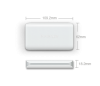
This is the one I carry in my bag for travel.
They're both >90W sustained draw rated and both have a peak power draw >110W so I feel comfortable about their being able to deliver the upto 90W that the w110er will demand at 100% everything.
The other one I've heard good things about is the Thermaltake Toughpower but I my local Microcenter didn't have it is stock and did have the Innergie models. -
They are both the same link, is that correct?
-
Noticed the Coolermaster USNA 120w charger was mentioned a few times in this thread, I bought one as they were on offer the other day, but my laptop hasn't arrived yet - can anyone confirm what tip I need to use as Coolermaster support have been no help!

-
They should have been different links.
The DC-DC one I use in the car is here mCubeMini90 Overview the mCube Mini 90 is the name.
The AC-DC one I carry in my bag is here mCubeSlim95 Overview the mCube Slim 95 is the name.
They're both by Innergie and are much smaller then the brick that came with the laptop. I leave that one at home for use at my desk. This lets me hide the cord from my wife's style radar while not having to worry about ease of access. -
Hello all! I'm Shad0w n am new round these here parts! Iv recently acquired a Clevo W110er and am having problems installing drivers for the Nvidia GeForce 650m gt. If someone could shoot me the device id for this graphics card or point me in the right direction I would greatly appreciate it! Thanks!
-
Well what problem are you having ?
Did you download latest drivers ?
NVIDIA Driver Downloads - Advanced Search -
I have it and it works perfectly!
-
Brilliant Could you tell me which colour tip you're using please?
-
This is the W110er I own...
http://www.amazon.com/Clevo-W110ER-2-30-3-30GHz-i7-3610QM-7200rpm/dp/B008FZUGZG
The message I get when trying to install the driver is the driver cannot find compatible hardware. I just need to know the device id of this particular Nvidia graphics card. Thanks! -
Download 306.97 and you will be fine.
-
Iv tried em all with same resulting message. This is where I got that idea for the device I'd. Iv done some research n it seems ppl w/this issue have been successful w/this method. So's anyone w/the same make of Cleve W110er that could pass that info to me/forum....Thanks
Also would like to know why/what causes this hiccup. -
I guess the link would be helpful....
Sid's BlogSite: How to install nVidia Optimus driver
Lol! -
Well I put my ice cold drink to the left of the machine n less than 10min later it was warm. Lol! Iv attached a screenshot w/gpuz/cpuz/coretemp.
B the way, is it wise to run all three of those at once? Maybe a lil late to ask that question. -
Hopefully taking delivery of mine at some point this week, only this is that I've ordered it without a hard drive as the SSD prices from company I'm getting the laptop from are a little high!
Looking at getting a Samsung 830 256GB, however being a 7mm drive it requires a spacer to fit in a number of notebooks - which comes with the "notebook edition". I'm looking at getting the "basic edition" which is about £15 cheaper, can anyone who's got a Samsung 830 in their W110ER confirm whether the spacer was required or not please? -
Both fit. Nothing to be worried about
-
I'm using the spacer that came with my SSD 830 256GB, it would not be "fixed" without it.
-
You don't need a "Samsung" spacer, just make your own from plastic, cardboard, or wood.
-
Thanks for the replies!
-
If you get that error but others don't, then getting their ID will probably be useless. What you need to do is check your own ID in the Control Panel. Click on Start, type 'Device Manager' in the search box, select it then go to 'Display adapters', right click on your 'Nvidia GT 650M' then select 'Properties' then select Details. Where it says 'Device description' click to change it to 'Hardware Ids'. You want the 8 numbers after 'SUBSYS_', mine is 1150.1558.
I bet you have a different one, if not then something else is wrong or maybe it has something to do with the Integrated graphics. As suggested by Wingnut, you should try the new WHQL Drivers first. -
fresh install, bios flashed, latest drivers.
if it still doesn't work, then it's hardware defect, no need to look out for an ID.
What would you do with that ID ? Try and tweak the latests drivers each time, hoping that's the only problem you'll get ? -
the green one >>> perfect fit
-
Thankyou!
-
Hy,
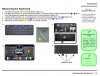
can anyone give me an explanation how to change the keyboard on my w110er? My keyboard is broken and i got a new one from the manufacturer. The explanation says "press the latches to elevate the keyboard" but there are no latches to press.
thanks,
Tammo -
I can easily see the 4 holes on mine, in 1 2 3 4 on the picture.
How much was the replacement ? From Clevo, or do you have a rebranded one ? -
I have had previous Sager laptops where a few of us had GPU hardware ID's that were not included in the Nvidia Drivers so no official ones would install without modding or until Nvidia added those id's.
Sometimes mistakes happen or they lag behind when including them. So if the problem is the ID, doing a fresh install, the Bios update and installing the latest Drivers wouldn't make a difference so it is best to rule out that first. Tweaking the latest Drivers usually takes a few minutes too. -
Well, mine is 0FD1, if it helps !
-
Hi everybody!
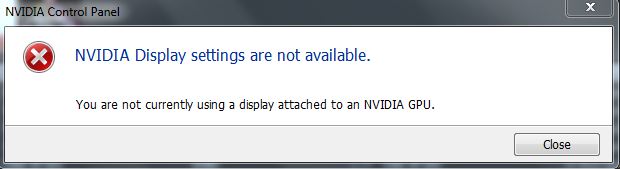
I've been using my W110ER for the past 2 months and everything has been fine. But all of a sudden I can't open up the Nvidia control panel, It give me the error message " Nvidia Display Settings Not Available, You are not currently using a display attached to an NVIDIA GPU" (Pic attached)
I don't know what to do! I've tried uninstalling, running a driver sweeper and re installing the drivers, but it doesn't seem to do any good. Any suggestions?
Thanks in advance!
-Z1nG
Ninja Edit: In device manager theres a aution sign next to the 650M and when click properties the error message is Windows has stopped this device because it has reported problems. (Code 43)Attached Files:
-
-
Hey there, debut in this topic as a Clevo W110ER owner! Well, soon to be.
I've just ordered this spec from PC Specialist for £775;
- Intel Core i7 3632QM (35W, 2.2GHz)
- 8GB Samsung DDR3 1600 RAM
- 750GB Seagate 6Gb/s 8GB SSD Cache drive
- Matte Screen
- 300mbps Intel Wireless card (Upgrade over the 150mbps standard)
Really, really eager to get this monster of a machine. My only real concern about it is battery life. I'm sure I can improve it by undervolting using Prema's BIOS mod, but I was wondering what else I could do to improve battery life as well as software settings. I'd aim to get it up to a reliable 5 hours with any changes I make (Including Undervolting). The reported 3 hours are a little lackluster.
I was thinking of creating a custom battery. You may think I'm crazy, but my father has done this with other things before, by stringing together a set of smaller batteries to gain a higher overall capacity. Do you reckon this could be done with the W110ER (Coming from someone who knows nothing about it)?
Also, could a few people give me their battery life statistics on their "Power saving" plans doing basic web browsing on low screen brightness? Just a rough estimate, or whatever your best power saving efforts you've made.
Also, @Z1nG, not really any clue there, sorry. My instinct is hardware, but this is an Nvidia card and their drivers are unreliable and terrible, and I've had similar reports with my 560Ti when it's absolutely fine, under W8. It took a HELL of a lot of tweaking to get to work again. But since you've already tried drivers, I think my instinct could be correct. Can you still RMA the 'top? -
@Z1nG: I'd tried to flash the BIOS + fresh windows install, if it persists I'd say you've fried your gpu somehow
-
Ordered mine from PC Specialist too, similar spec though I'm installing my own SSD and left the wifi card as standard. Unfortunately I'm still waiting for mine to enter the build stage, ordered on the 15th - they've been waiting for stock ever since (A kind chap on their forum enquired and they said stock could be due in late this week / early next) Will let you know when mine is built/shipped as hopefully it will mean yours follows soon afterwards!
-
That sucks :/ I haven't checked the status yet. Really blows I'm going to have to wait so long for this machine D;
They said it'd be shipping on the 29th. No idea what that means for it. I ordered mine about 4-5 days ago. Not actually sure lol. I'll have to check up on it.
*** Official Clevo W110ER / Sager NP6110 Owner's Lounge ***
Discussion in 'Sager/Clevo Reviews & Owners' Lounges' started by Ryan, Apr 7, 2012.