 Problems? See this thread at archive.org.
I was also told the 29th, but it looks like the goalposts have moved - I'd ring up if it wasn't an 0844 number
-
Now this is the machine that Clevo SHOULD have made: http://rog.asus.com/notebook/14-2/g46vw/
Asus G46VW:
i7-3630QM or i5-3210M
14" 1366x768 (eww, why not 1600x900)?
GTX 660m 2GB GDDR5
mSATA + SATA
Optical Drive (??? - I don't see no stinkin' ODD)
Backlit keyboard
180W PSU (???)
348x261x22mm/13.7x10.3x0.9in (compare with W110ER 11.3x8.2x1.5in)
2.5kg/5.5 lbs (4.0 lbs W110ER)
Other than the screen, which should be 1600x900 it looks like a great 14" option and competitor to the M14x, although we'll see how pricing goes. -
Then you may as well get a 15 incher. 12-13 is the sweet spot IMO.
I love the idea of the size of this system. Things I know I will find a gripe:
- Battery Life
- Keyboard without backlight
Otherwise, I have no problem with this. I don't need the GDDR5 memory, this isn't an uber gaming system for me. It was designed to be something that could play games better than my 6630m which barely gets 30fps on BF3 on low at 768p. At 768p, this thing rocks! The fact it can even do 1080p for some games impresses me.
For my proper gaming I have my desktop, which I'll use 10x more than the Clevo I've purchased.
The temps don't bother me too much either, nor does the screen. The screen would be more of a problem, if it weren't such a high DPI and doesn't suffer from the horrendous screen quality that Dell offer in their 1366x768 displays on their lower end systems. The fact that 1366x768 looks so nice at 11 inches is great!! -
I do love my W110ER but honestly my preference would be 13" and 1600x900. The screen is too small to do any amount of work on it for any length of time. Backlit keyboard is nice, but not a dealbreaker for me. Battery life is ok, but it should be better.
-
That's why I'm not doing work on my W110ER ;P
It'll be exclusive for gaming on the go and web browsing/IM. I may type some documents on it, but most of my productive work will be done on my 24 inch 1080p screen. -
Nevermind, specs aren't accurate. It's 1.5" thick at the back. Not that I care about thick/thinness, but < 1" thickness is quite a feat for a 660m
-
Looks like they have stock, got an email this morning saying mine has been built Hopefully you'll get one too
-
Ah, that's awesome!! I was worried it wasn't going to come when expected, but it seems it may do so! ^^
My personal challenge with the W110ER is to eventually bodge it up to 4-5 hours of battery life for web browsing tasks. Going to try absolutely everything. My last resort; I'm creating a battery if possible and if it will create a gain xD My main worry is that this battery is the best you can get for the size. -
Well after the newest Intel ME and drivers and the latest BIOS(1.4) when I tether via bluetooth and with everything set to balanced via windows plan except the maximum CPU to 99% instead of 100% I get ~4.5 hours battery life doing web browsing with pigdin connected to a jabber server constantly in the background. I've got one of the first w110ers as it was made by mythlogic from their initial shipment of chassis. I run the laptop on battery twice a day for ~2 hours so it has been getting heavy wear. A fresh one should be over 5 hours.
If that isn't enough for you there is a post earlier in the thread http://forum.notebookreview.com/sag...ger-np6110-owners-lounge-248.html#post8668030 that shows a external battery that exactly matches the bottom size of the laptop. The only place I've found them for sale is at Super High-Capacity Rechargeable External Battery Pack - BP170 and I haven't had a need for that much battery life myself so I've never purchased one.
But if you're looking to make your own it does show that it is possible and will work to increase total battery life. -
Awesome! That puts confidence in me. I've got a 3632QM coming in mine (Kinda annoyed since wattage doesn't seem to make a difference). I won't be using Bluetooth or be connected to a server.
If I wish to use an external battery, heavily considering this instead of making my own;
Anker® Astro3 10000mAh Multi-voltage 5V / 9V / 12V 2A External Battery Pack ( Dual USB Output plus DC output ) for Samsung Tablets, Netbook, Digital Cameras, DV Recorders, PSP, NDS / NDSL; Smart Phones, Android Phones: iPhone 5, all iPhone, iPad, iPo
It might not give me that slab's battery life, but that completely defeats the idea of portability and this will give me enough plus I can use this with my phone too. Can't wait to get this damned 'top. -
Id like to buy some wireless card to this my w110er what support 5GHz freq and 300mbps speeds. What do you guys recommend? How does the killer N wireless 1201 or 1103 fit this, no modding or so and I dont need BT connections.
-
Are you saying the 35w 3632QM gets the same battery life as a 45w 3610QM ?
-
Does not seem to handle 19V
-
I think it's pretty much the same, yeah. I chose it because I was under the impression that it'd save battery life but now I'm not so sure from what people have said :/ I'm hoping that I might be able to clock it back up if a way to OC is found for the lappie, but I don't think there is any chance of that happening.
Okay, well that's that idea out of the window then. 19V seems crazy high in my mind, but then again, what the do I know. I know for certain I'm not buying that horrible slab battery someone else put on here. Defeats the object of portability altogether. -
Interesting. So no difference in heat or battery life?
Does this mean the 3840 and 3820qms will yield the same battery and heat but way better performance than the 3610's?
3rd Generation Intel® Core -
Mine has been dispatched, hopefully with me for tomorrow!
-
Yes, a difference. We're talking about a 400-500MHz difference in clock compared to 200MHz. Those higher end processors are pushing things further.
Mine isn't finished D; I didn't order quick build OR quick delivery though.
Hoping it might be built tomorrow, but I'm only 5 days through the standard build time, I'm afraid they're going to be ho's and wait up until the 9 day mark to build it... -
Hello NBR,
I've read through every post now and I just got my laptop from Derek @xoticpc. First thing I did was flash the prema bios, the ME, then installed corresponding ME drivers. I update nVidia drivers and then installed batterbar. I also disabled hyperthreading as someone suggested.
I'm getting a draw of about 13-15mW and I was wondering if that's kind of high?
Do you guy have any suggestions? -
One suggestion: don't double-post.
If you aim at portability (and safety), don't make your own battery
-
Seems like you've posted this several places, I'll do this quick.
Although it depends on what you are doing, I would go ahead and say it's rather good, do you have a SSD btw? It draws less energy than normal HDD's -
Well, I know the sort of size I'd be aiming for
It'd stick out of the bottom a bit further for an extra row of small cells. But if I CAN get 5 hours of web browsing battery life like someone said to me, I needn't worry. I just haven't heard a single person say they can get that sort of battery life with the mods thus far. -
13-15W is pretty much normal. Battery life with i5-3360m with Prema's BIOS using Clevo quiet mode I can get ~ 5 hrs with 30% brightness surfing. I haven't tested the quad core yet though with Prema's BIOS, but my experience is that it should be similar. I did an uncontrolled test with the quad core and believe it was over 4.5 hours.
-
Laptop arrived this morning just as I was leaving for work
Will get it all set up tonight - could anyone confirm what Nvidia driver I should be using for Win 8 64bit? I've heard of problems with certain versions so I'm a little confused
-
LaptopNut... Thanks for the reply sir. Iv been battling one heck of a cold since last Friday. In between Iv been doing research and communicating w/computer upgrade kings tech support. He sent me the info I was lacking and the last 8 digits you have are the same as mine. So's I guess it's not owner specific. More like model/hardware specific. When looking in device manager the only thing that shows is the Intel graphics. So's I applied the workaround by editing the nvac? file n it almost worked. Got a lot further than Nvidia graphics Hardware not found. This time it said I lacked
a couple of updated files. I can't remember which at the moment but I shall repost my findings within the next couple of days as I'm beat n not over this cold as of yet. But thanks again! -
Thanks for answering, I did pick up an SSD the Crucial M4 256gb
I am running in idle, WiFi off, hyperthreadhing disabled, brightness on minimum, powersaving mode.
I can't get over 3 hours of battery life -
Have you used Throttlestop and other monitoring programs to check how much time your CPU is spending in the deeper C-states? I found I had a couple rogue services that were drawing 1-2% CPU constantly and preventing the CPU from idling cores 3 and 4. Once I IDed them and prevented them from running from startup it really helped my battery life as more cores were spending more time in at higher C-states and consuming less power. The low power word/browsing/viewing pdf usage doesn't require many cores so you want to be aiming for high usage of deeper C-states on as many cores as possible.
Another issue might be the range you are from your hotspot. I'm normally tethered to a phone sitting next to my laptop and the adapter is able to use a low transmit power. If you're using a hotspot that is farther away it will take more power to transmit and at these low watt-ages even 1 or 2 more W usage can have a impact that is noticeable on battery life. -
WOW Thanks for the hotspot suggestion. Moving closer to the router set me down about 11.5mW SOLID. I think the 13-15mW spikes were from it trying to get to WiFi. =[ Unfortunately at school I have no choice and at home I am very far from the router.
About the C-states and IDing the rogue services that prevent my cores from idling, could you elaborate? -
Your lucky man, I can't seem to even get below 20mW usage. I wish there was a forum just for this laptop like the m11x had, it's hard to find all the good stuff people are doing in one thread. What did you do to get it to 13-15 in the first place? Thanks.
-
sorry guys, this is bugging me. I think you are referring to watts (W) not milliwatts (mW). lol If our laptops were drawing 13mW.. I'd get a year of battery life
-
what program are you guys using to monitor it?
i will try to get snapshots of mine. -
Out of the box I
1. installed Prema UV 1.4 Bios to lower GPU voltage
2. installed the new ME engine
3. installed ME drivers
4. Disabled hyperthreading
5. Disabled turbo
6. Went into windows power management and changed all the advanced settings to maximum power saving no performance. -
Also update to the latest nvidia drivers. I don't think stock drivers properly shut down the GPU when not used like it should.
-
My system has apparently been built!
Now going through QC and final testing before hopefully being shipped out. I'd like to think that'd be today, but I'm not going to keep my hopes up. I did skimp out on the delivery after all and it's only been 6 of 9-11 days build time xD I'd hope to get it by mid next week.
Thanks for the tips of how to save power when I get the 'top tium and WingNut. I finally got some drivers yesterday that ing work with Win 8 Pro >.< 310.33 is the only driver that has worked properly so far, even then, I still had to install them from Safe Mode. I was getting 40fps average at all max with 2-4xMSAA yesterday on my 560Ti at 1080p on BF3 O.O I presume it was just the map, but I'm hoping when I go back, I get similar performance on others... -

I put 3840Qm on this clevo , GT650M with +290mhz on core and 230mhz on memory , it rocks ! -
What sort of temps do you get?
And what is the total sum of those clocks now? -
During OCCT power systeme test : 90/92°C on cpu , 85/87°C on GPU with 1.4 prema bios
I can reach 2,8ghz for 31watts on 4 cores , 3.2 ghz for 36Watts on 4 cores , 3,6 ghz with turboboost (temporary) for 45watts on 4 cores and 3,8 ghz with turboboost on 1 cores (2 threads) , with Throttlestop.
It's possible to have full speed (3,6ghz on 4 cores) during a long time , with prema bios and throttlestop , but the vid isn't very stable with 90W power supply (with 3 usb connected , wifi ,cpu and gpu on full load ,highest brightness , some copy with the ssd ect ... (power systeme of occt. On battery , i think that it's impossible. -
Dude, that's seriously amazing.
Those temps are pretty good and that's some beastly power right there.
So I could lock my 2.2GHz CPU at 2.8? Using Throttlestop and Prema bios? This is the 35w CPU I opted for, although now I have no idea why xD -
Normaly , yes , but for only 28 seconds
-
Ah so it dies after 28 seconds? XD
-
Hey folks, noob here.
I'm planning to get one of these, but I have something I've been wondering about first.
Basically, I want to have one around February. Is there going to be a successor to the 650M GPU before then, or perhaps a refresh of the Clevo/Sager chasis? Basically, if things are still going to be relatively the same in February, I'll just get it now, no sense waiting. However, if I can wait a few months and get an upgrade, I will, because I want it to last me as long as possible.
I know, people always say, "If you're going to wait, might as well wait forever!" etc. If the refresh and/or new GPU won't be out until, say, June anyway, then I'm not going to bother waiting.
That out of the way, I need some help deciding upon specs.
Processor--It looks like I have one i5 to choose from or one i7. Everyone seems to indicate an i5 is sufficient, maybe even better, for gaming, and that an i7 would just draw more power and generate more heat. This might be true now, but what about in a year or two? Will games start making use of it, causing me to regret my decision to save $100 and get the i5?
Memory--8GB is more than sufficient, people say, for gaming, but it's hardly much more money for 16GB. If I want to leave iTunes and Firefox open in the background while I play Guild Wars 2, is 8GB still plenty? (Basically trying to justify getting 16GB, but if it seriously won't make any difference, even in a few years, then I won't bother.)
Display--I'd really like to try the matte display, but $180 seems kind of steep. Is it that much nicer of a screen, in addition to being non-glary? If so, that's probably worth it, but I don't know. It would be nice to be able to play in the backyard.
Sorry for my wordiness. I hope you folks will help me out since you've already got the computer I plan to buy! Thanks in advance. -
My bad, I meant 20kmW
Wow, thanks a ton! I'm a little scared of bricking my computer but maybe I'll give Prema a try. What exactly is ME? Did you get it off the the Prema website? -
Hi,is it suitable to use this type of cooler zalman nc1000
http://forum.notebookreview.com/accessories/162929-zalman-zm-nc-1000-notebook-cooler-review.html
thanx -
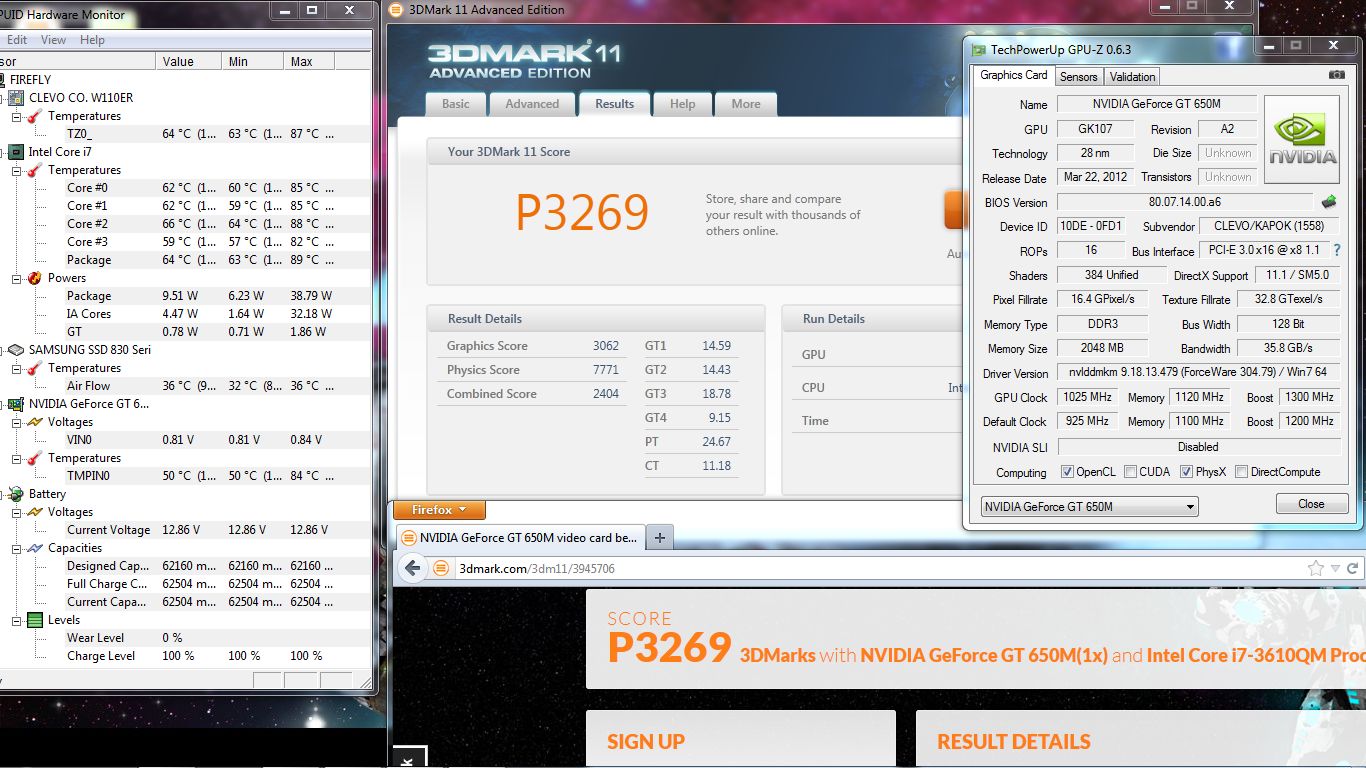
Here's mine with 3610QM
http://forum.notebookreview.com/sag...w110er-first-look-review-102.html#post8732274
-
really impressive
!
But i don't understand , you get higher grafics score by 230 points than mine by gpu +60 mhz and memory -10 mhz than mine ... Have you done something ?
It's seems to be the highest score for this computer :thumbsup: -
GPU @ 1300MHz, MEM @ 1120MHz. BIOS mod with GPU settings preset in the vBIOS. I've since reverted to the low voltage GPU BIOS only because it consumes less power and runs most games very well even at 1000/1100
-
okay , and what is your bench voltage on gpu ? Is there any bios modded for GT650m of W110ER?
For me i have 1230 mhz on gpu and 1120 mhz on memory for gaming , very stable. But i can't have more than 1240 mhz and 1130 mhz when benching ...
But With 60 mhz more on gpu , you have a very interresting score , approximatively +10% more fps . -
Did you use ThrottleStop? And yes it was an overvolt mod, although it didn't help boost GPU performance much, for my board ~ 100MHz more which other than for benchmarking purposes would have resulted in maybe 1FPS more in games.
-
yes , but my cpu don't want to climb over 3200 mhz on 4 cores with turbo boost (during aeon) , i don't really know if i have to activate eist , C4 ect ... on the prema's bios or on throttlestop ...
I learn that the 37**/38**QM can be O/C a little , but i don't know how. In several forum , i see that this is juste for some others clevo and alieware pcs , and on others , it indicate that it is for all..
Of course , i can reach some higher frequency but during small time and on one or two cores.
You have a higher cpu score with normally a slower cpu : NVIDIA GeForce GT 650M video card benchmark result - Intel Core i7-3610QM Processor,CLEVO CO. W110ER score: P2931 3DMarks
Don't really understand
actually , Throttle stop is runing , clock modulation , chipset clock mod and set multiplier are on max/turbo , eist and C1E is on , BD prochot too. -
Incredible temps. My i5-3320M runs as high as 86*C in 3DMark - and 94*C in prime+furmark. The Sandy i7-2630QM goes to 102*C in prime+furmark. Repasted with MX-2, in a relatively cool room.
-
3DMark 11 isn't as CPU dependent as Vantage or 06. So CPU doesn't matter as much. Plus I was using 304.79 driver which seems to add some good performance in benchmarks but can also be unstable in some games/benches.
*** Official Clevo W110ER / Sager NP6110 Owner's Lounge ***
Discussion in 'Sager/Clevo Reviews & Owners' Lounges' started by Ryan, Apr 7, 2012.


