 Problems? See this thread at archive.org.
Judging by what nVidia Inspector reports, after a few seconds my 306.97 reverts to 135/405.
But there's something weird here. If I start GPU Shark all by itself, it shows 405/900, and stays like this forever.
If I then start nVidia Inspector, it stays at 835/900 for a few seconds, then BOTH the Inspector and the Shark move to 135/405. It's as if nV Inspector makes something click...
-
That's very useful, will try with the new driver!
EDIT: Nothing :/ Still clocked at 405 solidly. Make 0 sense why Nvidia'd do it. I could manual set clocks but don't even know if I can go low enough.
EDIT 2: Oh wow, I set Performance level 0 to 135 Core 135 mem, only the mem sets. are Nvidia doing -.- -
Really? Which bios version do you use? I installed the prema 1.4 two days ago, and no success.
-
Hmm ill try that asap, thx. I'll tell the results.
Another thing, this wasn't happening when i had Win7 installed, just began to happen juat after I installed Win8. There could be anything related to this??
Tomorrow i'll try to reinstall Win7, if that doesnt work, i'll try the 120w psu. -
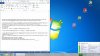
Yay I am very happy with Prema's suggestion.
My laptop discharge rate is always between 7,000mW and 9,000mW now and it occasionally hops up to 10,000mW but very rarely.
Here's something weird, when I first got the laptop BatteryBar told me the Battery Wear was at 2% and now after a couple cycles it dropped to 1.4% 1.2% and now 1.1%
How reliable is this application (Battery Bar)? Are these results real or am I putting too much confidence in one program?
What worked for me (Again)
-Prema UV 1.4 Bios
-Disable hyperthreading in bios
-Upgrade ME
-Install ME driver
-Don't use the 306.97 Driver
-Go into power options and in "Power Saving" set everything to bare minimum
-Cycle the battery once or twice
-I'm always on the 2nd tick of brightness which is plenty bright for me in class
Don't know if this helps
-WiFi on increase power consumption ~1,500mW
-Each step of brightness is an additional ~1,000mW (7steps) except first step is like ~2,000mW -
I wanna see =[ I can't see your pictures
-
I use 1.4UV
-
When you first install windows or get a laptop, it estimates the true battery capacity as it's never exact. With each discharge it "recalibrates" the setting since it has more information. So when you get it uses what it knows to come up with 2% wear. After a discharge or two (and best down to 5-10% on occasion), it just has a better estimate. It's a good idea to calibrate the battery (really the indicators) ever few months with a full discharge.
-
my battery now displays 11% wear level, I'm a bit worried :-/
maybe I let it discharge completely too often.. -
Well, discharging the battery also depletes capacity, but by only a fraction of a % for each full discharge whether a straight run from 100% to 5% or five 20% discharges and recharges. If you need/want to use the laptop on battery though, it is what it is and what batteries are designed to do. You should get several hundred discharges before useable capacity starts to become an issue.
-
10% is already a lot, it's been only 6 months. How is yours ?
I use it on battery each night, and it often runs off juice before I sleep.
Then, I don't always recharge it immediatly, it often waits overnight and that's the bad behavior from me. -
Apparently lithium batteries shouldn't be drained to 5 or 0% capacity every time you use the laptop. It's recommended that the battery be used down to around 30%ish and then a recharge, from what I've read.
I think you are meant to once every while to drain it completely, not totally sure. -
You should never drain it completely, but 10-20% is ok. Ideally no more than 20% on a regular basis. But use it how you need to. You'll have to replace it eventually and use it to meet your needs, not so you can meet it's needs.
-
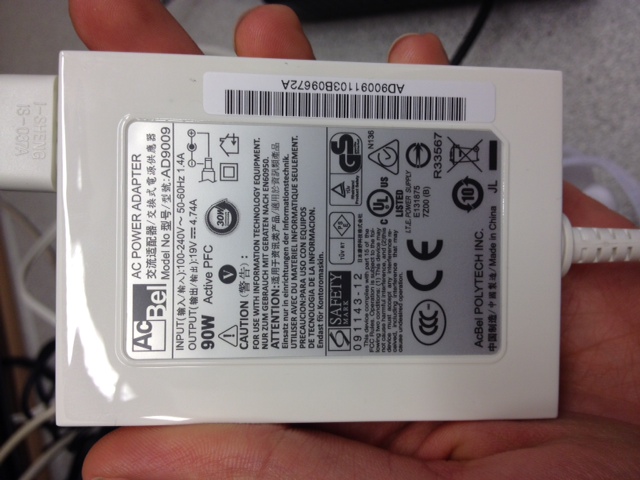
Just wanted to report, I am happy with my $25 90-120W AcBel AD9009 slim adapter. It's TINY. Smaller/lighter than my Air's and ZenBook's adapters. Do a 1 month trial of Amazon Prime to avoid $7 shipping.
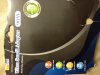
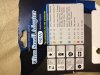
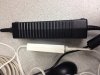
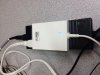
.. just ignore that costco laptop, haha.Attached Files:
-
-
Yes, identical product, but in that terrible destructible hard plastic wrapping instead of a reasonable card board box, haha. The retailer I bought mine from charged $25.50, as seen below. (I included the link twice in this thread and in your review, so I didn't want to spam it or seem like I was a reseller).
Amazon.com: AcBel AD9009 Slim 90W AC Adapter - Ultra Small: Electronics
A black version also exists, but AcBel, and the European re-sellers didn't even reply. I was only trying to help get them out of their debt crisis
Edit: yours has a plug adapter, but the cord to the wall socket is universal and removable on this adapter. That plug adapter is worth $2 on dealextreme, so you decide if $2 is worth paying $25 extra. -
Ah, good. I was gonna say, $50 was a little steep, and I didn't like the universal plug, too big and bulky, unless you need it.
-
hey guy im interest in this sager 11'', where can i buy it, at what range? Should i buy from sager website ? If not which trusted place to buy online
-
You can buy it directly from Sager or one of the resellers which typically will bundle things like better warranty or tech support. Prices will be pretty much the same all around. Feel free to PM any or the resellers here with any questions.
-
I can without a doubt recommend LPC-Digital and XoticPC. I'm a bit partial to LPC of course, they've made things happen for me and help me get review units. Otherwise, XoticPC is a great reseller too. Mythologic is another option if you want more customization and more of an individualized service since they build and sell the systems themselves.
-
Acer timelinex serie uses another plug type.
The worst part is, one will fit in another (can't remember which way though) -
It's not only for the timelineX series.
If you read the customers reviews, one of them said "When it arrived I was not very happy that it came with many little different plugs. This allows it to work with a wide range of laptops. But there is no instructions to tell you which one fits." -
I overpaid $5.50.....
![[IMG]](images/storyImages/22705117.jpg)
-
-
red diamond.. Red diamond!
-
Same player shoot again !
![[IMG]](images/storyImages/image.jpg)
-
LOL Thats awesome, and now back to your regular scheduled thread, before the mods kill us both.
-
I'm getting worried about the temps on my W110ER, i was playing Crysis 2 and the CPU was really hot (96C max), I dont think that's normal.
It has an i7 2720QM, using ThrottleStop, stock termal paste. -
After a long time, or if the fan was stuffy it may be "normal"....
how are yours temps usually ? 95° is the maximum I'd recommand to never break, the shutdown is not very far behind anyway. -
One thing that I'm confused about, is the fact that I don't think that my GPU is getting that hot. I don't think it really breaks the 80 barrier, the fan rarely spins up that highly. I don't know that the CPU breaks the 80 mark either...
It's almost always on a flat wooden table when gaming. I need to do an actual test with me measuring the temps. I just find it weird people talking about high 90s.
I'm using a 3632QM and the UV bios. I think it's Arctic MX 4 on the CPU. -
Ambient temperatures also play a huge role, here in AUS its really hot summer now so its not uncommon to hit high 90s. Oh, the CPU gets REALLY hot when forced to use throttlestop and the GPU at the same time, I get about 85 degrees on Shogun 2 and BF3, the GPU would peak at about 67-72 degrees with the UV mod and a 22 degree ambient temperature. The i7-3720m is quite a bit faster than the i7-3610m so its not unreasonable to expect temperatures in the 90s.
-
What games you play? With UV BIOS and dual core 35W I'm getting upper 70's for most games for CPU with Throttlestop ON, and low to mid 70's with throttlestop off. 45W CPU is a bit hotter, but still under 85C, Throttlestop might push it to 90C in extreme cases.
-
Mine cannot handle over 80C, otherwise it shutdown, I did not figure out why this is happening. With my cooler pad it try to maintain around 80 to 82, so it 's in the edge to shutdown.
I guess it is the thermal paste that is causing this -
check the tdp / power draw, it might not be because of the temps.
-
Never even considered it XD I live in the UK, here it's freezing right now, temperatures range from 3 degrees up to about 12 max. It was probably about 6 today, if that. It's not cold as such, but ambient is about 20ish degrees in the house.
I'm only using a 3632QM as well, so it makes sense. It idled at about 67-70 at constant 2.4GHz using Throttlestop. I didn't try a stress test, but will assume it'd sit around high 70's to 80's.
I play Battlefield 3, Sleeping Dogs, Skyrim, Crysis 2/3, Just Cause 2, and many others. I need to do some proper temp tests to see how it goes.
Also, is there anyway to get throttlestop to do the normal cycling of the clock, so it idles at 1.2GHz and then pushes up to 2.4GHz when it's being stressed?
How far can I go with sensible temperatures and without crashes from your experience, since the 3632 isn't a full 45W CPU AND I'm on a UV bios... I guess for the UV bios 2.4 is probably my limit.
Haven't really got much more than 100MHz out of core and mem on my GPU on the UV bios, I crashed once and just left it at 100 overclock because I was happy with the performance. -
It's brand new, i recieved it yesterday x.x
-
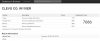
Can anyone tell me if this score seems right using the trial version of Geekbench in 32 bit mode? I would have though I should score closer to 9,000-10,000. I believe the MacBook Pro 15" retina has the same internals but scores closer to 11,000. The score below is closer to the Macbook Air with 2 cores according to Geekbench. Here's my result using Windows 7 64 bit:
-
I meant a long time playing, like +2h.
Or when the fan is blocked, like, in your bed. -
Okay...
Can anyone explain why I can actually manage to bench 2.8GHz on TSBench and not bluescreen with a 3632QM, on a UV bios and not go over 86 degrees...? I'm going to assume that TSBench isn't very stressful? It's putting all cores on 100%, but would my 'top experience more than that in a normal stress test?
I'm running off of mains power btw, as you would running a stress test. I'm almost reaching XM levels here.
This is with no GPU bench mind, maybe I should try a game while at 2.6 or something first and then bump up if that succeeds... -
You just stressed the CPU, not CPU+GPU, so it doesn't have to heat that much.
I'd say yeah, here's mine with i5 2410M @ 2.8Ghz (turbo)
CLEVO CO. W110ER - Geekbench Browser
Do you have 1 or 2 memory modules ? -
Okay, just ran Skyrim at all max 1366x768 with 2x AA and a 100 core, 115 mem GPU OC and 2.8GHz CPU OC and ran under 80 degrees most of the time, in the 70s. I had stuttering when I changed clock midgame, but stopped Skyrim and restarted it and it's run flawlessly.
I know Skyrim isn't too CPU intensive, so I'm going to try Sleeping Dogs and also BF3 multiplayer. I have a sneaky feeling these two will protest.
EDIT: WOAH, 2.9GHz went from 86 max up to 92 max and 89 min across all cores XD I'd never even use anywhere near that, maybe 2.6, but it hasn't crashed which is crazy. My supposedly overclockable 2009 desktop CPU can't even touch the OC'ing ability of this processor in a laptop.
EDIT: http://browser.primatelabs.com/geekbench2/1291428 < Geekbench with 2.9GHz clock on a 3632QM UV BIOS.
Score: 9337 -
geet score !
-
For Core i CPUs, locking your CPU to a low multiplier when it is idle is not necessary and actually, it should be avoided. Open up the C States window in ThrottleStop and have a look at what C States your CPU is using. If you don't have a lot of background junk running on your laptop, you should see that your idle CPU cores are spending 99% of their time in the C6 sleep state. When a core is asleep, it makes no difference what core voltage or multiplier the active CPU is using.
You can buy a Kill-a-Watt meter and do your own testing but you will probably need some very expensive lab quality test equipment to detect any difference.
Here's a good comparison of the Windows High Performance profile vs the Windows Power Saver profile.
http://img843.imageshack.us/img843/7598/highperformance.png
http://img819.imageshack.us/img819/8890/powersaver.png
In both examples, at idle, this desktop computer consumes between 34 and 35 watts at the wall. Multiplier high or low makes no difference. Power Saver doesn't save anything when the CPU is idle. It does reduce peak power consumption but it ends up increasing overall power consumption because the CPU cores have to remain in the active state for a longer period of time. You are far better off running a CPU fast so it can get its work done quickly and then get back to sleep. That's how Intel designs their Core i CPUs to operate.
The Windows Power Saver profile does the exact opposite. It prevents the CPU from getting up to full speed. That kills performance but doesn't save anything. Doing this to a CPU is old school. It makes the CPU inefficient and sluggish and it ends up consuming more overall power to complete a task.
This paper from some smart guys at Berkeley debunks the low speed CPU myth.
Power Optimization a Reality Check
http://www.cs.berkeley.edu/~krioukov/realityCheck.pdf
Here is the modern way to save power.
![[IMG]](images/storyImages/c6c7.png)
Make sure your cores are spending as much of their idle time as possible in the C6 or C7 sleep state.
Razyre: The TS Bench test is just so you can see if Turbo Boost and your multipliers are working correctly. The type of load it puts on your CPU and the amount of CPU power consumption is similar to but usually higher than what you would see when running a demanding game. If you want to give your CPU a thorough work out then try running Prime95 version 27.7 or LinX combined with the latest Intel Linpack libraries.
Prime 95
Free Software - GIMPS
LinX
LinX - A simple Linpack interface - Page 34
If you have Windows 7 with SP1, either of those 2 programs will fully heat up your cores but in a laptop, I find those 2 programs to be excessive since they push your CPU far harder than any game ever will. The TS Bench is more like taking your CPU out for a good jog. -
That's some brilliant information right there
I'll continue to use TSbench, because I'll never really be doing more than gaming, and of course testing things out real world in cpu intensive games.
And maybe I'll try leaving the setting on high performance, if it is true that power saver makes things worse.
EDIT: Getting about between 80 and 90% in C state 6 when there are a few programs open.
Also, how the hell am I able to get this thing running at 2.9GHz stably...? Trying to put it at 3GHz it seems to hit a wall, but then again, only running Geekbench here.
EDIT 2: Not so successful with GPU overclocking. Getting artifacts at anything past 115 core and 100 mem. Would this be to do with the UV bios? Temperatures on both CPU and GPU are just below 70, using a cooling pad directly onto the CPU/GPU. -
The dumb question: where can I measure the tdp/power draw? Which software?
Does GPU-Z have this info? Or MSI Afterburner? -
no dumb question, I'm not sure you can actually, except if you have a watt-meter of some sort..
I don't think any software will give the total system power draw accuratelly... batterybar does an estimation when on battery though. -
It has 2 memory modules. I noticed yours is an i5 compared to my i7, which makes sense why there is a difference. Would there be any difference in my score if I had run the 64 bit test? I have not modded or changed my bios in anyway, so I am wondering if that is why my score seems low? Has anyone else ran a Geekbench on their W110ER with the same exact processor as mine?
-
Yeah, it seems i got a big problem to solve...i have the i7 3720qm, maybe can estimate the tdp plus the vga.
The wierd thing is im playing games since i bought the notebook(July) and never had this problem before, what could have possibly change the power consumption like that, or even increased temps from one day to another?? -
Change in drivers? Windows update?
*** Official Clevo W110ER / Sager NP6110 Owner's Lounge ***
Discussion in 'Sager/Clevo Reviews & Owners' Lounges' started by Ryan, Apr 7, 2012.




![[IMG]](images/storyImages/711021mzlfoohclsf480x48075.jpg)


