 Problems? See this thread at archive.org.
FYI the undervolt mod only affects GPU, that won't change CPU temps by much.
(should be better on load though, since they share the same heatsink)
-
-
Oh, that's why it doesn't cry when I OC it XD
Sadly, I'm not seeing much battery life saved Hopefully the 09 BIOS will change that.
I am running on a Balanced power profile on battery though with the processor running at high performance as I have been informed it's better to have the processor maxed out because it'll go into sleep states when not in use. I also limit the GPU power heavily on this profile, but it doesn't seem to make much difference. Battery is still terrible at around 2.5 hours. -
If you have a temperature sensor open or other app that polls the GPU it can cause issues. In Nvidia control panel under "Desktop" pull down menu choose the "Show Notification Tray Icon" option. Then make sure you set that app to show in the taskbar always. If something is polling the 650m, then it will be solid colors or pulse colors.
So far 305.53 seems to be one of the more "battery friendly" GPU drivers. -
throttlestop does that too.
and I wouldn't touch cpu management settings, it already handles things pretty well IMHO.
there's been a new 310 beta driver a few days ago btw, installed but didn't check idle states. -
Thanks very much for the advice. GPU temp could be doing this.
Well as I said, I'm running the CPU at maximum performance as the Throttlestop guy recommended. None of the new drivers are too great on mobile, -
Would you be so kind as to run Speedtest.net - The Global Broadband Speed Test on your 6235.
My 6230 is half the speed of my other 4 cards. I'm thinking of ordering the 6235 so want to check,
TIA -
I was wondering which games gives you 10+ FPS with CPU WFO?
In anycase I would think that leaving the CPU alone but slight OC on your GPU may help your peak load temps? On some (most) games that are GPU limited, like Crysis, CPU speeds do not even register in benches unless way under powered.
I was playing Skyrim and noticed it was a wee bit jerky in some outdoor areas. I later found out that I had left laptop in power saver mode. The laptop did run cooler so now I leave in power saver mode for first tests. Of course some games that are more CPU hogs will let you know they are not happy. -
CsGO I noticed a frame diffrence and Diablo 3. Also if you go into the Nvidia Control panel and change the power setting of the GPU to Max performance Games will run alot better because the GPU runs at 100% no matter the application. Skyrim runs like butter on my laptop. Some high and medium settings with AA 2x. and I get constant 60fps with vysnc turned on.
-
OK, yes Skyrim runs like butter, on mine, with all turned up as well.
You sounded like you wre running hot, so I was suggesting run ur GP at UV with slight OC if you can. The new CPUs run hot so I was suggesting NOT to lock the CPU on max trubo.
Are you saying to run CsGO, a Source based game, you have to max your CPU? Throttling?
cheers -
I didnt say I had to max the cpu, Someone asked me what changes I saw in what games... Have you noticed that Source has made changes to the engine.. Try it VS CSS. Its more CPU and GPU intensive compared to Other source games.
-
Well, from what I can see so far, the card is pretty damned good. I can't remember the card I had in my old laptop (Dell Vostro 3550), but it was shocking
and dropped out 24/7 and could barely get a connection.
The 6235 on the other hand is obtaining a solid connection through multiple several inch thick brick walls where the laptop is one side of the house and the router the other, about a 20m distance apart. I'm obtaining 15mbps download and 10mbps upload over that distance, with my router being crap, the max obtainable is 20 down and 16 up, so I'm losing about 5mbps through the walls but I'm getting a VERY solid connection.
My actual connection speed is 45mbps down and 16mbps up, but as I said, I can't get that over this router. To be honest, once I got the driver working, this card has been absolutely faultless. I'm so glad I upgraded to it over the standard. -
OK, the tops I could get was around 16Mbps with the 6230. All my cards are limited at uplink of 5Mbps by Charter.
The ONLY difference between cards, according to Intel, is the BT 4.0 vs 3.0 in mine.
Oh well, for $28 with shipping, I'll order one tonight.
Thanks -
Just did a test next to the router and it was from 20-16. It may be the same as the 6230, but the important thing is, the connection is completely solid and very strong.
It may be the card can't go higher than 16mbps, it doesn't bother me, I'll just connect via ethernet if I want to download anything, most of which is done on my desktop anyway.
I've fixed the touchpad button problem. One of the pieces of plastic coming off of the touchpad inside the laptop had snapped. Took the whole thing apart, superglued it and it seems to be all good.
Just as a note to others, be god damned careful removing the keyboard, you might get the top of the keyboard coming off separate from the bottom half, which in my case broke some of the tabs, so the keyboard is a little loose now. I'll probably glue it a little later if it gets worse, it's fine for now, but if worst comes to worst I guess I'll have to buy a new keyboard.
EDIT: Oh! No, it's gone again. F*ck this.
Does anyone know if I'd be able to just get hold of the touchpad bit...? -
Ouch. From past posts; ordering parts for these are a major pain. I would check with your reseller(s), and Clevo.
I went ahead and installed my 6300. It rocks, but I stll want my BT back, and my usb port back. Connectivity for the 6230 was never an issue just long muti gig down loads.
GL with your key pad.
Interesting parts thread; http://forum.notebookreview.com/marketplace-questions-member-feedback/538848-pkhetans-feedback-direct-clevo-dealer-spare-parts.html -
I'm going to contact PCS tomorrow and ask them about it. It might need a new case or something. I mean, I COULD successfully glue the thing, it's the fact the super glue I used was half dry and only a measle came out and seemed to stick and work. If I had new super glue then it'd be better. It's just the fact that I went to all of the effort and put it back together and then it broke that really blew. I guess now that I know how everything works it'd be twice as fast, but still.
-
My sager is making a static noise whenever I open some applications, games, and/or folders. It doesn't make the noise when I open the same stuff again, it just happens randomly. My volume is all the way down and it is the stock speakers from xoticpc. I just got this laptop yesterday. Any idea what's happening?
edit* Now it's happening whenever I adjust my volume from the taskbar. -
I got that on occasion, its likely due to poor electromagnetic insulation for the onboard sound card components. Not much we can do I'm afraid.
-
Even though if it just starts doing it after being okay for awhile? I don't like how something annoying like that can happen frequently.
-
it must be related to the hdd/ssd bus. when it's read/writen.
when you load the same stuff again, it's read from cache/memory so won't trigger the buzz. -
Doesn't exactly sound like that. The laptop could load a whole game up for the first time and not trigger the buzz.
-
have you tried turning the WiFI off and see if the buzzing goes away?
-
I have been trying to get mine to do this but no luck..maybe wrong choice of words.
There may be a grounding issue somewhere our main board. Note that I'm using a hitachi 750G spinner, FWIW
You might ask Xoticpc why some do and some don't? Also, static through speakers and headphones? What about a USB DAC? This to get an idea where noise is generated.. -
I think I have the same problem as you...
The laptop have normal sound here, but I was playing BF3 and suddently the sound started to come just scratches... Come to windows, and everything was just scratches, I muted, increased\decreased volume, nothing worked. Only after restart it worked good.
This happen to me 2 times already.
But about static noise, I don't have it. In fact this is one of the onboard soundcards with less static noise that I have heard (maybe the metallic-end of the plugs also help). I have the Senheiser CX-300 precision II, and they are very, very, very sensitive 1\30 volume on my mp3 is enough for me with this in-hear plugs 1 single bar of 30, and this is a very LOW power output MP3 player.
I can hear EXTREME STATIC noises on almost every god damn audio equipment (On most pc's I tested, I can even detect by the static noise, when we move our mouse). And even the sound effects of games I can detect the noise behind the sound effect that start before the effect and ends after the effect.
And in this laptop, I'm glad I have found the lowest static noise of crappy sound cards. In fact it even has less static noise than the USB Creative X-fi Go Pro (But hey, with normal headphones you can't detect static noise in none of them).
Now about sound quality.... That's a complete different thing. This laptop has the worst speakers I have ever heard (and even with bad quality, they aren't even loud. With people talking normally I can't barely listen to a music). Then with headphones it just has regular sound quality with not much power output, but it's not BAD.
BUT other thing is if you activate the THX, it will kill the sound quality, kills all bass, and none of the options work any good (extremely bad to use THX ON with sound output). Even with everything off, just by having THX ON (even though with all options off), kills all the sound quality and all bass.
In comparison, Creative USB X-fi Go Pro is like a million times better, and their options actually work with THX ON, and it makes good bass.
Keep Cool -
hey guys, dumb question, does anyone know:
1. is the HD bay Sata III (i.e. 6gbps?) because on the schematics it says SATA I and II only
2. is the SD card slot directly wired to PCIe or is it ganged to USB
I have a hunch number 2 is direct to PCIe when inspecting the schematics of this machine but I want to be sure because I'm looking to purchase a Patriot 64gb Class 10 SD card to act as permanent storage for random stuff I don't use often but need on hand. The card is capable of 50mb/s read and 30mb/s burst write, its nice to know if the card can operate at 50mb/s read but I might get a cheaper one if the SD card slot is ganged to USB and thus limited to 30mb/s. -
Not looking at the schematics but a "class 10 SD" card is rated at max of 15Mbps min. In any case your true speed may vary like the wind. If doing local buy with return rights, I would get both and bench them with C Disk or actual stopwatch. The Patriot (Speed is based on internal testing on SD 3.0 and UHS-I mode environment) Good luck with that Stay away from cheap Transend cards, I had to send them back due to droped video frames.
This would be the only way, without actual testing, to guarantee true USH-1 speeds ; Lexar® Professional USB 3.0 Dual-Slot Reader | Lexar -
new nVidia beta 310 driver today
-
I have an SD card that reads at 45-50MB/s and it works in my Card Slot at full speed so you are good to go!
-
Cool I'll be getting that then. What about the HDD bay?
After poring through schematics of other machines, our Clevos are quite fortunate to have an SD reader hooked up to PCIe. Almost all other machines I've seen other than the MBP or Lenovo thinkpads have the SD reader slaved to the USB2 bus instead of the 100mhz PCIe bus. Granted, the reader is sharing the PCIe bus with the LAN port and the USB3.0 ports, most of the parts can achieve top speeds without saturating the PCIe link. -
What do you mean? The HDD bay is not run off the PCIe bus. It is a Sata III from the Intel Chipset.
-
Yes, the HD mainlines right to the Panther Point hub controller. This is the hot running PCH chip with the big alum heatsink on it.
The Realtek chip suporting the card reader speck;
Supports 1-Lane 2.5Gbps PCI Express Bus
Supports memory card interfaces
Secure Digital (SD v3.0, UHS mode), SDHC (up to 32GB), SDXC (up to 2TB), Mini-SD, Micro-SD (T-flash)
MultiMediaCard (MMC v4.2), RS-MMC, Mobile-MMC, MMC-micro, and MMC-plus
Memory Stick (MS v1.43), Memory Stick PRO (MS-PRO v1.03), MS Duo, MS-PRO Duo, Micro-MS (M2), MS PRO-HG Duo v1.01 8-bit mode, and MSXC (up to 2TB)
xD-Picture Card (xD v1.2) including Type M+, Type M, and Type H
I don't get the marketing choice to stamp Class 10 SD instead of UHS mode in bold on the SD card? Anyway it's nice to know that ha1o2surfer has checked it out. -
Hi Guys, just got Farcry-3
here is the gameplay video on w110er:Last edited by a moderator: May 12, 2015 -
where can you get this game?! looks amazing!Last edited by a moderator: May 12, 2015
-
Just upgraded my elderly Intel 320 120gb SSD to a Plextor M5s 256gb. It was a real steal for $175 AUD considering the 256gb Samsung 830 was $200. I only wish the random 4k performance was higher but it still shaved off about 3 seconds from the cold boot time.
I had my sights on the 840 pro but too poor this Semester lol.
Otherwise this plextor drive is solid.
Funny question, does anyone know if SD cards have/need garbage collection? I know my Patriot Supersonic has a controller with 4 memory channels which is capable of garbage collection (if the marketing material is to be believed) but I've always wondered if other removable media have this. -
SD cards are nothing like SSD's. They have wear leveling in that they only write to the least written to blocks, but they don't shuffle data around like an SSD does to ensure even wear. They only write to "empty" blocks. Once you delete files, then and only then can it write to it. Garbage collection is not necessary because it does the cleanup as it goes, which degrades performance but for removable media is needed because it has no controller of its own. So it deletes the file, then clears the block, unlike an SSD that will flag the block as deleted but clean it up when the garbage collection routine engages.
Where did you read the patriot has garbage collection? It's just a quad channel controller meaning it can write to four channels simultaneously, almost like RAID 0. -
I could just be seeing things but reading the article again, I thought most of the drives tested had GC though I don't know if the Patriot Supersonic (not the magnum) has GC.
AnandTech - USB 3.0 Flash Drive Roundup -
Garbage collection is just a way for the system to actually erase a cell that's flagged deleted before it can write to it again. USB drives tend to do it real time because it's a removable device and don't know how long it will be enabled. So I guess I was thinking along the lines of an idle time/delayed GC routine like an SSD, which it does not do.
Here's a good article explaining GC and TRIM: http://thessdreview.com/daily-news/...ion-and-trim-in-ssds-explained-an-ssd-primer/ -
Can I use AcBel AD9009 Slim 90W AC Adapter and overclock gpu on Prema Mod v1.4 OV?
-
I just switched to Prema's OV BIOS and noticed a few things.
Firstly, you have the ability to overclock higher, as was specified.
Secondly, the GPU is doing something strange during games, where it's almost going from 60fps down to 30fps and back up to 60fps again, regardless of the game that's being played. I assume this may be throttling due to temperatures or something.
Which brings me on to temperatures - They're high. I used Prema's UV BIOS and the temperatures were simply incredible. It was the OCing ability that I wanted to try out in Prema's OV BIOS for the GPU.
However, I haven't managed to attain very good clocks. The driver for the GPU just seems to keep crashing, which is irritating to be honest. I was wondering if this MAY have been because of my CPU being overclocked to 3.1GHz... XD
I'll try again with the stock 2.2GHz for my CPU and use higher GPU clocks. -
Mostly your CPU throttles because of tdp...are you using throttlestop to keep it in turbo mode?
If so you can increase tdp in the mod bios. Just confirm current "package power limit 1" and time under the "TPL" section of Throttlestop and increase it in the BIOS accordingly. Max value is the limit shown in "package power limit 2".
Watch your temps
-
I've used ThrottleStop at 31x multiplier lol. I think it's mind blowing that you can put a laptop CPU in an 11 inch notebook at 3.1GHz and temperatures are still just about acceptable, even when it's overvolted.
You've done an amazing job Prema, seriously love your BIOSes and I look forward to BIOS 2.0
-
Okay, been using my W110ER docked for a little while.
Something I've noticed, is hideous audio output. I'm getting pretty horrible feedback over the 3.5mm cable to my external speakers and although it doesn't suffer from feedback via earphones, the quality of playback is still devoid of bass, less clear and quieter than it should be.
Over the speakers it sounds like a car accelerating and decelerating along with a general static like sound constantly in the background. The 3.5 cable works with everything else, fine, but my laptop suffers.
Twisting the cable about does very little, nor does moving it around. I've looked in the settings and can't find anything and I've attempted to stop other programs like THX interfering.
Does anyone have any clue what the hell my problem could be?
EDIT: The car like sounds stops when my GPU isn't being stressed. I was doing a stress test at the time... So GPU activity is interfering, I still have a static like sound going on and poor quality, the sound also varies depending on what activity is going on the laptop, such as the mouse being moved.
It appears whereever I touch the laptop with the connector that is metallic I get the exact sound feedback sound.
Also, using Windows 8.
EDIT 2: Discoveries being made! I did something (Honestly don't know what) and now the audio quality is perfect. I'm getting no feedback through anything but my speakers, which is better.
No longer getting the problem with the jack where I press it against metal parts and it gives feedback either.
However, that static noise in the background increases by about tenfold when I plug the power in. Why the hell is this a problem?
EDIT 3: Solved! The inputs in the back of my speaker pod (Z5500 5.1 Surround) were interfering with my 3.5mm cable inserted in the side. Removed them, no problem. Irritating, but at least nothing is defective ^^ -
Well to what was the input at the back of your speaker pod connected? Maybe you had a ground loop.
-
hi i am thinking to buy this .
should i go for seagate momentus XT or a 256GB SSD ?
I want to load things fast as well store things -
Hey all,
I've been a lurker on these forums of recent. I've got to add that HTWingnut's review along with this thread helped me choose my new laptop, so I'm now the happy owner of a w110er! It's been less than a week and honestly compared to my old netbook, which is of the same size and weight, couldn't believe how much power was packed in. Boot up time for win7 about 8-9 sec.
I've seen that there are modded bios's (Prema OV and UV) and to be honest I'm new too this. I've done a bit of looking around and even looked on Prema's site but cannot find an adequate description of what the UV/OV bios's specifically do. Further, I've considered OC'ing my gpu, it would be awesome if their were a list containing info on whether people have modded the bios at all, if so which, as well as the max stable clock/memory speeds they have been able to OC too. (Maybe I'm asking a bit much but it saves having to go through 395 pg's worth of thread).
In all honesty, if someone where to OC their gpu how much of a performance boost could someone realistically expect? I just really want to figure out whether its worth OC'ing my new little beast or not.
Thanks for any replies!
-
The Hybrids are nice for commonly used programs and Windows boot times bu they wont always help, just commonly use programs. The nice thing is the extra storage room you have. A full SSD will always give you the fast read/write time regardless of how often you use the program but you're limited to storage room. Your best bet would be to get a large SSD like 512GB or get the 256GB and get a USB hard drive for storage.
-
So, the OV and UV BIOSes.
I'll start with OV. The OverVolt BIOS supplies more voltage to your components than Clevo allowed for stock. Basically, this means you can overclock your components further than stock because they've got the juice to do it. The sacrifice is extra heat and loss of battery life.
The UnderVolt BIOS give the components slightly less voltage to your components than Clevo put in there stock. Because they used more than required, you can easily use your W110ER on the undervolt BIOS as long as you aren't looking into serious overclocking. The bonuses are much cooler running and slightly improved battery life.
I'd definitely recommend the UV BIOS, but not so much the OV BIOS, unless you REALLY want to overclock, which I doubt you even need to.
As for overclocking, it depends on the person. If you are trying to play the latest games at 1080p or you REALLY want to pump up to the maximum settings at the native resolution (1366x768), then it's for you. However, if you just want to play your games with no tweaking on your laptop screen or externally at native res, you needn't worry about overclocking your W110ER.
The 650m is so powerful to the point at the native resolution it can run most modern games flawlessly at near or max settings. The only games found to really tax the W110ER are Metro 2033, FarCry 3 (This is just unoptimised as hell) and that's about your lot. I'm sure there are a few more, but those are the two that jump out to me.
Even then, at 135DPI games look pretty damned good at 1366x768 and turning down the details a little makes very little difference to the experience.
However if you DO wish to play at 1080p, then the DDR3 VRAM on the 650m is a large bottleneck, and this is where you may want to look into overclocking. For serious 650m overclocking I'd recommend at least the stock BIOS or ideally the OV BIOS. Once you have met that prerequisite, then download "MSI Afterburner" and install it. Then you can begin to play with clocks.
So on the 650m, there isn't hell of a lot you can do, you can only adjust the core and memory speeds as far as I know. Stock, these are 835 and 900 respectively. From my experience, the 650m has a threshold that goes up to around 1100 on the core and in the 1000s on memory. The thing is with overclocking, everybody's hardware is different. Certain computers have higher limits than others. So it's all about experimentation, all I'll say is as long as you watch your temperatures and make sure they don't go sky high, your system won't suffer from a few crashes doing overclocking. Try the GPUz render test, or another piece of software like "Furmark" or "Unigine" to stress the GPU to make sure it's stable. Then try it out in games and look on the screen for any defects called "Artifacts". This is essentially corrupted data being sent to the screen from the GPU when it's taking on more than it can handle. These can vary massively. There can be black squares everywhere, decolouration, or more subtle things, such as lines protruding from objects that shouldn't be there. If you see any of this, turn your clocks down a bit and then try again. Once you finally find a happy medium, you're good to go!
This may be a bit brief, but feel free to ask me about any of what I've just said and I'll elaborate!
Happy W110ERing XD -
If you are Canadian, read this! From Canada, it's important to know your options and this may help you.
Wanted to make a quick post about my shopping experiences that led me to the decision of purchasing a W110ER. I'm from Canada and as a Canadian, there aren't many options around for us that allows us to order the W110ER from US resellers without having to pay a ridiculous amount of fees at our door when delivered.
If you order it from a US reseller of Clevo products, such as XoticPC, Sagernotebook, or Maingear, etc, regardless of where you order it from in the US as a Canadian, you'll be paying a large amount at your door.
When you order it, two things will happen:
1) Say for a $1000 laptop. You pay for regular ground shipping which will be around $80. You also pay the courier company like FedEx, to bring your product across the border and fill out the necessary paper work. For that service, they charge a fee for it called the Brokerage fee. The brokerage fee is based on the declared value of the product. For a $1000 laptop, it looks to be about $75. So now you have a total of $1000 for the laptop, $80 for shipping, and $75 for the brokerage fee which is $1,155. When this product is delivered to you at the door, you'll pay the $75 brokerage fee to Fedex ON TOP of GST/PST or HST on the $1,155. So once again at the door, you pay the brokerage fee plus GST/PST or HST to the courier guy. He has already taken care of the GST/PST or HST at the border when declaring the product at customs. So you are just reimbursing him back.
2) Instead of paying the $80 for ground shipping then paying the brokerage fee at your door, you pay for an expedited service, which will cost more, but the brokerage fee is included in the price. This may save you some money and time. Everything else is the same.
I had many different options and had a hard time narrowing it down. What ultimate led to this purchase was the small 11.6" and 3.9 lbs small size and ultra portability. I'm a student and I'll be bringing this laptop to campus and back home every day. These were the models I was competing with:
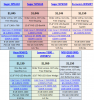
Aside from all of them being 15.6" and about 6 lbs, they all had either the 3610 or 3630 processor, which isn't a big difference. They also all had the 1080P screen, a 7200 RPM 750 GB or 5400 RPM 1 GB drive, and all had 8 GB of ram.
What convinced me to not get any of them? I did an immense amount of research and yes, you do want a GT 650 2GB GDDR-5 and not a GT 650 DDR3, like our clevos, but the only way to get a small and ultra portable laptop is to compromise on the GT 650 DDR3 on our W110ERs. You have the same processor power, a better hard drive, it's small, and ultra portable too. At home, I plan to hook it up always to a monitor or my 55" Sony LED for gaming. I won't be able to output and game at max 1080p settings like the GTX 660s can, but it's the compromise you have to make for ultra portability. There is currently no best of both worlds. You either have to realize that there is no such thing as a GDDR-5 GT 650 card in an 11.6" or get a bigger laptop with more GPU power.
As for the screen, you get two options of the glossy screen or the matte screen. From what I read, the glossy screen's contract ratio is 175:1 and the matte screen's ration is 500:1. The upgrade difference was $120, which is over %10 of the laptop's overall price. If it will be your primary screen, it's completely worth the upgrade for the contrast difference alone. But for me, i'll be outputting it to a monitor or TV always and as a secondary display, the glossy finish is ok.
The model number of the matte finish screens is AUO B116XW03 and you can find these display on the web for anywhere from $60 to $100. If you are handy and can purchase this for $60, it may be more cost effective to purchase it and install it yourself.
I originally wanted to purchase it from Main gear to get the Pulse 11 (clevo W110ER) but then found out paying the taxes and the brokerage and the shipping charge to make a $1000 laptop be almost $1,300 is not worth it.
Therefore, I did some more research and came across two Canadian resellers that specializes in Clevo products.
1) Reflex Notebook Canada - Your Source for Sager Notebooks and Laptops in Canada
2) Eurocom Corporation - Number 1 in Desktop Replacement Notebook Technology
Reflexnotebook.com specializes in Sager Notebook products, which is their own rebranded Clevo W110ER.
Eurocom is also another reseller but they are their own brand, Eurocom. They purchase barebones packages from Clevo W110ER directly and operate as a warranty service center and reseller.
I was originally going to purchase it from Reflexnotebook and purchase this with these options:
Sager P6110N:
- 11.6" glossy screen
- gt 650 2gb ddr3
- i7 3630 2.4 ghz
- 8 gb ram (2x 4gb)
- 750 gb 7200 rpm hdd 16 gb cache
- intel advanced N 6235 wireless + bluetooth adapater
- windows 8 home premium
This came out to be $1045 + GST only and free shipping and no brokerage fee. So the total was 1045 x 1.05 = $1097. The bad thing about buying from reflexnotebook.ca to me was that you had to either deal directly with Sager in the US, so you pay for shipping both ways. Or you pay reflex $30 and they will cover the shipping both ways to Sager. Or you pay $71 and you send it to Reflex instead of Sager and they fix it there, where they also pay for the shipping.
But I came across this instead at Eurocom Corporation - Number 1 in Desktop Replacement Notebook Technology
Eurocom Monster:
- 11.6" glossy screen
- gt 650 2gb ddr3
- i7 3630 2.4 ghz
- 4 gb ram (2x 4gb)
- 256 gb SSD MICRON/CRUCIAL S4
- intel advanced N 6235 wireless + bluetooth adapater
- windows 8 home premium
The only major difference is the 256 gb SSD.
The price came out to be $1208. But they offered a 10% student discount. So the price was:
$ 1208 minute 10% = $1087 + GST = $ 1141. They also offered free shipping. The best part about buying from Eurocom was that it's in Canada and they fix it there always rather than sending it to Clevo. You also pay nothing for shipping and there are no extravagent options to choose or pay for, unlike reflexnotebook.
So I paid $50 more at eurocom, got the same Clevo W110ER, received excellent customer service from Gary, head of accounting and sales at Eurocom, and for only $50 more, I received the best repair option and a 256 GB M4 Crucial SDD drive over a dinky 750 GB 7200 RPM mechanical drive. I dropped from 8 GB to 4GB of ram, but I plan to get corsair vengeance anyways so it's not a big loss.
I hope this helps you in Canada. -
I found one of those Kennsington 120w power supplies. Holy crap was that worth it. I can now carry my laptop/mouse/powersupply in a sleeve
-
Hey Razyre,
Thanks so much for that time you put into that response! It's a definite help. After your explanation of the OV bios I don't think I'd want to tamper around with the voltages seeing as I really am new to this. I'm quite content with its performance at the moment and chances are any games I play may be older games which I used to enjoy back in the dizzay.
Though I did see you recommend the UV bios. Just a few questions about it. Does it undervolt the GPU and if so doesn't that then reduce gaming performance? Does gaming performance reduce as a whole if the CPU, RAM etc... are undervolted? Do you also need to slightly OC the gpu to get gaming performance back on par with stock bios when using the UV?
How much of a difference to battery life could one expect? I've seen numbers with standard bios around 4-5 hrs. Thanks again for your response and I'm sure with your response to these questions it should put me in good stead to consider using the UV bios.
Cheers,
Bugd -
I'm always a fan of UV. OV has been a mixed bag depending on lot of things but extra heat is normaly in the mix. Prema's OV mod was a compromise but reading from others, good if you leave it alone with Prema's clocks.
In one post you mentioned the OV heating. Did you log any stock vs OV temps for us lazy ones OV will fail on some chips so not every one is so lucky.
Are there many user's here that just stay in OV or only ocassionally? Permanent OC, and what clocks would make a good poll?
cheers
*** Official Clevo W110ER / Sager NP6110 Owner's Lounge ***
Discussion in 'Sager/Clevo Reviews & Owners' Lounges' started by Ryan, Apr 7, 2012.


