 Problems? See this thread at archive.org.
No problem!
Well, there is 0 performance decrease from the stock BIOS, as the voltage doesn't affect performance. It simply changes how much power is supplied to the components, and they can run at the same clocks as stock on the lower voltages. Fairly sure all clocks are the same.
As for battery life, it's impossible for me to comment. I've experienced pretty dire battery life with my W110ER so far, hovering around the 2.5-3 hour mark, and I really need to get testing to find out what's wrong. It's all too likely to do with the clocking of the Nvidia GPU or a Windows 8 related issue (Bluetooth isn't working on W8). I'd go straight for the UV BIOS my friend, I've been very impressed with it!
For most, they've said it can give an increase in battery life, but I'm not sure of the exact numbers. I think I did notice one too, although not as significant as everyone else's.
I haven't done so noI'm one of those lazy ones too. I'm sure it isn't just me though, OV seems to be running at least 5-10 degrees hotter than UV. I'd say that for me (In freezing cold Britain, ambient room temperatures a cool 20ish degrees) idles on the CPU are around 60 and GPU 45-50. At load, the CPU can go up to 90 degrees on a high overclock (3.1GHz), but normally it sits around 70-80 at load.
On UV, I was getting idles of 50-60 and load temps of no more than 70, no matter what I threw at the laptop. I could only get a max OC of 2.9GHz on the CPU with the UV BIOS.
I OC a lot of the time on the OV BIOS, I've been trying to find the max limit of my chip and it looks to be around 1150MHz Core, 1000MHz memory. With that I can almost maintain a fully playable FPS on BF3 @ 1080p all Ultra O.O. It's been hovering between 20 and 30, mostly 25-30, and is fully playable on smaller maps. The one I tried to really push the W110ER on was Gulf Of Oman, probably the worst map for optimization. Not sure how well it'll go when I try out Armoured Kill, because the render distances on that map are insane xD
But when your 650M stutters less and you prefer playing with it to your 560Ti, you know you've got a good system on your hands, although I think my CPU and PSU are suspect in my desktop.
-
Also, anyone have any ideas why Nvidia Inspector is unable to do anything to clocks on my system. I literally can't do anything with it. I have to use afterburner.
Using 310.54.
Is there a driver I should use instead? It literally gives me no control of clocks. I want to set idle clocks to around 100mhz, they're at 400. -
@ Razyre
Yours and other users notes, on W8, have me standing by until all the drivers jell. Nothing new here as in past upgrades. I use mine for work as well as play so set my limits.
I have a few old drives lying around so will use one of them to debug W8, never my main drive, after the holidays.
Your UV temps; they only affect the GPU, how do I wish I could UV the CPU like my SU7300.
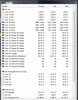
The attached shows temps running IntelBurnTest on MAX stress. This is in a 24C room with power plan on high. You can see the peak package power and clocks before throttling in the MAX column. Using the UV mod.
Looks like a classic case of CPU throttling, no
No way would I want to risk locking the turbos unless I add another fan and heat pipe...sound of clucking chicken...
-
I honestly didn't know that it only affects the GPU. But seriously, on the UV BIOS I couldn't go higher than 2.9GHz via throttlestop. And I will do the same burn in test to see what temps I get. I have rarely hit 90 on any stress test, other than at 3.1GHz, definitely not at 2.8.
Also, what is your battery life like? What Nvidia driver are you using?
I'd love to know so I can get this sorted. Seriously, just doing a test of timing, at the 1 hour 30 idle mark on half brightness doing absolutely nothing, next to no programs or activity, I'm already down to 50 percent battery O.O -
I'm still using what came in the last windows update 306.97. I forget which keeps the IGPU active, mine?
I get almost 4 hours in Power saver mode; Batt. Bar now estimates 3:52 after two months of use. Battery wear floats around 1.3 to 2.1 depending on float charge after last drain, now 1.3 was1.8 yesterday....
I'm 1.4 UV with EME 8.1.0.1252, everything else is bone stock. I read comments, all over the place, that newer EM software is using more idle current but darn if I remember where. Maybe the one I'm using?
I suffer from CRS so need to get off duff and start collecting all these "nuggets". I'm sitting in a hotel in Brazil, ATM, so not much time until after the holidays.
GL
BTW, I ran ITB using my dinky 90W iGo travel charger. When i get back to the States, a 90W load test is in the works, so bought local at Office Depot. I would not trust any of these miniture wonders to put full output over 30 minutes or so, or they feel like they may go "Nova". $45 -
I find that I scrounged another hour of bat life with the UV mod (assuming the NV drivers let the GPU downclock properly). The really weird thing is:
I can get 5.25 hrs with absolute battery life saving (this includes several registry mods to fully park the CPU core). This setting is not very practical as the comp is laggy as hell.
4.5 hrs is feasible on standard idle with no wifi but the weird thing is, I can get 4.25hrs while watching video (just enough from Perth to KL Malaysia).
I love it that the UV mod does so much to lower the GPU temperatures so that the CPU gets more headroom with Throttlestop
That being said, SSDs might make a difference, my Intel 320 was known to idle pretty low since it has DIPM and it was so slow the peak power was reasonable. My new Plextor M5s idles a wee bit lower but peak is much higher so the bat life hit is quite noticeable if I'm copying a lot of files from the SD card to the SSD.
I'm using the Acbel 90W slim adapter -
Hmm, that's some interesting info, thanks guys.
I was using Wi-Fi in my test, because in reality, I'll be using Wi-Fi regardless. My lappie lasted about 2 hours 50 minutes on half brightness, Wi-Fi, few programs open and the screen on, idling.
Is there any particular reason that I can't get Nvidia Inspector to work? Is it working on 306.97?
EDIT: I just upgraded to 310.70, and I can set low mem clocks but NOT core clocks. Core clocks refuse to go below 405 whatever the hell I do. -
Hi !
Could you tell me which nvidia drivers correctly clock down when idle please.Currently using last beta driver.What can cause the driver not to use correct states? -
I would like to know this too.
-
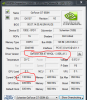
I think this means I'm good as it clocks down after brief period.
-
306.97, right cool. I downloaded the one from the Clevo site a while ago, 306.48, but never used it. That clocks down properly too. Even on this driver, you STILL can't change the idle clock, but fortunately, it is down to 135 from 405, a big improvement. Whether or not that'll make battery life much better, is another question. I'll do some testing.
-
The new ME & Driver 8.1.20.1336 work pretty well (on the blog)...not so the latest nvdia driver...
-
Is there any possibility to replace the fan with one with better airflow or more silent? also i noticed fan seems to push air inside the case...im wondering how to improve that in order to guide air in the right direction...
-
seems perfect to me, other manufacturers should take notice actually.
-
Strategic duct taping
-
Perma, any updates on BIOS mod 2.0? I'd love to test what you got, (I am unemployed so I have lots of time to fiddle with it)
also what do we gain from updating the IME firmware? -
I posted about taping the fan assembly so it forces more of the air out of vent and it works quite well ( I posted it quite a while ago)
-
hello
does anybody know is that possible to change w110er gpu with nvidia future gpu fo example GT 750M or ... ?
thanks -
It is not possible to change the GPU, it's soldered onto the motherboard as opposed to being on a removable MXM card.
*edit* I'll be getting one of these laptops come January when the next lump of student finance money comes in, but there are a few small mods I'd like to do hence if anyone could provide information on the following that'd be great:
Speaker Access - how hard is it to get to them and is there any spare space? (for replacement/improvement)
Webcam - apparently it's connected via internal USB which should make it replaceable, can't find information in the service manual, can someone check? I'll replace it for something better
Powered USB port (on the right) - maximum current? Standard 500mA or greater? (to test, try charging a tablet that's in heavy use from that port)
Lid - I assume it has the usual magnet and reed switch setup, how far away does the lid have to be to trigger it? Also is the lid flush with the palm rest? I'm thinking of adding an LED above the display shining down onto the keyboard (i.e. a "ThinkLight")
That's all for now, thanks in advance folks
-
Pretty aggressive mods you have in line there!
My thoughts:
Speakers - easy enough to access, although good luck finding a replacement. Even if you find one that fits, it may need wiring/soldering to get appropriate wires to the right connector
Webcam - Most webcams are just connected to an onboard header tied to the USB bus. Although you'll have to disassemble the screen bezel and get appropriate wiring and connector
powered USB port - 500mA is spec for USB 2.0, 900mA for USB 3.0. One USB 2.0 on right, two USB 3.0 on left.
Lid - I don't think it's magnetic. If it is, it's a strong magnet. It only needs to get to about 15 deg open before it enters sleep/shut down/hibernate, whatever you have it set at. See this short video I made of it below in spoiler tags. The system actually does sleep or shut down and screen doesn't just go blank at that angle. I set mine to shut down, so it took an extra 10 seconds to shut down, just watch for the blue power light on the right to turn off.
<iframe width='640' height="360" src="http://www.youtube.com/embed/aU1A93ZKinc" frameborder='0' allowfullscreen></iframe>Last edited by a moderator: May 6, 2015 -
Agreed, seems mechanical, you can feel the force comes from the bottom of screen (can't remember the english word, but you got me ^^)
Although, you can set the screen to go blank in windows settings as with any other laptop ! -
Thank you both for your responses,
Regarding speakers, the soldering doesn't frighten me I'm a computer science student with a healthy electronics background, case in point my current laptop (Thinkpad T60) has an extra mini-PCIe port because I noticed the pads were there and wanted to add a video decoder card. I had to cut through some of the chassis to do it but it was worthwhile.
Webcam, well, so long as the cabling is easy enough to find it shouldn't be too much bother to replace. Consider this line of inquiry solved.
Lid - that's odd, I thought magnetic locks to keep laptops shut and also provide feedback on where the lid is were standard these days. Still if it's mechanical and activates as high up on mine then there should be no issue with my plan, even less of an issue if I find some empty space up above the display.
The reason I asked about the powered USB port is that the schematic from Eurocom says that it can be a dedicated charging port or have data passed through, which should mean it can supply 1500mA with a smart device, or 5A with a dumb device attached. Hence, I think some real world testing is required with devices that'll draw more than 500mA
-
Spec calls for "UP TO" 1500mA charging, so whatever it is, I don't know, as they are at liberty to run from 500mA to 1500mA. 5A is for like a dumb wall charger.
-
would you mind sharing that schematic or provide a link to it? as another former EE student I always try to get schematics and service manuals
EDIT: found it already
Thanks,
Michael -
Ah you're right, the limits are high but the actual provided current could be practically anything :/ Ah well, I guess I'll find out what it can provide when the laptop turns up.
@mm3 W110ER Service Manual -
many thanks
-
Hi, I'm sick and tired of desktops as of late and then I found this little gem which will easily take care of my computing needs.
One question though! Are there any comparative benchmarks between ivy i5 and i7? -
Not yet, but soon. I've been taking my sweet time finishing benchmarks between i7-3610QM and i5-3360m. I'll just tell you that newer games like Battlefield 3 (multiplayer), LOVE the quad core, and it's hard to match performance even with a faster clocked dual core.
-
Well, that settles it then! Quad it is.
-
that's maybe more a dual vs quad comparison
-
It has probably been asked in here before but what type of RAM is requried for this laptop. I just sold my m11x and will be purchasing this from RJTech. I have some Corsair PC10666 RAM - 8GB, (2x4GB), DDR3, 1333MHz, SODIMM Laptop Memory, Class 9 . Just wondering if the PC10666 RAM is compatiable along with the 1333MHz speed. Thanks and I am pretty stoked about getting this thing.
-
Easily, you can even OC your ram if you feel like it using Prema's custom BIOS
-
Ya I think I will use Prema's Bios because I am going to get the quad and I would like to disable the turbo and what not. Thanks for letting me know though, I was just concerned because it wouldnt work in the M11x because PC10666 wasnt the right one I think I need PC3- 10600 or something like that.
-
Disable turbo? What for? I would disable hyperthreading if anything. You're going to want turbo, and likely throttlestop, to get max performance, unless you're looking for the quietest and coolest machine. 1600MHz RAM will give you the best performance, but really biggest improvement will be with the integrated graphics, otherwise it will be largely not noticeable.
-
Another point to note is that your laptop won't be able to exploit the full potential of any SSDs without the turboboost. Performance can drop as much as 25%. My machine can't utilize the full potential of even an Intel 320 with Turboboost on.
-
Ok, I'm new to this forum and new to my w110er. I got it from cyberpower PC and it is a great machine! The only difficulty I'm having so far is that the thing wont shut down or restart... I'm running windows 8 pro. I've already disabled the new hybrid boot option which was suggested to someone else in a different forum, and that didn't work. I've also done a refresh of the system and that did nothing either. Next I'm going to try to disable hibernation in the bios to see if that does anything (yet another suggestion in another forum). If anyone has run into this problem and found a solution that works, PLEASE let me know!
I've been flipping though some of the pages in this forum and you guys all seem very knowledgeable so I would greatly appreciate the help.
P.S. Could installing the custom bios do the trick?
I should also add that when shutting down or restarting, the computer hangs, there will be a black screen but the computer will fail to boot or shut off all the way. Also, I'm dual booting with Ubuntu 12.04 LTS -
??? Not sure how SSD performance relates to turbo boost?
-
I have win 8 pro. And I have seen my system hang when resuming from hibernation, basically bios initiation or something. I just shut it off forcefully then turned it back on, seemed to work. I use the uv prema bios mod. hibernation is well worth it if you want to have a faster boot with windows 8, and save a bit of power if the system is unplugged. Sleep mode still sucks power from the battery. (Mine goes into hibernation after about 30 mins of sleep) I haven't had any hang issues during shutdown, but then again. I hardly shut my 6110 down anyway, I have no need to, I need it to start up instantly when I need it to, I cant be waiting for it to boot.
I guess I've booted in under 7 seconds, but this is getting a bit off-topic.
Can't help ya, try installing a bios mod. I don't have your issue. -
I'm pretty sure that the 2.30Ghz clock on the i7 3610qm, will achieve the same 500+ MB/s speeds.. Without the need of turbo boosting. My cpu hardly does anything copying files. I would assume that the cpu would be 100% utilization, or close to 100% to even require the turbo boost. Thats pretty high for copying files. I don't believe turbo boost has anything to do with SSD or HDD performance.
-
The sad part is, that I cannot get the powered usb port to work unless my system is in sleep mode. It wont ever work if the system is completely off, or hibernating. Might be just me..
-
Well, I appreciate any and all input so thanks! However, it looks like I wont be installing a bios mod until 2.0 comes out. I flashed the latest ec and bios from clevo and ALL my problems disappeared in both windows and ubuntu! I'm just happy to have worked the kinks out for now.
-
Does the bios let you change the clock and let you keep turbo on? If so I will of course leave it on. And yes hyper threading is something I will definitely turn off. Actually just ordered it a few minutes ago from rjtech with no hard drive and ram for 940. Kind of high I think but what frustrates me the most is they made me pay extra for the 120W power brick. I also pulled a blond moment and picked windows 7 and not 8 but sent them an email as soon as I looked at the order to hopefully get that changed. But besdies all that I am pretty excited to get this computer and be able to finally play BF3 on a laptop. That m11x just wouldn't cut it.
-
Ok guys sorry if this is posted in the wrong section (mods move if needed)...long story short i'm looking to get a portable gaming laptop...i was going to buy the alienware m14x, but i'm reading too many horror stories about them...so i came across clevo and i'm liking the 11.6" form factor...so i'm thinking this will be the way i want to go...just curious though is there any place you guys can recommend over others on where to order it? I've seen different places and they all seem to offer different free or special upgrades...also i saw that the place mythlogic you can get a matte screen...is the regular glossy screen that bad? Has anyone gotten the matte screen and were glad they did? This will be my first gaming laptop so i want to make the right choice now if i can...thanks in advance
-
Major problem. There was a power surge at my place. Had to wait a while to get back on my laptop so the electrician could fix things. Once that was dont i go plug in my laptop and hop in a game. I see that the temp on my GPU instantly went out to 92 C, GPU at 99%, and core clock only stays at 405mhz. Is there a fix for this or do i need to use my warranty.
Edit: I should add when the power surge occurred i was in game and played a while after until my laptop top shutdown, probably due to stress. -
I think the first step would be to identify what country/state/area you are in!
-
If there was a power surge then did your power go out? If so, then it may have been playing on battery which is why it eventually shut down. But that GPU temp and useage is troubling.
-
Yes. Im a college student that rents a room. This power surge only happened in my room and only my power sockets were shut off. Couldn't draw any power from them. Sounds like i gotta use my warranty.
Edit: i was also using the 1.4 OV Edition -
Still getting very poor battery life.
Does anyone have a comprehensive guide that could help me out? -
There are some registry hacks you can try to park all the CPU cores and in to a deeper state, alas the guide is no more so I'll see if I can dig it up again. The newest ME firmware+driver on Prema's site dropped my idle CPU wattage from 6 to 3.2 watts. I'm sticking to the NVIDIA 306.97 drivers which seem to work well but I miss the 301.24 drivers which had the best power consumption to date (I could push 5hrs 30 minutes at idle easy with the screen on).
If your SSD supports it, theres also some registry hacks which enable HIPM and DIPM to drop idle power usage by the HDD/SSD.
I recommend the UV BIOS, I find OC doesn't really benefit this GPU since the GDDR3 is such a bottleneck even at stock speeds already. I reckon none of the Drivers since 301.24 never really switched off the GPU properly (except maybe 305.23 but that had some performance issues). If this is the case, then your GPU is idling with a higher wattage. -
W110ER will be a great choice for a gaming laptop - this is my main gaming computer and it satisfies all my gaming needs, running every single game from Far Cry 3 to Planetside 2 with no problem and good graphic settings.
Glossy screen is not bad by any stretch of imagination. I constantly use productivity software in conference rooms with huge windows and never had an issue with reflections. For gaming - I constantly play in brightly-lit rooms, on charter buses and trains and have no complaints. I've ordered mine at Mythlogic so they also did a nice color-calibration. Of three other monitors and a flat screen tv that I hook up to - W110ER is vastly superior color-wise.
Mythlogic is a fine choice - they ship the laptop in 3 boxes with lots of padding and have good communication via phone and live-chat. Although they are a little on the pricier side.
If I were you I'd also opt to go with Windows 7, since at this point it's a more reliable solution for gaming, since most of the software you will be running would be first optimized for W7, not 8. You'll always have a chance to upgrade a year or so down the road, when more of the third-party drivers, tools and utilities that you will use with you PC will be optimized for W8 properly.
*** Official Clevo W110ER / Sager NP6110 Owner's Lounge ***
Discussion in 'Sager/Clevo Reviews & Owners' Lounges' started by Ryan, Apr 7, 2012.


