 Problems? See this thread at archive.org.
Yeah, I'm using OV but I'm going back to UV I think.
I haven't found the GDDR3 to be the biggest bottleneck in the world, I mean, it is the 'neck in the system, don't get me wrong, but I was managing to get BF3 to run @ 1080p at Ultra on some maps with no AA above 30fps. I could play it on medium on any map, which I still think is impressive, since I'm only going to be playing at 768p most of the time.
Putting the system up to 1100/1200 clock does make a difference.
I don't have an SSD in there, I needed more space so I have an HDD, I can look that up.
306.48 (Think I'm using that) drops idle speeds down to 105MHz, although the memory still sits at 405. I can't seem to get any software to edit these values which is annoying as hell. I'll try the suggested drivers you've put there (Is 301.24 not viable?).
When you say ME driver, what do you mean?
Thanks for the help.
EDIT:
I am on 306.97, back to UV and have installed the Intel Management Software, but I want to know before I do it, do I need to make a bootable flash drive to flash it? Just like you do for the BIOS mods?
-
Is there any way to make the mouse pad more gaming-friendly? I've tried playing a couple of games with it recently and realized that if I'm holding any button on my keyboard the mouse pad doesn't register movement. To think that I finished first Half Life back in 2000 on some crappy laptop and even that one's mousepad worked without problem. There gotta be some third party driver or tool to make it better.
Also - is there a way to selectively turn off Fn commands. Most importantly - F4 key as a Sleep button, which is for some unexplainable reason located right between Mute and Volume down. I'll be playing at night in complete darkness, the game goes too loud - I start mashing the Volume Down button, accidentally hit Sleep and everything crashes - right when Capra demon had the last 10% on HP bar... -
@factory
If you have the synaptics driver installed, I'm certain there is an option in there. If you don't, download it from Clevo's site.
I had this problem on my old laptop and fixed it and have the same problem on this one, I just haven't found that option again yet. -
Thanks, I do have Synamptics, but I can't figure out how to open any sort of Options screen through it. None of the .exe files in Synaptics install folder seem to open. I'll let you know if I find a way to open it.
[EDIT] - that was silly, just needed double click on the mousepad icon in the tray.
[EDIT2] - OK found a way to fix it, turn SmartSense slider all the way to OFF. -
Actually, the momentus XT is probably sufficiently advanced to have DIPM but the reason its not good for HDDs is the massive latency spikes (especially 7200rpm drives as they take longer to reach full speed from a standing start). You can instead choose the option to turn off the HDD which will work just as well.
For me personally, 301.24 was the best but it can't be found anymore plus the performance is nowhere near any of the modern ones.
As far as I understand, the ME driver (its usually a software package) is basically a transparent toolset exposed to windows to allow advanced power management from the OS environment, revisions generally improve stability and power performance of intel CPUs. However, the reason you need the Firmware as well is that the driver may be issuing updated commands that the old firmware doesn't recognize. That being said, I think noticed that power consumption actually went up with the last Driver+firmware version so its hard to say. Though, You also cannot flash back to an older version.
Prema has more detail on his site but it involves making a DOS bootable USB and flashing the firmware from his site. Once you flash the firmware, you install the matching management engine driver (which you have already done). You can track the power consumption drop via throttlestop. Generally quite painless and I for one feel fortunate that we are getting ME firmware+driver updates at all. I don't recall any other machines with this kind of support. -
Found an obvious solution for that too. If anyone's wondering: Control Panel ->Power Options-> "Choose what the power buttons do" -> "When I press the Sleep button" -> choose "Do nothing" from the drop down menu.
-
Hi Razyre,
I have been reading your helpful posts since ordering myself a w110er with a 3632qm from PCS and hope you can help me. I know that this is the only 35 watt TDP processor offered by PCS and I was wondering whether the 90 watt PSU is adequate after reading some rare posts of possible throttling with the 45 watt rated quad cores. I ask because I know the 3632qm is basically and cherry-picked 3630qm.
Soon I will need to sell my desktop and move abroad (q6600 with ati 4870). I want to be able to use this laptop with an external screen as a desktop replacement for home gaming and as a portable work laptop. I need the laptop to be reliable and I chose the 3632qm hoping it may be a little more cooler and that the 90 watt PSU would be easier to transport.
I have read you get nice cool temps with the UV bios, how did this compare to stock? I have no interest in overclocking and understand that the 650m will disable the turbo boost.
Still in pre-production so I have time to change.
Thanks! -
Hi guys, I'd like to buy this laptop and I have a question. I hope someone can help me out.
Can it automatically recognize a plugged in HDMI cable? Well I mean do I have to choose HDMI video and audto output manually every time I plug in the cable or it does that automatically? Or perhaps I can choose a primary output device only once, is that possible?
And what if I turn on the machine when the HDMI cable is in? Is it going to send output to HDMI right away, including the BIOS screen?
It's really important for me to know that. Could someone please take a minute and test that? Many thanks! -
You're in luck! I just tested this out on my new monitor for my workstation at home. Yes to all of your questions. The only thing I had to do was select the second display from the display options in windows but once that was set, it recognized it every time.
-
@froggiie_uk You don't need to use the stock 90W or 120W power adapters, which are huge - I've been using 95W Thermaltake Slim Adapter for 6 months now instead of my 120W stock one and it's been working flawlessly. If I'm not mistaken someone earlier in this Thread confirmed "scientifically" that it shouldn't cause any issues. It's out of stock on Amazon.uk, but if you can find it elsewhere or order from American Amazon it's a must buy for anyone planning to travel with their W110ER a lot.
Can't check the BIOS screen right now, but would like to confirm that the display automatically switches to HDMI or VGA connection, once you've set it up the first time. Checked it with two Samsung TVs and three monitors of different brands. -
froggiie_uk,
Have had the I7-3632QM in my W110ER for about 4 Weeks - Tested and never managed to get it to draw more than 55watts from the wall. -
Thanks to you and factory _666 for the helpful replies

-
So you're saying I shouldn't flash the new one? I haven't done so yet. Thanks for the information also. I'm STILL getting pretty dismal battery life even with the UV mod back on there, plus the Intel management driver and using Power Saver, turning the hard disk off after 2 mins etc. Not getting that mystical 4 (Ideally 5) hours battery life some are reporting Only thing I can REALLY think of is that I'm using Windows 8 and I have networking programs on in the background. I'll disable the programs (Other than Dropbox) and see.
Looks like the other guys beat me to it
-----------------
Unrelated, but there is a reported "Internal empty port 4" under the "Intel rapid storage technology" manage tab. What is this? -
Thanks to everyone who replied!
I'll be on my way to buy this wonderful machine! -
No no you should flash the ME version, the dodgy version was 2 months ago. The new version I can confirm does reduce CPU wattage.
You can try some advanced CPU power management tweaks, beware though, these involve editing the registry.
HKEY_LOCAL_MACHINE\SYSTEM\CurrentControlSet\Control\Power\PowerSettings\54533251-82be-4824-96c1-47b60b740d00
This is a detailed explanation of the PPM features and includes an index of the relevant keys
PPM in Windows 7 and Windows Server 2008 R2
This guide will explain how to enable these hidden features
Dozty | How to Unlock The Hidden Features of Processor Power Management
However, this guide is only the most basic options
to unlock everything you basically use an elevated cmd prompt
powercfg -attributes SUB_PROCESSOR [whatever key interests you from the microsoft guide] -ATTRIB_HIDE
The most difficult feature to unlock is the CPU core park override, this registry key allows you to park ANY core, not just hyperthread cores. Sadly, I've forgotten how to enable this and the guide on the internet is a pain to find ( I think there was a post in the W110er owners lounge). I can try to clone my registry key that will enable it for you if you like (Windows 8) -
That's such a great help marksman, got some free time on my hands so I'll try all of this ^^
Is parking cores an ideal option? I see people poo pooing the idea a lot, unless that's just me remembering things wrongly lol -
The theory at least is sound. unclewebb is actually very experienced with these matters so he'd be able to give you a better answer. In a nutshell, coreparking only really expands on what Intel CPUs already have and thats adaptive clocking based on workload. Coreparking simply takes things further and doesn't allow threads to be scheduled on certain CPUs without a certain busy threshold being reached (this is also an adjustable PPM parameter). Coreparking doesn't do much from a power saving perspective to most people because only the hyperthread cores are parked by default, the intent is to ensure threads are always run on real cores if possible before forcing cores to multitask between threads. The reason people often disable coreparking is because of the increased latency caused by the thread shuffling plus some time sensitive programs don't take kindly to having their threads mixed and matched around.
The equation changes completely when you have that Corepark Override switch which allows you to park full cores. This means that you can dictate which cores will remain inactive and in a power saving state until a busy threshold is reached (plus you can additionally dictate how aggressively the core will try to return to a parked state). This means that most threads will run on one core (I don't think you can park everything as a single core must be active for windows to schedule background threads) in theory saving lots of power (maybe 1-2 W). However, you must also realize that power saving is not only relevant to running as little resources as possible, a single core running at load for a longer period of time may very well use more power than multiple cores running at the same load and getting the work done faster. Therefore, the corepark override will likely only help most with idle battery life but perhaps not light usage (I haven't tested)
A few things I've also found that may increase battery life, I have tested a few WIFI cards and have found the Intel 6300 to be one of the most efficient, it has very obvious adaptation to workload (you'll see the mbps jump around alot).
Earlier in this forum thread, somebody mentioned a specific reseller Matte screen B116XW03 v.1 which actually has very low max power consumption of 2.9W. The B116XW02 v.1 matte screen has a power consumption of 3.8W and our stock gloss screen actually consumes 4 W. I don't know if the 2.9W max is because of higher efficiency or if the max brightness is lower.
I noticed also you use a Momentus XT, I think most 2.5inch HDDs idle at fairly high wattages of around 1-1.5W and theres not much point in turning it off because Windows will always request access to the HDD (logging etc) thereby forcing it to waste juice constantly spinning up (7200rpm drives take a while to spin up). An SSD can help, even though their load wattages are equal or higher in some cases, some SSDs have idle wattages of <1W and more importantly, they don't have spinup time so they don't waste as much juice on those random small windows access requests. Plus, SSDs spend more time idle since they get the job done really quickly and go back to sleep. -
Hey guys, I'm interested in purchasing an AC adapter for my W110ER (3630QM) that'll be arriving in a few weeks. I'm thinking of leaving the 90W adapter that comes with it at my desk at home since it sounds quite hefty. I've been looking for a small universal adapter for transport to and from classes. I live in New Zealand and none of the local stores have much in the way of slim, 90W (or more) universal adapters. I'll probably get one from USA, but it would have to be from a large international supplier like Amazon for ease of shipping and accepting international credit cards. The Coolermaster USNA 95 looks good but it doesn't appear to be available. Other options I have looked at include the Innergie mCubeSlim95, the Antec SNP90, the V7 ultra slim adapter, and Thermaltake Toughpower Ultra Slim 90W.
What I am looking for is a slim, light and reliable 90W (or more) adapter. Any USB ports are nice but unnecessary. I don't need it to work when flying or anything like that, just the basics. Does anyone have any recommendations for what adapter to buy and where to buy it from that will ship internationally for a reasonable price? Cheers! -
Thanks very much for explaining that.
I have an Intel 6235 and the "M116NWR1" matte screen as far as Wi-Fi card and screens go.
I did just find out something very, very significant. My system was set to use the Nvidia GPU by default... For everything. Even in power saver mode, I am fairly certain that the system had decided to almost solely use the 650m. This is a catastrophic choice for battery life and having switched over to the Intel IGP in power saver, I'm pretty damned sure that the system is saving a LOT more battery.
I need to do some tests, but I have a feeling idle battery life and usage under stress is going to be MUCH better now. Also, what is an ideal tension for the battery to be under, considering there is a full HDD in my system? I'm getting "11934mV" according to BatteryCare, not sure if this is good or if it's even reading correctly, but I have a feeling that some people have had lower readings than this.
I feel like an idiot considering registry hacks, flashing the BIOS, sorting out PCI-E power saving etc. etc. and I hadn't checked that Optimus was working how I wanted -.- -
Just a word of warning guys, Throttlestop no longer works if you use the UEFI BIOS with a secure Boot windows 8 (I'm not sure if it also applies to UEFI boot but it seems likely). I'm communicating with Unclewebb for a workaround but the problem seems to be deep as the program can't load the Winring.dll driver
EDIT: false alarm, turns out driver enforcement wasn't disabled properly, everythings back to normal -
Thanks for the heads up.
Turns out, this makes little difference. Battery life is still absolutely terrible. I... I don't even know what to do. The fact is, without core parking using Power Saver AND a UV BIOS, AND having switched the Nvidia GPU as near as off as it can be, there is no real reason why I should only get 2.5 hours battery from my W110ER.
What drivers/software could drastically drain battery,..? I seem to be getting the worst battery life of the bunch. It should at bare minimum be 3.5 hours. This is hardly an Ultraportable with the battery life of a DTR. -
Sorry false alarm, turns out I didn't configure the driver enforcement properly, TS works normally now
I guess you can try my .bat file that enables most of the processor options I'm using, also I was wrong, Windows 8 has corepark override on by default so it parks all cores.
powercfg -attributes SUB_PROCESSOR 893dee8e-2bef-41e0-89c6-b55d0929964c -ATTRIB_HIDE
powercfg -attributes SUB_PROCESSOR bc5038f7-23e0-4960-96da-33abaf5935ec -ATTRIB_HIDE
powercfg -attributes SUB_PROCESSOR 45bcc044-d885-43e2-8605-ee0ec6e96b59 -ATTRIB_HIDE
powercfg -attributes SUB_PROCESSOR df142941-20f3-4edf-9a4a-9c83d3d717d1 -ATTRIB_HIDE
powercfg -attributes SUB_PROCESSOR 68dd2f27-a4ce-4e11-8487-3794e4135dfa -ATTRIB_HIDE
powercfg -attributes SUB_PROCESSOR 943c8cb6-6f93-4227-ad87-e9a3feec08d1 -ATTRIB_HIDE
powercfg -attributes SUB_PROCESSOR c7be0679-2817-4d69-9d02-519a537ed0c6 -ATTRIB_HIDE
powercfg -attributes SUB_PROCESSOR 71021b41-c749-4d21-be74-a00f335d582b -ATTRIB_HIDE
powercfg -attributes SUB_PROCESSOR ea062031-0e34-4ff1-9b6d-eb1059334028 -ATTRIB_HIDE
powercfg -attributes SUB_PROCESSOR 0cc5b647-c1df-4637-891a-dec35c318583 -ATTRIB_HIDE
powercfg -attributes SUB_PROCESSOR a55612aa-f624-42c6-a443-7397d064c04f -ATTRIB_HIDE
powercfg -attributes SUB_PROCESSOR 447235c7-6a8d-4cc0-8e24-9eaf70b96e2b -ATTRIB_HIDE
powercfg -attributes SUB_PROCESSOR 4b92d758-5a24-4851-a470-815d78aee119 -ATTRIB_HIDE
powercfg -attributes SUB_PROCESSOR 7b224883-b3cc-4d79-819f-8374152cbe7c -ATTRIB_HIDE
just copy and run in a .bat file with admin privileges.
I guess though with what you said, it may be defective battery as I can comfortably get at least 4 hrs idle/surfing. Your Seagate Momentus XT is the only other difference between yours and my machines (mine has a Plextor M5s 256gb). I'm also running Windows 8 on UEFI and Secure boot. -
Can I reverse any changes made by this?
I'm still running via BIOS I do believe. Little reluctant to use Secureboot since I lose the option to use Throttlestop at any point. Once again, I don't think I can reverse the changes can I?
I guess I could talk to PCSpecialist and see what they say. I have a 2 year warranty on this thing. Defective battery just doesn't seem likely, but maybe, it's a possible.
Really sorry to be such a pain, you're being so helpful right now, thanks a lot. -
If thottlestop stays active in the background (check for its icon near the clock) and it's configured to monitor the gpu (nvidia or amd is checked in settings), your battery life will strongly decrease.
-
If only it were that simple lol, Throttlestop isn't active at any point when I'm on battery. Not open in the background, nothing.
-
That was just an idea =)
If it bothers you enough I'd recommand a fresh win7 install with minimum softwares, then monitor power consumption on a regular basis when you start to modify other stuff. -
Weird situation with performance. Over time my games started performing slower and slower. Main offenders that I've been playing - PlanetSide2 and Chivalry:Medieval warfare. They used to run pretty much 30~60 fps all the time, but last couple of days they would start to resemble a slide show on more and more occasions, dropping down to 19 and 12 FPS even. When looking at Throttle Stop it used to show ~30x multiplier most of the time, but now it fluctuates from 12x to 28x even during CPU intense moments as FPS drops dramatically. Turning TS off doesn't seem to change anything at all.
PS I use "Ac-on, Battery - off" option in TS. It used to bug out from time to time: sometimes my multiplier would lock on 12x. Replugging the cord and restarting TS would solve the issue and the multiplier would jump to 30ish immediately. Now it always fluctuates between 12 and 28x, no matter how hard the task.
The only thing that changed since good times is that I currently stay at a place with higher room temperatures and the desk is constantly warm, so my idle and busy temps are ~3C higher than usual. Oh and a couple Windows updates installed themselves, but I don't think problems started then.
Attached are screenshots of my TS settings.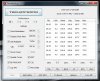
If anyone can lend a helping hand of wisdom (maybe UncleWebb himself) I would greatly appreciate it.
EDIT: I use stock BIOS, not Prema's -
Are you using the 90Watt or the 120 Watt adapter? I have seen my laptop do the same thing until I switched to the 120Watt adapter
-
Hi Razyre, finally got my w110er from PCS... great little machine!
I remember reading you had problems with your bluetooth. I'm just writing to say mine was disabled in the bios and worked after I enabled it. I presume this has already been suggested and also it would have come up when you tried the different prema bios'. -
Good to hear froggiie! Please report on your average battery life that you get with the machine to compare to mine, that'd be so useful, along with the components that you've got in there. I want to see as many different results as possible.
My Bluetooth is working fine now thanks It's a little iffy to get working (I think there was a bit of a hiccup with the driver install) but once I enable it in the device manager manually instead of using shortcut buttons it works when I want it to. For some odd reason, when the UI overlay thinks that Bluetooth is off, it's actually on XD When the UI comes up in the corner saying "On" or "Off" that is.
-
I'm using American version of ThermalTake Slim 95W adapter, which is supposed to support up to 120W. Been using it for 6 months playing pretty much the same games and didn't have such a problem before. However for the past 2 weeks (approximately since the issues started to occur) I've been staying in Eastern Europe. Outlets are 220 volts here as opposed to 110 in the US. My adapter supports up to 240volts, otherwise it would burn out.
-
The registry mod merely exposes hidden options to the advanced power menu but I think there is a command which is just basically the opposite (i.e. hides options), what you do with them is your choice.
-
I've been having steady FPS drops in BF3 lately. How can I optimize my settings for top performance? I am playing on low settings at this point with the 310.90 drivers and I only get 60 fps about 75% of the time.
-
Try disabling HBAO and SSAO (its hard to notice their effects on a small screen anyway), disable MSAA to relieve the load on the already strained Memory bandwidth, FXAA is still ok. Try getting all the terrain and model settings to Medium and that should do it. I personally also disable high shadow quality as well as I find it adds more for the GPU to do without much visual benefit.
Are you on Prema BIOS mod? if you are then OC the core as high as it can go but more importantly, OC the Memory, I could get to about 1100mhz CUDAmemtest Stable which relieved the performance drops a lot. I tried also to reduce AF to x8 in the NVIDIA menu.
Also check this out
http://www.geforce.com/optimize/guides/battlefield-3-tweak-guide#1
NVIDIA were surprisingly systematic when they analysed all the possible performance effects on their hardware. -
I already disabled HBAO, SSAO, turned off AA, FXAA, and have everything set to low. The FPS takes a hit when I enter a new part of the map, then it quickly rises again.
I am on Prema BIOS mod, but the only OC'ing I have ever done is my GPU in MSI Afterburner. How can I OC the memory/core? -
Oh okay, I guess I'll give that a whirl then.
MSI Afterburner has the options to do that.
I can't usually get very high on the memory though, more than around 100MHz OC and my card starts to stutter/artifact. -
You can now get a slim 120W adapter from them, I know my 95W got pretty hot so maybe worth checking out.
-
The FPS hit you are describing is the consequence of having GDDR3 RAM. Specifically, its the low memory bandwidth to compute ratio we are saddled with due to clevo's poor judgement. When fully loaded, I'm guessing the immediate area of the map mostly fills the internal cache of the GPU hence theres no need to fetch more data (or limited need) from the vRAM bank. When going to a new area rapidly, more data is requested and the GPU is waiting basically for the vRAM to fill the data to the internal caches and then to the CUDA cores.
This won't show up in benchmarks, the FPS will be similar or even higher than the lower clocked GDDR5 650m but the frame latencies will be wildly different Review: Nvidia's GeForce GT 640 graphics card - The Tech Report - Page 6. In the 640 case, its actually the best case scenario since the CPU is not a bottleneck.
You can mitigate the issue somewhat by OC the memory from MSI afterburner. You can generally push about 100mhz guaranteed but anything beyond 200mhz is luck. Perhaps with a vBIOS mod that loosens the GDDR3 timings we might be able to push 300-400mhz but this is the limit.
At the end of the day, even OC, the GDDR5 model has TWICE the memory bandwidth we have so I guess theres nothing more to do. -
He's using a mechanical hdd, could as well just be map loading.
-
Do you play BF3 Marksman?
I can do a test myself to see if I have this problem. I don't remember having any problems at 1366x768 and only remember having general low FPS in larger parts of the map, as opposed to jumps up and down when at 1080p.
I don't think I'm on 310.90, I'm on 306.97 for GPU clocking. -
I decided I am going to sell my NP6110. Very difficult to part with this beast, but I wanna go for a large machine.
-
Exciting! Be sure to his us up if you have any questions on configuration.
-
Hey Derek, could I sell it back to you guys?
-
Haha, I wish we could but we actually don't deal with anything used so the powers that be won't let us.
-
I do, same name as my NBR on Battlelog, I go on the Aussie servers more since the powers that be decided we shouldn't have fibre with the rest of the world
On my desktop which is a 4.4ghz 2500k, Intel 320 SSD and SLI GTX 570 at 800mhz, I actually do get mild microstutter on the larger maps. It manifests as the occasional jump or jerk here and there (my ping is around 70) even with butter smooth 60 FPS as I suspect I'm hitting the vRAM limit.
When I tried to game BF3 on the w110er, the performance is generally acceptable at 1366x768 with similar albeit less frequent microstutter as the SLI rig. At 1080, the microstutter is downright unbearable as I could visibly see the 650m struggle to load the relevant data from the vRAM bank as obviously capacity is not an issue due to 2gb being available. -
I wonder how well the cooling system can cope with that i7 and 650m.
![[IMG]](images/storyImages/08.jpg)
-
Anyone have any suggestions how to boot from USB? the option does not appear in the bios, secure boot is NOT enabled.
the aim is to update the bios with Prema's bios
Thanks,
Michael -
Make sure the drive is inserted and then press F11 for boot options.
-
meh, F11 does nothing, F7 does give me the boot menu, although no USB, only UEFI IPV4, UEFI IPV6, windows boot manager and SD.
-
Sold mine... looking at it for the final time before I ship it away. It was a fun ride.
*** Official Clevo W110ER / Sager NP6110 Owner's Lounge ***
Discussion in 'Sager/Clevo Reviews & Owners' Lounges' started by Ryan, Apr 7, 2012.


