 Problems? See this thread at archive.org.
@bitslightlymad
Do you have a link to your HDMI converter? Is the 1080P limit, mentioned by HT, still in affect? (anyone?) Will the bit depth be adequate for your needs as you may only be 256 colors if all this works? I hope all this works out.
Will using the internal 11" screen for tools and an external large 1080P screen for work area be enough? This works well for me with PhotoShop, but works if nothing else.
More on the subject: HDMI, Optimus, and 2560x1440 - AnandTech Forums
-
Hello world.
Been lurking and reading. The owners lounge thread is quite a thing to have at ones disposal when considering a notebook. Huge thanks to everyone for the ridiculous amount of information and discussion assembled here. I finally pulled the trigger and I went with the Mythlogic. I feel like there's value in their approach and so based on my priorities I don't see their cost as out of line at all. I actually think it's a bargain. One thing I like is that there are so many ways to get a Clevo. Anyway - now the agonizing process of waiting for it to ship begins! Thanks again to all the posters, particularly Prema, HTWingNut, and mythlogic. -
Need help connecting Clevo W110ER to 2560x1440 monitor - AVADirect Custom Computers Forum
here you go guys, the original source of info was a pain to find. I reckon you might just have to trial and error the HDMI cables. -
@hydra : this is what I have at present - got it for dirt cheap :
Nyko - Products - Pure Hd
@factory_66 and @Derek - I know Monoprice.com, I have used it while in the US. At present I live by the South China seas. No dearth of cheap HDMI quality cables here - but quality, I do not know.
Will look around and post here with any info I get.
@Marksman30k , that link was awesome find. Thanks!! -
Excellent!
Bummmer, on my newer laptops more and more really usefull ports are being left out , but VGA still lives? It looks like the HDMI consortium is slowly killing off the video ports. And for whatever reason, customers are not finding anything but 6 bit laptop pannels, even as an option. Millions of colors on a 6 bit panel?
Yea, again let us know what you think after you get your monitor. Your link: Features the latest HDMI specification,1.3b1? -
Wow thanks for the update on the IPS screen issue. So it basically is possible to put a decent screen in these small laptops (Wondering why Dell wouldn have offered that to begin with). However I would stick with a 11" one.
 Your connector is a different on as in our Clevo, but still that makes me hope for a good screen.
-
@JMN73 Congratz! I had a great experience ordering from Mythlogic and never regretted a single dollar, don't think you'll be disappointed.
-
Hey guys,
Im getting one of these for a mate of mine and id like to ask for some temps idle and load from someone with a dual core and someone with a quad core CPU and the newer BIOS and EC versions (please state full specs if you can for reference). Is the fan still off at idle and that loud at load? Its been a while since i tried one of these out myself so id like to know how they handle the thermals now with recent updates to the firmware.
Also if possible battery run times would be appreciated.
Hes still torn on which to get atm (more processing power vs heat, fan noise and higher power consumption meaning shorter battery life). -
Hi...I was wondering...would it be theoretically possible to put one of these FullHD screens in W110ER:
Part Number - N116HSE-EA1 Laptop LCD Screen
ChiMei N116HSE-EA1 REV.C1 11.6" Laptop Screen Led Replacement -
There seems to be limited options for the 11" Clevo from various screen manufacturers. That said, I would contact the seller to ask for exact screen compatibility with the W110 LVDS connector.
The only options I have seen is the 11" Matte 720p screens from resellers, on this forum, using AUO screens.
This site shows the one option: https://www.laptopscreen.com/English/model/Clevo/W110ER/ -
If these laptops were only eDP instead of LVDS, we would be all over that.. But alas they are LVDS
-
Maby a reseller who has access to all this could chime in?
->Looks at mythologic<-
-
Your going to have to dig through the post. The dual core guys are reporting close temps to the quads. For the quads have your mate start here: http://forum.notebookreview.com/sager-clevo-reviews-owners-lounges/660753-htwingnuts-sager-np6110-clevo-w110er-first-look-review.html
I'm using the undervolt mod so temps are well controlled on my Quad and without it on the small frame. Note that the resellers are using faster i7 in the new builds. I have not used any of the newest EC updates at this time but sure other will chime in...
snap..did you not have your own? -
I did have my own when they were released and tested it out back then (with a few CPUs i had at hand) and decided not to keep it.
Im buying for a friend of mine now and am wondering if the newer BIOS and EC have changed fan profiles and battery run times.
I already ordered one for him though with an i5-3340M. He can always upgrade to a quad later if he feels the need.
I might also get one for myself again as my needs have changed a bit and i actually might need a small powerhouse now.
Ill see how it fares with the updates now. I do hope they changed the idle fan profile as 60C is still high for idle however you look at it. -
I'm using the nVidia 306.97 driver with Prema's 1.4 UV. The performace and temps are good for this size laptop, no? I find that an OC helps some games for a few FPS and other games seem to get cranky with OC. I made up my mind, a few laptops ago, to just get enough horespower to get me through the games without OC. I now have two older laptops with failed GPU's.
Where I'm going is I hate the extra heat.
The attached is mine after 40 minutes of idle, note the package power. My fan turns very slow now but forget where the change was made. This is all boring bone stock with stock TIM. I stole my son's Diablo 3 keys so playing that ATM. I you want I can post back an hour of gaming, for reference, if you want.
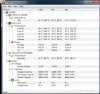
-
Thanks hydra, that looks like a nice improvement in idle heat management. Is the fan audible in idle now? If you remember a screen of gaming temps would also be nice
. I might really get one myself again when i get my next paycheck.
-
As i remember the stock PSU is rather large and bulky for this little laptop and also only 90w. Is there anything smaller/slimmer/better than the 120w Cooler Master already suggested here?
-
No, the fan is turning slow and quite. My stock 120w brick is in the drawer. Many users that travel, over seas myself, use the slim, thin, 90W supplies. Mine was on sale at a local Office Depot for $48 US; the iGo with the 2 amp USB port. Many others are using different ones if you serach these threads.
Diablo 3 and Sacred 2 Gold, my two current games, draw from 55 to 68 watts from the wall with Kill-a- Watt. The little supply gets very warm after extended play but not hot. I would never bench or OC with these, but that's cheapo me.
BTW, my i5 2430 SB also draws about the same when idle with a slow fan. My drives are noiser than the fans.
Edit: Diablo 3 temps for 70 minutes, at 21C for all temps ambient. Long screenshot...
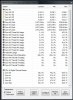
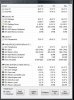
-
Thanks hydra, that was very informative. Appreciate the effort. Your laptop runs really cool, i do hope its the changes theyve made since its release.
I managed to get through 40 pages (50 posts per page), and did find a few more PSUs i can buy here in the EU. Ill just have to see which is the smallest then if 90W is already enough. -
what are you guy's thoughts on using batteries from other laptops with perhaps a higher capacity in this laptop? I wonder if the battery sizes match up at all, but I don't have a bunch of different laptop batteries lying around with which to try this out. Any thoughts?
-
Batteries aren't interchangeable usually (as noted in your OTHER post asking the same question). They are unique to this laptop and unless Clevo or third party makes a higher capacity one you're out of luck.
-
i know they aren't usually, but i was wondering if it'd even fit size wise, maybe similar clevo batteries? I don't know, i was just wondering
-
If it has the 40 pin connector it might just work. Except for the AUO panels, there are also some ChiMei ones working in the W110ER (have one myself). I guess all these 11" Win 8 tablets, which are coming out now, could just help us find a better screen, as there are tons of new IPS screens out there.
A few pages ago someone proved that he was able to install a 12" IPS HD-Panel into an Alienware M11x.
However, this matter requires an insider, as panels seem to be hard to get as single units. So if a reseller could use his connections to get a sample and try this would help a lot.
I will write an e-mail to mysn.de later, asking them if there is an IPS option now, with all these new panels flooding the market.
[EDIT] The N116HSE-EA1 seems to have an eDP connector, which makes it not compatible to the W110ER. There is a model called N116HSG WJ1 which has similar specs, but is connected via LVDS. This one might work, but it's hard to find the real specifications as they are contradictory. -
Not a bad panel (the WJ1), the issue is that the W110 has only a single channel LVDS cable, which basically means that you'll have every other line as white as you need a dual-channel LVDS cable to make it work, and the LVDS cables are unique to each machine (length and motherboard connector)
-
Thanks mythologic. So if I understand this right, there will be no way to put a decent IPS screen in the W110ER, as there is just no panel that will be satisfied with this type of cable it offers? (The connector on the motherboard would actually allow it?)
-
There is a good chance that there isn't signal at the right pins on the motherboard to power a dual-channel cable. So yes basically the long and short of it.. You can have as nice of a Single Channel LVDS 11.6" LCD that you want but it has to meet all those specs
-
I found this panel, IPS, but was noted "in production" but no stock found Also unable to check 40 pin location or bracket/ back light specs. Upgrading to 1080P screen is going to make a big hit on GPS performance, as one forum member asked, unless you do fuzzy non native. LOL, 1080P in a 11.6" format would make my eye's bleed, no?
Anyway for the IPS, we can only hope : LP116WH4-SLN1 Datasheet download - Panelook.com -
You could summarize what specifications should be in the display so that the display could be used in a laptop W110ER? This would simplify the search!
Does anyone have any information about the display Samsung SEC3052? It is used in Samsung 900X1B.
Here is a review of this subnotebook:
Review Samsung Series 9 900X1B Subnotebook
As I understand it LTN116AT01-801 - this is SEC3052. -
If we assume that there is power on both channels, is it possible to set the display N116HSG-WJ1 using dual channel LVDS cable Fix-30P-S8?
At least theoretically, it is possible? -
Good question. I also don't understand Clevos strategy here. The W110 is based on a very modern platform. So which benefit would it have to drastically castrate the screen connector? Is it because they save like 1 cents per unit?
(Read something like this about this Italian guy who is bringing out this Ubuntu Tablet with the Kickstarter Campaign. He said his Chinese contractors would change the layout of the board he ordered a billion times just becase one part was 0.1 cent cheaper to find. At the end the protoype wouldnt even boot.)
-
I'm very close to purchasing one of these. I'm going to go for a 120GB SSD, 3632QM and 8GB combo. I'll be using mostly for gaming, video and photo editing as well as some Revit MEP.
Are the 3632qm's considered the best heat/performance/battery compromise? Does it make much of a difference or is the 3630qm with a higher TPD but higher clocks still getting similar temps?
Final question can the 2nd microphone be uses as a 2nd headphone socket? I'm going travelling so would like to be able to plug two seats of headphones in. -
I did (single channel LVDS) Basically anything less than or equal to 1366x768 is single channel, and anything above that (1600x900 etc) is dual channel.
What i'm saying is that the motherboard traces aren't there to provide signal on the second channel even if you got the right cable built (with all the wires). -
Honestly, get the 3630qm cheaper and has slightly more performance on tap when needed. I have the 3610qm and the wattage is 34-35W when under prime 95 blend load capped at 2.9ghz same as (3612qm). I also did measurements, an increase of about 0.1ghz corresponds roughly to an increase of 1 degree of temperature up to 3.3ghz, beyond that, I believe it is at least 2 degrees of temperature. So basically, you are paying extra for slower speed and maybe a saving of about 1-2W at load. Not worth it IMO.
As for the headphones thing, I don't think it can be used as a second socket due to lack of wiring. That being said, I believe you can get Y-splitters for about 1 dollar on ebay. -
Some pc's you can make any input\output to be what you want, but I think that's a rare feature.
In this one, at least I didn't find anything to do that.
Using a Y-splitter may not be that good, it will probably remove the bass from the output since the power is being split into two. (At least with the speakers I also have an Y-splitter, but it seems both have lot less bass than leaving only one alone. But it's not a big problem since the speakers can still get a big bass cause they have amplifier).
Keep Cool -
Someone's buying me a 6110 for my birthday.
I'm going to need a proper carrying case/messenger bag/whatever to carry it around from place to place, preferably something that has some internal padding/protection, and a place to put the 120w (i7) adapter and the spare battery. Anyone have any specific suggestions?
EDIT: I'm in the US, btw -
Cases are kind of personable, you will get lots of ideas unless specific. If you have an Office Depot near you , take W110 in store and try them out. The 120w brick is huge for small bags. My backpack gets over stuffed for airline use so got this which fits with slim 90W brick and BT mouse, MS5000.
Anyway all fit fine, has shouder strap and fits into lager bags if nessesary, and, easy at the x-ray both at airports. In store they have lots of choices!
Samsonite NetbookiPad Case BlackBlue by Office Depot
happy B day! -
Thanks. I guess I'll have to wait until it arrives, and take it to an office supplies store. (There's a staples nearby me)
-
Thanks for the advice. My local place (Scan) only has the 3632QM but PCSpecialist has the 3630qm really unsure what to do at this point. I know its only a few Mhz less but i'm thinking of the thermal output as well. I'm off traveling round S/E Asia where it is a lot hotter than the Uk then onto Oz so lower temps may be better for maximizing the Turbo boost.
What are peoples thoughts on 3630 vs 3632 with regards to heat output?
Just a final question with the BIOS mod's I take it they enable Turbo during gaming on the 3632qm? So 2.9ghz on on the 3632 will run cooler than 3630qm at the same speed? -
The 3632 would make a difference in temperature only because its peak speed is slower, the 3630m will output the same heat at the same clockspeed. As for exploiting turboboost, its irrelevant since the program you are looking for is called Throttlestop 5.00, you simply run it and your CPU will force boost as long as it is active, even when the GPU is active.
If you get Prema's BIOS mods, you can set the desired turboboost TDP in the BIOS but its not as important as Throttlestop. -
Cheers Marksman. I was told by PC Specialist that Turbo is disabled in the BIOS (I knew already about the Prema Mods) so I presumed I'd have to use that in combination with ThrottleStop. I love throttle stop I used it extensivly with my old M11X See my Signature).
I thought the 3632 would run cooler clock for clock because it has a 35Watt TDP compared to 45Watt TDP. Am I missing something? I'm ordering at lunch time so need to be 100% on this. -
Intel's TDP ratings aren't very helpful. The 3632QM achieved the 35W TDP rating by it being lower clocked than the 3610qm, .1GHZ under base and .2GHZ under stable turbo. Typical freqs. 2.2-2.9GHZ, while the 3610QM is 2.3-3.1. -
Turbo is very much active but only when the GPU is inactive (i.e. nothing is using the 650m). Throttlestop removes this and temperature limitation. The BIOS lets you set the TDP ceiling so Turboboost can work without Throttlestop so the two are synergistic but not reliant on each other. Heat output is directly proportional to a CPU's clockspeed and exponentially proportional to its operating voltage. The "cooler" running is simply that the 3632m is running at a lower clockspeed (lower voltage can play a role as the chip might be better binned but I doubt it). I.e. it is specced to output 35W at 3ghz. The thing is, 90% of the 3630qms will also output 35W when clocked at 3ghz so you're not really gaining anything by picking the 3632qm but you gain 0.2ghz under all cores with the 3630qm. I'll bet the worst binned 3630qms may output only about 1-2W more at 3ghz.
-
I own a 3612QM (also 35W rated TDP) and it makes like no difference in battery life...it's just the Long term TDP value set to 35W instead 45W (which I could do with my BIOS, too), so it caps at the TOP and not at idle or lower clocks...
-
So essentially with Throttle Stop and Prema's Bios you could have a 3630qm running around the same temps and power requirements as the 3632qm for cheaper and a few extra mhz when needed.
Well i've made my mind up! 3630qm it is then! Thanks a lot guys! -
Report back to us with your gaming temps on the road. If you end up using a cooler, please report temps with and without.
Enjoy! -
Does anyone have a link to an audio driver with a sound equalizer? I'm finding the volume painfully quiet. I've installed media players with equalizers but they do not work for everything so I'd like a system wide solution. Thanks..
-
Ditto to the above.
The included THX branded utility is nice, but I'd like a custom graphic equaliser, rather than simple bass, treble and stereo widening effects. -
(If this is considered spam I'll happy delete it)
Here's my little review of the PC Specialist Inferno 11.6", based on the Clevo W110ER which I received last week.
The important specs are:
i7-3630QM
8GB Memory
Nvidia GT 650m
120GB SSD
The textured rubber feel of the casing is very unique and prevents the laptop from slipping off surfaces or your lap. The smallish keys were fine to type on, even for my large hands. The Trackpad isn't brilliant, but I think it's more down to the included software. I'm sure I could probably find a third party solution to make the trackpad behave more like other notebooks.
Temperature-wise the machine will idle at the desktop at around 50c and reach a maximum of 80c (even when throttling is disabled). The machine doesn't have the cooling for the CPU to go into Turboboost mode, but that's to be expected. From all the tests I did the games were bottlenecked by the GPU and not the CPU.
Acoustics are silent when at the desktop, rising to a slight whisper when not on a flat surface or doing light work. During gaming the fan was no louder than my old desktop Nvidia GTX 560. I imagine quite a few people will use headphones, however the volume was loud enough to drown out the more than tolerable fan noise. Once gaming has finished the fans go all the way to silent again in under 15 seconds which is pretty remarkable.
Sound quality out of the box was average, however with some tweaking in the included THX utility I was able to get a much more acceptable sound. I put Surround to 40% (which basically just gives better stereo separation from the stereo speakers), and the "Speaker" setting (essentially bass as far as I could tell) to 90%. I turned off all other adjustments.
The screen is excellent. I much prefer the ever so slight "dusty" look you get with a matte screen compared to mass reflections on a glossy screen. The only minor point I will say is that out of the box the colours were rather dull and the gamma was a touch too high. I simply changed the Saturation to +10 and Gamma to 0.9 and the image was much more on par with my usual 24" gaming monitor. There was no input lag or ghosting.
Performance was fantastic for such a small and light device. I used Nvidia Inspector to force Adaptive Vsync since for some reason it's missing in the Nvidia control panel for the mobile 6xx series.
In Borderlands 2 with most settings on maximum I was getting highs of 60 and lows of 30 during intense firefights. I'd say at an average I get around 45fps. This is still much more than the consoles and looks much nicer.
Diablo 3 was always 60fps, never dropping.
Sonic and All Stars Racing Transformed was always 60fps, never dropping.
Sadly I don't have a great camera, so I'll simply just include these photos that I think show how nice the build and screen are. This was taken in typical home lighting. Any glaring, over saturation and colour bleeding will be due to my poor camera. The screen looks much nicer than this in person.
![[IMG]](images/storyImages/8467773933_793e1370fd.jpg)
![[IMG]](images/storyImages/8467773643_b9dbe105eb.jpg)
Here is also a direct recording from Sonic and All Stars Racing Transformed through MSI Afterburner. All settings are at maximum.
This was captured at the native resolution of 1366x768 on the laptop itself. I included the Rivatuner/MSI/HWinfo64 OSD so you can see temperatures, framerates and workloads. Pretty impressive stuff considering it's rendering the game, the movie capture and writing to the SSD all at the same time.
Note that the second number on CPU Usage is just the maximum recorded. The first number is the important current CPU Usage.
Last edited by a moderator: May 12, 2015 -
Does someone know how many physical USB lanes are available on the mobo ?
I have that USB bluetooth module which I will mod into my clevo, and I wish I don't have to sacrifice an usb port for that. -
why bother modding the bluetooth module?
didnt your network card come with bt4.0?
*** Official Clevo W110ER / Sager NP6110 Owner's Lounge ***
Discussion in 'Sager/Clevo Reviews & Owners' Lounges' started by Ryan, Apr 7, 2012.


