 Problems? See this thread at archive.org.
...what did I do...I was just thinking loud, we can't do that on NVIDIA anyway...LOL
-
-
I believe someone else might have had this problem but I couldn't find it. Throttle Stop no longer works on my system, it seemed to be a long time coming. It would allow turbo for hours on end then dropped to half an hour then 10 minutes and now it wont turbo at all lol. Not that it is such a big deal, I am more interested to figure out why though. I was playing BioShock Infinite (LOVE that game, runs beautifully on this laptop) and I would enable my key combo for my Turbo profile in Throttle Stop and then... LAG. I'm talking about 60FPS down to 13FPS instantly. Then I disable Throttle Stop and it jumps right back up to 60FPS. (I use nvidia inspector to limit frame rate). I tried this with no battery in and with my 130 watt adapter. So now I play all my games without Throttle Stop and games which didn't run too well before now run fine. I'll let you know what I find because I am almost 100% positive someone else said the same thing!
-
^^ I had a big problem when using an adapter with less than 120W. With a proper adapter though I've also noticed that TS is not providing as much boost as it used to 8 months ago. The multiplier never even goes above 25, while before it would constantly hold on 30 in the demanding games. Maybe we messed it up ourselves somehow...
-
And because of this I am going to buy a 3840QM. I think the increased performance will help when it decides to throttle me. It will have more power regardless of what speed it's at compared to my 3630QM. I would like to get a 3940XM but I think that will cause more problems than it's worth haha
-
3840QM is not worth it unless it's same cost as 3740QM. The extra 100MHz doesn't do anything for you, and only costs you extra.
-
you are absolutely correct!
-
I bought a 3820QM.
The w110ER cannot handle it. Theres no power or juice. Benchmarks were the same as my 3610QM.
Ended up returning it. -
I know they aren't refreshing the design of the W110er but will they be updating the motherboard with a new soldered GPU? I'm about to pull the trigger on one of these but not sure if I should wait until June.Will the upcoming 13" model be alot more expensive? I'm looking to spend around £670.
-
what do you mean? I run a 3630QM with the same TDP. I get the same score as other people with this CPU in a 15inch. So the 3820 or 40 should work just fine.
-
EDIT..
Doesn't matter, just purchased one on ebay for £570 with a 3720qm and 16GB of RAM! -
No I tested it.
The 3820QM cannot run at full throttle all 4 cores at 3.7ghz. It can only top out at 3.2GHz. Nothing more.
The CPU had trouble performing to the full performance. -
3.7GHZ is only achievable on one core so I can seeing all cores of a CPU stressed and not reaching it's boost clock.
Am I right guys?? -
You should be able to run at 3.7GHz with XTU, but I don't believe it's supported in this model.
-
You can use my mod BIOS to OC the CPU...XTU doesn't work on this chipset.
I put my 2960XM in there and ran it at 4Ghz across all cores, but the PSU (and mostly board) won't allow much more than booting into Windows at those speeds.
-
The W110ER has trouble pushing the 3610QM already.
This laptop was designed for 35W TDP not 45.
I ran the 3820QM with Trottlestop and IntelBurnTest, results were lower than than my 3610QM. -
I see no problem with my W110ER pushing the 3630QM and it's a 45 watt CPU. I get 65ish when GPU is active (without throttle stop) imgur: the simple image sharer
-
I've got 2 problems.
One, I'm trying to find the right driver for an unknown device in my device manager simply labeled as "PCI Device".
My other issue is with the wireless adapter. I think the wireless adapter goes into some kind of low power state whenever the lid is closed. I've already changed every power option to "do nothing" and also changed the power settings for the adapter itself in the device manager. I did some research and it seems this kind of is an intended feature for most laptops. Does anyone know a workaround other than the obvious "keep the lid open"? I have the laptop hooked into an external monitor setup and I'd really like it to use its full features with as little physical footprint as possible. -
I don't know of a workaround on the wireless issue unfortunately. As far as the missing device, I was initially assuming that was the wireless missing but then the second part of the post disproved that. Does your card reader work?
-
It was the card reader. Thanks for the tip.
And my current temporary workaround for the wireless situation is this external antenna I'm using. Unfortunately, it takes up a usb, which the 6110 is in very short supply of.
I hate wireless internet. -
Good to hear! I was thinking of the USB solution but wasn't sure if it'd suffer the same problem as the built in wireless, I guess being USB controller based it makes sense that it'd be independent.
-
Interesting. I could not get past 65GFLOPS on my laptop!
Is my laptop defective!? ALL THIS TIME?! -
you should be getting higher than that for sure.. you CPU is just a little bit ( I mean, a tiny bit) slower than mine is. weird..
-
3630qm vs 3610qm as far as I see.
-
yes good, uh, observation........ hahaha That's what I meant by a tiny bit slower. His CPU is comparable to mine but I think he should be getting more is what we were getting at.
-
Can anyone else with a 3610QM do intel burntest and show me their results!!
Please! I need to know if i need to rma the laptop! -
Your not taking in the CPU being thermal throttled, which mine does on 1 or more cores, depending ambient temps and load.
I have 2 cores thermal throttling, via HWinfo64 running on the side, this posted way back. The turbo runs between 2893 and 3292 with some cores hitting 96C.
As before this laptop runs great for it's intended purpose. All stock including TIM.
Posted is just three runs with settings on MAX. If anything, clean and re-paste?
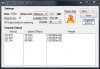
-
Hmmmm strange my 3610QM must be running very poor. My laptop keeps on throttling.
Even with the 3820QM i could only get 65-69GFLOPS.
Maybe it's time to RMA the laptop? -
I am re-running the test at your settings. You should not be getting 96c! my 3630QM stays under 90c (without the GPU being active). I'll post a picture soon, it's running now. I verified my score with my friends 15.6 Asus gaming laptop, which the model number escapes me, and he gets the same exact score with the same CPU. That means the W110ER is using this 45 watt CPU to it's limits no problem! Your CPU may also be very busy with other tasks which would explain the lower score. I think it's performing within specs. I use the Thermal Paste, Artic Silver 5, FYI.
EDIT: My test (I was browsing the web while this was happening, but it didn't seem to affect my score too much) http://i.imgur.com/VF3LKgp.png
EDIT AGAIN: I am going to do a full CPU test with GPU active but idle and see if it changes my score. (turbo boost)
Here is my test, it affects my score slighty, it does raise the amount of power my CPU draws slightly as well which is weird. http://i.imgur.com/oNR8D1t.jpg -
Again, I would try good cleaning using 100% pure alcohol or Artic Clean and re-paste if your getting 100% thermal throttle. Post your HWinfo64.
Somebody else, stock, could post their bench?
What PS supply are you using? Mine was made using my travel 90W iGo at work. I test at MAX to throw all the ram in the mix to check for lock ups. No lock ups, I'm happy. FWIW my i5 2435 gets 35M Flops but lower temps on 17" laptop.
@ ha1o2surfer; Yea, I only see the 96C when I hammer the CPU with IBT, not while gaming. My 120W supply, lower ambient, and different TIM may improve things but no time for further torture tests. -
I am using a 130W powersupply supplied with the laptop.
I am not getting anything over 65GFLOPS... So sad. I wanted to get that 3820QM processor but my computer couldn't pushed more so I didn't bother buying it.
I could have gotten my 3610QM exchanged for the 3820 by adding 200$USD more. -
Here's what i get with my tiny i7-3520M, HT and Turbo enabled.I need to repaste i guess knowing that ambient room temp is very mild.Maybe replace CPU?
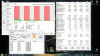
-
Yours is beating up on my SB 2430M which works very well along side my now vintage 560M GPU. 93C, you only see it with ITB?
I think most would suggest a repaste as long as those temps are only with ITB which runs hotter than Prime. Have you had any shutdowns or overheat problems with games? If not, repaste if it suits you.
If my old Toshiba would accept Ivy Bridge, I would make you an offer! I can only use the SB 35W i7-2640M in dual-core. -
I can't complain about performance even with HT and turbo disabled because of the 2.9 Ghz base clock. I see those temps only with IBT, while gaming max temp hovering around 86C on CPU and 75C on GPU, no shutdown or throttle ! id be happy with cooler temperatures though ,since my GPU batch overclock easily .Finally, for me,the i7-3520M is very suitable for this machine.
P.S:too bad for the SB socket,i have an unused i5-3360M OEM for sale. -
With intelburntest my CPU never passes 86'c. But I'm still being throttled.
How come? -
Maks sure there no program that is activation the dedicated GPU while you are running these tests.
-
Your CPU is fine. Noticed that I ran my test with the MAX settings? I got back to the house and ran the same test in normal. Same GFlops as yours. Throwing more ram stresses things more and a higher GFlop is the results. If you use HWinfo64 along side, it will tell you which GPU is active. I used GPU-Z to make the 650M active but results were all messed up as per third picture.
Today the room was 20C and I had no Thermal core throttle in four runs. I did reach fast peak of 92C in the max column but 89C was the norm in most cores using max settings. Look at the posted HWinfo64 pics and compare temps. Notice the thermal core readings, yes or no if throttling. It took the 4th run to show 92C but I hate to run more than 5 at those settings. Higher temps are possible after 10 runs as the whole chassis gets warm.
At the wall, 72 watts were pulled when running MAX settings. When nvida turned on with GPU-Z, max was only 45W, speed ratings were off as well, so suspect software and or BIOS conflict, third post.
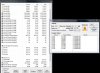
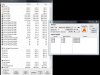
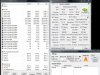
-
Strsnge problem, my system crashed while playing a game. Got the blue screen and dump. Turned it off then waited and turned it back on. Its very very very slow on boot up on the bios portion. Anyone else ever have this?
-
If its affecting BIOS times then it could be the RAM or HDD. To test the RAM you can get Memtest86 PassMark MemTest86 - Memory Diagnostic Tool to test your RAM to see if they are having errors.
-
..as for the ram you can pull one stick, boot. If no change swap and try again.
Let us know what you find.
I keep a bootable 4G USB ready for clean install and old 250G drive ready if I kill my drive. Not sure what your options for drive would be other than W7 disk check.
I forgot to mention, you may get a hint by searching thru your administrative tools under "event viewer". There is a memory tester included but never used it. -
i've been having issue with wifi connectivity after waking up from sleep. it doesn't auto connect, and when i try to select a network to connect to, it says it failed, but after leaving it alone for a few minutes it automatically connects again. wifi also disconnects after a while.
this only happens when it's on battery. while plugged in everything is fine. i've unchecked the part in device properties to turn off network to save power, and set other wifi power options to full power, and this still happens.
i'm using prema mod 2.1 with win 7. anyone else having this type of issue? it seems to me like the wifi card isnt getting enough power after waking up from sleep, but i don't know what else to do to fix it. -
I haven't played anything demanding for a week or two and launched Far Cry 3 yesterday. For some reason FPS drops down from ~55 to below 30 regardless of whether I choose W110's native resolution or HD. When I run Throttle Stop 5 in Monitoring mode it shows that multiplier is always around 12x. Turning TS on with Turbo doesn't change anything. I already double checked that power mode is in High Performance - what else could be causing my CPU to bug out like that and Throttle Stop not to work?
EDIT: When I turn off the game, multiplier jumps back to normal.
EDIT: Temperature related. Once I repositioned my laptop for better air intake and let it cool down for 5 minutes everything went back to normal. When CPU is above 95 C it starts throttling despite TS I guess. -
Factory-666,
Curious. What is your frame rate/temp stock vs locking the turbo with TS? 5 FPS? What do you mean by HD? 720p and 1080P is listed as high definition. I always try for native as I hate the scaled look on LCDs but that's picky old me.
thx -
If anybody's interested and from the UK, I'm selling my W110ER
Will be using the money for an mATX/ITX machine. Just didn't end up using the laptop as much as I would have hoped, despite it being excellent.
Edit: Sold! -
@hydra By HD I meant 1080p, sorry for not clearing that up. I always play at native even when connected to a monitor or TV since it gives the best performance. But with Far Cry 3 every time you Alt+Tab out of it and then maximize the game window it automatically goes to the highest resolution, and since I was connected to a monitor that was 1080p. My point was that at that moment native or any other resolution worked at 19-26 FPS, while usually it runs at 55 on native.
As for other question I'm not sure I understood it correctly but in general Far Cry 3 runs my CPU at ~ 90's C and FPS is ~55 dipping down to late 30's at "explosive" moments. Turbo through TS doesn't add FPS in general but prevents it from dipping below 40. Temperature-wise TS adds a couple degrees, in fact I never ran benchmarks on FC3.
Actually I'm suspecting a general temperature problem since last night for the first time in 8 months my laptop shut down 3 times while playing Far Cry. Very alarming. -
Are you still using factory TIM? Your post suggest every thing was fine then suddenly high temps? Your post reflects nearly the same as others on various threads. Missed your last edit. You might try one of the smaller single fan coolers...keeps the bottom a bit cooler
Our 650M is a lower mid range card but many try to see if they have a closet Clevo P370EM. Doing game bench marking with my 560M, I drop 8 FPS from 720P to 1080P. This card is slightly faster than our 650M. So, me, myself and I will only game at native on the W110ER.
I loved how some of the older CPUs would let me OC and UV with TS. However theses newer hotter CPUs blow the doors off my older CPU. For now I'm more than happy with Prema's GPU UV mod to help with gaming heat in our 11" package. Sure wish the Clevo P370EM would travel as well as the W110ER, no?
If you go back all stock, what happens then? -
Does anyone have the coolmaster 120w PSU? I just got one and I can hear it buzzing when charging audibly from the charger and also through the earphones (this stops when unplugged). I'm wondering if I have a dodgy one..?
-
I would bet yes unless you have a damaged charge circuit in laptop. The easy test would be to swap bricks. No, I don't have one....anyone else?
BTW, your I5, you ran IBT but I saw no numbers. When you get a chance please post your link. My vanilla i5 2430 hits 35 GFlops, twice of my old T9300. -
The coolermaster ones do tend to buzz a bit in my experience.
-
Cheers hydra and Meaker. I might take it back to the shop and see what they say.
If your referring to the i5 on my M11X I dont have it anymore. I've got a W110er now. I need to update my sig. -
Has anyone put a 3G modem card in theirs? I feel like it's impossible since you'd be trading Wifi for 3G and it has no SIM slot. hmm, wish it was possible!
*** Official Clevo W110ER / Sager NP6110 Owner's Lounge ***
Discussion in 'Sager/Clevo Reviews & Owners' Lounges' started by Ryan, Apr 7, 2012.


