 Problems? See this thread at archive.org.
Hi All. Am new to Clevo. Have ordered a Clevo W110ER should be with me next week. Any threads I should be reading in particular?
-
You could always check out prema's unlocked bios and GPU Vbios overclocking if you are that way inclined.
-
I've literally just purchased a sleave from Dell/Alienware for the M11X. It's an 11" notebook so fits perfectly and even has a zippable pocket which fits my coolmaster 120w power brick and an external HDD. They are in sale until the 28th in the UK I think. Mine was £14 delivered.
![[IMG]](images/storyImages/A4265975.jpg)
-
Nice, though it would make it very obvious it's probably worth stealing :/
-
I use an orange netbook 12inch sleeve from the flea markets. gets the job done and solidifies the image that my laptop is a netbook thus is not worth stealing. Also, the $2 atom insode stickers from ebay are priceless...
-
Put one on an M18X along with an HD4570 512mb sticker

-
For those curious about the battery life difference between 1.5v and 1.35v.
I just tested my W110er, exact same BIOS settings, 3 minutes idle on battery with Battery Bar with Windows at everything Minimum
Samsung 1600mhz 11-11-11-28-2T 1.35V
Min: 8500mW
Max: 11000mW
Observations: tends to hang around the 9500mW range.
Kingston HyperX PnP 2133mhz 12-12-12-30-2T 1.5V
Min: 8500mW
Max: 12000mW
Observations: tends to hang around 10000mW range.
So from these results, you stand to gain roughly about 500mW-1000mW less power draw at idle (roughly 6% more battery life at the very best) by going with 1.35V, this is assuming you are comparing with High performance 1.5V kits, I expect the difference between 1.35V stuff and garden variety 1.5V kits with be much smaller. However, the 2133mhz kit gives a massive boost to IGP performance so I personally would go with the faster kit.
I'm gonna do a more accurate run soon -
What about heat? Did you notice any increase using the old hand sensor or closed up using HWinfo or such? Faster IGP or better battery life if heat not an issue.
LOL, I did not buy an I7 with dGPU for long battery life so any small loss would not be an issue...
Benchmarks against AMD's iGPU would be interesting but know you don't have the hardware. -
Actually, there is quite a difference in heat (unfortunately, no software can get a temp readout on the RAM banks on this machine). The 2133mhz RAM is noticeably hotter, similar to the PCH (and probably contributed to the extra heat to the PCH too). The Samsung sticks were barely warm after the test.
The benefit of 2133mhz RAM I don't think is easily measurable with an FPS meter. It makes games on the HD4000 noticeably smoother with less jitters, especially with an OC on the iGPU clocks, this is partly caused by the Min framerates which drop really low with 1600mhz RAM. Interestingly, the HD4000 8mb cache is supposed to remove a lot of the memory bottleneck issues so in theory, this setup tends to respond better to system memory with low latency vs high bandwidth (as the iGPU will poll the system RAM intermittently but frequently). I'll get round to doing a gaming test with 1866mhz 10-10-10-32-2T settings and see.
I would also like to see how the AMD chips respond to the 2133mhz RAM. -
Hi there
I will get my W110ER soon, therefore I'd like to know if any of you guys tried the new Nvidia drivers on Linux please? Is Optimus working well now?
Thanks
-
I'm curious as well. I have found one write-up showing how to manually switch between Intel and nVidia using a command, but I didn't get it to work under Ubuntu 12.04. Didn't spend too much time on it though.
EDIT:
As indicated by the post below, it uses Bumblebee. -
Works fine for what it is. It doesn't switch over though. Still need bumblebee. But you no longer need to wait for a patched driver version to catch up with nvidias current.
Sent from my SCH-I535 using Tapatalk 2 -
I purchased this.
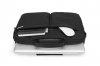
The handles disappear, and the strap is detachable. It's intended for a 13" Macbook, but the Clevo fits perfectly. The sleeve is lined with fake fur (go figure Apple people). -
The newest OS is Mountain Lion. Real Mountain Lion fur is expensive?
-
Okay, seems nice for me. Even though it would be great to see a real support from Nvidia one day.
Thanks to both of you
-
I've added a bit of Carbon/Customization/Protection to my W110ER. What do you all think?
![[IMG]](images/storyImages/20130529_104819_LLS_zpscbd45489.jpg)
And a bit more copper..
![[IMG]](images/storyImages/20130529_105331_zps7f31783f.jpg)
-
Awesome! Looks like a good job.
-
That's reaally sweet. What did the process entail?
-
I just purchased some carbon fibre wrap 3M-DI-NOC is the best. Clean the top of the laptop, I use pure alcohol wipes. Then simply cut it to size and then use a hair drier to warm the corners so it sits smooth. A craft knife is used to trim the excess and if you cut on the edges you won't damage the laptop. It was easier than I expected.
I just used an official GeForce metal logo to break up the carbon effect which I purchased of ebay. -
Gah, really want to do some customisation to my W110ER.
Keyboard wise, I never found anything as a replacement (always too big), so I'll have to sit tight and do with the one I have.
I always wanted to install a touchscreen just for a laugh, but the one I was looking at is no longer sold.
I also wanted to create a custom battery pack for the W110ER, but I think it's probably too dangerous and likely won't work properly if I do so.
If only there were companies I could hire to do this stuff for me xD -
Yeah I know! The only other mod i'm going to do it cut the bottom out near the CPU heat sink and add a black metel grill to let more air in when its mounted on a netbook cooler.
-
Don't destroy the bottom plate just yet.. Leave it off and try your cooler. My full on gaming temps were not any better so I pulled the blocks back off. Post some before and after shots using something like HWifo64 or such for your comparison.
I maybe had 1-2C better but did not log ambient temperature in my rush. I had one poster tell me ambient temps do not make a difference!
The repeatability of the chip sensors is questionable so I only use it as a guide on MY machine.
EDIT. Way back, I tried using an acoustic tachometer for my electric helis but unable to get steady fan rpm reading, works great on two bladed heli. The only other method would be to cut fan wires to measure DC voltage, 5vdc full on or 2.5vdc half speed? Nothing I know will read our fan RPM, anyone? -
You may be interested in this thread. A custom-fit CPU cooler made for this laptop.
-
Thanks, read that and commented last month. Did you see a difference in yours? If so I'll drag mine out and try again.
-
What problems are people having with temps?
I'm curious, because I've been absolutely overjoyed with mine. I can OC everything and never hit 90 degrees on any component. Everything is usually under 80, even with OC'ing. -
It seems to come down to variability in the heatpipe bends and contact surfaces. I've never had an issue with my temps either. I have to 100% load both CPU and GPU to hit 93C with the bottom on but propped up at the back with cubes. If I take the bottom cover off and use a U2 then I top out at 89C.
The reason I mention heatpipe bends is that some people have reported changed temps after remounting and bending their heatpipes. Either accidentally (and often getting worse temps) or a few who have reported lowered temps after deliberately changing the bends to increase mounting force using leverage. No one has done a scientific study of the variability but it seems to be the best reason I've seen for the wide range in temps people report with similar hardware. -
Hmm, strange.
Anyone found a 11.6 inch LVDS IPS display yet? ;P -
Unlikely, LVDS is being phased out for eDP as the industry pushes for higher resolution. If we had eDP to begin with it wouldn't be so bad but alas.
-
I'm aware it's being phased out, then I found this: LG Display LP116WH4-SLN1 Overview - Panelook.com
I mean, that display could be nearly perfect.
EDIT:
http://www.panelook.com/B116XAN03.0_AUO_11.6_LCM_overview_16795.html
Also found that. I think AUO actually make the W110ER display, that one is AHVA which is similar to IPS I believe and yields even better stats than the IPS ones
These displays appear to be 40 pins, which I think the W110ER can accommodate, with the sacrifice of the integrated webcam. If you can find a 30 pin one, please tell me. -
The biggest thing thats bugging me about these panels is the Minimum order is like 10 units. We gotta get someone like Mythlogic to test them out because they can probably actually utilize the volume
-
Well, we must have the demand for 10 different people to buy these displays. If a company such as Mythlogic would be interested, it would be great to get someone like them to try the displays out.
I'm sure if we can find the right display though that we can find somewhere to buy them in smaller numbers. -
If you guys dig deeper you will notice stock "NO". It had been that way for a year on that panel so may had been a quick run? Now I see 363 or could that be 363 thousand. I wrote one Seattle based company and we have had responses from several resellers that they would love to sell us these panels but stock never found. I went the external 24" 8-bit panel, 5ms, alas Tn.
Edit: Anyone game on an IPS screen? I read response time in not good, ie, motion blur over the thin film panels.
As far as temps, no problems here but always looking to lower them. I used the copper blocks as an easy "let see what happens". -
I game on IPS monitors on my desktop. I dont see any blur but they do have slower response times then current TN panels do. However they can still be 6ms which just a few years back was considered great for gaming, until TN panels starting doing 2ms or lower response times. IPS panels are just not geared towards gaming as much, more for color and viewing angles.
-
So there is mention of stock there now? If you see it says production "Q1 2013" so perhaps it just took them a while. Notice systems are coming up with screens like this now. When were companies last contacted?
The W110ER isn't my main system, but I'm likely to be buying an Ultrasharp 2K display soon enough. That has something like 6-8ms response times which is perfectly fine for gaming (Unless you're REALLY anal). These panels do appear to have response times more like 25ms which is quite high, but I'd be interested just to see what they look like.
I've been tempted by 120FPS displays to get extra smoothness on picture because I do notice motion blur, but the picture on these displays isn't and never has been stellar. I want to upgrade for more screen space, size and nicer colours and just for a smoother experience, it's not worth it really. I could go between 2 displays, but then I couldn't stand the colour reproduction on the 120FPS one when I came to play any games... -
Where would I go post to if I wanted to sell my w110er? Working perfectly, pretty high spec? Don't wanna spam this thread haha!
-
I wouldn't know the best place, but what are you replacing it with?
-
As noted in the other thread: http://forum.notebookreview.com/sag...w110er-first-look-review-119.html#post9219794
-
You mean 120 hz refresh, right? LOL, I get 238 FPS playing 3D Doom. My big panel is old and 60hz. Looking at the big 120hz TV's I still see motion blur to a lesser extent. I need to check out the 240hz panels. On a laptop, my question on video cards that support it, what would you loose between 60 to 120hz ( in FPS) at same rez?
Wait, your in the UK. Would that not be 50hz, 100hz and 200hz? -
Yeah, 120hz refresh rate. You have to remember, it depends on what's actually being sent to the screen in terms of motion blur. It has everything to do with response time, fps, quality of the screen etc. TV screens tend to be far lower quality than monitors as a rule, because most TV channels throw out POS video. Even then, if you're watching @ native 1080p HD, you're sitting so far away you don't notice the quality drop. On monitors, you're right nose up to them so they need to be top notch.
I don't want a 120fps screen on lappie or anything lol, it's my casual gaming system. My desktop is what I want a 120hz screen potentially for. I get like 140-270FPS in games like TF2 with a single 7950 XD All video cards on lappies will support the frame rate, it's whether your I/O can handle it. If the W110ER had Displayport, or Dual Link DVI then it could output 120fps, but it only has HDMI 1.4, therefore you can get a max of 60fps (I think you /might/ be able to get 120fps at a lesser resolution).
And no lol, screen refresh is the same in the UK as it is in the US, or indeed any other country. No PAL, NTSC bull going on there or whatever. -
No 120hz tv is even going to compare to a high quality 120hz monitor
-
Precisely.
-
Or a korean 1440p IPS which you have overclocked.
-
Shee, I guess my brain was stuck on our old PAL to NTSC converters at work now that you mention it. Yuk. There went my shot on Jeopardy!
I was reading that some of the ATI cards will let you select 120hz over HDMI if monitor up to it. I need a 120hz monitor to torture... -
Hahahhaha. I've been really tempted but the lack of connections on those monitors is ridiculous. Not to mention you are not really guaranteed perfect screen quality lol. I will probably go with an Ultrasharp lol.
But man, OCing a screen does sound tempting xD 120Hz 1440p IPS D:
Sounds interesting to me, give it a try if you can lol. -
Hello,I'm having a spontaneous shut down problem when putting heavy load on CPU/GPU,such as playing something modern,can someone help me a bit?
I thought this to be an overheating issue,before I reapplied thermal past to CPU and GPU temeperatures were 60(CPU) 93(GPU),so it was definetely GPU overheat; but after I cleaned everything and replaced thermal paste,the temps max out at 50(CPU)-80(GPU),but the shutdowns still happen quite often. What could it be besides overheating and what can be done about it? Specs are 3612QM 2.1+8gb RAM. Idle temps are 45-50-60(CPU-650m-HD4000).
Could it be HDD,or memory overheat? Faulty memory(I thought it'd BSOD then,not shut down)? Or maybe it's something with power circuit? I'm using stock 90W brick. -
It seems to happen where there is a large load put on the GPU Memory + GPU + CPU. What game are you running? I would set up a dual screen system, one for playing a game and one with CPU-z + GPU z open (to the bar graphs) and just keep watching it until it shuts down. This is how I found it it was the GPU causing the issue (I was also using a 90watt, but I have a 45 watt CPU) If you have a 120 laying around, I would maybe try that as well. I might put a video up replicating the issue.
-
Your W110 shuts down with high GPU temps, then continues to shut down after re-paste. Your first set of temps looks reversed unless you had GPU overclock? Have you ever applied any BIOS mods? If no, and machine continues to shut down under load, I can only suggest second re-paste making sure all is very clean before pasting and making sure heat pipes are not bent and damaged and fully seated. And, go back to stock mod for testing. Not all chips likes OC!
If machine then continues to shut down, I would call my reseller for possible warranty work. Anyone else? -
Thanks for your reply!
I was running Wargame-Airland,with gpu-z and realtemp(didnt found option to log in cpu-z) in background doing logs,last temps recorded before shutdown were 58 CPU and 78 GPU. Same shutdowns happen when playing GTA 4 or Skyrim w/ENB or Black Ops.
Will go look around for a 120W brick... -
Thanks for reply!
I did not do any OC'ing and was running stock BIOS; temps before repasting were high(I assume) because of THAT:

But after I repasted it as best as I could,system still shuts down at 78 GPU and 56 CPU... I even tried a Prema BIOS today,same result - maybe I should try undervolt version? Can I install it just the same way I installed regular Prema version(no need for rewriting ME)?
Oh,and after repaste:
View attachment 96972 -
I can't see the attachment, I'll recheck my log in..
Read Prema's version warnings and no need to do ME as long as matched as per Prema. Your temps looks fine, I and others have reached way higher without shutdown. See HT's temp posts.
I have peaked that high on 90W slim adapters but risk smoking adapter. I would still put this question to your reseller incase you have a voltage/current problem on the board.
As mentioned by Halosurfer, I found that I can log temps using some of the built in logging, text file, supplied with utilities like old ntune. I think HWmonitor has this. I was able to read this after crash when using old software GPU flashing.
*** Official Clevo W110ER / Sager NP6110 Owner's Lounge ***
Discussion in 'Sager/Clevo Reviews & Owners' Lounges' started by Ryan, Apr 7, 2012.


