 Problems? See this thread at archive.org.
I flashed UV version and did not have any shutdowns so far...Hopefully it'll stay that way;thanks for replies,thanks Prema for BIOS.
What makes me wonder is why does Intel Hd4000 reach 80C,while processor stays at 60?.. And thats while using 650m.
-
-
Part of it could just be mismatched temp sensors, part is the HD4000 is processing the frames and outputting them.
-
You can flash the ME update from my blog, too....
-
Mismatched temp sensors..? You mean some cable isn't fit correctly on M/B or some bug inside CPU? BTW does anyone else get 80C HD4000 temp whaen using 650m?
Thanks,thats what I did the first time: I downloaded ME and,as described,flashed ME firmware then regular BIOS mod; last time I only flashed UV BIOS w/out reflashing ME,is that OK?
As far as I understand,correct order is to flash ME,then BIOS,then install ME software under win? And no need to keep looking for ME firmware updates as 8th(?) version is the last working for W110 M/B?
Also,could you please clarify what EC is and how do you find what version is for what BIOS? If it's not too complicated,I'm just curious how it works and what it's for.
Thanks for your work,donated a small bit,sry,a bit low on $.. -
Directing this at Prema:
Please forgive in advance if this is a stupid question, I have no experience with custom BIOSs...
Can the BIOS be modified to include a keystroke sequence to cause the system to boot to a "hidden" recovery partition with a "ghost" image (much like Dell, Acer, Gateway, etc. systems)? This way, once the best basic configuration is created, a "ghost" image (along with its .exe and batch file) could be saved to the "hidden" partition for later use as a system recovery tool. This "ghost" .bat would be accessed by a specific keystroke sequence at boot-up, bypassing the normal boot-sector, and launching a recovery application.
Thank you for your consideration and for not calling me an ID10T....
-
Tybalt39, if Prema unable to help, this may help you: Windows 7: Create a recovery partition
-
I mean that inbuilt chip sensors are never hugely accurate and can differ from each other.
-
I really want to know now whether or not I can get this display to work in the W110ER XD
LG Display LP116WH4-SLA2 Overview - Panelook.com
I thought someone said that there were 40 LVDS pins on this laptop, but looking at the service manual there appear to only be 30 :/
What /really/ confuses me, is why you can get a 30 pin 1080p panel, but yet these 768p panels are 40 pin?
EDIT:
Okay, so the screen on my W110ER is an "M116NWR1 R1".
I look this screen up on "Panellookup" and find that this is infact, 40 pin LVDS...
Then I look into it further and there are different connector types and all sorts >.<
Is there ANYONE here who fully understands what is going on with these different specs? -
I thought 30pin is eDP. Plus, apparently, it is impossible to have a higher resolution than 1366x768 over 40 pin LVDS.
-
I think you can have more than 1366x768 certainly, just not with what the W110ER has.
That screen is 1366x768 (I want that res for games and also because it's nicely readable at 11.6 inches). You can have 30 pin and 40 pin LVDS. -
It's not just the connector pin count it's how many pins are actually populated.
-
See this is the sort of stuff I want to find out.
The W110ER service manual I found (Eurocom provides it I think, if you do a Google) says that the W110ER has 30 pins for LVDS. Now I look up the M116NWR1 R1 and it says it's a 40 pin display. That's pretty confusing XD
I want to know how LVDS connectors differ too, because I don't think one 40 pin LVDS connector will just work with another, sadly. Someone tried to put a 12" display on their W110ER, perhaps I can find information from them, although, not sure how well that went lol. -
Motherboard connectors vary wildy and its possible the chip on the motherboard wont output 2 LVDS channels or the connector on the motherboard simply does not have the pins.
-
That's the reason that I've been trying to match the screen specs as much as possible. Sadly, I doubt this one will work, since I was reading that there is a slight difference in pin spacing between the two, which almost instantaneously means that the connectors will be incompatible.
I really need to find somewhere where I can talk this through with someone who will have a clue what they are doing lol. I don't necessarily need an IPS screen as such, but IPS is obviously the ideal and it's about the best you can get for a reasonable price and indeed at that size and in that form factor. -
It looks like a 40pin on screen and 30pin connector on motherboard. HT changed his screen out and the mounts were wrong, but that should have had the 40 pin connector as well. If work would leave me alone, I would pull screen to verify and photograph.
One of the MX11 guys found an IPS 12" panel and posted on this thread to see if it might fit our screen frames as he was not having much luck.
So you would have to find a supplier who can sell you, one each, 11" IPS single channel screen with proper mounts and with backlight compatibility. And, verify compatibility with supplier or take the $100 chance? Or try the 12" panel if all compatible.
I mght add that the 30 pin Motherboard connector only has 18 pins active to Panther Point with the rest N/C AND no mater what, these are still 6 bit panels that have to dither the color. Where's our Dream Screens?
BTW, the screen you listed is an 8 bit panel, What I would like to know is will the Panther Point support 8 bit for millions of colors?
This is reported to be my stock screen, 40 pin connector; http://www.amazon.com/AU-OPTRONICS-B116XW03-V-0-Laptop/dp/B00A0PE9QQ/ref=sr_1_1?ie=UTF8&qid=1370885468&sr=8-1&keywords=b116xw03+v0 -
Yeah I was shocked when I found out these screens are only 262k!? I wondered why it looked so crap compared to my desktop monitor.
And that's another AUO screen. You have the B116XW03 while I have the M116NWR1 R1, which I believe may have been used on the M11X.
So when you're talking about 18 pins being sent to panther point what do you mean? What does this mean for the screen effort?
Great to finally have someone to talk about with this.
Also, I would /hope/ that Panther Point supports 8 bit colour, surely there have been higher end laptops with much nicer screens with the same chipset? It's much more likely to be the connector limiting us. -
I did some more digging, according to intel you can get 24BBP from our single channel or 36BPP from dual channel LVDS.
If you look at the schematic you can see what is connected and notice that the other channel is not connected as reported by many. Some of the macs have 8 bit and Ppoint as well so dumb question. The HP have the dream panels but have not researched their chip sets.
But, the panel you found looks good. Now all we have to do is find a real life distributor; and hope the 25ms response time does not affect game play I will risk the $100 or so if I could find one.
My B&M store has my open box 24" Samsung 8 bit TN and the 24" LG 8 bit IPS panel side by side ($200 new). Other than wider viewing angles I was rather disappointed with the LG display. Colors and black levels went to the Samsung. Anyone within a Sams club can see those there. The 12" IPS posted from the M11X guy looked WAY better than my AUO judging from screen shots. -
So you think we're in with a shot?
I know, the 25ms sounds a bit crazy, but I'd kinda be willing to sacrifice for the colour quality lol. I think on a screen of that size it should be okay. Probably because this is a tablet display.
And seriously, this IPS will be far better than the AUO displays we have XD The colours alone will make it worth our while.
If we can find some other people, then we may be in luck. -
My friends's wife flipped a glass of water onto my W110ER with most going right into the Power Button. The PC shut off and wouldn't turn on. I shook the water out, put it on the side and covered it with bandages filled with rice, to dry out the moisture.
After a couple hours it did turn on, luckily. However after turning it on once the power button doesn't seem to work anymore. Pressing it doesn't send the computer to sleep nor does it wake it up if I close the lid. Now I have to keep it connected and always on,
What solutions to this can you offer? Except sending it back to Mythlogic for repairs. Thanks! -
Unless the water was distilled, there is some mineral content. When the moisture evaporates, there can be a thin film of conductive material deposited on the circuit board/contacts. Try cleaning the switch contacts and the circuit board solder points with a solvent/alcohol/board-cleaner (or even just a dry toothbrush). This has worked for me in the past (pagers/cell phones "dipped" in water, electronic toys in puddles, etc). Check the entire board for any "powdery-looking" surfaces.
This may or may not be the issue, and there could be others as well.
Good luck! -
FYI, for those interested (if you installed an i5 to keep the cost down): There are 5 pcs of i7 3632QM on eBay for $200 each (Buy it now). 35W Quad-core i7 CPU for the W110ER. Not my ad, just for information. I will delete this post if it offends anyone.
-
Anyone with kingston hyper X can give me their 99xxxxx - xxx.xxxxx numbers?
I want to see if my revision of the ram is the same as the ones that are being overlocked to run 2133mhz.
Thanks guys. -
I just replaced my 3630QM with a 3840QM and I noticed something very interesting. Under full load, the 3630QM would be hovering around 1.3volts, the 3840QM uses 1.0050~ volts. Because of this, my full load temps for the CPU hover around 70c. Could anyone verify their 3840QM or similar is running at this voltage. Oh, also at idle, it sits around 0.8volts
-
Likely to be a combination of luck (i.e. you got a good chip), improved binning+yields on the 22nm production and your 3630 was crap. My 3610m idles at 0.87V and clocks to 1.13V at full Intel IBT load. However, mine can get to 85 degrees at full prime load even with fans at full.
-
All I know is my i7-3740QM runs cooler than the i7-3610QM it replaced, and runs things a lot faster. I'm happy.
-
Ok, so I am not going crazy! Yeah, what a difference between my 3630 and my 3840. WOW, I do a lot of VM work and compressing files and it has improved performance in those apps by a long shot! and now my fans rarely come on!
-
So, it seems the W110ER has been discontinued, right? And nobody else is making 11" gaming netbooks.
-
Clevo builders should still have them, like Mythlogic.
-
Yeah to my knowledge it's not dead yet. It isn't being refreshed though and no, no other company makes an 11 inch gaming machine anymore. It's pretty sad tbh, it's a great form factor. I'd be happy if some company actually pulled their finger out and made a decent ultrabook with a thunderbolt 2.0 based eGPU system with perhaps an MXM type deal card inside so the enclosure is little bigger than a 3.5 inch HDD or something.
I could deal with Iris 5000-5200 graphics onboard with an eGPU. It'd give me a really nice form factor, lots of battery life and the ability to play games properly on whatever it be, a 770/780M outside of that. Of course a ULV wouldn't be /ideal/ but it'd be a damnsight better than nothing and it'd give you a better rounded system. The M11x worked pretty well with a ULV processor tbh - W110ER's lack of battery life really irritates me.
EDIT:
The closest you can get to the W110ER is the new Razer Edge Pro tablet. It's 10.1" with a 1366x768 IPS screen, but it's only a 640M LE (My 650M can run nearly 3x faster) and a ULV processor. It's quite a good idea though and hope it gets refreshed. Then again, it'll never, ever have the low price that the W110ER has. Mine was only around 7-800 quid which is a steal considering the spec. -
The new 13" is not massively bigger and is all hardware focussed to take advantage of that 765M.
Would have been cool to see the 760M in this though. -
The 765M is pretty much 2x more powerful than the 650M and on par with a 560Ti if my calculations were correct - Pretty damned good for a 13 incher. I just don't feel that 13 inches is quite as nice at the thickness that Clevo is proposing though. I love the 11 inch form factor and don't particularly want to give it up.
-
Thanks for advice! Unfortunately I don't have time, patience or experience to unscrew the whole thing and then fiddle with the insides. I also need to fly transatlantic next week so my idea is just not to turn the computer off at all during the whole trip.
Can someone please check - if I put it into hibernation, can I turn it back on just by pressing keyboard buttons or "Fn+F4"? I'm not sure it will last 15 hours on battery
Also - the new 13'' sounds awesome. I think my W110ER is feeling heartbroken and hence ailing. -
Hibernate saves the contents of RAM to the HD, then completely powers-down the PC. When it powers-up again, the RAM is reloaded from the file on the HD, bringing the system back up at the point of Hibernation.
Standby keeps a low level of power going to the RAM and CPU, monitoring keystrokes and other I/O, but consuming some battery power.
I just tried to bring my lappy out of hibernation using the keyboard; no joy. -
Thanks for the experiment. I'll just have to hope that the battery can keep my lappy on sleep for 12-15 hours.
-
Sleep for 12-15 hours seems very likely. I think that it should have no issues with that at all.
-
Standby on my machine takes ~10 percent battery every 4 hours.
-
gentlemen,
It's a pleasure to let you all know that I too joined the few that were able to hook up to a 2560 x 1440 resolution monitor. ;got mine off ebay - a crossover 2730MD with hdmi.
I had to change my hdmi cable to a 1.4 (or 1.4a) to allow custom resolution.
Here's few things you need to know - I had earlier asked on this forum and Marksman30k had replied with a link to avadirect forum.
That setting will not work (at least didn't work for me).
Here's what worked for me - you will need to change the TIMING STANDARD to CVT-RB
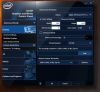
Hope that helps.
Cheers!
PS: I am not into gaming. So don't know what photos would you like. If you need photos let me know. However beware - you cannot unsee my dirty desk. -
Is there a way to set the PC to turn on automatically using BIOS and Task Scheduler? Just to be on the safe side if my laptop does power off, I set it to turn on every hour, unless it's already on.
-
btw, I posted an youtube video on the W230ST thread - I think it's the first video out there.
Anyone who can validate this video...
http://forum.notebookreview.com/sag...levo-w230st-sager-np7330-owners-lounge-9.html -
I'd like to share an interesting experience with my machine that's not necessarily Sager NP6110 specific.
I have my little Sager hooked to an external monitor and keyboard so I can use it like a desktop as well.
Previously, I had the display settings set so that when the monitor is hooked in, only the external monitor shows while the laptop screen remains black. I do this because I don't want two screens showing, but I also only have wifi access through the laptop's antennae, therefore it must remain open since the antennae is in the monitor and won't worked while closed.
It was working fine till today. I was playing Metro Last Light and the game crashed to desktop. I tried to boot it up again and the game asked if I'd like to run it in safe mode. I clicked ok and everything went dark. The monitor showed "out of range" and my laptop screen was still black. I unplugged the monitor and the laptop screen came on again. I looked up many different fixes but nothing worked since my problem was very specific and I checked the refresh rate a dozen times, but both the laptop and the monitor only support 60hz. I couldn't change any monitor settings without it being plugged in and when it's plugged in I can't see anything therefore I can't troubleshoot. I found the solution through windows shortcut keys and changed the mode to extend. For some reason, the monitor would only display "out of range" when set to display by itself, otherwise it worked fine.
tldr; I found the problem was with the intel graphic software. Unless I set the output in the software to monitor specifically, any changes I make in windows will not work. This is another reason I hate optimus. I hate having to deal with 2 different graphics chips constantly vying for control of my display and programs.
Anyways, I learned something today. -
So I have started to mess around with some overclocking and such and I have a hard time believeing this is real... http://i.imgur.com/OCiUX1d.png I did a burn in test for 12 hours (got 98gflops) and CPUz never changed and the Intel XTU says the same thing. Also, it must be using a lot more power because it uses around 55 watts under full load.. What is going on here? lol I just find this hard to believe.
-
What's wrong with that? I get 3.8ghz on my 3720qm. It's the temps you have to monitor. What were yours full load?
-
REALLY HOT, ~85c
-
The biggest problem with the 3840qm is that it cost near half the W100ER at most outlets. Me, I'll take one for $200, no ES's. My next platform upgrade will be at least a year from now unless safety bonus is huge
I can get this for $500 with new open box 17" Tosh.
Toshiba Qosmio X875-Q7290 3D FHD i7-3840QM PS, I think this guy is a scammer so would research the heck out of them
-
How are you guys getting 90gflops
i had a 3820QM and it is only pushing 70gflops... my computer wouldn't go in turbo mode!
-
85C isn't too bad on Intel Burn test a 4ghz!
Hydra what is wrong with ES models? I've got one and have been very impressed with it. OC's well and has 8mb of L3 Cache and even the GPU goes to 1350mhz (not tried any higher) so basicly getting a chip which will run faster than a 3820QM for much less money. -
The problem is that it's hit or miss. You either get a CPU performing at spec or better, or you get one that is crippled. Looks like you got a good one.
-
..also ES CPU's are classified as stolen. Try to send a defective one back to Intel? I know, I know people can justify the lower cost no mater what, no?
"Can I get Intel ES Processors from Intel?
Due to the pre-production nature of Intel ES Processors, they are generally only loaned by Intel to Intel's Original Equipment Manufacturers (OEMs), Original Device Manufacturers (ODMs), and Independent Software Vendors (ISVs) for pre-production test and evaluation work under specific contractual terms and conditions that assure the protection of Intel's assets and confidential information.
Intel ES Processors are not made available to the general public by Intel.
Contact your vendor or place of purchase if you have received an Intel ES Processor in place of a production processor.
If you have additional questions or concerns, please contact Intel® Customer Support, using one of the methods below:
Intel® Customer Support Phone Number
Contact Intel Customer Support
Email Intel® Technical Support: supportmail.intel.com
Intel® Corporate Security Investigations - [email protected]"
What is not said is will MIB knock on your door, lol -
Seriously, what's the deal with these one-and-done netbook gaming systems? First the M11x, now the NP6110--my last two laptop purchases respectively--and I planned to buy whatever replaced the NP6110.
Were Dell/Sager/Clevo just not making money off these things? I thought these things had been selling well... -
Maybe the supplies of the 11" screens drying up or lack of a range of screen types? Supposed to be soon released 13" model which allows lighted keyboards and a wider range of screens. With the competition, I would guess that you have to make something with unique new features not like the same old iPhone?
My Ul30vt is another, 3 year old, 13" one hit wonder now doing HTPC duty on a 4" high shelf...
*** Official Clevo W110ER / Sager NP6110 Owner's Lounge ***
Discussion in 'Sager/Clevo Reviews & Owners' Lounges' started by Ryan, Apr 7, 2012.


