 Problems? See this thread at archive.org.
Is this referring to "laptopscreen.com"?
-
Are U using MS USB tool or other to prepare your stick? If you think it's a Prema mod then maybe post directly to BIOS link. I would try since I'm undervolting but out of time and spare drive, ATM.
gl -
So this works in 6 bit or the 40 to 30 pin motherboard cable allows for 8 bit? I've had my eye on that panel many post back. If response time good and PQ is excellent then in either 6 or 8 bit; the resellers and this forum could use a couple of crates of these!
Also, your extra heat pipe mod. Do you know if heat pipe length can be shortened by technique or an absolute length is needed?
TIA -
That's not mine, but yeah without a doubt its working fine in W110ER...
Not my heatpipe mod either, but they contain a pressurized liquid/gas, so cutting them isn't a good idea.
-
Posted a support ticket and am waiting for a reply.
Sellers on other sites (suppliers selling bulk) haven't replied so I'll give up on those.
http://www.amazon.co.uk/gp/product/...&pf_rd_t=101&pf_rd_p=358549767&pf_rd_i=468294
Going ahead and buying one of these too soon. -
![[IMG]](images/storyImages/7XbUNzT.png)
... ^^ -
It's on the way!?! Good find, how many pieces in stock?
BTW, your external battery, I was doing some rough guesses;
19vdc @ 2 amps gives you 38 watts to play with for 10 hours if my math is right. Using Kill-a-watt, 90 watt adapter, alone, floats 0.3-0.5 watt for adapter loss reference.
Powered off my W110er peaks at 43 watts but trickles down to 29 watts after 4 minutes of charging 80% battery. However, 60 watts, short peaks at idle, and charging laptop.
Battery out and laptop off, would sucks .6 watt or so just sitting there. This might be the sleep and charge function.
Battery out, laptop idle, 16 watts but peaks 30 watts depending on housekeeping or browsing. All bone stock but Uvolted GPU by Prema.
Is the 2 amps absolute max or can you get 3 amp peaks (57W) to handle surges or strictly for charging only? -
I believe laptopscreen.com now has one screen left in stock, so if you want it, it's there haha.
They told me that they stock the exact model, so I decided to take their word for it and go for it... Hope I don't regret it ;P
I think it does 3A @ 19V?
Astro Pro2 Spec:
-- Input: 15-19V / 1.3A (max)
-- Output: DC 12V, 4A / 16V, 3.5A / 19V, 3A(max); USB 5V, 2.1A
-- Size: 7.3 x 4.9 x 0.6 inch; Weight: 19.8 ounce
-- 18 months warranty
Either way, I only need this for web browsing and such when it's on the battery. I get 2.5 hours battery life MAX under Windows which is absolutely god awful and I have no idea why. I've tried many things to improve it, to no avail. All that makes it better is turning Wi-Fi off, but that's no flaming use when I need it.
So, by your calculations, if I tone the power consumption of the laptop down I should be able to get at least 7ish hours out of it? It's a lovely battery that one as it's quite small and the reviews are stellar along with great customer support. I'm also considering creating my own mounting bracket type thing to attatch the battery to the bottom of the laptop. I haven't bought this yet and will do after I go to China (I don't trust customs at all) providing it'll provide the power that I need.
Is there a better way than BatteryCare to monitor the power I'm using?
I must say, I'm really enjoying having bought the W110ER now. It's all starting to come together. Lots of different mods are on the horizon and I love it! Buying a complete system that does everything you want it to is great, but it's also really cool when you modify it yourself and improve it. You end up with a system unique to anyone else's.
I just contacted Art Swift from CUPP computing and got a reply about their ARM board (Which could potentially boost our battery life from 2-4 hours all the way up to 10-20 hours):
Improvements that can be made or are possible in the future:
- IPS Screen - Way better viewing angles and colours
- External Battery with mount - Longer battery life
- CUPP Computing PunkThis - Using the ARM processor, we could gain anywhere between 10-20 hours battery life (10 being the worst case I'd say)
- eGPU - Alleviates any issue with DDR3 bandwidth when docked and would give playable performance in virtually everything at 1080p.
- Touchscreen - Use USB touchscreen overlay (need to find a new vendor of these)
As I keep saying, the only thing other than those that I /really/ want is a backlit keyboard but I may try and do an LED based solution instead. The Lenovo "Thinklight" while very primitive in its design would really work a treat.
![[IMG]](images/storyImages/ThinkLight1.jpg)
It'd be really cool if I could have something more keyboard level that'd do the same job, but I'd have to find an interesting way to power it if I wanted it to be a little more permanent than a USB based solution. -
Let us know how it goes. Good luck.
-
Received my adapter in the mail and......... IT WORKS! I am at work so I only had a dual port gigabit PCIe card to try it out but it totally works! I'm using it currently to browse the internet. This is exciting. When I get back home I'll do some tests and show some pictures.
diegomcx likes this. -
Thanks... I'm going to need it xD
Hey hey! Told ya it would. Look forward to seeing some pictures and it with the GPU connected.
EDIT:
Really, really struggling to see how I convert this from 40-30 pin LVDS when I get it... Can someone enlighten me?
EDIT 2:
Well, the screen already in my laptop is infact 40 pin LVDS. So I'm wondering if there is already some sort of conversion going on. It's still a 6-bit panel obviously, but there are 30 pins on the mobo tom my knowledge.
http://www.panelook.com/M116NWR1 R1_IVO_11.6_LCM_parameter_3728.html
http://www.eurocom.com/download/m228_ServiceManual.pdf
Page 62 shows the LVDS interface. -
The whole "compatible with" thing on their site...we really wish you get the IPS!
Don't worry about the connector, the screen just works out of the box, you will only require a simple LVDS extension cable as shown in the screenshots as the connector on the screen is facing the other side rendering the cable to short.
In China it came with the IPS screen... -
Well, if they're telling the truth about models being exact, then it's the IPS. If not, I'll send it back on the grounds that the product is misadvertised (although with an annoyingly expensive fee on my head).
So do you have one on your way Prema?
I will be installing this some time after August 8th (I know, nearly 3 weeks, gah the tension) and may order the extension tomorrow to make sure that I can do it ASAP.
-
I had one ordered in China last week but they broke it during packing...was the last one they had in stock...luckily my friend deals with them directly, he said
the Chinese dealers that we posted here can't be trusted, they will send you B-quality screens with pixel errors etc...he's sourcing a new one now... -
Careful with laptopscreen.com.
If you read carefully, on the checkout part.
Laptop LCD Screen 11.6-inch WideScreen (10.08"x5.67") WXGA (1366x768) HD Matte LED compatible with p/n LP116WH4(SL)(N1)
Notice it says "compatible with p/n LP116WH4(SL)(N1)".
However I do hope you get the IPS version!
I should order it since I am in Canada.
-
As I said, they told me they stock exact part numbers so I thought "bugger it" and went for it.
He said "for this item" so perhaps they don't for /all/ screens? I hope this is the IPS because the communications on this site are good and it seems fairly legitimate. They say they ship thousands of screens a day so this could well fit the bill.
An agonising 2.5 weeks to find out. Hopefully some others find a supplier in that time
-
Hi guys. My W110ER has been crashing regularly for the past week. I have tested the CPU with Prime95 for 12 hours: no crashes running the blend test. I tested the RAM with Memtest86 for four hours: no errors. However, when I test the GT 650M with Furmark, it crashes after 1-2 minutes. I can't even open 3DMark without the computer crashing. Obviously the other tests could be a bit more thorough but it seems like the GPU is the problem.
I've been using the integrated graphics over the past couple of days, and I haven't had any crashes while I've done that, except when I've tried to open 3DMark.
When I use the GT 650M, crashes occur frequently but randomly. Sometimes I'll get through a game or two of Starcraft 2 before it crashes; on other occasions it crashes as soon as the game launches, or when I alt-tab out of the game. Skype has caused blue screens, same with watching videos.
I was using the nVidia 314.22 driver before the crashes started occurring. I have uninstalled and reinstalled this driver, the 320.49 driver, the 326.19 BETA driver, and the 310.90 driver. At the moment the 326.19 driver is installed. Nothing has brought it any stability.
What do you recommend I do? I'm hoping it's just a problem with the drivers or some system files rather than the GPU itself. I've attached the BSOD logs and the CBS log which found some errors. Thanks.Attached Files:
-
-
Another interesting idea to try, especially for the eGPU guy:
Buy an mPCIe splitter and split your GPU between the wireless and GPU and see what happens
It's a cool idea in practice, because although it may be too bandwidth starved to serve both a GPU and a wireless card, the mPCIe slot could certainly serve both another device and the wireless card at the same time...? -
it only has one lane available so no matter what , only 1 device can be attached at once. I was thinking of finding an adapter that has a USB port right on the board inside the laptop so I could just use a mini WiFi adapter.. but haven't found one of those yet. I had a bit of trouble getting my 550ti to not bluescreen my laptop on boot. After a restart following the driver installs it bluescreens, if I remove the driver and let windows install it, it works just fine.
-
Feel a bit silly having said that XD Such a ridiculous thing to miss.
I've wanted to create some sort of mini hub inside the laptop by splitting one of the USB ports (Preferably one of the USB 3.0s). Maybe you can do it with mini connectors or raw wires or something. It would be brilliant for the inclusion of a touchscreen. -
What BIOS version are you running?
Have you overclocked anything?
What does it say on crash? (i.e. hard crash requiring reset, NVIDIA driver stopped responding or jagged lines and artifacts on the screen)
Only from the information you have already posted, I would say the cause is the Drivers you are using. Try going on the latest WHQL ones and do a clean install.
After that, run 3dmark and G80 CUDA memtest all at stock speeds and see if any errors are thrown up. -
Hey, thanks for your response
No, I haven't overclocked anything. I'm running Prema's v3 UOV Mod. It always crashes in the same way, straight to blue screen from whatever I was doing without warning, graphics are always fine on games/videos up until the blue screen.
Thanks for your suggestion, I'll give that a try and let you know how it fares.
EDIT: tried a new partition of Win7, the driver worked great so I've reformatted and it's running like a charm
-
Hey which cable do we need for the LP116WH4SLN1 screen?
-
We need an LVDS extension. Screen arrives on Monday and I CAN'T GET ACCESS TO IT FOR 2 WEEKS XD
-
Can you point on ebay where LVDS extension?
-
Haven't found one myself yet. I need to.
-
Why do we need the LVDS extension?
It doesn't plug in directly? -
You can just plug the screen in direct, unmounted for first look. (careful!)
LCD Screen LVDS Cable extension tutorial - YouTube -
I installed the latest Prema UV BIOS and I'm having an issue where when I enable the fan while playing a game, it spins full speed for a few seconds and then turns off for about a third of a second before spinning up again. It is quite irritating to say the least. Can anyone provide a suggestion to what I could do to remedy this problem? I think it might have something to do with the BIOS not enforcing the fan profile quickly enough. Maybe Prema has any suggestions?
-
Anywhere I can still get these laptops? Or am I stuck using ebay and the like?
-
That's normal on all Clevos. It's called 'pulsing' and happens when the EC reads a temperature where it would normaly adjust the fan speed and gets overridden by the full fan command.
-
Extension Cable
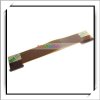
Available for sale in single-quantities at less than US$5. Available from others on Alibaba as well. -
Well, apparently the existing cable just isn't long enough to reach, that's all.
-
Damn it, laptopscreen.com has it but its 9$ + shipping.
-
Would it be possible for you to adjust the speed in ms it takes for the BIOS to override the EC fan speed settings? On my old dell Inspiron e1705 with the SpeedFan program it lets me lower the fan enforcement milliseconds, which gets rid of this same problem we have here.
-
Hey guys, I ordered an extra panel by mistake. Is anyone interested in it?
-
Im keen on the panel
-
It came without the extension cable, my supplier from China shipped it to me. It is the LG IPS we have all been looking for.
I will post pictures of it shortly. -
Cool. Please do. I have 2 more friends with this laptop who wants the IPS. I can order from laptopscreens and get a little discount when they are back in stock. Hopefully, then I can afford to get it. Jealous of all of you who has the IPS screen but good for you all. Please fill us in on how it looks.
-
Hi, can i replace a i5 2410m with a i7 ivybridge quad core in a w110er? if yes, any useful past posts or guides on this please? thanks
-
Oh nice. I just hope mine is the right display! It's arrived, but I can't get hold of it for 7 days at least
Yes. Just take the bottom of your W110ER off, remove the heatpipe, remove the i5, replace it with the i7, repaste and you should be good to go. Needs to be a 2000/3000 series i7 (2nd/3rd gen).
EDIT:
One thing I must ask (already have, but want to press), is there some way I can monitor specifically what components in the W110ER are using what amount of power? I just find it very hard to believe that this laptop can only achieve 2 hours of battery life with a 62 watt hour battery... I've disabled my 650m, turned on power saver settings, set up core parking and yet I still get a dismal battery life. Is the quad core simply eating lots of power regardless of what I'm doing? Considering it's a 35w chip (same as a dual core...) and clocking down, why would that be an issue...? -
Any peripherals will also eat in to the power budget. Windows 7 isn't the best optimized for low power, too many random services that keep waking up the package. I can easily achieve 5hrs on Windows 8 with the same power tweaks though even this is nowhere near what Haswell can achieve.
Its the little things, for example, even using the Touchpad can kick a CPU core out of C7 and in to C0 active or it could be something like background programs -
omg you guys rock.
You finally made W110 IPS come to life. What a great community!
I'll wait for it to be back in stock at laptopscreen.com and try to get a hand on it myself. :thumbsup: -
As promised!
LG Factory Screen IPS!
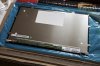
:thumbsup: -
Well I'm on W8 and I get poor battery life XD
I at first thought perhaps it's W8 that gives me poor battery life, I just think this laptop is inefficient as hell lol. -
Well I'm on W8 and I get poor battery life XD
I at first thought perhaps it's W8 that gives me poor battery life, I just think this laptop is inefficient as hell lol. -
The screen really draws a lot of power, I got home to put my laptop on my dock at my home office and forgot to plug it in and it lasted just over 4 hours. I usually get 2-3 with LIGHT usage with the screen open... and my battery wear is already at 16% after a year of usage everyday
-
Yeah same here really.
The IPS is supposedly meant to use a watt or so less power XD Makes me jealous when Dad touts his Sony Vaio Duo 13, which can actually get up to 20 hours battery life with WLAN off O.O It's a beautiful device, 1080p IPS screen, backlit keyboard, touchscreen, dual cameras, NFC, LTE, thin aluminium design, tablet/laptop modes etc. It just doesn't have the blistering performance of the W110ER, nor the price tag XD That thing cost near £1,500 with the ULV i7 (Haswell) and 8GB RAM. I hope to mod the W110ER in various ways so I can get some of that performance haha.
I'm going to do some testing with an LED when I get back to see if I can nicely light the keyboard in the dark. Not sure where I can jump the power off of, but I want to use a really low power LED to do it. -
Nice job Studie. Did you order at laptopscreen.com?
-
I think he got it from a supplier in China. Laptopscreen has imported it from China to Canada I think.
*** Official Clevo W110ER / Sager NP6110 Owner's Lounge ***
Discussion in 'Sager/Clevo Reviews & Owners' Lounges' started by Ryan, Apr 7, 2012.


