Problems? See this thread at archive.org.
I have a ghost S1 sitting here and you guys are so tempting me on the reference PCB and a water block.
-
-
Tart Cherry juice seems to help with my ankle and keeping it from flaring up from an old injury.
 electrosoft and Mr. Fox like this.
 -
-
I found other supposedly stuck pixels , visible however with other solid colours ( 1 white, 1 green , all in different locations ).
I wonder if others may find this very happy surprise. -
For some reason, dead pixel screens love to come on my table
and this time it was in my X170SM-G. Anyway, asked for a replacement as it was still under 0 dead pixel warranty. The tech came and we replaced the screen. After replacing the screen, these stupid lights came on and won't budge!
![[IMG]](images/storyImages/IMG-20201130-200647.jpg)
![[IMG]](images/storyImages/IMG-20201130-200653.jpg)
I suspected the screen so I unplugged the screen cable but the lights stayed on. Then when I plugged the screen back in and was tucking the cable back into it's grooves, the light flickered and I noticed that as soon as I played around with the cable, the light intermittently turned on-off which suggests that the cable is internally faulty. The screen surprisingly is working 100% fine and there are no problems. Just these stupid lights. Anyone else had any such issue before with these laptops? I have asked for a replacement cable but it will take a while and this red light row is driving me nuts!
Edit: I just noticed that these lights keep turning themselves off and then back on at their complete and utter will even when I am not touching the screen cable. Is it a faulty keyboard? The lit up keys still work with all the effects. It is just that they never completely turn off and always remain with this dim red when not showing any effects.Last edited: Nov 30, 2020 -
Does Ztec have anywhere that shows the frequency of the panels? I can only see the resolution and that’s it. I can assume the 4k panel is 60hz, but the rest are unknown...
-
The Full HD (1920x1080) are the standard 144Hz screensjc_denton likes this.
-
@Donald@zTecpc ztec doesn't ship to Europe or it does?
-
At this time we only ship to USA and Canada. Our international customers use USA forwarders to save on shipping costs.joluke likes this.
-
Um I can't take the card apart again.... Replacing pads gets too expensive for someone on a fixed income and I already ran out of my thermal paste from too many disassemblies which is why I bought the Kryoaut Extreme, and now I'm completely out of money.
I did take this a few weeks ago.
Mr. Fox likes this. -
I feel you on the dead pixels. That’s why I went with the no dead pixel warranty on mine. I feel after a certain price point it should be standard to consider ANY amount of dead pixels as a defect. And I’ve run into them more than enough times that I’d gladly pay for it to be pixel perfect. My ultra wide monitor took over 4 years to get its first dead pixel and that in my mind is ok. But never out of the box.
Mine gets here Thursday. So I can’t comment on anything on it yet. Hopefully it’s nothing serious. If it’s just the keyboard atleast it’s replaceable.
So what is this fun little project for? I think I missed that part.S.K likes this. -
I will no longer make fun of Beardedhardwares fish gpu.
-
Thank you, Brother @Falkentyne much appreciated. Are the yellow boxes around the resistors that you shunted? What is that gray stuff on top of them?
Is there something posted online for it that I can read up on?
Yes, I know what you mean about money. Everything worth owning is too expensive for everyone unless they have more money than common good sense.
I just cannot get over how weird-looking the FE and reference design PCB is. I guess it doesn't matter as long as it runs like a banshee and is durable, but it certainly is odd.
Last edited: Nov 30, 2020jc_denton likes this. -
It's to get a large amount of through air from the 2nd fan.
I had this with my 4850 cards in crossfire with arctic accelero S1s, they shared one big fan on the end and it cooled both pretty well. -
Yes, the thought process is understood, but it does not look any less odd compared to what we are used to seeing. It has merit if you plan to use the stock cooler. If it works, it works. Can't hate that. But, it adds another layer of complexity and an extra form factor to deal with (which may initially increase design and production costs) for the manufacturers of aftermarket coolers and water blocks. I am glad many of the AIB partners are sticking with something a little more conventional, including skipping participation with the janky new power connectors that threw a potentially costly wildcard at the PSU manufacturers. These are things that will ultimately be passed on to the consumers that have to subsidize it. You know the manufacturers are not going to just magically suck it up and absorb it.
I like progress when it is meaningful but change for the sake of change, or for self-serving ambitions, (and the fallout it often causes,) not so much.
I am glad you replied. I see that I forgot to attach the image that I made reference to. (There were no yellow boxes on the original image.)Last edited: Nov 30, 2020 -
Is it just me or is the X170 more expensive than the P775TM it's replacing? It feels multiple hundreds of dollars more expensive than the P775TM no matter where I spec it out.
I don't really fancy spending around $2000 for a laptop that comes equipped with an RTX 2060, an i5 10600K, 8 GB of RAM, and a drive with less than 1 TB of storage space. Something seems wrong here. For this price, I was expecting at least an RTX 2070, an i7 10700K, and 16 GB of RAM. Am I just being unrealistic here? I could've sworn the P775TM was significantly cheaper.Mr. Fox likes this. -
Yes, but it's also a better product. Not that it justifies the increase, but only that you are getting a better product in numerous ways. Build quality, performance, design, thermals... all better. Insyde H20 BIOS is a step backwards, but in most other respects it is a huge improvement. There are not many products that are priced proportionately to what you receive in return. Everything is overpriced on the major internal components as well (referring to CPU and GPU). That problem applies to desktops also. Especially GPUs that are desirable. Once they apply the "enthusiast" factor it instantly becomes ludicrous.
All that said, it's not any more overpriced than the inferior disposable turdbooks with higher specs compared to those that are more mundane. In that case, I'd say it offers far more value compared with the "high end" turdbooks.Last edited: Nov 30, 2020 -
Has there been any confirmation that X170-sm will support the new gpu's RTX 30x0?
jc_denton likes this. -
TCJ + bicarbonate (sodium, magnesium, potassium...take your pick) is a game changer for me and inflammation after heavy lifts, long hikes and gout.
-
It's this stuff.
https://www.amazon.com/gp/product/B01MCXW1Y1/
Works out to about acting like a 15 mOhm shunt when applied on top of a 5 mOhm shunt, or a tiny bit lower (== 3.50 to 3.75 mOhms total new shunt resistance), but it must be applied thick enough and must cover the entire shunt--applying too thin will not be effective. And it's a bit tricky on shunts that have the conductive silver edges lower than the black middle housing, like Founder's Edition 3090's, because getting good contact with the low edges without touching the PCB is a bit tricky. This 'lower edges' issue on the FE shunts make using paint to stack another shunt on much more problematic since the top shunt will be unable to make direct contact with the silver on the original shunt.
When using the paint as its own shunt, the original shunt must have the conformal coating fully scraped off the silver edges, with a tiny flat blade.
It's a lot easier if the entire original shunt is fully flush (then it's simple), and you can also use it as a conductive adhesive to stack another 5 mOhm shunt on it without soldering (but in this case, assumiing the original shunt is fully flush with no depressed edges, you want to use as little as possible. You still have to scrape the edges first though.
Even soldering to stack a shunt is tricky on the FE due to the depressed edges of the original shunts. Have to ensure proper contact with the solder.Mr. Fox, electrosoft, jc_denton and 2 others like this. -
Has anyone faced AUDIODG.exe crashes related to the realtek audio driver? Uninstalling it fixes it however sound blaster atlas doesn't pick the speakers up anymore without it
-
I have posted a new very simple method for neutering the CCC that needs minimal cleanup and no registry deletions (previous simplified method was being reversed after every couple of reboots but this new method is 100% working and tested thoroughly for a day). Now you guys can enjoy a fully working neutered version of CCC that will not interfere with OC at any level.
http://forum.notebookreview.com/thr...-cpu-oc-component-completely-x170sm-g.834715/Damnacious, Mr. Fox, Mister-Knister and 2 others like this. -
I haven't, and I have installed Windows for at least a couple of dozen times on this machine. Can you share some system events? I suspect that there could be a different underlying cause that is causing these crashes.
I turned the machine off and let it stay connected to the charger overnight. The next morning, the problem fixed itself! Apparently it was due to the fact that I did not electrically discharge myself before changing the laptop screen and the static current kept the keyboard funky for a while. I have heard a similar story from a friend today (his machine was Acer though). I have closed the lid multiple times throughout today and used the keyboard for typing as well but the problem has not returned. I hope it never returns.
It was SO annoying!!!
Last edited: Dec 1, 2020 -
Had the same happen to me in my P775DM3-G and guess where the f00king pixel was stuck in pitch black? Right in the middle of the screen. Did the same and it hasn't been stuck in black for half a year. Lol
-
Oh weird had not heard of that before, anti static bands are useful!
joluke likes this. -
-
No idea what happened to be honest. But the stuck pixel is fixed now
-
Well I’m glad it fixed itself. This is one of the reasons I usually wear a static wristband when I’m working inside a pc. I’ve actually been that unlucky person that zapped something. Even though pretty much everyone says it’s impossible. But I’ve never experienced something like this. Done a lot of weird and dumb things but this one is new.S.K likes this.
-
Well every new day brings something new to learn! Once I got out of my woolen blanket with sparking hands (literally crackling sparks) and opened my old Alienware machine for some work and when I booted it up, it couldn't detect the mechanical hard disk for some reason. It turned out that I had fried the sata controller! Ever since then, I regularly discharged myself against a metal window or something before doing any work on electronics. This time I just forgot and glad I got this gentle "rude" reminder.
-
Wish I kept them, but without them the machine is fine so if I do reinstall them I'll let you know. Thanks.I too agree the problem might reside elsewhereS.K likes this.
-
Have you done this mod to your current Windows power plan? Having PCI Expresss Link State Power Management set to power saving can cause all kinds of havoc and surprise BSODs due to Windows 10's innate crappy architecture.
![[IMG]](images/storyImages/Disable-USB-Suspend-And-PCI-Express-Link-State-Power-Management.png)
I have to admit; now that I have completely stripped away Edge, IE, Cortana and other microsoft bloatware garbage including Xbox, People, Maps along with all their background services (both from registry and files), my Windows installation is rock stable and so fast that it is ridiculous. I cannot imagine going back to running all this background garbage again. 3 days in and my machine is still running strong with no shutdowns or reboots during this time. This includes over 24 hours of straight heavy gaming. Took a lot of work but finally it's stable and completely loving it. There is no guide available for it btw, so don't be surprised if you don't find anything regarding how to do it on your machine.
Last edited: Dec 2, 2020electrosoft, Papusan, DreDre and 3 others like this. -
There are guides. But you need to point in the right direction so people can get to them! A good direction is the mydigitallife forum. Loads of tools and handy guides on how to strip windows from all the bloatware and crapware
And the MSMG toolkit which can be downloaded from here which will create a custom iso for installing windows without all the crap in it:
https://msmgtoolkit.in/
https://forums.mydigitallife.net/threads/msmg-toolkit.50572/
All you have to do is point the direction. It's all there, guides, tutorials, tools. Now to learn how to use them and enjoy a good windows experience in the end electrosoft, Papusan, DreDre and 1 other person like this.
 -
I do not use any third party guides or tools when it comes to Windows cleanup except for one tried and tested tool i.e., ShutUp10. From my experience in this field since 1996, I have always found manipulating things from a separate OS inside the Windows installation to be far more effective than trying to modify things while staying logged into the same OS that one is trying to modify. The problem with most windows "guides" is that they get pretty much obsolete within a matter of weeks or months since Microsoft keeps changing stuff around and there are some areas in Windows 10 that are not even visible to the user while logged in which is a total dictatorial approach. It is more important in case of such machines as this since these are supposed to deliver sheer raw performance that can rival or in some cases, even beat the desktop. Personally, I am not a fan of Windows unless it's about gaming and other windows specific tasks related to work.electrosoft, Papusan, DreDre and 2 others like this.
-
I run the high performance profile one, which was enabled directly via running sophia debloat script, which also removed cortana edge etc, plus some other things. However even in the high perf one the usb suspending was on, which I now disabled, thank you , I also reinstalled audio drivers via obsidian updater, will report back
On another note, I discovered that ( overclocked or not) the gpu power limit riding increases wattage and temperatures by a significant margin , (even with phobya) we're talking a 10 degree margin on full stress tests and a total system power draw of 370 watts instead of roughly a bit less than 340. Interesting bit is, my other non power limit riding profile (all afterburner ofc) still reaches the nominal 200 watts limit, however, it doesn't have that dramatic increase in temps.Last edited: Dec 2, 2020S.K likes this. -
Can you post the link for that debloat script please? Thanks
-
https://github.com/farag2/Windows-10-Sophia-Script
there are others ofc, but I like this one for the time being for not being intrusive and also creating a safe restore point in case anything goes wrong -
Thanks
-
-
Many thanks again for your advice and information Mr. Fox! It is greatly appreciated!
From what i remember, retail brand names can put their names to different brand manufactured products. I'm not sure if this is still true. From memory, is Samsung the same as Micron IC products? If my memory is also still half decent, Crucial is predominantly Samsung products, while i assume Kingston is Hynix?
This beastly laptop will be moved around almost constantly, so it seems by your advice that a liquid metal might not be such a great idea. If that's correct, it seems i might give Thermalright TFX or Kryonaut Extreme a go - if i can find them!
I have some more questions for you too, if I haven't hassled you too much already...
From what i understand of what i've read/seen of your advice, reducing voltage (undervolting) to the CPU may elicit improved performance by decreasing temperature and, i assume, subsequently limiting throttling. My query then is, if a subsequently sufficient amount of cooling was able to maintain the CPU at suitably reduced temperatures even under maximum loads, would increasing the voltage yield greater performance if throttling did not occur?
If the above is true, would this also then similarly apply to RAM and the GPU?
Do you know what the maximum intake pressure is for the stock fans? Particularly, what the maximum pressure is before they'll start to break, or what intake CFM limits these fans might have which would limit their airflow capabilities?
Are you aware of a list somewhere for the diverse range of thermal pastes of the maximum temperatures which thermal pastes can withstand before 'burning off'?
The reason for these questions is that i've been considering just building a laptop cooling pad utilising refrigerated/condensed air to supply approximately 252 CFM refrigerated air, at a constant 16 degrees Celsius, to those intake fans. My initial projections indicate it will cost me close to AUD$500 to build, yet if i can significantly lower temperature, while also eliciting greater performance by increasing voltage, then the cost may prove worthwhile. However, if overvolting won't produce potentially greater results, then it wouldn't be worth the expense. I also don't want to break the stock fans either by introducing too much condensed air through them at too high of a pressure.
Many thanks Falkentyne! This information is really helpful! -
You could just have an AC vent pointing at the intake of your cooling pad.
Papusan and Damnacious like this. -
That is true, yet it wouldn't be very portable
-
Hi guys!
I am running my X170SM-G (XMG Ultra 17) with a 10900K. The temps are usually okay and when playing games at 4K 60Hz (World of Warcraft, Warhammer II Total War), the CPU temps are around 65 - 85C.
But I have a temperature problem when I open files (workspaces) of a scientific program for work (called FlowJo) to analyse multidimensional data sets. When opening saved files (workspaces), the computer usually has to re-calculate the analysis. I've done this work previously on my 6 year old Macbook Pro Laptop with relatively crappy hardware (Core i7-4870HQ) compared to my XMG Ultra 17 with the 10900K. The calculations usually took a few seconds to minutes on the Macbook depending on the complexity of the analysis, but it never got any temperature issues (I rarely heard the fan going crazy during calculation / re-calculation). But with my XMG Ultra 17 it is different. The re-calculation times when opening those FlowJo workspaces feel quicker, but the fans turn at max speed and the CPU temps get up to 97-100C for a while. I am also getting max fan speed and those temperatures when I perform analyses in an active workspace on the XMG Ultra 17. I am afraid I will fry the CPU when doing this kind of work. I was surprised to reach 100C. I thought the computer would turn itself off for self-protection at that temperature. I am surprised the XMG Ultra 17 has such temperature problems with this analysis, when the 6 year old Macbook didn't have temperature problems and just took slightly longer for calculation. I was wondering if I can adjust some settings on the XMG Ultra 17 to set a limit for the CPU so the temperatures stay lower and accept that the calculations take a bit longer? Is it possible to set a temperature threshold of like 90C above which the CPU will start to throttle to prevent it going up to 100C? Or do I not need to worry about the high temperature readings as long as the computer does not shut itself down?Last edited: Dec 2, 2020 -
take up the no CCC religion and convert yourself to Throttlestop.
Also, macs are known to don't give a damn so their cpu, mobo or anything could fry, main reason why the comparison with these "great arm m1 chips" is so compelling for the 3 scenarios it's useful for , for the time being
joker33 likes this. -
Well the new macs just have such a low power target that it does not matter lol.
-
Thanks for the advice. I haven't used the program before. Could you possibly tell me which settings to change to set a lower temperature threshold for CPU throttling to protect it from overheating'?
-
Give PROCHOT Offset a negative value of your choosing. The throttle temperature is set to 92°C in throttlestop by default, so set the offset to -7 to reach your target throttle temperature of 85°C.
Why not just use Windows 10 LTSC? Then you don't have to do any of that stripping away stuff. You can get a barebones Windows 10 installation out of the box that way.Papusan likes this. -
Thanks! When I started the program for the first time, the offset value was set at 2 and PROCHOT temperature was 98C. IS that not normal? I set it now to 10 (or maybe even 15) to get a throttle temperature of 90 or 85.
Does this throttling temperature only stay enabled as long as ThrottleStop Program is running? I found a tutorial to add ThrottleStop to your start up sequence using the Task Scheduler ( http://forum.notebookreview.com/threads/the-throttlestop-guide.531329/). -
Yes, yes, yes! I just received my new X170 from zTecpc. Thank you @Donald@zTecpc, @Prema, @Mr. Fox, @jc_denton, @Papusan
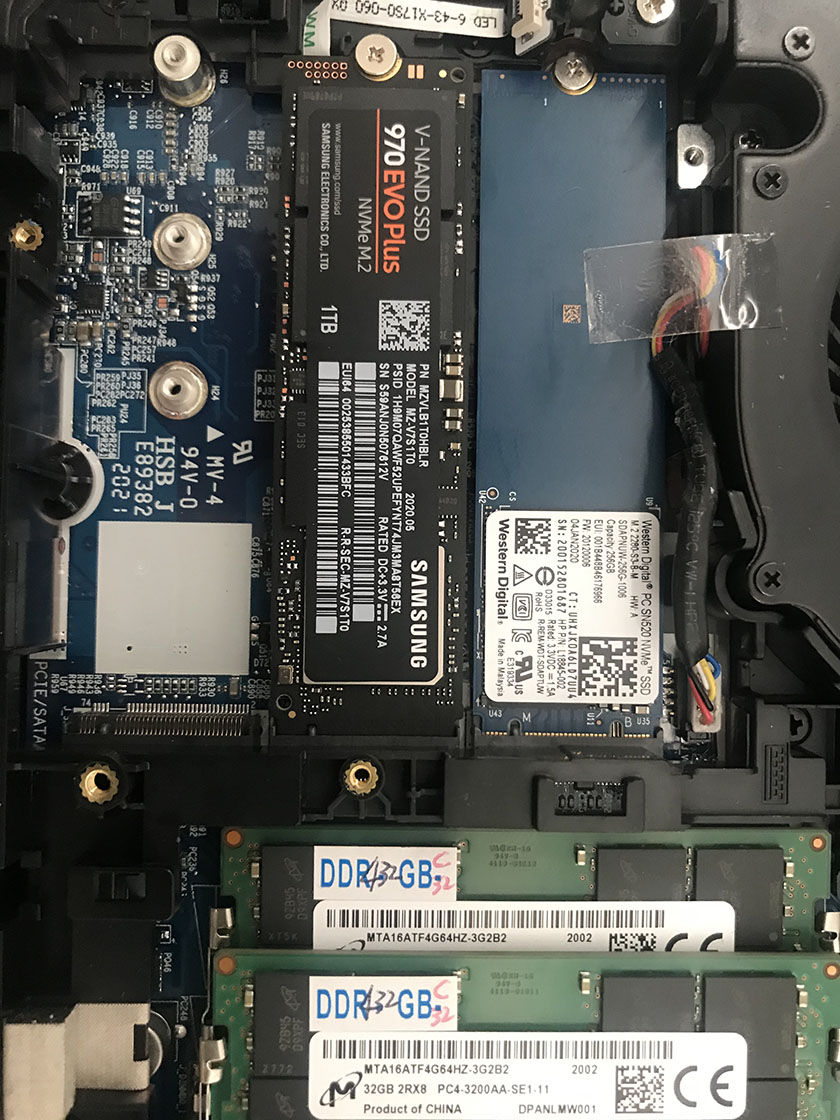
Got mine with the cherry-picked i9-10900K, 2060 graphics and every single cool-down option. I have 2 x 32GB 3200 RAM, and a Samsung V-NAND SSD 970 Evo Plus NVMe M.2 1TB that I'm installing in it.
I do have a question, as I seem to be at a loss (couldn't find the right answer online, and zTecpc has gone home for the day.)
I took out the battery, installed the RAM and SSD on the 2nd socket next to the 256GB PCIE that came with the OS from zTecpc; put everything back in and turned the laptop on. (See Image)
The laptop is blissfully fast, opens programs in a flash, and it's a beaute. It recognizes the 64GB RAM, but, it does not recognize the 1TB SSD. If I open Device Manager and go down to Disk Drives it's there alongside the WDC PC SN520 256GB drive. When I restart and go into the Bios, both drives are shown.
If I click on File Explorer - This PC - Only Local Disc (C, 174GB free of 237GB (this is the 256GB that came from zTecpc), but no other drive shown.
Maybe a stupid question, but what do I need to do so that I can get the laptop to recognize the new Samsung V-NAND SSD 970 Evo Plus NVMe M.2 1TB drive?Attached Files:
-
*** Official Clevo X170SM-G/Sager NP9670M Owner's Lounge ***
Discussion in 'Sager/Clevo Reviews & Owners' Lounges' started by Rahego, Jan 10, 2020.