Problems? See this thread at archive.org.
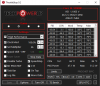
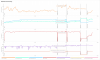
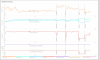
Just played Red Dead Redemption 2 for a couple hours. These were my temps from Throttlestop...
-
Attached Files:
Terreos likes this. -
-
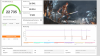
I couldn’t help but try to crack that number. Done and done.
If @Mr. Fox didn’t have spots 11 through 2 claimed I’d be shooting for number 3.
As much fun as this is I’ll have to see what is actually useable in games. Think I went ten minutes in Witcher 3 before she crashed.
-
Nice and that's very greedy of @Mr. Fox
-
I can load up RDR2 on Tuesday and try running it at stock and see what I get. But those temps look toasty to me. Delidding the CPU would go a long way at taming that 10900k.jc_denton likes this.
-
I plan on it. I will probably buy the kit from Der8auer then use Mr Fox's guide on how it is done. I considered myself a computer geek prior to this but getting this x170 and this community is a whole new ballgame I am new to!!
-
Something isn't correct. Next time you run 3Dmark FS then scroll down the results page and take screenshoot of detailed monitoring also. It show clocks and temps.
The review unit at Notebookcheck showed around 29500 in 3DMark Fire Strike Physics. You shouldn't need delidde to get correct scores with stock clocks.
Edit.
-
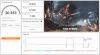
Ok, had some time to download the free demo for 3DMARK. Here are my results, nothing extra done, testing laptop as it came from Ztecpc with all the nice upgrades. My video card is a 2060.
Attached Files:
jc_denton, Terreos, Papusan and 1 other person like this. -
-
WOW. Just took a FS test. Totally jacked up from what I can see. My CPU gets no hotter than like 74C, my GPU about the same. The CPU drops WAY down in the physics test to between 49C and 53C. Makes no sense to me. I think I am going to wipe my system then start from scratch. I should have done that from the get go anyway. I literally took my SSD from my old laptop, my MSI 63VR Stealth and put in in my x170, changed a couple bios settings, and it worked. Just had to install the drivers, and I was up and running. NOT the right thing to do, I know, but I was so damn stoked to get this thing I couldn't help myself. Check out the uploads...my system is messed up right now...it is actually running cool, but something is WAY off.
Attached Files:
-
-
Attached Files:
-
-
Hi guys,
I tried to familiarise myself with throttlestop, but I would appreciate your advice on specific settings for the 10900K in the X170SM-G / XMG Ultra 17.
1. When I started ThrottleStop for the first time, I assume all the settings were stock settings, is that correct? The stock PROCHOT temperature was set at 98C. Was that the same for your laptops?
I find this a bit high as my laptop eventually reached up to 100C. So I set the PROCHOT temp manually to 90C to protect the laptop from overheating.
I also tried some undervolting to lower the temps and got a stable configuration with -100mV on both CPU Core and CPU Cache. I have a few more questions, however, and would appreciate your input.
2. After undervolting the laptop runs at max 92C under stress and can keep 4.88 - 4.9GHz. But that frequency is only held for a few minutes, after which throttling starts due to "POWER". The CPU frequency drops to around 4.6-4.7 GHz. I guess that throttling is due to 130W TDP limits, or what does the "POWER"-throttling mean?
3. Do I also need to undervolt Intel GPU? I think to remember reading somewhere that the Intel GPU is disabled on 10900K in XMG Ultra 17 laptops? Is this correct?
4. At ThrottleStop stock settings a tick was set for "SpeedStep", but "Speed Shift - EPP" was unchecked. In green letters there is "SST" written behind it.
- From what I've read online, "SpeedStep" is an older technology which was replaced by "Speed Shift - EPP". Should I disable "SpeedStep" and endable "Speed Shift-EPP"?
- I also read that the green writing "SST" already means that Speed Shift is active. That would be confusing, because the "Speed Shift - EPP" box is not ticked.
- In case you recommend the activation of "Speed Shift - EPP" and de-activation of "SpeedStep", which value between 0 and 255 should I choose? I understand 1 means higher performance and 255 means lower performance. Can I then just set it to 1 in case I operate the laptop mainly from the power supply and not the battery? Does a setting of 1 have any disadvantages or does it bring any danger to the CPU (e.g. overheating)? I am just surprised as most people choose a value of 32 or 64 even for performance settings, when a value of 1 would deliver a better performance.
Thank you in advance for your help! -
They are the settings TS finds once it is opened the first time, that is why it is suggested to remove and reset every xtu ccc profile beforehand. Prochot might change from vendor to vendor I assume but there is nothing wrong with either keeping it or lowering it depending on your preference.
The Power limitations come from power limits, you find them under tpl I believe, clamp them or not too if you wish, you can also set more stuff there.
You are right about the intel gpu, the laptop is directly linked to the nvidia gpu , I undervolt everything just because of OCD
Speedshift is also found on bios setups for xmg ultra bios iirc and I too found it disabled at first boot of TS, anyhow I tested with both ( step - shift) on or simply speedshift on, doesn't change much, if you want battery duration, set it to like 200, for normal and gaming , 32 or even 64 works nicely for me, if you want balls to the wallz , 0, all it does it enables with C1E to clock down or up when necessary without staying pinned to your max frequency.
However, there are throttle stop guides, updated to 2020, with pretty much everything explained there, I suggest to give them a read.
https://www.ultrabookreview.com/31385-the-throttlestop-guide/Last edited: Dec 6, 2020jc_denton likes this. -
Great start. Congrats on the system!
We can set 3DM to leaderboard mode. That way it only shows each users top result:
https://www.3dmark.com/search?_ga=2.190334317.772689765.1607259658-902210088.1607259658#advanced?test=fs P&cpuId=&gpuId=1327&gpuCount=0&deviceType=ALL&memoryChannels=0&country=&scoreType=overallScore&hofMode=true&showInvalidResults=false&freeParams=&minGpuCoreClock=&maxGpuCoreClock=&minGpuMemClock=&maxGpuMemClock=&minCpuClock=&maxCpuClock=
Come-on 26K FTW!
Last edited: Dec 6, 2020 -
"You are right about the intel gpu, the laptop is directly linked to the nvidia gpu"
Does this mean that the Intel graphics can't be used, just the Nvidia? -
-
Aaah I did not know that. So I’m number 8. . .and there are some Area 51m R2 beating me. I can’t have that.
Mr. Fox, jc_denton, raz8020 and 1 other person like this.
-
-
Appears to be power limit throttling, rerun with hwinfo64 in the background and check what perf limit flags get triggered.Papusan likes this.
-
Thanks for your response. I haven't isntalled Intel XTU. But from what I understand from your answer, CCC (=Clevo Control Centre?) generates and saves also an XTU profile?
How do I find and delete it? Do I have to de-install CCC if I want to use Throttlestop or can I run both simultaneously?
Could someone post some screenshots with the standard settings for the 10900K (Main Window incl. TPL, FIVR and Options)?Last edited: Dec 6, 2020 -
I suggest not to use both of them in conjunction, and by clevo led disaster and I can't read -100mV undervolt centre, I mean the cpu overclocking bit, which you can uninstall. If you want to do it proper, I suggest revo uninstaller, autoruns64 and manual search of all the XTU related bits, then reboot and use magical throttlestop. Out of the entire clevo lack of control center, I keep the OSD function key, removing it disables my ability to turn off touchpad for instance.
-
Thanks for your reply. Sorry for the stupid question, but this is all new for me. Did I unerstand correctly to only uninstall the CPU overclocking bit of the CCC and you can keep the Flexikey, Fan profile, GPU overclocking, LEDKeyboard and Powermode part of the CCC? How does that work? I haven't even enabled the CPU overclocking bit in the BIOS, so it doesn't show in the CCC app.
And what files do I need to delete regarding XTU? What search terms should I use? I am not familiar with XTU at all. -
Follow this guide: http://forum.notebookreview.com/thr...-cpu-oc-component-completely-x170sm-g.834715/Mr. Fox likes this.
-
CCC uses a sort of integrated version of XTU to work, if you could call that working, hence my suggestions.
I simply search under "this pc" for "XTU" files, you can also go look under drivers of course, there will likely be leftovers there.
As an alternative to CCC you can use Obsidian's suite, however, keyboard lighting does not work unless you got the clevo led app.
I mean all these problems would be fixed with a decent bios but i'm a european pleb so I do not get to enjoy Prema -
Thanks a lot! This is super helpful. I will follow part 2 as I already have my laptop completly set up. Is it a problem in case I already have Intel DPTF installed? The guide mentions the option to install it after removing CCC CPU componments. And after following those steps and removing the XTU/CPU component of the CCC, can I run CCC and Throttlestop simultaneously? Or do I still need to completely de-install and remove CCC?
Same here. Based in the EU. Hopefully XMG will become a Prema partnerLast edited: Dec 6, 2020S.K likes this. -
The only problem is with the background instance of XTU installed by CCC setup. Running ThrottleStop in parallel is no problem. I am running CCC, ThrottleStop and XTU simultaneously (only XTU is dealing with the OC and undervolt part while ThrottleStop is only setting the ProcHot offset for me. Good luck!
P.S., Don't forget to create a backup before attempting any of it. Personally I'd install a clean copy of windows, without drivers, fully updated and then take a backup of it so I can restore anytime I want without spending too much time; and then follow step 1. Deleting registry keys can become a bit tedious as it needs a lot of permission changes per key for almost 80% of the mentioned keys.
And Intel DPTF is personal preference. I don't like it because it creates unnecessary performance degradation in some cases, but you can leave it on if you don't care about having the best benchmark scores.Last edited: Dec 7, 2020joker33 likes this. -
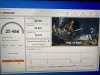
Not quite done. But improvements are still being made.
Still gotta mess around with memory. My least favorite thing to overclock.
PS: @Colorme
oh forgot to mention to set your undervolt in the bios as well as your voltage offset. You then apply the overclock with something like Intel XTU and you’ll get the binned specs we paid for our 10900k’s.
Last edited: Dec 6, 2020Colorme likes this. -
just ccc using
https://www.3dmark.com/fs/24253383Attached Files:
-
-
I still prefer the old Classic Search But the results won't change with the new, LOOL
A Jokebook in between is neither nice But we have to give some credit to our good friend
@GTVEVO who made this soldered tragedy to perform better than
"Worlds Most Powerful NR2" from Dell

Me you're looking for?
Last edited: Dec 6, 2020raz8020, joluke, Terreos and 1 other person like this. -
Clevo finally updated its driver page:
https://www.clevo.com.tw/clevo_down.asp?lang=enPapusan likes this. -
Are you using Prema bios ?
-
Hey there! I'm curious if you guys can offer some comparisons.
Earlier in the year I ordered an NP8378f2 ( Clevo PB71DF2-G) with the 10th gen i7 but the high pitched whine of the fans triggered a crazy level of anxiety in me for some reason and it was impossible to concentrate on any tasks while the fans were spinning. What would cause the fans to spin? Literally everything. I don't think it knew how to run cooler than 80C under almost any condition besides sleep mode.
How does the NP9670M lineup fare in this regard? Does it have the same fans and the same particular fan noise (or one equally nerve wracking) as the comparatively thin and light np8373f2? Does it heat up enough to be a toaster just by opening your text editor?
My only other basis for comparison from Sager is an older model NP9870-S ( Clevo P870DM) from 2016, also a thick bodied beast, but we're talking 6th gen i7 Intel and 980GTX Nvidia. Normal temps on this older one hover at 56-62 even when multitasking at using Unity, Rider, GitKraken, Photoshop, VPN, and a bunch of background tasks and background YouTube videos. It's 4 generations behind, but the lack of throttling made it perform better than the latest and greatest. Is it just the nature of the beast that the modern lineups of Intel processors run super hot for even any one single task? Does the THICC body help with this in any noticeable way?
And finally, how are the speakers on the np9670m? I was surprised at how nice the ones on the old NP9870-S are and found the ones in the thinner np8373f2 disappointing by comparison. Does the new model live up to the older standard?Last edited: Dec 7, 2020Donald@Paladin44 likes this. -
Just a suggestion...most people here recognize the Clevo model numbers more than Sager model numbers. You might get a better response if you were to use the Clevo model numbers, which are built under several brands, not just the Sager model numbers.
-
Thanks for that tip, I updated my post to include the Clevo model numbersPapusan, joluke and Donald@Paladin44 like this.
-
does anybody have the thunderbolt Software not the driver for windows 10. I have a a windows install with no microslop crap in it and dont wanna install the microslop store. i need it to approve my thunderbolt dock as its not approved and the dock is not working as its not approved.
-
I finally re-installed my machine from scratch and followed the tutorial to get a Control Center installation without the CPU component from @S.K . Thank you very much for the tutorial and for answering follow-up questions via PM. Please find some benchmark results from pre- and after installation below.
I have a problem with after the fresh installation, however, and I was hoping to get your advice:
Some of the fonts (not all) and some program icons are very fuzzy and not sharp. This wasn't the case for previous Windows installations on my laptop. Did I mess up anything during the installation? I did a clean re-installation of the graphics drivers, but no change. I have the recommended resolution (3840 x2160) and recommended scaling factor of 250%. The button is activated "to let windows try to fix apps so they're not blurry". I am surprised why this problem occurs after this Windows installation, but hasn't occurred before. I used the same Windows USB installation drive and the same drivers as before.
Benchmark results from 3DMARK Time Spy:
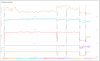
(1) Old Installation ( Complete CCC, PROCHOT 90C, -100mV, SpeedStep on, Speed Shift off): Graphics score: 10503, CPU score: 12784. Please note that the CPU was running at 4.9 GHz across the whole benchmark with a few episodes of lower frequencies as shown below. I am not sure if Speed Shift was really off here even though I disabled it in Throttlestop, because I was told the Control Center CPU components are apparently controlling a lot of CPU settings in the background.
(2) New Installation ( CCC without CPU component, PROCHOT 90C, -70mV, SpeedStep on, Speed Shift off): Graphics score: 10727, CPU score: 12669. Please note that without the Control Center CPU components, some behavior of the CPU changed. I guess the real behavior got apparent now which was masked by the Control Center CPU components. As far as I could test for now, the CPU is only stable at -70mV undervolting after the clean new installation. But also the CPU clock behaviour changed during the benchmark. The CPU did not held 4.9GHz across the test, even though there was no temperature or power throttling.
(3) New Installation ( CCC without CPU component, PROCHOT 90C, -70mV, SpeedStep off, Speed Shift on): Graphics score: 10754, CPU score: 13291. The CPU could hold approx 4.88GHz across the whole benchmark, except for the CPU benchmark, in which it went down to 4.78 GHZ. Temperature throttling happened during the benchmark.
It seems like Speed Shift is improving the benchmark compare to SpeedStep. It would have been nice to compare the CPU behavior from the old installation with the full CCC and Speed Shift enabled. But I think we can infer from the CPU clock behavior that even with Speed Shift disabled in Throttlestop, the CPU frequencies during the benchmark indicated that it might have been running anyway in the background?Attached Files:
Donald@Paladin44 likes this. -
-
Here is your issue..."...and recommended scaling factor of 250%."
Windows does not scale well, particularly at such a high rate as 250%.
Put it at 100% and everything should be clear and sharp.
Why get a 4K UHD (3840x2160) screen if you are going to scale it to 250%, which is a lower resolution than even 1080p? -
Well, with 100% scaling, all the icons and fonts and panels are super small. Is there any other way to enlarge it besides adjusting the scaling factor?
And I am surprised that the scaling factor of 250 was working for my last installation, but after this fresh installation some things seem blurry. Is there any other setting I can change that could help?Donald@Paladin44 likes this. -
Yes, small is a characteristic of 4K UHD (3840x2160).
That is why I asked:
Why get a 4K UHD (3840x2160) screen if you are going to scale it to 250%, which is a lower resolution than even 1080p?raz8020, Papusan, Terreos and 1 other person like this. -
You can make the icons bigger. Google is your friend.
https://www.google.com/search?q=make windows 10 icons bigger&ie=utf-8&oe=utf-8
And even with my terrible years I would run a 17” screen at 125% at most. 250% is overkill.raz8020, Papusan and Donald@Paladin44 like this. -
Some programs are also just not coded to scale well, it's a common issue with some professional software like Sage.
raz8020, Donald@Paladin44 and Papusan like this. -
A user posted a few posts ago that clevo has released updated drivers. Is it okay to install them over the old ones, or should the old drivers be de-installed and removed first?
And thanks for the advice regarding bluriness/scaling. It is indeed program specific (e.g. ThrottleStop is affected), but also some windows of the operating system are affected (see screenshot). The fonts on the top of the panel and of the tabs, for example, look very crisp and sharp, but the rest looks a bit blurry, including some icons. I am aware that UHD displays can have this issue and was therefore happy with the last 3 windows installations I had on the laptop in which everything was sharp and clear. Something must have changed with my latest installation, but I can't figure out what. Or maybe I just haven't noticed this before ?!?Attached Files:
Last edited: Dec 7, 2020 -
-
Well, I just reinstalled Windows. When I did that and installed just the basic drivers, then re-ran Firestrike, I actually got a WORSE FS score. I was actually getting a little worried that I got a trash CPU. However, then I took the back off and disconnected the CMOS battery. After I rebooted, my physics score in Firestrike skyrocketed, as in the attached screenshot. I went from like 30fps before the CMOS battery disconnect to over 90fps afterwards!!
Attached Files:
Papusan likes this. -
-
If you are running the latest version of Windows 10, Fire Strike physics scores will take a MASSIVE hit. Each version update of Windows 10 degrades performance. My physics scores are about 2500 to 3000 points higher with 1803 and 1809 than they are in newer versions.Papusan, Terreos and Donald@Paladin44 like this.
-
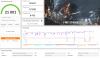
I just did a quick Throttlestop with -100 voltage offset and got 22735 now. And yes, I installed the newest Win10, 20H2 or whatever it is. I can't stand it. I have been using 1809 Enterprise for a couple years and I really like it...they keep taking goodies out of Windows and making it worse. I am going to reinstall again with my old 1809.
Attached Files:
-
-
Much better results. Nice. Now give that GPU some love.
Mr. Fox, Papusan and Donald@Paladin44 like this.
-
-
Yeah, newer doesn’t always mean better.
Great improvement but still too low. Disable antivirus etc when benching. And use Windows High Performance power plan. Same with O&O Shutup etc.
The physics score I posted in one of my previous post (sub 29500) default was with Win 10 2004 May Update (19041.xxx)
Edit. Also graphics drivers and messed up Futuremark (UL) software can affect the scores.Last edited: Dec 7, 2020
*** Official Clevo X170SM-G/Sager NP9670M Owner's Lounge ***
Discussion in 'Sager/Clevo Reviews & Owners' Lounges' started by Rahego, Jan 10, 2020.