Problems? See this thread at archive.org.
That must have cost them but they did it anyway, gotta give them credit for that.
-
After the e BSODs, we’re you able to get back into the BIOS?
I’m having a different situation. My screen does not turn on. Like if the laptop was off, but I can hear the fans on startup, and the keyboard lights stay on, until I press the power button to turn the laptop off.
Tried pressing the usual F2 at startup, also tried F10, F11, and F12. Nothing with the display panel turning on.
Took out all RAM, usual 1 stick turn on at a time, replace and try again, nothing.
Sent an email to support, but being the weekend may not be until Tuesday when I hear back.
Any suggestions in the meantime are highly appreciated. -
Yes I can use the machine normally. Bios and all. So far I’m using the machine just stock everything and it’s running fine. Just have not had time to diagnose what happened. I was trying to run the machine on 4.9Ghz all core because 5.0 was just too warm for my taste in games. Since it seems stable right now I think I just messed the voltage up.
Do you have an external monitor? That would be my first test is to see if maybe your screen died on you.Last edited: Feb 14, 2021 -
What triggered the issue in your situation? Did you change RAM or something? Or, it just started acting goofy?
Clearing NVRAM is difficult on newer laptops. Remove the battery, AC adapter and disconnect the coin cell battery. Wait a few seconds then reconnect everything. Power on. Wait a few minutes. If it doesn't power cycle itself, hold down the power button and turn it off. Disconnect AC adapter about 10 seconds. Reconnect AC adapter, and power on. Wait a few minutes and it should power cycle itself a few times, poop its pants, then boot. I had great difficult clearing NVRAM on the X170 after having 64GB or 128GB of memory installed. If you were trying to reset NVRAM after having the popular new 3200 CL22 1.200V turdbook-friendly crap sticks installed, if you have a single stick of DDR4-2133, 2400 or 2666, installing that and leaving the other slots empty can be helpful to get it to take a big dump. -
I’m sure I have one somewhere in the garage. I’ll have to dig it out.
-
Didn’t do anything. Just shut it down normally. Came back a few hours later, and display won’t turn on. That’s when I tried to do F2 but still no display.
Laptop could be going into the BiOS after I press F2, but since I have no display, I don’t know. -
How odd. Did you update the GeFarts driver, or do you allow Windoze OS X to manage drivers autonomously as a zombie PC? Did you try connecting an external monitor to see if there is any display output?Last edited: Feb 14, 2021
-
I don’t do any video driver updates, unless they are automatic. I know that Windows did a restart mid-week for some Windows updates.
ive only tried connecting it to my Samsung TV via HDMI, no luck. The TV thinks the laptop is off, and says to turn on external device. -
Hmm. Interesting. Is the screen totally pitch black with no backlight, or black with the backlight turning on? If the latter, if you hold a flashlight up to the screen can you detect any text or images? If not, maybe the GPU has given up the ghost.
-
I don't own this laptop yet, but perhaps you could try the same procedure I used on my Ranger to do an NVRAM reset. I don't know if the procedure works on other machines, but I suppose it's worth a try.
1. Remove all RAM from the system
2. Turn the laptop on. I don't know the beep error codes for Clevo laptops, or if they even beep at all.
3. Let the laptop do its thing until it turns off.
4. When the laptop turns off, quickly insert in a RAM module before it turns back on. You will have about 2 seconds to do this.
5. Let the laptop crap itself and reset. You should be good after that.
I have no idea if this procedure works on Clevo laptops, but I suppose it wouldn't hurt to try.
Also, do you use EVGA precision by chance? EVGA precision has killed laptop panels in the past. It killed my Ranger's first screen. I was in a similar predicament as you around 4 years ago. I used my Ranger before going to school, but I got a black screen after coming home from my best friend's house. I couldn't get any video output no matter what I did, so I tried a screen swap with my Lenovo Y510p and viola! I got a picture on the screen.
The first thing I'd try to do in the event of no display output is to try the NVRAM reset procedure. If that fails, I try a panel swap. In my experience, it's usually a dead panel that causes no video output to the screen. -
@Clamibot Evga Precision kills panels? This is the first I’ve ever heard of this.
-
As far as I know, it no longer does. It has been totally redone by EVGA and it's no longer the same program. It used to have a pixel overclocker thing built into it and that was contributing to EDID corruption, especially when used in tandem with Windoze 10. Alienware laptops were getting their screens bricked left and right back in 2015, right as Windoze OS X went RTM. Then Clevo followed. It also seemed to be more common with LVDS laptops than those with eDP. LVDS is no longer common on any laptops that I know of. They are almost all eDP now.DreDre, raz8020, Papusan and 1 other person like this.
-
Well atleast they didn’t just sit on their ass and fixed it. Though the only reason I use theyre software is because I normally buy their GPU’s so I need it to play with the RGB.
 Mr. Fox likes this.
 -
Indeed, at least with the older versions.
I did not know this was fixed. Good to know EVGA resolved this issue. -
Screen is totally black.
-
I’ve done that already. Took out both RAM sticks, turned the computer on. No beeps. Just the usual fans to full speed for a few seconds, then fans turn off. RGB keyboard lights come on, then turn to blue lights like normal. Computer stays on until I hold and press the power button.
dont know about EVGA. I use the laptop as it came from the Sager reseller. -
@Colorme
Remove the:
- AC Adapters
- System Battery
- CMOS Battery (open the bottom plate and disconnect the small white connector for at least 30s)
Now reconnect everything and press the power button once.
The system will go through additional reset and configuration cycles so just sit back and relax until the welcome screen.
Also check if removing the SSD does anything. @Mr. Fox and I both had drives die after a recent Windows update.Last edited: Feb 15, 2021S.K, Clamibot, electrosoft and 8 others like this. -
I have a quick question for you guys here.
Do any of you set PL limits to keep temps under control or just let the cpu thermal throttle.
PS. Tried undervolting it does nothing for my temps. -
Bought mine from ZTecpc and they delidded the cpu and there were some thermal mods to keep the cpu in check. At stock my 10900k runs in the 70’s during gaming.DreDre likes this.
-
I always max out the power limits so that power limit throttling does not occur. Capping your power limits impairs performance.
Is the undervolt you are setting lowering the voltage? If so, then you'll need to focus on thermal compound, improving fit of the heat sink, etc. If the voltage is not changing (and your undervolt is not being applied) you need to fix that first.Last edited: Oct 23, 2021 -
If i leave it alone it will pull 170w and go to 99C in games and bounce off that with max fans.
Voltage changes but temps dont move. If i go too low i just get a BSODMr. Fox likes this. -
Do you mean the stock 3.7ghz non turbo mode ?
-
In that case you will need to work on the actual hardware to correct the problem unless you are OK with lowering performance as a work-around band-aid solution. What you are experiencing is typical behavior for an X170 with no thermal mitigation steps taken.raz8020, Clamibot, Papusan and 1 other person like this.
-
What steps can i take that do not void my warranty ?
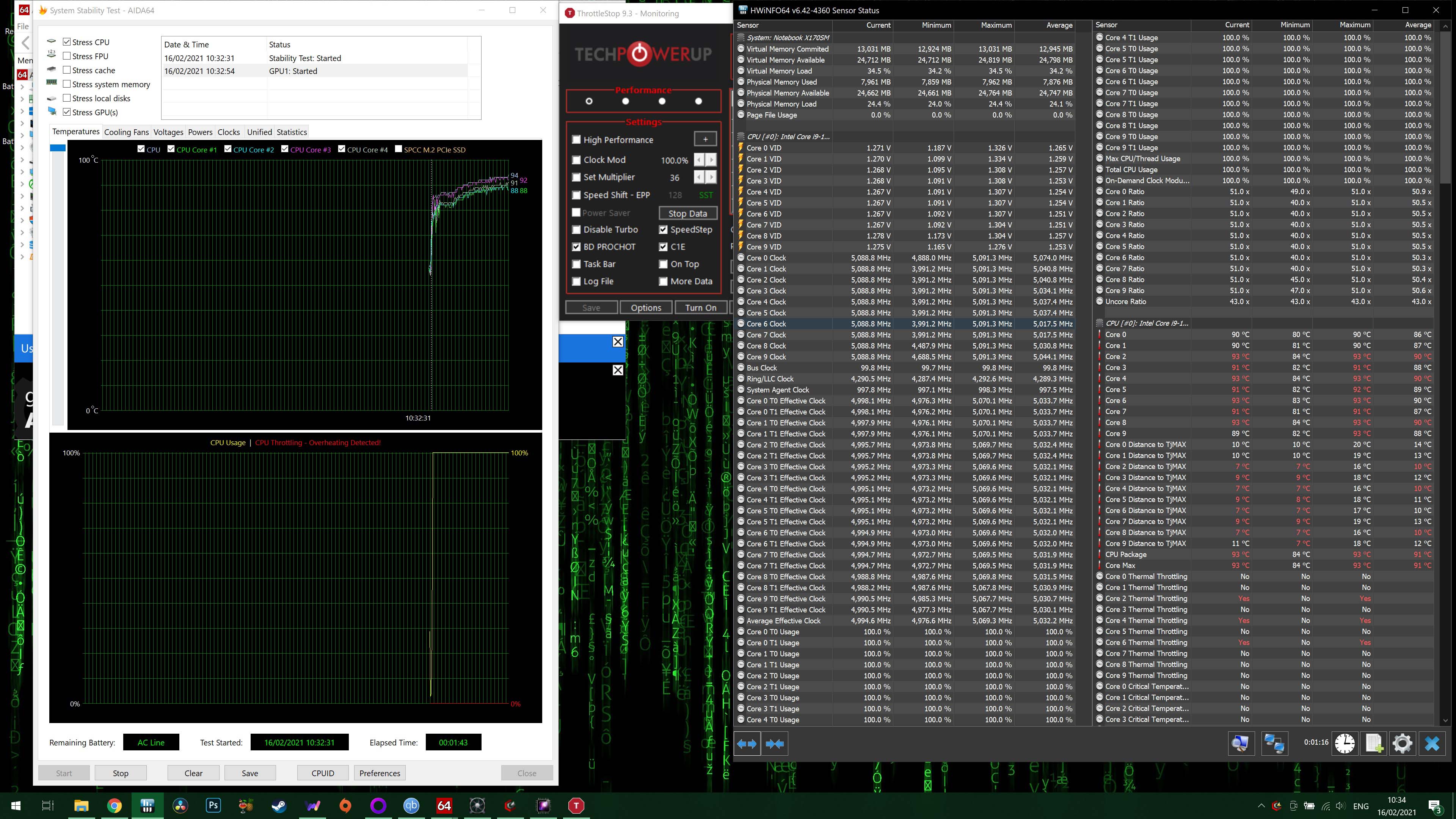
EDIT: MAnaged to get TS to work with a -110mv to core an -25mv cache. And done an aida64 stress test on the CPU FPU CACHE and GPU hoverd around the 80s.
No idea what i did differnt but the UV stuck. Very happy !Last edited: Feb 15, 2021 -
I just got my baby back from Eluktronics!!
... Now what?!? Lol![[IMG]](images/storyImages/f0c672886e515f05b2fae95f5a54287e.jpg)
![[IMG]](images/storyImages/fb2aafd2c0fbc367d669a750c9641793.jpg)
Sent from my OnePlus 7 Pro using Tapatalkraz8020, Clamibot, electrosoft and 3 others like this. -
Turbo is still enabled. Just no overclocking. I got mine to run for benchmarking at 5.0 all core. I could run games that way, but it was in the mid to high 80s. It’ll take a little work to get it under control, but Mr. Fox is giving some of the best advise that’ll help you.
-
You see any difference?
-
Not yet. I have no idea what I am doing. I am going to delid and put Coollabratory Liquid Pro on in a couple days. I don't know what settings to change in the Bios.
Sent from my OnePlus 7 Pro using Tapatalk -
Where did you buy it?
If you are not modding anything it should not affect your warranty. But, I'd start with using a superior thermal compound, like Phobya NanoGrease Extreme, if it has whatever the seller chose to use on it. Make sure all of the screws are snug (not super tight) and the most obvious things. If you are running full turbo in the 80's now then it sounds like your undervolt wasn't being applied correctly and that is already a major improvement. -
The PremaMod BIOS should already have an undervolt built-in and should run cooler without touching any settings, just using @Prema default settings. He has also removed the throttling crap that would occur with the stock BIOS, and that requires no special settings. So, touching nothing it will run cooler and faster than it did with the stock Clevo BIOS. One of the goals of developing it is having a BIOS that just works right and performs better even for the noobs that are never going to touch anything.
You don't necessarily need to change anything in the settings, but the beauty is that you can now. You can set XMP or use custom memory settings now... but, couldn't with the stock BIOS. -
Thank you everyone for the tips on trying to get my laptop back in working order.
So far nothing has worked. The display won’t turn on. Still trying to find an external display, but have lots of boxes in garage and haven’t found one yet.
So far I’ve tried:
Disconnecting AC
Take out battery
Disconnect CMOS battery cable for over 1 minute
Press power button on
And waited for 5 minutes. Display won’t turn on.
Done the above, take out 1 of the 2 RAM sticks
Press power button on.
Display won’t turn on.
Done the above switching to the 2nd RAM stick in the same slot.
Display won’t turn on.
Switch the RAM sticks to the other slot, turn on, then repeat with 2nd RAM stick.
Display won’t turn on.
I've even tried the above with no RAM sticks at all.
Computer seems to turn on, multicolor RGB keyboard turns on, fans turn on for a few seconds, then RGB keyboard goes to blue. Everything seems normal as when the laptop was working fine.
Reseller contacted me today, we’re scheduled for phone call tomorrow.
Will let you know the updates. -
It has MX4 on it right now.I think the first thing i'll try is the washer mod for the CPU. As i think i can do that without removing the heatsink. Just going one screw at a time.
And under 125w PL and full GPU and CPU load in aida cpu spiked at 96 but was normaly around the 86-89 mark. Honsestly not sure if thats any good or not.Mr. Fox likes this. -
The number 1 test is what @Mr. Fox suggested with the flashlight. That will tell you if it is the GPU, or the screen.
-
You may want to loosen the screws a bit as you will be applying a lot of force on individual sides doing that.JKERP likes this.
-
Good point. The washers will arrive tomorrow so i'll do an update then.
These are my temps under Aida64 with max fans before the washer mod. Only a short test shown but no matter how long i run it for these are the max temps i'll seeAttached Files:
Last edited: Feb 16, 2021 -
-
Yes, did that already. Black screen.
-
Hmm, that means your CPU has failed. Work with @Zoltan@zTecpc tomorrow to arrange its replacement.
No need to look for that external monitor.raz8020, Clamibot, Papusan and 1 other person like this. -
It would be nice to have an unlocked bios for my X170........... People should stop fighting especially when no one is charging for it.
-
Thanks. Will do.
-
I have thought about doing this because it is a MAGNET for fingerprints!!
Now you gave me some motivation to get it done!!
Sent from my OnePlus 7 Pro using Tapatalk -
Does anyone use a screen protector on their x170?
Sent from my OnePlus 7 Pro using Tapatalk -
I've done it to all my laptops. I will be doing the keyboard deck later on.
-
A total of three NVMe SSDs in less than 90 days for me (so 4 counting yours). Two on one system, one on another. Two of them I was later (just last week) able to find a way to resuscitate using Linux to repair the firmware partition. The other one is messed up so bad the system can't boot at all with the SSD installed. It just stays on a black screen and never tries to POST.Papusan, raz8020, Colorme and 1 other person like this.
-
Looks beautiful. What a great idea. That’s something I may try in the near future.JKERP likes this.
-
Darn. That’s beyond bad luck.
I too thought that a drive may have gone down, but the display not turning on made me think otherwise. -
Washers are in. Just about a 2-4C drop in temps. Small improvement but i'll take it.
Had to pull back the UV to -80mv from -100mv as TS Bench was throwing out errors.Attached Files:
-
-
Every little bit helps. I was able to get away with some benchmarking at around -100mv, but was never stable for long term use.
-
Nice cut and fit
*** Official Clevo X170SM-G/Sager NP9670M Owner's Lounge ***
Discussion in 'Sager/Clevo Reviews & Owners' Lounges' started by Rahego, Jan 10, 2020.