Problems? See this thread at archive.org.
Is there a disassemble guide somewhere that I can use to do a repaste job?
-
There's a guide here (thanks to Theriko):
P15xHM_ESM.zip
Just be sure that you apply the paste depending on the instructions for that specific type. For example, Arctic silver recommends a surface spread application while IC Diamond recommends a pea sized dot in the middle of the die. Other pastes may have different application methods. -
So as my luck would have it my Sager 8130 died on February 25 which was a Saturday here in the states. I called up Sager on Monday and got an RMA with free shipping both ways as I'm still under warranty. I finally got to UPS on Wednesday and Sager received it on Friday.
It turns out my unit had faulty memory which is what I had expected. I received the unit back today, Wednesday the 7th.
Can you believe how fast that process was? I can't. -
I am the proud owner of a new Sager NP8130. I bought it from PowerNotebooks.com and am so far very impressed. Donald and his team made the experience painless.
I ran PCmark 7 tonight and I got a score of 1828.
NVIDIA GeForce GTX 560M video card benchmark result - Intel Core i7-2670QM Processor,CLEVO P150HMx score: 1828 PCMarks
I'm not familiar with the benchmark so I am not sure how good of a score that is. Do I need to do some optimization or am I good to go?
I should point out that I think the computer runs great!
Thanks! -
I just got a new NP8130! In Australia from AffordableLaptops. It's due to arrive in 10 - 14 days! So excited!
Yay for me! -
For those who ordered from Malibal can you tell me if the shipping cost (ground) is already included in the price quote.
-
I have a class 10 32 GB SD card that I am copying only 6 GB from and the speed is ridiculously slow (25 minutes and counting). It also is making my computer slow and sporadically unresponsive. I think I fixed this once, but am having troubles finding the issue/solution. Any ideas? Thanks!
-
SD card speeds seem fine to me Though as I am sure you have noticed, it kind of sucks how the sd card protrudes, would be nice if it didn't.
-
And USB 3.0 transfer is 12 MB/sec. Something is wrong.
-
12 MB/s could be just right depending on the card. Even though its a USB 3.0 port doesn't necessarily mean you will go that fast. Your transfer speeds will be limited to the slower component involved. Think of it this way, if the speed limit on the highway was 4500mph but your car can only got 12mph then thats the fastest you'll go. Can you check it in a USB 2.0 port and see if you're getting any better speeds. Even 2.0 at 450mb/s should be able to handle the full speed of your SD card. If you try it on another port and you're getting the same speed then I would think everything is working as it should.
Easiest thing to do is do a search on the SD card make/model and see what the speed its rated at. -
I'd still say those are low transfer speeds in general. 12Mb/s is almost 25% of the slowest speeds that a mechanical drive can attain:
Charts, benchmarks 3.5" Hard Drive Charts 2008, Average Read Transfer Performance
I'd think speeds of 50-60MB/s would be more typical.
OP: Have you installed the latest chipset and USB 3.0 drivers? -
I agree if he was talking about a hard drive but a "class 10 32 GB SD" 12MB/s sounds pretty spot on. They are listed anywhere from 10-30MB/s depending on the card. Again the suggestion to check the make/model of the SD card is what i would suggest to see if that is the speed its rated at.
Class 10 got its name because its rated at 10MB/s transfer speed. So you are actually getting slightly faster then advertised speed
If you have a Class 10: 66× = 10.0MB/s, 100× 15.0MB/s, 133× = 20MB/s -
What max temps are you guys getting with the GTX560M using the new OCCT 4.1.1 (@1920x1080 with shader complexity of 8 and error-checking checked)?
-
Sorry, I assumed he was referring to a completely separate issue from the SD card he was testing. He didn't list what drive he was using on the USB 3.0 port and I just assumed mechanical.
My mistake
-
Hey guys, I'm experimenting with overclocking my gtx560m using msi afterburner + kombuster (furmark). So far I haven't had any problems, but I noticed that the memory clocks GPU-Z report and the memory clocks afterburner report are completely different. Also, gpu-z doesn't show a difference when I change the memory clocks in afterburner.
For example, right now, afterburner says my memory is running at 1310Mhz, but Gpu-Z says it's at 655Mhz. That's a huge difference!
What can I trust Afterburner or Gpu-Z?
Thanks!
P.S. I just realized gpu-z's value is exactly half afterburner's. But, which one is right?!?!? -
I assume After burner is showing it at its actual DDR speed while GPU-Z always shows single channel speed even if you're actually running dual channel. 655x2 = 1310 so they are actually showing the same speed but reporting it a different way.
-
GPUZ reports the per clock speed of the RAM, while afterburner must list the effective speed. Therefore, as hutsady said, you're getting 1310Mhz which is DDR 655Mhz (x 2 = 1310).
See here for an explanation:
Double data rate - Wikipedia, the free encyclopedia -
Great! Thanks guys! I figured it was something like that after I realized one was exactly half the other.
In other news, I was able to OC my memory to 1346. I could have gone higher, but my benchmark scores in furmark were starting to drop, so I backed of and left it there.
I'm on to OC'ing my core and shaders! -
I have my memory at 1625, no problems.
-
Nice! From what I've read GDDR5 is very crash resistant, and so when overclocking one isn't looking for the highest memory clock without crashing, but the highest memory clock that creates the best benchmark. I saw my benchmark scores starting to go down at around 1355Mhz, so I backed it off until the scores rose again. Now, that could have just been an anomaly with the test and in fact I could go higher and get a better score.
Now I'm going to see if I can't get higher! -
Could you post your settings and laptop specs?
I'm sure there are a few people here that would love to see how you were able to get your memory clocked that high.
-
+1 tell us your secret!
-
And what are CPU load temps lile for the 2670qm in a sager np8130?
-
Secret? There isn't any
560m
i7 2720 ES
1.06 bios (old as hell, but it worked fine on new bios)
8 gig ddr3
![[IMG]](images/storyImages/3-15-2012%201-53-41%20PM.png)
-
Nice! Hey, could you run a kombuster bench at 4x msaa and 1920 by 1080 with only your memory overclocked? I'd love to see what score you get.
-
1005
Full rendering (open gl 2)
res 1920x1080
AA 4x MSAA -postfx off
min 17 max 19
max gpu temp = 77c -
That's the 2 minute 10 second test, right? (13something miliseconds), and you were plugged in when you did it? I find those numbers weird because I get around 1990 in kombuster with my memory at 1346. I suspect you may be hurting your scores with that overclock ( if we are talking about the same test).
You didn't happen to hit the extreme bench, did you? the scores you posted look alot like the ones I got for the extreme bench. If you did do the extreme, then that overclock is making a huge difference ( I got something like 13 fps in that, if I recall right). -
Are you using open gl2? When I took the oc off I got 13-15fps
instead of 17-19
New test:
I not launched the program
(just normal, not dx9, dx10 or 11)
then click kmark benchmark preset extreme
940 pts on graphics
no oc:888
this is just memory to clarify, 1250 vs 1625
Also this isjust the graphics score of the benchmark, there are lots of other numbers. -
oh, okay extreme preset, then that makes sense. I was talking about doing a custom bench using the settings I mentioned. That uses the button below the extreme bench that says "Benchmark (no submission)", and takes the users own settings ( the ones below) into account.
Anyways, thanks for doing the bench. It's pretty amazing to see the difference only memory OC can make.
Your Gpu gets kinda hot when you do this, are you pressing Fn+1 when you run the bench? Just wondering because with fans at full I have a hard time breaking the 61C mark in that bench. Though I do have ICD7 so that could be helping. Though, without Fn+1 I get to around 73-4C -
What are 2670QM and 560M load temps like with this laptop? I need to confirm my own results with yours, please?
-
Fans are not at full DJ, they are automatic. However I am using 1.06 which has fans go on a lot. Much more than the 1.14 or w/e they have now. Reason I am on old bios is for my 2720ES not to throttle as much.(They throttled my ES cpu on new BIOSes)
-
hm... What TIM are you using? I'm seeing around 73-4C max ( on auto fans) even when playing games for hours. But, if you're using the stock TIM, then that difference seems about right.
oh, and yes open gl2 is what I've been benching in. -
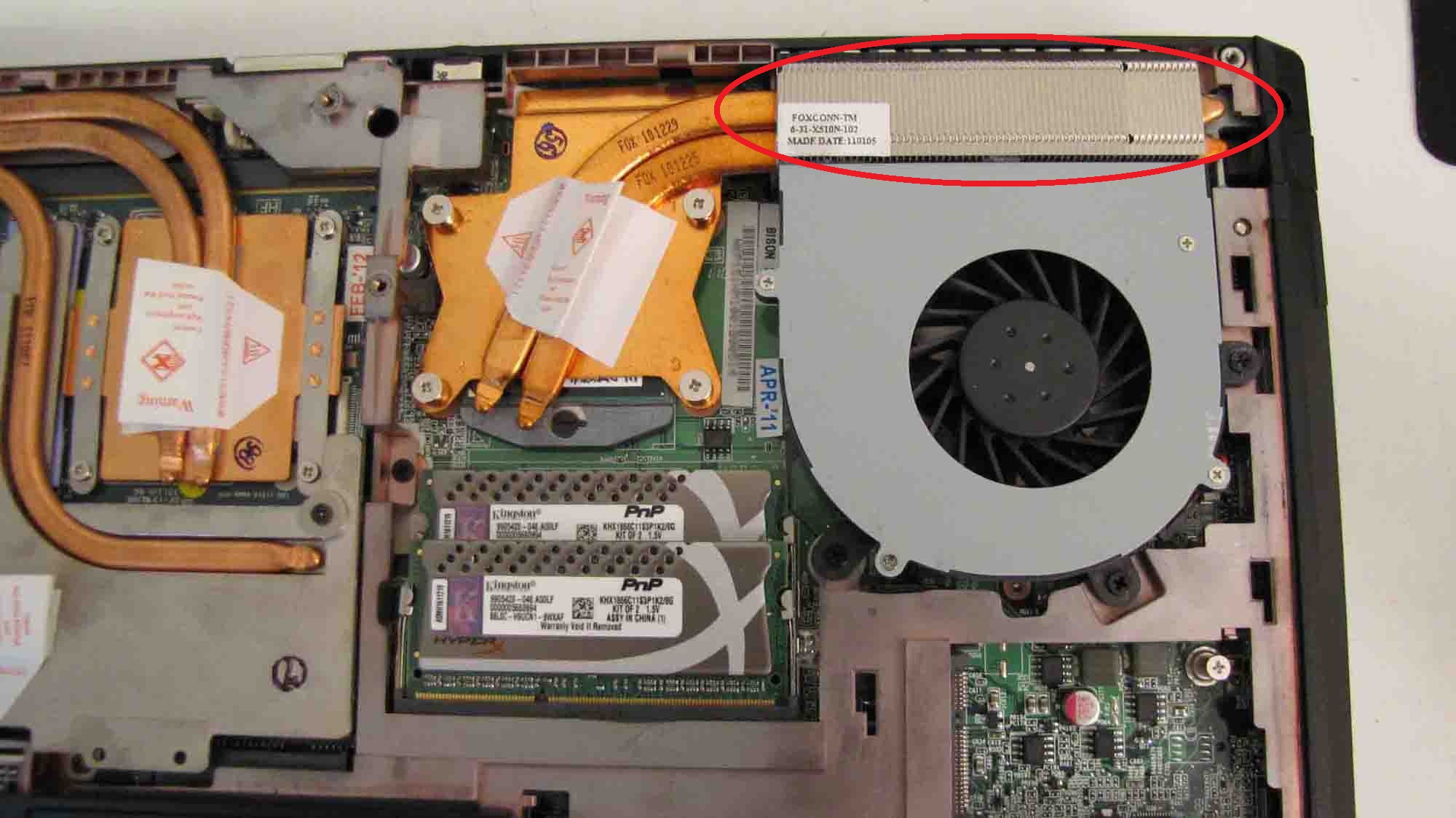
The review of this notebook that I watched (from XoticPC) shows the laptop has a silver-colored heatsink. My NP8130 has a copper-colored one similar to that of the GPU. Is this normal?
-
mines copper
-
Both GPU sets on my notebook had copper heatsinks (460m and now the 580m), while the one for the cpu is silver/aluminum (2720qm).
-
Weird, my CPU has a copper heatsink. Is there a difference? Well, copper has better conductivity.
-
Copper is a better heat conductor, but far more expensive than aluminium (more noticeable when producing mass amounts). Because the GPU can produce significantly more heat than the CPU, it needs a more robust cooling system- hence the copper. At least, that's the most reasonable explanation I'd have for the difference.
-
I'm having an issue with my monitor displaying anything under 1920 by 1080. If I select it the monitor will just display the same image multiple times and flicker making me unable to do anything.
-
Hmm..just wondering..noticed this weird red tint on my screen..I've never really noticed this before and was wondering if it should be like this. i can tell when the screen's black when loading up a game then the left corner is a redish tint. :s
-
But my real question is why does my 8130 have a CPU copper heatsink and others have aluminum? Which is newer?
-
What cpu do you have?
-
2670QM. 10char.
-
Thought it might have been due to having either 2920xm or 2960xm, guess that shoots that idea.
-
Oh ok. What's your CPU heastink, copper or aluminum?
-
Aluminum with a 2720qm
-
you have a defected panel quite common, go rma if you care.
I was luckily and didn't have it but I had to rma my laptop anyway
my friend had your issue -
When did you purchase your system? I have a hunch that the aluminum CPU heatsink is an older version for older systems.
-
Those that claim an aluminum heatsink please post a picture of this and tell us from whom it was purchased, and when your machine shipped.
The Sager factory in California have been shipping the copper heatsinks.
_ -
My system was shipped on the 4-12-11.
Attached Files:
-
-
Both heatsinks are copper (ones with stickers), the case for the fan looks aluminum however, which is perfectly normal.
Official Sager NP8130/Clevo P151HM1 Owners Lounge
Discussion in 'Sager/Clevo Reviews & Owners' Lounges' started by opelfrost, Jan 9, 2011.