Problems? See this thread at archive.org.
Thanks Hutsady.
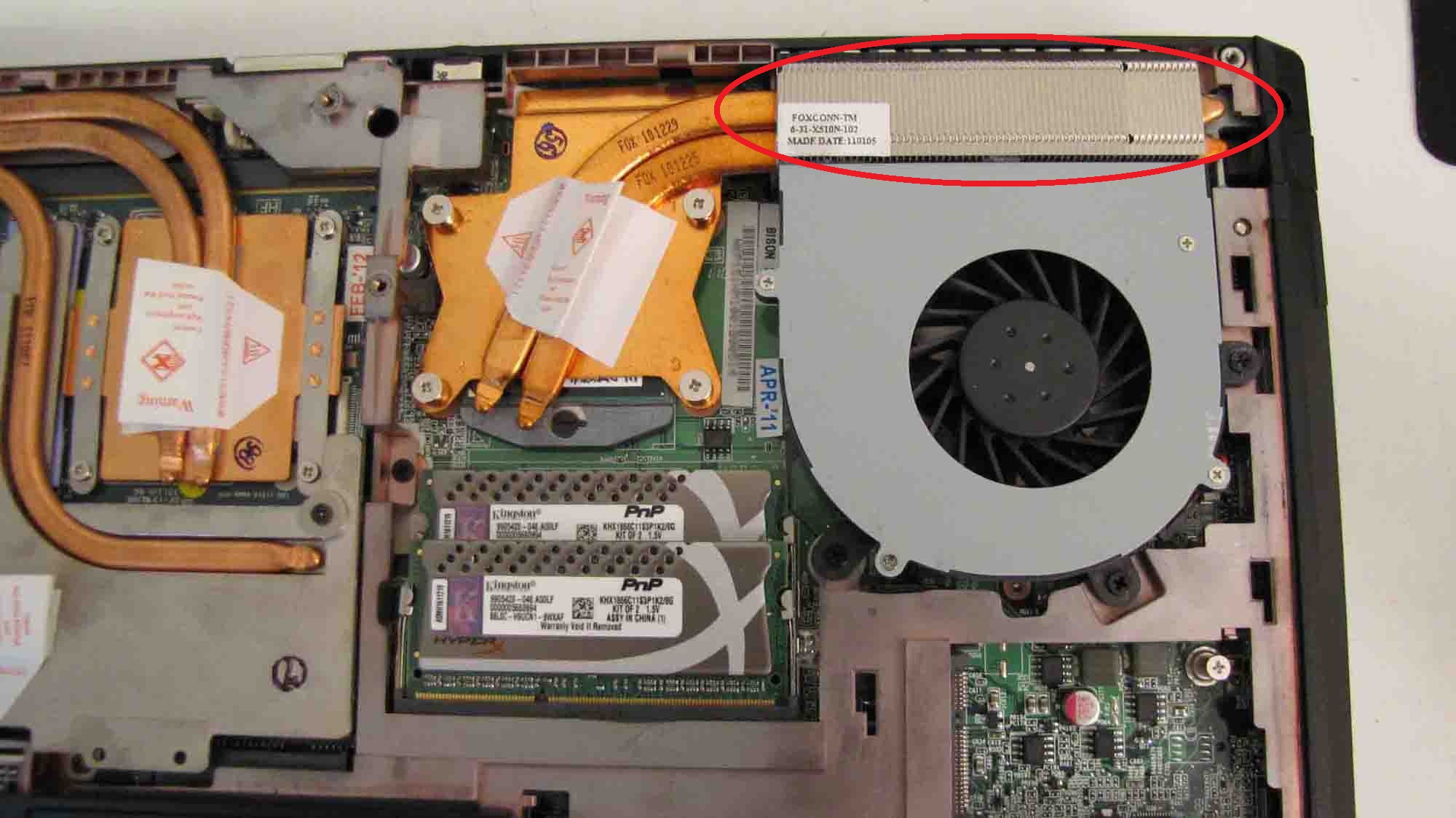
I thought that the heatstink part above the fan was aluminum (because of the non-copper color). Either way, the heatstink works very well, I don't think I have ever seen the cpu go over 70C.
-
I see what you mean. The cooper parts goes all the way through, you can see the rest of it coming out the other side. If you're maxing out at 70C thats very very good.
-
That part on my system is copper-colored as well. Why is that again?
-
Got a few questions for you P151HM1/NP8130/1 owners.
1. Anyone have the config with a i7 2670QM and a HD6970m? Just wondering what kind of FPS in BF3 I am looking at if I get this config.
2. How horrible is the GTX560m compared to the HD6970m?
Reason why I am asking these two questions is that I am mauling over two different system from XoticPC and Malibal.
XoticPC
Sager NP8131 / Built on Clevo P151
- FREE!! Continental (U.S. Lower 48 - UPS Ground Only) Ground Shipping on ALL Sager Laptops (Enter Coupon Code: "SAGERFREESHIP" during order process)
- 15.6” FHD 16:9 LED Backlit Wide screen (1920x1080) Super Clear Matte Type Screen (SKU - S1R324)
- NO Professional Monitor Color Calibration
- Standard Dead Pixel Policy
- 2nd Generation Intel® Core™ i7-2670QM, 2.2-3.1GHz, (32nm, 6MB L3 cache) (SKU - S2N224)
- -Stock OEM Thermal Compound
- nVidia GeForce GTX 560M 1,536MB PCI-Express GDDR5 DX11 (SKU - S3R452)
- No Video Adapter
- 8GB - DDR3 1333MHz Dual Channel Memory (4 SODIMMS) - SPECIAL! (SKU - S4P369)
- Sager Branding
- Standard Finish
- 500GB 7200RPM (Serial-ATA II 300 - 16MB Cache) - Default (SKU - S5R207)
- Combo Dual Layer SuperMulti DVDRW/CDRW Drive w/ Software (When selecting a Hard Drive in the Optical Bay, No Optical Drive is Included) (SKU - S7R455)
- No Extra Optical Bay Hard Drive Caddy
- No Back Up Hard Drive
- NO External USB Optical Drive
- No Floppy Drive
- Internal 7-in-1 Card Reader (MS/MS Pro/MS Duo/MS Pro Duo/SD/Mini-SD/MMC/RS)
- No Back Up Software
- None Standard--
- Sager - Built-in 802.11 Wireless B/G/N - Stock Wireless Card + Bluetooth (SKU - S8R110)
- No Network Accessory
- Built in 2.0 Megapixel Camera
- No TV Tuner
- Sound Blaster Compatible 3D Audio - Included
- Basic Black Business Case - Included
- Smart Li-ion Battery (8-Cell)
- No Car Adapter
- No Spare AC Adapter
- No Dock/Hub/Adapter
- Integrated Fingerprint Reader
- No Headset
- No External Keyboard or Mouse
- No Notebook Cooler
- No Thanks, Please do not Overclock my system (Overclocking will add 3-6 business days to build time)
- No Operating System Redline Boost
- No Operating System Standard - Drivers & Utility Software Only
- No Office Software
- No Software Bundle
- LIFETIME Ltd Labor* 1 Year Parts Warranty Lifetime -24/7 DOMESTIC Based- Toll Free Telephone Tech Support (Labor Warranty through Xotic PC)
Includes FREE Shipping Both Ways for Warranty Repairs (SKU - X9R009)
- No Outside of US Shipping Coverage
- No Xotic PC Gear
$1,119.00
Sub-Total: $1,119.00
Malibal
Lotus P151HM1 (P151HM1)
$1,084.00
$1,084.00
Customizations:
Display: 15.6" 1920 x 1080 FHD LED AUO B156HW01 V.7 95% NTSC Glossy Display
Processor: Intel® Core™ i7-2670QM, 6MB L3 Cache, 2.2-3.1GHz
$80.00
Memory: (8GB) 8192MB, PC3-10660/1333MHz DDR3 - 2 SO-DIMM
Graphics Card: AMD® Radeon HD 6970M 2GB GDDR5
$95.00
Hard Drive: 500GB 7200rpm 2.5" SATA 300
Optical Drive Bay: 8X Multi DVD+/-R/RW RAM Dual-Layer Drive
Operating System: None
Wireless: Internal 802.11B/G/N LAN and Bluetooth Card
Cooling: Stock OEM Thermal Compound, CPU & GPU
Keyboard: English: US & Canada
Power Cord: US & Canada
AC Adapter: Full Range AC-in 100~240V, 50~60Hz, 180W AC Adapter, DC output 19V, 9.47A
$95.00
Branding: MALIBAL
Build Time: 5-7 Business Days (Estimated Time)
Warranty: LIFETIME Ltd. Labor and 1 Year Parts Warranty with 24/7 Support (USA)
Extras: Standard Black Carrying Case
Product Subtotal: $1,354.00
Just trying to justify the $235 swing. Swing me.
-
According to notebookcheck, in BF3
6970M averages on High: 45.7FPS and Max: 19FPS AMD Radeon HD 6970M - Notebookcheck.com Technik/FAQ
560M averages on High: 37.7FPS and Max: 17.3FPS NVIDIA GeForce GTX 560M - Notebookcheck.com Technik/FAQ
So you can see the 6970M is faster.
Keep in mind while you're looking at the NP8131 the specs are subject to change before the ship date of April 12th. The GTX 560M might not be the card it actually ships with. -
Those are the heat transfer pipes. Unlike desktops that have the fans right over the cpu/gpu, notebooks use those pipes to transfer heat to the fans that sit off to the side. Copper is used as it is one of the best materials to transfer heat.
-
If you don't plan on changing your graphics card in the future, then I would highly suggest that you get the 6970m, it's significantly more powerful than the gtx560m. But, seeing as this new refresh is right around the corner, and you'll be able to upgrade the GPU to the next gen, then I would save the money and put it towards something like a 7990m or GTX680m. The GTX560m is in no way a weak gpu either, so it's not like you won't be able to play games while you're waiting for the new mobile gpu's, it just means you won't be able to play them maxed out.
Just so you know, you'll probably have to spring close to 500 dollars for a new high end GPU, so if you're planning on going that route, start saving. -
Yeah, figured that. I just can't seem to get a good date on when all the refresh models come out. April 12th seems to be the day to look for though.
As far as the GPU is concerned, I figured spend more now (ie HD6970M) get more back when it's time to put that card on eBay. Then I will be able to justify the newer GPU upgrade.
-
That's a good idea, though Idk if you'll get back what you put in, but you will have a better gaming experience in the interim.
-
Ahh really, well I'll probably send it in then..Was thinking about sending it in because I've had a couple of BSOD's as well. Better go and do the RMA process :S Hopefully it doesn't take too long.
-
Yeah but actually that is not my question. My question is why do others have an aluminum heat-transfer pipes while others have copper (like me)?
-
Simple, aluminum is cheaper, and not nearly as effective.
-
I guess I'm lucky then, because they seem to work great for my system.
-
Still not the answer to my question. I'm asking about the "difference". Why do some reseller have theirs at aluminum and some copper?
-
Are there Clevo based machines you know of that use aluminum instead of Copper or are you just asking in general?
Basically what it comes down to is cost as Donald mentioned. Aluminum is cheaper and doesn't cool as well but costs the manufacturers less to install. Depending on the GPU aluminum might be all thats needed. On higher end cards which need better cooling you'll find cooper used as it transfer heat better. There could be brands out that that use aluminum for the higher end cards but they are just trying to cut costs. -
The system I got was thru XoticPC (which came from Sager), it has an aluminum transfer pipes, its also for the CPU (2720qm). The gpu has a copper one. This is just for information on the subject.
-
I dont get this, the picture you posted two pages back clearly show copper for both transfer pipes.
If you dont mind I reattached it -
Please be sure to separate heat sink from transfer pipes in your description.
-
I'm asking in general. And my question was for the CPU heastink/transfer pipes and not on the GPU. Let's be clear on the terms again, what I'm referring to is the rectangular metal area (in the picture attached in your post) just above the CPU fan. Can you see that it's colored aluminum compared to the GPU which has a copper color?
-
the copper extends through that, you can see the end of it coming out the other side.
-
Here is my picture and the manual.
Attached Files:
-
-
Yup. So the difference in color on that area is randomly selected by Sager?
That is exactly what I was referring to. Thanks for the pictures. -
what they use for the fins can vary but the heat transfer pipe under that is always copper
-
Is there in any way can the Intel 6300AGN wifi card have Bluetooth access? I just noticed now in my adpater properties that it has a wireless bluetooth interface? Here's the pic:
![[IMG]](images/storyImages/Capture-37.jpg)
It even has a setting in the "configure" section of that picture where you can enable Bluetooth AMP.
Nothing happens when I press Fn+F12 in the keyboard though. -
don't think the 6300 has the actual hardware for it, the software is pretty much generic/the same for both the 6230/6300 that's why it has those settings.
-
Just as I thought.
-
The only way to get bluetooth with the 6300 would be through adding an external adapter. I assume they removed it because the third antenna takes up the room needed on the mini card by the BT module, because otherwise I can't imagine why they'd cut that feature.
For Clarity: The 6300 can never do bluetooth. The above is only referring to using an external USB bluetooth adapter if you have the 6300- as it's the only way currently to get both. -
What is that external adapter?
-
A bluetooth adapter that connects to a USB port
-
I don't understand why an external adapter is needed to make the bluetooth with 6300 work? What does it have to do with the 6300?
-
I think what Malibal was trying to say was that the 6300 does NOT have bluetooth on it, and if you want to have bluetooth on the laptop you have to go buy a USB Bluetooth adapter that plugs in separately and has its own bluetooth chip and antenna in it.
-
How's the compatibility of this laptop series with the new Kepler video cards? I read from other threads that a BIOS update might be needed?
I am hoping that I can upgrade my current 8130 with 460M GTX to a new 660/670M GTX. -
Yes, thanks for clearing that up. I just realized that it wasn't as clear as it could be so I edited the post. The 6300 can never do bluetooth- a separate external module would be required to have that functionality on the laptop.
-
Thanks for the info. What do you mean about the third antenna taking up the space for the bluetooth device?
-
Idle speculation. I haven't seen the plans for that chip, so I can't fathom why else Intel would choose to leave Bluetooth out except for two reasons- 1) bumping up the speed and adding the third antenna removed the space on the mini card where the module would have been, had it been a 2 antenna 300Mbps module like the 6230 or 2) there was some level of interference or incompatibility that led to performance problems with the 6300 + bluetooth. I guess it could also be a marketing decision to leave the capability out as well, but only Intel knows that
-
Seconded. I want to know more about this too
Could anyone think of any reason why it should NOT work? (Don't mention the power requirements...)
Mr. Mysterious -
If the BIOS+EC doesn't support it, then it will load the wrong or no fan tables and won't be properly cooled. Also without proper support in the BIOS it might not properly power-save and so would be worse on the battery. Just some ideas, but thats all speculation until tested.
-
Alright, I've been having some fan issues similiar to the guy in this thread: http://forum.notebookreview.com/sager-clevo/629724-malibal-lotus-p151hm1-fan-problems.html
It's the left fan. It sounds like the blades are hitting something, very annoying. I actually had this issue during the first 2-3 days but it stopped.
I opened the laptop and cleaned the fans out, that solved the problem for a couple of days, and now it's back.
Is this behavior part of a dying fan? -
^^^^when that happened on my old, cheap cooling pad, it was because one of the fan blades was chipped. If you open it up again, be sure to carefully inspect the fan blades for signs of damage.
-
Yes, I don't think it has anything to do with being clean. I opened it up in a safe enviroment when it was still running, and the noise stopped when I took off that metal pad covering the fan. It came back when I placed the metal pad back on... The noise also came back when taking the metal pad off and placing the cover back on *shrug*. My temps were also lower with that metal pad off
.
I loosened the screws holding the fan on, and now the noise stopped again. i have no idea whtat to make of this, something in the laptop is probably misaligned. -
Likely. After I got the chipped blade sorted out, a power brick smashed into the cage of the fan and inhibited it more. Now I don't have a working cooling pad. You should probably just not tighten the screws so much, leave them slightly loose.
-
Right, that annoying sound is back. I noticed it when waking up this morning. It seriously makes me want to throw this laptop against the wall, it's that annoying. Makes it hard to work and get things done
The noise is gone when there's nothing obstructing the fan, but when I put my hand over the fan, the noise comes back. I really don't know what to make of this. The noise sounds like something is rattling inside the fan, but there's nothing there! Maybe the fan is off balance or something. I noticed a lot of circular scratch marks on the bottom of the fan itself.
I am going to try and call MALIBAL for a fan replacement cause obviously I can't fix it.
EDIT: It sounds like this; HP Pavilion fan clicking noise - YouTube -
Yes, if you haven't already, please open a support ticket on our site and we'll get it taken care of
-
anyone's usb port died? The usb port on the left side of the laptop closest to you has died for me ;'(
-
Nope. Must be that crazy memory OC, messing with your USB ports!
(jk)
-
Is it normal for the trackpad to have a small area (where you mostly put your finger) to lose its "roughness"?
-
indeed it's normal, mine looks fugly now
build quality on this lappy isn't the best -
Sigh So when I decide to sell this laptop, I will be losing money
Is this the same with the 8150? -
Thinking about getting a Lotus P151HM1 from MALIBAL. Is there a need for a cooling pad?
-
Nah, cooling systems for these laptops are superb. If you want to shave off 5-10C more from your temps, you can raise the back of your laptop by 0.5"-1" using an eraser for example.
Official Sager NP8130/Clevo P151HM1 Owners Lounge
Discussion in 'Sager/Clevo Reviews & Owners' Lounges' started by opelfrost, Jan 9, 2011.