 Problems? See this thread at archive.org.
Yes newer processes are more dense and TDPs have gone up.
-
-
Luckily the larger dies help with spreading the power densities over a larger area.Spartan@HIDevolution and Papusan like this.
-
Still larger denser cools are still harder to cool than larger less dense chips.
-
Hi guys my 775 is still going strong but a recent new flight simulator is demanding more then my GTX 1060 can provide. Is there a way or a company you know of that can do upgrades to the 775? Looking to swap the 1060 for a 2070Super or 2080
-
You can DIY upgrade to RTX20x0, it should be plug and play however, you will need the new RTX heatsink. For RTX20x0Super, you will need to mod the drivers.Spartan@HIDevolution, Papusan and cfe like this.
-
A 2070 or 2070 super would cope a lot better with that game.
-
2070 Mobile is in short on level with 2060 desktop card.
![[IMG]](images/storyImages/jgb533gPKEoviPAyVPCAFS.png)
https://www.tomshardware.com/uk/fea...or-benchmarks-performance-system-requirements
Yeah Pascal was harder to cool than the bigger Turing chips.Last edited: Aug 24, 2020 -
Crazy how the rtx2080ti gets brutalized in that benchmark.
-
Does no better than the 2080 super, that's interesting.
-
-
At the same time it is consistently lower, you would have to do testing to be 100% sure. Interesting at around 60FPS is when the CPU seems to be the limit.
-
It appears so. HOWEVER. Firstly, they tested with a 9900K, what kind of CPU would this game need to let the rtx 2080 fly? Secondly: "The Core i5-9600K and Core i9-9900K basically deliver a similar level of performance. There's a bit more stuttering when you first load into a flight with the 6-core/6-thread chip, but nothing major. The same goes for the Ryzen 9 3900X and Ryzen 5 3600." This means that the problem is rather bad optimization than a pure CPU bottleneck.
-
The game is DX11 and not very well threaded. It needs a CPU with high clockspeed rather than one with more cores.
-
It would be interesting to see what a really tuned chip gets to confirm that.
-
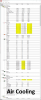
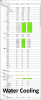
Just got the liquid cooling block that I ordered from Aliexpress (made for these laptops). Everything is up and running and it works amazingly well. The best part is that it's a hybrid type heatsink, as in it can do air and/or water cooling. About the only upgrade left would be the 780 watt PSU. Anybody got any benchmark requests?
Ambient Temperature=74F @ 64% Humidity
Benchmark used: Unigine Heaven (2x warm-up run+ 1x benchmark run)
DX11/Ultra Quality/Extreme Tessellation/AA Off/3840x2160
Idle CPU Temp on Air===32c/89F
Idle CPU Temp on Water=25c/77F
Idle GPU Temp on Air===34c/93F
Idle GPU Temp on Water=27c/80F
----------------------------
Maximum CPU Temp on Air===74c/165F
Maximum CPU Temp on Water=49c/120F
Maximum GPU Temp on Air===78c/172F
Maximum GPU Temp on Water=52c/125F
CPU Temp difference=7c-25c
GPU Temp Difference=7c-26c
 electrosoft likes this.
 -
Pictures of the installed heatsink?
-
I didn't know where to turn, for an issue I am having, so I thought I would come back here for some assistance. I just recently did a reset of Windows on my system, and everything went fine for reinstalling Windows and the required drivers, except for audio. No matter what I did, I cannot get rid of this issue where, anytime I either adjust the volume (through the systray icon) or if I open Youtube or any website that needs audio, I get a loud "pop" sound. As long as I stick around that site, I won't hear it again, but if I go somewhere else online or again, if I run an app that requires audio, I'll get that pop. It's highly annoying (just as annoying as installing the driver, rebooting and the audio gets set to 100).
So far, I've uninstalled and reinstalled the realtek audio driver, which has not fixed the problem (I was able to figure out the infinite uninstall/reinstall loop from the realtek installer, which I had hoped would resolve my popping problem). I went into the power settings for the system, to make sure there isn't any power setting that affects the audio as well...basically, I'm at wits end right now, trying to fix this problem and I don't know what else it could be. The Realtek driver I am using is the one posted on Sager's website ( https://www.sagernotebook.com/drivers.php?cat=710 ), which has worked before, just fine. I honestly don't know if I'm still doing something wrong, or if perhaps windows is still interfering and installing a generic driver overtop of the one I installed.
Any advice would be greatly appreciated. -
I was able to solve this by disabling Power Management in the Realtek Audio Console app that was installed by Windows after installing the driver.
Sent from my HD1925 using Tapatalk -
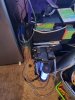
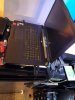
Next time I service the fans (evict the dust tenants), I'll take pics. Until then https://www.aliexpress.com/item/4000174372901.html?spm=a2g0s.9042311.0.0.58a14c4dZXlsTp is the one I got, the P775TM-1 option is the one I chose, but they support other options as well. You will have to create a slot in your plastic beneath the HDMI port for the inlet/outlet, but thats easy, and the bottom of the case still fits over the block/heatsink. Here are a few outside pics though.
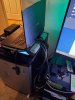
-
Nice catch.
-
That would be an awesome solution for me, but I cannot find where Windows installed that. I do however, think the way the audio is acting because of some sort of power management being active, I just cannot find where else that control may be to disable it. Honestly, I don't recall ever having to go through so much bolonie to get my audio working right.
I should elaborate to the fact that I installed the only driver that Sager had shown for my system, on their site. After installation, I never got the audio manager installed, but quite frankly didn't think i would need it. My previous Windows setup did have it, just can't recall how I got it before, unless I did let Windows install the driver and left it alone, but I also didn't have the popping noise then either. This time around with just the driver installed, I get the pop. I may just uninstall the audio driver completely, reboot and see what Windows gives me again, and if the audio manager does get installed, at least I'll be a step closer to the solution given above.Last edited: Sep 8, 2020 -
Could be from the app store.
-
Still no joy on resolving the pop. I did however, find a driver that has the audio manager, but it may be an older version, since it looks different than others I've seen in YT videos, dealing with the audio problem. When using my headphones, no popping noise, all audio comes in clear and wonderful. The popping only happens with the laptop speakers, so I'm back to square one. Any advice or solutions would be very helpful at this point.
-
If drivers are not cutting it then maybe it's a bad passive on the drivers for the speakers. Did you try an old windows version install?
-
Well I did a last ditch effort by installing the original driver on the dvd I got with my system. Oddly enough after install and reboot, I got zero sound...go ahead and laugh. I ran the windows 10 troubleshooter which then recommended it update the driver, which it did and I got sound and the ever present pop. Headphones work great though, with clean sound and no pop.
Thing of it is, how can anything physical all of a sudden fail, just after a reinstall of Windows?
Anyways, I have sound, and if it gets too annoying, I'll file a ticket with Sager. -
0. Always use DDU to remove all audio drivers and everything that reeks of Realtek
1. Try installing Soundblaster BEFORE Realtek drivers
2. Try an audio mod such as http://forum.notebookreview.com/threads/realtek-hd-audio-mod-for-clevo.814860/
However, be aware that with every Windows update the driver might become bugged (I'm using a modded driver and it still works)Papusan likes this. -
@jmorvay, Do the speakers periodically emit a short sound, like tapping on a microphone? I have the same thing, after installing the new version of Windows 2004. I had to install it together with UWP in order for the creative sound blaster to work. Since before that there were no unnecessary sounds, the reason is in Windows. Just try old build 1803 or another, or boot from LiVE USB and check.
I didn't find a way to get rid of this, but since I had to try a million versions of the driver for everything to work as I need it, I gave it up. -
Yes, the "pop" sound I get, is just like a tap on a microphone (I realize my previous explanation didn't do the issue justice). I read somewhere, that this sound coincides with power management, in that the audio gets shut off after a certain amount of time. Before my last fix, when i had the Realtek driver installed, that also installed the audio manager, there was a setting in the manager that allowed user control over this power management, but unfortunately, it didn't work, probably due to the manager being an older version.
I would have to safely say that my issue is like yours, in that after my recent reset of Windows, version 2004 was installed and possibly borked the audio driver, or the driver is still not compatible with this version of Windows. I'm not one to roll back to an older version of Windows, mainly due to the fact that I don't have the time to do so. I am working from home right now, so my computer has dual usage, and can't risk more issues that may interfere with being able to work. My bread and butter job is 2D and 3D design work, so I use apps that have laborious installs and take a while to set up. Aside from that, everything else can be redone pretty quickly, but again, I can't risk any downtime (hence why I chose to do my reset over the recent holiday, with the extra day of testing and such).
I would welcome the advice and assistance in finding a driver that works and won't be affected by new versions of Windows, but honestly though, you would think that hardware manufacturers would be more on the ball in updating their drivers to be compatible with Windows' updates, and maybe they are and the drivers just aren't as easy to find. I tried once to get an updated set of drivers through Realtek, but for some reason, they use 56k modems to driver their servers, since a 256mb file would take 3 hours to download (and that's with ultra fast internet on my end).
"I had to install it together with UWP in order for the creative sound blaster to work." <-- What is UWP, if you don't mind me asking? -
Unless I'm missing something, I looked up DDU, and it's only for video card drivers.
My next brute force step is to delete everything realtek, and take your advice of installing creative's soundblaster connect 2 software (coming from Sager) first and then I'll try the official Realtek download I FINALLY completed (3 hours for 256mb, what the heck??). Hopefully that resolves it or I'll just sit in the corner and suck my thumb. -
DDU does audio drivers as well, it's an essential program to remove drivers.
Papusan likes this. -
UWP is a Universal Windows Platform that provide apps that can be installed from Windows Store. It is nessesary for creative sound blaster.
 I always clean windows image from this peace of sh*t, but this is the only way to get 3.5 jack working properly.
I've had been testing various options for a week.
I always clean windows image from this peace of sh*t, but this is the only way to get 3.5 jack working properly.
I've had been testing various options for a week.
-
To say that I'm embroiled in a royal spitshow is an understatement. I used DDU to uninstall the realtek drivers, and each time I rebooted (DDU recommended to clean, reboot, clean, reboot again), a driver was installed. I probably should have left it there but I went ahead and installed the creative soundblaster connect 2 software and the official Realtek drivers and it brought that wonderful 'pop' back. So I have the 'pop' and now Creative Soundblaster Connect 2 can't run because it doesn't recognize that I have a sound device!!!!
The only thing that sounds right are the headphones, but I have a snowball's chance in h3ll of getting an equalizer to adjust the sound. -
@jmorvay, if you don't want reinstall windows, just test it on the Live USB OS. It is safe your time.
That bip sound 100% software bug. -
Passives can fail at any time if there is something wrong with them. However I would suggest a totally clean install to test.FTW_260 likes this.
-
Well I might just do that, when get the time.
-
Disable your internet connection when installing new drivers and try installing them manually after you downloaded them. There are ways to keep Windows from auto-updating your drivers.
Papusan likes this. -
You can always take an image backup of how it is now so you can jump back.FTW_260 likes this.
-
@jmorvay, hmm, yesterday I disabled this option, as described earlier, and I don't see any extra sounds yet ...
Meaker@Sager likes this. -
Oh power options, when are they going to stop biting?
-
@Meaker@Sager, yes, I've been watching the laptop for the second day and everything is ok.
-
Fast startup has been a pain as well, just like the old wifi/bluetooth power management options.
-
Alright folks, I'm throwing up the white flag here. Per a previous suggestion to start with a fresh reinstall, I did just that. Ultimately, as of right now, the driver installed is the realtek audio driver and not the Realtek HD audio driver. No matter what I do, something seems to get screwed up, either I get the 'pop' with no headphone function, or get the 'pop' with headphone funtion but reduced audio from the speakers. I've already known that the built-in speakers aren't the greatest and Sager's focus, for this model of laptop was more about audio for headphone use, but in general, I really shouldn't be getting this 'pop' in the first place.
Prior to last week's reinstall, my system's audio was just fine, no 'pop' great sound from the headphones and not bad for the speakers, since I was also using the Soundblaster Connect 2 app. When I did my reset of Windows, I didn't do anything different from what I've done before, so this is why the audio issue is so puzzling. I would love it for someone to provide solid advice for fixing this issue, if of course, they have gone through the same issue as I have. One would think that installing the OEM driver, would be enough, but obviously it isn't. I have had to go under the assumption that it's a Windows issue, but if that was the case, then more people would report the problem and there would at least be a fix in place.
I have now done 3 reinstalls of Windows, this past week, uninstalled and reinstalled the audio drivers with no real difference or resolution. Currently, my built-in speakers get the short 'pop', but my headphones work. I could ignore the 'pop' and just move on, but a apart of me really wants to know what is wrong and fix it, so if anyone has any solid solution, I am all ears. -
Do you use Obsidian control center?
-
As a matter of fact, ever since I read on here how much better their apps were, I bought the fan control and control center, as well as running keyboard LED (though i discovered really quick not to update Keyboard LED, as it'll break). I do not however, use the driver updater, but if that might solve my problems, I might invest in that as well.
-
Did you try headphone fix etc settings?
-
I finally found a fix, temporary, but anything is better than what I had. After sending in a ticket to Sager, describing the issue and asking for assistance (which I eventually didn't get), I started searching youtube for "audio power management" (since we all know how specific we need to be with searches), I found a video from 2018, where the presenter showed off an issue he had that was identical to mine. Granted, he had the Realtek Audio Manager, whereas I don't, he outlined the problem with the pop, as well as showing how to fix it. As I said, it's a temporary fix, in that it isn't controlled by an app, or something that i won't have to revisit. Basically, the video describes how to make a simple change to the registry, nothing to add persay, it's just a key change. Once that's done, reboot and everything is good to go.
He was right, I did exactly how he showed, rebooted and now, no more pop.
I'm pleased but still puzzled how something so simple as a driver install, would cause this issue and really the only good fix, is to hack the registry?
One minor downside to the fix is when I have to disconnect from a/c to battery, the soundblaster connect settings reset, and then reset again when I connect back to a/c. Not to big of a deal, I'll live with it, as long as I don't have the pop anymore.
Oh well, consider my issue closed for now. I'll stick with the fix until someone gets off their butt and fixes the problem. Heck, even Sager customer service didn't know about this and I had to inform them. lol -
It can happen with uncommon issues, it's not something I've heard of complained about.
-
@jmorvay, Ie such a long story will end like this strange?
Attach the link to the video so that someone else with the same problem can solve it too.
BrightSmith likes this. -
Is there an overview somewhere not only of different BIOS versions (yes repo) but also what they fix?
-
Sorry, I didn't include a link, in case others can't figure it out or bork their system and then I get blamed for it. I guess it can't hurt right now, so here's the link:
Listen close to the examples the Youtuber has in the video, because the sound is exactly what I get on my system. If anyone is familiar with this issue and have an alternative way to fix it, I am all ears.
Now that I'm fixed for now, the only one nagging issue remains now, after disabling the power management, and that's with Soundblaster Connect, in that it will NOT retain any custom settings I set in their app. More specifically, I can set the sound up like I want, but once I use the headphones, it resets, and the same thing happens when I disconnect headphones. It's an annoyance that I would like to resolve too. SB Connect is supposedly up to date, so it isn't a version issue, though it COULD be for my specific hardware. I can remember the first time I had this installed, where you had a small switch at the bottom of the app to specify headphones or speakers, but that option is now gone in the version of SB connect that I use.
On a related note, I discovered the issue as to why my driver was changing. When installing SB Connect, there is an option to install a driver (must be a SB-related one) and I was including it everytime I reinstalled SB Connect, but recently, I did not and the driver I had didn't get overridden so everything is cool and groovy, with the exception of the SB Connect settings not being retained. Another good tip, is to make sure that you disable the ability for Windows to keep drivers up to date, as well as NOT having Windows sync computer settings (which ultimately does a mirror of your system config, so if you reinstall Windows, it conveniently puts everything back the way it was, which can frustrate people who are trying to start fresh).
I still can't believe that after a simple windows refresh, I am having so many problems with just the audio driver. I really wish Realtek would get off their collective butts and fix this problem.FTW_260 likes this.
*** Official Sager NP9175 / Clevo P775TM Owner's Lounge! ***
Discussion in 'Sager/Clevo Reviews & Owners' Lounges' started by Spartan@HIDevolution, Oct 6, 2017.


