Problems? See this thread at archive.org.
I've started having a new audio issue, where audio becomes distorted at times to the point that I can't understand speech. I haven't figured out what is triggering it, but it has been happening at least once every couple days and I can find no way to get audio back to normal without rebooting.
Sent from my HD1925 using Tapatalk
-
A windows update for sure. Remove audio drivers and install latest, OR roll back the windows update and disable automatic driver updates.
-
Check the audio driver date and version.
-
Is there any information about TDP of RTX 2060? Planning to minor upgrade from my 1060.
-
The Clevo MXM version is 80W.
-
But even at 1060 the limit is 88W ...

-
Yep, but it does run very cool as a result.
-
And the performance uplift is pretty significant too in modern games using more integer math, around +50%, which puts it in mobile 1070 ballpark.
-
Hi.
I bought this laptop second hand and I got some questions that maybe you can help me with.
The actual config is i8700k, gtx 1080 mxm 8gb. 16gb corsair 2400mhz.
The BIOS is 1.07.25 Tpcs3 and EC is
1.07.16.
I bought another another kit ram from amazon, I should get it tomorrow and that is 2x 16 Gb 2933 MHz.
HyperX HX424S14IB/4 Impact DDR4, Black 32GB.
They should work inside right?
And is this laptop ready for future upgrades? Can I put inside an i7 9700k and a a rtx card with this bios or do I need to install another one?
Thx -
Yes that ram should be fine. You need a modified bios for those upgrades.
-
@Meaker@Sager
Thx, yes I just installed the Kit ram and they are working nice!
So you mean if I want to change from the 8700k to a 9700k I need another bios? Which one I need then?
When I installed the new ram I also observed that one of the speakers is damaged somehow, its the subwoofer I think, see the photo. How hard is it to change it. I saw that is really hard to get to it. Do I need to open the whole laptop?
And I also observed that the thermal pads on the gpu are not that well placed.. Is this standard? Should I change them with some gelid extreme ones?
I am also getting an error in event viewer about the HKClipSvc service failed to start due to the following error: The system cannot find the specified path.
![[IMG]](images/storyImages/IMG-20201010-125927.jpg)
![[IMG]](images/storyImages/IMG-20201010-115400.jpg)
![[IMG]](images/storyImages/IMG-20201010-123448.jpg)
![[IMG]](images/storyImages/IMG-20201010-123350.jpg)
![[IMG]](images/storyImages/IMG-20201010-123406.jpg)
![[IMG]](images/storyImages/IMG-20201010-123339.jpg)
-
So long as the pads are making contact and not impacting core contact that's the main thing.
jc_denton likes this. -
For those P775TM users having problem with bad audio after Windows updates or because of their crappy Realtek drivers in general, I've found that this mod is stable and offers perfectly crisp audio: https://www.techpowerup.com/forums/threads/realtek-dch-modded-audio-driver-for-windows-10.250915/
Make sure you enable Developer mode in Windows or the extra apps to tweak your sound system won't install. -
That might help someone I've been looking at one totally separate device lol.
-
Hi.
Where is the second M.2 slot ? can someone can send a picture showing it.
Thanks -
You should be consulting your manual, it's worth the read! But one is next to the GPU fan and one is next to one of the 2.5" bays.
Papusan likes this. -
I wanted to provide an update to my audio dilemma, with a strange turn of events. Last week, about Thursday, I discovered after starting my computer for the day, that I couldn't get Youtube to display video. No matter what video I selected, I would get a blank, black window, yet I still got full audio. The strange thing was if I "gave focus" to another window (not in the browser) or if I simply clicked on the Windows start button, the video would appear, but then if I went back to the browser window with Youtube running, the video would disappear. After tearing out my hair for two days on this (with zero help from the internet), I thought I resolved that with a simple change of browser, to Vivaldi since Chrome and Edge both exhibited the same behavior. Keep in mind that up until that Thursday morning, everything was running completely normal on my computer.
Long story short, I wound up relenting, and decided to once again, wipe the system and reinstall Windows. I used the supplied Sager USB drive (which has the stock Windows 1803 on it), installed that, then immediately grabbed the Clevo dvd and installed all my drivers. After a couple of hours I was back up and running, and I finally let Windows perform the updates it needed, including getting the feature updates for 1903 and 1909 (I stopped at 1909, since I am still not 100% sure of it's integrity). In the process of grabbing updates, Windows took it upon itself to install Realtek audio drivers, the control panel and Soundblaster Connect. Low and behold, evrything works perfectly and I no longer get the 'pop' from my speakers. What I can gather, is that the mistake I made all along was NOT having Windows grab those drivers and utilities and install them, because those were what I needed, instead of the separate drivers from the net.
With the proper drivers and apps, I get no 'pop', I can retain the audio settings in SB Connect for my laptop speakers AND the settings for the headphones separately, just like I remember from way back when. The key here is to allow Windows to grab what it needs and not fight it, like I did. On a similar note, the video issue in Youtube is gone too.
The only thing left to do is perform a system backup and tuck that away in a safe place.
-
Good that everything works. How is the sound quality?
-
Not that I have anything to compare it to, but for laptop speaker quality, they do well now, by way of the SB Connect app, holding the settings I have set. Headphone quality is as it has always been, very good quality and again, with the Sb Connect app. Of course, it also depends on what apps you use that utilize sound. One example I can provide is for playing music, which I use AIMP, as it has a good quality equalizer and handles bass really well. For Youtube, that depends on the quality of the video, so sound quality varies.
-
The amp also adjusts to the headphones so the volume range should be good.
-
Installed Metro Exodus and.. oh boy, this game is scorching my GTX1080, getting 88-90 degree Celsius while the 8700k is chilling at 70..and this on full fans and coolpad. In BF V im getting like 70 max on the GPU.
I was planning on repaste it and do a paperclip mod on it anyway. What do you think of using the K5 Pro as alternative for the pads? Its good enough for the GTX 1080, and on the die ill be using Kryonaut.
Can I use wood thoothpicks instead of the paperclips? Read somewhere that the thoothpics are putting a better pressure on the die, or should I stick to the original paperclips? -
I'd modify the pads for thinness if you can, paste is not so good for larger gaps.
Cylix101 likes this. -
I see,ill leave then the k5 pro away and I have ordered Gelid extreme Pads in 0,5, 1, 1,5 and 2 mm sizes.
Is this photo good to use is as a reference for the GTX 1080 heatsink?
[QUOTE="bigspin, post: 10949977, member: 65693"![[IMG]](images/storyImages/fd59c67f2a4a6816f3b10830f0e337c5.jpg)
Sent from my SM-G970F using Tapatalk[/QUOTE] -
That’s a heatsink for RTX 20 Series.
-
Oh...is there a diagram available for GTX1080? Or the same rules apply: 1 mm pads on Ram, 1,5 on the mosfets? But where does the 4 mm piece go ?
-
May not be a 4mm piece, your eye will tell you when test fitting it.
-
Allright, my 2 mm pads arrived yesterday from amazon, i hope ill have time around weekend to do the operation. Tried yesterday to play around in Assassin Creed Odyssey but the temps were reaching 90 degree C again..so its a must. Ill post also some Photos of the current state of the thermal paste and pads.
In another note, the paste that ill use, Thermal Grizzly Kryonaut, i read some posts where it says is drying up above 80 C...should i worry to use it on the GPU? -
I never had issue with it.
-
Ok guys had a little time this night so i did the repasting and changed the thermal pads, also did the paperclip mode and now im Happy!
.
Now the GPU Temp is staying at 71-73 degrees Celsius in Assassin Creed Odyssey, before it was reaching 90.. also in BF V im getting only 62 64 C.
I used gelid extreme pads and replaced every old pad with the coresponding Gelid -0,5 cm, so instead of 2 cm I put 1,5cm and so on.. On the die i used the Kryonaut and spread it evenly from corner to corner, at the end i did the Paperclip Mod.
Some pictures with before and after:
Weird enough one of the old thermal pads was missing, on one of the mosfets i think..
-
I'd take out the card and mount the heatsink on it outside of the case, this way you can check the fitment and check if there are any issues. Easy way to do this is by having a flashlight and checking if the light bleeds through.
-
Hello, everyone, hope your laptops are doing great and all! So, last time I've been here, I was discussing the issue with the fans and EC not behaving properly. Basically, at some point, laptop would just forget to ramp up the fan on the GPU and let it sit at 90 degrees, where the Nvidia limit would come and underclock the core. I didn't know what was causing the issue exactly, so I tried reinstalling the BIOS and EC firmware, but that didn't help. I tinkered in CCC (since I didn't have Obsidian's Fan Control at the time) and just made a custom profile for fans, which was working fine as it seems, as long as the app was running. But at some point I just got tired of the app, so I bought Fan Control and enjoyed the great "Normal mode", which kept my GPU cool at all times. Until today that is. I was enjoying some game, and usually I can hear fans ramping up whenever GPU would go up to 100% utilization. I didn't. So i took off my headphones, loaded up Nvidia's new overlay (similar to MSI Afterburner) and saw those 90 degrees again. Clearly, I went to Fan Control to see what's going on, and I saw notation "Disabled" under GPU, meaning that I and the app couldn't read the temps, however the Fan RPM was still showing up. Getting to the point: it seems, that at some moment EC or Fan Control driver doesn't get readings about GPU temperature (even though it is still available for other apps in OS) and thinks that it doesn't need to cool it anymore (it was like 16% on a fan RPM, 0 degrees on the readings of GPU). It seems, that the problem still persists for me and I need to find some kind of a solution to make sure, the laptop can cool GPU at all times. I would really appreciate any suggestions.
-
Hmm this again.
I actually also was here with that issue, and even got my firmware reflashed with no success... But then, it just went away.
Months later i had that problem appear again, was hitting the wall with it for couple days, and then it just disappeared again. Seems like some sort of rarely reoccurring bug.
It shows, indeed, in that any fan controlling software (including system's own firmware) cannot read GPU temp properly and always sees it as some fixed near-idle value, while any software that just monitors it, sees it properly.
I couldn't find any reliable way to reproduce it.
You can try resetting bios and/or installing/reinstalling CCC?Last edited: Nov 7, 2020 -
Now, unrelated question.
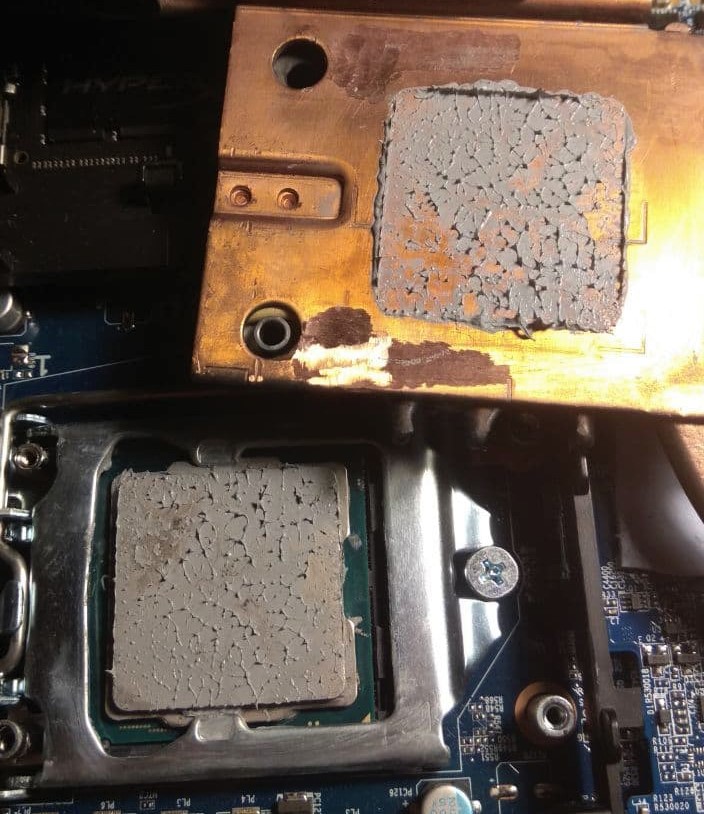
I have (still) a problem with my CPU cooling working way worse than it's supposed to.
I got a 9600K, far from top of what's usually installed in these. Recent experiments revealed that CPU side thermal pipes and copper contact plate itself don't even feel warm when CPU hits 90c, and disabling the fan barely makes any difference. Pipes themselves are working, and GPU side works as it's supposed to and gets really hot.
At the same time, under mild loads CPU doesn't really overheat, with 30-40W of typical gamey load it sits around low 60's with idle fan. But it skyrockets and hits 90c or more under heavy load of 80-85W. Not even trying to get it over 85W as it'll just melt.
Also, i seem to have sub optimal contact there, determined by that heatsink does not stick to CPU, like it does to GPU. Yet it looks normal, there's photo.
So couple of questions:
Is this behaviour normal for our system? Does your CPU cooler heat up?
If it's not, any suggestions as how to fix it? Will a copper plate over CPU be helpful?Attached Files:
FTW_260 likes this. -
-
@hissy, i ordered some taller BartX IHS, with increased height, to check same behavior.
-
It should get hot, you could do the hot water test and put the cold plate in hot water and check that all the pipes get hot VERY quickly. If one stays cold it is broken.Papusan likes this.
-
Oh, water.. My brain doesn't even allow water near anything electronic, so i didn't think about that/ Thanks, will check to be safe. Though not only radiator end of pipes doesn't get hot, eve the copper plate that directly touches the CPU doesn't got hot. But i can't check if CPU lid gets hot, it's inaccessible as you know.
yes it most likely looks like really, really bad contact, but check the photo, and i can't get it any better without grinding off or adding something. -
The heatsink itself has no electrical parts and of course you dry it off fully before putting it in the system.
-
Oh, you too? I thought maybe I missed something and got EC firmware installed incorrectly. The only thing that comes to my mind, is that it might have started happening after i got 1.07.16 update, but that was a long time ago, maybe more than a year. Is it possible to try downgrading or updating that?
-
I have Premamod and didn't install any official updates. If you don't mind doing it, you can, but no guarantee that it will even affect the issue in any way.
-
Oh, right, I was trying to get my hands on Premamod but the guys were only providing it to system builders at the time. I guess, situation is still the same?
-
Guys, what do you recommend for future upgrades. At the moment i have the i8700k and an 1080 inside, was thinking of upgrading in the near future to a rtx card to take advantage of DLSS. How does the P775 cope witth 2080 or 2080 super? Or should i stick with a 2070? Temperature wise? Thinking also of a CPU change sometime in the future, ill be editing 4k footage and thinking that an 9900k or 9900ks would be more suited. Can the cooling system keep up with this CPUS?
-
for gpu definitely go for 2080 if you have that much money. Their 2070 is heavily crippled by that 115W powerlimit and it can't be fixed any other way but hardware mod, and without mod it may be slower than 1080.
-
I'd say look out for what comes out and see if it fits.
Cylix101 likes this. -
The Clevo 2080 Super is a 200w card. Clevo 2080 is capped at 150w.jc_denton, electrosoft and GrandesBollas like this.
-
You say it would be possible to mount a RTX 3xxx in this chassis??
Any ETA on RTX3xxx MXM?
Yes ill try to find a good deal on a RTX 2080, but they are pretty expansive still... -
No idea yet, but it's worth waiting considering where you are now.
-
The only disappointing thing about MXM is its price. Upgradeability remains a figment if it continues to cost more than half the price of a new system.
GrandesBollas likes this. -
And that is why laptops make a bad investment. Though these LGA laptops perform better than BGA, in the end upgradability is still contrary to the initial purchase outlay. One is much better off financially buying a desktop in the long term. Laptops serve their purpose in the short term. Buy the best for the price, then throw it away when it becomes crippled either by age or unfixable hardware failure.
Sent from my iPhone using Tapatalk Pro -
And as cards diverge selling becomes harder too, not an easy path but sometimes can make sense. Also depends on the price of the mid range cards.joluke likes this.
-
*** Official Sager NP9175 / Clevo P775TM Owner's Lounge! ***
Discussion in 'Sager/Clevo Reviews & Owners' Lounges' started by Spartan@HIDevolution, Oct 6, 2017.