Problems? See this thread at archive.org.
Did all that but instead of the cmos battery i pushed fn d and triee that for like 3 times. No succes, the keyboard will light in all colours and then some seconds later it will light only blue..and nothing will haben. Should i get the battery out aswell? Is the fn+d not the same? I saw on the clevo repository that the latest bios is 1. 07.29, ill flash that and see again but im still thinking the cpu is defective.. It was a used one. Think ill gonn send it back
-
-
Thx, ill try that today after work and see and ill report back.
The i9900k that i have is a new r0 stepping so maybe the update of bios will help but what i found on the internet the bios that i have 1.07.25 supports the r0.. Who knows..
LE. Just to be sure ill update this bios 1.07. 29 that i found here : https://my.hidrive.com/share/yze8mg-wf8#$/BIOS and EC Firmware/CLEVO/P_Series/P7xx_Series/P7xxTMx/P7xxTM1(G)
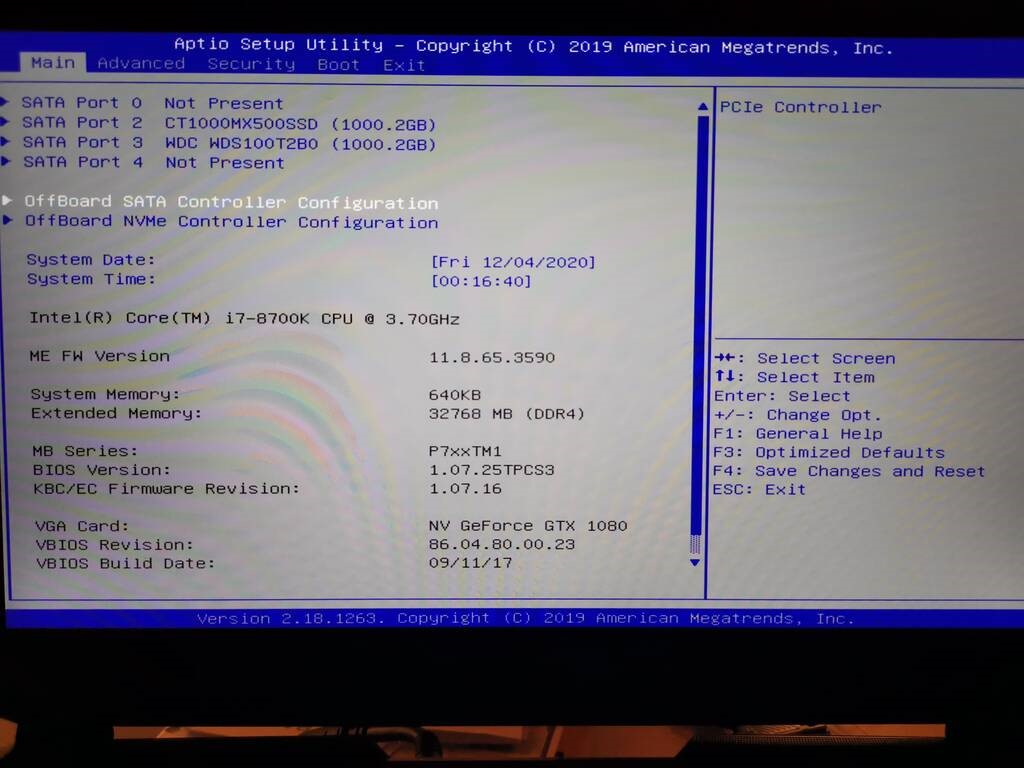
My bios build you can see it in the photo but its 1. 07.25Attached Files:
Last edited: Dec 4, 2020 -
-
Im back sadly not successful... I did the bios update. It went smooth. Im on the latest bios 1.07.29. I also did what you said @jc_denton. Put back the 9900k inside. Took the keyboard apart, took the cmos battery, waited 1 minute then push the power button for 30 sec to discharge and then put back everything and pusb the power on button.. The vents went for 1 sec to maximum, indicated that the cmos was cleared and the fans went quiet.. Keyboard went on in every color foe 10 seconds then it went blue and the screen remained black.. No succes pushing f2... So really looks like i got a dead cpu..
Can it be that i dont have enough power? I got the liteon brick.. It should be enough for the 9900k right? It works wirh thr 8700k and 1080 with no problem..
Do i need two power bricks for the combo 9900k and 1080?? -
That does sound as the 9900k might be faulty. You can try to run it with a single stick of ram in dimm 4 to see if it'll boot. Ideally you would test it in a different system to confirm the suspicion.
The 9900k\1080 does not require two power bricks, I've ran my at 5Ghz with a power modded 1080 for over a year on a single 330w without any issues. -
Thanks for your help, appreciate it. Yeah sadly i dont have another possibility to test the cpu. I opened a ticket with ebay ill send it back. Tomorrow il buy another i9900k, there is a guy near selling one thatbis already delided and has a custom ihs on it. Ill try with that one and see. Hopefully that will fibally work
jc_denton likes this. -
It's a bummer, hope you get it sorted. A taller IHS makes a big difference in some of these machines, since it adds increased pressure and a better mount. We have experimented with custom IHS 4.37mm IHS from BartX, which was a significant upgrade after a delid.
-
Reporting in, i just got the modified i9900k today and i put it inside, laptop works like it should. Succes
 . so i looks like i got a bad one the first time.
Now for the the modified, super pleased with it, the guy was a professional delider if i can say this, its a new chip, he delided with delid mate 2, he polished the die from 0,8 to 0,3 with diamand tool, put conductonaut on it and after it put a custom IHS from copper and nickeld. In his pc on an Asus Maximums 11 Extreme and AIO Cooler Master ml240 he got 5,15 GHz on all cores.
Now i have another problem, i was using FAN Control from obsidianPC but now after the CPU change i have lost the license! The Program says its not a valid license, i paid for it at the time and it says in the order that it does not expire ever! is this a bug or what..did anyone who use FAN control expiernce this? Now i cannot use the full potential of the CPU cus the FAN control is only in EC mode and i cannot control it how i want..
jc_denton likes this. -
He had his own thread for the software, try messaging him.
-
Thx i will, i also sent a email to obsidian support but dont think ill get an answer till next week. Strange i got also the other software from them but those work, didnt lose the license on them.
-
Lapping it down to ~8700k or thinner gives that chip new life, just be careful with the mounting pressure.
-
Very careful! It can easily crack the thinner you go.
Cylix101 likes this. -
Mounting pressure from the CPU Heatsink you mean?
Just did a test playing witcher 3 for an hour on ultra and used the Obsidian control center to put all cores at 4,7 Ghz with an undervolt of -75 and the cpu didnt went above 66 Celsius, fans were on EC auto but notdidnt reach 100, pretty impressed with the temps, the delid is really doing a nice change and the Phobya extreme is really good, its my favorite now, thinking of repasting the 1080 with it and get rid of kryonaut. Before the CPU swap i repasted the old 8700k with it and got a 10 degree Celsius reduction on it.
Thx @Meaker@Sager and @jc_denton and all other for the help and info.
What undervolt are u recomanding for the i9900k to further reduce the temps? The 8700k was -100 on the stock bios but the 9900k was only -50. Can the i9900k stay stabile at -100 aswell. Atm im at -75.
Looks like im almost complete with the upgrading of my laptop, only thing left is to swap the gtx 1080 with something newer like RTX 2080 but those are still expansive as sh...
, one can only hope the p775 will get RTX 30xx support. Thinking to buy anoter 32 gb of ram to have 64gb for my video editing if i can get a good price. One last thing ill do is to mod the back cover but i need to get an extra one and now my local retailer doesnt have one and found one on aliexpress but the delivery time is like 2 months..
jc_denton likes this. -
How are your gpu temps and clock rates when playing Witcher 3 on ultra for an hour?
-
Between 71 and it reached to 77 on really intensive scenes, at most they are keeping steady at 72-73. I got the 1080 locked at 1700 mhz @ 0,975. Vents are on EC mode. I need to try it with the back cover off, in firestrike it did a big differance on the gpu, like almost 7-8 C reduction, thats why i want to cut the backcover
-
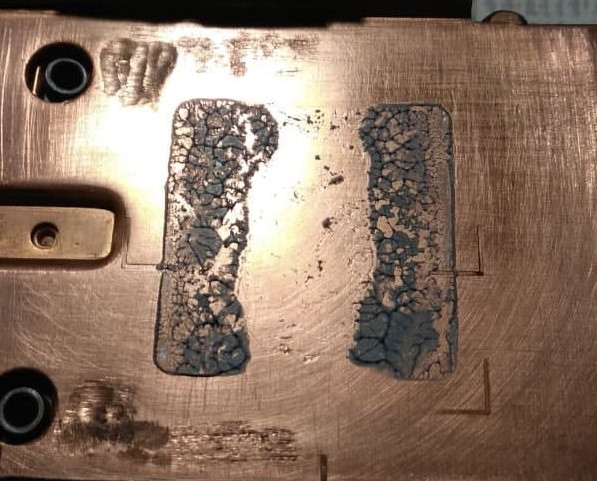
Soo i came back to by CPU cooling problem and found this. Whoever has concerns about cooler efficiency, now you know where to look...
It's rather hard to flatten it there without some fancy tools, all these pipes stick in the way.
half-assed it (again) to more or less flat state without even proper finish for now, and can hold ~100W on CPU with "acceptable" temps. Still needs a delidded CPU, but that's left for upgrade, a 9600k can live without it.Attached Files:
dmanti likes this. -
-
Ouch, well that was not helping.
-
I resolved my problems with the Obsidian Software, got in touch with the Support from them and they were really helpful and reactivated my software to work with the 9900k , now they are working again. t
They have really great support! Did have to wait a little more because was a national holyday this week but now is all good. -
Good to hear, I guess it is tied to hardwareID.
Cylix101 likes this. -
Yes i think so, everything that i tried, install in safemode, antivirus off, delete everything from hdd and registry and so on was unsuccessful.
-
Just on this, thermal stress and physical stress are more of a concern with a thinner die.
-
So i still have a problem, even after the upgrade to i9900k, its not bothering me that much but i want to resolve it.
.
The problem its that i dont have gsync option in nvidia control panel. I had this problem also with 8700k and the old bios..no gsync whatsoever.
Im on the latest bios now, 1.07.29, latest nvidia driver: 27.21.14.5730 (GeForce 457.30), the panel is the FHD 144Hz AUO B173HAN03.1 .
It has to do with that whitelist right?
Any chance to get gsync again or can i forget about itAttached Files:
-
-
Did you have it at the beginning? The panel has to be in the list of the donor system in order to work.
-
This is the problem. I got the laptop from ebay as second hand.. Dont know the history of it..
From the purchase i didnt have it but the label with nvidia gsync is on the laptop and all. -
So it has never had G-Sync since YOU got it?
-
Yes, i got it without hard-drives, put s new ssd at that time and installed win10 pro and the lateste nvidia drivers at that time, in October and i didnt have it, that time i was on the 8700k and the 1.07. 25 bios. And now with the 9900k and 1. 07.29 and latest nvidia drivers and still dont have gsync.. Strange.
Can it be that the gtx 1080 that is inside is without gsync? I dont known the history of the laptop and maybe it was changed in the past from the previous users. -
This also could be faulty PCH.
-
If thats the case how can i check it?
-
First of all try vBIOS with updated GOP for gsync card, also if the panel is gsync cerified or not.
But some systems got something screwed in the PCH and only by replacing it the gsync was back (with rewritten BIOS).Cylix101 likes this. -
From what i found out the panel FHD 144Hz AUO B173HAN03.1 is gsync enabled.
any info on how i do this, is any risk of bricking the gpu? -
Using hardware programmer.
As far as I know it is a risk of breaking the GPU when it's about gsync.Cylix101 likes this. -
Oh i see, thats a little to much risk, if there is no easy fix then ill have to live without it, think its not worth it. Thx for your info and help!
-
Probably not worth it with a powerful GPU and a fast refresh rate monitor for most people.
-
Ah yes it was nice to have it but i can live without gsync. Some people reported that gsync came back with new drivers...who knows maybe ill get it back sometime with new nvidia drivers or maybe when il change the 1080 with a 2080 or so sometime in the future.
In the meantime i had some amazon points and bought another kit of 2x16 ddr 2933 but i was now wondering isnt it better to have 2x32 gb instead of 4x16 gb?Last edited: Dec 17, 2020 -
Remember that even if you buy an identical kit of ram, same speed, timings, size etc. they are not guaranteed to work together without errors with your old kit, since they are not a certified kit of 4 but two kits of 2.
-
Oh i see, ill see on Saturday when i get the 2nd kit. all 4 are them are HyperX Impact DDR4 32GB (Kit 2x16GB), 2933MHz CL17 SODIMM XMP - HX429S17IBK2 / 32.
Hopefully they will work without errors. if not because of the extended return policy from amazon i can send all 4 back until end of january. -
It's not a crazy speed so hopefully it will be fine.
Cylix101 likes this. -
So got the Ram ahead of time, Friday night so i got to install them, did from the beginning a clear cmos with fn+d and afterwords didnt have time to boot to bios, went directly to windows and to my suprise i got in cpuz some crazy timmings..like 14-16-16 instead of the normal xmp1 17-19-19..
. Let lt like that and played like 1,5 h witcher 3. Afterwords did a restart and went in bios to see whats with that timmings and now they were back to the normal values of 17-19-19. Was that a glitch of CPU-Z or somehow the rams got overcloacked themselves??
Anyway they work all 4 dimms, cant complain, but the boot time is slower with 4 dimms, maybe 1-2 secjc_denton likes this. -
Interesting bug with the timings, great that the sticks run slick without complaining
-
Could play with the timings and test?
-
Yes i think it was only a CPU-Z bug. I tried now XMP 2 Profile from bios but no go, got BSOD right after windows loaded..
-
-
You think i can get something better as xmp1 when the profile 2 is giving bsod? Im also on the crappy stock clevo bios. Hmm maybe give the profile 2 some more voltage.
-
Stock bios is actually pretty good at timings, try this;
nvram clear
boot into bios after system trains
set xmp 2
let it train
and see if this is stable in windowsSpartan@HIDevolution, Papusan and Cylix101 like this. -
-
did the nvram reset, let it train now i got completely different profiles
-
They are now detected as 2666 instead of 2933 MHz
Last edited: Dec 20, 2020 -
Use thaiphoon burner to read the actual programmed clocks.
-
Got another problem. Im getting Thermal Throttling on only one Core, Core 5 every time im running CinebenchR15. I repaste with Phobya and second time with Kryonaut but still got the high temp on that core.
CPU is delided and with Conductonaut and it got a custom taller IHS. Can it be a contact problem because of the custom IHS?
Should I try the toothpick mod?
First Photo is with Phobya, second Kryonaut. CPU is managed from Obsidian Soft at 50, 50 , 49, 48, 47, 45, 42, 42.
Last edited: Dec 22, 2020 -
I would guess that this may be bad thermal contact between the die itself and IHS just around where that one core is.
*** Official Sager NP9175 / Clevo P775TM Owner's Lounge! ***
Discussion in 'Sager/Clevo Reviews & Owners' Lounges' started by Spartan@HIDevolution, Oct 6, 2017.