 Problems? See this thread at archive.org.
You can take the screws out.
-
-
Anyone knows if Bartx is still around? i sent an email regarding a custom IHS 9900k for my clevo but 4 days later still no answer from the website.
Regarding the soldering shim on the heatsink i should go witha 1 mm thick one right? I have a 0,5 mm right now, the 1 mm will be here in 2 weeks only.. -
Did you contact him via the email provided on his official site? Could be that he is busy, I'd wait a couple more days and then send another polite email about the inquiry.
The "8th" gen IHS will also work with the 9900K, but it was initially designed to be used with a lapped 9900k.Cylix101 likes this. -
Yes, used the website to contact. Will wait till next week, its almost weekend anyway.
 .
.
Sadly the 8th gen clevo ihs is also out of stock on the website.jc_denton likes this. -
I took the last two - regular and fat version for CFL.
-
I don’t think so. The 9900K die is much thicker, and using an 8th gen IHS on it would crack the chip.
-
You can sand down the IHS a bit probably but yes would need modification.
-
Yes it sure can, but you can alleviate that extra pressure from the ILM by having a washer under the main screw and use it with a non die lapped 9th gen chip. I wrote about it on here somewhere.
-
While waiting to get the new ihs i started to cut the back cover. Until now i cut it in the middle, should i cut it also where the fans are? I still need to smooth the edges with sandpaper.
Thinking to put a a very thin mesh to protect from to much dust.
I did a test in bf 5 everything on ultra with the gtx 1080 at 1885 mhz i got around 71 Celsius, also fans on normal profile in obsidian tools and the fans from the coolpad on max. Without the cutout i was at around 75 degrees.
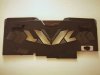 Last edited: Jan 15, 2021
 -
Just be aware some of the other internals could get a bit warmer.
-
This will be offset by use of an mod U3 cooler with proper fans etc.
-
Ah yes im using a u3 modded wirth 2 noctua 140 mm fans
and my laptop is 100% stationary, doesnt move from my desk and away from coolpad.
Last edited: Jan 25, 2021Papusan likes this. -
Nice mod, you can test how much more you can squeeze out of it by a/b testing with and without the cover. I'd guess by adding in a mesh and having all grills cut outs, is min/maxing it fully. And still regaining structural stability and dust prevention.
-
More under the keyboard but unless you are in an extreme environment it should be ok.Cylix101 likes this.
-
Thanks, yes ill need to test it further, need to really get a good mesh that is thin enough to stop some of the dust coming inside and let enough air inside for better cooling, if its to thick then it will negate the mod and ill be back to zero
Last edited: Jan 17, 2021
-
With my U3 mod the internals above the KB run colder than stock machine without bottom mod SSD's etc never break 50C in full load. PCH temp won't max above 50C.
You can reduce dust with your wifes used nylon stockings on the U3 Mod Or just buy some good filters if money ain't a problem, LOOL
![[IMG]](images/storyImages/l7jFJQ7.jpg)
-
Hahaha, thats a MacGyver invention right there
-
-
You can get more aesthetically pleasing options as 3x120 is fairly common
-
finally change the cable and problem is gone. your video link was extremely helpful.yrekabakery likes this.
-
Nice work
-
I have gotten in contact with Bartx and hes going to do a custom IHS for my 9900k , just need to wait a little bit because of corona..
While waiting and browsing the other threads i read about the vapor chamber cpu mod for the 870tm1 so anyone tried to do one for the single cpu heatsink from the p775tm1?jc_denton likes this. -
Anyone knows if these fans work on the p775tm1 and are quieter? CLEVO 6-31-P870S-101, they look to have more fins.
https://www.ebay.de/itm/CPU-Lufter-...782393?hash=item3ff2d1e839:g:c4YAAOSwHwleKYNB
I also saw that someone used a fan from Predator Helios 700 as a gpu fan to keep it silent, anyone tried this and knows the part number?
 RTX2080 Intel 9400F 4k 120Hz Screen _ eBay-preview.png) Last edited: Feb 1, 2021hissy likes this.
Last edited: Feb 1, 2021hissy likes this. -
That's a great question, was going to ask that myself. Stock fans with these cheap bearings.. oof.
I'd prefer something on ball bearings, have good experience with those.Cylix101 likes this. -
Those fans are quieter because they are the 5V fans for the original P870DM that spin at lower RPM than the 12V fans in the later P8/P7 models.
-
I see, but that means that they are not that good performance wise.
Would really try the helios 700 ones but cannot find any info on them only the helios 300. Are they the same? -
So, DON'T CONNECT THEM TO newer P7/P8 models. They would just fry if they receive more than 5V
yrekabakery likes this.
-
Well they will try and rev to over twice their rated and go pop lol.
-
Hello, I have a problem. In idle mode, the CPU clocks up to 5Ghz on all cores.(i9 9900k)
When I run Prime95, the CPU clocks up to max. 3.6Ghz although in the Bios the Turbo is activated.
What could be the reason for this?
I don't want to overclock.
I just want the CPU to clock up to 4.7-5Ghz at full load and the clock to go down in the idle. Something is wrong with the bios settings yet...
What settings do I have to do in Bios?
I use the Dsanke Modbios -
Do you use Throttlestop? Is Speedstep enabled in bios?
-
I don't use Throttlestop and Speedstep +Speedshift is on.
I got it by just re-flashing the modbios. Now the clock works perfectly. But I can't overclock the Ram. If I use the Multi from 10x133Mhz to 11x133Mz, I get a black screen when booting, even if I defuse the timings or increase voltage...
i use
Corsair Vengeance® Series 32GB (2 x 16GB) DDR4 2666Mhz -
Are you raising all the timings including the secondary ones? Could just be a bad sample on the ram.
nurex likes this. -
![[IMG]](images/storyImages/IMG20210201165710.jpg)
I didn't raise the secondary timings. How much should I raise the secondary an primary timings? Original it is 18-19-39 -
For me the 133mhz base clock for ram just didn't work, needed to switch it to 100.
nurex likes this. -
do you have a picture of your Bios Ram Settings? Even with raised secondary timings comes the black screen -
Prime 95 is going to max out the CPU hard so as a maximum load state you are going to run into any limits such as current or power limits.
-
I am getting crazy
, just got the new taller Copper BartX IHS delivered, really nice made, hands down, he did a great job, i just leaved it for a second on the couch table and my 1 year son got it and threw it on the floor! My mistake, didnt anticipate hes that fast
. And now i got a nice dent in one of the corners. How should i procede to repair it? I suppose i need to file it down, but only the dent somehow.. think the outside dent is not that bad i can leave it like that, but the interior one is troublesome
-
Dude, just polish this corner and don't worry, it's just a piece of metal)
-
So, I overclocked my memory to 2800. CPU beheaded and Conductonaut used and GPU with Conductonaut. Temperatures are perfect and notebook is quiet
![[IMG]](images/storyImages/IMG20210212165737.jpg)
![[IMG]](images/storyImages/IMG20210212170941.jpg)
![[IMG]](images/storyImages/IMG20210212170524.jpg)
![[IMG]](images/storyImages/IMG20210212170510.jpg)
![[IMG]](images/storyImages/IMG20210212170045.jpg)
-
CPU power usage during the Prime95?
-
125W in Prime95
Undervolt -110
CPU is not overclocked -
-
Thank you. I'm also very proud of it and when playing it's finally quieter than before. Previously had temperatures between 85-95 °C
-
Just don't smash small fft prime avx workloads for long periods of time, not good for the VRM.
-
I think my heart would skip a beat if that happened to me, which is why I initially had BartX make two prototypes just in case.
You should be able to polish that down with some 400 grit and it should be right as rain.Last edited: Mar 13, 2021 -
Ah yes, thx il try with 400 or more to stright it again. So before ill mount it I need to soak it in LM right? the one that i have one is nickelplated so no need but for pure coopper is a must right? whats the best method? In the Oven?
-
That or you'll need to take it out and re-wet it every so often.
-
Treating the copper IHS, grab something like 2000 grit sandpaper and scuff the surface slightly. This is to speed up the diffusion reaction between gallium and copper when you heat the IHS, either by baking it or heating it for a couple hours. You'll notice the 'liquidy' metal will pretty much disappear from the surface as it diffuses into copper. I usually give it a couple drops of new LM as it bakes throughout the process to saturate it. After first application, you then proceed to remove any 'slurry' that's left (which is mostly tin and indium) with rubbing alcohol.
From there you can either very lightly polish it with 2500+ grain, to smooth down the surface where reaction took place. It should be greyish looking, if you see copper underneath it means you went too far From there you can clean it up and have it ready to be installed.
-
I see, thanks for the valuable Info!! But any other way to bake the IHS without putting it in the Oven for 2 hours? Think my wife will kill me if i stink up her kitchen
-
Yep!
The reaction happens at room temp (20c) from what I recall, you could place it somewhere warm in a box for a couple weeks. Or let a hairdryer blast on it for a while. Reaction speeds up with the temperature, so you make do with what you have.
*** Official Sager NP9175 / Clevo P775TM Owner's Lounge! ***
Discussion in 'Sager/Clevo Reviews & Owners' Lounges' started by Spartan@HIDevolution, Oct 6, 2017.


