Problems? See this thread at archive.org.
Good, then i think ill put it in a box on the heater, we have like -10 Celsius every night this time of the year so its nice and hot on top of the heater every night and use a hairdryer to speed up the process
-
-
hello everyone 2 days ago I bought a p775tm1g and I have questions about the fans. In some games, the fans work normally, and in some the following scenario: I start the game, the fan rotates at idle speed, the temperature rises, rises, and about 80 degrees for the GPU and CPU It rapidly gains momentum and as the system cools, it works correctly. The solution presented by Obsidian is not very pleasant, when surfing, the fans constantly over-gas.
Does anyone have information about this? -
Im using the Fan control from Obisidian and it works great., you can configure the profiles inside the software to your pleasing. I use the Normal Profile with some tweaking and when surfing i dont hear the fans and the CPU and GPU stays around 30 - 33
Did you bought second hand? Did you clean the internals and reaplied TIM?BrightSmith likes this. -
i bought new one.because of the child, I have to use the low speed of the cooler of 65 units, I have already tweaked the fan control, neo when surfing is less than a second, the temperature rises above the limit and the fans spin up and down like motor
-
Make sure your firmware is up to date.
-
All up to date
https://ibb.co/rdFJ9xz -
Any ideas?
-
Fans WILL be loud when gaming. I don't mind the noise except for the continuous spinning up and down, which you can reduce by the manual setting in Obsidian tools.
-
I am not satisfied with this fan behavior when surfing using obsidian. and does not fix the behavior of the base firmware, or can it be a glitch?
-
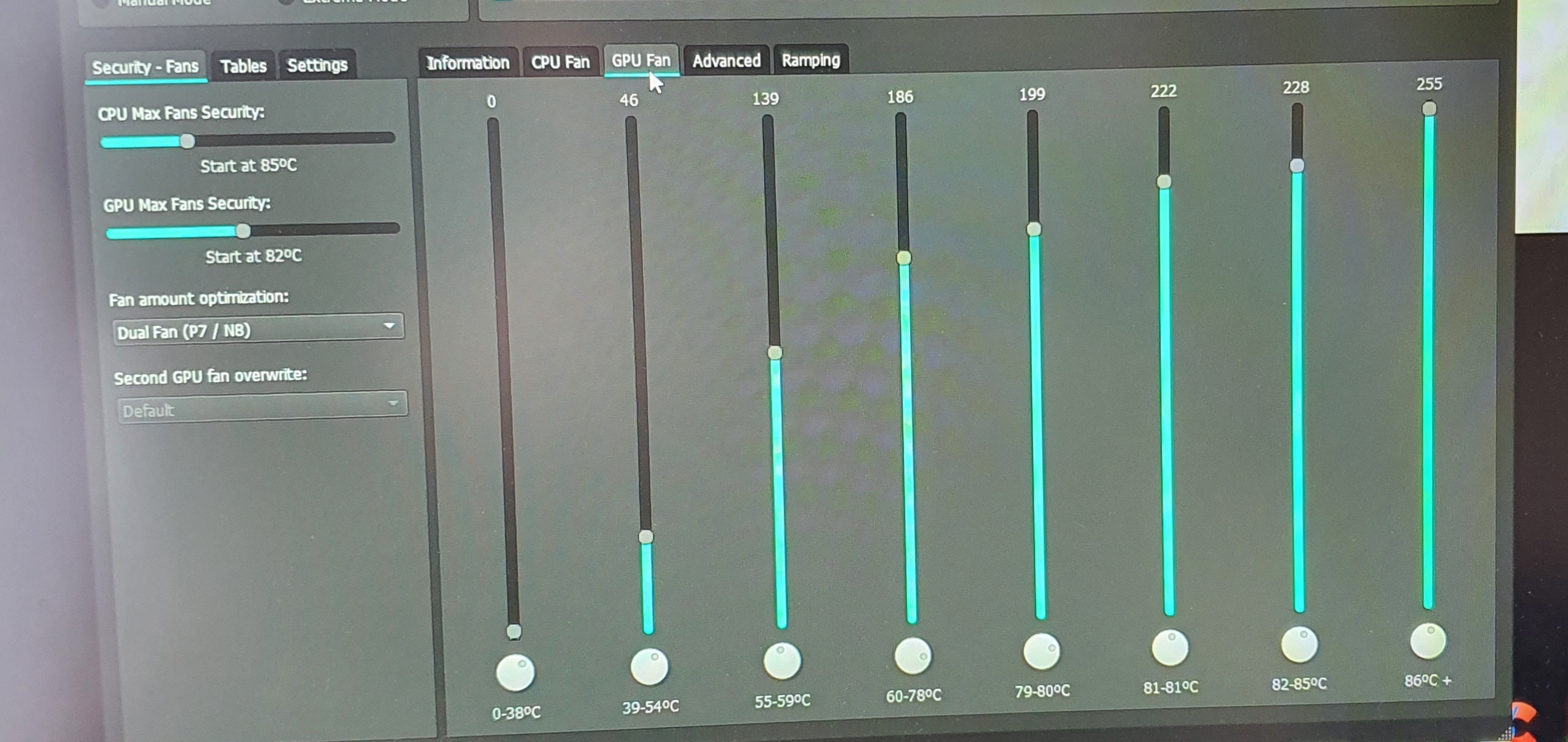
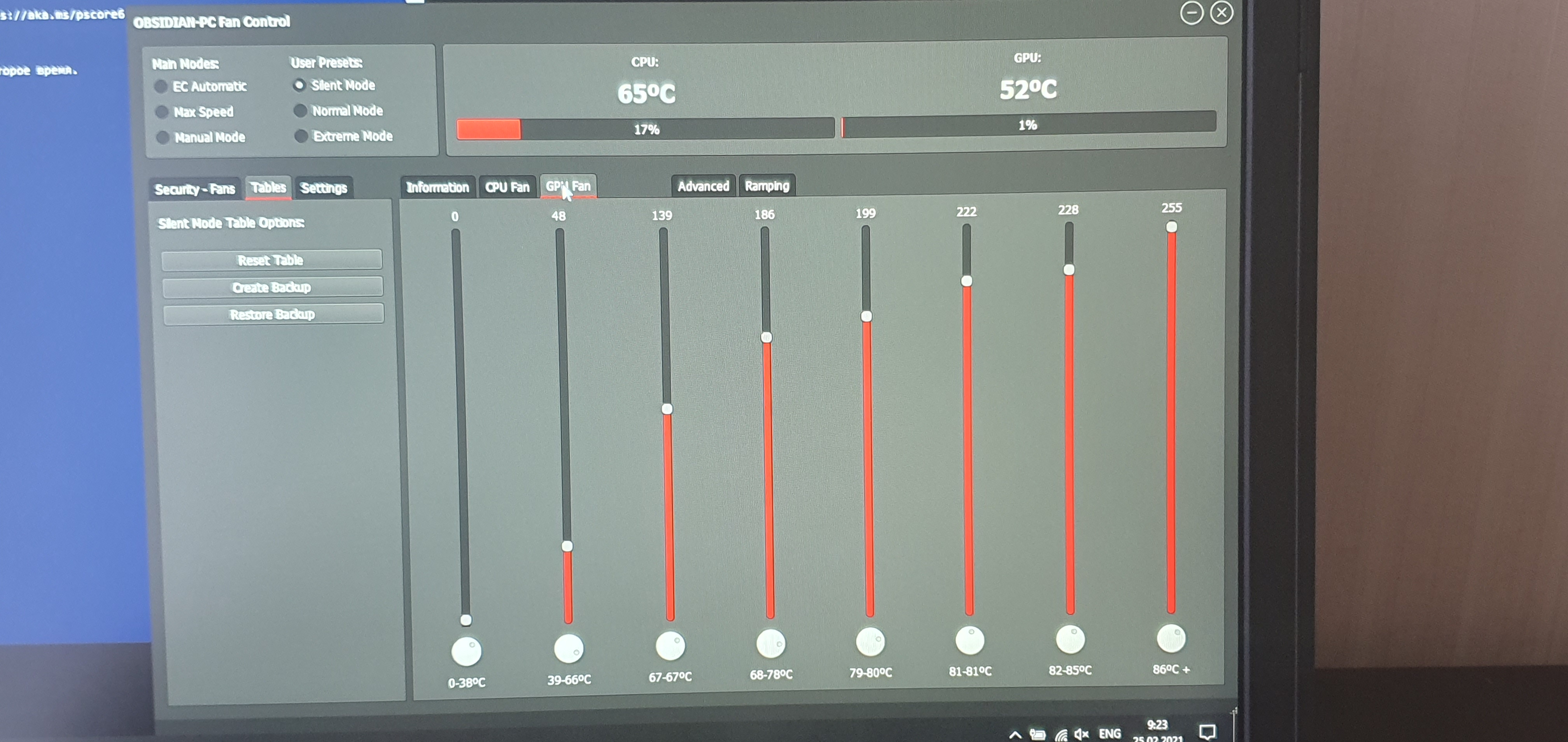
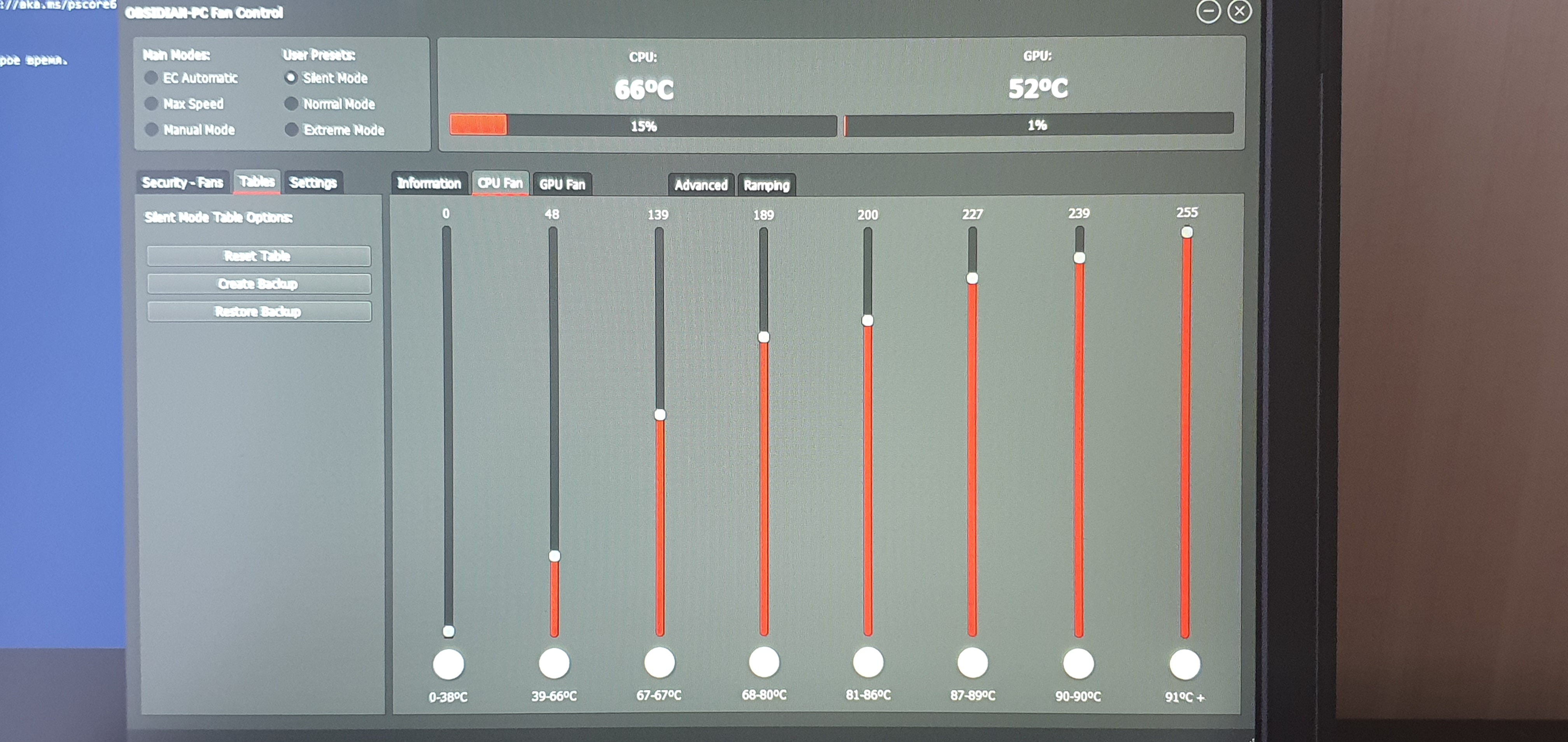
Can you post a screenshot of your Obsidian settings? Do you use Silent or Manual?
Cylix101 likes this. -
What temps and rotation of the fans do you have when are you surfing? Strange that is so loud when you are just surfing or doing office work.
-
Worth looking at background usage and make sure nothing is keeping the GPU clocks up.
-
Gpu 300mhz during surfing, cpu on balanced power mode, the main problem is that the temp on cpu rises rapidly,by 0.5 seconds for Example : surfing tem on cpu 48, then rapidly change to 59 or 62 by 0.25sec and down to 48. Defenetly at that time fans going me mad with raising rpm up and down.
These are the settings I use for quiet idle. since I don't turn off my computer 24/7. This photo is old, but the temperature range of the second slider is now 39-59. further game turnovers
Problem is that the fans are very sensetive because i think that temps are spurious and wrong
New shotsAttached Files:
Last edited: Feb 25, 2021 -
-
(Edit: I was confusing my P775TM for my PC50, sorry)
Attached Files:
SatyreX2 likes this. -
-
'balanced power mode'? Are you running Obsidian together with CCC? You should uninstall CCC first.
-
I am using Only fan controll and cc 2 1.0.80
-
new problem. after the computer is idle with the lid closed, opening the lid the computer works but the screen does not start. I have to turn it off via the power button. All settings for turning off the display are disabled, Windows is freshly installed along with the drivers, all sleep and hibernation options are disabled. The magnets are in place and work fine.
-
Chipset drivers and the such installed? GPU drivers?
-
Yep, chipset and last nvidea driver
-
Have you tried removing CCC and installing Obsidian control center + Throttlestop instead?
-
In that case i have no chance to control my LED keyboard, i"am Already tried that variant.
I think we should disregard my problem with FANS, i think i cope with this.
New problem arrived.
LCD doesn't start after opening the lid
Fresh bios and EC/ Fresh Nvidea / Fresh Chipset / Fresh Windows
No hybernation / windows Fast boot / there is no any actions by lid or power key
in BIOS hybernation Off / Fast boot OFF
I will try to leave the computer with fan control on in manual mode today. And I'll see if there will be problems after the downtime, it seems to me that the problem lies in the stock fan control, since it turns off the video card fan.
It seems to me that all hangs were in EC AUTOMATIC mode.
SODIMM all Alive ( fresh) samsung 4x8gb on 2666 on stock timings
My Conf p775tm1-g i5 9600kf anr rtx2070 new revision ( all From clean Clevo)Last edited: Feb 26, 2021 -
I think your problems come from using both the CC and Obsidian tools at the same time, they are going head to head. Get rid of CC, delete everything related with it, for Keyboard LED there is also an Obisidian app. it works perfect.
I have all the Obsidian tools and they are working perfect and better als CC. On my rig at least.
Here are all the Obisidian tools, also the Keyboard LED: https://shop.obsidian-pc.com/en/support.html -
Thx. The problem was use stock clevo fan mode, during this mode gpu fan turns off during idle... this cause overheat.
Ccc 2 1.0.80 work grean with fan controllLast edited: Feb 26, 2021 -
-
it isn't solved.....
Again my monitord don't start SOmetimes HELP -
Anybody know how i can update my bios ( DSANKE/Prema ) too old for my lap
My version of Bios 1.07.29R0Y6
EC 1.07.16
Any chances to unlock ot get unlocked version ??
Old versions of bios can't identify my rtx2070 ( new revision) -
A routine check
Did someone find a way to uplift the Clevo RTX2070 powerlimit yet? -
You could shunt mod it.
-
That's about the only way since bios mods basically involve crossflashing now.
-
Welp, [disappointment]
Continue waiting then, ordered some necessary stuff about 2 months ago and local post apparently stole it again. -
That sucks, had our postal office lose another package last month (again), so I can relate.Papusan likes this.
-
That sucks, never had that happen to me fortunately.
-
That doesn't instill confidence, lol. I would try to use FedEx or UPS as an alternative if possible.
-
1 is quite impressive, I think in average post offices tens to get 2-3.
-
Soo, i did it.
In truly orkish way, but i successfully shunt modded my RTX2070
...and undone it back.
As turned out, it isn't really worth it for daily use. Assuming that shunted power reading stays proportional to real power, my card was drinking around 160W under load - almost 50% more than stock. It's a bit over what i'd call safe for its power system.
This only allowed to rise the sustainable clock up to 1785 mhz, or by 10% (and that isn't even entirely stable, but just below that point when it trips some protection and shuts down)
Maybe it's a bad chip, someone already claimed to have such clocks with stock card, but it's what it is.
Maybe this info will be of use for somebody.jc_denton likes this. -
Did you solder two resistors in parallel for this mod? What kind of temperatures did you see?
-
Used pieces of wire as resistors, this dropped 115w to "40w".
and max core temp was about 75c (stock 71c).
edit. whoops my bad, estimated power was 145-150W, not 160.
I suspect it tripping protection may somehow be related to 150W max power (rtx2080) that system is designed for? -
Going too low can go a bit odd and they can be odd if out of balance too much on both resistors.
-
Makes sense, though main thought is - 10% are not worth it for daily use.
I'm not comfortable with putting more that 150W through that thing -
Oh it's a very poor power Vs performance trade.
-
If you can lower the temperatures by mods or undervolting, you will gain more performance than with the powermod. However, the powermod does stabilize the frequency curve, but makes the vrms run crispy hot.
Papusan likes this. -
I just don't believe you. No way it can gain over 10% performance for the same stock power in non cryogenic conditions. It's 2070, not 2080, it never runs particularly hot in this chassis)
unrelated up side, suddenly found a 8086K already delidded by our local maestro. Should be here tomorrow. -
Lower temperatures give lower power consumption and higher clocks which helps the power curve.
-
But how cold it must be to gain +200mhz over what it has at 71c, with only limit being PWR? And how it should be possible in a laptop?
Now, happy and weird news. Just received an 8086K, it works, was not a scam. It's supposed to be treated with liquid metal already too, but if this part was a scam it's more easily fixable than with 9gen solder.
But it had strange effect on my bios (that's Prema one): it defaults to -100mv voltage offset, which happens to be just too much to work, so i was scared for a moment that it's a scam. And it refused to save 0 offset, i needed to put non 0 value for it to apply.
Now testing testing, then tweaking tweaking. -
That's stock behaviour, though an 8086k should cope with that.
-
I just recently purchased a Pro-Star branded 775tm1-G with a i9-9900k, and a gtx 1070, and I'm trying to install linux. Specifically, 'm trying to install Ubuntu Mate. I've tried both the 21.04 beter and 20.10 but they both freeze before the live enviorment can even boot.
Lemme know if you need more info, and sorry if this si the wrong thread -
-
If you can keep the GPU <40c, the gains would be pretty substantial. But benching and daily use are two different beasts, benching at <40c is doable, thanks to Scandinavian weather. The benchmarks don't last long enough for the heatsink to fully soak, and lets the card keep high frequencies throughout the run.
Daily use with gaming in mind is different, it's more of an endurance test for the thermal solution. Here the GPU loses 12Mhz core clock per 3-5c above 38c (AFAIR) as the heatsink becomes saturated. An example from my usage, this translates to ~55-59c GPU temp at 99% utilization in Warzone after 4 hours, and this is with a single card on the 400w vapor chamber.
With the P775, you have a couple mods to drop temps ~10-15c, if you don't mind having the bottom cover off and a couple fans pushing air directly onto the GPU side. But this is a band-aid solution, which is not very portable. But it's the cheapest one aside from getting a custom heatsink.
*** Official Sager NP9175 / Clevo P775TM Owner's Lounge! ***
Discussion in 'Sager/Clevo Reviews & Owners' Lounges' started by Spartan@HIDevolution, Oct 6, 2017.