Problems? See this thread at archive.org.
I asked a similar question a couple weeks back; you may want to check out page 116 of this thread. TL/DR: I'll be using mine primarily for gaming, so of the three, the consensus was to go for the dual video cards.
-
Yep, dual video cards are your best bet. Remember that Intel SSD's are very expensive compared to other brands, and sager overprices them even further. Crucial 256GB SSD's are under $1/GB on newegg now, for example, and these are easy to upgrade yourself if you want to later.
-
Intel prices have dropped considerably, at least in Aussie, the 240gb 520 is $50 cheaper than the 256gb M4, the problem is that the Clevo prices are the opposite, with the 520 being considerably dearer. I'd have to say that Intel prices are now pretty competitive.
-
Hi guys! im looking for help with the power brick of this laptop
so what ive found is that the intel 3930x processor draws about 11amps at full load and a single 100watt gpu comes in at just under 8.4amps at full power but a single power brick is rated for a max of 15amps
will the cpu/gpu throttle because of the lack of power or what would happen? -
At max load CPU+GPUx2 you will need 2 PSU's.
-
i did not specify to the company i ordered from that i wanted a second PSU so i just wanted to see if a intel 3930k and nvidia quadro 4000m that i ordered will end up drawing from the battery for extra power on hard rendering operations and that i should get a second PSU
-
You know how little power batteries provide, right? Anyway, the system isn't wired like that. If you try to draw too much power, either your system will abruptly shut off or your power brick will explode.
-
i thought something like that might happen so ill talk to my supplier about getting a second PSU and the adapter
-
Core i7-3930K and Core i7-3820: Cheaper LGA 2011 (page 1: Introduction) - BeHardware
looking at the chart of watt/amp power draw from these guys you should be able to overclock the CPU to 4ghz pretty easy anything past that would be getting vary hard -
I asked mythlogic regards this, and they said on the new clevo p270wm (their Nyx7212) you don't need two power bricks unless you're over-clocking. I asked them this since I'm getting two gpus. (the 7970m's)
-
I was wondering if a single 7970M is better than Nvidia's 670M in SLI?
Also, how much more will the 7970M cost than the 675M? -
Hi Hexum,
What you really want to config depends on your needs.
Like the post above suggest the most advisable upgrade for your p270wm is the dual gpu (better get the 7970m x2 than the 675 [cause the 7970m is so much faster but not too expensive]
If you'r editing Videos and render major projects via CPU - while you'r playing games .. then go for the hexcore!
i'll tell you my opinion on SSDs:
They are great performancers - since transferrates above 200mb/s which no HDD can reach (at least not without raid)
They are expensive, and may not last so long as the HDDs do (may vary on usage)
If you want to get 5% better framerates in games - you can take the ssd, but think about the dual GPU option which provides much higher framerates.
if you don't need to store a lot of data (music/videos/etc) then go for the ssd - but a good 7200rpm HDD can store more data for a much cheaper price!
---------------------------------------------------------------------------
7970m: 3DMark 11 - Performance GPU 1280x720: 5447points
675m SLI: 3DMark 11 - Performance GPU 1280x720: 5990points
you may look on a 580m SLI vs 7970m comparision since the 675m is just a rebrand 580m.
as far as i know the 7970m is about 100$ more than the 675m, this may vary from different resellers.
---------------------------------------------------------------------------
if your CPU and both your GPU's are NOT on max load then one Power Brick will be enough... but like Akimox said..
-
Thanks for the feedback. Seriously,much respect to you guys, geeks are always thorough with their follow up.
Sounds like I'll do dual video cards, preferably the 7970s. Still a possibility I'll do one card now, get a hex core instead of a second card, and get a second card at a later date.
One other thing, a 90% matte screen was an option on powernotebooks a few days ago, but disappeared quickly. I wanted it over the glossy for more correct colors... Is there another vendor that offers it? Maybe I just need to call powernotebooks and order specially over the phone.
Speaking of resellers, seems like powernotebooks has best prices for the configuration I want. I haven't really looked into vendor ratings or any of the perks they might offer. Anyone have any opinions on vendors? Of course I want the best price, but if one vendor has a much better reputation for customer service or other variables, I might consider. The configuration I'm going for is 90% glossy or matte screen, 16gb quad channel 1600mhz ram, 750gb 7200rpm hd, 3820 processor, dual 675m or 7970, standard intel wireless card, will be installing my own OS. Also, are the no dead pixel guarantees and upgraded thermal compounds for cpu and gpu worth the extra $60/$30? -
With regards to getting a second card at a later date. I'd get the card now, since mobile cards don't really seem to drop much in price. Where-as a desktop CPU should theoretically decrease in price in the next little while (since there's way more demand/production) From my own research looking into some of the 4xx series mobile Nvidia cards, they're still going for around 480 bucks a pop, possibly due to the rarity since most laptop builders don't design their rigs to have removable GPUs.
-
Any resellers having this with 2 x 7970m's?
-
From my experience of talking with the various resellers, Larry from lpc-digital is the prime example of great customer support. It's the reason I decided to order from that company in particular.
-
Patiently waiting mid-May…
Still holding tight to original configuration of dual video and the 3930K…
Out of all the gripes for the new machine I could give a hoot if I can overclock or this or that. I’m buying the machine at its face value as configured. I’m buying as much as I can now so that I won’t have to upgrade down the road for its service life. I expect it to perform at its advertised speed and that’s it.
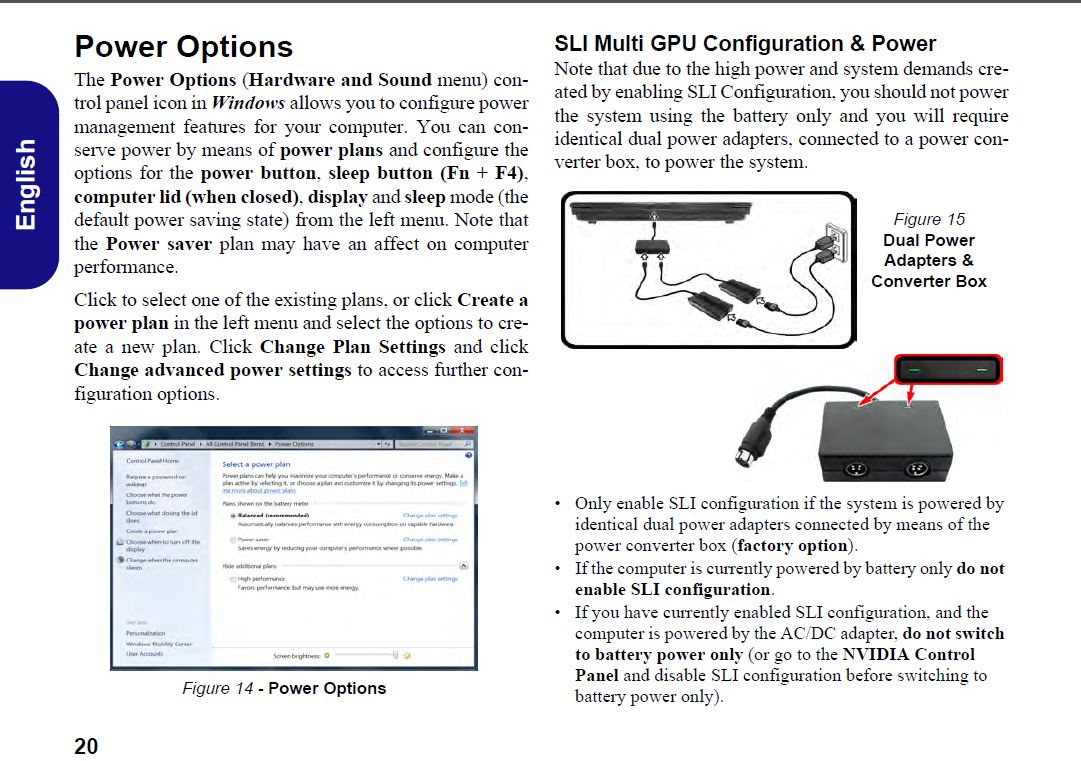
However, having two power supplies with an additional dongle to power the dual video version is majorly F’Tarded. This is my only real gripe with this machine, which I haven’t even had in my hand yet. And then; if you only have one power supply on hand and want to run the machine, you’ll have to manually disable the dual video, per manual, and vice versa.
After fixing their first batch woes I hope they’ll be working on a single power supply to handle the power of the machine in its entire configuration. It’d be nice to have one brick without the adapter to join to power supplies - you can still utilize the smaller supply for those who don’t want it, but a bigger supply with auto switching to regulate the supply/demand should be properly engineered; especially if they intend to go at this ultra-power-portable market long term.
If anyone from their design team is listening, I’m willing to fork out an additional few hundred bucks after the sale if you guys come up with a single power supply capable of handling the full system power demands. I don’t see myself wanting to switch back and forth between one and two bricks. I expect to be toting along dual bricks everywhere and never want to mess around with switching one of the video cards on or off if I can help it.
Even with the above or reading other moans about this machine, the ~3.4k price as optioned is well justified and eagerly anticipated. 14 more days? Hmmm… -
Here is the configuration I had ordered with Mythlogic a few days ago. around $3.3K, waiting on the price difference for the 7970m crossfire. I had changed my mind a few times till I settled on this, I guess I've talked to both Jeff and Josh. Both guys were great. Wonderful customer service...
Saved System Configuration
Mobile Chassis: MYTHLOGIC Nyx 7212 (Clevo P270WM) with backlit keyboard
Mobile Display: 17.3" Full HD (1920x1080) Glossy 90% NTSC Color Gamut LED Backlit LCD
Dead Pixel Guarantee: MYTH Pixel Perfect Guarantee
Monitor Calibration: Free MYTH Professional Monitor Color Calibration
CPU: Intel Core i7-3930K 3.20GHz, 2133MHz DDR3, 12MB Cache, Hex Core Processor
Thermal Compound: Free IC Diamond Thermal Compound
System Memory: 16GB (4 x 4GB) , PC3-12800, 1600MHz SODIMM (Samsung) Quad-core+ processors ONLY!
Video Adapter - P270WM: 2 x NVIDIA GTX 675M 2048MB GDDR5 DX11 Compliant Video Cards
Optical: Notebook Black 8X DVD+RW/CDRW Combo Drive
Hard Drive: 500GB 7200 16MB Cache SATA Notebook Hard Drive
Hard Drive: 500GB 7200 16MB Cache SATA Notebook Hard Drive
Webcam: Integrated Webcam
Fingerprint Reader: Integrated Fingerprint Reader
Wireless Card: Intel Centrino Advanced-N 6235 2*2 802.11 a/g/n + Bluetooth V4.0 350MB Total Bandwidth
Bluetooth: Integrated Bluetooth 2.0+EDR
Operating System: Windows 7 Home Premium
Anti-Virus Software: Microsoft Security Essentials
MYTHLOGIC Assurance: MYTH Lifetime Assurance with Lifetime Labor + 1 Year Parts Warranty, 45 Day 2-Way Shipping Cont US
Phoenix Upgrade Plan: Lifetime Phoenix Upgrade Plan -
The waiting is killing me, I ordered mine in March I think, buddy just ordered a 15in clevo, and he got his in like a week (different circumstances I know), but I'm so jealous.
-
Same boat... Just checking threads periodically to see if there's any news. I'm not pressing my reseller. He told me the delay was mid-May before it was out in the threads. I'm doing everything just fine without the new machine, it's just one of those gotta-have-it type things. Maybe the May 15 day will match the Diablo release date.
-
Well that does us no good... Builders will get to test it on our rigs I guess. Yeah Myth has kept me up to speed as soon as they find anything, just the wait is killing me. As I've said before the death of my old laptop has exacerbated the situation. My desktop is getting wonky right now too (worried my SSD with the OS on it is trying to croak) so it's adding a bit of urgency to my need for this laptop, as I'm currently enrolled in online classes. On top of that wife went TDY and took her laptop, so if the worst case scenario happens, I'm in an online Comp Sci class... with no Comp.
-
I still don't know if I should bother with an P270WM...
After all, how much faster will the desktop quad 3820 be versus the i7 3720QM mobile?
Anyone know how much time the battery can hold out with optimal power saving on? -
You may want to contact altleet about this - he had some ideas, and while it doesn't sound like he'll do the work as he's cancelled his order, perhaps he can provide you with the resources / contacts to resolve this issue for yourselves and other users - http://forum.notebookreview.com/sag...levo-p270wm-owners-lounge-81.html#post8418166
What does that mean? Do you mean start the machine and just browse around OR start it and then OC the CPU as well as both GPUs? If you just start the machine and keep everything on stock settings, you should be able to get by with one power adapter.
The only reason the second power adapter came up is because some NBR users would "trip" an overload on the x7200 PSU when the CPU and both GPUs were under heavy load. Not 100% about this, but it might have been the CPU, GPU(s) or both had to be overclocked. Again, not 100% certain on the OC portion of this problem. -
I just have a hunch that maybe they are waiting for the release date of Diablo 3 so that they can include a copy in these machines as part of a promotion. Well whatever happens I'll just wait patiently for it or else I might regret later if i decide to buy the Asus ROG G75 from XoticPC. It's going to be a big jump for me from my old laptop to this one. I hope I didn't make the wrong choice.
Asus M50 SV, Intel Core 2 Duo T5550 @ 1.8Ghz, 4 GB RAM, Windows ultimate 64 Bit, 250 GB HD, 6TB Western Digital My Book Live. -
I have mixed feelings about a parallel launch with D3 and the sager. It'd be great if it was on the system saving me a midnight launch waiting period, but I doubt that would be the case. As long as I can get the laptop before D3, I'd be more than a happy customer.
-
JClausius - I've been through the thread a few time and missed those posts, or it wasn't pertinent to the level of my understanding at the time. My comments on the switching 2nd video on/off were strictly taken out of context from the manual; reference m224. (Image attached.)
I just read the blip on Wikipedia: Clevo_x7200 Known issues. It discusses the power supply as you’ve stated.
Excellent news is that it sounds like people are well on this issue and there may be hope for a single power supply or I may even be able to get away with the one when using under light duty.
I just freaked out when I was trying to understand their power rig for the 2nd video card and read the blurb in the reference manual.
Thanks again for taking the time to help the newbs like myself.
D3 + new CLEVO P270WM = OVERKILL
TigerWolfe, LOL.. I had horrid nighmares when I saw my reseller post a Youtube video, of the P270WM. I was thinking quietly to myself, "Those pricks are testing and playing with MY System!!" hehe. I'm sure that's not the case - but the video is horrible quality and not much of a review. There's just not much info on these machines as no one has one yet. Sorry to hear your machine is buggered up and I hope the new one gets here for you on time.Attached Files:
-
-
I have had discussion on the bricks with eurocom last month, and as far as I've been told that the work of Powerful PSU is in its testing phase and that it should be in the market in about 4 - 5 months, but then again I have no clue if its going to be successful.
Later on for one or more reasons I have decided to switch on to P170EM, over P270WM. To list these reasons:
1, Having to deal with 2 x Power Bricks.
2, Weight of P270WM is around 6 KG + 3 KG on the bricks = 9 KG in the bag not really a portable option for me.
3, Stability of this kind of configuration seemed questionable.
4, I am able to use iGPU (HD 4000) on the P170EM that means when I fly across countries I can use my laptop on power saving mode and have great battery life which is more then 3 hours and 30 mins.
5, Hearing the release of HD 7970M and its performance was good enough to compare it to SLI GTX 675M.
6, Finally the massive Delay.
By making this decision I am still able to get what I want for less price and much better in accordance to me.
But then again these are just my thoughts on this. Feel free to share yours. -
Yeah, the old laptop, was salvageable enough to make an HTPC so that was cool at least. The desktop... no idea, I seem to have terrible luck with 2TB Caviar Blacks... they (WD) replaced the last one for free cause it buggered off on me, and now it seems like the replacement might be going the same route. Simultaneously I think I'm running into those dreaded SSD lifespan/failure rate issues, for my OS drive.... /sigh
-
Just ordered mine today. I really hope it lives up to the hype. Got it from powernotebooks, and might I say that they have excellent customer service. I plan to use this laptop as a permanent fixture on my desk. The option to be able to lug it around for those month-long vacations (albeit very rare) to the provinces and other areas where there might not be any internet access or even a TV is just an added bonus. I dont think it was meant to ba a laptop that people bring around all the time. 9kg is a burden but much better than bringing an entire desktop setup with monitors and all. How do you guys think this laptop will fare in room temperatures of about 32 deg Celsius with an SLI 675 and 3860k config? My Macbook Air literally melted...
-
Well said Altleet... Thanks a lot for the follow up on the PSU. "There's hope."
I don't blame you for not wanting to lug around the P270WM on trips. With my bad back, I rely on a quality wheeled laptop bag. Usually I’m walking a good few miles through auto plants, laptop and periphery in tow. At this point I’ll probably use 2 machines and try to leave the P270WM at home office or local. The heavy computing tasks I do in the office anyhow, not on-site at the machinery. I don’t know, there’s a million ways to look at it.
I saw the 7970M on the P170. “Looks attractive.” I’ve already turned in one newly configured laptop for the P270WM. I’m done changing my mind. Now, a lot of it is just seeing this thing through. I won’t notice gobs of power oozing out of the case in comparison to anything on the market because I don’t work on multiple power-workstations. I only use my own rig that is still in pretty good for being a few years old. When I get my hands on the new P270WM loaded and configured I know it’s going to be like going from a stock Camaro with a V6 to a custom Camaro, V8, NOS and all that… But I’d get that same feeling from an M18 or comparable.
P270WM = Nerd Candy… And I’ve got a bad sweet tooth. ….Is it practical? “Probably not.” LOL
TigerWolfe - I haven't had the hard drive blues in a few years and keeping my fingers crossed. Been through the Maxtor and WM failures and NOT FUN. That just sux big time. This stuff seems to run in spurts. You'll have your tech luck coming in spades soon enough, I'm sure of it. -
My foolish American brain doesn't even comprehend what those temps are...
/heads to google
/let's self back in
I'm not sure, that doesn't seem too insufferably hot for an ambient temp, but I pretty much never let my house get above 24 deg Celsius (thanks google) so... -
yeah...it gets pretty hot here in the philippines... outside at this very moment... its 38 degrees celsius. The airconditioning is barely able to catch up. My goodness you would not believe how many times I asked that question to different resellers and especially Mr. Stratton and every single time they answered "Sager has the best cooling in the industry" ...wish apple could say the same hahaha. Wouldn't want a 3.5k laptop melt now do we.
-
Could you detail what you mean by literally melted as in how you were using it and how often did you clean it and all. I will be facing far more severe temperatures ( like 44 degrees Centigrade ambient in summers) and I am not sure how this would fare at stock clocks under those temps. Your input, in details , would help a lot as have never owned such a machine before and would much rather opt for NP9170 than this if I understand that it cannot be managed. Any one else with experience in hot ambient conditions plz do pitch in.
-
38 isn't to terrible for outside... the deserts of Arizona can get pretty toasty, I wish they'd only get to 38. Kuwait was the worst I've seen so far, we'd go out to the plane to fly and it'd be 60C, this lead to many sad times waiting to take off.
-
ok hahaha sorry to give you the scare.... well the macbook air (known for not really having the best cooling hence its small and thin frame) was used for regular internet and some minor video editing. I would leave it on for hours at a time, sometimes 12 hours straight. No gaming. I put in on a flat glass table. the bottom was clear and had proper ventilation. The first to go was the hinges... it got so hot it warped and semi-melted. then naturally the LCD display gave too (because of the hinges) after a couple of months i noticed the entire laptop wasnt FLAT anymore. IT WAS CURVED!!! haha. ok so i might have exaggerated about it melting, but thats NOT SUPPOSED TO HAPPEN! a warped laptop... i swear. The Sager im getting has SLI 675m, i73930k, 240Gb SSD, 2x 500Gb Sata II 7200 rpm HDDs. IC diamond thermal cooling and the rest doesnt contribute too much to heat i think...
In fairness to apple. they immediately fixed the laptop...no questions asked. I guess they knew this problem was pretty common. Great customer service -
thanks for the input... i wanted other people's experience with using high end laptops in "not-so-ideal ambient temperatures"
-
I too have experienced playing games with my current laptop (Asus M50SV) at higher temperatures when I was still in the Philippines. Most temps there range from 32 to even 38 in summer. And at that time I was at home for a year without a job and just played games like Crysis and other 3D games almost everyday. My laptop's palm rest feels like its burning up and the games I played started to become laggy and at one point it just shut down giving me a BSOD (Blue Screen of Death). I googled the net and found out that its probably caused by heat issues. So I tried cleaning the laptop fan and the radiator was full with dust like foam. I used an air compressor to clean the thing and it was like new. I tried using it again and the heat in the palm rest was not that hot anymore, also the lags were gone. But I still have 1 thing I worry about which my PSU which is very hot that I used a small desk fan to cool it off.
Now that I'm in Canada the situation changed for my laptop. Currently I'm living inside a room in a basement and I must say the temperatures are damn low. I can feel my knees freezing and the floor is like ice. So what I did was put my PSU on the floor and tried playing for 12 hours at heavy loads. It didn't heat up like it was still in Phil. And my laptop is as cool as it was before (provided I keep cleaning the fan and thermal module assembly). So in conclusion I can say that room temps do matter and since I'm getting the NP9270 with 2 PSU, they are gonna be sitting on the floor for a long time.
-
This has changed a bit from the x7200's manual, but mostly to cover the 2nd PSU. Here is the section from the x7200:Basically what they're saying is don't run SLI unless you're on a power source. They have to say 2 PSUs to CYA, as certain configurations / overclocks will trip the PSU and switch over to battery.
I took your quote to mean the system would freeze and immediately shutdown or not even boot. That is not the case, you'll just want to switch off SLI when not on power. -
2 days in is mid right? Anyone? I can haz laptop, please?
/waiting sucks -
I too share what you feel TW. It's been a loooong wait since March. I hope they get it right this time.
-
Jclausius,
Makes sense and will be tolerable. I'll try it out with the single PSU on low to normal throttle and keep an eye on it. Heavier use and common sense will dictate when to rig up the second PSU. I kinda got the hint they were in the CYA mode after reading over all the info a few more times.
It's a big negative and probably scares a lot of potential users away. I hope they come out with the single brick that can power the dual GPU/SLI confiuration sooon. -
just talked to my sales person at xotic PC...got pushed back to "late-may"
-
As far as Myth knows there's been no further delays. Would you care to give some supporting evidence? I'm not doubting just to be a jerk but you've got a brand new account, and it seems to have become relatively popular to troll the people interested in this rig.
-
I do not, its just what I was told on the phone.
I seriously hope what I was told is wrong. I tried to order the thing when it first came out, then was just floating on the site in limbo and then ordered it as soon as it came out again for pre-order.
I promise no trolling from me. I sent an email to my sales person for evidence.
Sorry about that. -
No worries. It might be them just being preemptively cautious. Myth has said they'll call me as soon as they hear anything, as soon as I hear something I'll post it here for everyone else as well.
-
Wonderful.
I've been watching this post sense page one (my birthday...watched that present go down in history) and its the only place I've been able to find any news on this thing.
Thanks everyone, you guys are great. -
it wont surprise me if there gonna be another delay, sosad ;(
-
I feel your pain; this was going to be a [March] birthday splurge for me as well.
Seeing as how I'm interested in it for gaming, and seeing as how we just saw the release of new mobile cpus and gpus, I'm starting feel the same sentiments that Altleet expressed a page or so ago... -
Lollllz
Funny how a lot of people had march birthdays.
I was thinking of treating myself out to a birthday gift as well.
....and still waiting heh -
Hopefully it's out before my birthday. June is looming ever closer
**Official Sager NP9270 / Clevo P270WM Owners Lounge**
Discussion in 'Sager/Clevo Reviews & Owners' Lounges' started by Aikimox, Jan 25, 2012.