 Problems? See this thread at archive.org.
Did you happen to enable either Silent Mode or Eco Mode?
Either of those lock the CPU down to the minimum speed and sometimes enables the Power Saver power plan, then forgets to change the power plan if you switch off Silent / Eco.
If you aren't certain what the CPU is doing then install HWiNFO. It has a very useful dynamic speed display.
John
-
-
Both the Silent Mode and the Eco Mode were off, and the Ultrabook was plugged in.
I will check the HWiNFO under heavy load later.
What is your Passmark Performance Test by the way? -
Thanks I will try that now. The newest bios is actually P07AAC.
-
Hello everyone,
for about a week I'm owner of this astonishing laptop : )
But i have a problem with Wi-Fi. I have Windows 8 PRO and combination FN+F12 is not working, I can only turn on Wi-Fi manually in settings (when I do that then blue led on F12 turns on, so mechanicly this button isn't damaged.). Is there someone who had the same problem and found solution? -
Look in SW Update for the airplane mode driver and install it.
If that doesn't fix the problem then reinstall Settings.
John -
Does anybody's touchpad settings get reset every time they close the lid? I've noticed that drag and drop setting keeps coming back when I turn it off every time I start the laptop. Shutting down the laptop is fine but closing the lid reverts it. All my drivers are up to date according to SW update.
-
Samsung don't update the version-specific database for the older models.
Fortunately, the touchpad driver is generic and, if you use SW Update to look at other models, then you will find many newer versions of the touchpad driver. However, the latest, for Windows 8.1, seemed to make things worse for me.
John -
Why is it that when I plug in my charger, the screen brightness can go higher than usual? And only on Samsung Optimized. The brightness is capped when I'm not plugged in and on other power options. Is there a way to remove this cap? It's sometimes hard to watch lower quality videos without plugging in.
-
That sounds like adaptive brightness or the display power saving at work. See http://forum.notebookreview.com/samsung/629523-disabling-series-9-adaptive-brightness.html and http://forum.notebookreview.com/sam...ness-driving-me-nuts-unable-disable-help.html.
John -
Is there any posibillity to turn off light sensor for the back-light? In Samsung Settings>General Information> backlight i can only change the light level and nothing more.
-
My very unscientific fix for the light sensor is to cover it with a small piece of black electrical tape so I have full manual control over both display and keyboard backlighting.
The newest versions of Settings include a control for the adaptive brightness (but lack a control for the Battery Life Extender). There is also a remark that if you keep pressing the Fn + up brightness when it shows 100% then the adaptive brightness gets turned off and you can get the real maximum brightness.
John -
Thank you very much for fast reply. You mean that the newest version of settings gives posibillity to turn off auto-brightness of backlight but it doesn't have battery life extender (charging to 80% ) ?
-
Yes. In fact, Settings on my X4C is now messed up such that pressing Fn+F1 results in one copy of Settings (which has the BLE option but no adaptive brightness) opening with a pop-up window in Korean / Chinese with an OK button. Once I press OK a second Settings without BLE but with adaptive brightness also opens! So it's a bit messed up but gives me more options.
John -
Hey guys
So I installed Option gtm671W in my 900X3C and also installed all drivers without problem.I dont have any yellow warning in device manager.I can see 3g and wifi.Wifi connection is great.
Only and the biggest problem i have is:Windows keep telling me to "Insert SIM card" which of course i already insert in USIM SIM card slot.
I tried Windows 7 and Windows 8 but its same thing Windows keep saying i need to insert Sim Card.
Does somebody have suggestions what i can try? -
Will the SIM card fit the other way up?
Try a different SIM card.
Is the hardware locked to a particular network?
John -
Has anyone found an answer to this?
-
Officially there is no Win 8 driver support: GTM671W/GTM679W Downloads | Option
Run services.msc and disable the WWAN Auto Config (or whatever it is called). Then try different connection managers:
Option uCAN uCAN Connect 2.2.4
Option Globetrotter Connect: Globetrotter Connect 3.1
MWConn (highly recommended): MWconn -
I think it is by design. TurboBoost only runs when on mains power (but I don't know whether this is programmed into the BIOS or the CPU itself). I suspect this is because the extra power needed when running in Turbo mode means the CPU is less efficient. My 3317U CPU runs at about 0.86V at 1.7GHz but 0.97V at 2.4GHz (ie 11% more power).
John -
Thanks guys
I tried Win 7 and 8 and they give exactly same symptoms ,they ask me to "Insert SIM card".So my guess is ,if everything works i would be able to use Win 8.
I will try to explain everything i dont know will i succeed.
When i install USIM SIM card holder together with option gtm671w i dont see wifi(wlan) but i see wwan part of modul.
When i remove "sim card holder" i see everything,and wifi and wwan.
My guess was "sim card holder" cant sit properly..So i cut part of "sim card holder" which covers wifi and now i see wifi and wwan even when sim card holder is in place.
So why my connection cant go true sim card holder that i have ,is sim card holder broken somehow?or i just cant get it to sit 100% in place.
Here is picture:
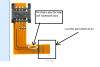
But please if somebody knows for what that pin is used (in ellipses).That is only pin that's used by Intel wifi & bluetoth and also sim card holder,all other pins dont encounter. -
I suspect this to be either a driver issue or Windows power management settings taking effect.
At least on my linux driven X3E I can set the clock manually including turbo whether or not on AC.Dannemand likes this. -
Was the SIM card working properly before you cut it?
Have you tried the ideas from 2 posts above? -
Sounds a bit like this (check dulax posts):
X220 mSATA, SSD & ExpressCard Questions - Page 2 - Lenovo Community -
Yes I saw that but what he means when he says:
"Flexible upper curve was damaged, so as this court did nothing more than to be a bridge of the same."
.I am so scared buy the fact that Intel 6235 WiFiBluetooth don't need pins where sim card holder goes and that's why Samsung didn't connect them to motherboard. -
The Half Mini Card is a Standard: http://www.pcisig.com/specifications/pciexpress/specifications/Half_Mini_CEM_ECN.pdf
I don't know what reasons Samsung would have not to comply with that.
Does the slot have UIM pins? -
I was wrong about this.I hope.
USIM SIM card slot don't need to connect with motherboard it only needs connection with wwan card...I guess.
Sorry I don't know what are UIM pins. -
Hello,
from yesterday FN+F2/3/12 (screen bright +/- and wifi) stopped working. Is there any solution? -
Does somebody know purpose of update called "Marker File Patch(Win 8)".
About FN and F keys from post before main.
You need Easy Settings(Windows 7) or Settings(Windows 8) for these keys to work.You can download it with SW Update. -
That's what I was thinking first too. But this Mini Card pin sheet makes me wanna believe the SIM is handled by the controller on the motherboard.
Did you make sure the pins sit tight and at the right place?
Have you tried the SIM holder solely w/o Mini Card?
Have you tried it with the Intel Card?
Have you tried different SIM cards?
If all that doesn't work I'd replace the SIM holder and test again. -
Running mini PCI-e 3G card with USB - mini PCI-e to USB - easiest way
See this,after this my hope grow up a little bit more that hardware i bough for this set up is fault.I will buy another Option.I find it like spare part for Samsung Slate 7 : BA59-03230A
Interesting is that for BA59-03230A card is saying EU and card that i bought was from Australia,maybe is issue in that.What do you think?
I tried another sim and it didn't work i order another sim slot it will be here next week. -
i have windows 8 and SW and those buttons still doesnt work.
-
with "SW update" you need to download "Settings"
-
I have the newest version of Settings but there isn't any option to change brightness or enable FN keys... I turned off adaptive brightness in Intel and Windows settings. I can change screen brightness but only manually in Win settings. Also I have installed the newest drivers for airpline mode but FN buton responsible for Wi-Fi still doesnt work : (
-
Ok sorry ,you have Settings i didn't understanded that way.
It never happened to me .Only scenario when i saw this on my notebook was when i installed Easy Settings on Windows 8.
Did you try what "oled" wrote to you.
http://forum.notebookreview.com/sam...-np900x3c-ivy-bridge-cpu-253.html#post9550722 -
What ACPI hiccup mean?
Battery reset is that pinhole under the laptop? -
You will need to google ACPI.
And yes ,battery reset is that pinhole under the laptop.
What version of Settings do you have? Is it 2.0.0.43 ?exodius likes this. -
But did you reinstall Settings?
Re-installation should fix whatever has got broken, possibly by updating other software.
The pinhole on the bottom is a battery disconnect switch. You need to first unplug the mains power, then poke a straightened paperclip or similar into the pole (there should be a small click), then open the computer and try to start it (with mains power still unplugged). It should not start (if it does then the battery is not disconnected). However, holding the power button down for a minute should cause a CMOS reset. The battery will automatically reconnect when you plug in the mains power. However, first try reinstalling Settings.
Johnexodius likes this. -
Ok, so I reinstalled Settings and then I reinstalled Windows but both of those actions didnt help : ( Without Settings every FN key works fine excpet brightness and wifi, when I install Settings the only change is that blue LED for volume on/off works (without settings this LED is always off)
Sorry for my English, I hope you understand what I'm writting -
I don't understand. What has this mod to do with anything?
Australia uses pretty much the same WCDMA networks than Europe does, so the cards should be working on either continent.
Btw, you haven't answered if you tried this: -
Battery reset helped, now everything works fine. Thank you very much Oled, Unit Igor and John Ratsey for your help !
-
Thanks for your feedback.
This bug seems to exist in all Ivy Bridge Series 9 / Ativ Book 9 models. I don't know what causes it in Windows, but under linux it gets randomly triggered by suspending to RAM (sleep).
Does anyone have a competent contact at Samsung to submit this bug?
I'm still undecided if this is a rhetorical question
-
Yes I tried all that but they all give me exacly same simptoms:" Insert SIM card please"
-
Is there any way to not include arrow keys when we lock F keys with Fn Lock ?
-
So i got my antenna from G01 for 900X3C WWAN mode.But it doesn't look good.Antenna cables for WWAN are short and connectors are the small version of normal.
Does somebody knows what are these connectors so i can look fort extensions?
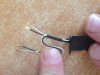
-
I think the Fn key behaviour is programmed into the BIOS so it might not be possible to change in software. However, you might be able to use keyboard remapping software to change the behaviour, but this would then also apply when you use Fn, rather than Fn Lock. The separate navigation keys is one of the advantages of the 15" Series / Book 9.
It might be hard to find the extension wires. You might have to buy another antenna such as this and then use the cables with your antenna. This might require a little skill with a soldering iron.
John -
Do you think on 15.6" Ativ Book 9 2014 ,because 15" series 9 have same arrow keys with Home,End etc...
I mange to upload picture.
What i want to know is name of those little connectors so i can google it.
But i think i trow 300€ for this mode that will never work out.In the end i will have to buy G01 version and stick to it. -
They look indeed short! Compare to the picture in the X3E/X3F thread.
Can you please post a picture of the whole module. Maybe one from top and one from bottom.
But just for WWAN, WiFi connectors fit, right?
The bigger ones seem to be standard size I-PEX / U.FL connector. -
SO what a relief.
My project is finally finished.
I have man that is good with little things so he solder me a longer wires(from other wwan antennas)on antenna.I was supraised it works.And just for the record the shorter wires are for wifi and and longer for WWAN(i thought otherwise).
P.S. I order immediately one Option gtm671w for new ativ book 2014 when i buy it.
Here is one picture:
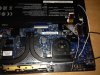
-
How do you know that? Do the cables or antennas have that printed somewhere? I'm asking because looking at X3F it's not clear which one is the WWAN / WiFi module as both are covered.
Just to be clear,
so even the longer cables were not long enough to reach the card?
so did you replace all 4 cables?
you have them all soldered directly on the antennas? -
So how did you get rid of the "Insert SIM card" message?
It would be useful for anyone else who wants to try this if you could list the parts and required work in one post.
John
13.3" Samsung NP900X3C with Ivy Bridge CPU
Discussion in 'Samsung' started by John Ratsey, Apr 11, 2012.


