 Problems? See this thread at archive.org.
It's the place where you find the .cfg file you need to edit.
I should mention that overvolting a gpu is much more delicate than overclocking it. It can reduce the life of your gpu greatly and should be done very cautiously. You know that right?
-
@Alienware-Luis_Pardo Why no touchscreens? Yes, I know they're not normal in gaming laptops, but it is nice to have a touchscreen for Windows 8, and some games are supporting touch now.
-
I didn't know that
-
I find the afterburner.cfg in my C drive folder, I cannot paste the notepad there.
-
I think it's not a good plan to play with your voltage if you have never done it and don't know much about it. Normally, people only do it because their overclock is too high to be stable. Increasing the voltage increases the heat by a lot. Since I can easily go 920/1350 without additional voltage, there must be something wrong if you have problems at 850/1250 or even stock clocks.
Could you tell me your voltage under load? It would surprise me if it was different but it should be 1.025v. You can use HWInfo64 or gpu-z for that. -
Touchscreens are glossy. With a Leap Motion you can have the touch feature on a matte display for less than 100 dollars
Sent from HTC HD2 with Tapatalk -
Ive had it at 0994 on Asus Gpu Tweak. Im just llooking to get higher fps on Bf3. Right now Im averaging 40 on non AA, and mostly medium settings.
-
Gpu-Z: 1.00
-
Gpu-z is the most reliable imo. Is 1.00v the absolute maximum under full load?
-
I raised it, I get 1.020
-
I think that should be safe if that's your absolute maximum since mine is at 1.025v stock. Did it fix the bf3 issues? What driver are you on?
-
I have my Gpu % jumping between 65% and 100% again, using 13.5. Bf3 is crashing on me at 850/1250, 1025v, and power at 105 on AsusGputweak.
-
Putting the power at +20% should fix the usage problems.
-
It has been at 20%
-
Man, I think im going to just build a gaming rig. Bf3 on medium is getting under 35fps with 1250/850, power %20, and 1.029V. Same settings from yesterday, yet fps have dropped a lot. This doesn't make any sense.
-
While a gaming rig will crush this, I'm getting awesome performance out of mine for such a mobile laptop. I play at 40+ fps everything maxed out at 1080p except for MSAA. I do this at 895/1300 (+20% power) with the 13.5 beta 3 drivers and a 120W psu.
This laptop is just a truly mobile laptop with impressive performance for its size and mobility. If you want top of the line pure gaming performance and have no need for mobility this laptop is not going to give you that.
Edit: check your gpu utilization. It's probably low at medium. That's causing the low fps. for me, higher settings can give better fps because of better gpu usage.
With machater's utilization fix I get 60fps at medium. Might be worth having a look at that.
Edit2: here's the link: http://forum.notebookreview.com/showthread.php?p=9222654
Edit3: if you're not on 13.5 beta 3 it's definitely worth installing that one. It has far better performance than any other driver I tried. -
Hi Prank
Thanks for the info here. I've gone from playing bf3 on low to playing ultra except that setting you mentioned and got great fps results. I've used afterburner and got some great frames temps and fraps recording now Fraps used to be dropping my fps by like 20 frames but on the higher settings its only taking 2 - 5frames which is great!
One question: You went and bought a 120w psu adapter and just plugged it straight in? No software adjustments or bios updates it just sucks the power out of it if needed?
If so I will pick one up asap!
Cheers
-
what settings do you have msaa at prank?
Also I can only get 15.6 drivers now - where can I grab the 15.5 you have?
Nm I found it
http://support.amd.com/us/kbarticles/Pages/amdcatalyst13-5winbetadriver.aspx -
Off
AA post is maxed though.
-
Thanks for the quick response
From a quick 1 minute check I seem to get a few extra frames with 15.6 beta but I have more testing to do before I can say for sure.
Did you update the bios to throw on a 120w psu? Or just plug it in and bobs your uncle? -
just plugged it in
-
I applied the utilization fix and got a boost. I unlocked msiafterburner clock speeds to overclock higher than stock, but when I "apply" them they reset back to "0". Familiar with this?
-
Yeah, I can't overclock past 1250/850 without it going to 0
-
yes, you'll have to reboot to make it work, if you did not do that already.
-
I did, also unistall and tried over, not I can't move the bars at all. Do you know any software that can get the chip to 1300/895?
-
Hey man
Cool!
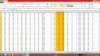
So I have overclocked and I'm getting much better performance than before, however according to HWinfo I am getting drops in my GPU Clock and Memory Clock.
Do you think this is down to the 90w psu? I have used msi afterburner as power limit +20% core clock at 850 and memory clock at 1250. I have attached a picture of the clock speeds in hwinfo as it won't let me upload the excel file for some reason.
What do you think?
If its the psu I'll grab one next week, but I don't want to get one if that isn't the cause of the problem!
-
If you reinstall the .cfg file will be gone and reinstalled so you have to edit the values again. Did you do the steps regarding the registry?
Have you updated your drivers? Also, how is the load on the gpu? If it's heavy and the drivers are up to date, I think the 120W will fix it since I don't have these problems anymore since I bought one. If it doesn't fix it for you please don't be mad at me.
-
Anymore you say?
So you had issues like this with your 90w ps? Well my driver is 15.6, I'll try 15.5 just to be sure but otherwise hwinfo shows 850 and 1249 at 64% usage but then when it drops to 7xx clock speed utilisation shows at 100%. Sounds like it doesn't have the power so it downclocks me thinks.
I'm gonna grab the 120w then next week after a few tests.
Thanks for your help man and no I won't blame you if it doesn't fix it but I get the feeling it will though!
-
I've cut up an egg box and have one blue tac'd to each corner (away from the fans of course) to raise the laptop and keep it cool. As cheap as it is, it works well! Not seem temps over 77 I don't think yet.
I'm going to look for silver door stops and use them to blue tac underneath when I want to game, so it looks more suave
-
@saracenrush.
The 120W psu just seems to give a lot more stability when overclocking. No usage/clock drops. Resetting and reapplying the OC tends to help too.
edit: why don't you do more commentaries? You have a very good voice and pronounciation and some prety decent equipment. I'd watch it
-
Thanks bud
Just picked up a 120w psu so will let you know how I go with that.
Yeah I want to build my channel but I have just moved to Australia and had to organise that plus when I was monetising the videos adsense decided to refuse the last two saying I don't have the rights! It was quite off putting since it takes a lot of time and effort to build a channel it helps to have an incentive of a little cash as well!
After some research it seems adsense is not the best partner for gamers so I've read up on another youtube partner just for gamers but I need to build my channel to 1000 subs and 1000 views per day. Quite a bit!
Edit: I've just checked and it looks like the only requirement now is 350 views per day - JOIN TGN | TGN is The Gamer Nation Nice!
So I've decided to crack on again with the videos and build up my channel without getting any dollars, got some material already actually just need to edit it into a video.
So watch this space!
Thanks for the encouragement
-
Hey guys!
Sorry I've been away. I updated the drivers to these new beta versions, and the brightness issues were gone.
I installed battlefield 3 and it doesn't run properly, because of an apparently common error which is the menus not showing when in fullscreen and mouse not working properly aswell.
I'm able to play it correctly when not in fullscreen.
Now i've been reading this thread and was thinking about a bit of overclocking as well, so I installed msi afterburner. If I keep everything at stock clocks and settings, the game seems to run indefinitely, while if I overclock it, my pc freezes after a bit, like it does with SeanToombs.
I believe the gpu doesn't even reach 81ºC, but even if it does, I find it weird that it crashes. I'm using the stock psu 90W.
Any thoughts? Also, Pranktank, I'm curious about how to set msi afterburner to more than 1250/850? -
This is from the owner's thread.
It really surprises me that your games crash. What drivers are you guys on? 13.5 or 13.6?
And for BF3: if you update it, it should work fine in fullscreen.
EDIT: @Saracenrush, I subscribed. I see we have some common interests: birgirpall, frankie, jackfrags, MKBHD. Do you play DayZ too, aside from BF3?
-
So after playing most of the afternoon with the 120w psu I've had no issues with any clocks dropping! So anyone with clocks dropping within a good temp range and the right drivers installed (I'm on the 13.5 beta as they do seem to be better) I would advise to go and get a 120w psu for sure!
Welcome to the channel Prank Yeah those guys are some pretty good youtubers, you should check out levelcap if you haven't already he's pretty darn good and growing fast! No I haven't played dayz yet, I haven't even seen any footage of it. I think it's a mod for Arma 2 right, making it into a zombie game? I will have to have a look at both Arma and dayz and see what the craic is.
-
I'm on 13.6. Could it be OS related? I'm on Win 8 64-bit.. Thank you, i'll try to update it. Whats the easiest way to do it, if I may ask?
-
Ah good to hear you're getting the same great results as I am. May I ask you what 120W psu you bought? Mine isn't of that great quality and is not very reliable it seems. Is yours grounded?
I'll check him out. Frankieonpcin1080p and jackfrags make some good dayZ vids. DayZ standalone is coming though, should be made much better than the current mod.
I don't think it's the OS since I'm on the same OS.
You could try to roll back to 13.5 beta 3 as descriped in this post under Updates> graphics : http://forum.notebookreview.com/showthread.php?p=9135887 -
So I've installed the 13.5 drivers. I ran msi afterburn and Kombustor and this is the graph it showed me:
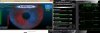
Section 1 is everything at stock clocks, we can see the gpu usage is steady around 99%.
Section 2 is only the Power Limit maxed out, everything else at stock clocks. We can see that the core clock doesn't vary as much, but the gpu usage starts to wobble A LOT.
Section 3 is everything maxed out. The core clock increases, obviously, but starts varying again, and the gpu usage keeps bouncing around..
I didn't leave it for tooo long, and it reached around 84ºC. When it did, I lifted the laptop off of my desk and it cooled down to around 81ºC, Still, I don't think heat is the problem of the game crashing..
Thoughts on this? Thanks guys! -
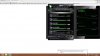
I thought I'd stress test the gpu to know if the pc would crash other than on BF3 using Kombustor. I left it for several minutes at stock clocks, several minutes with the Power Limit maxed out and another several minutes with everything maxed out. While testing everything maxed out, the pc froze. I was concerned it was temperature related so I picked it up from the desk. It "unfroze" but then windows showed the message below "Display driver stopped responding and has recovered - Display driver AMD driver stopped responding and has successfully recovered."
At the moment of the "crash", gpu was at 87ºC
So, what do you guys think the problem is? Is it normal for overclocking to cause the gpu usage to vary that much? Thanks! -
Yeah it was decent performance before but now its freakin awesome! When I took the laptop to the shop today to make sure the adaptor would fit the guys behind the counter where telling me it was an ultra book lol. Yeah an ultrabok that can play bf3 on ultra!
Here's what I picked up, seems pretty decent
120W 5-24VDC Auto-Switching Universal Laptop Power Supply - Jaycar Electronics
I'll go have a look at this dayz now then. I take it you play? -
@Unknown94
Your gpu acts differently from mine it appears. Do you have the 17" or 15"?
For me, at stock clocks and 90W psu the +20% prevents usage dropping to 64% and downclocking. It's strange that in your case it performs better at 0%.
With 90W and overclocking it seems that 90W just isn't enough, regardless of the other settings. Causing downclocks and usage drops.
The laptop has no thermal issues whatsoever. Definitely not when the back is lifted. The temps you are getting are ok and should not crash the system.
I get the same error message when I overclock past 925/1400 and then play BF3. Could you tell me what voltage is on your gpu under full load?
This laptop takes almost all the advantages of an ultrabook and leaves out the one main disadvantage which is a ULV-processor and weak graphics. I love it. I never expected to play bf3 at those settings. Definitely not when I was playing on high at 30 fps on the stock drivers. After some tweaks this laptop is a beautiful beast.
No I don't play dayZ, it's far too time consuming for me now. I just watch it on youtube sometimes. I like playing bf3 and such much more.
-
@pranktank
I have the 17" (770Z7E-S01).
Would you say a 120W psu might be able to solve these issues? I'm glad to know the temperatures are ok!
I'll gladly you tell you what voltage is on my gpu. How am I able to see it, though?
Btw, you must've forgotten to answer, but how do I update BF3 ?
-
Seantoombs has the same crashes and he has the np770Z7E too. Maybe it's a problem specific to the 17" model? I don't remember a 15" owner with the same problems.
You can check it with HWinfo64 or GPU-Z (by VDDC).
Oops I missed your question sorry. Origin should update it for you. -
I see, I thought you had the 17" as well. I'll check the voltage and report back in a minute
Thank you!
-
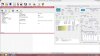
@Pranktank I installed GPU-Z but it wouldn't open. It showed an image with its logo and it just stayed there. I tried installing HWinfo64 but it seemed to only recognize Intel's gpu:
-
Set both programs to "high performance" in the switchable graphics app and try again. If that doesn't work start a game and open one of the programs after it has loaded.
EDIT: you have to run hwinfo64 in "sensors only mode". -
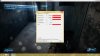
I've managed to get CPU-Z working, here's the printscreen:
-
Hmm that seems okay. Do the crashes still occur?
-
Yes, they do, IF overclocked. Haven't had any crash while not overclocked..
-
I have the 120w PSU now, I'm able to play BF3 on mostly Ultra settings, no AA at 40ish FPS, I don't know exactly how many fps because I don't look anymore, I dont wanna know.
But I still have crashes unless I lower clocks under 1250/850. -
It's strange. It seems that 17" owners can't overclock as far. Maybe a bios/driver update could resolve this or there is a setting we are missing.
If you run 3Dmark11 at those clocks does it complain about. "Driver device hung"?
New samsung series 7 with 8870m review / test
Discussion in 'Samsung' started by pranktank, Mar 23, 2013.


