 Problems? See this thread at archive.org.
@easyday: Compare to the pics linked here for the US (Best Buy) NP700Z5C-S02UB model. Like Matt says, they look the same to me.
Above the keyboard is an air vent stretching across most of the width. To the left is the Chronos logo, and to the right are the LEDs and the power button (top right corner).
-
-
I also noticed the pictures at Amazon-US are pretty off -- Korean keyboard on Amazon's photos (though the Samsung details area has a US keyboard), and I think it's the Z5A rather than the Z5C! Those pictures are missing a lot...the grill, the logo, etc.
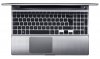
The correct image is more like:
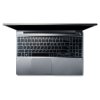
-Matt -
Ah, of course -- air vent -- I always wondered how air got in! After looking at the Z5A internals, it all makes more sense now.
 Air goes
in the top, then
out toward the back! Guess I better stop eating over the keyboard.
Air goes
in the top, then
out toward the back! Guess I better stop eating over the keyboard.
I'm excited to hear you're joining the club -- keep us posted!
-Matt -

From comparing it seems to be a design change to the top area of the laptop, a grill for either the fan or speakers?
Edit: Sorry seems this has been sorted now, I took to long posting the images! -
The 2 dotted columns above the keyboard are where the speakers are (they are aligned with Series 7 chronos text and the LEDs on the right). Above that, between the monitor hinge and body are the fan vents for the CPU and GPU fans [right and left respectively]. The laptop has 2 fans, so you see two separate vent groups.
UPDATE: Same as previous post. Was not looking at the latest replies -_- -
Actually air goes in from the bottom and front (vents near the card reader) and out the back as you mentioned. Those grills are for the two speakers
-
Regarding German version I can help if needed as I have one - only i5 version. I would suggest to wait for E series.
Sent from my HTC Sensation Z710e using Tapatalk 2 -
That was all my mistake. I looked at the pics and assumed the grill was an air vent. My own Z3A doesn't have a grill like that.
Thanks all for clarifying.
Update: Just to make sure we don't get into a loop here: My Z3A DOES have speaker grills, but it's not located above the keyboard like those pics of the Z5C. The subject is now fully debated as far as I am concerned
-
Just wanted to thank this group for the suggestion of VMWare. I installed it, bought a fresh Win XP disk and now have my needed Win XP legacy software running in a virtual machine. Quite pleased with that solution despite what appears to be a slight performance hit.
-
is there anyway I can play game while charging without making the battery dying? I searched google for disable battery and use AC for this but no result
.
-
What exactly do you mean? My laptop will still charge while gaming albeit very slowly. Your battery is actually draining while you play? Are you charging multiple devices while gaming? Try turning your brightness down.
The included 90W AC adapter is barely adequate for this laptop if you're doing any hard gaming. Something you can try is set your max CPU clock rate to 99% under your power scheme in Windows 7 (or 8?) on the advanced settings. This prevents Intel's Turbo Boost function from taking place and as a result, will use less power as your processor will only run at a maximum of 2.3Ghz. -
Or is it that you are worried about leaving the battery on charge? The battery will automatically stop charging when it is full but, to further reduce the wear on the battery, you can enable the Battery Life Extender in (Easy) Settings. This limits the maximum charge to 80%.
John -
Yes I afraid if my battery getting wear, how can I know if it stop charging if it is full, cause I still seeing the charging icon while my battery is full? I did enable my battery to Battery Life Extender.
Thank you very much.
I mean can I play game with the battery still on charge. I just worry about battery getting wear when I using while charging. I just looking for a software like Battery Meter (Dell laptops) and is there any kind of that software is similar to BM?
Thank you for answer my question sir.
Sorry for my English if it is bad. I've been in US 2 years until now
-
If you hover the mouse pointer over the power icon in the notification area is should tell you what is happening. Once charged it should xx%, not charging (where, if BLE is enabled, xx is 80% or slightly less (the system won't do a top-up charge until the battery has dropped a few percent)).
John -
Thank you John, I see it now (sorry because I didnt look at it first)
So can I still plug the charge in even if it is full (80%), and now my Laptop is using power from AC right? -
That's the plan and it seems to work for me. Once it gets to 80% it will stop charging as long as it remains plugged in until the charge has dropped several percent (which probably takes several days) after which it will do a top-up to 80% again. However, if you disconnect / reconnect the PSU then charging to 80% probably happens. Limiting the maximum charge to 80% is less damaging to the battery chemistry than charging to the full 100%.
John -
hi at all
yesterday a see two model of the samsung series 7, and now i'm uncertain between them. The model is:
NP700Z3CH
monitor 14"
i5-3210M
6GB of RAM
GT630M
8 cell battery
and the other is NP700Z5CH
monitor 15,6"
i7-3610QM
8GB of RAM
GT640M
8 cell batteyr
i will use at the university,so for me is very important the battery. I will use it also for developing,and for some old game.
so my questions are:
1)can i change the battery by myself? or it's integrated?
2)the 15,6" have e worst battery life than the 14"?or even with better CPU and bigger screen they have the same battery life?
3) how much is better the i7 than i5?there's a big difference,or it's under the 20%? -
1. The battery is integrated. You can swap it if you have a screwdriver, but that's not something I would plan to do twice a day. More details here.
2. I would expect the 14" to be more frugal on battery if only because illuminating a bigger display to the same brightness will use more power. The power difference between the CPUs on idle may not be much but running any CPU-intensive activity on battery will drain it much more quickly, more so with the quad core CPUs.
3. You can compare the CPU performance at notebookcheck. However, the magnitude of the difference will depend on what you are running: A normal single-threaded program will use only one core and the difference in speed will not be noticeable (see the single-threaded benchmarks such as the Cinebench single and SuperPi). If you are going to use programs that are designed to use multiple cores then the performance difference will be very noticeable.
John -
I'm sure this has probably been answered somewhere, but from a quick browse of the thread(s) I've not found a definite answer. If I want to replace the 1TB HDD that came with my laptop, do I want to get a 9mm or 7mm SSD? From what I've found it seems that the 7mm drives are the ones to go for?
(I originally posted this in the disassembly thread, but it might be better in here as it's this specific laptop I'm referring to - just in case there's any difference between the versions?) -
YES. 7mm. I installed the Samsung 830 256GB.
Sent from my iPad using Tapatalk -
thanks a lot someone here know how if the battery in the 15,6" and 14" is the same? beacause if not i will buy the 16," that have a better hardware,screen and same battery life
it's possible to change the CD/DVD player with a second HDD or simply remove it after the guarantee will end? -
double post,sorry
-
The 14" has a 60Whr battery and the 15.5" has a 80Whr battery.
Plenty of people have swapped the drives around, the most common action being to put an SSD in the main drive bay and move the HDD to the optical drive bay. Provided you do no damage and can restore the hardware to the configuration supplied by Samsung your warranty should not be affected.
John -
I'm running Win 8 and have looked around for the Battery Life Extender option but have yet to find it. Am I blind?
-
It's on the General Page of the Windows 7 Settings. I believe that the Windows 8 version has lost some functionality (but hopefully not that one) but there may be an answer in the Windows 8 thread (it says it is Series 9 in the title but most of the Samsung + Windows 8 issues are generic).
John -
try Fn + F1, and it should appear.
p/S: I dont know what is different between Power Saver and Samsung Optimized. Can anyone explain it for me please? Thanks
-
I also thought I saw the option in BIOS...right?
-Matt -
Yes. At least on my model.
-
i'm thinking about buying the samsung series 7 chronos (NP700Z5C-S02UB). i got some questions on it before i buy it:
- is the resolution of 1600 x 900 good enough to play games on?
- is it a good enough to play black ops and devil may cry 5 smoothly?
- i hear people dont like the screen.. whats wrong with it?
- should i wait for the next series 7 version to come out this year?
- what month will the next version come out?
- is the i7 quad core? -
1- Yes. 1600X900 on a 15" screen is a pretty good sweetspot imho, particularly when tied to the 640m; 1080p is a little high for that gpu.
- It's person-specific. It has pretty narrow viewing angles, but once you play with the settings it's not so bad. I like the matte finish. Most complaints I've seen are from people who didn't adjust the settings, or are photo-pros.
-I didn't because the new one looks like it's going to be silly expensive, like the Asus U500 was (~$2500)
-Dunno
-Yes -
Yes, absolutely.
BF3, yes, absolutely. DMC5, don't know but would assume yes.
Nothing. Viewing angles are meh, and color/contrast is so-so. After a week of ownership it's a non-issue.
Definitely. It's a better machine, but the best guess is expect to pay anywhere from $200-$500 more for the newer model.
Nobody knows. I'd estimate April-May. Keep in mind that if you wait until then, and buy one, a few months later Samsung will release the same model at around the same price, with the "4th gen" Haswell CPU. And you'll then wish you'd waited for that model instead. I'm 100% glad that I bought the Z5C when I did (November) and I have no intention of trading it in for the next release.
These are all my own subjective thoughts -- I'd imagine and expect that other owners will give different answers!
-Matt -
Italian and other european samsung facebook pages say februari.
-
I forgot to mention: didn't someone a few pages back list a couple German (Swiss?) sellers?
-Matt -
Woops, no, it was the other thread:
http://forum.notebookreview.com/sam...ries-7-chronos-amd-hd8870m-6.html#post9019311
-
Thanks. By the way, I ask these questions because when I try to read my PDF manual on the computer, it locks up every time. Strange. I've even tried downloading the manual to my XP desktop and it fails every time. Anyone else have this problem with the PDF file?
-
hi,i want buy the NP700Z5C. Someone had made the upgrade from windows 7 to windows 8? Or there is some problem?
-
Is there is PDF version of the manual? I thought they were all animated horrors created using Shockwave or similar and run as an executable. I know I just get a box with a blank screen if I have the security in IE set to high so it's possible various other security settings can cause it to fall flat on its face.
See this thread. While it say Series 9 in the title, most of the issues apply across the range of Samsung notebooks.
John -
I saw those for my Sammy model: 200MB horror EXEs. But just checking now on samsung.com, there are actually PDFs for Win8. Still 25MB but they're not too bad. I can view it all right.
http://downloadcenter.samsung.com/content/UM/201210/20121026202221731/Win8_Manual_eng.pdf -
hi gadgetrants.. im a bit confused as to which samsung to get,. either the NP700Z5C-S02UB or the new one debuting this year. i want to get the current one.. but many complained about the screen being dim and angles being bad. can u help me with making a decision as to which to buy?
-
can anything be done about the trackpad, I've noticed something that really bugs me now, if you tap the pad to select sometimes it doesn't work (or so it seems) then when you move the your finger to click again it has a little "no moving symbol", can I do anything about this??
thanks -
As I recall...the last forum member who went to check it out instore really hated it. Of course, the problem was exacerbated by the fact that there were much nicer displays nearby at Best Buy. I really have only one piece of advice which is try to find a nearby Best Buy (if you're thinking about the S02UB) and evaluate it yourself. Otherwise, everything I've read so far about the Z5E is that it's a really, really nice display. Of course, it'll likely cost more too.
Oh, to reiterate what I said a few posts above (other owners please chime in): I personally think the S01US/S01UB/S02UB have great displays. Not breathtaking, but definitely better than "OK".
-Matt -
Do you have the version of the trackpad utility that has the "advanced" settings for palm tracking and sensitivity? Tweaking those settings might help -- I haven't seen that issue though.
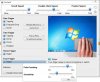
-Matt -
I have it too. It just depends on what you are using ti for and where you come from as a user. For me, I notice the viewing angles only when I am sitting VERY close to the laptop (usually in bed, laptop on stomach), at which point I realize how close I am and edge back to a more comfortable range. That said, if you are a photography pro or someone that requires IPS displays in everything they own, you likely won't like it (then again, you likely would get a different laptop, spec-wise, anyway). If you are an average joe, and are willing to adjust some sliders, you should be fine.
-
Yeah I have that, I'll give it a go thanks!
-
- i havent found a samsung series 7 with the Z5E item number. can you please post a link to it?
- you said the display on the NP700Z5C-S02UB was breathtaking. so do you have any complaints about the display at all?
- can touch and interact with the display on the NP700Z5C-S02UB?
i'll most likely use the laptop for games, youtube, movies and multitaking between docs and pdfs. that said, i dont want to experience bad visuals with games or movies. whats your experience with it with games and movies? do you like watching movies and games on it? -
The Z5E is the new model -- not available yet in the US, but there are lots of prerelease info links, e.g.,
Samsung Unveils Enhanced Series 7 Chronos and New Ultrabooks at CES 2013 SAMSUNG
I'm sorry if I mistyped, but I meant to say the S02UB isn't breathtaking. I'd rate it a bit above average. No complaints.
Also the S02UB has a standard screen -- the new Z5E has an optional touch screen though (see the link above).
-Matt -
I split this up:
Movies- I haven't watched many movies in the form of DVDs, but I've watched some HD Youtube videos and the screen is really great. The built in color management software has a "movie mode" that also kicks in for games when you go fullscreen. I like the settings, some don't. Personally, particularly with the matte screen, I like it a lot for video. The speakers are a little tinny, and lack bass, but a decent pair of $30-40 headphones solves that problem.
Games- I've been playing some Mechwarrior Online, Cities XL 2012 and The Walking Dead. Walking dead runs like butter, maxed out. Cities XL runs really well too, though it has issues with Optimus so it's not as smooth as it should be. Mechwarrior online took some Optimus tweaking to get the GT640m to kick in, but as a Cryengine 3 game (very demanding), it runs well at native resolutions at mid-to-high settings. I also did some brief testing with HalfLife 2 and Minecraft and they ran perfectly, maxed. In terms of screen quality for these things, it's a good screen. Refresh rates are acceptable without too much ghosting, and again, the matte screen allows me to game on the train to work without fighting reflections. COntrast levels are also good, with dark areas sufficiently visible.
Also, no real edge bleed to speak of on mine, but that does vary between units.
To be honest, my biggest gripe has been the wireless transfer speeds and connection consistency. Multiplayer gaming has been somewhat challenging. Sometimes it's perfect, other times I have to restart the wireless card. -
Actually I find the speakers gave a good amount of bass response. To get rid of the tinny sound, I use the "rock" equalizer setting on Easy Settings. As with most rock presets, it emphasizes bass and treble, while toning down the midrange to get rid of that concert hall effect. Try it out, I personally think it makes the 2 speakers plus subwoofer sound as they should.
-
is it possible to replace the hard drive on the NP700Z5C-S02UB with an SSD?
so do u think that devil may cry can work smoothly? below are the PC requirements:
Devil May Cry Minimum System Requirements
OS: Win XP / Win Vista / Win 7 / Win 8
CPU: AMD Athlon X2 2.8 Ghz / Intel Core 2 Duo 2.4 Ghz
RAM:2 GB Memory
GPU:ATI Radeon HD 3850 / NVIDIA GeForce 8800GTS
DX: 9.0c
HD:9 GB Free Hard Drive Space
Devil May Cry Recommended System Requirements
OS: Win XP / Win Vista / Win 7 / Win 8
CPU: AMD Phenom II X4 3 Ghz / Intel Core 2 Quad 2.7 Ghz
RAM: 4 GB Memory
Graphics: ATI Radeon HD 6950 or more powerful
Samsung Series 7 Lovers - Here's The NP700Z5C Ivy Bridge!
Discussion in 'Samsung' started by yknyong1, Apr 23, 2012.


