 Problems? See this thread at archive.org.
This is probably that delicate moment where I ever-so-politely suggest you go back to, say, the 160th or 170th page of this thread, and read a bit. So far, many of your questions have been asked and answered.Either way, if you haven't seen the threads below, it's a great place to start your reading:
http://forum.notebookreview.com/sam...0z3-np700z4-np700z5-series-owners-lounge.html
http://forum.notebookreview.com/sam...icky-list-find-most-popular-threads-here.html
-Matt
-
-
Your patience is commendable
-
hi matt.. looks like u can replace the HDD with a SSD.. just 2 questions on this:
- what good quality but low priced SSD (120GB) would u recommend i get?
- if i install an SSD, can i remove the 8GB SSD already in the laptop? -
A 7mm thick SSD is preferable. Look at the Samsung range. The PM840 (not PM840 Pro) is competitively priced. 120 / 128GB is OK if you are planning to put the HDD into the optical drive bay. Otherwise I advise find the extra cash for a 250GB SSD.
The 8GB iSSD is soldered so it cannot be removed, but it can be disabled. Alternatively, it can be configured as storage.
John -
Amazon.com: Verbatim 120 GB SATA III Internal SSD 6.0 Gb-s 2.5-Inch 47378: Computers & Accessories
120gb SSD for less than $100 as of this post ($95). -
The price of the NP700Z5C-S01US dropped under $1000 at Amazon and CircuitCity/TigerDirect this week, presumably reflecting the tail-end of the inventory (I'm usually wrong about such things, e.g., I was completely off on my Asus Transformer predictions!). If in fact Samsung has ended production on that line, I'm intrigued to see what they'll shuffle next into the ~$1000 slot. I think we all assume the 15" Z5E will be considerably more...maybe they'll offer a variant without the touchscreen, and maybe a few other downgrades (e.g., 1600x900 display) around that pricepoint? Another possibility is that the Z5E with all the bells and whistles (e.g., 240GB SSD, 16GB RAM) will be the premiere model at $1800, while the one with lower-end specs will be...maybe $1200?
EDIT: Holy carp guys, just noticed that the S02UB fell to $899 at Best Buy:
Samsung Series 7 15.6" Laptop 8GB Memory 1TB Hard Drive NP700Z5C-S02UB - Best Buy
That's the definition of "make me a deal I can't resist". We did not see a deal anywhere near that in 2012.
-Matt -
thanks i'll look into it.
hi john. im confused. ur saying that in order to put in a 120GB SSD that i got to replace the optical drive? so wat happens if i need the DVD drive? why cant i just replace the hard drive with the SSD?
also, i went to best buy yesterday. the laptop (NP700Z5C-S02UB) looked flimsy. and the mouse wasnt responsive. it was not a good experience. -
I think he was saying that a 120GB is probably too small for most people -- if that is the SSD size you want to install, it makes sense to pull out the ODD and put the original HDD there for extra space. The other option is to buy a larger SSD and only swap out the HDD. It's pretty easy and cheap though to put your optical drive in an external enclosure which powers by USB, if you want that option.
That's very weird news about the S02UB -- but I've noticed that Best Buy does not really take good care of their machines. I hate to make an odd suggestion, but I have (literally) stood in a store, rebooted the machine several times, and updated/repaired system software (e.g., reinstall the mouse driver) until things were working properly (for some strange reason, the floor models often have admin rights and wifi access, a lethal combination). After doing that, I get a better picture of how the machine actually performs. I've also noticed that some have just taken a beating. If possible, try to get your hands on a second one.
-Matt -
Correct.
John -
+1
I used to work at best buy back in the day and I can tell you for a fact: Never judge a system's performance byw hat you see in the store. The in store machines are loaded down with a demo software and a "deep freeze" auto-restore software that loads them down pretty bad. Essentially, it's an always- on app that does two things:
- Displays the demo you see running that also lists the system specs
- Ever 30 Minutes, or after 5 minutes of Idle, teh system un-does everything the last user did, returning the machine to a specific state. That way, if someone downloads a virus or or something, it's auto-wiped. -
thanks. appreciate the clear up.
- hi matt.. thank u for clearing that up. i got a question about the screen on the S02UB. does it have the same screen quality as previous series 7 laptops? or is it different?
- is the screen quality the same as the new one that will debut this year? -
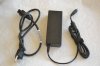
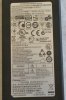
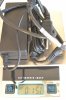
Would someone take a photo of their Z5C charger and post here?
-
Just to confirm, the port for the HDD on this laptop is Sata III, not Sata II, right?
-
Well, it's a slightly complicated answer. The short version is, "Yes, the S02UB has (a bit) better color and dark/light contrast." That was supported by the fact that when checking the display panel ID, Windows 8 reported SEC0007, rather than SEC0006 which is the model on the S01US and S01UB. Indeed, the S02UB I bought also came with the SEC0007. But when I downgraded to Win 7, I checked and mysteriously the device ID reverted back to SEC0006. But it looks better to my eye and a few others have reported the same experience.
I can't resist teasing you and saying: it seems you haven't dug too far into the news releases. Google it a bit, you'll be impressed! The answer to your question is that it will be MUCH better -- 1080p, IPS I think (not sure), and something like 178-degree horizontal viewing angle. The tech press were peeing on themselves at CES. It will be an amazing machine. FWIW, I have the impression if you buy the S02UB, you'll really get upset when the new model is released -- my advice is to wait for the new one, assuming you're OK with paying more for the upgraded features. Otherwise, the S02UB at $900 is a spectacular deal.
EDIT: I think I stand corrected. I went back and reread Samsung's original press release, and they explicitly mention that the 13.3" Series 7 Ultra "features a 178-degree viewing angle." The 15.6" Series 7 Chronos, however, "features a high resolution, Full HD display (1920x1080), with 300nit brightness." No mention of viewing angle on the Chronos. I would therefore suspect it is definitely not an IPS panel, and possibly only an incremental improvement over the current display (higher resolution notwithstanding).
FWIW, in their hands-on computerweekly.com notes:
http://www.computerweekly.com/blogs...s-2013-hands-on-samsung-series-7-chronos.html
Of course, that's worth the paper it's printed on. I remember when the Z5A came out -- and then the Z5C -- we hung on every word of the early reviews and user reports. The only way to know for sure will be to wait for the release!
Sure, give me 5 minutes.
The standing assumption here is "yes." There are numerous reports of owners here installing an SSD, and I don't remember one saying "WTH, it's SATA II." On the other hand for the life of me I also don't remember anyone reporting speeds on their new SSD.
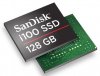
I just checked HWiNFO64 -- keep in mind I'm running the stock HDD -- and I'm not getting a clear answer. HWiNFO64 is reporting that the SATA port 0 (HDD) is running at SATA II (3.0GPS) while SATA port 1 (8GB iSSD) is running at SATA III (6GPS). That's consistent with the hardware specs on the drives themselves. So while I can't confirm that port 0 CAN run at SATA III, it's clear the neighboring port does. FYI, remember the iSSD is a proprietary chip that's soldered to the board and cannot be replaced:
SanDisk U100 and iSSD i100 solid state drives introduced
-Matt -
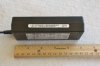
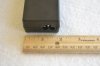
Pictures of power supply for the NP700Z5C-S02UB (ymmv):
-Matt -
Hi Guys,
I have a choice to buy two laptops, First it is NP700Z5A the other is newer version of the same laptop NP700Z5C. Does it worth to pay extra 70-80 $ to get the newer model if I will be using mostly for the Internet and MS applications? Also what is the top 3(5) improvements for the newer version? ( except obvious faster proc)
Is it possible to install additional SSD drive for both models?
Thank you in advance! -
Hey, welcome to the forum! I'd gently steer you toward the Z5C (though see conversation above and thread here about the fancy new Z5E). Personally, the upgrades that convinced me were:
- Ivy Bridge CPU in the Z5C
- (Slightly) better display in the Z5C
- NVIDIA GPU (vs. ATI Radeon) in the Z5C
I'd say it's definitely worth the extra few bucks. Did you see that Best Buy has the S02UB for $900?
-Matt -
Whoa for $900 that is an insanely awesome deal. I'll have to agree with Matt and say that you should definitely go for the Z5C if you can, it's also cooler and more efficient than the Z5A as well as faster of course. Should be able to squeeze out 15-30min extra battery life out of it.
EDIT: Yes the port for the hard drive is SATA III as I see speeds of around 450MB/s on my SSD. -
I purchased 02UB last week for $999 at Best buy. Went back today for the $100 price match, no problems. This is to replace my Dell XPS i702x i7.
-
Can someone else confirm theirs is the same charger? Or looks different?
-
Mine is the SEC0007, and while I've done some tweaking of the color settings, the viewing angle issues can't be helped. It's not that big of a deal for me though. More importantly, though, has anyone else seen/commented on the color shift that occurs when the panel comes on in Windows after the screen has been off for a bit? What happens for me is that for a split second it comes on and looks good, but then a bluer hue kicks in right afterwards. I think it would look better if the bluer hue never kicked in! For clarity's sake, I'm not talking about when the dimmed screen goes to full brightness, or the dynamic or adaptive brightness functions. What I'm talking about is a difference in hue that's occurring, seemingly with two components of the backlight hardware coming on a different times. It's something along the lines of how florescent lights will turn on, and then will kick in a bit further. Maybe there's two backlights on this thing internally, one with a better color profile?
-
If you're still running Win 8, take a minute and search through your registry (I used regedit on a unit at the store) for "SEC0007" and "SEC0006." For whatever reason you'll find that both show up there.
Regarding the bluish "kick-in" I don't think you're imagining it. I have a suspicion it's related to the default color profile that is controlled by Intel HD GPU and its corresponding driver. Play around in the "Intel Graphics and Media Control Panel" and you'll see that you can tune down the blue to your liking, and if you save it as a color profile, it should stop the issue. If you want to explore other solutions (e.g., loading a Windows ICC color profile that you might like more) check out this thread:
http://forum.notebookreview.com/sam...es-7-chronos-np700z4-np700z5-icc-profile.html
Note that one strategy that's come out of that thread is to disable Intel's color management by toggling off igfxpers.exe in msconfig. I also learned a lot by reading this:
Stop Losing Display Calibration with Windows 7
-Matt -
I would also add that the Easy Settings on my Windows 7 X4C has Display Color options at the bottom of the Display tab. That may try to over-write color preferences set elsewhere. I have mind set to "No effect".
John -
John makes a really good point -- Easy Settings (or just "Settings" in Win 8) works through the Task Scheduler, and so can be slow to start. Oftentimes owners see delayed responses after starting the machine and get puzzled, e.g., a recent review on the S02UB at Best Buy:
Samsung Series 7 15.6" Laptop 8GB Memory 1TB Hard Drive NP700Z5C-S02UB - Best Buy
..."Technology guru"...really...?... LOL
-Matt -
Excellent points! FYI, my machine came with Windows 7, but regarding SEC0006 vs SEC0007 in the registry, it could just have to do with both loading the same drivers or what have you, so who knows.
I had already discovered the "Stop Losing" info on my own, so my issue must be the Intel Graphics persistence module. I did explore the Intel Graphics settings and found that one particular option was set to it's own settings versus letting the applications decide, so I've already tweaked that, but I don't think it solved my issue. I'll see what I can do about disabling the persistence module and see what happens.
Yep, already had mine set to No effect, but thanks for pointing this out, others will benefit.
Edit: Actually, according to yknyong1, you have to have Standard selected, or the bluish hue and ICC settings will be superseded: http://forum.notebookreview.com/sam...p700z4-np700z5-icc-profile-4.html#post8239996
He may be on to something here. I'm going to investigate further.
Edit 2: On the other hand, Speedy21589 has a contrasting take (no pun intended!) that also makes sense:
http://forum.notebookreview.com/sam...p700z4-np700z5-icc-profile-6.html#post8414360
Edit 3: Speedy seems to have been right. Disabling igfxpers.exe, regardless of the Easy Setting set, seems to maintain the ICC profile of one's choice. -
I neglected to add: at the end of the "Stop Losing Display Calibration..." post I linked to above there is a follow-up post that might be helpful (on a personal note, I gave "autoruns" a try and it's amazing):
Intel’s Video Drivers Kill Display Calibration
-Matt -
quick question about the new samsung seies 7 chronos that'll come out this yr... does it have "motion sensor" software that allows you to navigate through webpages via hand gestures in front of the camera?
also, the current model of the series 7 (S02UB) has bad viewing angles and color issues. can you guys recommend a similar machine with the same specs with non-click touchpad similar to this model with HD display? maybe sony or toshiba? -
Read through the web pages being prepared by Samsung. The new Series 7s are discussed in detail in this thread.
John -
You're talking about the "LeapMotion" sensor... it's not out yet, but can be added as a peripheral for $80 later this spring/summer.
As for the laptop you are looking for, there are some Asus laptops that might get very close, but heads up, they are going to be expensive. They have an ultrabook with very similar specs, but it runs $2500. That said, pretty much every laptop in the higher-end spec range these days has a click pad as opposed to a trackpad and buttons. I thought I would hate it on my S02UB, but you get used to it, and I like it a lot now. -
Hey all! long time forum reader, long time never asking questions type of person...but let me get to the point.
Bought a Lenovo Y400 during its fire sale ($749 for 2gb 650m, 14 inch, i7 3630, 8 gig ram) and I hated it and returned it. The screen was just not great and the touchpad drove me nuts after a lot of driver messing. The specs though were wonderful and it was amazing for WoW. (also threw in a 64 gig ssd and used its hdd for space in the optical bay with a caddy)
I cannot even come close to another laptop in that spec range/price. The Best Buy S02UB with 1tb, 640m 1gb (you know the specs) is a very good looking machine. I dig the size, reso, weight and the 180+ page forum posts on it. The only issue I have is I cant determine if the Lenovo was overkill for WoW and this laptop fine or if I am low balling my needs. Is this fine for WoW?
Another thing is, I love the SSD main os drive and using the drives that come with laptop in a caddy in the optical bay. Will that work for this? I have a macbook 13 caddy that worked in the lenovo so I assume it should be ok?
Last is there are soooo many models for this I cannot determine after reading this long long thread if the best buy model with the 1tb acually has the 8gb cache? In store it also says its 3635 i7 but the ones in here are 3615? If its just the 1tb throwing the ssd in fresh install would be smooth but the cache is another story.
end of wall of text. Thanks. -
Welcome to the forum
I'll let others who own this specific model provide their input -- though I can say I love my older 14 inch Series 7.
Re the SSD and moving HDD to the ODD bay: Lots of people have done that. Discussions about it almost daily -- and particularly the last few days. Check the thread linked below:
http://forum.notebookreview.com/samsung/626915-hard-drive-caddy-series-7-a.html -
Anyone have issues with gaming on this laptop and the power supply? There's one review on Amazon stating that the laptop draws 98W and the power supply provides only 90W so while gaming, the battery is used.
If that's the case, has anyone tried a universal power supply (120W or larger?) And what is the OEM charger tip polarity and size? -
Hello
I have just picked up a 700Z5C-S01
A couple of upgrades that i will make before using it in earnest:
Remove ODD & replace with existing 1TB HDD & install a 512Mb 830 SSD for the primary drive.
Upgrade to Win 8. I'm using it on my desktop and quite like it.
Memory upgrade. My problem is what size memory can I install? I've read somewhere that the 700Z5C only supports up to 12Gb?
Can someone let me know what size and type of memory to get?
Thanks -
There is 4GB RAM soldered on board and one SODIMM slot which can hold up to 8GB. You need a 1600MHz DDR3 PC3-12800 SODIMM.
John -
Thanks for your reply John.
My 700Z5C came with 8GB. Can I add an additional 8GB?
Terry -
Very unlikely, if it came with 8GB then it's 4 on board and 4 in the RAM slot. I don't think any of the Z5Cs shipped with 8GB on board. You can check the RAM configuration using CPU-z.
Your only memory upgrade option is to change the 4GB SODIMM to 8GB.
John -
You're spot on John.
It has a 4GB SODIMM installed.
Thanks -
I noticed that review too and have to admit it sounds pretty truthy, however, I don't think we've seen confirmation of the issue here -- that is, that the battery draws down during gameplay with the AC power. IIRC, the only issues that have come up in the last several months have been (1) a concern about the life of the battery (i.e., whether or not to use Samsung's 80% utility), and (2) one case of a defective power supply. So either it isn't really an issue (I'd a thunk we would know about it here) or it is but we don't have enough data to spot it.
-Matt -
Gaming on this laptop shouldn't be an issue, it doesn't throttle while gaming (mine stays at around 3.1Ghz) so power wasn't enough of an issue for it to clock down. I think that Amazon review is incorrect because even with an overclocked graphics card (660m speeds) at 100% usage and the CPU at 3.1 and 50%+ use I was hitting like 87W. I'm assuming I hit 87W because my charge rate according to BatteryBar was only in the 2-3W range instead of the usual 46W range. I wrote a post about this some pages back but I have no idea how I'd find it.
The guy in the review was probably running Furmark and Prime95 simultaneously, which is something would definitely NOT recommend doing. It's a completely unrealistic scenario.
The i7's TDP is 45W and I think the 640M is 35W, so with the screen and other stuff going on I'm sure that power supply is cutting it close. -
Sounds good. I'll just monitor it to be safe. I'm more worried about battery life since this will be a 95% desktop 5% travel laptop and it will be plugged in most of the time. A samsung rep on the tigerdirect youtube channel specifically said that leaving it plugged in was no bueno for battery life. But that the Samsung battery utility was supposed to help improve average cycle life from 10000 to 15000 or something like that. There's an apple support page which recommends storing the laptop at 50% capacity, not 100% if you aren't going to be using it right away because it will reduce the maximum capacity of the battery. I do wish I could just take it out and put it on the side so the heat from the CPU/GPU doesn't reduce it's life when I have it plugged in.
-
This probably won't change anyone's minds, perceptions, or habits but: when I bought mine 2 months ago, HWiNFO64 estimated battery wear at 0.4%. I run my machine 24 hours a day, 7 days a week. No breaks, no holidays. I also have it charge fully to 100%. Two months of ownership, and it's still exactly at 0.4% wear. Maybe I'm just a lucky guy but I treat all my laptops the same way, and I've consistently gotten 2-3 years of excellent battery life out of each one.
-Matt -
If you're primarily using this as a desktop replacement, may I ask why you chose this laptop specifically? Its form factor and battery life don't exactly represent the desktop experience, and for the price you can find something with a more powerful GPU and a higher resolution screen, at the cost of battery life and mobility.
For what it's worth, I do quite a bit of gaming on this thing as well as running the battery through full cycles when I'm not gaming and I don't use the 80% battery saver feature. My battery wear has been at .4% since I got it in October so it's holding up fine. If you do decide to get this computer for whatever reason I'd suggest using the battery saver feature to keep it at 80% when you're plugged in all the time. I'd also suggest getting a good cooler for it if it's a desktop machine. -
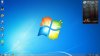
Does anyone have a problem like this? The screen gets very pixelated.. I'm not sure how else to explain it. I have tried driver updates and reinstalling them but to no avail. It will fix when I tilt the screen though. -
can you guys help me out with this problem?
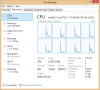
Why does it keep running at maximum speed even when I just restarted my Laptop? Then I reset it and it didnt fix the problem. People say that the Hyper-V causing it? Any ideas?
I found some post about it
windows 8 - Processor always at max speed - Super User
Hyper-V Windows 8 CPU power management problem
Please help me out. Thank you -
I haven't had that problem personally, but it looks like there's JPEG compression artifacts on your desktop? Very weird problem. Does it persist if you open a full screen program like Chrome? How often does it happen or is it permanent? Try checking your resolution settings and make sure it's set to 32-bit color and not 16-bit. This is found by right clicking on your desktop, selecting "Screen Resolution," then by clicking "Advanced Settings" in the bottom right corner. Then, click on the "Monitor" tab at the top of the box that opens and make sure your refresh rate is set to 60Hz and your color setting is "True Color 32-bit." Other than that I have no idea without more information to be honest.
EDIT: I just realized the JPEG compression is probably due to the fact that your screenshot is a JPG file and not a PNG file. I don't see a problem in that case, but I'll leave my previous statement if that's not the issue.
That doesn't seem to be the laptop that this thread is centered around, as you have an i7-3720QM and ours either has an i7-3615QM or an i7-3635QM. You should probably try finding a more appropriate thread to post your question as it may be tied to your notebook manufacturer or model, as well as other components.
Regardless, your processor speed settings can be found under advanced power settings for whichever power profile that you're on. Scroll down to find the "Processor Power Management" submenu and click on the "minimum processor speed" and make sure it isn't set to 100%. -
I mean I'm in the same situation with them sir. I didnt run anything but Task Manager keep appear that my CPU is using 3.09 Ghz. Then my fan starting to make loud noise and getting heat. I'll try one more reset tomorrow
-
hi all.. just wondering, does anybody having problems with usb 3.0 and usb 2.0? it seems to me like these ports always trying to disconnect devices ( usb 2.0 pen drive or usb 3.0 external hdd ). trying to copy for example over usb 3.0 files about 12 gb large and i can hear how my externall hdd stop spinning and copy progress is in frozen status ... reinstalled latest usb 3.0 drivers, latest chipset driver and still the same .. even if i want to copy something to my usb 2.0 pen drive it just sopped and i have to reformat the usb pen drive...
-
Alright it seems I misunderstood then. Did you try my advice at the bottom of my post? Power profiles have a big impact on processor speed.
Also cEvin_K your problem is not specific to this laptop I think, I've had it happen on my old HP. I don't know how to fix it though. -
Yes I did try your advice (thanks) but it doesnt work. Before this happen I installed the AVA game, play it a bit, after I quit the game this thing start to happen. Tried to reset (Remove all setting, files) but no good result. Check it in my router, my laptop actually run 2 pc in it.
-
I would recommend periodically running the battery calibration in the BIOS. My NP900X3B reported the same 3% wear from new for 9 months until I ran the calibration. See here (and the following posts) for what happened. It's prudent to check the true health of the battery towards the end of the one year warranty period.
John
Samsung Series 7 Lovers - Here's The NP700Z5C Ivy Bridge!
Discussion in 'Samsung' started by yknyong1, Apr 23, 2012.


