Problems? See this thread at archive.org.
@lemodular: Welcome to the forum. Sorry to hear you're having such a hard time with your Sammy.
That's great advice from TechBill to check for malware. Another tool I use from time to time is PrevX -- and of course Microsoft Security Essentials, if you don't already use that.
If malware is NOT the issue, I agree with Matt that some other software is the most likely cause -- although a defect iSSD or HDD could also cause this disk grinding.
I would try and disable ExpressCache (just as a test) to see if that makes a difference. IF it makes a difference, then try and defrag the drive, then run C:\Program Files\Condusiv Technologies\ExpressCache\bootopt.bat (it should take a while to run, otherwise something is wrong).
Let us know when you had a chance to check those (malware and ExpressCache). Hopefully we can nail this.
-
-
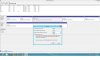
I'm trying to Shrink my C: partition but am confused by my options.
I defragmented the partition, then right-clicked to Shrink. The option I was then presented with seems to be allowing me to only Shrink it about 50%, rather than from 900GB to 60GB. Could someone see the attached image and let me know if I'm missing something here? Thanks in advance!
-
@WSR: Unfortunately Windows will only shrink if there are no files in the way - ie it won't move files to make room for further shrinking.
You could run disk cleanup and CCleaner, temporarily disable hibernation and pagefile, then defrag again. That may allow you to shrink further.
Other options are:
1) Use a 3rd party partition tool. I use PartEd Magic, which is excellent (and free), but that's a Linux LiveCD which I would ABSOLUTELY NOT boot on your machine with UEFI enabled. (See the sticky warning thread). I hear good things about Easus, but have no experience with it myself.
2) Perform a Complete Restore from Recovery (F4) and use the Advanced Option to choose a partition layout. That should allow you to set the size of your Windows drive and a Data drive (at least SRS5 does that). You will lose everything on the disk, so you need to backup data first and restore it afterwards. Programs must be re-installed.
That's all I can think of right now. Other suggestions, guys? -
@Dannemand - I would understand that if I had tons of stuff on the computer. But this is a new system and I show less than 57 GB being used . . .
-
Further to the previous suggestions, I would wonder if it is a disk problem. I've known computers slow down drastically when they can't read the drive properly and keep retrying (to be followed soon after by not working at all).
In theory, the drive's SMART data should show it if has a problem although it could be an interface issue such as a cable not plugged in properly which is causing a lot of corruption on data transfers. The way I would test for the basic drive health is to remove it, put in a USB enclosure and plug into another computer where I can run a drive benchmark (but speed will be limited by the interface unless USB 3.0 is used) and also provides the opportunity for a full scan for any nasties.
John -
I understand, but unfortunately that's simply how Windows' Disk Shrink works: If there is just a single file in the way, it won't shrink it any further. Sometimes you're lucky it will shrink a lot other times not so much.
Very likely, your hibernation file or pagefile are the ones preventing shrinking. That's why I suggested you disable them both (temporarily), clear anything you can from the C drive (Disk Cleanup and CCleaner), defrag again (even several times), then try shrinking again.
To disable hibernation, open an Administrator Command Prompt and type powercfg /hibernate off.
To disable pagefile, open Control Panel > System > Advanced system settings > Advanced > Performance > Settings > Advanced > Virtual memory > Change and select No page file for your C drive. It will warn you that this is not recommended, but that's OK.
When all is done, you can re-enable hibernation and pagefile.
Alternatively, just shrink as much as you can now and create your Data partition. Move data files over, then see if it will let you shrink more later. Problem is, you cannot expand your data partition "to the left" even if more room has become available.
OR use a 3rd party partition tool OR do a Complete Restore (both described in my last post). If you don't have a lot on your system yet, I would just do a Complete Restore. There is never a better time to try these tools than when your system is new and you don't have a lot of data and programs to worry about. -
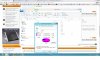
It doesn't seem to work or I can't do it properly. Can you tell me what I'm doing wrong here?

-
Gentlemen (and ladies?), Thank you for the suggestions and I may have found the solution.
@Gadgetrants - I can't seem to get into Safe Mode either with your method (Power down, power up, hit esc, then F8) as it always seems to go seems to boot normally. I have tried the various F keys but none will interupt the normal boot sequence...very strange. Will explore this more.
@Techbill - Thanks for suggesting Malwarebytes, it is one of my favorite along with CCleaner and SB Search and Destroy....and occasionally SuperAntispy. I did as suggested and found no Malware.
@Dannemand - I suspected an HD or iSSD failure too, but no unusual noises or corrupted data...as far as I know.
@John Ratsey - That is a trick I use on typically bad drives too.
So I agonizingly try to back step and uninstalled some programs I suspected that was accessing the disk in the background where I cannot see as a running program. The culprits may be Adobe Flash and/or Samsung Support Center (which a module seems to crash everytime I open it yet still works). Its been about 12 hours and everything is still running fine after several reboots and usage. Keeping my fingers crossed that this will stay this way.
There are alot of knowledgeable people on this forum and I hope to discover and learn from you all and maybe even contribute from time to time.
Cheers. -
I had exact same problem with Samsung Support Center crashing every time I open it or reboot the computer when I purchased the laptop new. So I started over again with fresh Windows 8 using the Windows 8 Factory reset program. I selected disk wipe so that took a long time like 6 hours or so to complete.
This doesn't bring back the bloatwares but it does bring only the Samsung Support Center back, then from there I installed only drivers but not the nivida drivers which I went and got it directly from the nivida website.
Now I am loving my Samsung laptop, it really kick butts and I am still using a standard HDD that came with the laptop for my drive and it flies!
I thought about installing one of them SSD drives but I think I will just get one of those higher and bigger cache HDD instead so I have a bigger drive to edit my videos with and not having to lose my dvd disc drive for more space.
When I check desktop or laptop to troubleshoot, I use Ultimate Boot CD and boot any desktop or laptop then run Xwindows with utilities that will allow me to trouble shoot. One of the utilities will read the logs in your HDD that is written and stored by SmartDisk to tell you if they detect problem with the HDD.
Hope you find a solution to your problem,
Bill -
No worries, it's just a teeny-weeny typo: After ECMC, insert a space, and then *.sys

Great, I'm thrilled to hear you've sorted things out! Did you get a chance to try the "msconfig" approach to Safe booting? I am willing to bet $2.37 that it works the same way in Win 8 as it does in Win 7! BTW, a few pages back Dannemand explained how Win 8 machines are set to kind of hiber-sleep (data and programs are wiped from RAM, but system drivers are cached to disk), which means you're not "really" shutting down all the way (which explains your booting "issue"). Somewhere in Win 8 though (Power settings, maybe?) there is the option to do a true shutdown if you want, which means the next startup will be a full cold boot.
I still haven't opened mine up yet (3 months) but given the recent discussion about UEFI issues (and live-booting Linux), I'm tempted to move myself over to BIOS and do a full reinstall of Win 7. Anyway, I mention that because, at the same time, I may (a) pull the ODD, (b) move the HDD over into the ODD slot, and (c) put a medium-sized (e.g, 128GB) SSD where the HDD was. It seems several owners here have done that, which gives you the best of both worlds (i.e., SSD performance plus 1TB of storage space for data).
EDIT: uh oh, I just noticed you said, "not...lose my dvd." I'd just as soon toss mine out, but I know others are wedded to theirs!
-Matt -
Still no luck
-
Ooops, this time it's my bad -- I missed another detail.
You're currently in the system32 directory. So first, type (and enter) "cd drivers", which will move you to the driver directory.
Then type ""findstr /s ECMC *.sys" and it should work. Remember not to include the quotes.
-Matt
PS The /s command means "search this directory and every one beneath it" so if you prefer, you can just run the "findstr..." command right there at the system32 prompt! -
Ok I think it worked this time around.

-
Excellent. The culprit is ExpressCache.
What I recommend doing next is going into "Features and Programs" and uninstalling the ExpressCache program, then running "SW Update" which will detect that it's missing and reinstall it.
-Matt -
Thanks Matt, I'll give it a shot and see how it goes. Thanks for all the help.
-
Fingers crossed that this sorts things out. Remember there was a second driver (EtwB) that you should also check!
-Matt -
Ok here is a screenshot after ExpressCache was uninstalled.
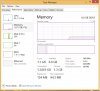
The RAM usage is more reasonable after it was removed I think.
Here is another screenshot with ExpressCache re-installed.
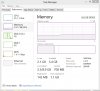
The Non Paged Pool is back to 1.1GB again. Therefore I'm thinking the driver for ExpressCache is at fault here, right?
As you recommended, I also did the command prompt for EtwB and which is what I got:

-
I just wanted to check back in on this thread. I have had the Best Buy S02UB for about a month now and am very impressed. I am not impressed with the Samsung settings app. I have uninstalled it a few times but when the Silent Mode is set to Auto, it auto never changes anything. It pegs my cpu to 1.15 regardless of how many apps I open or games I play and it causes the lappy to just slow down considerably. This is on a fresh OS install with a limited amount of Samsung apps installed. One other thing that I am not sure if is good or bad is the CPU says 2.4 ghz max but mine is always at 3.xx it rarely drops below 2.6. Is it supposed to always be that high? something wrong with the multiplier? overlocked somehow? This is with tons of open or nothing at all.
-
OK, a couple thoughts. First, great detective work. That's very telling about ExpressCache, and likely confirms there's an issue there. Can I suggest a follow-up?
- Shut down, and then reboot
- Run poolmon as soon as possible, sorting by the Bytes column
- Keep a sharp eye on the top entry (presumably, ECMC) and note how quickly it grows
- Report back!
Second, can you rerun the findstr on EtwB, but this time:
- After opening the command prompt, enter "cd ..\.." -- this will take you up to the root of the C directory
- Then run "findstr /s EtwB *.sys" as usual
It will search a bit more exhaustively -- might take a while.
-Matt -
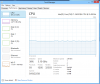
Here's a shot of my system summary in HWiNFO64:
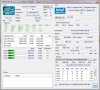
That's pretty typical for me when I'm doing day-to-day work. I'm not 100% sure about what's happening with Settings on your machine -- you're running Win 8, right? Something important for me when I downgraded to Win 7 was to make sure that .NET was completely up-to-date. You might want to run Windows Update and see if anything happens.
-Matt -
here is mine:
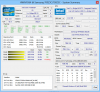
this is with 6-7 tabs in chrome, AIM open, and a few work programs. -
If I do turn on Samsung Settings Silent Mode my pic looks exactly like yours. My issue is it never max/min while in auto it just chills at that identical rate or should I not care? I just was wondering if its hurting the system that its stuck at 1.15 even with WoW open and chrome etc.
-
Whoa, that's what it looks like with just a little bit of Chrome and a few other things? (Interesting, I just noticed that your Core 3 is throttling.) Definitely odd. I would pull out the Task Manager and Resource Monitor and start poking around -- which app is being naughty?
I would also ask for a second opinion (I don't use Silent Mode) but I would not be concerned at all that the CPU runs at minimum speed in that state. In the power settings, one of the things that Silent mode does is "passive cooling," i.e., it lowers CPU speed before spinning up the fans to keep the CPU cool. I would guess it's just doing its job! Of course, there are likely other things that Silent mode is controlling behind the scenes, but I would focus first on the "max CPU" issue that you're seeing.
EDIT: and on a more personal note...how does someone get 5 posts and a rep power of NINE?!?!??!?! LOL
-Matt -
-
also the throttling occurs on each core it just switches randomly all the time.
-
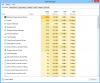
OK...um, what is the Meditech Magic Remote thingie? Very suspicious looking. And is system CPU use hovering at ~10%, or was that a spike? I'd prefer looking at the CPU tab in Resource Monitor, which includes a 60-second average.
Can you also post a shot of the "Details" tab?
-Matt -
Thats one of my work progs.
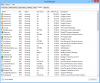
-
No clue on the rep power lol. I will take the love though.
-
Thanks for the Details tab -- sorry to be a pain but can you sort (descending) by CPU and repost -- I think 24% CPU for one program is a red flag (or was that just a momentary spike?).
-Matt -
This is with Silent Mode off and just one tab in chrome no other apps.
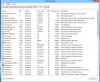
-
its just so odd that its running at such a high ghz for no reason the main cpu user on my previous pic should be there right? I opened 5 more tabs and its sitting 3.29 ghz 18% util. weird.
-
OK, so that's pretty mysterious -- this is where you see your CPU speed at max, right? If it isn't due to a misbehaving app, I'm afraid something a bit more systemic might be the cause. Let's see what John and Dannemand have to suggest. In the meantime, if you feel up to it, I would recommend running SW Update, downloading the Intel chipset driver (I'm seeing 9.3.0.1021 on SW Update for Win 8) and then seeing if uninstalling/reinstalling that helps.
-Matt -
I believe Rep Power is how much love you can GIVE -- and grows by how long you've been a member. There is no limit to how much love you can RECEIVE if someone with enough Rep Power gives it to you.
So you have a big heart
-
For NP700Z5C owners who've been following announcements and developments of the new 770Z5E (non-touch) & 780Z5E (touch), I spotted the latter machine at Best Buy today:
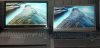
That's the new model (w/1080p touchscreen) on the left, and our beloved model (the S02UB version) on the right.
I'm not trying to start a new conversation here -- there's already a flourishing discussion on the new model elsewhere ( but let me warn you, those guys seem to bicker and disagree a lot more than we do!) -- just wanted to share a few thoughts and first impressions.
First, the new model is gorgeous, and the screen is (undeniably) much, much better than the one on the 700Z5C -- though it is glossy, so if you're a matte kind of guyhi2
it may not be for you. But the colors were much richer and "truer" on the new display. And the viewing angles were..well, they were the way viewing angles are supposed to be. Touchscreen was a nice feature too. Other thoughts:
- I like that Samsung removed the MBP-style notch from the wristpad area and just created a small tab on the upper lid for opening
- new one weighs a few ounces less, but it's not a meaningful difference
- I definitely prefer our keyboard design (black keys with white undertones) -- not a fan of the new silver (and backlight sucks)
- trackpad on the new model was absolutely perfect -- no dips in sight
- I'm a bit envious of the true VGA port on the new model -- that's something I need a lot
- first impression on the JBL speakers (mounted underneath) was they were very nice
- finally, $1200 is a very reasonable price, though I believe the NP780Z5E-SO1UB has the lesser of the two new Radeon GPUs (I might be wrong, but I think the forthcoming S02US or S02UB has the nicer 8870m).
Anyway, I was very pleased to see I walked out of the store without that intense "I have to have it" feeling. The display left me feeling a bit...down-trodden...but otherwise I'm more than happy to wait for the Haswell release and reevaluate the options then. The way things are going, that should be sometime later this fall.
-Matt -
I have been a member for a good amount of time. I just never wrote anything. A moocher of knowledge I guess.
-
Ah!...2009. Now I GET IT!
-Matt -
What Power Plan is being used? Is it the Samsung Optimized or the Maximum Performance? The latter, in my experience, puts the CPU at maximum speed to avoid the very slight latency associated with the CPU changing speed.
John -
Hi Matt
Thank you for your opinion.
I want to buy Chronos and can't understand if it is worth waiting for NP770Z5E in my country (release date unknown) or I it is better to grab NP700Z5C now for better price.
Please help to make decision.
Matt, can you compare build quality/handling/etc of the two models, I mean personal feeling you cannot see on photos?
There are two things that stops me from getting OLD chronos: bad screen in terms of contrast and angles (resolution is ok) and slimmer design of the new chronos - I like that "wow" handling effect.
for NP770Z5E
+slimmer design
+better screen (I need matte non-touch version)
for NP700Z5C
+available now
+better price
+all hardware bugs should be fixed, all downsides (screen) are well known because of many reviews
+I think it is cooler with i5 than the new one with i7
As you can see I don't really care about performance difference. i5+640m+6Gb is ok for me.
What do you think as Z5C owner is it worth waiting for matte screen version? Is the old screen so bad comparing to the new one? currently I have old Lenovo T400 14" HD+ which is not good contrast performer either, but it is ok for me.
Thank you
Nick -
Hey Nick! This is a personal decision and in the ideal world, you'll be able to put the two machines side-by-side and compare them slowly and carefully. I was pretty lucky that I got the brief chance to do so -- I'm guessing the Z5C will go out of production soon and only the Z5E's will be available (at least in the US, not sure about elsewhere). For example, the NP700Z5C-S01US is not sold by Amazon US anymore.
Let me respond to your questions point-by-point:
- Screen quality. I would say the Z5C is GOOD and the Z5E is EXCELLENT. The Z5C is by no means a poor screen. But I can't put it any simpler than that: good vs. excellent. (In psychological terms, what "good" equates to is, "As long as I only have my display to look at, I am a happy boy!" LOL)
- Slim design, AKA wow effect. I'd have to say this is a tie for the two machines. What I do to assess the wow factor is I unplug the machine, close the lid, and then flip it over several times in my hands (carefully, of course!). What I'm testing is the weight, weight distribution, how tight the lid remains shut, any sharp corners/edges, etc. I take my laptop in and out of my case and backpack several times a day, so the slimness and "feel in the hand" is important to me. The newer and older machines feel the same to me (note that the Z5E lacks an optical drive).
A minor footnote: as I mentioned above, the contrast of the black keyboard on the silver background (Z5C) appeals to me more than an all-silver design (Z5E). Of course, someone might say, "But you don't look at the keys when you type!!!"
I don't think I can comment directly on your thoughts above about "bugs" and "i5 cooler than i7". AFAIK, the Z5A has had a few difficult moments, but the Z5C never received any firmware updates that fixed something major (possibly because of the switch from Radeon to NVIDIA graphics?), and I just don't remember complaints on this particular forum about persistent issues (e.g., bad wifi, temps, battery life, etc.). It seems like it was well-built at birth! Also, I have the i7 and as I type (Firefox with 27 tabs, Acrobat Reader, Excel, Resource Monitor) the CPU is hovering comfortably at 48C and ~3% use.
So, I tried above to note this is a personal choice, but if I wanted to influence your decision, here is what I would suggest: try and wait for the 770Z5E. IIRC, when the 770Z5E becomes available, it should cost less than the 780Z5E version because it lacks a touch screen. I understand that it will have a 1080p display, though it's not obvious to me if it will be matte or glossy. However, note this description at http://pci34.fishingtree.com/nike2/amazon/770Z5E/:
For me personally, the decision of 700Z5C-now or 770Z5E-later would boil down to which brand of GPU I preferred (I wonder why Samsung switched back to Radeon?). Costwise, the 770Z5E should only be ~$200 more than the "equivalent" Z5C model (sorry, I don't know which currency you use), and the minor downsides (e.g., keyboard design) would be outweighed (remember, this is my tastes not yours!) by the improved display, the VGA port, and the (promised) improved battery life. BUT, I also noted in the earlier post I am extremely happy with the Z5C and will gladly wait to see if the Haswell update on the Series 7 Chronos is really a significant step up or not. If not, I have no problems holding on to this machine for another 18-24 months. It really is the best laptop I've owned to date.
-Matt
PS EDIT: as a final footnote to this ridiculously-long message, I wanted to offer a bit of a backstory to the whole "I just bought X1 and now a better X2 is available!!!" phenomenon (AKA, "buyer's remorse," AKA, "the damn consumer electronics industry evolves too fast," etc. LOL). And the backstory is: as an owner of several Android phones, I'm also an occasional outspoken member at droidforums.net. I currently own the Droid 3, and I'm still bitter about how quickly Motorola replaced it with the Droid 4. As evidence of said bitterness, I submit Exhibit A: Is anyone else as mad as I am? - Page 4 -
The NP700Z5C didn't come with an i5 as far as I know, but an i7 shouldn't really run any hotter unless it's fully taxed. The Z5C is a little smaller (really important for me) in terms of width and depth, but yeah the Z5E is slimmer. As a result though, you can't have an optical drive and even if you don't care about that, it also means that the Z5E will max out at one 2.5" drive. On the Z5C you can take out the optical drive and have an SSD and HDD combo on the laptop, which is pretty nice.
The build quality of the Z5C is awesome, and it should be noted that the bottom on the Z5E is still plastic so you won't be getting a full metal laptop either way. The Z5E with the matte non-touch screen should be coming relatively soon internationally. Also, with the Z5E, I'm guessing you'll get 1 hour of extra battery life over the Z5C because its battery is larger by 11Whr. The screen on the Z5C is better than most 15.6" laptops especially those with 1366x768 screens, but I can imagine the 1080 screen on the new Z5E is incredible.
Just my 2 cents. -
Excellent, excellent point.
I've been waiting to give you a hard time about seeing you at the "other" subforum (don't want you to leave us!) but I haven't found the right moment to do so...
-Matt -
hi matt.. i saw ur pics u provided with the old model (NP700Z5C) side by side with the new model (780Z5E). and i got to say from the pics that the screen display of the new model looks paler than the old model. i could be wrong about this since theyre pics but thats the impression i got.
also, do u think that its possble to replace the silver keyboard of the new model with a black keyboard? -
Haha yeah Matt I still like to contribute to this thread mostly and just lurk the new one but most of the time you get to the questions before me. And I just noticed that you did on the last page as well, probably while I was typing
-
I have an older HP HDX 18 with silver backlit keys and it's hard to read the keys.. no contrast. On my Toshiba it has black, back lit keys and is day and night better. But other then that, these new Samsungs look very sweet. I heard the battery life is going to be crazy good on this one, like over 8 hours. So if one did not want to wait for Haswell this one should do fine. Pretty much the reference no compromise W8 machine IMO.
-
That is exactly right. I have the HDX18 too - and it's been great - but the keyboard is often difficult to read, both with and without the backlight on. My Sammy Z3A with black keys and backlight around the keys as well as through them, well, it's one of the best keyboards I ever had.
-
The caveat on the cell phone photo (well...first, remember it's a crappy cell phone photo!) is that other than pulling up the same screen background, I didn't fiddle with the display settings at all. But it's my solemn opinion that the new display is better (by the way, I am neutral on the glossy vs. matte issue), though I say get thee to a Best Buy and check it out with thine own eyes. Seeing is believing.
My other personal thought is it's highly unlikely you could switch keyboards. EDIT: while glancing at my keyboard, I realized I have a more nuanced answer: technically, there is no keyboard. What we have is a solid upper panel, with key cutouts. So what your question turns on is: "If I popped the keys off the old model, would they fit (individually) on to the new model?" And that's a relatively simple question -- we just need someone to do the experiment. But my estimate is still the same -- I would assume that there will be mismatch at some point, e.g., one Spacebar is longer than the other, the Fn keys are narrower on one than the other, etc. Another open issue is how swapping keys would match with a different backlight setup.
-Matt -
Is there any way to turn off the keyboard backlight auto dimmer? I want it on all the time...
-
Somewhere in the back of my head I'm sure this has been discussed and solved...let me do a quick bit of searching...*WAIT*...
http://forum.notebookreview.com/sam...vers-heres-np700z5c-ivy-bridge-100-print.html
http://forum.notebookreview.com/sam...vers-heres-np700z5c-ivy-bridge-142-print.html
http://forum.notebookreview.com/sam...vers-heres-np700z5c-ivy-bridge-181-print.html
Yeah, I see the issue has popped up, but no solution. I bet John remembers -- maybe a Registry hack? I'll take a peek and report back.
In the meantime, I have some "not very good" news: in my experience, the keyboard backlight is very temperamental. I've been married for a very, very, very long time, so I'm pretty comfortable dealing with "things" that...how can I put this...well, things that seem to suddenly change or act unpredictably with a will of their own. So the keyboard turning on and off at times doesn't bother me much. But I can see how it would drive a younger, single man insane! LOL
-Matt -
OK, hold on -- am I losing my marbles, or shouldn't this do the trick (I guess I had misremembered that it didn't work):
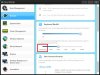
At least in principle, setting the timer to "Do not use" should equate to "Leave on all the time." Anyway, I just set it to that and it's staying on. Of course, I won't know for sure until I walk away for a while. Anyway, couldn't you set it to 10 minutes? Remember, it's an activity sensor, so you'd have to be idle for quite a while before the backlight dimmed. Just my 2 cents.
EDIT: let me consolidate these 2 messages. What I'm saying here is that setting the timer to "Do not use" should keep the keyboard backlight on all the time. Not sure if it works as designed. The previous message, HOWEVER, is saying: sometimes the keyboard backlight does NOT work as designed, e.g, I start typing and it doesn't turn back on, I press the Fn key to increase brightness and I get the OSD that says "It's too bright in here for the backlight" EVEN THOUGH I have the power settings turned on to "ALWAYS use the keyboard backlight" (in other words, ignore the light sensor reading). There's a ghost (or two) in the machine somewhere!
-Matt -
I'm seeing something similar with my NP900X4C except the message I get when using the backlight Fn key controls is "You can use the keyboard only when the surroundings are dark". And I'm in a room with sub-par lighting. However, if I physically put something on top of the light sensor , set the lighting to "off" in Easy Settings then use Fn+F10 (which moves the setting away from "off" then the backlighting comes on. Last week I updated the BIOS. Coincidence? Did Samsung mix up the backlight brightness (the Fn key controls) with the ambient lighting level needed to trigger the backlight. I think my recommended work-around of a small piece of black tape over the sensor (on the Z5C this is just to the left of the HDD activity light) may be the best fix so the computer thinks it is in permanent darkness.
John
Samsung Series 7 Lovers - Here's The NP700Z5C Ivy Bridge!
Discussion in 'Samsung' started by yknyong1, Apr 23, 2012.