 Problems? See this thread at archive.org.
It happened to me some times that the keyboard backlight wouldn't come on in a dark room, and trying to use the Fn keys to adjust it would give me that message John mentioned. For me it only ever happened when resuming from sleep or hibernation -- AND it hasn't happened in a while.
When this DID happen, the solution on my PC would always be to open Easy Settings (Fn-F1) and manually turn the Keyboard Backlight slider (on the General tab) all the way down to Off, then up again. That would turn the backlight on.
It was still annoying, though. Again, fortunately it hasn't happened in a while -- maybe since my last BIOS update, not sure.
Note: I am not talking about the timer that Matt referred to, but to the actual Backlight slider itself. I leave that timer on 1min, and I only have to touch the touchpad or Shift key to turn backlight back on when it times out.
-
-
Hi
Thank you very much, Matt.
Your long post is exactly what I would like to hear, i.e personal subjective opinion.
As I said I don't really care about performance difference between i5+640m (i5 is available in my country) and i7+8770. I think price difference will be 200eur as it is usually is when a product comes to Europe.
The main concern is screen in terms of contrast and viewing angles (HD+ resolution is ok). I checked X5C in a local shop. When I looked at the screen for the first time blacks seamed really grayish, but then I adjusted angle and blacks seemed ok, I hope I didn't look at it too much from the bottom, so everything looked dark. Still VAIO S with FHD IPS (?) has more vivid colors.
Tell me, does Z5C lid works as it should and it is easy to adjust the angle, at least? And if I can get +/- normal blacks if I look at the screen with the right angle without adjusting it if I take a deep breath?
I noticed that new Chronos is bigger, no small bezel around screen anymore.
I'm looking for any feedback on Z5E FHD matte screen contrast/angles. If it is significantly better it is worth waiting.
Bezel, screen bezel, keyboard, price, not available now... everything should be outweighed by the screen.
I'm not that "buyer's remorse" guy, but of course I want to pay for the up to date product, cause it will be my primary computer for 2-3 years. I even like to troll iPhone guys: "If you bought iPhone 5 you admitted that your previous iPhone 4S was bad (small screen, slow CPU, glass unibody, too much bezel)". Try to explain 6 months ago that 4S is far from perfect... now it is easy Apple fans are amazing sometimes. Sorry for offtopic.
Thank you Matt.
Nick -
hi matt.. i'll be going to a best buy to check this comp out.. i'm desperate to buying the 8870M version. but its so damn expensive. i'll let u know what i think of the Z5E once i play with it in the store.
-
Nick, glad I could be of help. On the new Z5E, instead of a bezel per se the screen is edge-to-edge glass, however, the display itself stops several millimeters from each edge, leaving a noticeable amount of black edge. I didn't think about this until the sales guy at Best Buy (poor guy, he sees me EVERY 4-5 days!) pointed out that with Win 8, there are touch gestures where you swipe from one side of the screen to the other. So the way the Z5E display is built is optimal for that.
I also think (others can confirm) that while sitting and typing, it's fairly easy to find the "right" screen angle on the Z5C. But look back and you'll find a few owners who just couldn't find that angle on theirs. Most don't mind.
Have you visited the forum for the Z5E ( http://forum.notebookreview.com/samsung/702308-introducing-new-series-7-chronos-amd-hd8870m.html)? I encourage you to check it out -- lots of new owner impressions there. Just us boring old Z5C owners here, and none of us are really qualified to tell you what the new one is like!
Very cool (pun intended!). I'd love to hear what you think, but your post might be more appreciated on the 8870m forum, where they're scrutinizing every inch of it!!!
If you'll forgive a bit of unsolicited advice (which I need to learn myself): don't stress out over this model or that model, this GPU or that one...trust me, come November and today's flashiest Series 7 machine will be looking mighty yesterday. Just focus on "what you need for the next year or two" and enjoy the ride.
-Matt -
hey matt.. i visited best buy here in nyc. the Z5E is very nice. the screen looks way improved and i'm very impressed by it. the colors are lush. the viewing angles are very good too.
but there was an issue that i noticed. next to the Z5E was a touchscreen sony vaio with an i5. i compared the smoothness of the touchscrreen movements to that of the Z5E. when i moved a folder around i noticed that the vaio was a bit faster. i may be wrong in noticing this.. i dont know.. but i do have an eye for minute details.
i noticed also that i really like win 8.. before, i didnt want to mess with it. but now i love it. thank u for the advice about not stressing over todays comps that will become yesterday's snails tomorrow. i wanted a future-proof comp. but in searching for one, i echo our words that one doesnt exist. i'm thinking about buying the Z5E. lets see what i decide in the next several days. -
^^ That's a great way to start the week. Glad to hear you had a positive experience.
-Matt -
Here is a screenshot with poolmon running as soon as the PC is on the desktop.
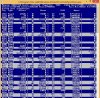
Then after 2-3 minutes, ECMC shows up and the Non Paged Pool goes up to 1.1GB again.
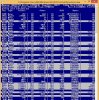
My Expresscache version is 1.0.94, is there an updated version of it for Windows 8 which I can download manually as SW Update couldn't find any updates for it. -
When you run SW Update, check the lower left corner and see if you have the option for "Find Model." If so, you can enter NP700Z5C, navigate to the S02UB, and grab the drivers and programs you want for Win 8. In that mix you should find the ExpressCache app. You can also select the "Save Setup Files" option which should give the same list. Either way it looks like 1.0.94 is the latest. If you don't mind uninstalling and reinstalling, give it a try.
-Matt -
LOL @ married comment...I am too, and it's not that the on/off bothers me, it's the inconsistency... which I should be used to: My wife is 8mo 3weeks pregnant. 0.o
That said, my Easy Settings don't have that option. In fact, my Easy Settings don't look like that. I have the SO2UB, and that slider ends on the left at 30 Sec. There is no "Do not Use" option.I have version 2.0.0.21, and is the newest version Software Update will grab. -
First WOW that's amazing news about your wife. I guess the bag is packed and you're ready to head to hospital any minute now (I was a little grossed out with our first, when she put a towel on the car seat, "What's that for?" "In case my water breaks in the car" "Oh...great...")
And VERY interesting news about Easy Settings (or just Settings...I forget if you're using Win 8). Could you post a screen shot of Easy Settings? I want to see if you have the full complement of tools/tabs, e.g., General, Power, Display, Sound, etc. Sounds like you might not have a full installation -- or of course, they might have removed the option you want?
-Matt -
Hey Gadget, I got nervous and returned it. Thank god for Best Buys easy return policy (and being silver member) I went with the new Z5E. I wont go into a long post about it in here but the screen is sexy time and the touch screen is a fun "function" The GPU def doesn't handle WoW like the Z5C. That made me sad. I do love the keyboard and its firmness.
Thanks again for looking at my screenshots. Its crazy that for almost a month I thought it was fine but it just seemed so odd it never went down and was always throttling. Also if you return to BB with a full wipe (ie no recovery) they aren't smart enough to know you cant restore without a disc. They tried to tell me I was returning it without the proper files. I promptly explained how it worked and he said and I quote "I stopped caring after I processed the PRC" -
LOL. I've hidden garbage bags in various places, towels as well, JUST in case.
And yea, my easy settings is weird. For example, the settings for the Screen Ambient light sensor are in the Win 8 Settings area, not in Easy Settings (I'll call it Easy Settings so we know what I am talking about, but it is just called Settings).
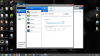
I don't know if it is because I have Win8, but this is what it came with. -
@Modred: Looks like there is a checkbox ("Turn the keyboard backlight off when the computer hasn't been used for the following period of time"). In Easy Settings (Win7) the timer slider just has an extra stop at the extreme left that serves the same function as your checkbox: Disabling the timer.
In your case, with that checkbox being cleared, it should NOT time out the backlight...
Edit: Oh, fingers crossed all goes well with your wife and the baby
-
(Thanks!)
Unfortunately, that checkbox only does something if the ambient light is such that the keyboard is actually on.
So, in my office right now, well lit, no matter the status of that checkbox, the keyboard is off. Similarly, if I cover the sensor, the keyboard lights up, no matter the status of the checkbox. -
Yeah, that sucks. Clearly this attempt on Samsung's part to make sure we never have keyboard backlight enabled unnecessarily, has been causing far too many problems in all versions of Windows and (Easy) Settings.
You may be down to John's suggestion of applying some black tape over the sensor. I know, not exactly a classy solution
As I mentioned in this post I only seemed to have the problem when resuming my PC from sleep/hibernation. And not for a while, possibly since my last BIOS update. -
one question buying i decide to buy the Z5E.. do u know if i can get it without paying taxes on it?
-
LOL I have to say you are the most interesting bird on the internet.
Honest answer: Nope. Since it's Best Buy, no way to get around tax. The best you might hope for is to wait for someone (a) to list it on Amazon, (b) get nervous when it doesn't sell, and (c) they decide sell it at cost or less. But with Best Buy's 30-day return policy I'd pay tax in a heartbeat (well, I'm cheap, so maybe 3-4 heartbeats) and remember that I have total peace of mind for 30 days!
Actually...guys...what if he drives up to New Hampshire? But then darn the gas money = sales tax savings.
-Matt -
I was kind of afraid that this was the case. I'm poking around my Registry as a last-ditch attempt...see next post...
@Modred: thanks for the screenshot. I especially appreciated the whole desktop (go Minecraft! and I'm very curious what's lurking in "Baked Goods"?) but if you want to just capture the top window, you can use CTRL-ALT-PRTSCR (sorry if you already knew that!).
-Matt -
OK, just found something. I vaguely recall discussion of registry mods sometime ago, but in lieu of actually finding the posts...
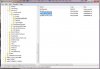
What I can confirm is that while Easy Settings is closed, toggling the KBD_backlit_idle value (in regedit, see path to the entry at the bottom of the image) to 0 sets the keyboard backlight to ALWAYS ON, while setting it to 1 sets the backlight to defer to the timeout delay.
I can't predict whether Win 8 will have the same registry settings -- if not, I would create the KBD_backlit_idle as a new DWORD value in the SecKeyboardBacklit folder (however, I refer here to the usual " don't modify the Registry if you don't know what you're doing" warning -- though your screenshot above reassures me that you know what you're doing LOL).
EDIT: ARGH! After thinking about it a bit more, I suspect all that changing the "idle" key to 0 does is it selects your leftmost option from the slider -- in your case, 30 seconds. ARGHHHH! Well, before completely throwing in the towel I would set both the "auto" and "idle" keys to 0 and see if that helps. Maybe we'll get lucky and a programmer at Samsung coded the slider so 30 seconds = 1, and 0 is a hidden value (Unlikely, huh? Don't C/C++ arrays start with the default index of 0?)
-Matt -
Also, Snipping Tool is great for anybody making frequent screendumps. Capture any part of screen, draw on it, save it as tiny GIF. Comes with windows.
Sorry, back to the scheduled program
-
Dannemand I also have that same keyboard backlight issue only when returning from sleep. I employ the same fix as well, I just go into Easy Settings and manually adjust the slider which kicks the light back on. Also laxmaster7, you may want to wait for the Z5E with the 8870M if you want more performance than the Z5C in games.
Love the keyboard backlight on this thing though, it's so much more elegant than other laptops. -
I did not know that, thanks for the heads up.
I also realized I could have just cropped it in paint, but I was lazy... -
I'm surprised to hear about the 8770m -- I haven't looked at specs, but just naively assumed that Samsung would step up the quality of the GPU on the next build. Hmm, maybe there are some more systematic tests on the owner's thread -- I know the first few owners were running GPU benchmarks...
Guess you've been banned from this thread and we won't see you 'round these parts... j/k I *do* wonder if we'll see the Z5E (or whichever it is) with the 8870m in the next 20ish days...if so, what would you think?
EDIT: I hear you on the "I stopped caring..." comment. I've returned 2 or 3 defective machines to Best Buy, and I always have this great speech worked out, and they're like, "Do you want this back on your card?" "Wait, don't I have to tell you what's wrong with it?" "*Sigh* Whatever, dude *rolls eyes* *stops listening*" Nerds get no respect, I tell ya.
-Matt -
I am always on here reading so I might go back to silent status! I really think the issue with the 8770 is that there are no real AMD drivers for it yet. Going to the site it cant find any and the ones that come from samsung seem plain not ready for prime time. I did a fresh wipe and put a 128g ssd in it and it sure does fly. The battery life is unreal on it as well. As for the 8870? I think I will most likely keep this one for a few reasons. 1. My wife is going to kill me if I spend another weekend at BB 2. I really dig this laptop so far (lol 4 days). Thanks and see ya all around!
-
Ah, drivers... That's kind of reassuring. Please do continue to lurk (or pitch in) as you like. And don't tell anybody this but: I have the feeling this amazing thread may be on it's last lap around the track. I mean, who wants to read 223 pages?!??!!
-Matt -
Then again I am not smart enough to know the real reasons why the slow fps/performance. After the wipe and ssd it goes between 70 and 35 so maybe its fine. Good threads die eventually maybe this one is done and served its purpose?
-
Done-ish. Medium, to medium-well. Or maybe we're just experiencing a winter-time lull!
-Matt -
Some Fn functions are not working right now like the screen brightness, settings, and backlit keyboard brightness adjustment. But the volume button works. I even tried to manually open the Samsung Settings file but it does not open. Any help please?
-
What happens when you press the Fn-Lock key?...does the onscreen icon appear and toggle on/off? Same for volume -- do you get the onscreen display?
-Matt -
I've never had an on-screen indicator for the Fn-Lock, even when it was working. For the volume, I do get the onscreen display.
-
Ah, in that case I would completely uninstall Easy Settings, reboot, and reinstall it, paying attention to any messages that pop up afterwards (e.g., update .NET as needed).
-Matt -
Hi
Can anybody point me on Chronos closest competitors?
I still did not decide should I wait for Z5E or grab Z5C, waiting for answer from local Samsung office.
It looks like offtpoic in this thread but you, Series 7 Lovers, probably considered other brands too.
My quick research shows that it is very difficult to find any other brand notebook with close specs.
I'm looking for 14/15.6 HD+ FHD good quality MATTE screen, solid construction, i5 normal voltage or better, nvidia 635M or better, compact design prefered, +20% price range from 700z5c.
Like Macbook pro 15" with matte screen and Windows
Correct me if I'm wrong
1. Macbook Pro 15" non retina version - very good laptop, but - glossy screen, 2x more expensive, I don't like MacOS at all.
2.1 Dell Latitude, rock solid, but no descrete graphics, heavy.
2.2 Dell XPS - why glossy screen?... Ohh,,, heavy, problems with throttling.
2.3 Insipron... all glossy.
3. HP 6570 - good screen, but they put outdated Radeon into this brick, it is almost as fast as HD4000.
4. Sony S - veeery good screen, but plastic build quality, problems with heat. I think sony is the primary competitor!
5. Lenovo T530 - good screen, proven construction, but problems with heat (throttling), heavy brick, it is the same as 5 years ago, no improvement at all in terms of size, expensive.
6. Asus did not find any with non UltraVoltage CPU.
7. Can believe Acer can make rock solid laptop.
Interesting that according to notebookcheck.net even expensive business laptops (T430/T530/Latitudes/Elitebooks) have same bad contrast screens. ?
All Samsung 5 series, even 9 series 15" have the same bad contrast.
Can you recommend any specific other brand models who can compete with 700z5c?
Thank you.
Nick. -
Nick, last year while I was in shopping mode I compared the Z5C with the Sony S15: http://forum.notebookreview.com/wha...30-impressions-sony-s15-samsung-np700z5c.html. Obviously in the end I chose the Samsung, but I thought the Sony had a very nice screen (despite the "orange" reputation).
Another machine I was interested in is the Asus N56VJ-DH71: http://forum.notebookreview.com/asus/693671-asus-n56vj-dh71-n56-refresh.html That machine has the 635m, a gorgeous FHD screen, and if the specs are correct, weighs around 5lbs.
In the end, I decided the Samsung was the right machine for me, in part because of the build quality -- both the Sony and Asus machines were a bit too plasticky for my particular tastes. Of course there were a dozen other issues that were important, and in particular, battery life (the Z5C is much better than either alternative).
Finally I was also interested in the Dell XPS 14 Ultrabook, but there were many minor problems and issues associated with that model (e.g., the one that I bought had a dead fan in it).
Sorry I can't comment on the others you listed, though I've become increasingly curious about Acer. I have the same impression as you about build quality but I would really love to test one for a few weeks and see for myself!
-Matt -
Wow, i read this Sony vs Samsung review when I first looked at Chronos. Did not notice that it was your review, Matt.. thank you.
Your requirements match my requirements almost 99%.
Asus N56VZ has 650M. Sounds good. The screen is still TN but looks much better than Chronos's screen according to review. I did not find that it in local shops, internet shops only, unfortunately.
Did you have anykind of hands-on with Asus? What can you say about build quality?
Anyway N56VZ looses in portability. 2.7kg vs 2.3kg, Samsung is slimmer 34mm vs 23mm. (sorry for metric system)
Nick -
Yeah, I agree the Samsung beats the Asus in terms of overall design/appearance. I actually owned a cousin of the N56VJ, the N56VZ, for about two weeks. I returned it because the HDD and other components are under the wrist pad area and it was uncomfortably warm for me. On the other hand, the screen was superb and as I recall it had the 650m, which my son absolutely loved. OK, actually, he's nowhere near the hardware geek I try to be, but his favorite games (esp. BF3) ran very well on the N56VZ.
But let me give you an idea of how cool the Z5C runs, at least for me during daily work. I just bought an infrared thermometer so let me give it a shot:
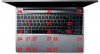
Keep in mind the ambient temp is about 21C (70F), but those are still fairly representative temps for the keyboard and wristpad areas. NBC reports considerably higher temps for the 17" model ( Review Samsung Series 7 Chronos 700Z7C Notebook - NotebookCheck.net Reviews), though their ambient temperature was also almost 27C (performed in June vs. me in March!).
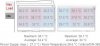
Anyway, maybe I labor the point. But the main issue for me was the Asus was too warm for my tastes. However, it was definitely well-built...also very fast. I think the nails in the coffin were that it barely got 4 hours battery life, and it was quite heavy. Remember though the N56VJ is supposed to be much lighter. Also, as I recall the Asus comes with excellent speakers plus an external subwoofer.
-Matt -
Just upgraded the Intel 6235 driver to the 2/20/13 version (I think the PROSet package is listed as 15.6.0, but the driver version is showing as 15.4.0.11). Here's a shortcut to the download page if anyone's interested: http://downloadcenter.intel.com/Det... (64-bit)*&DownloadType=Software Applications For new owners: consensus here is to grab the driver-only version, i.e., Wireless_15.6_Ds64.exe, which runs about 19MB. See item (4) here for additional info.
FWIW, it installed over the previous version without modifying the advanced settings, and I'm seeing a slight improvement in WLAN throughput.
-Matt -
Hi
Again you are the right guy who can help with decision.
I check several sites and all specs say that N56VJ is 2.7 kg. If you change GPU from 650 to 635 it should not reduce weight by 300g..
4h of battery is ok for me... heat... hmm... ok I agree... the cooler the better...
Would you exchange your Z5C to N56VZ if battery life is not so important, 2.7kg weight?
I saw N76 17" ASUS in the shop... not impressive... good materials but it is really big (17"). While screen is off, Samsung is much better
UX51 - very good, but Macbook pro price is out of budget
Nick. -
Awesome, I've just downloaded it and will install it now. Hopefully It fixes some of the issues I've been having with it, nice find!
Hey Nick I just want to make sure you're aware that the N56 is not nearly as thin as the Chronos; the shots Asus provides on its website are quite misleading. Otherwise, it's a great laptop.
http://3.bp.blogspot.com/-UvExQypiiyw/UC95a2shh5I/AAAAAAAAFqs/4q-IeJlMKrY/s1600/Asus+N56VZ-DS71.jpg -
Hmm, I'm looking for the right way to answer that question...OK, here's a metaphor for what will happen if anyone touches my Z5C:

*fingers crossed*
-Matt -
Hi gadgetrants, I see you own 700Z5C. What CPU do you have? Can you run cinebench (10 or 11.5) with single-core and multicore modes. I would like to compare results since I get worse results compare to notebookcheck.
Thank you very much for response.
Some mine observation:
Prime95 + FurMark - GPU is 69C. CPU (core #2) is 90C. Hard throttling up to 600Mhz.
Prime95 - Core #2 throttling. 90C at 1500-1700Mhz.
After switching off prime95 temperature in a second drops to 60C on CPU.
Cinebench 64bit R10
Single Core: 4548
Multicore: 16142
In all cases Core#2 cause throttling.
Seems to me I need to exchange this instance (probably they didn't apply termopaste on CPU at all). -
hello everybody.
I am from south america and last week i went to new york and bought a samsung NP700Z5C-S02UB equiped with the intel 6235 wifi+bluetooth card.
The laptop came with windows 8 (a pain in the a rse), so when i was in the us i started experimenting a lot of problems with the wifi, but i thought it was win 8.
So when i returned to my country i installed win7 (i wasnt able to make the ssd disc work with the win7 installation, so i installed win7 in the 1tb hdd), but the problems with the wifi signal continued, if the 6235 card is in n mode, i am not able to send NOTHING trough the netwrok because it disconects almost inmediately, and the conection speed is very mediocre.
I am considering selling this pice of carp and buy another one (in my country the only high end laptos available are de nv56 and ideapad y580, i am huge toshiba fan, but they sell mediocre products here).
But the oder thing i was wondering, if is posible to replace the crappy intel 6235 for another card (i dont care loosing bluetooth or midi).
On this video on youtube:
Asus Zenbook UX32VD Wifi Upgrade - YouTube
the guy says that the connectors of the intel where smaller than the 1102 killer, so my question is, does anybody know which wireless card use the same size of conectors as the 6235 and can be installed in the samsung???
Thank you in advance. -
@gonzagnr: Congrats on your PC, and welcome to the forum.
As widely discussed in many threads on this forum, people have varying degrees of success with Wi-Fi connectivity on these laptops. Before you dump your "piece of carp" here are some steps you should try:
1) Download the latest Driver Only wireless driver package from Intel Download Center. Gadgetrants just posted about a new update yesterday in this very thread. It's named Wireless_x.x_Ds64.exe for Win7 and Wireless_x.x_De64.exe for Win8. DON'T install it yet!
2) Delete your current Wi-Fi adapter in Device Manager. Uninstall Drivers if prompted.
3) In Windows Programs and Features, uninstall PROset drivers for both Wi-Fi (Wireless) and Bluetooth. Reboot.
4) Install the new Driver Only wireless driver package you downloaded. It runs for a while, then should detect and install a new adapter without the Intel PROset bloat.
5) Using the Power Options control panel, Change plan settings for the Samsung Optimized profile, then Change advanced power settings. Under Wireless Adapter Settings choose Maximum Performance for both Battery and Plugged in. You may want to do the same for the Power Saver profile (which will be used if you activate Silent Mode).
6) On the Advanced tab of the Adapter settings (in Device Manager) make sure Transmit Power is set to Highest. Also, you may want to try and disable Bluetooth AMP.
7) Reboot again.
Now see if your WiFi works betters. On my older model with Intel 6230 it's pretty good -- about the same as my friend's $2500 MacBook Pro, but not as good as my old HP HDX18. I had other Samsung units with Broadcom WiFi before this that were terrible.
I hope it works for you. Please let us know.
But regardless of whether it does, I really think you ought to stop making copies of your post to different threads on this forum. I am not a forum moderator and cannot tell you what to do; but I CAN tell you impatient crossposting tends to annoy the very people you want to help you
-
vyurin, I gave Cinebench 64bit a spin (R11.5) and came up with:
OpenGL = 32.5
Multicore = 4.66 (NBC = 6.47)
Single Core = 1.00 (NBC = 1.39)
Like you, my scores are somewhat lower than notebookcheck, though it's hard to know what other system differences might have affected the scores. I haven't seen evidence of throttling on any of my cores, but then again I don't stress them very often.
-Matt -
Hi Matt,
Thank you for you information.
As I already mentioned, mine throttle all the time under the load. I never get steady 2.4Ghz on all cores under the load:
Prime95 + FurMark. CPU (core #2) is 90C. Max 800Mhz(right number).
Prime95. Max 1900Mhz.
What I noticed, when Core#2 start thermal throttling, all other cores drops freq too (they are maintain same freq as core#2). In Prime95 + FurMark 3/4 cores get thermal throttling.
PS. My old 13in T8100 Laptop easy handle full load at 2.1Ghz and able to keep temperature about 75C on all cores.
Thanks,
Vlad -
Vlad, I'm happy you mentioned your other machine -- I know Prime95/Furmark work the system pretty hard, and I often read reviewers say "that it represents extreme conditions." But if your T8100 handles the same stress, then I think the Z5C performance might be a concern. I'll rerun Cinebench with HWiNFO64 open and see how the cores look (yeah, I know it's not the same as what you did
)...report in a few moments...OK, just re-ran the assessment and everything looked normal. Sorry if that's not useful info -- I tend to baby my machines!
I think there has been an owner or two here who opened their machine up and reapplied thermal paste. I'd give it a try if you're feeling up to it, unless of course this is a brand new machine and you have a gut feeling something is wrong.
-Matt -
i almost bought the NP780Z5E yesterday. thank god i didnt. the reason why is cuz the backlit keyboard is so dim. i never seen a backlit kb so dim before in my life! i thought it was the comp itself. so i went to another best buy. and the same thing there! this comp really sucks. i was so close to buying it. the only way for me to buy this comp is if theres an update that'll brighten up the kb.. thats the only way.
-
Hi Matt, thank you for you effort to help me. Can you please confirm that during Cinebench test, CPU cores doesn't fall below 2.4(2.3))Ghz? What is the status of "Thermal Throttling" HWINFO64 reports during testing?
PS. Definitely I am not going to open laptop to re-apply thermocompound on brand-new PC. I am glad that I have return policy Probably today I will try to test some of them (not only Samsung) directly in store.
Thanks,
Vlad -
Vlad, I'll rerun Cinebench right now and report back. However, I smacked myself in the head after my last message when I realized max CPU during the test was 70C IIRC -- nowhere near high enough for throttling. But let me give it a try and I'll report CPU speeds...
...OK, and the new results are in:
OpenGL: CPU = 2.4GHz (all cores), ~70C
Multicore: CPU = 2.4GHz (all cores), 80C
Single core: CPU = 2.4GHz (all cores), 65C
So pretty much 100% CPU at full speed on each test -- it was strange to see that the single core test actually spreads out a bit over the 4 cores, and that all 4 are maxed out in speed, when in fact it's supposed to be only one. I guess that's a consequence of how native processor allocation works, which Cinebench can't override (?).
Again, what I see is full CPU utilization at 2.4MHz and with temps no higher than 80C, no evidence of throttling in HWiNFO64. Remember though you reported temps ~90 (right?) which is considerably more than what I've seen.
EDIT: out of curiosity I decided to run BF3 for a few minutes. Finally got max CPU up to 90C, and noticed that one of the 4 cores began to throttle -- speed dropped from 2.4GHz to 1.4-1.7GHz. The other three were comparatively stable at 2.4.
-Matt -
Dannemand, thank you for your reply.
i have made all you sayed, and the speed has increased a bit (still mediocre, my old toshiba with an intel 5100 gest 8-9MB/s with my router and the samsung only gets 3), but the drops still happening, so the wifi still useless.
Is there any recomendable card to replace this crapy 6235??? because reading on internet i saw the killer 1102 works very good, but the u.fl conector is bigger, so you need to tape or solder the antennas cables to it.
Does anybody know if the intel 5100 conectors are the same size?? i dont care ordering one fo these "old" adapters, because on my toshiba works flawless.
Thank you for your replys.
ps. i am really disapointed with samsung quality control, i wont ever buy another samsung product again, i should have chosen another toshiba instead
ps2. Today i discovered another problem, i installed far cry 3 to see the performance, i didnt have a mouse usb at that time, so i was going to test it using the track pad as a mouse... if you hare holding a key (any key) in this case the w to run, the mouse STOPS WORKING, i tested it while on windows desktop and happens the same, is anybody else with these problem???
I really hate this laptop, i hope i can sell it and get a toshiba -
Hi Matt, Looks like your results(temperature) is much better than mine. Mine grow up to 90C from 56C within few seconds (10-15s). And keep steady, drops only when CPU reduce freq. About single core - mine doing the same - spread, but I still expirience throttling. I am going to visit shop today to confirm that is problem with this instance only. About BF3 - this game depands both CPU/GPU. So probably throtling of one of CPU is OK.
Somehow in my case while thremal throttling occupie on Core#2, all other cores drop freq as well.
Samsung Series 7 Lovers - Here's The NP700Z5C Ivy Bridge!
Discussion in 'Samsung' started by yknyong1, Apr 23, 2012.


