Problems? See this thread at archive.org.
@gonzagnr: I understand your frustration. As I said, I too had a unit with poor wifi which I ended up returning. But the unit I have now is one of my best laptops ever. Sure, it has its imperfections and peculiarities -- even my super expensive HP HDX18 has that, they're just different ones from the Samsung.
I am not saying you should accept a non-working wifi. If you tried the specific steps I described -- and in that order -- then you may have a defect unit. Samsung provides international warranty, you should give them a call.
As for replacing the adapter, that may or may not help. What limits reception on these models is all the metal blocking the antenna. If on top of that yours had a weak wifi adapter (or maybe flaky cabling) it will exacerbate the problem. Others should have more insight in that.
But if you conclude from this issue -- with an otherwise great machine -- that all Samsung products are bad, then you'll be missing out. That's my honest opinion.
-
-
I think the 6235 just doesn't like certain routers, as it sometimes goes weeks on mine without disconnecting to 2-3 days of constant disconnects and router resets. That's on my stock FIOS router from Verizon, I'm not sure what you have down there in SA. The 6235 just isn't a good card, but also it's not representative of the laptop just like Dannemand said. One thing I found out however is that the connection was totally stable when using WEP encryption as opposed to WPA and WPA2. I was excited when I found that out but unfortunately somehow WEP encryption gave me about 1/5th the speed of the other two.
Also Matt it seems like you have some pretty awesome temperatures. I've never run Prime nor Furmark on my laptop (only on desktop) but my CPU regularly reaches 90C while gaming, and that's not even at 100% utilization. I'd say the cooling system is just barely good enough, then again synthetic burn tests never seem to adequately represent real-world load scenarios. The thermal paste replacement wasn't really that worth it either as I didn't see a temperature benefit for the CPU, only on the already-cool-running GPU. -
@gonzagnr: In this post you're saying you have a NP700Z5A (Sandy Bridge), not NP700Z5C-S02UB as you said in your previous posts.
Of course that could be a typo. But if indeed you have a Z5A, I believe that model came with either Broadcom or Intel 6230 WiFi adapter, NOT Intel 6235. My NP700Z3A (14" variant of yours) has 6230 and I am seeing decent performance with that. But I saw really bad performance on another unit with Broadcom. If indeed yours has Broadcom, replacing the WiFi adapter might help after all.
That STILL gets us back to why you should simply call your local Samsung support. They may replace the adapter for you -- or do whatever else is required. -
Hi all
Z5C or Asus N56??
I need your help to choose between Z5C and Asus N56. Please help with your subjective opinion but try to be objective. I need specially Matts opinion again, cause Matt had both devices.
When turned on shopping mode for a laptop, I wanted Macbook pro 15" like laptop with matte display, windows and normal cooling, I did not look at old style device like... N56... wanted slim design, solid body, good matte screen HD+ or FHD, non U CPU, good GPU. Good option - ASUS UX51/52 - out of budget.
Average screen and some little Samsung problems (wifi, sharp edges, touchpad) made me to look at N56 too. .
I'm going to use laptop at work (web, office, vmware fusion) with external monitor, then take the laptop and do some moderate gaming at home.
3h battery life is ok, so both devices fit. Currently I use Lenovo T400 1440x900 LED which is not very good contrast performer.
Finally I found N56VZ in a shop, when i was looking for bag for Samsung
My opinion:
Asus N56VZ i7 3615QM, GT650M, 750Gb 7.2k, FHD
Pros:
1. Screen is much better, this is the main (the only?) advantage.
2. Asus is ranked higher than Samsung in my country, people think that Samsung laptops are not very good -lots of returns, bad quality (can't prove or deny)
3. Should have better sound
4. Good reviews
Cons:
1. Size, weight 2.7kg
2. Feels like 2008 design, i.e. thick.
3. Build feels like more plastic. Don't like old style rounded bottom of the laptop. Palm rest is plastic probably.
4. One button Touchpad maybe. Does Samsung have the same?
5. Better 7.2k hdd (can be replaced with SSD anyway not really advantage.)
Concerns:
-I'm afraid that N56 will get really hot and throttle all the GPU/CPU power. Probably I will go for N56VJ with i5 3210/3230 and GT635M just to get it cooler.
-I saw a post in ASUS thread that N56VZ (GT650M) is discontinued and is replaced with N56VJ (GT635M). Why? Asus page says it is still in production. Again feel like buying outdated product in case of VZ. What model should I go for then? Both still are available in my country.
-Does Windows 7 (I hate W8) works well with scaling? I feel like FHD on 15.6 with 100% scale, everything will be too small for easy reading.
Samsung 700z5c i5 3210, GT640M, 1Tb 5400rpm, (will not wait for 770z5e)
Pros:
1. Modern design, good looking, compact, thin and light... small bezel
2. Good build quality? Sales in the shop pointed that aluminium bezel around the screen used to deform creating sharp edges around the screen. True or not?
3. Should be cooler.
Cons:
1. Screen. This review says that contrast is 61:1 !!! Could be it is not so very mega important, cause I will use external monitor at work. Anyway screen is important part of the computer and i need it at home, so is Samsung screen so bad for a naked eye? (sorry already asked)
2. Local rumors that Samsung is bad, small wifi/touchpad problems reported in forums.
Concerns:
1. Checked latest post. Should I afraid of throttling with Samsung too even with i5?
2. Z5E announced... Z5C is getting old...
Both laptops will be a good a choice for me, if they work of course. So it is even harder to make a decision.
Long posts are welcome
Thank you very much for reading till the end.
Nick -
sorry, i made a mistake, the laptop is the NP700Z5C-S02UB, buyed on bestbuy 2 weeks ago and equiped with the 6235.
i read a lot of post of people saying they send the laptop to samsung and they replaced the 6235 with a new card of the same model and the problems persisted.
so i think is not worth it send it to samsung.
I have the laptop on sale, but in my country is veeeery hard to find buyers for this expensives laptops (this one here costs 1800 dollars), so i think is going to be hard to sell it and get a toshiba qosmio (the one i should have bought firstly but i was a bit short of money).
If i cant sell it, i will order the intel 5100 (the one i have in my old toshiba) and give it a try.
In the intel forums a lot of people have replaced the 6235 with the killer 1102 and the fixed the issue, but you have to tape or solder the antenas cables, so i want to avoid doing that. -
matt... is there ANY way to increase the brightness of the keyboard?? its so dim!!
-
Ah Nick I see you're agonizing, like the rest of us have from time to time.
I can't help you feel better but I can tell you it's totally normal and it does go away once you've decided!
You've really done an excellent compare-and-contrast -- the only minor point I would challenge is the reputation (in your community) for low-quality Samsung builds. I've been pretty impressed, and at least on this thread, read very few if any complaints from Z5C owners about defective builds (woops, there has been an issue with the edges of the trackpad, but I'd call that minor). Not sure about "the aluminum bezel around the screen" deforming, or sharp edges. Haven't seen that or heard about it, personally.
I also wouldn't worry that the Samsung throttles -- I think you'll find here excellent experiences with most owners, many who game daily. However, the i5 is a different animal and I don't know if it will perform differently when you push it.
For me personally, the most important difference between the Asus and Samsung (aside from appearance and battery life) is the screen. If you need a beautiful, vibrant display than the Asus is the better choice, and if the screen is not a total deal-breaker than I'd recommend the Samsung.
But that's enough input from me -- there are several other regulars (and a few newbies) here whose votes are just as important! Let's hear it from them.
-Matt -
To quote a wise man...
Ooops, wait, that was me! LOL
Sorry, that was goofy of me, but seriously: I think we must have done the same thing...I put my head down to the keys and said, "Is it ON???" I toggled the light level, a dozen times. Finally, when I got super close to the keys, I could see them changing in brightness, but no, the highest level was still pretty dim.
In any case, remember that you won't need the backlight unless it's fairly dark, and so the showroom may not be a fair test. FWIW I noticed that several keyboards look pretty bad in that context (the Z5C is an exception).
-Matt -
here on these thread you can read the problems of a lot of people with the intel 6235
Sporadic but recurring connection dropouts on an Intel 6235 wireless adapter
i have placed the laptop side by side with the router and the speed still mediocre and the drops occur constrantly, so i think its not an antenna problem, its a problem of the card/drivers, also in the link above you can see a lot of people with asus, dell, samsung, sony with this adapter with the same problem.
and my router is a tp link 941nd brand new (3 days of use) with the last firmware, in my home there are 2 toshibas, 1 hp made 100% of aluminium, and a desktop with a belking 802.11n wireles usb, and ALL work great, the only crapy one is the samsung. -
Thanks for the link, I made it to page 4 or 5 and it was some pretty sobering reading. I thought post #44 looked hopeful (I know it's Win 8 but...):
Sporadic but recurring connection dropouts on an Intel 6235 wireless adapter
It points to a potential fix: Intel® PRO/Wireless 3945ABG Network Connection — Wireless disconnect followed by inability to detect any networks
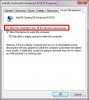
I have the feeling from that thread that everything and the kitchen sink has already been tried, but since it couldn't hurt, I wanted to note that the root of the problem looks related to power-saving, and that I remember reading something about turning OFF power management in the driver settings. Maybe worth a look?
-Matt -
i have already turned off the option that allows windows to turn off the device, and didnt work either.
i am 100% convinced its a hardware desig (intel) failure, or driver problems.
but what i really cant understand is how intel releases a product that dosent work well, and also dont understand how samsung and other manufacturers put those defective product on their laptops, it appears they have zero quality control. -
@gonzagnr: Let me try again: It varies from unit to unit. Of course not everybody who owns a Samsung laptop has the same experience as you. That's how come millions of PCs get shipped with 6235 adapters (Samsung and other brands). Some turn out terrible while others are sort of OK (even if not stellar).
If those PCs then also have a somewhat challenged antenna design (as IS the case with the Series 7 and 9) then the sum of weaknesses in the adapter, antenna, cabling multiply each other to create a malfunctioning unit -- as it would seem you have.
I would definitely contact Samsung. But that's your call of course. -
@ Dannemand
reading the link i posted before, i think that the antenna has nothing to do with this problem.
you can read how various users of differents brands replaced their card without touching the antena and their isues disapeared.
i strongly bealive is a hardware or driver issue (or maybe a bit of both).
Also i think samsung has not official service in my country, so i will follow your recomendation and try to contact some kind of agent here, but they wont have any idea because this model isnt available in my country.
The warranty i bought with best buy is the geek squad international for 2 year, do you have any idea how this works??.
THank you in advance. -
Ignore. wrong forum.
Attached Files:
-
-
Finally, I returned my unit to store. I got a chance to test store demo unit in prime95. It doesn't drop freq below 2.4GHz, but still CPU temp reach 90C. Cinebench R11.5 give the same result as mine at home and Matt's laptop. 4.6pts in multicore.
Besides of this I run prime95 on Asus R500A and with 3630QM and was impressed - no throttling at all, 3.1Ghz all for cores. Temp around 85C. Cinebench gives 6.2pts. -
Oh, didn't realize there was no Samsung office where you are. If it's not too costly to call Samsung US, maybe that's your best option, since that's where you bought it. Hopefully they can arrange for service in the nearest location to where you live. If you wait a few days, our resident oracle and moderator John Ratsey should be back, he may have some idea about this.
I'm afraid I don't know how Geek Squad warranty works. I would assume they only kick in after Samsung's factory warranty expires (most extended warranties are like that). But I honestly don't know. Others? -
@Dannemand
Lets wait a few days and see what Mr Ratsey can tell us about this
Tomorrow i am going to make a couple of calls and see if there is official samsung service here, but i am 99% theres is not (i am in uruguay).
Also if any other user of the forum has experience with geeksquad international warranty please tell us something
The following video is for the user who have the same problems i have
Asus Zenbook UX32VD Wifi Upgrade - YouTube
After searching in google, i found out the connectors in the ux32vd are smaller because its an ultrabook, in normal laptops the contectors used are the standard u.fl, so the killer wireless replacement should be plug n play. -
Hey Dannemand I'd love to be the optimist here, but I'm pretty sure there was definitely something wrong with all the Intel 6235 cards. If you check out the L521X forum, it's riddled with complaints and Dell actually took them back and replaced the cards, and in the Windows 8 model they ditched them altogether. My sister had the same problem on her Vaio S15 with the same card as well. The internet's covered with posts complaining about the 6235.
-
Thank you, yjgfikl.
I am sure you are right about this; I am not defending the 6235 at all. We've seen plenty of complaints about it here on this forum.
My point is a different one -- and actually it's three distinct points, but they all lead to the same conclusion:
1) Not all units are the same -- true for both laptop units and 6235 adapter units. It's hardware, and there are tolerances. The 6235 may have a design weakness so that it's never great, but still, some adapters off the assembly line may work better than others. But I have no doubt that the 6235 is generally a poor performer.
2) The Samsung series 7 (and maybe Series 9) definitely have antenna challenges caused by all the metal. I am not the expert here, but it's been covered extensively in this forum by John and others, as well as in various reviews. And the complaints about weak Wi-Fi go WAY BACK to the early models, long before the 6235 existed (using Intel 6230 and Broadcom adapters). And as with the WiFi adapters, all laptop units don't come off the assembly line exactly equal. Again, this is hardware, guys.
3) It's a compound issue: A mediocre WiFi adapter in an otherwise good laptop unit may perform acceptably, even if it isn't great. But a weak adapter in a weak unit is going to act like gonza's. We have to assume that the majority of units fall in that "acceptable" category: If all or most units were unable to hold a connection, Samsung obviously would not have released it, that would be suicide. Their QA may be imperfect, but they are not morons.
How big a percentage of units are as bad as gonza's is hard to say. But we can safely assume that the bad ones are either replaced or repaired -- and they end up being discussed in online forums like this. The "acceptable" ones get very little mention.
In my opinion, the conclusion remains the same: Give Samsung a chance to take responsibility -- and insist that they do. I am sure they in turn will put pressure on Intel. And I don't say this to be hard on Samsung: No vendor can crank out 100% perfect units, and any vendor will want a chance to remedy a bad customer experience, so they don't have people cursing and swearing that all Samsung products are bad -- the way we saw around here these last few days.
Getting a lemon sucks. I know that. Give them a chance to fix it. That's my take. I am sorry this turned into such an debate
-
I doubt Samsung would do anything about it, compared to the owners of the XPS 15 since I don't think we Samsung owners are very verbal about its flaws. It also helped that they had a Dell rep in that forum so their complaints were directly addressed.
I'm sure the antenna design probably isn't the best on the Series 7s and 9s due to the metal lid, but I really haven't opened the lid to know exactly where they're placed. I'm assuming on the Macbooks that they rest in the black plastic strip on the hinge. The Series 7 has a plastic base at the hinge as well, so I'm not sure why Samsung would choose to run the antennae up the metal lid instead.
Anyhow, the WiFi problem with the 6235 isn't so much the poor range (which is quite poor actually) due to the antenna, I think it's more just its inability to connect to networks and hold a connection without constant disconnects. From one of my comments earlier it may be that the card has issues with certain encryption types, as I've found that a connection on WEP was perfectly stable as opposed to WPA and WPA2 connections; but it was capped at about 1/5th the speed of WPA types.
Again, I don't want to place the blame on Samsung entirely, but it would be nice if they (and Sony) and definitely Intel actually acknowledged that there is in fact a problem with the card whether it be hardware or driver issues. Dell seemed to take initiative on it, I don't understand why the other companies won't. (hint: $$$$)
As we speak, I had to type this comment on my desktop because my laptop refused to connect to my network. Just saying. -
i agree with you, the problem is 90% the card and/or drivers, and 10%, because i have an hp made 100% of aluminium, and works flawless.
i think all the 6235 are faulty (you can see THE SAME fail not only on samsung, but also in sony, dell, asus), but i think some users have "more moderated" problems maybe due to router configuration, or band used.
I am still trying to find is samsung has an official service in my country, but anyways in the following days i will be ordering an intel 5100 half pcie to replace the crappy 6235 and see what happens.
Also i will be sharing with you the temperatures while playying far cry 3 in ultra, but i can tell you that al least they are rather good (60-65 gpu, 80-85 i7) -
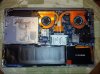
Hopefully this may be helpful to anybody else out there; I figured I'd upload a picture of the internals of the Z5C since to my knowledge the only ones out there are of the Z5A.
-
is the dissasembly procces the same as the za5????
because i am going to replace the 6235 and see if improves (i think it will) -
Here' s a video of the 17" Z7C -- I have every reason to think it's comparable to the 15" disassembly (the scary stuff starts around 6:15):
-MattLast edited by a moderator: May 12, 2015 -
Disassembly is as simple as just removing all the screws on the bottom and prying it off with a credit card or anything else of your choice really. Make sure you remove the fake plastic SD card from the front.
-
Your instructions (which I have complete faith in) remind me of this boneless duck recipe, which I've never mastered:
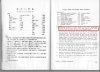
I've always wondered if I were a Chinese housewife, maybe the directions to, "stretch and remove all the bones from the duck..." would seem a little less...mysterious. LOL
-Matt -
Ha that's awfully similar to this one:

To provide a little bit more detail, I used the bottom part of a Carmex tube of chapstick because it's hard enough to separate the clips but soft enough to flex around the corners of the laptop and not scratch anything. It works quite nicely.

I start from the back (the lid side), alternating between sides and eventually meeting halfway under the mousepad. -
OMG the owl instructions were AWESOME!
And I KNEW it...there WAS a secret technique (the Carmex tube).
-Matt -
Thank you for the video and information
Today i discovered another "problem" with the samsung ¬¬
I noticed that when i plug and usb device (for example a pendrive) the dvd-rom makes the ejection sound, even though it was EMPTY...
Anyone else has noticed this?? -
I don't get that sound when plugging things in/out, but I do get a "woop, woop!" when I turn wifi on/off, or start certain media players. I guess I view it more as personality rather than a problem.
I assume it's some kind of system check of the drives (I get the same sound when I start HWiNFO64).
-Matt -
Huh, I don't get any sounds when plugging/unplugging USBs besides the normal Windows sounds, nor does anything happen when I start HwInfo64. Everything's fairly normal on mine hardware-wise.
-
Maybe this: Control Panel - Sound - Sounds (tab). Under Program Events check Device Connect, Device Disconnect etc and see if those are the ones you're hearing.
Personally I use the No Sounds scheme. -
Yeah, it's the TSSTcorp DVD on the S02UB that does it...seems to be a peculiar trait.
Nah, it's definitely a hardware sound. It's exactly the sound a slot-loader makes when it accepts or kicks out a disk.
-Matt -
So now I've noticed that my roommate's disc drive makes a sound whenever he opens iTunes from a minimized state and mine doesn't. His may do it with HwInfo and such but he doesn't use those types of programs so I wouldn't know. Maybe it's a BIOS thing? He's on P04AAG and I'm on P02AAG.
-
Yeah, somewhere back a month or so ago was a user who couldn't stand the noise. I think he said it was whenever he accessed audio/video media. It happens for me in a variety of ways, e.g., have him try this: toggle wifi on/off using the F12 key. I'm fairly sure it's due to the brand of DVD drive.
And I've been meaning to ask: did the upgraded Intel 6235 driver lead anywhere interesting, or pretty much the same?
-Matt -
OK, got it. Something else then.
-
Has anybody tried to replace the 6235 wifi card with this one: Amazon.com: Intel Ultimate N 633ANHMW IEEE 802.11n (draft) Wi-Fi Adapter - Mini PCI Express - 450Mbps, Bulk: Electronics
I don't have any problems with opening it up and tinkering with it but the adapter is not compatible or won't fit in there, its not worth it buying it and going to all those lengths. Please let me know if someone tried this. I am sick of slow wifi (24Mbps in 11g mode, 11n is atrocious in drops although it gets me close to 54Mbps on a 300Mbps router) on this otherwise awesome laptop. -
I'll try the wifi thing when he gets back and let you know. As far as WiFi goes, it's pretty much been the same. Occasional connection drops and such.
devsk I don't know how good the Centrino 6300 series is but I'd assume it isn't plagued with the problems of the 6200 series because it doesn't have Bluetooth. Be wary though, it 's got 3 antenna inputs and the Chronos only has 2 antennas, so I'm unsure if that will affect anything. -
Why go backwards? intel 5100 is a much older card. Why not something intel 6300 ultimate? Anyway, can you please update here whether the replacement card worked and worked better? Thanks a bunch!
-
Also, did anyone try this: Amazon.com: Tyco Wifi & Bluetooth Antenna: Everything Else
-
Since I don't care that much about bluetooth but care a lot about the performance of wifi, I will bite the bullet with this card. Most people have mentioned decent performance with just 2 antenna connectors. We will see.
-
@devsk I haven't hung out at the 17" subforum for many moons -- any insights over there about why the Z7C and the 6235 were/are so problematic? I always assumed the problem was worse than reports over here with the 15" Z5C.
-Matt -
I placed the order for it. I also ordered Amazon.com: Pair Laptop Wireless Mini PCI PCI-E Internal Antenna: Computers & Accessories to add the third antenna. Lets where this gets me. Hopefully, I can get close to 100Mbps that others have been able to get.
-
100Mbps throughput (or connection speed)? I've seen my throughput as high as 40Mbps, which is crazy-fast for my setup and more than enough to stream HD.
Oh HEY, I just realized: any chance you'll take LOTS and LOTS of photos when you do the swap? There are many interested owners here who would love to see what happens!
-Matt -
With 300Mbps max theoretical speed on both sides (router and the card), I should be able to hit 100Mbps in real usage. People have hit much better speeds than these with 11n routers. But I am not raising my hopes.
-
Hi
I just bought 700z5c. The main reason - better portability than Asus N56
First impressions: screen is really bright, but it sux in dark conditions, on the other way if you use it in normal office lightning, black levels are not an issue.
I hit wifi problem, installed new drivers... a little bit better with home wifi, I'll test office wifi next week.
HDD slows down the system, i'll upgrade it later. Not an issue.
The main concern right now - I can't get full speed from the laptop!
My i5 3210M is sitting on 1.2Ghz, plugged-in with Balance/High Perfromance power profile, running Cinebench or gaming, it is still 1.2Ghz. CPU temp is 60C. Windows reports that it is 2.5Gbhz but is running on 1.2GGhz. I used HWiNFO64 to monitor?
I Disabled CPU power saving in BIOS but it still there. Where is my 2.5Ghz i5 with 3.1 Ghz turbo? Windows 8 to blame?
Second question how can I make sure my favorite MMO game uses nvidia gpu not HD4000? Currently this cpu hungry MMO running not as fast I would expect.
Thank you.
Nick -
Did you enable the Silent mode? A side-effect is reducing the CPU speed.
John -
Nick, congrats on the choice! Glad to hear you've joined our club.
I'm not sure I can help with the CPU issue, first because it's Win 8 and second because you've already tried what I would do. Here's a suggestion anyway: have you gone into the power settings (Control Panel -> Power Options -> Change Plan Settings -> Change Advanced Power Settings) and looked at Processor Power Management? I suspect it will line up with what you've already seen for the High Performance profile, but maybe worth a peek.
As for getting your game to use the NVIDIA, you have two options. One is to go into the NVIDIA Control Panel, and under Manage 3D Settings, the Program Settings Tab will allow you to add your program and whatever specific settings you want. Second, on the NVIDIA Control Panel menu, under Desktop, you can enable the option to "Add "Run with graphics processor' to Context Menu" -- that will allow you to right-click on the program or its shortcut and you can select the NVIDIA that way.
-Matt -
Awesome devsk definitely let us know how your WiFi performance does, we're all really interested!
-
Last night I went to Best Buy to look at that new other Samsung model, it sweet but I think I am staying with this Z5 cuz I fell in love with it.
But I happened to check the price on the Z5 and it dropped another 50 dollar. I purchased this Z5 less a month ago so Besy Buy paid me the different back which was 54 dollars. I blew it on some xbox games.
Bill
Samsung Series 7 Lovers - Here's The NP700Z5C Ivy Bridge!
Discussion in 'Samsung' started by yknyong1, Apr 23, 2012.