 Problems? See this thread at archive.org.
because i have a toshiba running that card and the speed is amazing, i get 9-10MB per second, while the crapy 6235 only gets 3MB and with constants drops.
while sitting downstairs the 6235 only gets 12-80 mbits x second, while the toshiba with the 5100 gets very strong and stable 150.
another good replacement can we as other memebers said the 6300, but i haven heared any experiencied with this card, maybe some users with experience can tell us their opinion.
-
I don't think my wireless has ever dropped with my 6235. One floor away from my AP, depending where I am on that floor (our AP is in the basement), I get anywhere between 9-16MB/s transfers. My wife's Sony with the intel gets about the same. This is in the 5ghz range, mind yo.
-
Wow, those are impressive numbers for 5GHz across floors, no? BTW, I just spotted your poll thread from back in December -- sorry I missed that! Don't tell anyone I said this but....I think you made the right choice.
 Actually,
Nick4704 also ended up with the Z5C over the N56.
Actually,
Nick4704 also ended up with the Z5C over the N56.
-Matt -
Hope to find an answer. Replaced the 1tb hdd with a Samsung 250 840 ssd, clean install of windows 8. CPU will not drop below 15% usage during idle. All drivers updated. If I put a blank cd in the dvd drive the cpu goes to zero. I disabled the issd with no difference. This is a default install, "system" is keeping the cpu active. Samsung support was useless. Thanks
-
Thanks to all!
I think this was the cause. I changed it from auto to off and got ~2.8Gbhz... CPU speed/temp stays on 2.8Ghz and 70C while continuous gaming, but could be that game is not very demanding, MMO as I said. IMHO it is better to have i5 with stable 2.8Gbhz than i7 dropping to 1.2Ghz because of throttling (Asus N56 was with i7)
I'm happy with gaming performance.
wifi still needs investigation, i feel like response time raises sometimes upto 200-300ms to my AP, I used winmtr to monitor.
As I said screen is far from perfect in low light, not an issue in office daylight. I did not notice any feeling that screen is bad while gaming. I think this is the best resolution if you don't use scaling in Windows.
hdd is pretty slow but anyway laptop feels zippy... really wakes up from standby in a second. My Lenovo T400 could not do that, even with SSD. Will I see the same wakeup time if install Windows 7.
Probably I will install Windows 7 instead of Windows 8, Windows 8 sometimes is not compatible with everything and I need this compatibility for work.
Could you please point me to "how to install Windows 7 on z5c" or just describe what is the right sequence in a few words, like what drivers should I download from Samsung, and what from manufacturer, i.e. intel, nvidia, etc.
So far so good.
Nick -
It also depends on the AP, too. I had an old WRT610N and was getting around 5-10MB/s in the same location. After replacing it with a ASUS RT-N66U (same settings as old router), my speeds on both bands almost doubled. I have no issues with it at work, either.
-
Don't worry abut the idle CPU usage. After doing numerous clean installs I've noticed Windows will do that for a few hours of use before dropping down to 0% idle. The culprit? The indexing service. If you open task manager, go to processes and sort by CPU usage, I'm betting the indexing service is what is keeping our CPU active. Even if it's not the indexing service, it'l be some othr thing that will eventually go away once windows gets used to its hardware and software configuration. After a few hours, it'll go away so don't worry about it.
Also, since you've just gotten an SSD you should make sure to check if TRIM has been enabled, disable your page pile, and disable hibernation (with small SSDs). -
Glad to hear things are going well. Here's a thread that should help a lot with downgrading to 7: http://forum.notebookreview.com/samsung/697841-guide-how-install-windows-7-8-via-usb-np700z.html
RE: wifi speeds, when yjgfikl raised a concern a few weeks back, I did some investigating on my end and discovered that tweaking the router settings and firmware (esp. DD-WRT and TomatoUSB where possible) had a significant impact. I also noticed something VERY puzzling and discouraging: my Z5C might suffer badly on a particular set of settings with one firmware and run 2x or 3x faster with the same settings on another firmware (sometimes even different versions of the same firmware). I stumbled onto a more-than-adequate combination by trial-and-error, but it has me convinced that if I hadn't found "the right combination" early on, I would have very much focused on the 6235 as suspect.
Also, there is a Fast Start Mode after waking from sleep in Samsung's Win 7 Easy Settings -- there are some special tricks baked into Win 8 but I think if you downgrade to 7 you'll see reasonably good wake times.
Totally agree -- had a very similar experience ugrading from an N12 to an N16 (I dream of having an N66 some day!). Also note comment above about different modded firmwares and versions.
I should avoid sticking my nose in here since I know next to nothing about SSDs but I've read on a few optimization sites that since disk access time is so fast, that it also makes sense to turn off Indexing. Thoughts?
-Matt -
It's weird, I know a lot of people turn off indexing with an SSD but I actually like having it on. I search for files pretty often and it feels like having indexing on makes sense for what I do. I don't think it hurts the SSD once the index has already been created. In my mind, I do one large read while creating the index rather than recurring smaller reads while searching for files each time.
-
^ That makes perfect sense!
Question: John has noted a dozen times to use a 7mm drive on the Samsung -- I'm wondering if most retailers typically offer both sizes? I see specials all the time (e.g., newegg) but haven't checked to see if it's one size or another. What's typical?
-Matt -
I'm thinking about getting one of these but I wanted clarification that it does indeed come with a 640M and not the lower clocked 640M LE chipset. Thanks
-
As far as I know, only some manufacturers offer 7mm drives which have definitely started to become more popular. All the current Samsung drives are 7mm, the newer Crucial M4s are also 7mm, and some Sandisk/Kingston stuff. Newegg always lists the thickness of the drives in the product details so keep an eye out. A lot of the ones out there are still the standard 9.5mm.
This has the full on 640M clocked at 645mHz with turbo to 709mHz as opposed to the 640M LE's 500mHz. It also has 1GB of GDDR5 at 4GHz not the DDR3 of the LE. -
This unit did the same thing with a hybrid drive installed. Never seen it before. My XPS 12 doesn't do this, 128gb ssd. Pop in some blank dvd and it quits. Im thinking its a driver problem. System shouldn't idle at 2.5 ghz. Interrupts seem to be causing the usage.
-
I'm still thinking about your issue, and looking for some insight or a clue. Something important: a wide rash of new owners have been steadily complaining about either sustained CPU or high RAM usage levels. The one thing they have in common is Windows 8.
I can't recall if you've provided more details on the CPU problem (e.g., checked event logs, Resource Monitor, process IDs, etc.) but if you have the time to do so and report back I'd like to hear what you find (or don't find). My naive hunch at this point is that it's not a "driver" per se, but possibly a Samsung utility app (like ExpressCache) run amok, and once you reinstall it will behave again. I also hate to ask but: (a) home many times have you installed Win 8 on this machine (or did you just clone your original drive), and (b) any chance you can try a Win 7 install?
The most interesting clue of all is that you insert a DVD and it stops. That's pretty informative, somehow.
-Matt -
Hi
I did some basic speedtests... I used speedtest.net
My Intel 6235 (driver Intel 15.6.0.19) managed to connect via N with connection speed 130Mbps,My best result was 15/27Mbps, with 10/15 like average (download/upload), speed feels like unstable. HP Probook of my colleague returned 35/24, and new MacBook Pro 13" returned 57/27. Probably 27-28Mbps for upload is a limitation of our internet connection. I see full signal bar. Access point is TP link.
At 300Mbps connection results were even worse because of packet loss.
What are your results?
Where is that point when it is worth to call Samsung tech center.
Never thought that in 2013 a product could have problems with wi-fi.
Nick -
This is with a clean install of retail win 8, no samsung software, no other software installed. After windows update, samething, after samsung install, samething. Put the old HHD back in, no problems. Followed all the suggested settings posts, no help.
-
In general for laptops, can you download the graphics drivers straight from the makers i.e AMD or NVidia or is it best to download it from Samsung? Thanks,
-
Samsung's, at least for the So2ub, are a bit behind. I just use the Nvidia Control Panel to search for and download drivers.
-
Nick, I wouldn't worry too much about those numbers. I realize how frustrating it is to see other machines nearby perform (much) better, but there are dozens of variables at play, so comparisons are problematic.
I just ran speedtest and came up with typical numbers for my home -- 20Mbps down and 2Mbps up. I get the same results whether I use wifi or ethernet straight from the cable modem. You might also try some speed tests across your local area network. In my case I usually get around 40-50Mbps transfer rates between the Samsung and my other networked machines, which is much better than the speedtest.net results (we only have one broadband provider and they suck).
With 15 down/27 up, it's definitely not time to call Samsung. The first thing I would do is go into the advanced settings for the 6235 and begin to tweak them. Also, if you can modify your router settings that might be helpful too. In my case, for example, three things doubled my transfer speed: (a) putting the router on N-only, (b) doubling the width of the N channel, and (c) finding the channel with the least overlap with neighbors. In other words, I would experiment with it some more before calling tech support (and remember, when you do call it's likely you'll know more about your system than the support person)!
EDIT: out of curiosity I went back to Intel's community forum, and it seems a few weeks ago they enrolled volunteers in a testing program:
Sporadic but recurring connection dropouts on an Intel 6235 wireless adapter
Sporadic but recurring connection dropouts on an Intel 6235 wireless adapter
-Matt -
Great info there, Matt. As always!
-
Hey Matt, i'm deerchasers son. The CPU is idling at 3.30 ghz with 18 - 20% Utilization, the processes causing it are "System(17%)",and 'System interrupts(3%)"
Under system the process that's hogging it all is System Idle Process coming in at 87. -
Fantastic, thanks for the update. Forgive the dumb question, but have you checked under advanced power settings to make sure that "Minimum processor state" under "Processor power management" isn't set at 100% or some other unreasonably high value? Either way I'd fiddle with the power settings a bit to see if that helps.
When I downgraded from Win 8 to Win 7 I noticed something similar (i.e, high System Idle Process, especially right after booting, though like yjgfikl noted, it resolved itself after a reboot or two) -- in that case, it was due to not having fully updated the Intel chipset drivers, as well as other Intel drivers (e.g., Intel RST). But I can't swear it's the same in your case.
EDIT: Oops, on SECOND thought -- that was rather silly of me. Remember that System IDLE Process is just a trick windows uses to allocate CPU cycles efficiently (i.e., it creates a "fake" process to account for unused CPU). I had a senior moment there, and should have said "System Deferred Procedure Calls" (DPCs and Interrupts). Any chance you can post a screenshot of the Details tab in Task Manager and/or in Resource Monitor? It's beginning to look a bit more like a mischievous driver after all.
-Matt -
The minimum is at 5%, i'm using the latest chipset drive from the SWupdate. I've rebooted numerous amounts of time still no change
-
Oh man Matt this is awesome, how recent was that Intel post? That'd be amazing if they really scrutinized the 6235 chips and found a problem or if it isn't fixable maybe we'll get lucky and get replacements! Look at me, getting all excited.
-
Don't get you're hopes up too high yet (sorry for teasing) -- they were recruiting volunteers back on 2/20 and if you jump to the end of the thread (3/7 I think) there's no new news. Maybe soon? Either way it's hopeful -- they've acknowledged the issue.
-Matt -
You might try this: instead of grabbing things from SW Update, look for the "Find Model" option in the lower-left corner, run that, and search on your model. I've sometimes noticed newer software and drivers than what SW Update suggests from its scan.
Remind me: have you only installed the OS and drivers once? If so, the first thing I would try is a full clean install -- otherwise it may be a long slog of trial-and-error troubleshooting.
EDIT: in doing a bit of research, I found this page, which looked pretty helpful: http://www.thesycon.de/deu/latency_check.shtml A quick thing to try is to run the latency checker (self-contained app) which may give you an idea if it's a DPC issue.
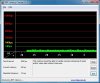
-Matt -
Would something in the Sysinternals Suite provide additional insight into what is happening? I would start with Process Explorer.
John -
If putting an empty disk in the optical drive, brings the CPU usage down, it means something is constant polling for the CDROM. It may very well be a bug in Windows or in some driver which interfaces with cdrom drive. System and System Interrupts consuming CPU point to that.
-
I get my 6300 and the antennas today. Let's see how it goes. I am desperate to go beyond 25Mbps.
-
Great let us know how it goes devsk. Maybe it's worth replacing the card if you see a significant change and if Intel doesn't act quickly enough to address the issues plaguing the 6235.
I just acquired a nice dent in the lid of my laptop courtesy of my roommate. Before I bother with going through the screen/lid removal process, is it worth contacting Samsung to get a quote on a lid replacement? I doubt they'd do just the lid and will probably do the entire screen assembly but I'm not too worried about it since I'm not paying for it.
I'll be using this thread if it's of any help to you guys: http://forum.notebookreview.com/samsung/632507-samsung-series-7-chronos-np700z5a-disassembled-parts-analysis-6.html#post8588358 -
today i ordered the intel 5100 card, i think it will arrive in 20 days cause im south america.
i think the problem of the intel 6235 is hardware issue, so for the ones who want a very high prformance card, get the killer 1202, if the price+shipping were not so high i would had bought it, you can find a lot post on google about people replacing the 6235 with the killer and then get full 270-300mbps after the swap was done, and 450mbps in 5ghz.
but for people who cant afford 80 dollars in an wireless card, i will post my results with the 5100 (12 dollars with shipping cost on ebay to south america). -
Guys, thanks for updating us on your wifi experiences -- it's a great service to the community and I know everyone appreciates it! And remember to try and post pictures while installing your new cards.
-Matt -
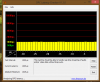
Here are the results..
-
Argh, I thought the reading looked a little fishy, and then I saw:
DPC Latency Checker
Since 1000 microseconds = 1 millisecond, it looks like that tool won't work correctly for the moment. Have you had a chance to look into John's advice? I think Process Explorer in Sysinternals will probably reveal the culprit.
If you're still interested in checking latencies, perhaps you can try LatencyMon 5.0 (seems OK with Win 8): Resplendence Software - Free Downloads Looks interesting -- on the "Drivers" tab you can look at the DPC counts for each driver in the system:
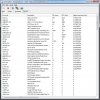
-Matt -
Ok guys. I have some bad news. Replacing 6235 with 6300 makes some difference but not a whole lot. The software (the driver) still sees huge number of TX retries and tones down the speed. Sometimes the speed falls to few Kbps when retries peak. But average rate did go up a little bit. I am able to get anywhere from 5-7MBps (about 40-60Mbps as opposed to 25Mbps before) on a lossy (too many packet retries) 11n connection introducing large latencies, resulting in a connection which can have very large latencies some of the times but still maintain decent average throughput. The lossy nature of the connection does not work for me when I have to VPN. I get choppy VNC connection like before. Disable 11n and there is no choppiness but overall throughput falls to 25Mbps just like before in 11g mode.
One good thing that came out of it was that I realized that its a combination of laptop and router at work creating this issue. Things can be improved by forcing the router to 11n only mode, the packet drops reduce and there is a consistently better connection at around 5-8MBps. So, definitely force the 11n mode if all your connecting devices have 11n chip in them.
Overall, I would say I wasted $43. I think forcing the 11n mode on router would have yielded the same results without spending this money. My take is that the issue is in the software driver. Its not coping well with 11n mode. It can be fixed and made better at the driver level.
PS: All these numbers are from a room downstairs when the router is 60 degrees angle upstairs 20 feet away.
PPS: The installation was a breeze. Open up, take one screw out, pull the antenna cords out, replace the card and replace the antenna cords and put the card and the only screw back in. That's it! I could not route the third antenna. So, I put it right above the disk (SSD stays cool) and routed the cable to the card by looping it around the case in places which stay cool. -
Curious....has anyone tried a fresh install of Windows 8 only to find that the Nvidia card is totally missing from the device manger? For the life of me, I can't seem to get the card to re-appear so I can install the Optimus drivers. It's basically the only thing I am missing for a perfect installation of Win 8. (I hope I am not high-jacking the thread... as it started out just talking about the laptop in general...but I apologize if I am doing so).
-
Hi
devsk, your experience is very important for the community. Personally I would go for proven 5100, so gonzagnr, I'm really waiting for your input!
I noticed that Samsung has put 6235 into new np770z5e, so the issue with wifi MUST be resolved. I checked DELL forums and they struggle with XPS.
Personally my z5c does not work with 300Mbps but has about 5% packet loss and some of high latency spikes on 130Mbps. It is possible to work, but still the speed could be better.
devsk, does 700z5c has some seals Samsung can check to void warranty? I mean I wish to replace the card, but don't want to void warranty. It was absolutely legal with Lenovo.
Does anybody replaced Intel 6235 with Killer card in Samsung (I saw video with Asus zenbook, where antenna connectors did not match)?
Another topic I wish to raise, if 6235 works bad with some routers I wish to have a list of routers it works good. It is cheaper to replace router than laptop.
Nick -
Howdy and definitely not a hijack! I'm wondering if you're trying to install from Samsung's driver package, or if you downloaded directly from NVIDIA? I'd suggest going with Samsung first, and upgrading as needed. Not sure why the GPU is not showing up in Device Manager, but I have an embarrassing confession that might be helpful: I tried -- and repeatedly failed -- several weeks ago to update the NVIDIA drivers (kept getting "installation failed" error messages). After about 2 hours it dawned on me: I was hooked up at the time to an external display. Once I unplugged, the installation went off without a hitch.
FWIW I've had good experiences with two Asus routers -- the RT-N12 and the RT-N16. Just keep in mind that I had very similar issues to other owners here at first (e.g., max transfer speeds around 5-10Mbps) until I sat down one weekend with the Samsung laptop, a desktop, and my Android tablet (running Wifi Analyzer), as I slowly worked through 6235 Advanced settings and router configuration options. And to add to devsk's observation: I've seen major differences in performance just by playing with alternative router firmwares as well.
-Matt -
Thanks!! I can tell you right now, that the 6235 works perfectly WITHOUT the Samsung easy share installed. I am using Itel drivers only and Widi works too. I am considering putting an 8Gb RAM chip in the laptop so that 4+4 will run asymetrically and the other 4 MB will run single channel (lot's of Photoshop CS6 and Lightroom 4, going on here).
I use a Netgear N900 (WNDR4000) router and it's just fine. Both 2.4 and 5Ghz work. But, the 5Ghz maxes out at around 19meg down in my speedtest.net sessions and the 2.4Ghz goes to 30mb (my max tier offered) with no sweat. In fact, beside my missing GPU from the device maneger list, the only single issue I have found so far is that when using an external USB 3.0 Compact flash read in the USB 3.0 port, it can't see the card (sees the drives though..all empty). In the USB 2.0 port it works fine, but on the slower speed of course. I think this is a known issue though.
I did get all my drivers from Samsungs SW update utility and some direct downloads from Intel. I was thinking that the Chief River chipset might be the culprit in the missing Nvidia GPU...but I don't know. I plan on putting the old 1Tb hard drive with Win 7 back in the laptop to see if the GPU shows up. I currently have a Samsung 256Gb 840 Pro SSD in it..and ummm....wow. Seriously. Cold boots to the desktop in under 10 seconds.
I was so suprised that I took a vid of it and put it on YouTube. I also put the Widi working on Youtube. Love the laptop...just a couple kinks left to go. Would love to hear anyone's opinions.
Boot vid:
Samsung series 7 chronos with samsung 840 pro 256g - YouTube
Widi vid:
WiDi test on Samsung Series 7 laptop - YouTube
Play them in 720P for highest rez viewing. -
Fantastic! Very interesting news on not installing Easy Share -- I don't have it installed either (nor a few other things). Maybe we can make a list of utilities left out that may impact wifi performance?
I took a peek at the boot video -- are you sure that was a cold boot? Remember that (somewhere in Power options, maybe) Win 8 now has an option for a hybrid shutdown, where it caches to disk all your system drivers. So when you reboot, it appears to be a totally new boot but in fact it's rereading them from cache. Either way I'm drooling over that start time (I'm around 30-40 seconds in Win 7 -- HOWEVER, I mostly sleep and rarely reboot!).
When you have a moment, try and list the order of driver/utility installations for your system -- perhaps there's a clue in that sequence.
-Matt -
Whether Win 8 holds the data or not, I suppose it doesn't matter to me. I shut the laptop off, no lights on, not hibernating. I push the power button. Boots in less than 10 seconds. I will say that if I had any windows open before shutdown, they are not there anymore when I boot back up. Of course if I hibernate, then all of my windows are still there...just like sleep mode (which by the way...resumes in like 3 seconds). It's all just ridiculously fast coming from Windows 7 and a normal HDD. I will never go back from SSD's after this experience. As far as Windows 8 is concerned, I use a lot of hot keys (like Windows key + X) and I broke down and bought the Start8 app for $5 bucks. Worth it..since I don't like Metro. Otherwise, Win 8 is exactly like Win 7...but faster and less pretty.
List of drivers? You mean versions? I will admit that I am technical, so I did not go in a standard order, nor did I use every latest driver off the bat. I first tried to use drivers from Samsungs site, before going to the SW Utility. I can tell you that the only Samsung software I really have running is the Samsung Settings app, so that my Fn keys and keyboard works, as well as display, sound, battery tweaks, USB sleep mode..... I mean, all of the tabbed setting in the Setting App are available to me. I ignored all of their other stuff. I wouldn't need or use it. I started by putting all of the standard drivers for individual components from Intel's site, then I compared versions and functionality through the SW Update app (which is excellent and convenient). -
I don't think we're on exactly the same page RE: Win 8 shutdown -- here's a link if you're curious about it, otherwise no worries!
Fast Startup - Turn On or Off in Windows 8
RE: driver installation, I think your strategy is similar to mine, i.e., major system stuff first, minor stuff later. There are a couple threads here regarding installing Win 8 and great advice in this thread in particular. Hopefully your mysterious missing GPU will sort itself out soon!
-Matt -
Ahhhh. I understand what Fast start is. Very interesting. I assume it is on by default, so I have no idea why I would ever want to turn it off. Thanks for the link, filed.
I will read the Win 8 thread. I have another Chronos on the way due to this one having a blown left speaker (crackles). Plus, I can still put the old hard drive back in and see if the Nvidia GPU is visible there...but I doubt it is since it is missing n the hardware. Although, I did update the Bios when I first got it and never checked to see if the Nvidia card was there. May be the Bios update removed it. Or may be it's dead. I will find out eventually and report back.
Thank you sir
-
I'm fairly sure your NVIDIA card is around and working -- I remember something fairly similar happening as I downgraded from Win 8 to 7. In my wrestling match with UEFI and its friends SecureBoot and GPT, I ended up installing 7 like...7 times! LOL It was actually very instructive. I'd hazard a guess that the answer lies somewhere in the Intel drivers you installed (or didn't). But if you're getting a replacement machine (did I read that right?) it may be a moot issue.
-Matt -
So myth busted, the WiFi antennas are indeed located in the plastic part of the hinge below the screen.

-
Yeh. The new machine should be here in the next two days...but the more I can tweak on this one, when I switch the SSD out to the new one..the less I have to do on it. Plus, I'm a glutton for punishment as I don't like it when I can't figure out what is going on inside a PC. Too many hours in my life at the grinder to let any pc beat me. So, I am going to mess around with it some more. Funny enough, I read that the fast boot option can keep a device from being recognized once the hibernation file is established. So, if the trick is to uninstall the root PCI bus and let the Nvidia card re-recognize itself, I may have to disable fast boot before messing around with uninstalling hardware in the device manager. Of course, I could have a bad bios flash...
Anyway, has anyone heard about a USB 3.0 fix yet? -
Where did you expect the antennae to be?
However, while the cover over the antennae is plastic, there is still a lot of metal (bottom of display back and base of computer) which partially block the WiFi signals. I wonder if one reason for the plastic base on the new Series 7 Chronos is to reduce this problem.
What USB 3.0 problem are you wanting to be fixed? Some USB 3.0 firmware updates have been released during the past year.
John -
That's actually exactly where I expected them to be. Some people somewhere were suggesting that the antennas run up the lid, causing signal weakness due to the metal. And I don't know, apparently our plastic bottom isn't helping much!
-
The current Series 7 has plastic base too, and I seem to remember reading an article almost a year ago, that it WAS exactly for that reason: Samsung found they couldn't run the antennae along the screen (which otherwise would've yielded better reception) because of the metal. Other vendors learned the same lesson.
I still think, as I've said a few times now, that (A) the antenna challenges in these Sammies will limit reception regardless of which wifi adapter you install (but to be sure, some adapter models are better than others); and (B) all units of PCs and wifi adapters are not completely equal, it's the nature of hardware.
Combine this with the very important point, which Matt has raised repeatedly, of router choice and configuration (channel selection in particular) and I think you will find that reception strength is a compound effect.
There isn't one single fix that will transform all of these PCs from turtles to cheetahs -- most units are in the middle anyway (whatever animal that would be ); and the ones that are truly turtles have a hardware defect, not a design flaw.
That's been my view based on the work and research of other members (posted I this forum long time ago). And I have to say, nothing I've read here recently has significantly changed that. -
Can you test it with it sticking out like that? Conclusively determine if the PC housing is interfering with the signal (I highly doubt it).
Samsung Series 7 Lovers - Here's The NP700Z5C Ivy Bridge!
Discussion in 'Samsung' started by yknyong1, Apr 23, 2012.


