 Problems? See this thread at archive.org.
When using an external USB 3.0 Compact flash read in the USB 3.0 port, it can't see the card (sees the drives though..all empty). In the USB 2.0 port it works fine, but on the slower speed of course. I think this is a known issue though.
-
-
I agree there are residual bugs with USB 3.0 support. A firmware update in mid-2012 made one of my USB 3.0 flash drives usable but a couple of months later a further update caused it to become unusable again.
If you have the Renesas hardware then you can try your luck with the latest firmware and driver here. The second group worked for my NP900X4C (but didn't make that flash drive usable again).
John -
Unfortunately I ended up removing the lid entirely after that photo was taken so I didn't turn the laptop on and test the speeds with it. I've also re-assembled it since then. It did cross my mind though.
-
I would avoid the bios ending in 5. I think it made my PC lose it's Nvidia GPU. I have 4 on the new PC and the GPU is back. Going from 4 to 6 might be fine. But I'm not going to risk it. Anyway, issue solved. USB 3.0 still not working right though.
-
 Result of process explorer
 -
ive had a problems with my USB 3.0 ports and sometimes with USB2.0 ports and just because of Samsung Kies Software. so if you are using Samsung Kies Software try disable kiessystray in task manager/processes ( i am not sure what the name is ) and that is should be ok... i have had same symptoms ... and sold Galaxy S3 phone too
 )) i have intel usb 3.0
-
I appreciate that follow up.
I am testing with 3 USB 3.0 devices. 2 External drives and one media reader. I have not put Kies on my machine. All of my USB 3.0 device can connect to the USB interface but they run at USB 2.0 speeds. In the "personalization" menu under devices, one of my devices says "you can run faster with USB 3.0" even though it IS plugged into USB 3.0. The other doesn't warn about the connection speed, but it also still runs at USB 2.0 speeds. An external 3.0 Compact Flash reader (SIIG) can not be read over the USB 3.0 at all, but runs fine on the USB 2.0 side. Also, it runs fine on my Asus G51SW laptop on the USB 3.0 port, and both external USB 3.0 drives run at full speed on the Asus.
Something is wrong the with USB 3.0 driver or the interfaces themselves on the Samsung series 7 (17")...for sure. -
Sorry I missed this -- was on the road for a week. I'm curious how soon after booting your grabbed this image? Interrupts/DCPs are using about 8.5% CPU which isn't horrible, but still higher than it should be. At this point I have a few thoughts, but want to avoid sending you on a wild goose chase. Here's something to look at: since we know that inserting a DVD seems to mediate the problem, disk access is likely involved. After doing a bit of browsing I found a thread which discusses similar issues: Interrupts spikes to 80% of CPU - Sysinternals Forums - Page 6
The post that might be most helpful for your situation is this one:
Interrupts spikes to 80% of CPU - Sysinternals Forums - Page 6
However, I poked around on my S02UB and only found the native chipset driver under "IDE ATA/ATAPI controllers" in Device Manager. Still, my gut feeling in the beginning was that uninstalling the Intel chipset driver and reinstalling (short of a full clean installation) was what I would do if the offending "program" couldn't be pinned down. Hopefully I'm not leading you astray -- when you get a chance, note if you can see what happens in Process Explorer when you try the disk "trick."
-Matt -
How are you defining your speeds? The upper end of real life USB 2.0 data throughput is about 30MB/s. USB 3.0 claims 480MB/s but the fastest I have seen is about 150MB/s (for an SSD in a 2.5" enclosure) and most flash drives are in the 20 to 100MB/s range (with read faster than write and decent speed only occurring with large files).
Does your Series 7 use the Renesas USB 3.0 controller? If so, you might want to try updating the firmware from here. Many months back Samsung were embedding the firmware update in the USB 3.0 driver update package but I haven't seen one recently.
John -
Just updated the BIOS on the S02UB to P05ABJ -- not 100% sure, but I think they may have fixed the issue with the keyboard backlight. In any case mine seems to be behaving, and the onscreen icon when changing brightness looks a bit different to me. Otherwise no obvious changes/updates.
-Matt -
Hey John. Thanks for trying to help me. May be someone else will notice this converse and be able to realize what I am missing. By the way, I'm still on the BIOS ending with 4. Haven't moved to 6 yet. I think I may wait until 7. So, I don't know if this is an issue with 4 and solved in 6...but...either way, I thought I'd mention it.
Anyway, I don't believe I have the Renesas controller. The Intel one is the one I have.
Intel(R) USB 3.0 eXtensible Host Controller- 0100 (Microsoft)
No Renesas in the device manager. I simply looked at transfer speed in windows 8...they are around 25-30 Mb/s. USB 2.0 speeds.
Edit: In fact, when I plug my drive in, which is a Seagate USB 3.0 drive, in the personalization area under devices, it shows that my "device could perform faster"... yet it is on a 3.0 interface and is a 3.0 drive!
Sigh. -
I would work through the Intel support info. There is a driver update from 8th January 2013.
John -
Yes. I have seen the .248 driver. I have the .420 one currently. There is a hack out there to use the .248 (as it is for Windows 7 only). So I will report back after I have tried .248. Let me know if you think of anything else!
Hack .248 driver for WIN 8:
http://www.2shared.com/complete/qH8WtHEu/Win8_INTEL_USB3_x64.html -
So I picked a new model off Amazon about a week ago, I don't think Samsung even lists it anymore, but it's model number NP700Z5C-S03US. Far as I can tell, it's similar to the S01US, but anyway, I'm mighty impressed with it. The only nagging issue, and one that seems fairly common with Samsung laptops, is the trackpad. It's hit or miss on whether it scrolls smoothly and works functionally after coming back from sleep. Luckily, I use a touch mouse, but still.
-
Welcome Neo! I was thinking about mentioning that neither Amazon nor Best Buy seem to have our machine listed anymore.
I'm curious if you found yours through a Marketplace seller, or maybe it was the last one out there.
Regarding the trackpad, any chance you can post a screenshot of your Elan Control Panel (not the Windows built-in one)? Depending on which one you're using, you may have more or fewer options available -- John has taught us a trick for using the better of the two utilities. It likely won't address the after-sleep issue, but it may give you a few more things to play with (e.g., palm-tracking and sensitivity).
EDIT: I just did a bit of investigating, and I'll bet yours looks like this (which means you have the latest):
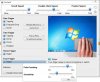
I also noticed that SW Update updated a few days ago -- have you checked to make sure your drivers are the latest?
-Matt -
ELANTECH Drivers
I use 11.14.1.3
After some adjustments. Zero issues (sleep or not) -
Hey Zeninsight does that new driver have proper double tap and drag support? I'm on 11.7.2 and I can double tap a file with one finger and drag it to somewhere else with a different finger. 11.8.5 (I think?) broke that support so I had to downgrade. 11.8.5 however had implemented a proper inertial scroll, but that is more of an aesthetic issue than a functionality issue. Would you kindly let me know if 11.14.1.3 has regained that feature? Thanks!
Also NotoriousNeo I'm not sur if this will help, but Samsung has set certain tasks to delay after booting (and probably after waking from sleep) so if you go into Task Scheduler and remove the 30 second delay from tasks like EasySpeedUpManager, SmartSetting and SSCSpeedBoot you may see a change in the trackpad driver initialization. -
Atention please
intel has released new drivers for the 6235 wifi card, i have installed it and it seems that the problem is SOLVED!!!!!! (or at least partialy for other users on intel forum)
I have been able to move files over 4gb at speeds of 12MB x second with 100% stable 300mbps conection in N mode.
also de ping latencies have improved A LOT!!!, realy realy impresive.
I still havent instaled the bluetooth drivers, because when bluetooth enabled in previous versions the conectivity was eeeeven worse, i dont want to install them yet because i am very hapy with the actual performance of the wifi.
So if any user want to install both drivers (please install the drivers only, no the whole package of the proset crapy software) please share your experiences. -
@gonzagnr: Thank you for that update.
Assuming you are referring to Intel's Driver Only package version 15.6.1, could you post what driver version your are seeing in Device Manager after applying that package?
I ask because I found that it didn't actually update my driver, it is still at version 15.4.0.11 after applying the 15.6.1 package. In my case that is an Intel 6230 adapter and Win8. But John Ratsey found the same thing with his Intel 6235 and Win7. See this discussion.
If this 15.6.1 package installed a newer driver in your case, I'll definitely have to dig deeper and try to find out why it updates some installations and not others.
Thanks again
-
Aw man, that got my hopes up. My current driver is also 15.4.0.11 on Windows 7 and a 6235. I'm going to hold off applying the new package until it's confirmed that it actually does something.
-
LOL
Don't despair yet. If gonza found such a dramatic improvement on his PC, there could still be some good news in this update. Fingers crossed
-
it says 15.4.1.1
aftr a bit more testing i dont know why but the speeds have decreased
so the problem is not 100% fixed, but i can say there has been an improvement. -
OK, so maybe some improvement, maybe not. It could still be partially good news.
I suppose it's possible that 15.6.1 could make some changes (say to adapter firmware) without actually updating drivers for those who already have 15.4.1.1 (or in my case 15.4.0.11). It's too late for me to check for that as I already applied 15.6.1.
Those who still haven't run 15.6.1: If you can hold off for a while, I'll see if I can find a way to display firmware version so that you can check before-and-after.
If anybody else knows (or can find) a way to check this, please chip in.
Update: OK, I'd hoped that either HWInfo or the Details tab in Device Manager would have revealed a firmware version for the WiFi adapter, but no luck. All I can think of to compare what changes are made by the 15.6.1 package (if any) is to export the adapter's registry key before and after applying the update and comparing the two.
On my Win8 with 6230 its HKLM\SYSTEM\CurrentControlSet\Enum\PCI\VEN_8086&DEV_0091&SUBSYS_52018086&REV_34. Use Details > hardware Ids in Device Manager to locate yours.
Others in intel's discussion forum on the subject claim to have found happiness with the new drivers, so I suppose they could have some effect.
Update 2: Forget all I said in this post. Turns out this latest update package DOES indeed update the driver itself -- which the one from last week didn't. Sorry I confused things
-
I installed the new driver. This time the animated icon chuntered round for longer than with last week's package (which did nothing) and my driver is 15.4.1.1 dated 23rd Jan 13.
It has definitely boosted throughput on my X4C and my initial impression is that it restores the connection faster after the computer has been sleeping.
John -
Confirmed here: Differently from last week's update, this new one actually DOES update my driver version to 15.4.1.1. And that's on Intel 6230 / Win8.
I cannot say if there is a difference in performance yet, as I already had excellent performance on my home 5Ghz net. But I hope it can improve connection stability on more challenging 2.4GHz public networks.
Thanks again, gonza, for calling our attention to this
-
I will try this when I get home. I had installed the 15.5.7 version as recommended by Netgear for Widi connections. It has a weird delay on first connecting sometimes but then is fine. I don't want to break wifi, but I can roll back. What info should I record BEFORE updating? Should I install FULL package or just drivers?
-
Most people recommend installing only the driver package.
John -
It appears that this latest driver package from Intel really DOES update the driver itself. The one from last week did NOT, and so I speculated that it might update something other than the driver (firmware or registry flags or some such thing). Hence my earlier suggestion to make before-and-after comparisons.
But you can disregard that suggestion as we now have verified that the update DOES indeed update the driver -- on two different systems (Series 9 and 7) with two different adapters (6235 and 6230) and two different Windows versions
-
My driver is currently 15.5.7.52. It seems to work well and Widi functions properly.
What is the utility that everyone is using around here to test speed, packet dropping, etc....
I see that there seems to be two different drivers available. One is through the Samsung software "Sw update"...15.6.1.20, the other is from Intel which says 15.6.0. I haven't done anything yet.
Any opinions? -
Just to clarify, the driver package Dannemand and John have installed is the 15.6.1 dated 3-19-2013 on Intel's website right? I keep seeing "last week's driver did nothing" and the most recent one on Intel's website is from last week. The one before that is from February. Is there a newer one I'm not seeing?
-
Yes, you are correct, package 15.6.1 dated March 19, 2013 is the latest (as of today). And it is the one John and I just found today updated our drivers -- after gonzagnr alerted us to it.
Last week John and I discussed the previous package from Intel, which was called 15.6, and which seemed not to do anything.
I am to blame for creating confusion here: When I saw gonza's post, I should have gone straight to intel.com and downloaded and tested this latest package (15.6.1) instead of speculating about whether it actually updated anything. I apologize for that
-
So I've just installed the new package and it did indeed update my driver from 15.4.0.11 to 15.4.1.1. I ran some Speedtests and didn't move a muscle before and after to compare my results. Keep in mind this is the laptop on my lap, on battery (maximum performance settings) about 8 feet away from my FiOS router. I'm subscribed to 75/35 service (usually 85/40 on ethernet).
Before:
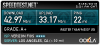
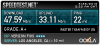
After:
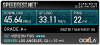
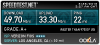
So it didn't seem to make much of a difference unfortunately.
EDIT:
Apparently my thighs are made of WiFi-blocking material
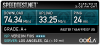
-
after testing the wifi card all the day i can say the problem is solved in at least an 80-90%
i only suffer 1 drop in more than 12hs use, the speed high and stable.
but you wont bealive this...
now i am getting randrom sounds from the speakers, some "poping"sound and others even worse :S:S:S:S:S
also when i open the windows media player the dvd rom makes the eject sound :S
i am very disatisfied with this computer, i wont buy samsung again. -
What sound driver are you using? I don't have this issue...but I DO NOT use Samsung's sound driver either, and mine works flawlessly. Don't give up yet...it's just stupid bugs.
Can you describe the "drop" you experienced? -
Thought I would join the fray with a bit of bandwidth testing/results. The outcome though is not very sexy -- basically what I found is the new wifi driver improved throughput by just a hair:
All results are based on the mean of 3 consecutive measurements
Test 1: speedtest.net (faster/higher is better)
15.4.0.11 = 18.2 Mbps
15.4.1.1 = 18.6 Mbps
Test 2: 64Kb ping to router (faster/lower is better)
15.4.0.11 = 29.0ms
15.4.1.1 = 28.7ms
Test 3: Netstress 1024Kb LAN transfer (faster/higher is better)
15.4.0.11 = 24.7 Mbps
15.4.1.1 = 25.7 Mbps
Sorry the differences are not more pronounced, but remember that I started off with reasonably OK rates (OK, not FIOS rates but good enough for streaming HDTV!).
-Matt -
The drop is when the laptop sudenly disconects from the network, after that drop i used it for many more hours with a lot of reboots (made by myself) and the performance remained flawless,also the stability, so i can say at least for me the problem is fixed in a 90-95%.
Also while pinging google, with old drivers i lost a lot of packets and the time was always over 100ms, some times over 2000ms, now when pingin google i get stable 4-10ms
As i said previously, i dont have the bluetooth drivers instaled.
About the "popy" sound i get its a bit random, i am using the latest samsung drivers downloaded yesterdat via sw update.
Can you tell me which drivers are you using??? i also get 2 times some random sound for a few seconds, sounds like "shhrjrjrjshshshsjrjrjrjrfiuuuuushhhhjrjrjrjrjrfiiiuuuu" or something like that (in a very high volume, very disturbing, the popy sound is low barely listenable, but is there )
I also get the dvd rom eject sound some times when i plug ann usb pendrive or some times when i open the windows media player, is anyone else experiencing these sounds???
Thank you in advance -
We've covered the DVD sound quite a bit in past discussion -- I suspect some people are "allergic" to it and some are not. I actually like it (I also get it when I toggle wifi on/off) -- not sure why it doesn't bother me.
I don't get it when I insert/eject a USB flash drive, though.
http://forum.notebookreview.com/sam...eres-np700z5c-ivy-bridge-142.html#post8912857
http://forum.notebookreview.com/sam...eres-np700z5c-ivy-bridge-142.html#post8912913
http://forum.notebookreview.com/sam...eres-np700z5c-ivy-bridge-229.html#post9112173
-Matt -
The .6699 sound driver provided by Samsung has an issue with the speakers that causes them to sometimes sound like a motorcycle. I'm using the .6662 from Realtek's website instead and I no longer have any problems.
Also I think only certain DVD drives make the weird sounds, my roommate and I both have the S01US however I have a silent MAT$HITA (it's censoring me) drive and he has a TSSTCorp drive that makes the initialization noise. -
Yep, the TSSTCorp is the naughty one.
-Matt -
It's weird that they'd put different components in the same laptop. I've noticed a few other differences between mine and his as well.
-
My impression with cell phones (it's an analogy, work with me here!) is that makers are pretty "promiscuous," e.g., supply chains vary on a weekly basis, so internals can vary widely across production runs. Or at least I read that all the time on the industry blogs/news. I figured it was the same for the brutal PC industry...
EDIT: wow, that sounds much more pretentious that I meant!
-Matt -
It's normal practice for notebook manufacturers to multiple source the interchangeable standard components such as HDDs, SSDs and ODDs. It provides some resilience in the supply chains and also keeps the manufacturers competitive.
John -
yes, my laptop has the tsstcorp :/
so this sound is "normal"???
can you send me a link to download the realtek drivers??
Thank you in advance.
ps. the wifi performance continue very stable and fast. -
I guess it's normal for that model disk drive. Must be something in the drivers for it. Anyhow, here's the download section of Realtek's website Realtek
-
I didn't install Samsung OR Intel Bluetooth drivers because it comes with Windows 8 and recognized the hardware automagically for me and works just fine.
The sound driver I have installed is RealTek High definition Audio version 6.0.1.6716. It might be the sound drive that comes with Windows 8 installs. I may have allowed Windows update to change the sound driver too. There is an additional sound device listed in Device manager called- High definition Audio device - Provider is Microsoft- 1/8/2013 driver version 6.2.9200.16497
I also have the Samsung Settings app installed and ALL of the "SoundAlive" settings work as well. SO...you may want to totally uninstall the sound card from the device manager and let it "scan new hardware". Then see what version it is and go to Windows update for the latest in there. I mean...it's sound, who cares as long as it works which driver it is using?
I think Lenovo has that driver version specifically if you want to try it-
http://support.lenovo.com/es_CL/downloads/detail.page?DocID=DS032444
Did you update the Wifi drivers only? Or install the full package?
EDIT: I installed the drivers only update. 15.6.1.6 (2-21-13)
Testing, ping speeds and Widi functionality now.
So far- My 30mb down and 4 mb up connection (SureWest) was only at 20mb down and 4 up on my 5G (Netgear WNDR4000 / N750) before. Now it is ROCK solid at 30MB down and 4 up, with barely a spike testing through Speedtest.net. I'm really pleased with this because I have a bunch of 2.5Ghz devices and I feel like it wouldn't hurt to run my laptop on 5Ghz. If the range is ok, I may keep it on 5Ghz. I plan on picking up an Asus AC1750 and using the new .354 firmware once the Merlin hack of it is released. That thing is supposed to be a tank with insane ranges on it.
Ping to Google at 1000k packets was commonly mid to high 40's. mOstly around 45 to 49ms replies. Now it is at 29-31 constantly, with an odd end spike to 66 and 70 twice in about 100 packets. I call that success.
2.4Ghz is a little more sporadic...and I didn't check the old driver to see the difference. But the new one is around 24-31ms to google and a spike here and there to 70, 55, one weird one to 200. It might be interference from the other devices in the area. Who knows.
on Speedtest.net I hit 24mb down and 4 up on 2.4Ghz. Tried it 3 times..to make sure. Laptop is in the same room as router. Tests are really eradic. I even got a 12mb down a couple times. No idea about this. But it's clear that even by looking at the green stat bar on speedtest during the test that the 5Ghz is super stable compared to the 2.4Ghz.
Widi. this driver has DEFINITELY improved the Widi. I have a Netgear PTV3000 with 2.2.12 current firmware on it. And the new driver not only show the correct firmware and PTV3000 adapter info, but it also has a new feature called "low latency" mode.
I am on 5Ghz internet while connected to the Netgear, so I don't know if the default is to connect on 5Ghz or not. But at some point I will try the 2.4 internet and Netgear at the same time. I don't care enough right now.
Hope this helps someone. -
I was wondering about that drive thing. I also have the Mat$hita. No noise from it here either.
-
Just picked up my first USB 3.0 flash drive (Silicon Power 32MB) and gave it a spin (after first converting to NTFS). Noticed the speeds were kind of meh, e.g., ~40MB/s. Figured I would delete the drivers from Device Manager (eXtensible Host Controller and Root Hub) and then, on a crazy impulse, decided to try my luck at SW Update. It installed Intel's 1.0.1.209 (Win 7).
So I ran CrystalDiskMark again and...darn, pretty much the same results. However, I remembered I hadn't shut down SW Update after the driver install, and after doing so, it kindly reminded me to reboot my machine. So rebooted, ran CDM a third time, and got (wow):
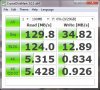
-Matt -
Are you on Windows 7 or 8?
-
7.
EDIT: I should probably add that when I first inserted the drive, I got the same "can perform faster" message as you. After goofing around with the Device Manager, and ultimately deleting the drivers, however, the drive was properly recognized once I'd reinstalled the Intel driver(s).
-Matt -
Yeh. They work on 7. I have 8. There is a hack out there for the win 7 drivers to be used on Win 8. I haven't tried them yet. But I will tonight.
Samsung Series 7 Lovers - Here's The NP700Z5C Ivy Bridge!
Discussion in 'Samsung' started by yknyong1, Apr 23, 2012.


