Problems? See this thread at archive.org.
Anybody got a guide for an A215? (Mine in particular is an S7422)
-
I am looking for disassemble instructions for my Toshiba A205-S5804, can anyone help? I will be upgrading my CPU and installing a Bluetooth module.
Thank You! -
Roasted,
This might help you out :
:
http://www.irisvista.com/tech/ -
I have a problem with my power jack; it shorts somewhere inside the body of the jack (it's not the usual problem where the solder points break). So I need to replace it. Problem is, I can't get the danged thing out. I put the solder iron up to it, and nothing seems to melt, I can't pull the jack away from the board. Any ideas?
-
Maybe someone knows how to dissasemble toshiba satellite a200? I unscrewed all screws however it does not open
-
Great Site I hope you make a million bucks
-
I too would be interested to know.
I have however gone a step further than you guys. Twice I have taken all the screws out I can possibly see but just cant get it to pieces, there is as said a way to get the top cover off because there must be more screws underneath it as that was the only thing stopping me getting right into it. -
The laptop is overheating. I guess my problem is that the cooling system is not working properly.
Could you please help me to disassemble my Toshiba Satellite A45?
I looked at http://www.irisvista.com/tech/ and followed the steps:
http://www.irisvista.com/tech/laptops/ToshibaA45/Satellite-A45-remove-hinges-1.htm
CJ wrote somewhere that Tecra A1 is similar to A45. So, there is a screw in the back. I will look for it (the laptop is not here with right now).
I didn't understand how to take apart the display, but looking better the figures I hope I know how to do it now.
My heatsink was clogged, then I cleanead the heatsink with a canned air to prevent my laptop from overheating. I don't know if I assemble it now, the cooling system will get better. Since it is open, I would like to clean both coolers. Do you think it is a good idea to take apart all parts or should I assemble it?
A little piece of metal appeared maybe it was damaging the cooler, I don't know. The fan in the middle of the laptop seems to be fine. Anyway I didn't get to take apart both coolers to clean them. I think I have to take the top (and the display) or back (but don't know how) cover. Could you please give me any idea how to do it?
Thank you very much
-
Hello, sorry but i need some help.... urgently... i dont know how can i do to downgrate vista to xp sp2 from a toshiba satellite A205-S5803 , i have really a big problem `cause i cant... I get an error that can not find the hard drive and only makes me f3 to leave the instalation and nothing more, What can i do now.
-
You need to put the sata drivers on a floppy disk and with the floppy drive connected to the laptop press F6 to get the installation program to look for the drivers on the floppy or slip stream the drivers into the installation cd using Nlite which is simple and fast to do. There have been several threads posted about this and you can do a search to find them, good luck.
-
Hi,
Currently I'm experiencing different colour of lines appearing in my screen.
Thus,does anyone knows how to replace the screen of Qosmio G20/25? -
anyone give me a step by step to replace a keyboard on equium a110?
thanks -
Great disassembly guides!
My question is: how much disassembly do I have to do just to replace my CPU on the Satellite A105? Do I have to do all 17 or 18 steps leading to that in the disassembly guide or can I just remove keaboard and surrounding fascia to be to the CPU socket?
Thanks!
Mark -
Anything with the A305 models available? -
Awesome info, thanks for putting that up there for us!!!
-
Calling all gurus!
I have a Satellite 2435 that has a problem consistent with a cold solder joint at the power connector. I need to disassemble it to gain access to that area of the main board. So far, I've found no disassembly procedure for a 2435 other than one for the LCD section.
Can someone offer guidance (or a link to a procedure for this model)? I would really hate to screw this up by flying blind.
Sincerely,
Toad -
I have a Toshiba Satellite 1415 notebook, and the screen does not stay in position, the screen does not remain vertical, it just falls down to front or back. Somebody told me that I have to replace the LCD Hinges that are attached to the monitor.
Please let me know how to replace the LCD Hinges that are attached to the monitor of Toshiba Satellite 1415 notebook.
Thank you in advance. -
Do you have a dissassembly guide for Satellite A135-S7404? If not, which of the following existing guides can help.
I have a memory card stuck in my card reader and I want to get it out.
any help will be appreciated.
rgds, EmmaK -
Here you go:
http://www.irisvista.com/tech/laptops/toshiba-satellite-a135/remove-mainboard-1.htm
It might be easier to get at the card with tweasers though. -
Does anyone have a disassembly guide for the U200/U205? I need to replace the CMOS (RTC) battery and can't figure out how to take it apart.
-
I also have a M115-S3094 after looking at the link above I replaced my HDD with a 320gb one I just took out the screw and pulled up on the cover and it poped right off.
GOOD LUCK
-
I have a Toshiba Satellite A105-S2071 whose fan has been getting really loud lately, and its very hot underneath the laptop and is easily susceptible to overheating. It's not a grinding noise, so I figured the fan is just clogged with dust and hair and things of that nature. What is the easiest way to access the fan and clean it out? Do I have to go through all those steps in the guide thats out there to disconnect the motherboard? Or can I just unplug the computer, pull out the battery, unscrew the bottom of the laptop, then spray compressed air into the fan?
-
I have a Toshiba Satellite A135 that runs on only 1gb with vista. I bought 2-2gb laptop memory pieces. There is one screw for the laptop memory panel. When I unscrew that, I am unable to pull off the cover of the memory panel. The end with the screw partially lifts up with some resistance but the part of the panel cover opposite the screw seems fixed. How can I take this panel off? I have no experience with replacing laptop parts and don't want to break anything.
Thanks so much for your help! -
I don't see any for the Toshiba Satellite 1130-S155, S156. Can you tell me where I can find it, or which other model is the closest to it to look at?
-
I don't see any for the Toshiba Satellite 1130-S155, S156. Can you tell me where I can find it, or which other model is the closest to it to look at?
-
Hey guys,
This thread is definently useful loving what i see so far.I was wondering if there is a disassembly guide for the Qosmio F25 i have one giving me a few issues and want to disassemble to replace motherboard,processor and graphics cards with replacements but since i never have taken one apart guide would be great.Thanks -
P305D-S8828 17" version of the A305 shown in the instructions. I tried to get the trim off at the top of the keyboard as instructed & I got about 3 inches in on both sides & the plastic wasn't letting go. I was afraid that the plastic would yield before the clip let go, so I stopped. I was putting a good bit of force behind it, so I got worried that there may be screws coming up from the bottom like some other models. Can anyone confirm how this model is assembled? It looks to be the same as the A305 shown in the pictures, but I lost my nerve with the plastic bent up almost 45 deg. & a blade prying under the strip & no movement at all. Actually the point that I stopped is looks about like the shot in step 1 of the guide for the A305. That's the point that the bezel appeared to be firmly attached.
Thanks -
Does anybody know how to remove screen on Toshiba X200/X205?
The guide they have does not provide insight on how to disassemble display panel.
I've removed four corner screws, but it still won't come apart. I guess there must be latches there, but I am not quite sure where and in which direction to pry as not to break it
Edit: Nm, found the guide on this fabulous site - http://www.irisvista.com/tech/laptops/toshiba-satellite-p205/take-apart-display-panel-1.htm
X200/205 have the same screen construction.
But the bottom latches are surely just horrible! Its absolutely nightmare to undo them. -
Hello all
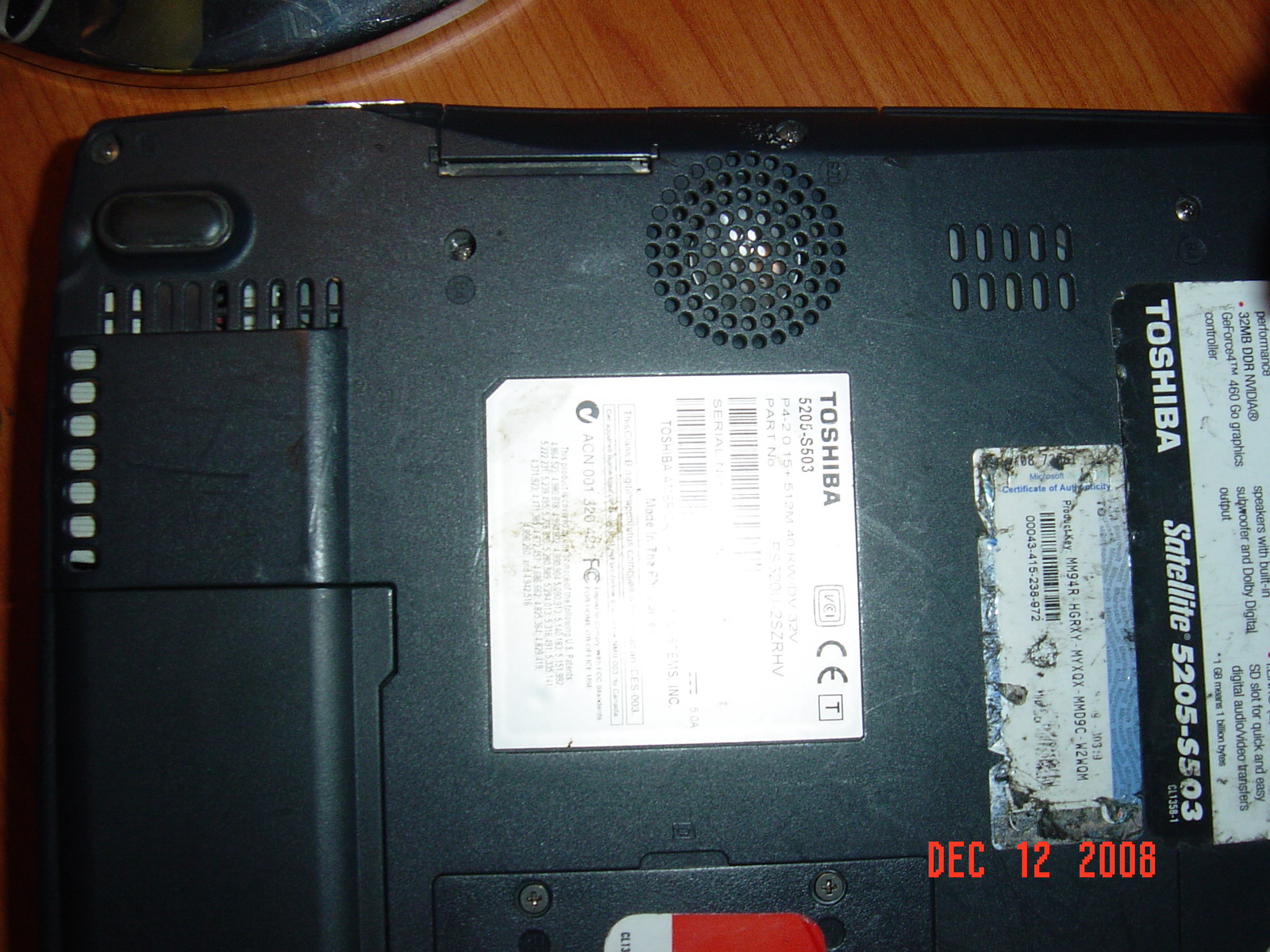
I have been following this discussion regarding replacement of the cpu fan. I have a Toshiba Satellite 5205-S503. Is the fan replaced from the bottom or do I need to remove keyboard and go from the top? pic attached
Where can I buy thermal grease?
Does anyone know if Toshiba posts their manuals online?Attached Files:
-
-
Fantastic Job!!!
The best I've seen and believe me, I have looked. Quick question.for the Satellite 5205-S503, is the cpu fan accessed from the bottom or do I need to remove the keyboard. Any help is greatly appreciated.
Again, great job. -
Hello guys,
I've got Toshiba Sattelite L305 laptop. As you know it uses Intel GMA4500M integrated video. My question is - is it somehow possible to find and insert some better video card there? I mean some GeForce or may be Radeon good enough for demanding games. It would be great of someone shares its expirience in this area.
Thank a much! -
Hi guys
I have toshiba satellite pro 6000 series and the lid of laptop getting loose
lately and is make me crazy . please help me how can i tight or fix this
problem , i did try to find some screw sround the screen or lid but no hope
there . please help me
thx -
More than likely you have a broken hinge. They control the tension on the screen they are ridgid wires that run from back to front of the base toward the latch mechanism. The problem is that many laptops have the processor in the corner near those wires that run down the side of the base. Usually what happens is someone closes their notebook up after running it and put it right away in a padded case. Those cases are great protection but if you put a hot laptop in them it's like an easy bake oven.
The problem was so widespread with some HP models there was a class action lawsuit. My dv9035nr had that problem and was out of warranty. HP sent me an email saying they would fix it anyway and sent me a box and shipping label to return it. You need to fix it right away though because it can cause other problems such as the lcd case can start to disintegrate. -
Hi guys,I have a satellite L300 toshiba laptop.its running on the T3200 intel processor and intel 4 series chipset. toshiba makes it clear that this laptop can ACCEPT PC6400 ram but does not say if it actually runs it at 800mhz or downclocks the DDR2 ram to PC-5300 to run at 667.
I need to know if this machine can support 800mhz ram or not so I can finally know if i should buy 800 or 667 mhz ram.
Of course I dont want to waste money on 800mhz ram only to get it downclocked if its not supported.
It seems intel sats the 4 series chipset (GL140 here) supports 800mhz ram yet my FSP on this processor is only 667mhz.
So im very confused and need help on this,thanks. -
-
i tried that but it doesnt have my exact model as there are many L300 models...
and even if it says it acceps pc2-6400 it doesnt mean it will run at that speed... -
You are awesome! I need to see if I can replace or fix the hinges on mine. I hope all the info here will help me. I have a Toshiba Satellite A55. If anyone have more suggestions that would be great! I am afraid my hinges will fall off soon. No crack on the outer frame just the inside hinges are loosening up.
Thank you for all your hard work in posting all the info for the forum!
-
Hi sir,
I have the Toshiba Satellite A305 . From your disassemble guide, I saw that it contains a empty bay. For what can it be used for? Is it a hard disk? Also, for the wireless card, can I replace it with the Intel 5300 AGN card? -
I have an A205 that seems to have the same, only I can't remove the plastic lid, and the connectors for the disk drive aren't there -- I see only empty places where the connectors can be soldered to the motherboard.
-
Hey guys, my Dvd drive in my Qosmi X305-701 has come unseated. I need to open my laptop and reseat it. How would I do this? I have taken out all the screws but the shell does not want to budge. Thanks in advance
.
-
Hi guys
I have a Toshiba Satellite P100-347 (PSPA6), just over 2 years old.
I think it needs come kind of dismantling and cleaning, because it gets kinda hot when used, especially around the middle left side. It happens on occasion that it just shuts down, and then refuses to boot up until I leave it to cool down for a few minutes first.
Do i need to dismantle it (I'm not very keen on doing so, although I do have experience messing with desktops), or can I somehow fix it with compressed air through the fans or what?
Any tips appreciated, thanks.
Jimmi -
R600 DISASSEMBLY
Opening the R600 case is tricky, but it does not require removal of the keyboard or the top bezel.
1. Remove all 394 screws (perhaps less - I didn't count) including the smallest one on the left edge.
2. Open the smaller of the two panels on the bottom - not the large one above the RAM, but the one that provides access to the ExpressCard connector.
3. With any plastic tool shaped like a large toothpick, slide each end of the ExpressCard connector toward the cable, freeing it. The cable release is shaped like the letter "L", and it really does slide. Really. Disconnect the cable.
4. With the unit upside down, on the right side of the front edge there are a couple of clips between the metal (magnesium?) top and the plastic (carbon fiber?) bottom. Working from left to right, use the plastic tool to free those clips, minimizing the force required and the pressure on metal or plastic. Be gentle.
5. Lift the DVD end first, rocking the bottom up till it clears the video and power connectors on the other side. Voila! The bottom has been detached.
6. Gasp as you see that the interior is mostly empty. The mother board fits under your hand. The drives and ExpressCard cavity occupy perhaps 80% of the interior volume!
7. The hard drive (2.5") is a pressure fit into elastic corners. Lift it slightly and detach the connector, being careful not to overly distort the tissue-thin connector ribbons. Slide the hard drive out.
Exactly the reverse for assembly, using modest pressure to snap the pieces together. You did keep track of where each screw goes, right? There are at least three different sizes. -
This should really come in handy for upgrading/cleaning my laptop out.
-
I have been searching for about an hour now and still nothing conclusive on the disassembly of a Satellite M40.
I went over those for the M45 but it does not look like it would be the same for the M40.
I need to replace the CPU cooling fan on mine....I have the part but am very intimidated by the seeming complexity of this whole thing.
Anyone know the exact proceedure for replacing the cooling fan on this M40?
Do I really have to take it completely apart like the instructions for M45 suggest. The cooling fan is at step 17 on that one!
-
I have a Toshiba M35-S456 which I have been using for over 3 yrs and have been very happy with it. Recently the fan has started making intermittent noise which tells me that it is going bad and I would like to change it before it causes any further damage. I ordered the fan from SparePartsWarehouse.com after Toshiba pointed me to this site.
I have never done anything as extensive as this (upgrading memory has been all I have done) and am wondering if I should be aware of any pitfalls when I open up the laptop. Do you have any tips for me?
Thanks,
SJ -
Disassemble Toshiba G50 ? is possible ? Thanks
-
Yes we do need this guide-
Would you (or someone on this thread) happen to have one for removing the CMOS battery for the A215-S4807? Do you know if the BIOS info for this model is stored in the EEPROM or can it be cleared by removing the CMOS battery?
Thanks! -
Hello,
I've just started up a new site for free laptop manuals.
I have the Sat M40-M45 and also the Satellite M40x laptop manual guides. May the manual you need is the Satellite M40x and not the M40-M45.
Not sure if I'm aloud to put my link here or not.
Hope this manual help all. -
great website, can you please get the tecra a9 service manual for me please.
-
If you need Satelite A105 disassembly FULL guide here is it.
http://www.paulstravelpictures.com/...top-Overheating-Dust-Removal-Guide/index.html
How to disassemble Toshiba Laptops.
Discussion in 'Toshiba' started by cj2600, Oct 9, 2005.