 Problems? See this thread at archive.org.
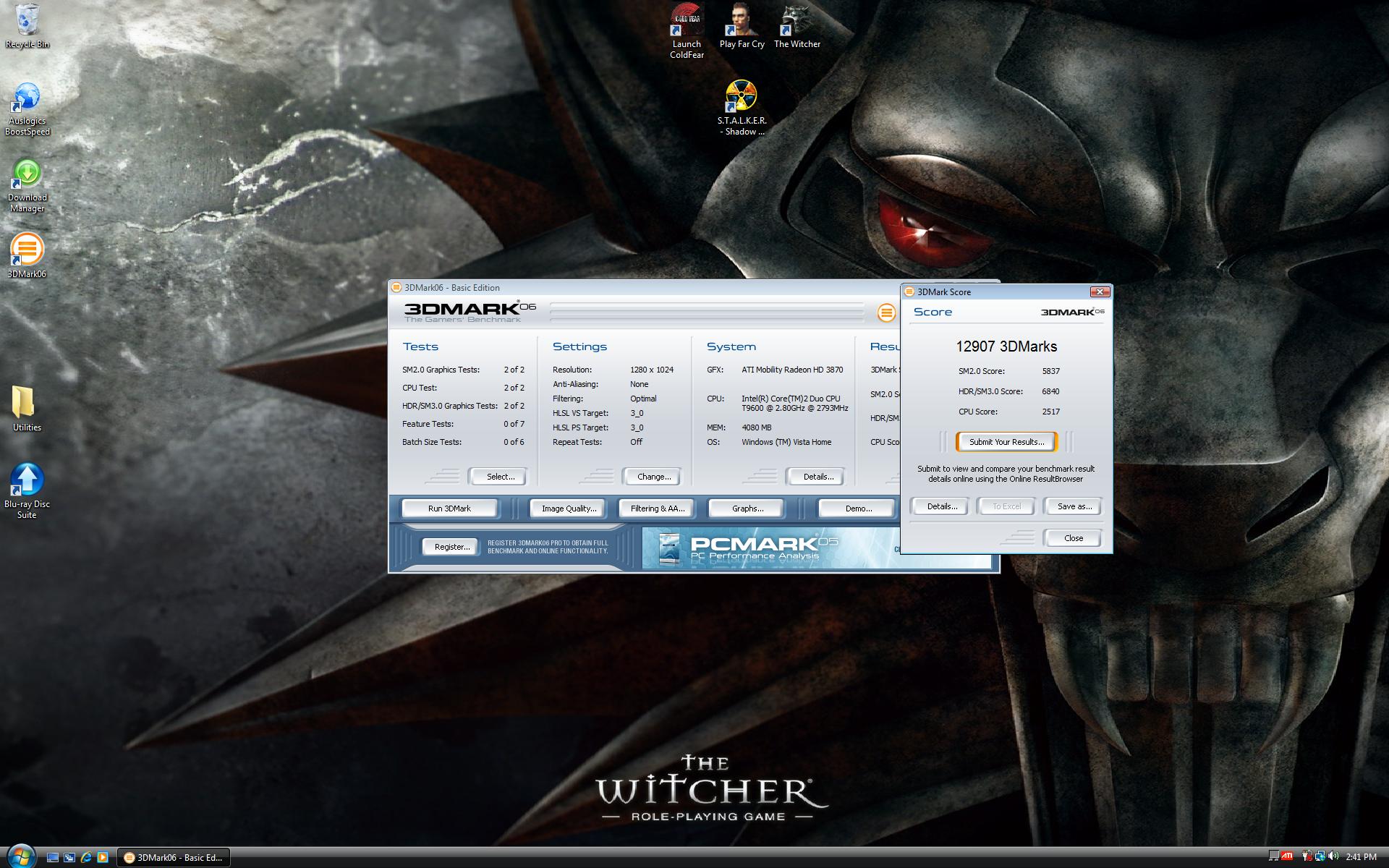
This is my X305-Q705
![[IMG]](images/storyImages/0502092245uj7.jpg)
![[IMG]](images/storyImages/w640.png)
sorry my cell phone sucks, btw, the image gallery doesnt work? i want to download this wallpaper
http://forum.notebookreview.com/gallery/showphoto.php?photo=1639
someone can help me?
-
I just want to make sure my laptop is behaving like it should... the GPU fan kicks up when the temp hits around 65 C, then it cools off to around 56 C, at which point the fan goes silent again. And the cycle starts again.
Is that normal?
So if I underclock the GPU, I should be able to maintain it at 56 C, which will keep the fan quiet? I tried literally 122/199/331 (the lowest the numbers can go) on the GPU and the temperature range remains the same... What am I doing wrong?
Thanks!
Raymond -
Yeah its normal. I had my x305 q701 since August of 2008 and was worried because it would do what you described, but I noticed through the months sometimes it would hold steady at a certain temp and not rise. But yes, it does get irritating when you focus on it, although I have a laptop cooler to drown out the sound, since it's constantly whining. =) -
Okay, simple question I hope. I have the x305-Q706. I made the restore cd's. I want to restore with Vista x64. The recovery disc is 32 bit. Anyway to get x64 from the cd's, and is there a way to recover off the hard drive partition since ther are 3 of them if you look in Disk Management
-
Grrr... Okay, now my fn-key combos don't work. (I.e. FN-F1~F9 and FN-Esc don't work.) Any idea how I may have messed that up?
Thanks for the help.
Raymond -
Last edited by a moderator: May 7, 2015
-
You didn't mess anything up, mine did the same thing. Don't know if it's buggy software or Vista. Go to start/programs/Toshiba/recovery/Toshiba application installer/click next/ click on value added package/install.
-
Last edited by a moderator: May 7, 2015
-
Nice Pics SGilmore.
-
Yep, i'll say the same. what camera are you using?
And underclocking should work, however since the same amount of electricity is running through the card, it will still be hot. there are ultimately 2 ways to really solve the fan issue, or any overheating issues:
1. apply AS5 to the GPU, might as well do it to the CPU also
2. get the NZXT Cryo LX notebook cooler....
also, check out www.pcsupport.toshiba.com and click on downloads, then type in ur model number and select it..there's new software and programs for the x305. -
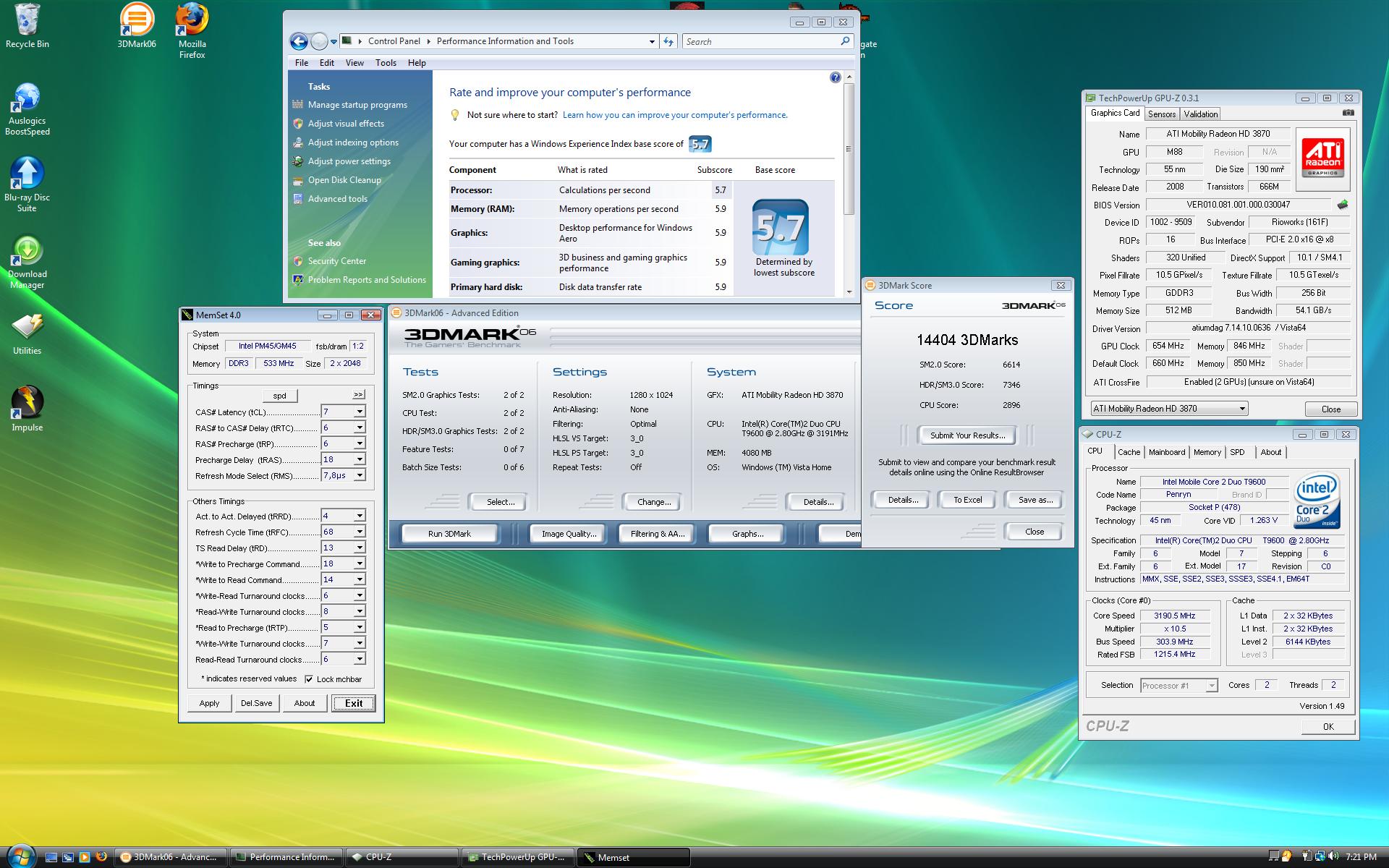
I know this is off-topic, but here are my new specs. As a Qosmio owner, I am now trying to sell a wonderful X305-Q701. I will post a thread in the NBR Marketplace soon. Until then, here are the specs for my new OCZ Extreme W840DI Whitebook. I used stock GPU settings for both tests, as you cant overclock them right now, but I did OC the Intel Core 2 Duo T9600 to 3.19 ghz, using SetFSB.
Attached Files:
-
-
Very nice...the CPU seems as if it is the bottleneck for the lower score here...with a x9100 or quad you could probably score a nice 16k
-
Hmm... didn't work. What else could it be? I know it worked the first day I got it. Then after I tinkered with some stuff (as in, followed the guide in the beginning of this thread), it stopped working.
Any other ideas? Thanks. -
http://cdgenp01.csd.toshiba.com/content/support/downloads/util_tvap_28648A.exe
download that, its the updated utilities. -
If you add a 2nd fan this can help. Use a small relay and fan starter capacitor and fix so 1st fan is low whilw 2nd is medium low and when 1st fan enters medium then high fan 2 relay can enter medium and high.
There's a few tricks to do it and really depends on your electronics skills or willingness to learn and or experiment.
Hope this helps.
just some ideas. -
So, everyone just passes my post right on by. Nice people here.
-
Sorry about that Kevin, when I made my recovery cds, and tested them, was presented with the option to install 64 or 32 bit version. -
Thanks Dude and CQ, it's a Sony Alpha A350k. 14.2 mp's with a 75-200 telephoto and a 18-70mm lens.
-
Thanks for the response, mine gives me 32 bit only.
-
Call Toshiba support, they will send you a x64 recovery cd.
-
One other question mate. What are you booting from the Win Recovery Environment?
Edit: Answered me own question. Boot from Disk 1. -
Can we use the built in vista utility to shrink "C" drive and creat a new "D" partition? (note: I dont care about the recovery part, the next install will be from scratch w/ a hard disck ghost image back up.
-
Yes, Vista will give you options for formatting your hard drive and creating partitions prior to installing OS. The Toshiba recovery cd's will also. I don't personally care for Norton Ghost because it takes up alot of space on HDD.
-
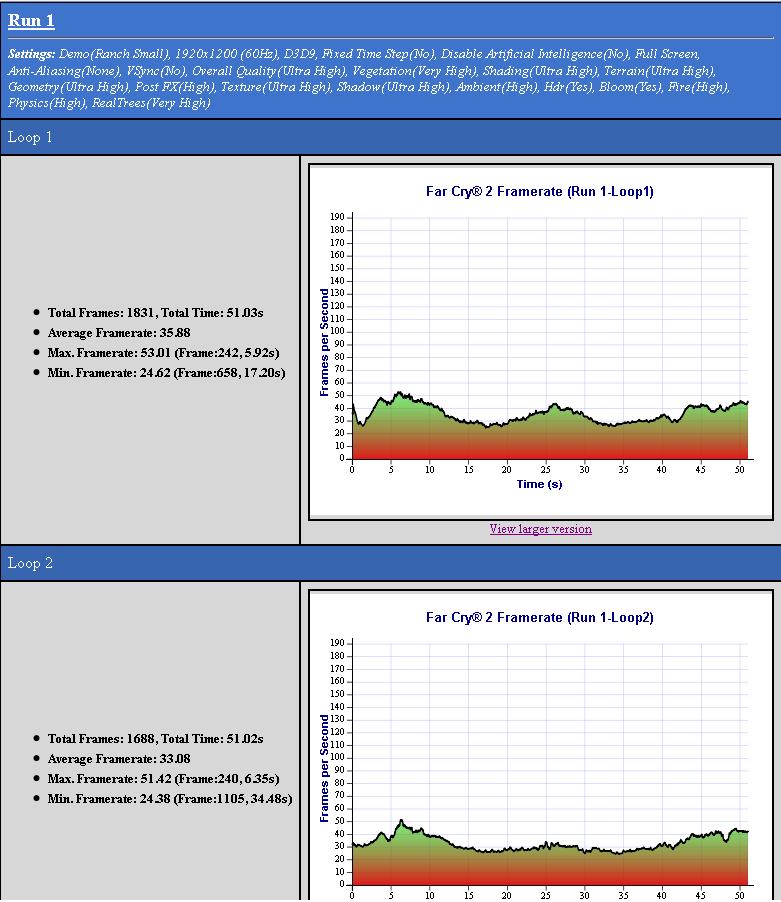
Far Cry 2 benchmark, no overclock and stock video drivers--176.49. The game tells me, "your video drivers are old please update them" at every start.
![[IMG]](images/storyImages/capturefl3.jpg)
-
Opps, sorry, I meant to say, for an existing OS (the Toshiba install). I just want to shrink it down to a managable size for OS only and create a D partition for other network shared media. Later, I will be installing a fresh copy of Windows 7.
-
Start/control panel/ administrative tools/computer management/disk management/right click on the appropriate disk and select shrink volume.
-
Overclock the processor a little bit and get quite a bit higher framerates.
![[IMG]](images/storyImages/capturetg8.jpg)
-
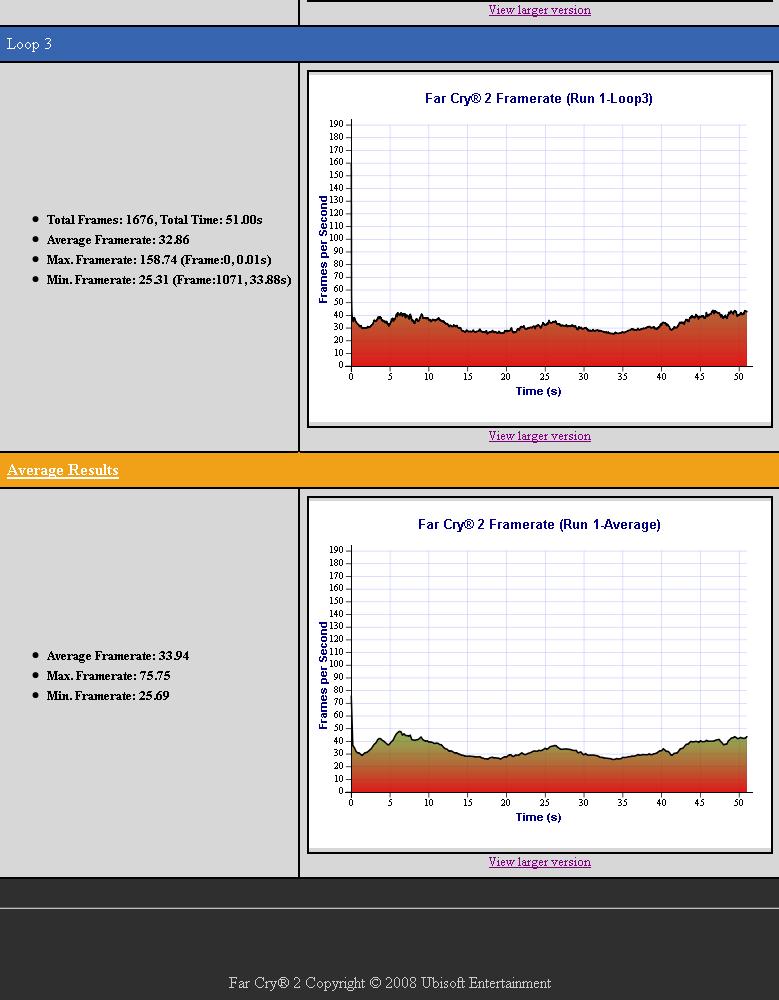
Would you care for a benchmark comparison? With my Whitebook?
Far Cry 2 benchmark @ 1920x1200, overclocked on the cpu, and stock video drivers--Catalyst 9.1(beta). -
Nice scores, I'm hoping that when get around to upgrading processor this machine will perform that well.
-
I hope so too. Hey some free advice, if you want to maximize performance and scores, go the with Intel Extreme CPUs. There are only two for montevina at the moment, but I've seen score through the roof with those. My boy E-Wrecked got 16k + in 3dMarks06 with the QX9300...The biggest problem with the whitebook right now, is the video card drivers. No overclocking, and almost non-existent DX10 support, though it is a DX10.1 crossfire setup. They are just minimized versions of the desktop equivalent HD3870, same amount of cores, stream processors, memory etc.
-
![[IMG]](images/storyImages/capture9oa3.th.jpg) [/URL][/IMG] Ran it with overclock on ultra high for the heck of it.
[/URL][/IMG] Ran it with overclock on ultra high for the heck of it.
![[IMG]](images/storyImages/capture10ey0.th.jpg) [/URL][/IMG]
[/URL][/IMG]
-
Btw Cq, is the 1920x1200 pretty nice? I'm in the 1680x1050 camp for 17" screens when it comes to that argument.
-
First, screen preference is just that, a preference, and as such I respect everyone else's opinion even if it differs from mine. Second, I have been blessed/cursed with 20/10 vision, so I love meh sum eye candies.
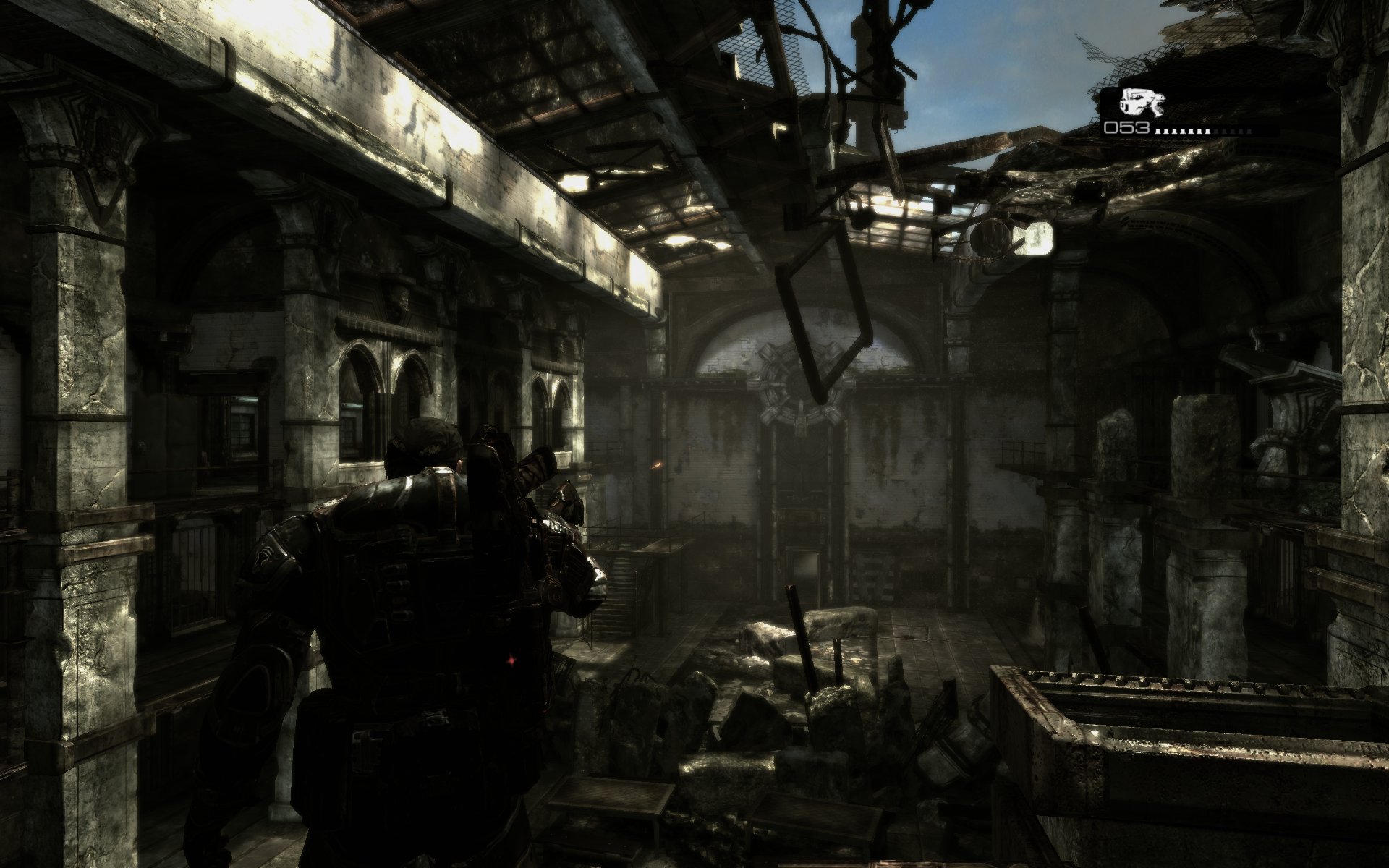
To answer your question SGilmore, mine has bluray, so 1200p is a must for me, as for the screen quality, I'd wager that it is the nicest and best quality(not the highest resolution) screen that I've had the pleasure of playing on. I think that even on a 17 inch screen the difference is noticeable, especially with still pictures, and movies. I also have a 1080p 42" LCD, so comparison is valid in my eyes. As well I just sold a 1680x1050 22" monitor, and I hooked it up to compare, sure enough 1200p looked loads better. It was a westinghouse LCD monitor, but a quality screen none-the-less. 1920x1200 on upwards are enthusiast only resolutions when gaming on a laptop. 1680x1050 is close though.I'll take some Crysis shots to help my argument. Here is a Hellgate London screenshot, and an impressive Gears of War shot until then. DX10 does not play nice with this beta driver.Attached Files:
-
-
This female cardinal flew out of a ceder tree and into the window because a hawk was hunting in and about that tree. It is not often that I catch the hawk hunting, so my chances of capturing a mid air capture of a bird are slim.
![[IMG]](images/storyImages/capture1ax0.th.jpg) [/URL][/IMG
[/URL][/IMG
Did get a photo of a roadrunner that caught a bird from the same ceder.
![[IMG]](images/storyImages/capture5jq3.th.jpg) [/URL][/IMG]
[/URL][/IMG]
-
-
No ideas on this?
-
When I made my decision to buy this computer back in December, screen quality was a factor. I settled on this one because of the price point/components. I was not looking at any ATI machines at the time but considering what your machine can do, you got the better deal. I doubt that I would throw rocks at this screen if there was a side by side comparison with yours though.
My old notebook is an HP DV9000. I would and may yet throw rocks at that screen because it BSOD on the second boot after receiving it back from the infamous hinge crack repair. Never been happy with that screen. The viewing angles are horrible. A side by side comparison is blatant--the whites are white and good contrast on this one, while the HP is very dull, not bright, and practically unuseable from anything other than a direct view. -
I originally bought the Q701 for price to performance ratio, and overall value. I'm not downing Qosmio, but I think Toshiba needs to support it's community with added features that should have been standard, especially regarding drivers, and an upgrade path. The Qosmio is such a caged tiger, but Toshi are missing the wagon on this, by caging it and not realizing it's boutique value in the enthusiast(read gamer) market.
-
Any input on the new Q725's? I know it's a quad COPU and single GPU 9800M-GTX but is it also an Intel chipset? If so it looks like a new Q9000 (2.0GHz) (or better yet, a Q9100) and Toshiba 9800M GTX pull will make our old Q702/Q705's a new Q725. Or does the new Q725 offer anything new the old ones lack? asside from the monitor, wich is the easiest swap.
-
Hello all,
This is off topic from the previous post but any help would be appreciated. I recently purchased a Qosmio x300-01G. I am looking to upgrade the P8600 CPU the laptop comes with to either QX9300 or T9800. My main concern is that the TDPs are higher for these CPUs. That being said, has anyone here upgraded their Qosmios to a CPU that had a 10 or 20 Watt higher TDP?
Some Details on CPUs:
P8600: (current CPU)
Speed-2.40 GHz
Bus Speed-1066 MHz
L2 Cache Size-3MB
Package Type-Micro-FCPGA
Manufacturing Technology-45 nm
Core Stepping-M0
CPUID String-10676h
Thermal Design Power- 25W
Thermal Specification-105C
VID Voltage Range-1.00V-1.250V
T9800:
Speed-2.93 GHz
Bus Speed-1066 MHz
L2 Cache Size-6MB
Package Type-Micro-FCPGA
Manufacturing Technology-45 nm
Core Stepping-E0
CPUID String-10676h
Thermal Design Power- 35W
Thermal Specification-105C
VID Voltage Range-1.050V-1.212V
QX9300:
Speed-2.53 GHz
Bus Speed-1066 MHz
L2 Cache Size-12MB
Package Type-Micro-FCPGA
Manufacturing Technology-45 nm
Core Stepping-E0
CPUID String-
Thermal Design Power- 45W
Thermal Specification-
VID Voltage Range-1.050V-1.175V -
Both of those processors are supported by the PM45 Express chipset by Intel. I had an Intel Core2 Duo T9600 in my Qosmio X305, worked like a charm.
-
Yes that should be fine. 20 watts is not too much..i was playing r6v2 and that drains a lot of power, and i had an ipod touch and another mp3 player charging...and had no problems...plus i got the nzxt cryo connected and that probably draws 15 watts, so u should be fine.
my only concern is that there might be a different heatsink for the quads, given they have 2 cores at the top.
and any advice on getting some high 3dmark scores? i got 8653 but im sure i can go higher. what results are people getting with the same set up as mine?
by the way, looking at my rep, i am surprised only 2 or 3 people repped me for this thread... -
The heatsinks are no issue. I realize the mobile CPU's do not have an IHS (integrated heat spreader) but the mating surface of the heat pip cooler is more then big enough to cover the entier 2 dies (2 sets of 2). Just make sure to apply the TIM (thermal interface material) accordingly for the quad cores (see instructions at attic silver no 5) http://www.arcticsilver.com/ins_route_step2intelas5.html
Can anybody with the Q725 or equivelant quad core rig confirm if the CPU heat sink is copper finned? That will if any, be the only advantages asside. -
@L1qu1d: waiting for that too
@sgilmore62: That picture was realy nice, it is my new destkop background picture now thanks
-
-
nice pictures...i have some of my own that i should upload..
-
This is so bizarre... I did that, and SOME of the keys worked for a while (i.e. the brightness up/down combination and the mute button) but others didn't, like the touchpad one and the wireless one.
Now... for some dumb reason, they all stopped working again! What the heck?
Any ideas why this is happening?
Thanks,
Raymond -
Hi everyone I'm new to this thread. I have just upped my bios to v1.90
it acted a little weird. i got pixellation on certain games,never got that before. has anyone else had that? I'm trying to reflash to v.180 but it won't let me,anybody have any success reflashing? also i saw on here somebody said something about modifying the keyboard so it doesn't flex so much, how do u do that? any help would be appreciated!! overall i like this laptop it runs pretty good over all! -
Raymond, I dont have too many ideas why this would be happening...I can only guess that it may be an issue with some of the toshiba utilities...perhaps try installing that software 1 more time...otherwise, in the meantime i will be looking for other software that could affect this.
and with the pixellation, are you sure it is the bios? all i could think of is reflashing the bios to 1.90. i have 1.90 and havent noticed any issues, and i upgraded from 1.70. and in order to reduce flex from the keyboard, some foam could be placed underneath, i suppose, however i havent tried it. i am not that eager to open this laptop up because the plastic seems as if it would become loose, since this is not the most sturdy build. -
Hey, sgilmore62.
How did you managed to get 11k in 3dMark? :O
I hardly can get 9,6k on x305-706 with latest drivers :< Can you give a few advices, please?
Official x300/x305 Owner's Lounge
Discussion in 'Toshiba' started by Bartlett, Oct 4, 2008.
![[IMG]](http://g.imageshack.us/img9/0502092245uj7.jpg/1/)




![[IMG]](images/storyImages/lostqosmiowallpaperym1.jpg)


![[IMG]](images/storyImages/capture2cv9.jpg)

