Problems? See this thread at archive.org.
I was able to do this, without a problem, and changing this automatically selects the HDMI Digital option in the Dolby Home Theatre settings.
Unfortunately it still didn't work for me. When I play a video on my laptop it still goes through the laptop speakers, even though they are disabled !?!
I used the test audio button in the Dolby settings, and was able to get a sound out of my TV, but only a sharp pop of static, then nothing. The cable is fine, I tested it on my blu-ray player to the TV, same HDMI port on the back of the TV too. This leads me to believe it is another setting on the computer, or my HDMI is pooched for sound.
Any other ideas?
Thanks for everyone's help!
-
I will let you know if I find something new. I'm at school right now, will try it out when I arrive home...

-
Finaly, I got SSD in my Qosmio too.
-
Welcome to the world of Qosmio SSD!
-
Thanks ! -
I have about had it up to here ^ with Dell/Alienware customer service. An alternative is the X305-0708. Anyone here have one of those? How are they?
-
I have not used Dell aka. Alienware. I have read user wich is happy and un-happy with Dell/Alienware. Isin't there any other options? If I could change date 8-9 months back, I would not buy Qosmio again.
-
Wow - that's not a good review. And here I thought the big Q was supposed to be all that and a cup of coffee too. Well - if I had my Dell order to do over again I would rather cut my wrists (ok - that's a overboard but you get the picture.)
BTW - if you ever do have to buy from Dell - do NOT use the website. The orders from their phone reps get put ahead of those from the website by DAYS. -
lol, okay I got the picture
-
perosnally I like my 706, but i do think it could have more features enabled through bios. i think my cpu is a big bottleneck with my system tho, in all honestly the single 9800m gtx model performs on an even level with the 708... and that is much more expensive...
-
Yeah, And why dosn't Toshiba gives uss RAID support ?!
-
anyone have issues when pluging in there hdmi cord into there x300 and getting black screen on the laptop and no picture on lcd tv? i just tried mine for the first time thats what i get and then have to do a hard shutdown to fix it with hdmi cable removed, basicly it seems my hdmi video out aint working! any help or advise would be great! thanx
-
Have you tried to press FN + F5 ?
Or it can be a conflict between your drivers... -
yes i tried pressing FN-F5 but nothing i nstalled a clean vereally function when pressedrsion of vista ultimate x64 on my notebook and grabbed the drivers from toshiba site except the video driver im useing is dox 181 driver from video2go but i did notice my media keys at the top dont realy funtion when pressed like the dolby key etc did i miss some driver to install? thanx
-
I will give you link to the driver
1min please...
EDIT: Okay, name of the driver for FN buttons is Value Added Package, I didn't post a link becouse maybe each modell has "own" driver... Give it a try.
Does the touch panel buttons work ? -
ok great downloading now! thank u! ill get back if all is good
-
No problem, always. I like to know result
-
yep that fixed my media buttons issues! ty sir! much appreciated
-
No problem, I'm glad I could help.
-
ok i just did a 3dmark06 test on this thing and this was my result something just doesnt seem right to me??
http://yfrog.com/0dbenchmarkoj -
Wow, your Grapich driver seems to be old. Have you tried any of the new drivers ?
-
gonna try nvidas drivers now thanx
-
Wait, Try 185.85 DOX they gives me best results ingame...
DOX drivers usualy gives low score at 3DMark06 ect.
EDIT: Link
http://www.laptopvideo2go.com/forum/index.php?showtopic=24003
Install this after driver;
http://www.laptopvideo2go.com/forum/index.php?showtopic=22329
And without un-installing it install this one over;
http://www.laptopvideo2go.com/forum/index.php?showtopic=24176 -
yep tried nvidia latest benchmarks wur lower ill give the ones u posted a try thanx again!!! was curious what apps you use to overclock?
-
Ok, I am finally back to the NBR forums after a lot of school and work.
So, can anyone give me a quick recap of what I've missed over the past 2 weeks? -
hey dude55 havent really missed much im just trying to get my benchmark as high as yours seems we got the same speced qosmios but cant seem to get it that high
-
Welcome Back Bro
There is one new nVidia driver out 186.06, temps. are low with this but 185.85 DOX gives me still the highest performance. Can't remember anything important... -
thanks tunay.
Ah I see, based on past experiences, I'm thinking that I will stick with Dox 185.85 drivers for now. But soon I will have to unfortunately dismantle this laptop and take out the thermal pads and actually put some thermal past the right way! (yes toshiba, I am talking about you) lately, even with a cooling pad with fans on high, on a flat cold granite table with a room temp of about 22C and it still hits 80C!!!!! So there is definitely something going on.
and turilo, what are you scoring on 3dmark 06? what drivers are you using as well? -
you serious! they didnt do a good job adding the thermal paste on these things! great looks like ill have to do the same
-
i think im going to upgrade my cpu what do you guys recommend?
-
if you do upgrade your CPU, it won't be easy at all let me tell you.
although, I would suggest a P8700, best performance for the price, around $250 or so for 2.53ghz of power. -
hmm not bad price at all! well ive opened many laptops hopefully it be easy as they wur lol now is that the best cpu i can get in this model or can i go any higher?
oh and my benchmark so far is 8,030 so far on o.c at 675/975/1775 i have no idea how you get yours so high!!
oh one more dumb question is it possible to have an o.c profile to just run on start up of the notebook? -
Edit sysdflt.nsu and yes
If you want the best best best CPU you can go for quad, but price is a little bit higher.
Dude55: I have upgraded my WD Scorpio Black 320GB 7,200rpm with SSD. This thing has helped me a lot with temps. GPU idle: 42C
-
ok sounds like its will be a quad core cpu i will go with wich one you recommend on that one? and were can i get one of these ssd drives? thanx!
-
Every where
QX9300 king of the hill. Search you will get results on NBR... -
nice! ill be definetly looking into getting that Qx9300! also i forgot to mention i spoke with a toshiba teck the other day and asked about the none sli gpu's in this particular model x300-02k they told me it can be upgraded to sli but i might have a driver issue hmmm
-
It the notebook quality worth so much money?
-
Ok everyone, I finally opened up my laptop and I replaced the thermal paste on the GPU, the CPU, and the Chipset! i used OCZ Freeze thermal paste and I already see results of up 5-10C! there was a lot of crap on the cpu, gpu, and the chipset and I removed it all and nicely smoothed on some OCZ freeze. by the way, I had trouble with the DC in jack. otherwise, it was pretty smooth.
-
Yep mine is actaully the same. Once it worked with an earlier driver but was blurry and not working right then started to do it all the time. As soon as I plug the HDMI in the laptop screen goes black and nothing shows up on the external monitor. I have sen this problem reported on the toshiba website and as usual it got no reply from them which to me normally suggests that there is a problem.
I have also read around the web that it could be to do with what mode it picks the external device in. Also could be to do with something called hdcp which is the high def copy protection that some devices support and some don't. I was trying to plug into my new samsung 24 inch monitor which i got especially as it had hdmi and guess what im using only analog now.
I have other problems with the laptop too which I will not go into as it will take all day. Im going to up grade the graphics and cpu at some point and when I open it I'm going to try and disconect the touch media buttons as they are triggering by themselves even without the drivers so sometimes I get beeps and lights going out, sometimes it boots with no lights on the media buttons. I think it has been something to do with over heating as they work after a cold start up for about 5 minutes then as soon as it heats up they go wrong. I must admit I wont be geting another one of these which is a shame as it could have been a really decent machine with another fan inside too. -
Hello Toshiba Hybrid SLI Qosmio owners.
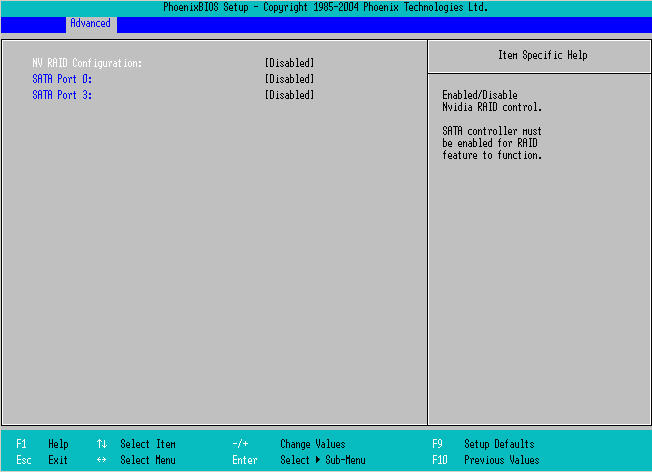
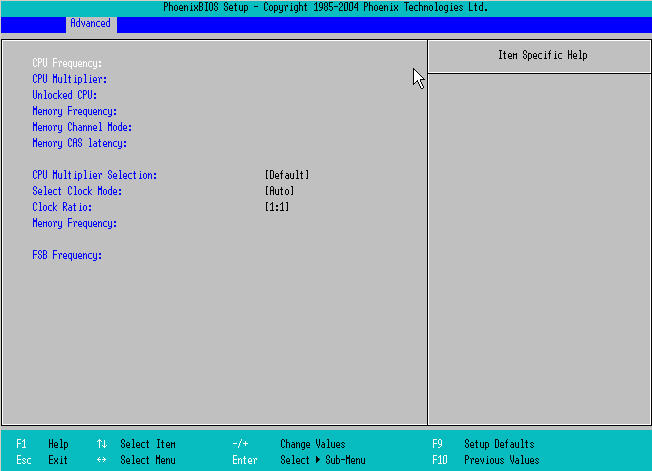
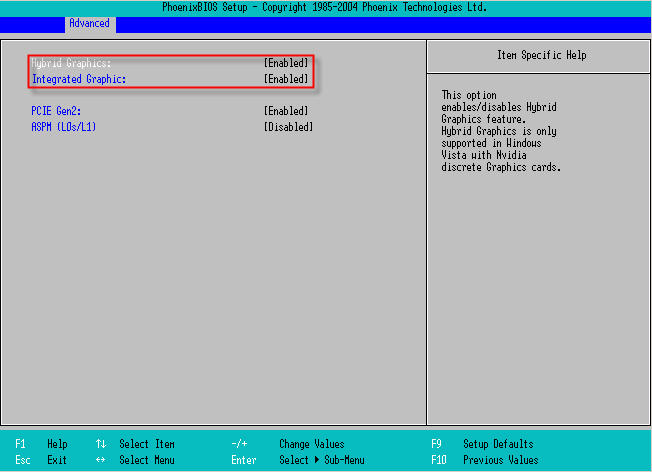
Few days ago released Dell’s Alienware M17x which has the same chipset with Toshiba’s Quosmio hybrid SLI laptops x300-x305 series (706; 708 and many others). Now I got screens of this BIOS. Check it out (in order they attached to post):
1. Advanced tab.
2. Nv RAID config tab.
3. OC tab.
4. Graphic tab.
So what we’ve got? – Yes you are quite right – everything we disiered!!! Anyone know does our motherboard have the second BIOS for backup the current, as for me I want to try to install this BIOS -_-…
Link to BIOS: http://support.dell.com/support/top...plash?c=us&l=en&s=gen&~mode=popup&file=315373
Is there any method to restore BIOS from CD of Floppy Disk with any jumper or key any other thing? I saw information about “the BIOS Key Installation Method” in BIOS update readme but could not find out how it can be done...
Any suggestions guys?
EDIT: After some minuties of exploring i realised that it is a nVidia's BIOS not the Dell's one, but i'm not 100% sure ofc... Compared code of Toshiba's and Dell's BIOS i found out that the Dell's code much more bigger than Toshiba's code, and there is just a little bit things added from toshiba to this BIOS just 15-20 strings.Attached Files:
-
-
Okay here we go, just need to find USB FDD:
--------------------------------
3) BIOS KEY INSTALLATION METHOD
--------------------------------
Your Toshiba computer has a special keyboard function to install an
updated BIOS image. In this section, the term "BIOS key" refers to the
key immediately to the left of the spacebar.
To use this function, you can use the BIOS installation diskette created
using method 1, above, or simply copy CHGBIOSA.EXE and BIO0009T.COM to a
diskette. Then insert the diskette and hold down the BIOS key while the
computer is powered on. The computer MUST be in BOOT mode, not Resume
or hibernate mode.
This installation method will only work with the internal keyboard. If
your computer is docked with the display closed and you are using an external
keyboard, the computer will need to be undocked and the internal keyboard's
key immediately to the left of the spacebar used.
When the computer starts up with the BIOS key depressed, the following
message appears:
'Ready for BIOS update. Place the BIOS diskette in the drive, and press
any key when ready to proceed.'
On some models (Satellite 5005 and others) where a system status LCD is
included, this and all messages displayed during the BIOS key installation
processs will appear in the system status LCD rather than on the main
display panel.
Insert the diskette that contains CHGBIOSA.EXE and BIO0009T.COM,
and press any key. The CHGBIOSA program will automatically load the
BIO0009T.COM file. -
Single GPU owners can't use this then ?
-
Okay, So I must ask X300/305 owners a question;
When I have my battery in my laptop my battery icon light is always on. On other laptops I have owned and have now the light turns of when the battery is fully charged. But my X300-13o this it dosn't. Is this problem only for me or what?
Here is a picture of what I mean:
![[IMG]](images/storyImages/dsc00004ihi.jpg)
-
Hey aristant did you try to install the bios?
-
Yes, its normal Battery led is always on.
-
Wired...
However, thanks!
-
@Aristant: Everything depends on X300 motherboard construction - if it is similiar to Alienware one and how many Toshiba-specific elements is there. We should take a look on M17x. It's a new model with GTX280M?
-
Alright i have great updates based on my temps:
Using an NZXT Cryo Cooler with fans on max in a room 75F, my temps are after playing 2 hours of R6:
CPU: 138F max (59C)
GPU: 150F max (66C)
before it would hit around
CPU: 155 max (70C)
GPU 175 max (79C)
so i definitely see improvements. -
2 tuηay:
Yeah this BIOS only for “31U” part number, which uses 1.60 BIOS version.
2 Thanatospy:
No i still can't because I’m far from home and there is no Toshiba service around :< So I cannot risk with my laptop, because if I fail I will not able to restore BIOS.
2 Arcean:
Yes it is new M17x with GTX280M/260M. Everything looks like the same but who knows what the difference can be hidden. If anyone could look on the BIOS with appropriate knowledge it might help. I tried to compare them but my qualification is not enough to understand what the difference in code.
Here is Alienware spec sheet: http://support.dell.com/support/edocs/systems/M17x/en/M17x_ComprehensiveSpecs_EN.zip
If some one has USB FDD he may try it because in case of fail it is possible to restore BIOS with "BIOS key installation method" that i mentioned above.
Official x300/x305 Owner's Lounge
Discussion in 'Toshiba' started by Bartlett, Oct 4, 2008.