Problems? See this thread at archive.org.
http://cgi.ebay.com/SATA-Blu-Ray-Player-Laptop-Drive-slot-in-load-DVD-drive_W0QQitemZ390080567977QQcmdZViewItemQQptZPCC_Drives_Storage_Internal?hash=item5ad29d1aa9&_trksid=p3286.c0.m14#ht_3339wt_1165
-
-
I understand the track record thing. Bought Vista as soon as it came out and had numerous compatibility issues with applications including some of Microsofts. Windows 7 is everything Vista should have been.
Not upgrading to Windows 7 will be the equivalent of upgrading to Vista too soon. I probably should have avoided the compatibility issues by staying with XP longer, but XP is a giant step backwards from Windows 7 IMO.
IE8 looks and works really good with Windows 7 where it was an epic fail in Vista. Even IE7 would be slow and buggy in Vista. Hated those frost over crashes, they don't happen with Windows 7. -
Thanks for the post ... it's not just Vista that had problems out of the gate ... I've been a windows user since day one ... back in the good ole' DOS days ... and almost every major release of windows since 3.11 has been problematic on some level (certainly not to the degree of Vista though) ... but I digress ... appreciate the info on Win7 .. if it's really what Vista should have been then it looks like the whole Vista experience was one giant beta test for Win7 ... makes you wonder why they just didn't wait in the first place .... i'll be ordering my copy soon thanks again.
-
Thanks for the link ... much appreciated .. after looking at this one I'm trying to source a resonably price BR-burner .. this is the one I'll likely be getting
http://www.lge.com/products/model/detail/gbw-t10n.jhtml -
i got an lg but it can only read blue-ray, the 1 you want is new, i just order 1 for me
 :
:
http://cgi.ebay.com/New-HL-4x-BD-R-Blu-Ray-Burner-Writer-Drive-GBW-T10N_W0QQitemZ260463743328QQcmdZViewItemQQptZPCC_Drives_Storage_Internal?hash=item3ca4d95160&_trksid=p3286.c0.m14#ht_3475wt_1165 -
thanks again for the links ... I think I'll wait a bit until I can get my hands on one a little closer to home ... after shipping and currency conversion it's almost 300CAD plus whatever the duty might be ... not a bad deal really .. just a bit more than I'm looking to spend at the moment.
-
hey all ..... got win 7 loaded on my qosmio x305 q708 and its great just have 2 probs ??? 1 unknown device ?????? and no FU keys ?????
any help would be great .....
PS.... had xp loaded on this before and some people wanted to know some benchmarks lol........ only did one it was 3D mark 06 and got a score of 2056 hence the win 7 upgrade....lol -
The one unknown device is probably Jmicron card reader and the buttons is tvap, download the vistax64 version, the windows 7 one does not work. give us some benchmarks, thinking about upgrading to qx9300 from hp parts $502. Just ordered a ssd from newegg.
also, you can overclock processor with nvidia system tools :yes: -
!! Realtek High Definition Audio Driver R2.31 Updated !!
-
thanks for the post sgilmore62 .....no luck with tvap they still dont work and i have allready got the card reader loaded and i still have a unknown device ?????? any other ideas ?????
will post benchmarks soon -
I have the x300-11s which is no longer on sale. My warranty is almost up and i was thinking about upgrading the hard drive and cpu, hopefully my system will 5.9 rather than 5.3.
I currently have:
intel core 2 duo P8600 @ 2.4 GHz
Toshiba MK3252GSX 320 GB @ 5400 rpm
wanting to upgrade to:
2x Toshiba MK2554GSY250 GB @ 7200 from ccl
Is 500 GB the limit
Intel Core 2 Extreme X9000 - from GamaIT -
Have you right clicked and let the windows search for unknow device ?
-
No, you can upgrade to 1TB (2x 500GB)
Also, my suggestion is to buy one 7200rpm drive which you use as system drive and another 5400rpm you can use as storage. This will save you heat and battery time...
My GPU temptrature dropped after I changed my 320 GB WD with SSD drive. Not sure about the CPU... -
An ssd would be a better upgrade witha a 7200 rpm 500gb data drive.
The x9000 is not compatible with your system as it is only 800mhz your system takes socket P 1066mhz processors. -
when your looking at drives over 320GB 7200rpm drives aren't going to give you a significant performance increase .. it will throw a lot more heat though so you may want to consider a solid 320GB @ 7200rpm as the primary and either an SSD ( which are still ridiculously expensive ) or a 500GB 5400rpm drive as secondary storage. my two cents worth as far as the cpu goes i'd also be concerned a bit about heat .. the x series CPUs draw a lot more power and subsequently throw upwards of 40W ... make sure that the heatsink is perfectly seated before you fire it up ... as good as the ventalation seems to be in these rigs there's only so much that fan can do to get rid of it ....
-
well, 7200rpm disks makes the diference in the access time, so you should "feel" better performance on these drives, anyway the performance of the SSD is absolutly outstanding, if you have a laptop and want fast windows load time, fast apps load time etc go for a SSD, they'r xpensive but worth every $, thats what i thing and feel with my sistem
Attached Files:
-
-
Agree!
I have also SSD Drive in my qosimo and the only part which hold this thing back now is T9600.
My qosmio was fast with 320 GB HDD, but now it is even faster... -
Hi guys im new here and would like to start off by saying what a great thread!
I've had my X300 since release, but i was wondering how to completely drain my battery so that i can unplug it and just use my DTR direct from the mains??
Thanks in advance!
-Jump -
Thanks for the advice. I guess im better off getting a P9700 2.8 GHz @1066 MHz and a SG 500GB HD @7200 rpm.
Im an animation student, so hopefully that would be enough for rendering and playing games. My cpu is at 5.3 and the HD is at 5.5, would these upgrades boost the score to 5.9 like everything else beside 3d graphics and business. (5.7) which will change after the upgrades right -
I can imagine the speed increase, isn't it harder though to live with less HDD space?
-
No bro, it is not a problem for me. I have like 3 computers (2 lappy and one destkop) I have everything (movies ect.) in 1TB WD My book. I have only about 6 GB music and games installed, 120GB is way enough for that... I have about 50-60 GB free now. Also I 2. slot empty, if you need more buy an 5400rpm 500GB HDD
Also I clean temp. files/ folders very often (Each time before shutdown)
-
well i totaly disassembled my qosmio to add thermal paste to my cpu and gpu found a big blob of dust on the heat sink also all went well i noticed that were the gpu fan is almost looks like one is missing beside it? is this how its supposed to be? now i can see why the fan mod was done if i had a fan on hand ive would have done it myself!! but not sure what fan i would need, but as for the over heating it idles now at 59 to 63 cecious hopefully thats normal it used to idle at 69 celcious! tried a game also no shutdowns and went upto 77celcious in gameplay hope this is a good temp to be at!
-
That is high idle temp! I got about 45-50C idle after upgrade to SSD. Maybe I also should change/add thermal paste
-
@ turilo, what thermal paste did you use? AS5 has a curing time and will get better as it cures.
-
i used arctic silver i read some were thermal pads would be a better solution???
-
what can happen if to much thermal paste is applied?
-
!! Wireless Network Driver Intel v12.4.3.9 Updated !!
NVIDIA System Tools with ESA Support v6.05 - 2009.06.10 Added to list
And
NVIDIA PhysX System Software v9.09.0814 - 2009.08.14 Added to list
Get'em here: http://forum.notebookreview.com/showpost.php?p=5020217&postcount=1454 -
It will act as an insulator instead of a thermal conductor and cause heat buildup. Your temps look okay and should get better as it cures.
-
well i had to redo my thermal paste cause i beleave i may have added to much didnt want to take the chance lol no biggie i am useing the arctic s 5 thermal paste also now id like to do that fan mod that cq did but haveing a hard time finding a 5v only seem to find 12v bummer
-
hey all ..... got win 7 loaded on my qosmio x305 q708 and it is running great .....
just have two problems no fu keys and 3dmark vantage running slow and giving me a low score ?????? lol this is about 7900 which i think should b better ...... any help solving would b great......
ps have tried both drivers for the fu keys with no luck grrr ......it is running win 7 ultimate x64 ....... all games run great at full settings with no prob... eg.. (call of duty 5) lol
Thanks Adam -
heres a fan
-
You can enable physx, overclock processor and gpu's with nvidia system tools and update display drivers.
-
Yeah, that is smart.
Good to see you still got yours though
-
I can't sell it bro, no budy wants it here in Norway. I think also it is a little bit expencive for most "gamers".
I think I'm going to continue to use this laptop... Most of people don't like the color
You have not bought a new lappy, have you ? -
okay well after i cleaned up the to much adding of my thermal paste and adding just a dab and spreading it around a bit seems now my x300 idles at 57 celcious much better now i think but im still thinking of adding another fan for that exstra cooling and for overclocking found a 5v heatsink fan in an old laptop that should work i also noticed on my mobo that were the fan is missing looks like there is a power port i can plug it into also no wire splitting involved hopefully!
-
Well im am sucessful on my fan mod in my x300 i should have taken a bunch of pics but was to focused i forgoten lol the 5v fan fit in perfectly and needed no splicing of wires works in the other extra power port that was there now idles at 46celcious and will not exceed 88celcious on full load and cools down quite quickly after full load is over nice! im quite content now for some overclocking!! any advice on that at all?
-
I can't undersand how toshiba has made X300/305 lappys. I have checked and I have 2 fans under my lappy ? Can I do a third fan mod
-
ya its funny how they show to fan intake under the lappy when theres only one fan realy there, well no longer for me now anyway
-
http://forum.notebookreview.com/showthread.php?t=360567
This is the way I have done it
I can't just say overclock to this clock becouse every card is identical. But your temps won't reach much with higher clocks if you change voltage then it can go higher by 10-15C -
I hold torch down and I have to fans just spinning like crazy
( I'm playing GTA IV )
-
lol for sure! well i did some oc and got 8895 so far on 3dmark 06 i guess haveing a 9800gtx and a T9600 gave you that score eh tunay damn!
-
Yes, I think so too, but also with little overclock. With stock clocks the 3dmark score is about 10k
I also have edited ram timings ect this has helped my score.. -
Has any 706 or 708 users installed 8gb ram yet? I read everywhere that, "you wont notice a difference" wondering if it''s correct.
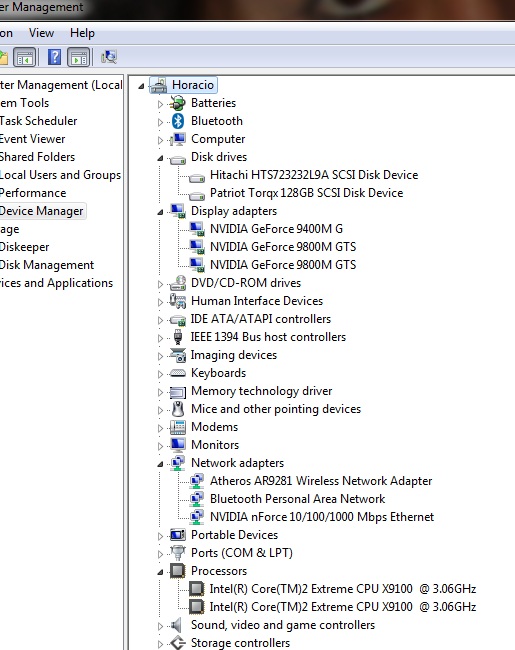
![[IMG]](images/storyImages/capturezwz.png)
-
I'm waiting for 4GB 1066 Mhz modules. I want to upgrade to 8GB ram And QX9300. I get all my 4GB used-up when I play GTA IV
Also, if I'm going to upgarde my ram, I'm going to buy something with lower timing... -
Can't wait to see your benchmarks after getting the new ram tunay.
-
Yeah, but we need to wait a little bit more to see the new benchmarks.. I also want to change my LCD to get something with higher resolution
-
What do you have 1440x900? going to go to 1920x1200?
-
Yes, 1440x900 is max for me
-
I can't upgrade to 1333Mhz ram modues right ?
http://www.oempcworld.com/OEMPCworld-com/2-0G-PC3-SO10666.html
BTW
EDIT 1: I found this:
http://www.amazon.com/dp/B0026IVHE2...e=asn&creative=380341&creativeASIN=B0026IVHE2
EDIT 2: I have found 2 QX9300, has anyone got information about those sellers ?
1. http://global.ebay.com/Intel_Core2Extreme_QuadCores_QX9300_253GHz_1066FSB_12M/140338069746/item
2. http://cgi.ebay.com/ws/eBayISAPII.dll?ViewItem&item=260469871681 -
tunay, this is the best deal for OEM QX9300... http://forum.notebookreview.com/showthread.php?t=404903 the price is lower than either of those engineering samples you linked.
I don't know if your Intel chipset can handle 1333mhz ram, the worst that could happen is that it would downclock to 1066mhz.
Official x300/x305 Owner's Lounge
Discussion in 'Toshiba' started by Bartlett, Oct 4, 2008.