Problems? See this thread at archive.org.
If i wanted to render faster in maya, what would you say the best upgrade will be. I was thinking about getting the qx9300 and faster 4 gb ram or more capacity 8gb
-
Get the QX9300 and 4GB of RAM hands down.
Also can you all update me on what's been going on here, I'm like 30 pages behind
-
Ok thank spectar82 I want to ask you some question,
1. Can you tell me the part # for the screen you are using and did you have to change the inverter or the LCD wire set what type of backlight ?
2. Is it dual or single backlight ?
3. Were did you buy it from ?
I was curious about putting 8GB of memory ram in it so it work ok . Now about your graphic, you change from the 9700 GTS to the 9800GTX. I want to do that too but I can't find 9800 GTX board at a reasonable price.
4. Were did you get your and what price?
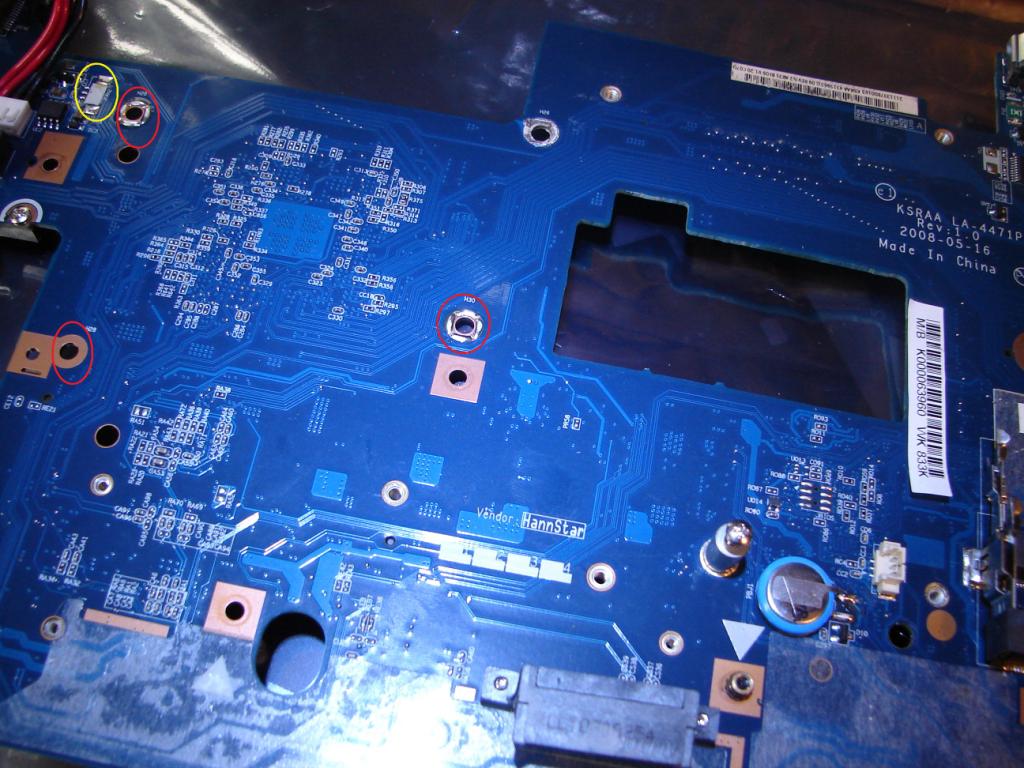
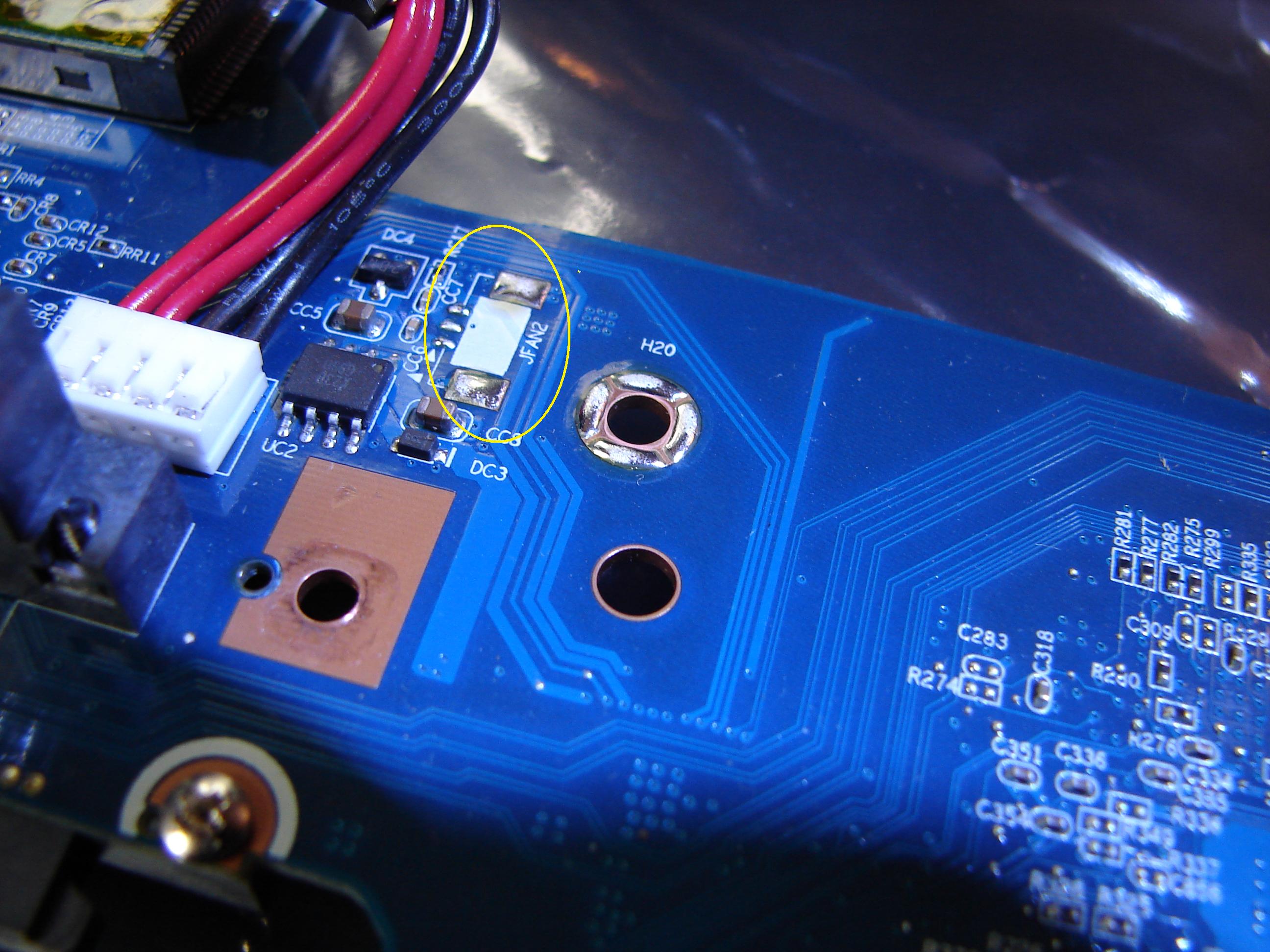
Also I notice that the Q701 motherboard do not have the poles( IN PICTURE BELOW RED CIRCLES ARE MISSING POLES) or the plug ( YELLOW CIRCLE IS MISSING FAN PLUG) for the 2nd fan.
5. Did you put the 2nd fan in?
6. Did you change your motherboard?
Sorry for all the question I am basically want turn it into a x305-Q725.
But with a INTEL t9900.Attached Files:
-
-
"Now about your graphic, you change from the 9700 GTS to the 9800GTX. I want to do that too but I can't find 9800 GTX board at a reasonable price."
I got mine 9800GTX (toshiba part no: K000063270) from this guy @ $200 including shipping. Ask him if he has anymore left.
hxxp://myworld.ebay.com/ltparts/
hope it helps.
cheers -
Ok Macmk thank you I will do that. But I doubt it. I being checking this same store back and forth for the last 2 months. but it wont hurt to ask .also may I ask which model you have and did you install a second fan? Maybe you can answer some of the other questions I asked earlier.
-
Anyone else out their running 8GB of ram in the x305. anyone run a single 4GB stick because I know it expensive so maybe buy one at a time
-
Ok, I appologize if this has been asked/answered in more detail but there are a lot of pages here and I don't mean to interupt any ongoing conversations but I have an X305-Q705 with a 2ghz P7350 in it and I want to upgrade. I'm in Canada so it seems hard to find places to order from up here that have a good selection of mobile cpu's but I found a place with a T9600 2.8Ghz and wondering, I see it was recommended to stick with the P series for the 25W but is it that big of a difference or is it still ok to get a T series? I almost never run on battery power anyway so i guess that shouldn't be much of an issue?
I can't stand this current cpu it feels like it's seriously bottlenecking the rest of my system and until I can afford better stuff I thought of this for an upgrade for the time being that is within my price range.
I'm mostly curious though (I've built many desktop computers but never opened up a laptop) but I found the link that shows the steps to opening up these laptops and I mostly want to know, if I put the T9600 in, will it fit easily, and with the same heatsink or do I need to change anything else to get the T9600 to fit/work properly? Like I said, I'm new to this when it comes to laptops so I just want to be sure before I spend the money and end up getting stuck with a processor I can't use.
Any and all help would be greatly appreciated. -
Ok here you go all of these CPU will work with all x305 series. Upgrade to the latest BIOS before you start doing anything.
all 45nm Intel Core 2 Duo
P7350, P8400, P8600, P8700, P8800, =2.26 to 2.66 GHz, 3MB L2 cache, 1066 MHz front side bus, 25W
P9500, P9600, P9700, =2.53 to 2.8 GHz, 6MB L2 cache, 1066 MHz front side bus, 25W
T8100, T8300 =2.1 to 2.4 GHz, 3MB L2 cache, 800 MHz front side bus, 35W
T9300, T9500, =2.5 to 2.6 GHz, 6MB L2 cache, 800 MHz front side bus,35W
T9400, T9550, T9600, T9800, T9900, =2.53 to 3.06 GHz, 6MB L2 cache, 1066 MHz front side bus, 35W
same heatsink no need to change -
I have this exact Australian model,check here: http://www.cworld.com.au/product_info.php?ID=139934
My 9800gtx died so i had to replace it. The laptop has 2 factory fitted fans,did not add any. Im installing x9100 and SSD as upgrades very soon.
cheers -
Ok I see you have the better one. Mine was the down scale model. I guess. only have one fan and came with the p7350 CPU, GeForce 9700M GTS and came with the (1440x900 WXGA) screen thats why I want to upgrade I got a T9900 on the way and I'm trying to decide on the RAM if I should go with 8GB RAM. I know it's expensive but I might get them one at a time
-
Thanks Conda!
-
Hello everybody!Please answer my questions...I got q9000 and 9800m gts and in 3d mark it scores 8300 is it a goo result?oh my laptop can perform better?also please tell me what is the best driver for my single videocard????
-
Hello
I have finally upgraded my P8700 to P9700 (6M Cache, 2.80 GHz, 1066 MHz FSB) now I want to upgrade my GPU. Because it has an Intel PM45, i won't be able to get a SLI. They said here 9800 GTX is the max upgrade that could be available,but probably, I may not have enoigh money for the 9800 GTX. I want to ask, Could NVIDIA GeForce GTS 260M replace the 9700 GTS socket ? and how is the GTS 260M compared to the 9800 GTX ?
Thank you.
-
Hello Dude55
Where have you been ?!
Well, I am also little bit lost now in this therad. I have other things to do, school work is taking most of my time... -
Stay with the official driver. You can also overclock, if you can take the risk.
-
Synaptics Pointing Device Driver 10/13/2009 - Updated !!
Here:
http://forum.notebookreview.com/showpost.php?p=5020217&postcount=1454 -
Ok, complete removal of this post: laptop was overheating and crashing.
I tore this thing apart again and put on more thermal paste to both GPU and CPU this time. right now I'm playing WoW in a window, installing Bioshock in the background, and Nvidia System Monitor shows core temps hovering around 74, GPU spiked to 69 but seems stable at 68-71.
Compare this to HWMonitor showing GPU at 89 running geoform before I took it apart (Geoform was running full screen after I saw the 89 degree reading, 2 minutes later it crashed).
So I'll keep testing this, see if I can't make it crash or if it will hold stable again.
Further editing: Playing WoW full screen through HDMI for a half hour, with the laptop on a chill pad, GPU stayed stable around 75. That's still warm compared to what other people have reported in this thread's early pages, but it's stable. I tried installing Bioshock (probably the most graphics-intensive game I have) to test it but the install failed when it couldn't download patches. I'll try with Sins of a Solar Empire or something tonight (or maybe finally buy myself Crysis!) and see if it will handle anything more demanding than WoW without overheating. -
Yeh i pretty much have the same question
Also could i buy another 9700m gts and put that in even though i will not be able to get sli? Basiclly does the mobo have two slots for gpu's
I'd say that the gts 260m would fit in the slot (as it would just be a standard PCI-e slot) but would it have the right dimensions for the shell? and were the heck would you buy it from, any one know?
I also think that its a safe guess that the gts 260m would be more expensive then the 9800m gtx because its newer technology.
As far as stats go the gts 260m is not as good as the 9800m gtx but the gtx 260m is a little better higher clock speeds etc. see for your self.
http://www.notebookcheck.net/Mobile-Graphics-Cards-Benchmark-List.844.0.html
If one really wanted to get places with graphics the gtx280m would be card to go for but the price the fit (dimensions and slot) and the availability could be problems, but i don't really know if some one does that would be sweet!
some one plz help -
hey im back, i havent been on in a while. i dont know how many people have upgraded to w7, but everything is working perfectly.
i downloaded w7 ultimate 64-bit for free, erased the whole harddrive and partitions, and did a fresh install, including all necessary w7 toshiba drivers... and FINALLY, I CAN FINALLY SAY, get ready for this::::::: the FN keys work!!! NOW i dont have to use the mouse. all drivers finally work, the laptop is 100 times faster than vista, more stable and is tuned better than the evaluation copy.
everyone should upgrade to w7, it runs so much smoother. ive had about 4 different x300's and they all had slow bootups with vista, but its super fast with w7.
im still waiting to hardware upgrade to a new processor, but its still really fast, and for more than a year, i haven't had any major problems with the laptop. its still looks brand new, not 1 scratch on it and i take it to school everyday
the summary of my x300
- bought it in september last year from bestbuy and kept about the 3rd one i got
- reinstalled vista about 10 times, and it still wasnt working right (OS, not computer)
- cd drive wasnt reading right, got a new one installed under warrenty for free in december
- installed W7 OS around april/may (i think)
- got screen frame replaced (left side of screen, teeth inside broke off), got new frame under warrenty in august
- while fixing the screen frame, they damaged my LCD, and i got a brand new screen in september (perfect, a new screen at the end of my warrenty)
- installed W7 ultimate with all drivers.
- current programs are word enterprise 2007, adobe master collection cs4 (photoshop, flash, illustrator, indesign etc), vegas pro 9.0, and alot of other utilites software, and currently installing alot of games (prototype, cod4, cssource, burnout, fifa, fallout, nfs shift, borderlands and alot more)
- tornB -
hey man good to see its finally working for you
I got windows 7 a few weeks ago and yeh its good havent had any problems and its faster than vista even though i never had any problems with it, but for me atm getting games and figiuring out what i can and cant do with my gpu as far as upgrading goes
just going back to my last post does any one where and if you can get a nvidia chipset and sli brigde for the x305 -
so are they drivers for the win7 for the x300 out
-
Ok, more of my harrowing saga, trying to get my Qosmio working again:
I'm not entirely sure it's a heat issue. Yes, the laptop seems to run hotter than everyone who was posting in the first few pages of this thread, but I occasionally get crashes before the computer has a chance to get that warm.
Therefore I'm thinking it's some sort of RAM problem, probably the RAM on the video card. I say this because the most times it happens, Windows Aero is on (always turned on), usually I have Hulu playing at in the background or on the 2nd monitor (so there's lots of buffering going on, filling up RAM) and World of Warcraft is playing. Also, Geoforms, I'm sure, soaks up the RAM when running.
Anyone have an opinion on this? It's very frustrating. I have MemTest but I doubt it will work on a 64-bit system, so I'm going to look for a memory testing software that works on a 64-bit system and maybe tests video RAM too. Anyone have any suggestions?
My next step is to replace the graphics card and try that. If I do, I may bump up to 8gb RAM. I'll keep you posted. -
Vista has build in RAM "tester"
-
k well i opened up my laptop completely yesterday and took apart everything. i cleaned out all the dust, and put on new thermal paste. there was barely any on, and it was getting pretty hard.
my temps before while playing borderlands:
cpu: 110c+
gpu: 110c+
after cleaning it, and applying thermal paste
cpu: 70c+
gpu: 80c+
it dropped it alot, but its no where near what it used to be, the cpu never went about 65, and gpu above 70c. does it just do that after the computers been used for a while? ive had it for over a year now.
i have pics of the computer dissassembled, the screen off, wifi cards, and the thermal paste that was "on" the cpu.
i cleaned it all off and put on ALOT of thermal paste. im guessing the more the better, so i put alot on. -
Hello, I'm new here. Could you please link the Win7 drivers page for the x300 you're talking about?
They're not listed on the Italian Toshiba webpage... I'm currently using Vista drivers, but the fn keys don't seem to work at all :/
Thank you in advance. -
alright here ya go, but be sure to use internet explorer, not firefox b/c it wont work
http://support.toshiba-tie.co.jp/windows7/drivers_cae.htm
on the left side, just highlight the x300 and it will open a new window automatically. -
i still can't get my FN keys or my webcam media button to work. All driver's are updated and installed
-
did u install the toshiba value added package? flashcards use that as well i believe. install that, then reinstall flashcards and it will work.
youll know once flashcards are installed when u go to start>all programs>toshiba>utilities>flash cards. if flashcards are there, with the zooming utility then flashcards are installed, but u need the value added package -
Nothing, installed everything. I solved the issue of some drivers running in Vista Compatibility mode, but the FN keys still won't work...
-
I don't care about those FN keys and button support--it's not worth it to have all those startup programs and processes running for something that is basically redundant in the first place. Except for the lights, I can turn everything else on and off with windows. I don't care about the lights--I think they are tacky.
Those touch buttons should be a BIOS thing instead of software IMO. -
I totally agree, I killed every single Toshiba process from the startup except for Toshiba buttons (which starts and closes itself, since it's not in the task manager). And I tweaked everything so that I have 32 running processes in the background totally
But I'm not talking about the touchstrip, which works. FN keys won't work, but oh well, I can live without them. I'll wait for some official drivers on the italian website. -
I would look at Microsoft support site fo FN key problems--they'll sort it out for you if you put a little time into it. There are 1000's of posters there chompin' at the bit to help somebody.
-
i dunno, but the fn keys work for me. i had to reinstall the flashcards and value added package quite a few times before they actually worked, i dont think i did it in the right order, but one order does work, because it works for me.
-
Alright everyone I am back again.
I have installed Windows 7 Ultimate 64 Bit and I must say it really revitalizes the x305. Everything runs smoothly and so far no issues. I plan to get a 640GB Western Digital Scorpio 5400RPM HD to replace one of my 200GB 7200's. I also might get a 9800M GTX, but I have to wait for the right pricing.
How is everyone's x305/x300 running? Any issues, questions?
Check the first post, I edited a few things, nothing big. If you want me to add something please PM me and I will do so. -
here are a few pics when i took my laptop apart on friday, notice how little thermal paste there is
![[IMG]](images/storyImages/iPhoneUpload-17.jpg)
![[IMG]](images/storyImages/iPhoneUpload-18.jpg)
![[IMG]](images/storyImages/iPhoneUpload-19.jpg)
-
Ah I see. I recently took apart mine about 1 month ago because of a loose cable with the screen that caused it to flicker. I reapplied some paste and everything is cool. With the NZXT Cryo Cooler my GPU temps are very nice at around 150F max and CPU at around 140F max.
-
yes, the thermal paste seemed to really help, even though its just regular paste, nothing special.
mine got so hot it was overheating when playing borderlands, but max is around 70 - 80c playing borderlands. -
Ah I see I used OCZ Freeze, works great.
Yeah mine was so hot it would hit 95C! I was like holy crap I better do something about this because my Dell used to hit that temp with the Nvidia GeForce Fx Go 5200...very old card, around 5 years old. Now when I try to use it, sometimes the screen flickers and stuff, but I put the fans on max so the CPU idles at around 30C and the GPU at 40C. -
Maybe I should do the same tornbacchus. But the thing is I don't got any time for that. I also want a new CPU, but... Maybe to summer I can.
But farest I heard, if you make too much thermal paste your tempratures will stay high (?) -
ive actually never taken apart a laptop before, but alot of desktops.
it took me about 2 1/2 hours to take the whole thing apart, clean it out, apply thermal paste and put the whole thing back together.
it is really worth it. just make sure you keep all your screw labelled and together. as u can see by the pic, i put the screws in different bowls, but still got confused.
im sure i can take this thing apart in under 20 mins now. i also want to upgrade the cpu, to at least a p9500.
and i was gonna ask, can this laptop support the i7's? -
I don't think they can handle i7
The price for CPU will be away high anyway. -
No, the i7's involve a different socket
Unless you just jam it in there like THERE!!!!!! STAY IN THERE YOU SUCKER! lol
But nah i7 won't work
-
QX9300 is the best thing you can go for then
-
im just looking at newegg.com http://www.newegg.com/Product/Produ...actory=1157&SubCategory=759&SpeTabStoreType=1
NOW is it better to get this
http://www.newegg.com/Product/Product.aspx?Item=N82E16819111007
or this
http://www.newegg.com/Product/Product.aspx?Item=N82E16819111011
now i think quad core will be better for photoshop, but i think the first one will be better.
i would really want the core 2 extreme, or even http://www.newegg.com/Product/Product.aspx?Item=N82E16819111006
but its so dam expensive.
+ i live in canada and newegg doesnt have it on their canadian website
-
Do you want a T9600 : O :d
I want a QX9300
-
id love a t9600, i only have a p7350, u sellin yours?
-
I'm happy with my $200 Q9200es from shirleyfu on ebay.com--I can run it 2.7ghz stable. The Nvidia chipset is holding it back some but...
![[IMG]](images/storyImages/eve.png)
-
yeah a t9600 would be sweet as, ill probably be getting one mid dec
before i asked about gpu upgrades and i have decided to go with the 9800gts the gtx just didnt seem worth it, i just want to know 100% will this card go into my q701? has any one done it before? i just dont want to spend $800 on a card i cant use
thanks -
Personally, I'd wait till the QX9300 prices down. That's the maximum upgrade an x300-305 can handle ATM with that socket.
PS: can anyone send me the Qosmio wallpaper, the one with flames
Thanks in advance. -
Maybe I can sell mine, becouse I want the (overpriced!) QX9300!
But, can I change my T9600 with my T7500 in my lenovo? Does anyone know anything about this ?
Official x300/x305 Owner's Lounge
Discussion in 'Toshiba' started by Bartlett, Oct 4, 2008.