Problems? See this thread at archive.org.
if you could find on of the wires that light up the leds already on the computer it might be possible to splice some wires together, that way you could turn it of and one as well. just an idea.
-
Heres a photo of the a500 keyboard in my Qosmio.
http://forum.notebookreview.com/showpost.php?p=5172512&postcount=1685
There are some more on this page and page 169.
http://forum.notebookreview.com/showthread.php?t=306522&page=170&highlight=backlit+keyboard
Heres a photo of the ribbon cable connectors, the copper colored one is for the backlight.
http://forum.notebookreview.com/showpost.php?p=5163061&postcount=1679 -
that looks pretty slick with the flatter keyboard
does any one hook up there 305-q701 to a hi def screen (1920x1080),and how does it play games like crysis with the high resolution? -
games like crysis already look awesome on 1440x900 can't even image it on 1920x1080. but you need powerful gpu for that. and cpu as well.
-
Well I just bought a 4 gig stick of memory I now have 6 gigs but my wie score went down not sure why though. Also was wondering if there is any order when installing all of the toshiba drivers. I just bought a 160 gig ssd drive and I will be doing a "fresh" install of windows on my laptop. I know in the past when I did a fresh install I had a problem getting all of the things to work on my laptop like the Fn key and media center buttons working.
-
What brand of memory did you buy?
-
I bought the same 4 gig stick that you bought. Super Talent DDR3-1066 SODIMM 4GB Notebook Memory
-
I've hooked my x300 up to my Sony Tv (1920x1080, 120hz via HDMI)
I played mass effect 2 on full resolution and on high, and it was playable, but turning it down a little made it alot better.
I've also played borderlands maxed out at full res on my tv and it runs perfectly. i also use the xbox 360 controller, and it feels just like playing on my 360. (actually even better framerates) I belive i heard that a 9700M GTS is more powerful than what an xbox 360 has. i cant remember for sure, but i thought it was around a 7600 or something, but i cant remember
I've also played blu-ray movies at full 1920x1080 resolution and it runs perfectly. it looks just like my bluray player.
i just want to upgrade my processor, but i dont know if I will. i might sell my x300 for a more portable laptop. i really like the m11x, but ill just have to wait and see.
ps: havent tried overclocking to play on tv, but might be a good idea -
yeh im not to worried if it only plays on medium settings i just dont want to have to play it on none native resolution, just trying to figure out hoe important a better gpu will be if i get a hi-def screen
well it sounds like it doesnt do to badly then -
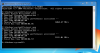
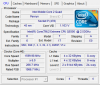
try running winsat mem from an elevated command prompt, heres mine stock and overclocked...
Attached Files:
-
-
Tried to overclock with memset but it wont save settings, is it because I have a 4 and a 2 gig stick now ?
-
Here is what i got...
![[IMG]](images/storyImages/mem.jpg)
-
I overclock using Nvidia system tools -- what was your WEI memory score before and after the upgrade?
-
Heres my latest Passmark score...
Attached Files:
-
-
Here is mine, Graphics And gaming graphics went down .1
![[IMG]](images/storyImages/Untitled.jpg)
-
If you're looking to take the SSD plunge, the Intel G1 80GB SSD is $149 with coupon code. Highly recommend...
http://forum.notebookreview.com/showthread.php?t=464997 -
hi,
does anyone have the part number for the spare parts warehouse for the sli configuration motherboard for the x305??? this laptop is amazing as far as customizing. It was pretty sad when the new qosmio series came out and they cant really be upgraded too much. But none the less if i can get a link it would be much abliged and one more thing i read about monitor upgrades in the forum and you will be able to fit a monitor in you x305 as long as it meets the 30 pin requirement. I upgraded my monitor twice. The first was to 1680x1050 but i had to upgrade again because the monitor was 59hz and i wasnt able to play all my games so i bought another one off ebay and now im runnin 1920x1200 i have not tried crysis yet on it but i have been playing battlefield: bad company 2 with a steady 30FPS w/VSYNC on a 9800M GTX. -
Can you post the link to eBay or more specific information about the upgrade monitor (1920 X 1200), thanks.
-
http://cgi.ebay.com/New-Samsung-LTN...QptZAU_Laptop_Accessories?hash=item5639a8ad24
that is the only one i can find right now. The one i bought was about 100.00usd. Im sure better and cheper ones will pop up. Ebay nothing really stays for long. Hope the link will help -
yeh im not going to upgrade the laptops screen in going to get a samsung p2350 screen, but would have the same effect i would imagine.
unless your getting tearing turn v-sync of, it will probably increase your fps
-
Hello Spectar82, we need to talk about that 1920x1200 screen i will pm you. here is the info you request the part number for the SLI configuration motherboard is k000065490 for q706 and k000069270 for the q708
-
hey does any one know which will be a better ssd the one i have now ie kingston v series 128 gb or a 64gb ozc ssd (not sure which model it is as i don't have it yet just wondering which i should keep/use
-
I have not have anyproblems with my OZC SSD, but the Kingston V is also a strong brand. I suggest you to ask in the SSD therad or something like that...
Good Luck. -
I just bought the intel g2 160 gig ssd drive and I noticed a big increase in speed in my laptop, here is what I got with cristal disk mark..
![[IMG]](images/storyImages/CristalDiskMark.jpg)
-
Thank you very much for the info... FYI next week ill be buying an x9100 and ill let you all know how it goes... i was going to get the qx9300 but i just game and dual core seems better for gaming than quad... now i just have to get a second 9800M GTX without paying the 1060.00... i was lucky and got mine off ebay for 175.00... too bad they dont make the 280M GTX for this laptop... its so sad that the GFX card for the new qosmio is integrated... i like upgrading my lappy because i can do it one part at a time and i feel more ownership im my laptop when i do the upgrades myself...
-
You are welcome Spectar82, now I need your help. can you provide the info for the 1920x1200 screen you are using. need part number, Brand and model. and did you also change the inverter or did you use the original one. thanks in advance
-
Here is the information from my Ebay purchase
Item title: 17" LAPTOP LCD SCREEN Compatible w/ N170C3-L01 (2-CCFL)
Web Address: http://cgi.ebay.com/ws/eBayISAPI.dll?ViewItem&item=190372794045
Item number: 190372794045
Seller Email: [email protected]
Total: $85.55
i hope it helps i used all the original parts from this laptop for the screen. This laptop is just about universal with anything. -
Thank Spectar82 that what I needed i will let you know how it work out.
-
yeh i know what you mean. also you dont have to shell up the big bucks up front
also about the kingston and the ocz ssd i asked about instant rely on ssd thread to go the ocz, if the ocz im getting is the summit or vertex then they dont use the jmicron controller like my kinigston so not stuttering better speed and possobly not latency spikes -
i just bought a x300 WOO
spec=
p9400, 2.5 ghz, 6mb cache, 1066mhz fbs
9800m gtx
4gb ram
vista ultimate
hdd 320gb + 60gb ssd
1680x1050 resolution
i bought if of a guy on ebay for $1750 AUD
so far all is well installed windows 7, swaped in my t9600, kingston ssd and 500gb samsung hdd put some ocz extreme freeze on the gpu and cpu
drivers and games next
some may remember me asking questions about gpu upgrades well this is how i have done it so, far its worked out cheaper then handing out over $1000+ postage and handleing to australia making it about AUD $1400, while i did pay 1750 for it i sold my old x305 q701 for $800 and i have a p9400 and a ocz ssd i can still get some money back on so i m happy
any way thats what i have spent the last week doing dismantleing two qosmios at once, parts were every were
-
hey does any one have any ideas on were i can download drivers for my x300 w00 i can find any on the main Toshiba support site and also nothing on the Australian Toshiba website (this model is an australian one)
-
Try the UK support site and use PQX32E as the short model number.
http://uk.computers.toshiba-europe....cId=&country=8&page=2&nextCl=true&startPage=1 -
thanks ill try that
-
hey guys,this is probably the least correct place to ask...but just recently i dropped my laptop while it was in the laptop bag on the floor. now the gpu fan doesnt kick in after high tempratures...both fans still work but the gpu fan kicks in after a temp of 57C....when i play games (counterstrike source) they are starting to lag.(never used to befor the drop).......would a bios update fix this?
-
i assume that you have a x300/x305
if the computer and fans still work i dont think it was the drop that did it
my gpu fan kicks in around 55-60C degrees so as long as it brings the temp down i wouldn't worry about it
and lag could be any thing from drivers to bad internet connection so im not really sure how i can help you, you could see if a bios update fixed it but id see if the problems exist some were else first -
has any one had this message come up with over clocking and benchmarking with 3dmark06
IDirect3DDevice9:resent failed: Device lost (D3DERR_DEVICELOST)
i cant got over the clocks 560/1400/840 or 3dmark06 crashes and i get that message
i found this thread
http://forum.notebookreview.com/showthread.php?t=240447
but changing resolution, updating drivers doesn't help and my gpu temp is about 70C when it crashes so its not to hot
any new ideas? -
i have the X305-Q701 Qosmio.... i recently updated the nvidia driver, still no help.
i dont know how to update bios for my laptop, my previous toshiba i was able to.
but even in offline mode on counter strike source laggs a bit, and the fan doesnt kick in.
i tried a program called speed fan http://www.filehippo.com/download_speedfan/
i didnt know how to use it.
and when i type dxdiag on run it says i have bios version 1.00 PARTTBLT
and some online scanner told me i have bios version 1.80....
what to do?
-
if you want to update your bios got to this site
http://www.csd.toshiba.com/cgi-bin/tais/support/jsp/home.jsp
go into downloads find your model and then refine you search with your operating system and bios download the first one (2.10) and follow the prompts to install it, just remember once your install it you cant got back
update did some more tweaking now i can get up to 569/1423/890 before i get the message:
IDirect3DDevice9:resent failed: Device lost (D3DERR_DEVICELOST)
3dmark06 score with those clocks is 11218 by the way (can complain to much but the card has more potential)
-
it says its for windows...not windows vista...
should i install it...or just reinstall my bios,if thats possible? -
First of all, hello guys. Long time since last now
Hope everyone is fine.
Umm, which driver do you use? The last driver version was bugged from nvidia. They have removed it but it is still accesable from google etc. I realy don't hope you installed that one with modded inf. Can you please post your driver version?
Hey man!
Can you please explain those Tweaks ??
For windows, Windows Vista is also based on Windows. Just don't use it on your system if you use MAC or something like that. You'll be fine.
Good luck
Last edited by a moderator: May 8, 2015 -
Current
Installed Driver: 195.62
thanks...ill let u know what happens after bios update i guess. -
That one is safe and lastest official from nVidia. That's good. In your situation. I would never install unofficial driver. In case your GPU fails now you're warranty will be gone.
-
sorry tunay if i got your hopes up
I said tweaks but all i did was move the sliders up one notch at a time till 3dmark crashed then i steped it back one notch and did the next one (i moved the shader and core speed up at the same time to have the right ratio or it artifacts or so i have read)
but you have no more clues on what that error message is when 3dmark crashes? would it run on another benchmarking tool? i don't have any other benchmarking tools at the moment, maybe its just a 3dmark issue with Toshiba gear or something and we can still over clock more we just need another benchmarking tool although it wouldn't be the same as 3dmark06 -
Ah, well that is the way to overclock. No, I left that with 3dMark06 etc. long time ago. My hopes are not up before I change my CPU. But, don't forget that we are very limited with GPU overclock on x300s. You can check in my signature, that is max I can go before 3dMark06 crash for me.
-
still nothing happened... my gpu temp according to speed fan is 60C
and fan now kicks in at 63C until it hits 55C!!!!
can anyone tell me how to use speed fan?
or it just doesnt work on toshiba?
cause there is a configure button,when i click it...then double click gpu, my desired temp is 40C then on the other side it says warning at 50C...
but when the temp is at 60C the gpu fan doesnt kick in for it to be my desired temp (40C).....confuzing,im sorry!! -
You will not be able to controll your fans with SpeedFan. I suggest you to download GPU-Z. You will still not be able to control your fans, but this can show you max and min temprature your GPU had. I only trust this app. when it comes to GPU temptrature. Now, 60C is not that high. My max temptrature under load is 83C (Got it form GPU-Z log). You can also check that if your GPU downlocks or not.
-
ah well just going to have to live with it
-
Your system is similar to my now
You can take a look here
http://forum.notebookreview.com/showthread.php?t=398767 -
yeh thats a good thread...toshiba makes a good product but thats it moding/tweaking/support is absolutely shocking.
-
Yeah, agreed. Quite sad, because this is a important thing for superusers, like uss.
Official x300/x305 Owner's Lounge
Discussion in 'Toshiba' started by Bartlett, Oct 4, 2008.