Problems? See this thread at archive.org.
Yes, you can upgrade your laptop. what do you want to upgrade more then CPU?
I'm glad to help my friend
-
Ok the things you can upgrade are:
CPU
SSD/hard drive
Ram
GPU
Screen
Keyboard
Personally I would recommend the cpu and SSD upgrade, a better CPU will obviously be good for games and for encoding unfortunately you cant upgrade to an i7 because it physically will not fit so you will have to get a core 2 duo you can pick one up fairly cheap or if you want i have one you can buy you, want 2.5 GHz or better to be worth while in my opinion
The ssd will make you system feel so fast, mainly with boot times and programs installed on it will load and respond fast, they can be kind of expensive but it depends how much you want to pay. An Intel SSD will set you back a bit but you can get a much cheaper one that will beat any hard drive
Ram you don't need to upgrade unless you run ram intensive programs
Graphics card (GPU) only do this if your craving fps in games and are prepared to pay for it unless you find a good deal!
The screen can just be upgraded to a higher resolution but again unless you want higher resolution in particular i wouldn't bother and besides it will only makes you GPU work harder
Keyboard if you don't like the current one then you can change it some one has tried to get a back lit one going, it fitted but would not light up
So yeh hope that helped, you if you want specific help on one of the things I mentioned more then happy to help -
Looking at starting with the CPU. What ones are compatible with the Q701?
-
well, you must not look at Q701 but look what your chipset can handle
-
basicly any CPU with a p socket should work so there are lots of cpus that will you could upgrade to
do you want a quad core and how many GHz are you after -
just got a samsung lcd for my lappy so far all is running good @ 1920 x 1080
oh and tunay i fixed my sisters laptop by baking the gpu @ 200C for 7 min took a lot of courage but it worked
-
Just trying to find out what is available so I can try and source and price them. Would like to try and get the best I can but will depend on price.
-
I am new to this forum and I was wondering if someone could tell me how to put the signature on the bottom of my posts?
-
An update on the issue I was having.
I got the new desktop LCD and plugged it into my X305 and it is working perfectly with the 9800M GTX card. I did have a crashing issue when playing graphics intensive games or videos at first, but that went away as soon as I disabled the powermizer feature of the video card. Now I am very pleased with it. Thanks for the suggestions. -
provantage have T9600's thats were i got mine
try this site they have alot of cpus and will give you an idea of pricing
i also have a t9400 if you want for 250ish
towards the top of the page look for a thing called user cp click on it under setting and options there should be an option for edit signature
yeh a big screen is nice
-
Nice! I've totally forgot about that method!
Dude, a few posts above!
I lol'ed
-
Hi,
My laptop x305-q706 crashes when playing games at high resolution and high graphics.
it crashes at around 100c.
sometimes it also crashes when there is high processing like long antivirus scan, hd video conversion. any activity which involves heavy cpu usage.
ive decided to replace the thermal paste.
1. Should i replace the thermal paste on cpu?
2. Should i replace the thermal paste on the gpu?
3. Should i replace the thermal paste on both the processor and gpu??
Thanks. -
Hi
I assume that's 100c on the CPU and yes that's normal to protect your hardware
I would replace the thermal paste on both that cant hurt but also check to see if both fans are working and make sure the heat sinks are clean (not dust caked) as they will need cleaning from time to time.
Also a tip: went applying the thermal paste check to see if you get full coverage after pressing the cpu and gpu on to there heat sinks
Hope that helps -
What kenny27 said.
It is not normal that your GPU reachs 100C, you should be glad that it downclocks
-
hey tunay i was just reading in the alienware forum and have a look at this, may be a cpu oc on the x300 is possible?
http://forum.notebookreview.com/ali...icial-m17x-benchmark-thread-part-3-a-327.html
5150Joker used the pll from the asus g73 to overclock his alienware, maybe we can find a mother board similar to the x300 and use a similar method with the offsets.
According to the link below the clevo M570TU has the same north and south bridge, so im not sure if that clock generator will work i just need to find it first
http://forum.notebookreview.com/sag...o-tool-v1-0-oc-your-cpu-automatically-59.html
im not sure what you and dude55 talked about when you tried overclocking before and i dont have much experience with cpu overclocking so tell me if im dreaming -
sorry i read further and found that the pm45 chipset isn't supported ignore my previous post
-
We're very stuck with the overclocking kenny
But, I've have another sad news for you guys.
My X300 "died" two days back. I've just not had time to post it here. The HDD led is always on and when my laptop is off the SD Card activity (?) led is always on.
I'm very happy that my SSD is not damaged, so I pluged that into my ThinkPad with a USB convertor and got all my files. The sad thing is, I'm leaving Norway in 5 days. And it is even not worh to take my laptop apar. I've already have my DV2000-series laptop apart, parts all over my desk!
However, I'm not going to leave this therad and going to stay updated and update you guys as well if I can find something new...
I've also got two pictures:
http://img203.imageshack.us/gal.php?g=imag0006yd.jpg -
If anyone is interested, Here is my NEW laptop I will be getting in July, when it is released:
MSI GX640-260US:
- 15.4" WSXGA+ "Glare Type" Super Clear Ultra Bright Glossy Screen (1680x1050)
- Intel® Core i7-720QM, 1.60GHz, + Turbo Boost up to 2.80GHz, (45nm, 6MB L3 cache) (Quad Core!)
- IC Diamond Thermal Compound - CPU + GPU
- ATI Mobility Radeon HD5850 1024MB PCI-Express GDDR5 DX11 (YES DDR5)
- 4,096MB (4GB) DDR3 1066MHzDual Channel Memory
- Combo Dual Layer SuperMulti 8X DVDRW Drive
- 500GB 7200RPM 16MB Cache Buffer (Serial-ATA II 3GB/s) - Default
- 5.9LBS WITH 9-cell battery, lasting 4+hrs
- 3 Year warranty + 1 year Accidental
- 3Dmark 06: 11520, but will be higher with Quad core i7
You know, I really like my qosmio. It hasn't given me any problems, and I will be keeping it at home, on my desk. I need a laptop that is more portable, that I will be taking to college, but I also need something very powerful. The MSI GX640 is the most powerful 15.4" laptop out, that is just under 6 pounds and has very good battery life.
I will do a full review once I get it. I can't wait to get a laptop that I can actually take everywhere
And the Pictures:
![[IMG]](images/storyImages/gt62791.jpg)
![[IMG]](images/storyImages/GT6271.jpg)
![[IMG]](images/storyImages/GT6276.jpg)
![[IMG]](images/storyImages/GT6273.jpg)
-
Sorry to hear that tunay so its a fully fledged paper weight, fixable or just new computer time? (thanks for the rep btw just realized)
Nice tornbacchus looks slick but still has a bit of fire, you getting it from xoticpc?
I'm going to sell my x300 in a month or two to my mate he has been hanging out for a good computer all his life. and then get a m17x with CF 5870s and maybe a m11x will be expensive but worth it
going to miss the x300 though, its flaming red and beautiful curves
-
yes I am planning on XoticPc. I really like the look of the laptop, and it is very portable. I'm staying away from 17" screens for now. I need a small 15.4", and yes it still has some red
-
Looks nice tornbacchus, I did not get the 3DMark06 thing? 200 3DMarks lower then my X300?
I hope I can fix it, I also love my X300, and my CPU, GPU etc. is working fine so I realy don't see the point of new laptop (yet).
-
yup, but that's stock, not overclocked, and without the Quad core
I beleive the 5850 can be overclocked a lot, reaching speeds of the 5870 and be pretty stable.
I'm just surprised how much laptops have changed in just the past two years in terms of performance to price. The 5850, that can be overclocked to the most powerful single GPU is pretty cool, considering this laptop will cost about $1500.
I might also consider selling my X300. No problems at all, no damage, no scratches, new LCD screen. Gotta be good for someone who wants a good computer, or a computer to use as parts or to upgrade. -
Yeh that's what I'm doing selling to a mate, there's nothing wrong with the x300 it just lacks the power the new tech has
So is the over clock on the 5850 a full time possibility?
And you probably have CPU overclocking options as well -
yes I know it is a very stable GPU overclock used when gaming, and can be underclocked quite a bit to conserve battery power.
I don't know about the CPU, but it has the turbo boost up to 2.8GHz I believe. -
Yeah 2.8GHz when one core is used, 2.52GHz when 2 cores are being used and 1.73GHz when 3 and 4 core are used, kinda confusing but it works pretty well by the sounds of it
-
Oh is that how it works? I thought it was the other way around, but I guess that makes more sense lol. So does that mean that running on dual cores, it is at 2.52 GHz, which is the same thing as my p7350 @ 2.0 GHz, just a faster clock? or will the speed calculated differently? I do not really know anything about the new i series.
I am also considering the 620M, which is the fastest dual core. It is just as fast as the 720QM in multi threaded tasks, and kills it in single threaded tasks.
They say it is on par or better than older dual core x9100's I believe.
I'm still making up my mind between the 2. The 620M is about $100 more than the 720QM, and it isn't quad core, but is just as fast and faster than it. -
I've also thought it was the "other way around" But, I'm also totally noob when it come to the new i series.
However, want to repair my Qosmio if it is possible, if not then I must new laptop :/
Beside my Qosmio, I also have one destkop, ThinkPad T61 (T7500, 4GB RAM, SSD drive) and another HP DV2000 series, which is taken apart now. I'm going to change the chassis and have it as my "hobby" and portable laptop. Spec. are good T7250, 4GB RAM, again SSD drive, new battery. I only want this laptop as my hobby laptop (as I said). I've want to do cosmetic modifications etc. Not a single laptop can be more portable then my ThinkPad is. I've get 4-5 hours of batterylife! I use it mainly as my school PC therfore I want the DV2000 as portable for other use. -
wow you have a bit of a collection
this site has a really good picture explaining i7 turbo boost -
selling T9400 here is any one is interested
-
Well, guys my X300 alive!
What I did
First in few days I started up my laptop by using second slot for HDD (I was using slot-one when it failed)
My laptop booted with a simple ethernet error message. Everything was working in first boot. But when I tried to turn the volume down it did not work (by the wheel). (This problem was there last few minutes before my laptop died last week.
I rebooted my system, and for second time it worked fully.
I shot her down and pluged my SSD to first slot.
This time when my laptop booted my volume wheel was working, but I had not my mouse connected. When I tried to enable the TouchPad I figured out that my keyboard wasn't working. I've rebooted and it worked.
I enabled my TouchPad it was not working. Volume wheel, keyboard, finger print reader etc. everything is working exept the touchpad. I've got so pissed that I smashed so hard into the palmrest (about on the touchpad) that my X300 bounced like 10 CM from the table and my ThinkPad wich was beside my X300 gave Bluescreen (RUNNING SSD!!!) However, I restared my X300, and both my TouchPad, FingerPrint Reader, Keyboard AND Volume Wheel was working!! I've shut my X300 down and either my HDD or Card - Activitiy led was on.
Now, I have unpluged my SSD again, and updated the frimware. I was still running on "stock" (1.10). Now it is 1.60. I've also formatting it trought USB 2.5" converterer. Tomorrow, I'm going to install new OS. I'm still not sure if I should go for Vista or Windows 7.
Thusday, 14:00 I'm leaving Norway. And I hope noting appears tomorrow so I can fix my X300 and use it this summer.
I've plugged my battery back in. (I was using it without). I booted into BIOS and waiting for battery to fully discharge so I can charge it up again. Long time since last I used it.
Everyting seems fine now, let's see what happends tomorrow. -
haha sweet who said violence doesent solve any thing
I prefer windows 7 but that's just me, heaps of people whinge how vista is so bad etc but it runs fine for me I just like how windows 7 it set out
good luck with tomorrow any way
this is my current setup had it for a few weeks now really liking it
![[IMG]](images/storyImages/dsc01224pk.jpg)
screen: Samsung P2350
speakers: logitech x-540
keyboard; razer arctosa
mousepad: razer vespula
mouse: tactx
external hard drive: Seagate 320GB
usb hub: 7 in 1 (powered)
headphones:tactx -
Dude, to be honest. I like Vista more then Windows 7. I have tried both, and yes. I still think the same. I have no problems with performance with Windows Vista. As I said, I have a boot time of 10 seconds +/- with Vista.
I bought a new bag and new mouse today. I don't have it here right now, (still in my car) but I can post the model later I have also cleaned my X300 completely, took me about 25-30 min.
Going to play around with Windows 7 little more, and install Windows Vista back, if I don't like it before tomorrow! I don't want any problems in summer..
I'll keep you updated!
-
Few details in my signature updated!
-
Nice mouse looks like a arm chair for your hand
, the tactx mouse i got is similar only a bit more angled and the thumb rest thing isn't as pronounced
-
lol
I've loved my VX Nano, and still do. But I wanted something else this time
UPDATE:
The HDMI control program crashes on startup. FN keys still dosn't work! Several unknown devices in device manager. Speed the same as Vista :/
Rolling back... -
Remember the extra driver to use the FN Keys.
It is called Utility Support Driver. Install it with the Value added package and it WILL work
Also, don't even bother with the HDMI program, it's useless. I just plug in the HDMI cord and it works right away, but I might have to switch displays in the settings.
I wouldn't install Vista again. I always had problems with it. It would just slow down after about a month. With windows 7, it doesn't slow down at all. i HATED the startup on vista. It took FOREVER. -
Dude, I've allready installed Vista back again. And yes, I installed Utility Support Driver. Personally, I don't have a single problem with Vista.
-
Working on it, what do you think?
Image removed!!
See post 2842
- tuηay -
nice
2 questions though
how are you doing that. (what program)
and whats her name
-
The program is:
Rainmeter.net
The package/skin is:
Rainmeter Skins - HUD.Vision v2.2 by mepu - Customize.org
Her name:
?
UPDATE:
I've found this
http://da-nadda.deviantart.com/art/reMix-set-Clean-version-101177829
I'm using this one
-
NEW!
![[IMG]](images/storyImages/68626484.jpg)
Tell me what you think
-
looks good ay, would be nice of there were options for temperature and gpu usage? info on the right is the way to go
-
There is, but I didn't do enough search for the right .dll plugin...
-
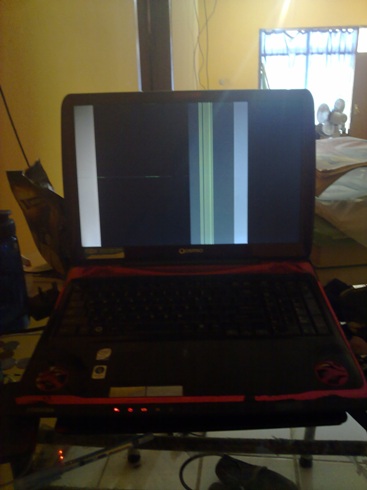
Hi everyone..
Me currently studying in indonesia..
Since two days ago,my laptop have become like this (refer to pic)
Is it due to gc or the lcd?i really hope the prob is the lcd...since many of our electrical equipment here damaged by unstable voltage here,i think my laptop also have been one of the victim...
Cant fix it now,have tesis otw...mayb send it for repair when back to malaysia...Attached Files:
-
-
it could be the lcd try plugging it into an external monitor if it works then its probably your lcd, if it doesnt work id say your graghics card is no good
is it like that all the time? -
ah I see you got the rainmeter working
-
Yeah, what do you think?
-
? what do you mean i haven't done any thing with rainmeter
-
You men this to me?
Official x300/x305 Owner's Lounge
Discussion in 'Toshiba' started by Bartlett, Oct 4, 2008.