Problems? See this thread at archive.org.
sorry read it to quickly and thought tornbacchus was you and got all confused
-
Hello everyone, I recently purchased a Toshiba X300 PQX32C-033 019 from ebay with windows 7 ultimate 64bit installed. But I did not find Toshiba Recovery Disk Creator installed in it. And I also could not download it from Toshiba site. Please tell me please, where I can download it and the last Bios with upgrade tool for win7 64bit. Thanks in advance.
-
haha

Hi
First off, welcome with your X300. It is most likely that the user you bought your laptop from has installed Windows 7 from scrach. What I suggest you to do is to forget about the recovry discs and get a Windows 7 64-Bit installation CD, you can get all the drivers from Toshibas side. Also, I have not seen the BIOS upgrade tool for Windows SeVen (yet?!).
By the way, does your FN-Keys work? -
Hi, thanks for response,
yes they work (Mute, Lock, Sleep, Brightness +-),others I have not tried. And I have not found hot keys for volume control. Do they exist at all? -
I was not able to get my FN-Keys working. And I can't remember which but one of my drivers crashed during startup.
What do you mean by hot keys for volume control? The volume control wheel or the touch pad keys? -
Does anyone know were I can get a 9800gtx video card for my x305 q11 laptop ? I have a 9700gts in it now and I think the 9800gtx is the highest
card I can put in it. Is there any e-bay sights or web sights that sell cards?
-
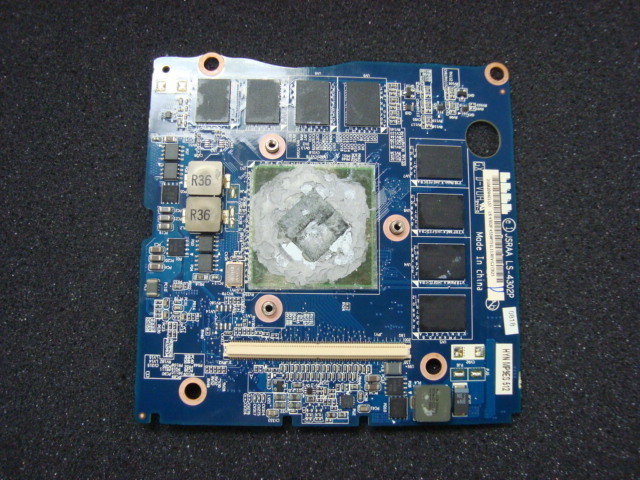
I think this is the 9800M GTX. Pretty expensive
K000063270 - Toshiba Laptop Miscellaneous Parts -
I'm trading my alienware m15x with faulty GPU for a x305-q705 on wednesday and I wanted to know if there is anything I should know about the x305? Any problems or something specific? He told me it's 1 and a half years old and every so often turns itself off due to overheating when heavy gaming without a cooling pad.
Any advice would be great Thanks.
-
I thought that apart from the wheel should be hot keys for the volume control. Now I see that there is only the wheel control.
-
yeh thats the one its expensive because its a Toshiba gpu, pity they didn't make it a MXM.3 card that would have made things far more easy
in the end your better off getting a new x305 with the 9800m gtx in it and sell your x305 q705 that will be a much cheaper option (thats what i did)
As far as i know there are no general problems with the x300 only individual cases really, although if you upgrade to windows 7 you will most likely lose function of your media keys it doesn't affect me as i never use em
For the overheating problem, you can probably fix that provided you don't mind taking it apart to reapply thermal paste and clean the dust from the heat sinks etc. Because its 1.5 years old the dust would have collected and is now causing problems during heavy usage
If you do want to do that there are a few guides which i could find for you if you want -
Yes I would really appreciate those guides, I just don't want to be ruining my new laptop the first day hehe. I'll probably Dual boot Windows 7 and Linux for a while also, do you know if it runs Ubuntu well? I know some laptops refuse to have Audio on Linux, and a lot of things just don't seem to work.
-
Well guys, I know I said I was looking at the GX 640, but the envy looks SO GOOD. I also got it today with 30% Bing Cash Back for about an hour (maybe a glitch), but I saved $430
My specs, AND my new Sig. V -
the best guide i know of is here
some tips
-be careful, you shouldn't have to force it
-don't work on carpet (because of static)
-the guide is for a slighlty differnt model then yours so use your common sense
-get some thermal paste ($5 from a computer shop) and reapply it to the heat sinks
-use some compressed air or and old toothbrush to clean the heat sinks
ubuntu should work well never tried it though
hope that helps
nice buy tornbacchus you'll have to let us know how it goes with some benchmarkes etc
-
Nice one tornbacchu!
You still have your X305 right?
@Eltocliousus, follow what kenny27 says. It is worth gold!
Sorry Kenny, I can't REP you up
Last edited by a moderator: May 8, 2015 -
Yes I do
It will be staying on my desk, at home, which is I guess why its called a desktop replacement. -
Thankyou for the guide and infrormation, I appreciate it. Apparently he already cleaned out the heatsinks and re-applied thermal paste and such, apparently after that the overheating problem actually stopped which is great. But I'll bookmark the link and save the information for when I need it.
Thanks again! -
no problems Eltocliousus good to hear the over heating has stopped
thanks tunay its the thought that counts
-
Yes...try to let it on for few minutes and it still like this...afraid to on it for hours...
I also think the same but now,I have to prepare for exams..may be after exams,I will do it...
Now,I have to search for the parts - a lcd with hd resolution to replace the older one or a gpu...
But I really hope the problem is the lcd..not the gpu...since I can upgrade it to hd lcd...
Actually,I really love this notebook..hihi -
Hi,actually im kinda confuse about what type of mxm in x305..here is the pic...
Attached Files:
-
-
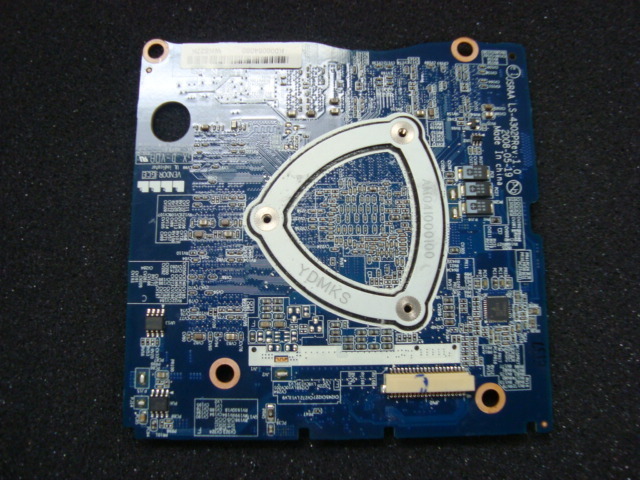
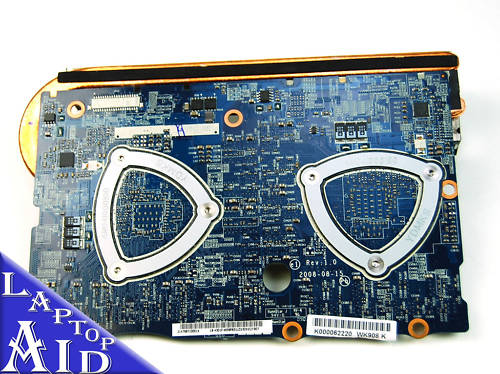
Its not a mxm its a Toshiba VGA board, the first post of this thread has info on were you can get them from
-
Anyone know if you could get cuda to work on a x305-q706?
-
not sure never used cuda, it is supported on the 9800m gts so it should work
im not sure if any one here has used it maybe try asking in the gaming (software and graphics cards) -
Is there anyone looking for 9800m gts sli?here is the link
eBay.com.sg: NVIDIA GeForce 9800M GTS (item 280536857943 end time Jul 26, 2010 22:55:16 SGT)
Just for your curiosity..
The problem with this is,you have to find the 240W adapter..hihi
-
Looking for some further testing with the 258.49 drivers (soon to be updated to 258.96) see here for more info. I am hoping to cover more Qosmio variants if there are any.
-
nice find
currently with the 186.03 drivers will download and test the 258.96 in the next few days i have the 9800m gtx.
by test that do you mean, run vantage or something -
What? My single 9800M GTX and T9600 have a higher score with about one year old driver.
-
Is there sumting with 258.96?I am already installed it few days ago..
-
What do you mean?
-
Oh,I mean is there any bad report about this driver?
-
i don't think so but Nautis is just helping people with problems on unsupported systems
-
don't forget that that system isn't overclocked, sgilmore i think got 13k
-
That's right. But, still
-
tested 258.96 drivers, crysis gpu benchmark had no change, 3dmark06 lost 700 points and would not take the higher clocks that the 186 drivers would, 3dmark vantage gained about 100 points didnt bother over clocking, heat was good didnt get higher then 75C
-
Updated INF from 258.49 to 258.96 including some additional settings.
Correct. I was asked to build INFs for the Qosmio before and said I would but nothing came of it. Figured I would stick to my word.
I modify driver install files to try to help bring updated functionality to notebooks where support is minimal or non-existent. My goal is to help educate people on how to support their own hardware when the company whose name is on the product stops supporting it.
Congrats. How does Cuda, PhysX, OpenCL work on that year old driver? Do they support the latest version of each? How about PhysX GPU selection? Flash HD acceleration? DirectCompute?
Glad to see so many reports of it at least working. Did you use the 258.49 INF on 258.96? I will look into the lack of higher clock rate. Functionality first then speed later. Thanks for your help guys. -
What would I need to put that 9800M GTS SLI In my laptop? Is it even possible?
-
I didn't say that I still was using that driver did I? I'm the maybe only one here don't care about fps but a updateed driver. And, if you look at first page I had a post where I posted new version of different main drivers.
-
i just installed the 258.96 after uninstalling the old drivers didnt use driver sweeper
about the the over clocking, it is limited because of lack of power so if you can make the driver more power efficient then great but other wise i think we are stuck
thanks for the support +1 rep -
Anyone know of a single 9800M GTX that is used? I want to up my gaming power.
Thanks -
Several months later and I still don't have some functions working since Windows 7 Enterprise x64 installed. I ended up getting the flash cards to load but not all the functions work such as the monitor brightness control & lighted control pannel on/off. The lights were on during install so they are stuck on. Any ideas? I dont need it perfect but would be nice to control viewing brightness on the fly or turn out lights sometimes.
-
tornbacchus, I have been also looking for a 9800gtx for my toshiba lap-top.
Let me know if you find a sight that sell's them and I will also look..
-
I have all functions working in windows 7.
If you don't know, install every single driver off of toshiba's website. -
Having problems with artifacts with the dual 9800s, updated to 258.96 using nautis' method i can't get past the first part of 3dmark06. And this is a new install of windows 7. Also i had artifact problems with older drivers but not as much as now.
CPU or GPU are not overclocked, updated direct x but same issue and i dont think it is a heat issue as nvidia monitor shows it at 65c max. Any ideas? -
try unistall drivers in control panel then use driver sweeper, reboot, reinstall drivers, reboot, test, might work
-
Hey guys, I kind of came into, or made myself, a little problem. I recently bought Starcraft 2 and while playing it for more than 1 hour my computer will power off. It seems that my system was overheating. After the first time I ran CPUID Hardware monitor to watch temp. and OMG , cpu 90-95c and gpu 90-100c. I want out to radioshack and bought some Arctiic Silver thermal paste and went through my whole laptop.
Results after themal paste were way better accept on board gpu still idling at 75c and gaming 90-100c. all others are idling at 50c or lower.
My question; I noticed during disassemble that the integrated gpu and cpu share the same heat sink on my 708 and the gpu contact had a thick thermal pad from factory that i replaced with a heavy amount of paste. Since my temp is 75idle on that gpu should I buy thermal pads online or do I just need to apply more thermal paste? Faster i can fix this issue the quicker i can zerg rush my friends. haha -
btw , any way to disable the onboard 9400 gpu? i've had a ton of problems with this damned hybrid sli bull. I want just the sli 9800m gts
-
Hi Kenny
It had been a clean reinstall of windows though so there were no drivers before. -
large amounts of thermal paste acts as an insulator so definitely get some new heat pads
yes but if you totally remove and reinstall the 258 drivers it might fix the problem. -
Hi guys, lately I've been experiencing a lot of black screen crashes when playing games. I'm not too sure what's happening. The Qosmio is 2 years old now and i just cleaned it out last week and replaced the thermal paste. I don't hear the fans going at insane speeds anymore and yet it still crashes. Anyone have any ideas? It's killing me... the screen goes black and the sound just gets stuck....It's seriously annoying and frustrating..... Thanks for any help!
-
So i replaced the thermal pad on the 9400 GPU and it's temp is nice now about 55-58*C on average idle, gaming no more than 85*C. I am hitting high temps of my 9800 GPU's while gaming, about 95*C during high loads, Starcraft 2 Menu's have full rendered backgrounds with high details that are just killing my machine.
What is a good idle temp for GPU's and CPU? also gaming or HIGH load temp? thank you. -
my sisters x305 had black screening when playing games and some times just web browsing, i tried driver updates, directx updates, os updates nothing seemed to work finally i plucked up the courage to try the oven trick which seems to have worked
just got a few questions for you
what model of qosmio do you have also what gpu
what happens if you plug it in to an external screen, does it black screen still?
watch temps closely, does it seem to crash at roughly the same gpu temp every time?
good to hear
95C sounds pretty high are the fans at full blast?
cant really compare your system with mine but i idle @ 40-50 for the cpu and and 50-60 for gpu, and max out around 80C for both it been a while since i checked
Official x300/x305 Owner's Lounge
Discussion in 'Toshiba' started by Bartlett, Oct 4, 2008.