Problems? See this thread at archive.org.
Try to find your answer in toshiba forum site...I think I have read about it there..
Just you need a little patience reading them..
-
or maybe its a bios option?
-
Ahh i understand now Kenny, thanks ill try that. Which drivers do you recommend?
-
Oh one more thing that ive noticed. Reinstalled to windows 7 (previously used vista) but couldn't get all 4 speakers recognised. Only see "stereo" and i think i have all the latest sound drivers (realtek and dolby control centre) installed. Has this happened to anyone as well?
-
What's the oven trick? I've heard it before but it seems different everytime I hear about it.
I have the first version. Q701 model. The GPU would be 9700 GTS.
I don't have an external screen so I can't test that out.
Strange thing is that everytime I feel the back, the temperature seems to be nowhere near what it used to be before I took it apart and cleaned it and applied the thermal paste. The fans don't even run at full speed...so I think it's not going past 70C.
I just tried Starcraft 2 on medium settings. It tops out at around 64C. -
I didn't know that you could get 4 speakers recognized i have only ever had the stereo option
If you could test it on a external screen (friends maybe) it would confirm if its a screen or a gpu problem, also any pattern at all with the crashes would help in figuring out the problem.
Make sure your drivers are up to date, all wires are in properly, and that there is nothing out of place with the screen and power saving settings.
yeh the temps on my sisters x305 q701 were never that high either but for some reason the screen would just go black and would be fixed on a reboot
The first thing that i would do it reseat the gpu. take it out reapply thermal paste etc
Only as a LAST resort before getting a new gpu would i recommend the oven trick, some people use an oven some a heat gun or air dryer, but the basic idea is to heat the solder on the gpu so it will re-flow and hopefully fix the problem
I preheated our oven to 200c (to much hotter and bits start to fall off and to much cooler and the the solder will not melt) and baked the gpu for 7 min on a tray with aluminum foil on it and just let it cool by itself, you don't want to warp
The only reason i say try reseating the gpu first is because im not sure if was the reseat or the bake that fixed it
Lastly if you do bake it, its on you head if fails what works for me may not work for you.
hope that helps -
not sure i can really recommend any drivers in particular but id start with the latest even though they seemed the worst then id try any that i have already downloaded and go from there
-
This therad has exploded with questions while I was offline, that's for sure!
-
Completly uninstalling and reinstalling graphics drivers has improved stability mainly on games like starcraft (haven't tried it for long periods though)...but playing 3dmark will just crash the laptop midway now, think the gfx card is faulty.
Bought this overseas so no warranty left as there was only 1 year international warranty. Think ill give a few more games a shot and play it longer to see how stable it is but it may be time to try the heatgun... -
a google search should bring up a few sites were some one had used a hair dryer
see the first post of this thread if you need a new gpu and cant find one on ebay
best of luck -
Got a heatgun and reflowed xboxes before so i hope it will be similar i.e. tinfoil the plastic parts and heat up the gpu chip, well hope it is the same anyways
Will test it with other games and check stability first though. And to be honest everything else works i just might upgrade my desktop and use the laptop as HTPC instead of taking the risk of ruining the thing. Its good that the laptop has optical out to plug into my home theater
-
Hi, I'm italian and my english is very bad but I wanted to know if it was possible to mount the gtx280m in the x305-q715. Thanks.
-
Sorry this is not possible as Toshiba had not used a universal standard for there graphics cards
The best single graphics cards you can put in your x305-q715 is a 9800m gtx, if you compare it to your current card i don't think it is worth the very large cost
hope that helps you -
Anyoone with sli 98000s have an issue where it only detects one of the 9800s? Can only see the 9400m and 1 9800gts and i have uninstalled and reinstalled all the graphics drivers but no help (although its more stable than ever!). Think a clean install of windows would be of any use?
-
Yes, whenever i used the official updated toshiba drivers, I have that very same issues.
-
How did you resolve it mate? Ive tried many drivers but still same result...
Edit - Clean windows install fixed it, thanks
-
Always the best way
-
Heh but a nuisance to get everything installed again!
Opened up the laptop to apply thermal paste to the gpus and runs much better now, stable and few artifacts if any. Just getting to the gpus was quite annoying, i'd imagine it would be a nutjob getting the the cpu! -
Something went wrong under my new installation of Vista, and now, everytime I try to do more then one thing once (overload) I get bluescreen. My HDD led is on all the time, well I hope something did go wrong so it is not hardware related!
-
that sucks man figured out the problem yet?
-
I have reinstalled Windows Vista now, and this is really strange. When I for example play GTA IV, small suttrings appear, and sometimes objects load late and other places I get huge FPS drop, other times my game just compleatly freeze for 2-3 seconds and then back on again. I tried to enable uTorrent while playing my game and this time my game started to freeze every about 10-15 minutes. I have no idea what this is about, but I'm not going to waste my time on it either.
EDIT: It freeze, no matter uTorrent is running or not. And, when copying files, and I click to something the whole thing just freeze, and takes even longer time then what it would do... -
OK i, having problems connecting to a LAN, basically i am plugging in the Ethernet cable in my x300 and the other end in to my brothers desktop, and after that i cant figure out what to do i tried setting up a network but it wants me to select the router or access point to use, does the x300 have and inbuilt router or something? am i missing some drivers?
Im a total n00b when it comes to LAN so any help would be appreciated -
I have no idea about that, but there is a modem driver under Vista at toshiba.no :/
-
ok ill see what happens downloading now
-
Cool! Keep us updated!
-
still no change, probably not possible without a router, think my friend has one which i can try for now
-
yeh my x300 now does what its is supposed to with the router but my bros computer is a different story old and uses xp don't think i will bother
-
What do you want to do? Or why do you connect to your brothers PC with LAN ?
-
we want to connect so we can play a few games. his computer isn't hooked up to the internet yet so the other option is lan. the problem is i have very little xp experience and his computer doesn't do any thing i want it to, also it keeps coming up with messages like "are you sure you want to continue saying yes may disable etc......."
so for now its in the to hard basket -
ah, I tried that few years back with XP to XP, and it did not work without a modem. For games, file sharing etc. you must have a Modem.
-
So guys? Anything new? Let's try to not let this therad dry huh?
I have looked for QX9300's but, lord they're expensive! I also have planned to move to Windows Seven. -
Nothing new hear still lugging my x300 to all my mates houses to play games
Have a look on the Australian eBay you can pick up a x300 with QX9300, 9800m gts in sli, 640gb hdd for $1700 AUD with options for blu-ray, 8gb of ram, and windows 7, if you contact them maybe they ship to Norway or Turkey? then you could just swap out the QX9300 and what ever parts you want and resell whats left over
Also check eBay for QX9300's might get a good deal
Just an idea
At the moment I'm saving for m17x with the CF 5870s, 6GB ram and getting blu-ray drive, intel ssd and i7 920xm from eBay. I love eBay as you can probably tell.
As much as I like my x300 I don't want to be stuck with it for the next 5 years while I'm at university
So why the move to Windows 7 tunay? -
I had a weird experience a while back that lasted for almost a month. It is with the led soft keys at top edge of keyboard. Since my recent install of Windows 7 enterprise this year, I was not able to turn off the led lights but they would go out if in S3/S5 suspend modes. Then all of a sudden they were stuck on and I could not use any of the features associated wih them such as camera, Dolby. If in S3 (sleep) I could see the rest of the lights go off except the soft keys. Now After a crash of some kind and flipping to my 2nd OS (the stock Vista x64) They were still inactive but after a reboot into the Win 7 Ent x64, they (only he touch keys) are no longer on and still not active. All other LEDs work fine.
I will add, I was never able to control the LCD screen brihgtness via the soft keys touch or the cards pull down. Any idea of a work around since then.
Other then this little bug, it is remaining to be a good solid unit after nearly 2 years of use. I moved to an i3 just to get in the ne game while I save for my new i7 this fall coming up shortly. I may move to the Sager family only if I dont see a Qosmio I like to compare. What are some good prices online or elsewhere on a i7 Qosmio in single nVidia on Intel chipset? -
kenny27, networking computer to computer would need a crossover cable.
Judgement posted the following on my LV2G thread:
I have posted a new 258.96 INF there with the APCM OptIn settings removed.
I have a hunch the triple sli is putting quite a strain on the pci express bus which would be causing some of the random issues. -
I have a good question for you. Has anyone been able to mount a dual nvidia VGA card from one of the dual Nvidia X305's onto an intel board??? Does anyone know if this is possible???
-
I don't think it would work, but you never know, its one of those things that if you got enough money to try it you would probably buy an other much better and newer computer
Interesting question though -
No, do not want to buy a new gaming lappy at the moment. I have just resotred my room.
For now, I want to sell my Qosmio and buy another gaming lapop after saved up some money for a game eater!
But my ThinkPad's CPU FAN is making som rare noice. However, I'm going to put pictures here of my room
-
a game eater which one you looking at?
-
Hi, i have a big doubt about my X305-Q706:
My system already has 5 changes of motherboard and 1 of the GPU which was made 1 month aprox. ago. Every problem appeared from one day to another (the system was acquired in august 09, i stop using it since march in which i acquired my alienware, actually my mom uses it only to play card games like 30m-1 hour a day), and it wasn't caused by the user directly (no overclock and games, only cardgames from windows..).
Right now my warranty ended in this month, and we have the fear that could fail again (my mom uses the hp mini that i use for school), and i have it saved in the closet thinking what to do with it.
Im thinking to use it like a server to backup my files and play suddenly any game which my current M15X with GT 240M can not handle (is difficult this since i use it alot more, almost all the day and has i7), so what do you think? I should use it (and with the risk to fail again, i dont want to spend more than $500 into a mobo/gpu, ah yeah and here in Mexico Toshiba's support sucks totally, it takes 1 month aprox to get a repair) or sell it?
How are your experiences since you acquired your X305? -
Nothing special, just for a good gaming laptop
Sell it. Toshibas support totally sucks here in Norway too. -
With this experience, i will never acquire another Toshiba (and HP, Acer are the same service center here), and not to forget that they made a scratch which didn't had before and they are very ignorant (they thought that the GPU was integrated after they saw it, my god..)
At least here Dell support is excellent, 5 days max only for a repair and they have knowledge of what are doing (no like that ignorant from Toshiba) -
HP lost my DV9000 in their service center
I did never get that laptop back... So for me, never a Toshiba or HP again. Acer is cheap plastic. The best laptop I've ever had was a Asus, it took about 5 work days to get my laptop back from rapair. They came to my adres, picked it up, fixed it and delivred on my door back to me. It just can't be better... -
I have friends with HP and they tend to fail too much, Acer i have never liked that brand... bad quality, ugly and their customer care is worse (A friend waited 2 months for a mobo)
For me at least Dell is my only option because the customer care here in Mexico is the same as in the US, but the other brands take 1 month or more to get a piece, and they tend to fail again. Apple is very common among the people here where i live (Cancun), service centers abound, but they aren't an option for me (before my M15X, i had a macbook pro 2009, is very good the OS but for the price we should obtain at least better gpu, with 30c of ambient temperature in this place they tend to stay around 75c idle, and i like to play too much Starcraft/fps). -
I see. My next laptop is going to be a Asus. It is just it. But, as I said, I want to wait a little bit before I buy something new. I have a T7500 and a 14,1" @ 1440x900 waiting. And a HP DV2000- series mobo. I maybe buy something cheap and swap out the CPU and LCD with mine. I also have 2 SSD drives. But, I'll not hurry with it, it is also hard to find a Asus with 14,1" and finger print reader, which is a must for me. I'm not going to play games on it, but just surf on web, facebook, MSN.. you know
-
Hello everyone,
My first post here!
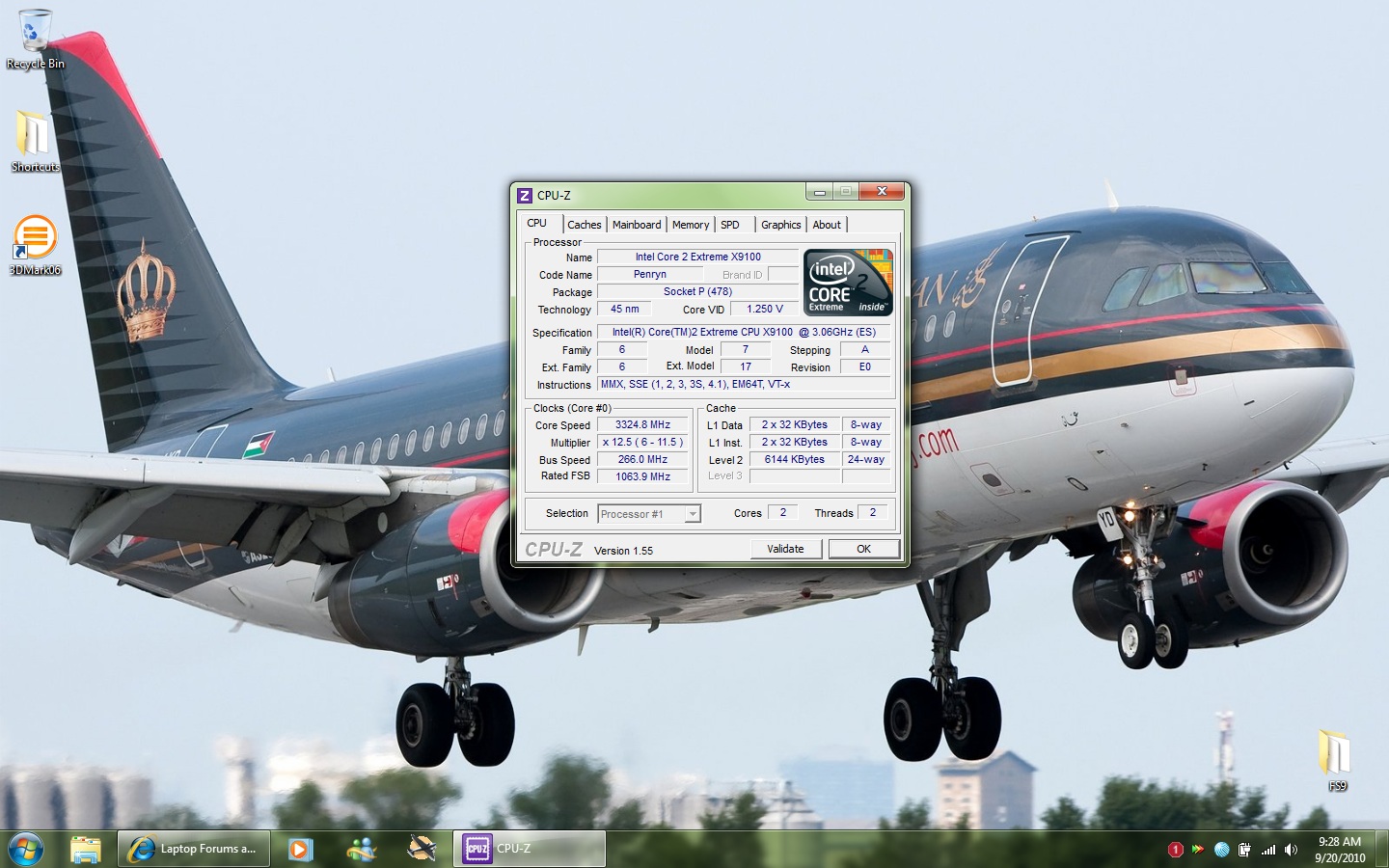
I have a Qosmio X300-14Y (Intel chipset) which was fitted with a T9550 (2.66GHz). Last week, I bought an X9100 (QHBQ - ES) from shirleyfu (such a great seller) for 299$ only. Yesterday, I disassembled the laptop (it took a long time), placed in the CPU, applied Arctic Silver5, reassembled and started the laptop. Everything went well!
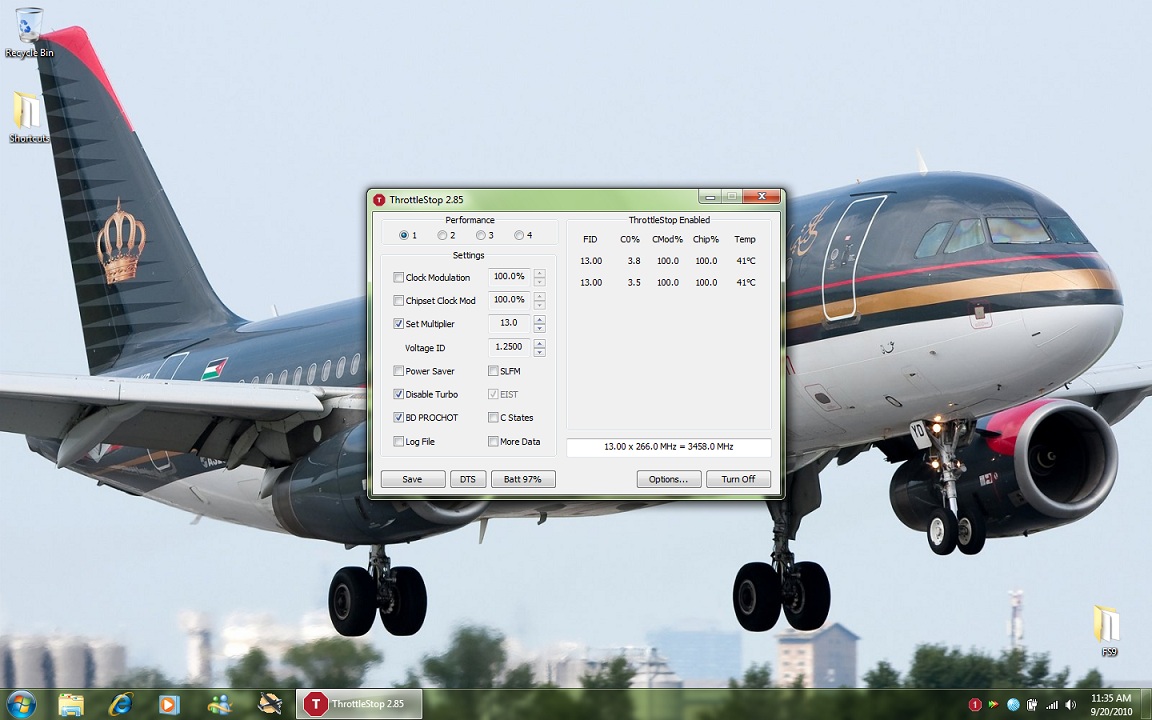
The thing I want to point out is that I can overclock the CPU!
I came across ThrottleStop (the greatest program ever) a while ago, and I read that I would be able to change the multiplier of any extreme CPU regardless whether the BIOS is locked or not.
The program can't be used to raise the multiplier of non-extreme CPUs. Therefore, I decided to try my luck with the X9100. I was lucky
I was going for the QX9300, but if the program didn't work, I would be stuck at 2.53 GHz
*Temperatures: (I have both cooling fans and a 35w heat sink)
1- Idle:
The T9550 used to idle at ~49C
The X9100 Generally idles between 40C-45C
2- Maximum load (Orthos/Prime95):
The T9550 used to reach up to ~72C under heavy load.
The X9100 @ 3.06 (266x11.5) and 1.2375V VID reaches up to ~88C under the same conditions.
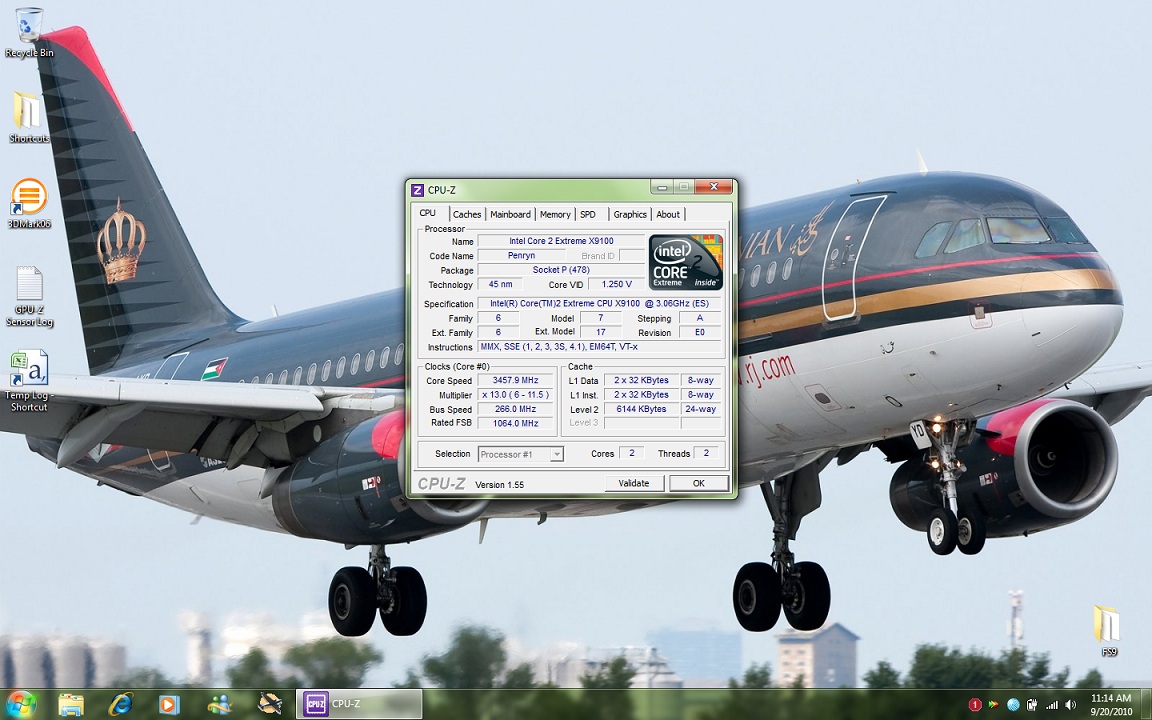
The X9100 @ 3.325 (x12.5) and @ 3.458 (x13.0) and 1.25V VID reaches up to ~97C.
(I haven't tested for stability, as the time for each given test was ~20min.)
I read that Arctic silver needs some time to achieve its maximum conductivity. But, I will buy a 45w heat sink when I find one (I think it should make a difference).
*Benchmarks: (Not much info here, I did some quick tests)
T9550: 3DMark06 CPU score was 2452, Windows Experience Index (Processor) was 6.3
X9100:
@3.06: 3DMark06 CPU score is 2802, Windows Experience Index (Processor) is 6.6
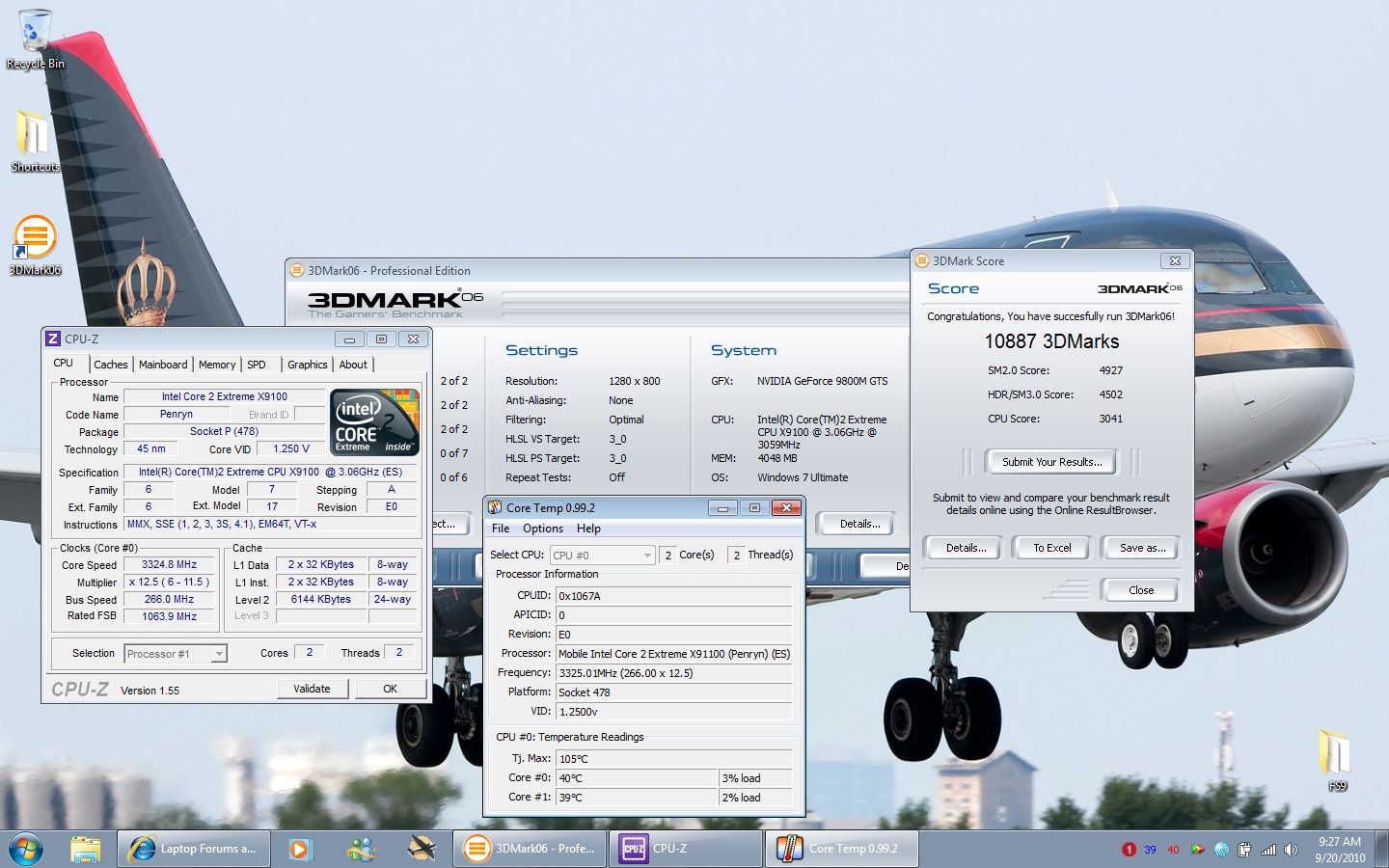
@3.325: 3DMark06 CPU score is 3041
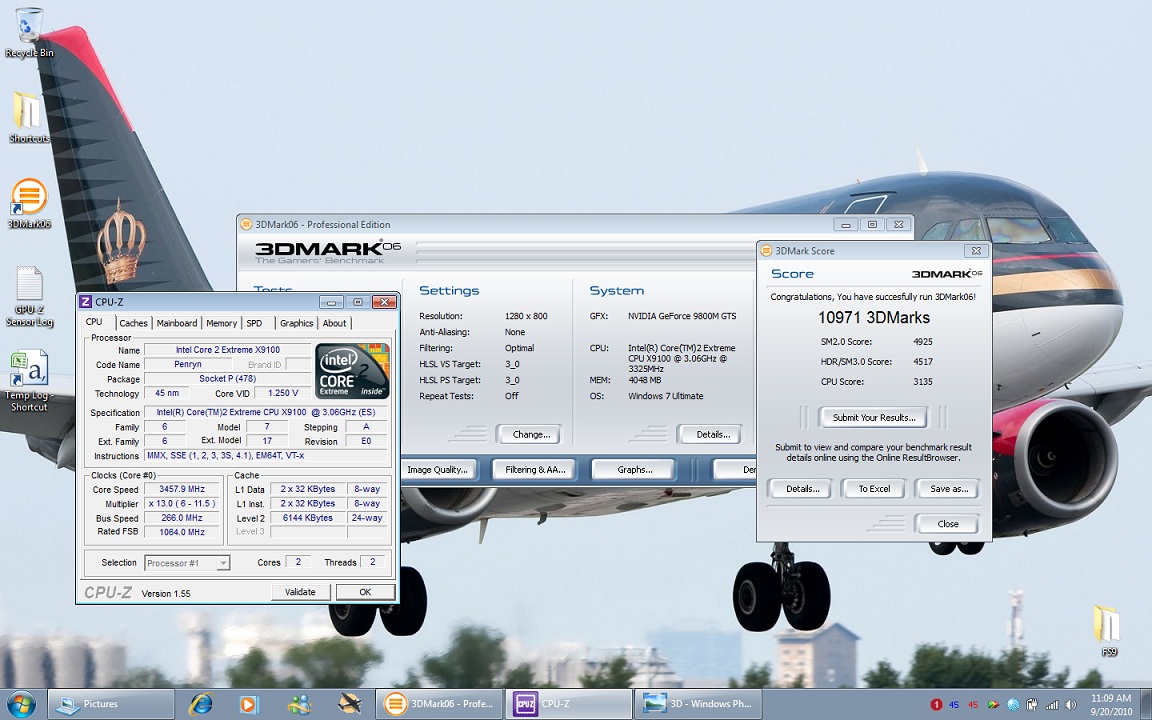
@3.458: 3DMark06 CPU score is 3135, Windows Experience Index (Processor) is 6.8
Maximum Temperature logged by CoreTemp was 88C among all three 3DMark06 tests.
Today, I will use 3.458GHz to play FS2004 (the main reason why I bought this CPU). I just want to see if this frequency is stable with FS.
Check out the attached thumbnails...Attached Files:
-
-
Personally there are things missing from the x305 that would make it a much better computer but as far having problems my system has been good. Would your system be over heating or getting hot by any chance? Selling the x305 is not such a bad idea
Nice work AdigA90 if your keen a gpu overclock could bump your 3Dmark06 score up abit more -
Thank you. For some reason, I cannot get a stable configuration higher than 650/920/1700, and I use 640/910/1700 mostly. The 3DMark06 score of 10971 was with 640/910/1700. I see alot of people with 700/900+, but I just can't get there!
-
575/890/1440 is the highest i can go on my 9800m gtx, both tunay and myself have a similar to yourself. only the 9700m gts seems to be able to overclock to its full potential, which is were you see the 700/900+ clocks.
-
Finally ordered an Alienware M17x, specs in sig, so I'm only going to have my x300 for a few more weeks
-
Yes. Kenny is right. If we could "reach" the BIOS and were able to read and edit it. We could change voltage of the GPU, which would give us better results. For now, we're stuck!
Oh, congratulations
But, I'm quite sure that this therad is going to die without you
Official x300/x305 Owner's Lounge
Discussion in 'Toshiba' started by Bartlett, Oct 4, 2008.