Problems? See this thread at archive.org.
You are talking about TurboCach right? About 2 years ago, in this therad we discussed it. Did you know what we ended up with? Nothing, TurboCach is absolutly useless, and even benchmarkers says it slows down the whole process becase it anyways can't be as fast as your GPU.
And hey! wait, who said Matt8107t was going to play games?
-
The Cpu I have now is the Intel core 2 duo p7350 and i do play games sometimes. The ram i am less concerned with as I have never really needed 4 gigs as of yet right now my problem is there are many times I'm doing thing and the cpu is maxed out.
-
My computer specs are in my profile.
-
Basically i just want to find out what the best possible cpu I can get that will work with the laptop I have.
-
Well if turbocache was useless I was not going to be able to play GTA IV everything on high since it requires 1gb vram and my 9800m GTS SLI only have 512mb. The same goes for sc2. More over gddr3 is nearly the same speed as the ddr3 1066mhz. It doesn't have that much of a difference. I agree that gpus vram is faster and it is better but when u run out of vram turbocache is good. Now to answer Matt8107t question I need to know what is ur mobo and which qosmio do you have?
-
just saw the spec of ur laptop. I believe that ur using qosmio x300 with the intel chipset. So u can go up to qx9300 for cpu. Any upgrade to your current cpu should make an increase!
-
so it is ok to go from a 25w processor to a 45w or will I have problems with temperature.
-
Well It depends. Qosmio x300 comes in 2 options. Either with 2 fans or with one. With ur laptop I would suppose that ur using just one fan. The best think to do when buying the new cpu is also buying the second fan for the qosmio x300. You can find it on ebay.
-
Btw turbocache 2 years ago was discussed as replacing the main discrete memory of graphics cards. Like the 6200TC . So obviously it would be slower because 1) then ram was a lot slower than v ram 2)the v ram was very limited from 1-16mb and maybe up to 31mb on TC version of the gpus.
Qosmio x300 comes with 512mb 9700m GTS or 512mb 9800m GTS SLI or 1gb 9800m GTX. So the graphics cards still have their own vram so if not needed more than that they don't use turbocache. Furthermore when vram is needed is always available if their is available ram. So for me that I play sc2 in ultra that requires 1gb of vram and I only have 512mb since I am running 9800m GTS in sli upgrading my ram to 8gb would eventually make a difference. So no turbocache doesn't slow up the system. It might slow it if 1) you don't have enough discrete vram 2) slow ram and 3)not enough ram. So turbocache migh be a gimmick but it gives some edge to the graphics cards limited to 512mb as mine. Even with higher resolutions that 1080p more than 1gb vram would be needed to ran games. Turbocache is a cheap and easy way to help the graphics card run the game. Obviously is not the same as using the vram but it still does a good job! -
I've also played GTA IV on everyting high, you don't need turbocach to work at that point. If you for example have 1GB GPU, you can still use the consol and sett everything to high +. But, to do that and get smooth FPS with a mobile CPU, is nearly impossible
 GTA IV is using more of your CPU then your GPU. My T9600 was always up to 98-99%, while my 9800M could almost idle on 50-60% of ussage.
Now to Matt8107t, you can go high as QX9300, your tempratures will be higher but your laptop will handle it If you want to do upgrades that gives you most incrase, start off with your CPU, then go ahead and buy a solide state drive, also known as SSD.
-
Well you don't need turbocache because ur gpu has 1gb ram. My dual 9800m GTS SLI which is a better config only have 512mb each. So turbocache is usefull in some situations. Furthermore I have an x9100 3,06ghz dual core. If it is overclocked to 3,8ghz gta iv plays smoothly on everything full. So it is not impossible. A quad core cpu like qx9300 would handle better gta iv I suppose. Anw Matt8107t has a 9700m GTS which has 512mb of vram. So yes an increase in ram will help in some situations. The 1st think he should do is upgrade his cpu.. Then an ssd. If he wants real gains in gaming it is better to change his graphics card to 9800m GTX which is the best gpu available for his config. At the end he can always upgrade ram.
-
I could still not draw view distance to 100 or over 30-40 to get a smooth fps. I bet you can't either, unless you want to play on 10-20 FPS.
-
I dont have it installed now so I can't really test it. But I remember that I had everything on highest setting (I think draw view distance was 100 not sure) overclocked to 3,8ghz and played it on 30fps. I would not get lower than 25 so it was working smoothly. When I go back home I might install it and show you screenshots but as of now I can't since I am still at the uni and don't have it with me...
-
You must use consol to get the view distance to 100. Because everything on high, takes about 670MB of your GPU, with view distance at 10 (or 14, can't remember) To get that to 100 you need way more then 1,5GB. However, it is not worth discussing. But it is this way
-
Well accoding to toshibas sheet:
NVIDIA® GeForce® 9800M GTS with NVIDIA® SLI technology
supporting TurboCache technology, 2 x 512 MB dedicated
VRAM (up to 1,791 MB total available graphics memory using
TurboCache technology with 3 GB system memory
I have 8gb of sytem memory so it is possible to go up to 1,7gb of vram with turbocache. Furthermore as I told u I can't be 100% sure that I had the distance maxed. So I can't argue for sure. I will be able to test it and let you know in a months time though. -
According to WEI my computer has over 4606 mb's of ram allocated to graphics.
I have 8 gb's of ram installed.
I'm running Windows 7 Ultimate 64bit.
Graphics
--------------------------------------------------------------------------------
Display adapter type NVIDIA GeForce 9800M GTX
Total available graphics memory 4606 MB
Dedicated graphics memory 1024 MB
Dedicated system memory 0 MB
Shared system memory 3582 MB
Display adapter driver version 8.15.11.8642
Primary monitor resolution 1440x900
DirectX version DirectX 10 -
Well, I'm going to leave this here, compare to your own if you don't understand the language.
![[IMG]](images/storyImages/gpuf.png)
-
Guys,
I have 2 OEM QX9300 processors that I need to sell.
I upgraded my X305 to 1 and was looking at getting more systems but didn't...
I am looking at getting 450.00 each + shipping. These are the ones that HP was selling for 500.00...Now look at the price...Woah! 507946-001
Let me know.
TIA
GTK -
I have some question about upgrading Ram memorry. I would upgrade my laptop memorry. i would like you guys to suggest me. In my counrty dosen't has DDR3-1066 SODIMM 4GB Hynix Chip Notebook Memory. I wonder that i can put Hynix chip DDR3 sodimm 8GB 2Rx8 1333MHz PC3-10700S (4GBx2) CL 9 on my x305-q720 ?
-
The 1333MHz modules will dowclock to 1066Mhz.
-
You can add the 1333mhz ram but I believe that 1066mhz is better (faster) for our laptops as there timings are better. Don't really know why. Anw if ur not planning to overclock then 1066 is the better way!
-
Weird...I just upgraded to 8GB (1333) (CMSO8GX3M2A1333C9) (Fry's) from the stock 4GB and my WEI went from 5.9 to 7.2... I am running a (Q706)QX9300 though...I have not modified the timings or anything yet... Currently they are set @ 9-9-9-24... Opinions on this are much appreciated!!
-
Well I get 7.5 on 8GB on 1400MHz ram (slightly overclocked from the FSB (133 to 140) so that sounds about right, you only gained 1.3 points btw, also check whether you are running at 1066 or 1333 in cpu-z
-
Thank you all you guys for suggestion.
-
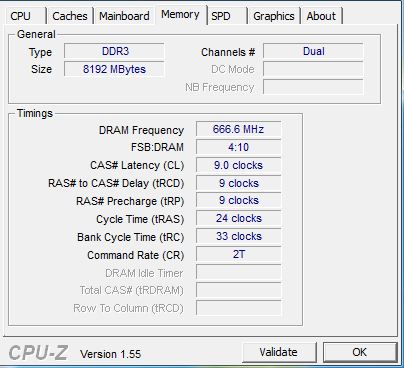
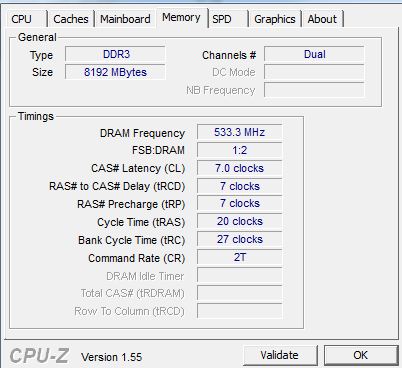
I have attached two CPU-Z photos...Quite interesting...
1(Left)-8GB (1333) (System appeared to be running warmer.)
2(Right)-8GB (1066) (System appeared to be default temps.)
TIA for everyone's input!
GTK -
so thats the same system with the same ram?
-
What? 10.char
-
The screenshots are from two types of ram... 1066/1333...
-
well sweet your running that ram at its max potential
-
Hello there.
I have a very weird problem with my Toshiba Qosmio X300. A couple of days ago I started to get some problems regarding my graphic card. Sometimes when I was playing or just doing something totally mundane such as browsing around on the usual forums etc. I started getting some kind of "crashes" where the screen would go black and then back to normal after a couple of seconds and I would recieve a message stating that the nVidia drivers had stopped working and that it had recovered properly.
After getting this kind of crash a couple of times I decided that the smartest thing to do would be to update my drivers. And so I did. That helped with the crashes. However, after having played on it for a while after having updated I recieved a blue screen informing me of a MULTIPLE_IRP_COMPLETE_REQUEST error. I let the system reboot and I continued playing for a couple of hours, then put on a Star Trek episode and went to bed without any problems.
And here comes the weird part. The next morning I turned on my computer and all I saw was just a blank screen. Everything else worked just fine. The USB ports started outputting power to my mouse, keyboard etc., there was a lot of HD activity and eventually Windows booted as I could hear it start. But the screen was still blank. Even my extern monitor which was hooked up didn't show anything. The status light was amber meaning it knew something was connected, but no image. After having rebooted a couple of times I decided to let it start windows again. This time I managed to start up Borderlands by tabbig my way through the icons on the desktop and I happened to remember it's position of the desktop. I could hear it start up and I could even start the actual game by navigating through the menues with the arrows.
I then tried to take out the battery and hold down the power button for 30 seconds, wait 30 minutes and then start it up again, first without and then with the battery. Still same problem and windows managed to start up same as before. I then tried to disassemble the computer to check if any cables had managed to break loose from it's socket or anything but everything seemes as it should. I even disconnected the cables from the graphic card and plugged them back in. I then assembled it, turned it on, but the problem was excactly the same as before. Just for the note I also tried to use the FN+F5 (or whatever Function button it is) to switch through monitors.
The only thing I can think of which I haven't done is to try to reset the CMOS, however, I can't find any guide or information on where inside the computer it is located. And I am very unsure that resetting the CMOS would even help anthing in this matter but it is sure worth a try as I bought this machine about 3 years ago and so I am stuck with the repair bill myself. I love my computer, but I sure wont spend over 1000$ on repairs.
So if anyone out there has tried anything similair or has any suggestions on what might fix the problem I would greatly appreciate it!
PS:
My model is a X300-13O. -
Right! But which on do you think is better? 1066/1333 based off screen shots? Both increase 1.3 but eh. BTW, the PC-8500 is Patriot...
Thanks for all advice\replies!
GTK -
So your model has the T9600 cpu and a 9800m gtx gpu
Its definatly a gpu problem, my sister had a qosmio x300 with almost identical problems, graphic driver crashes, random black screening which a restart usually fixed.
First try this
I baked the GPU (which was a 9700m gts), its not for the faint hearted and that has fixed it now it games hard and doesn't crash you could also try new graphics card, you can get a cheapish one here
Hope that helps
I think the 1333MHz one will be better but try ram benchmark to test it out, I have never tried it but I think the Everest RAM Benchmark might help you out, unless some else knows a better one. -
The thing is the screen is just entirely black even from boot. The usual Qosmio logo doesn't even show up when I boot it. I tried hooking up an external monitor which I know works with a cable I'm also 100% sure that works. Again, I can hear Windows start up properly but no picture on neither the laptop display or the external monitor. I can also start up games by navigating my desktop with the arrow keys, however, I have to do this in the blind as I have no picture what so ever. This leads me to the conclusion that my GPU is not fried and is working "properly". (I shouldn't be able to start up games if the GPU was dead)
The link you are referring to describes a problem where the computer is stuck in some sort of crash-loop. As I said this is not the case for me as I can still "operate" the computer but the laptop monitor is just completely blank and so is any external monitor I hook up to it.
But thanks for the reply
-
Sweet! You also got the X300-13o
I have never had a problem with my GPU card. And to reset CMOS is not possible on this laptop. I and Dude55 which started this therad have tried for ages to get it done (over P.M.) but it is just not possible. However, I don't think that will solve your problem.
All your issues reffers to a dead GPU (no picture on external display ect.)
Do you also have the 9800M GTX? (I ask because this model is diffrent from country to country)
Also, which driver did you run on? I know that some of nVidia offisial drivers have killed some GPU's before... Overall on the net. -
Yup and I've been super happy with the model until now
And yes I have the 9800M GTX
I downloaded the official drivers from nVidia own homepage (version 260.99). Does nVidia offer any kind of warranty on their drivers? I mean if it was the official drivers that killed my GPU it would be logical that they would cover the expenses of the repair cost. -
no, it was an earlier which they removed quickly. It is the king of the X300/305's but for your guys infromation, my X300 is also not usable anymore. It stopped from working, and now collecting dust. However, I'm about to buy/test another laptop. I'll still have the X300, maybe repair it.
Well, if you don't have the warranty left, you can also try to bake your GPU? I really have no idea how it works, as I never have tried it. But one thing is for sure, if I were you, I would not buy a new GPU to this laptop.
And another small detail, did you run on overclock? Did you have an overheating before this problem at all started?
Where are you from btw? -
I'm from Denmark
Nope, I have never played with OC'ing. However, I have had problems with heat before. But I fixed it by disassembling it completely only to find a centimeter thick layer of dust blocking the vent from the CPU. After I cleaned that out the CPU ran at about 60 degrees C at full stress and about the same for the GPU so no real heat problems there. I'm really puzzeled on how my computer could die like this since the only thing I did was update the drivers which I haven't been able to find any dirt on. So it would seem they are legit enough.
Well iif you want to repair you Qosmio, I happen to have a couple of spareparts for excactly your model
hehe.
And about buying a new GPU - not going to happen. I'm replacing this with a desktop PC since it's a hell of a lot cheaper than a gaming laptop and I'm poor since I'm studying at the technical university of denmark So I can't really afford to spend a whole lot on a new rig like this one.
-
lol, thats not far away from me eh
Well, I have no idea then. Have you ever looked into bakeing the GPU?
Or, I can sell my 9800M GTX to you if you want a new cheap one xP I know a lot of people from danmark
-
You live in Norway i suspect?
I have no idea on how to bake my GPU at all. I have never even heard of it. But I guess it's worth a shot
Well at what price are you thinking of selling it for? -
Yeah. I live in Norway.
http://forum.notebookreview.com/har...-kind-guide-how-bake-your-gpu-fun-profit.html
Quite old guide, but just to give you an idea. I have not thinked about price. But I can sell it, if you are in need for it. -
I got my GPU replaced last year so I think I should at least see if Toshiba permits special warranty on repaired items. If I'm lucky I can just ship it to Toshiba and they'll repair it for me. However, if they wont do that (which I'm sure they wont) I'll try to bake it. If that doesn't work either I'm very interested in buying your GPU
So try to come up with a price and we'll see what we can work out.
-
Sorry thought that your screen still worked which was why you could still open stuff. Im impressed you know your computer very well
Good luck with that. And that guide is pretty much how I baked mine -
Hi,
Im using Qosmio X305-Q706
SLI 9800 GTS.
Has any one had luck with the graphics drivers???
Im still using 186.81. has any one been able to upgrade drivers on their laptops beyond this wretched driver.
Nvidia drivers are in their 260's. I cant install anything beyond 186.81. -
I dont know if I can give u the page but if u search on google triple hybrid sli then you will find a forum where we discuss about the drivers and we have modified 2 versions of them to work up to now perfectly with our systems.. You can give them a try... I have the same gpu and I am using 260.99 drivers!
-
Here is the link...
hxxp://forums.laptopvideo2go.com/topic/26984-toshiba-qosmio-triple-hybrid-sli/page__st__80
Replace xx with tt...
I am running these drivers with my Q706 and have no problems... Good work Judgment! -
Thanks guys.
I had another question. the current driver i am using 186.81 usually shuts down at high temperatures to prevent the gpu from frying
If i use the drivers from the above links will it provide the same protection( shutting down laptop before it fries just when the temps are running high) -
It should provide this protection although my laptop never run that high to need a shut down! You should open up ur lappy and replace cooling paste. If you dont know how to do it or if it is under warranty then you can bring it to a technician and have it done for you!
-
We are 2 now tunay, my X305 has 4 months collecting dust. Any suggestion for my X305 than sell?
Without warranty, and bad experiences with the repairs i feel some risk to use it (dead mobo and the last was both GPU)
At least with my M15x i dont have any problems right now like the ones that the toshiba gave me... -
I'm currently looking into another systems. I'm not going to put money in to this laptop. I've also need to replace the keyboard now, but I can't find it anywhere and Toshiba's price is not actually nice!
Btw, guys, does it take forever for you also to past the BIOS post? -
For curiosity, which problem your x305 presented that made to stop it working?
Official x300/x305 Owner's Lounge
Discussion in 'Toshiba' started by Bartlett, Oct 4, 2008.


![[IMG]](http://img84.imageshack.us/i/gpuf.png/)