Problems? See this thread at archive.org.
I actually have no idea. It does not pass BIOS, it have started to happend quite often now. My keyboard does not work, to get it more right, some keys do not work somtimes, and b,n,a,n,m,enter,shift,alt and some other keys does not work at all. I'm simply pissed of this...
-
Try removing the battery and keep pressed the power button for 10-20secs. Replace battery and try turning it on! It should work!
-
Tunay, disconnect the built in keyboard and try it with a USB keyboard, the long post may be caused by the defective keyboard.
I've seen lots of replacement keyboards for the X300/X305's on ebay. -
Yes. But they're US keyboards. I have tried that judgment, it does not work. I think it is just better if I sell me out of this laptop as parts or something. I'm not sure yet tou, my Qosmio is basicly collecting dust now along with my HP DV2000 which is apart. My ThinkPad's CPU fan died, amazing how this laptop work without any cooler. The CPU did hit 96C wihle playing CS yesterday tou
 It is like, I had 4 laptops, Qosmio, ThinkPad, HP DV2000, and a DV9000. My Qosmio and ThinkPad did stop fully working the same week. I sent my DV9000 to HP service, never recived it back and now they can't find where my laptop is ( HP?!) my DV2000 is apart cause I was going to buy new cheap laptop and upgrade it with its parts, actually it has quite good spec. it was a dv2698eo special edition or something like that. Now I'm looking in to new laptop which I must get before the T7500 fry out on my ThinkPad without a single cooler...
-
IT seems its ur keyboard then. I heard lots of people having problems with the keyboard. you can get one here: Glossy Black UK Keyboard For Toshiba Qosmio X300 (K120) on eBay (end time 14-Dec-10 19:41:27 GMT)
It is not that expensive (25GBP) and it offers 1 year warranty. Better than buying a new laptop!! -
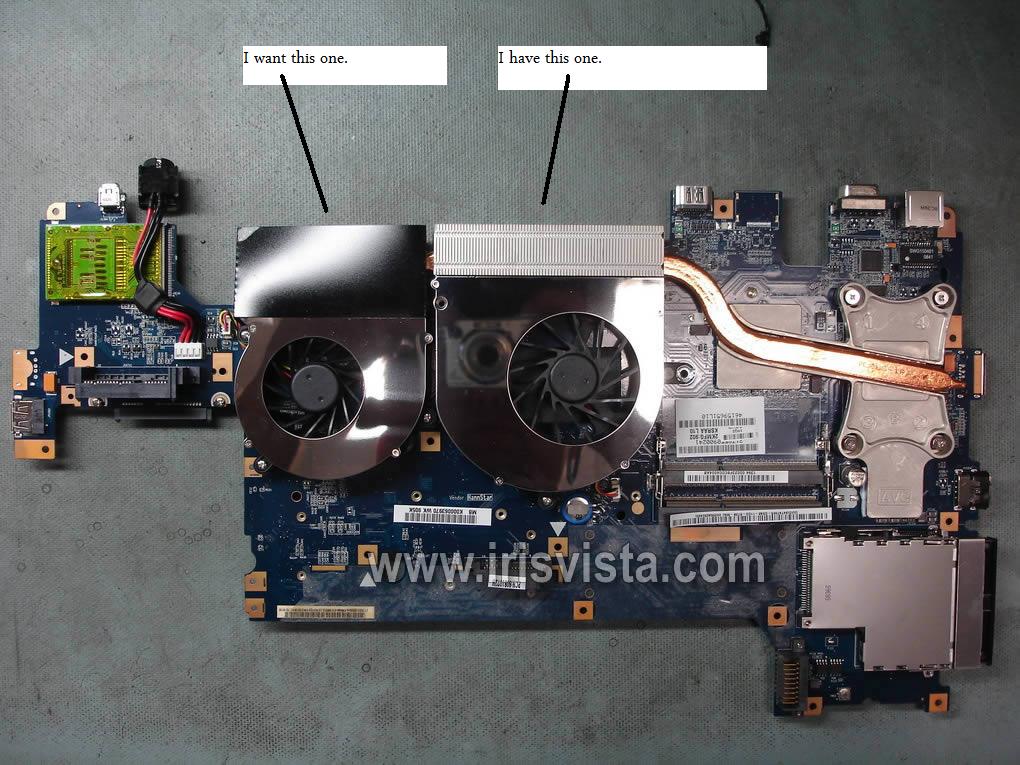
Hi, i`m the owner of a Qosmio x300-q701 with 9700M GTS videocard, which overheats and shut`s down the computer. The "fatal" temperature is 106-110 degrees C. Inside i have only one cooler for the cpu and i want to know if someone has 2 coolers inside, one for the cpu and one for the vga. I`m pretty sure that mounting the vga cooler is the solution to my problem.
Does anyone else have another idea? Windows 7 is better than Vista in this problem? Do you know where can i buy this cooler? -
Try ebay for finding the cooler. I never had the 9700m GTS but if you search google u can see many people using them and ask them for advise. From what I have read u can add a 2nd fan! You can find the fan on ebay and it's not too expensive. They only problem is that you have to dissasemble the laptop..
-
Thanks for you advice. I`ve already searched on ebay but i found only VGA/CPU cooler and i think is the one i already have. I still hope that is somebody around here who has 9700GTS with two coolers.
I `ve searched other forums and i found this picture, but i`m not sure if it`s a x300 qosmio or if it has a 9700 vga.Attached Files:
-
-
judgment: it is still UK...
Pilif I have the X300 with those two fans. It is a X300 board
-
What keyboard do u need?
-
Turkish.... But the thing isin't only the keyboard, I simply just don't want to put more money into this laptop.
-
Hey btw guys, the nVidia chipsets of X305s, is it running on nforce 730i ?
-
Does anyone have the 9700m GTS VBIOS? Or, does anyone know how to extract VBIOS from Toshiba system BIOS?
Can you try and upload your vbios for me? Pleease?
![[IMG]](images/storyImages/gpuz.jpg)
Thank you! -
Yes it is running on nforce 730i
-
I have the x305 q701, and since Toshiba direct is holding a black friday sale till Monday, I couldn't help but seize the opportunity to buy the X505 Q892 for a real steal at $979 which also includes a free 500 GB portable HDD. I love the X305 but it's already showing it's age, and the X505 Q892 has the Nvidia GTX 460m. Just giving yall a heads up before it expires on the 29th of Nov. this Mon. Oh use the coupon code "GAMING100" to knock off another $100. Merry Christmas!
-
Is it available in Europe for that price?
-
Thanks for response. Now i have to find the second fan and i hope this solution fixes my problems. Keep in touch to tell you what i`ve resolved.
P.S. If you know where to buy that cooler pls tell me. -
Take a look at eBay Pilif...
Thanks judgment. -
I have the second fan but you might not have the plug on the motherboard to power the fan, that was the problem I had with my first x300 but open your laptop up and see if it has it, PM me if your interested in my fan, its quiet useless to me
Not totally sure but i don't think it is possible to get a copy of the vbios from the qosmio x300 laptops, people have tried before and failed -
Copy that Kenny! I've (and again Dude55) also looked into this issue my first days here on NBR! Actually it is not possible to read/save the BIOS form our X300's. Another downside...
Lol, the first notication email I got from NBR was that my Inbox was nearly full So, there was a lot about this and the PLL for CPU overclocking...
-
I don`t know why i don`t have PM menu, so looks like we have to talk here. I`m interested in that fan, but, please, can you make a real photo? I`m not very pleased by opening my laptop, but i still want to buy that fan of yours. Which is the price that you want for that fan? How can we make the deal? I`m from Romania and i saw that you are from Australia so we have to use the post mail.
Thanks for help and i`m looking forward for your answer. -
How does $20 AUD sound and for that I'll send it for free, if you have ebay and paypal that is my preferred method of selling
I uploaded the picture here
When you do open your laptop i think it would be a good idea to clean the heat sinks as they are probably full of dust -
That thing with the plug on motherboard...i didn`t expect that. Tomorow i want to dissamble the laptop to see if i have that plug, but i`m a little afraid. I don`t have here necessary tools or space (i`m not home). What tipe of Qosmio did you have without that plug? Mine is Q701, the one with Nvidia 9700M GTS video board.
Thanks again for your help. -
Yeh mine was the q701 as well but you never know, if you are really keen you could splice the wires together from the other fan not sure of the effects on the other fan though.
Take it apart any way it sounds like your heat sinks are full of dust
And disassembly guide here if you need it -
Today i opened my laptop and saw you are right. I don`t have that plug. I have cleaned the vga and now it`s much better. the temperature decreased with 15 degree C and i saw that the cooler i already have gives air to my video card.
@kenny27 THANKS A LOT for your help, now my laptop is much better. I hope you are not mad at me because i won`t buy your fan. I`m really sorry but it`s uselles for me.
Thank you a lot again! -
Today i took out my X305 from my closet (is full of dust in the cover), and i made a clean install of windows 7, the only bad thing is that the 260.99 nvidia drivers doesn't recognize my GPUs, anybody had a similar problem with windows 7 or knows which drivers work fine? Thanks
P.S: Im going to use the Qosmio like server/back up and basic design (photoshop, corel draw, etc..), no games.. because like this laptop doesn't has warranty and in the past gave me too much problems (GPU/mobo replacements), i don't want to end with some dead part and pay more to repair this thing. -
Try googling triple hybrid sli. If u cant find the forum you can pm me. I have modified the 260.99 drivers and have work fine for me and others. You can download the inf on ur own risk from there!
-
Im going to try with other drivers from nvidia website, if not i will use the modified. Honestly im not going to use this laptop for gaming (for that i have my M15x), only design with the tablet and some normal internet surfing/homeworks in MS Office.
-
Your welcome and don't worry not mad at all, was just trying help you out
Maybe try the older 186 drivers maybe they will work? -
I believe ur qosmio x300 is faster than ur m15x. As I can see it only has a 240m..
-
Yeah, but im fine as i only play SC2 and sometimes BC2/MMORPG without problems, soon (if dell has the HD5850 or 460M in stock..) i will upgrade until is possible. The last time that i play something (curiously Crysis) my gpu and mobo died at the same time, and without warranty i will not take risk.
In general, my M15x outperforms in most cases my Qosmio, the i7 quad core makes real difference towards my C2D (like SC2, which i play a lot and uses too much the cpu), the only bad thing is the GT240M which i will replace as i said until is available. -
some people have put a 5870's in their m15x not sure what is involved, might be worth looking into?
-
I've took my keyboard out and throw it away. Now, I've hooked up a Logitech keyboard. My laptop do works. I've also clean installed Windows 7 to get a new start. Let's see how this turns out....
-
Nice work tunay
Used my sisters x305 Q701 at a Lan (I lent to some one) and it has its old problems again, random black screen buzzing sound only while playing games tho a restart fixes it has any one got any idea other then down clocking the memory just in case it happen again -
hmm, does it only happends when playing games or what? Under GPU load?
-
so far only under gpu load, she doesn't play games so that alright, I just don't want it to get worse and not have a fix ready for her
-
try installing the new bios and the new nvidia drivers.
-
Sorry, but I'm quite sure it won't fix it.
-
Kenny27: "1. Download the latest version of RivaTuner here: RivaTuner
2. Install RivaTuner and Run the program.
3. In the Main tab, click on the arrow next to Customize under Driver Settings to bring up more options then click System Settings (the first Icon)
4. In the Overclocking tab, where it says "Force constant performance level" select performance 3D.
5. Click apply, and reboot the system when prompted.
That has been posted on the Toshiba USA forums as a working fix for that problem.
Apparently the issue is caused by the Nvidia Powermizer feature, and that tool forces the system to use max GPU performance settings only.
Based on all of the positive responses that it got there, I would say that it does work. -
Thanks judgment I will try that as soon as I can and let you guys know how it goes
-
You should try priest setting it seems better!
-
sorry i meant priest-king, don't ask me how i confused that one!
-
I laugh hard at this bro! In my History class, when we talked about II world war. "eh, Tunay, what are you laughing at?"
-
haha its not the first time i have confused peoples names either
-
If for some reason the "Force constant performance level" drop-down is grayed out you will need to go to the "Power users" tab in the initial RivaTuner window. Then click on the "+" next to "RivaTuner \ NVIDIA \ Overclocking". Look for "EnablePerfLevelForcing" and under Value type 1. Click apply, this should allow you to modify "Force constant performance level." Finally, follow steps 3-5 above."
-
Thanks Priest-King so far working beautifully
-
Glad to hear it, now have fun killing those love starved cannibal zombie aliens.
-
how did you know me and my bro tested it by playing cod zombies?
-
There is still lipstick on your collar. -
Any of you tried 3DMark11 yet?
Official x300/x305 Owner's Lounge
Discussion in 'Toshiba' started by Bartlett, Oct 4, 2008.