Problems? See this thread at archive.org.
Btw I might need to get a new palmrest as mine started to change colour.. Does anyone know the part number so that I can order it (the one with the fingerprint reader)?
-
Okay I can confirm that the new nvidia drivers fixed my problems in most games. The problem in black ops was fixed by modifying the config_mp.cfg (can be found on your C:\Program Files (x86)\Steam\SteamApps\common\call of duty black ops\players\config_mp.cfg) and change the r_multiGpu to 0. I know that since my config is sli it should be set to 1 but when it is set to 0 the game runs fine! The sli logo is still on showing that both gpus are used! Sorry for all these posts.. I hope this will help the others! Btw I have CIR disabled, don't know if it contributes to the fix!
-
I have aswell high frames, around +75.
The problem was the constant freezing... shooting to the walls etc.
I cant install newer drivers withouth modifing the inf... -
That is very strange... I can install all drivers from nvidia since 267.24 . Now I am using the 270.61 from nvidia. I have changed the multi_gpu to 0 and no freezes. Frames are the same. Not big increase in frames with dual vs single gpu... What is you 9800m GTS id?
-
how do you guys solve the flickering problem in crysis 2?
i renamed the exe to bioshock but the problem is now im only using 1 9800, meaning only 30 fps when i should have 60 with sli! -
Good luck with that. I have searched for one, (new) without luck..
-
Sounds so bad...

-
Did u try to install the latest driver from nvidia? I am now using the latest one but have not tested it for a long time. Try the 267.24 beta version. For me it is the only one that fixes the flickering with sc2 as well as the random black screens. I believe it will solve the problem and in crysis 2. Furthermore try changing in the manage 3d the threaded optimization to on and the power management to prefer maximum instead of adaptive performance. Let us know for the results. I am certain that the 267.24 will fix ur problem since it fixed sc2 which I had the exact same flickering problem. Furthermore there is a patch for crysis 2 if I am correct.. A friend of mine had the same problem with his desktop and crysis 2 and did the following:
1. Download 267.24 drivers and install
2A. Download SLI fix for 267.24 from nvidia and edit Crysis 2 profile with nvidia Inspector
2B. Create new profile for Crysis 2 with Nvidia Inspector for Crysis2.exe and Crysis2Demo.exe
3. Set SLI compatibilty bits to 0x02004205
-Set Anisotropic filtering mode to User Defined/Off
-Set Anisotropic filtering setting to 8x or 16x
-Set Number of GPUS to SLI_PREDEFINED_GPU_COUNT_FOUR
-Set Nvidia predefined SLI mode to SLI_PREDEFINED_MODE_FORCE_AFR2
The above is from a post in another forum a friend of mine directed me to.. -
Can anyone tell me the part number for the palmrest with the fingerprint??
-
Palmrest with fingerprint reader
Toshiba Qosmio X305 Series Mainboard - Palm Rest -
Thank you!! Can you find me the synaptics touchpad (since when changing the palmrest its very hard to change the touchpad) and the front screen bezel as well? Brand new?
-
Touch pad
K000061770 - Toshiba Laptop Miscellaneous Parts
LCD Bezel
K000065270 - Toshiba Laptop Miscellaneous Parts
Both were listed under Toshiba X305-708 PQX31U-00U00C, one of the US, Sli models
The company does ship internationally. I deal with them all of the time.
Quite a few of the parts they offer are actually drop shipped by Toshiba.. -
Thank you again, but the shipping price is too high on that company! Btw I want to confirm that the fix for black ops is to disable CIR from brios. CIR isn't the infrared ? Why does that mess up with the gpu setup?
-
At least the part numbers will be the same, so it should be easy to find the replacement parts elsewhere.
-
Fixed your post for you
-
CIR off, reformated, all drivers installed (official toshiba), nvidia 267.24 driver for display. No problems with any of the following games: black ops, modern warfare 2, Starcraft 2. Even now in Starcraft 2 I nearly get 60fps everywhere (it is gaped to 60). If I install later drivers which are not beta my frames in sc2 drop to 40-45, and I get black screen or crashes without response in sc2. In modern warfare I get black screen and black ops freezes. So the only driver I found out working fine is the beta one 267.24 . It really makes me wonder why a beta driver is a lot better than a final release.. I am staying with that driver from now on.. Thanks all of you for any input and dseriewow for confirming the CIR observation! (Black ops is problematic with my config. I need to change it to multithreaded 0 in the config file and then set affinity to one core. That fixes the problem when in sli. If sli is disabled the it works fine with both cores. I don't know why...)
-
Just sent you a pm.
-
Anybody interested in buying an x305? I'm thinking of selling mine for $650 OBO.
BTW we are close to reaching the 300,000 views mark in this thread. I can't believe it is at 412 pages! -
Anyone who knows where I can find the latest realtek sound drivers for windows 7 64bit?
-
Model Content Page
Realtek Audio Driver for Windows 7 64 bit
Lastest update from Toshiba but it's long time ago.
-
I mean if anyone knows of the latest realtek release and if yes to post a site..
-
Black ops still freezes.. It is either a hardware problem or a black ops problem or a conflict..I am testing it with an external wifi card at the moment. It seems okay but always the same and then sudden freeze. I don't know.. I started to hate the qosmio! I am going to sell it in the summer when I am back for vacations. Okay freeze is fixed after playing around with ram timings. Really don't know why the default timings cause the freeze. I read about hybrid sli systems that the video is output by the onboard gpu so the memory has to be moved on the onboard one. So maybe somewhere there was a bottleneck. Will test a lot more since I have repeatedly thought that different ways had fix my laptop but the fact was that they just delayed the problem..
-
Does anyone know of any program that I can monitor the voltage of the motherboard ?
-
Info:
If there are any requests for changes to the OP please send a PM.
Thanks -
I have underclocked both 9800m gts memory clock from 799 to 750. I have not lost any frames (at least fraps shows same fps) and black ops is stable without freezing. Does this mean that I have a hardware problem or is it due to bandwidth problem of the pci-e (running on 8x? like the m17x r1 had a similar problem?). Or does it mean that my power supply has problem thus giving less electricity so I need to change it? If anyone knows please let me know so that I can send my laptop for a repair since I have 1 more year of warranty...
-
Able to find this brand new?
Wait, dosn't your kick up to x16 under load? -
Like the alienware m17x r1 which has the same chipset no the pci express is x8 for each graphic card. I run the game through the whole night until now. No slow down no freeze no black screen. Testing sc2 now and it is everything fine. It makes me wonder if my gpu or power supply are defective or if it is the same problem as the m17x r1 had with the pci express slot. I would like some input please... 799 to 750 mhz memory clock didn't make any difference to my fps in the games but if it is a gpu defect I would better send it for a repair now that I have warranty.
-
Well, I'm using my Asus at the moment. I can see if mines kick up to 16x as I know it does, but I have a single GPU.
Anything I can help you with? -
A single gpu would run at x16.. Dual gpus run at x8 .. The problem is that it does not seem to have any 9800m gts sli qosmio x300 users in here who can tell me if they have a similar problem. I know that people had the same problem as I did in batman arkham asylum and starcraft 2. So I am nearly sure that its not a gpu defect... The thing is that searching through google I found out that some 9m series nvidia gpus where affected with defects. Toshiba never revealed any of its gpus as defective whereas dell and hp did. So I am not sure if my 9800m GTS SLI config has a defect. I know that the decrease in the memory clock from 799 to 750 is not big and thus I only lose 1-5fps max on any game. So the question is should I send the laptop to toshiba and wait for 1-3months until they fix it or is my laptop not defective and the problem is the pci-e limitation thus not worth sending it to toshiba? I really don't know since as I told u already I know people had the same problem with Starcraft 2 but dseriewow said that his laptop with dual 9800m gts sli works fine in black ops (no freezes). So... any ideas?
-
Maybe buy your new laptop first then send the Qosmio? But, that may be hard(?).
-
If I buy a new laptop I have to sell the qosmio for at least 800euro 1st. So that is no option.. Thanks for ur input though! Ur the only guy replying to me! I know I became boring but I tried every possible way to fix this problem. I finally found a solution but it made me think if my gpus are defective. I would like some input from dseriewow or anyone else who has the dual sli version. Can dseriewow or any other SLI x300 user please test black ops over a 1hour (more commonly in villa map) in black ops and tell me that u don't get any freeze? The most O could make it work without underclock and with black ops on was 1hour and some minutes.. After the underclock sc2 runs fine without black lines, crashes or black screen. Same goes for batman arkham asylum, nfs shift and black ops.. The reply from toshiba uk was that my qosmio is 3 years old and it does not meet the minimum requirements of those games! I got pissed off by their reply! Black ops maxed out with 16x antialiasing I get 60-70fps. This means that my specs are more than enough! The reason I underclocked the gpu is because when the laptop run on battery and thus lower clocks it never crashed! So I thought lets try it. And here I am with a working solution!
-
Your problem is more than likely related to that game or that games engine. If it works fine doing pretty much anything else, it would not be a hardware problem.
It's an old problem of games being released with badly written code that won't function properly on some hardware. I have a friend that plays Everquest II and he is constantly complaining about glitches in new updates, and at the Toshiba US forum, we see it all of the time with other games there too...
Before releasing the game to the public they can only test it on so many systems, and it is rare for someone not to have a problem with the game or an update.
If you have ever used the 3D chat client imvu, you would know what I mean about buggy software code. It works great on some systems, but from reading the forum there you will see that pretty much every release causes a problem for somebody.. -
Then the question comes as to why does it work fine if the memory clock is underclocked from 799mhz to 750mhz? I tried 790,780,770 but only the 750mhz fixed it. On need for speed hot pursuit I had no problem though. Same goes with 3dmark 06 which I run it in loops and never crashed..
-
It could simply be the way that the program is accessing the memory. If there is something in the software code that does not agree with the way the hardware is meant to work, it will have problems. When you altered the memories speed, you also altered the way the hardware is functioning.
Now if all games or programs that push the system had a problem, then I would say it was a hardware issue. -
Do you believe I would have a problem with 3dmark06 or nfs hot pursuit if it was a hardware failure? Do you know any other program to test the gpu in order to see if it has defects? I have run furmark for an hour with no stability issues..
-
I've alway liked the design of the X305 series. Too bad they didn't make it in blue & black. I also think the HK speakers in the X305's are some of the best speakers to ever grace a laptop.
-
Look for other games that use the same engine as black ops and see how they do. That will at least tell you if it is the engine portion of the game, and if that is the case, it will be something that you can report to the creators of Black ops. Unfortunately, even this is not a guaranteed test as I have learned that the engine is used and each gets tweaked differently for each of the COD based games. if the tweak used for the Black ops version is the problem, it may not appear in the others as they are each tweaked differently.
With only the game doing it, there are no other tests that can be run that would push the system to crash. I built a custom PC for a guy to his specs, with all of the parts that he wanted. It was a fast system, and would do everything you asked of it with no problem, except run his favorite game World of Warcraft. The hardware in it would pass every stress test I threw at it, run any benchmark, or game, except for that one game. He finally had to give up on the idea of playing that game, because the problem was something in the game not liking his hardware... That's how I know about this issue.. -
I understand what ur saying. The problem is that I am waiting for a sli x300 user to report to me if he has a similar problem. I know that sc2 and batman arkham asylum had the exact same problems as mine. If the solution is losing 49mhz of memory clock that's not too bad for me but I don't want my gpu to die too early on me because of this.. Thank you for ur input. I know about this problem of games not liking some particular hardware but again I would like an answer from someone with a similar config so that I can be sure it is not hardware related! Anw now I am very happy since I can play starcraft 2 in SLI which gives me 50-60fps all the time and black ops without freezes! I am using nvidia display driver 267.24 (since they give the biggest increase in fps) and the nforce system tools 6.06. I created a profile to be loaded whenever I run sc2 and black ops which automatically underclocks my gpu memory clock to 750mhz. Thank you for ur reply it is well appreciated!!
-
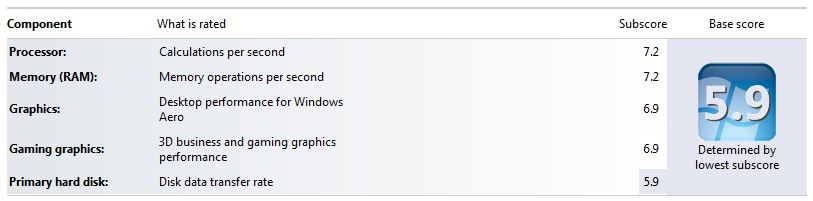
I have PC8500 and my WEI on Memory is 7.2...I did try PC10600...
http://forum.notebookreview.com/6908730-post3175.html -
judgment, you try the 270.61 drivers? If you did and I overlooked, my apologies.
Here is my WEI as of now... For me I went from 6.7 to 6.9 with these drivers, however, I have yet to test.Attached Files:
-
-
Thoughts on PC8500 vs. PC10600 other than future use?
Take a look at the link below...
http://forum.notebookreview.com/6908730-post3175.html
TIA -
With 267.24 my WEI went from 6,7 to 7,1 . Moreover the fps in SC2 from 40-50 went to 50-60. And black ops from 30-40 all maxed went to 50-75. That is a big improvement. I tested the 270.61 but they are not as good. Moreover they produce the same freeze in black ops, and problems with sc2. Can u confirm that you can run black ops without any freeze, which need to ctrl alt del and esc and then continue playing?
-
Can you make me a favour and test eithert Starcraft 2 or MW black ops and see if it freezes when in SLI ? I need to know if my hardware is failing.. If I underclock my memory clock to 750mhz from 799 then I have no freeze.. (sorry for double post ;p ) About ur ram I don't have words!! Mine is only 6,6 .. !!
-
Have you installed this? With 267.24 my WEI went from 6,7 to 7,1 also. The items below says it is for 267.24?
NVIDIA DRIVERS 7 -
Yes I have. That does not fix the freeze. Same for the 270.61 drivers. If you can test black ops I will be more than thankfull
-
I would but I don't own on PC... Xbox360... I will see what I can do.
-
I also have to downclock my memory to 750mhz when playing some games for my machine to be stable, so I just prefer to keep memory downclocked all the time (except in benchmarks). Black OPS runs just fine. Aero disabled, MultiGPU set to 1 in the .ini, 258.96 drivers. Going to test the ones you're using to see if they're any good.
EDIT: are you using 267.24 from the official nvidia website or from laptopvideo2go? Could you give me a link to the place where you downloaded the driver you're using? 'cause I'm having issues installing any driver since 258.xx.
Also, isn't 267.24 a beta release? -
I'm glad to help you, if I had the X305 with SLI I would be glad to test those games for you
It has, end of the story.
I dubt 267.24 is a beta, or it could be but it is outdated. I'm using the 267.76. However, I don't care about 5-10 FPS loss, always keeping my drivers up to date
Also, judgment, as I have said before, Toshiba's support is useless. This is just nothing to discuss, end of the story.
-
It says it's a beta release on Nvidia's website.
I do care about FPS loss, that's why I just stick with good drivers for my machine. Also, I only install desktop drivers on my Qosmio, therefore I have to wait for working modified infs from laptopvideo2go. I have been using 258.96 desktop drivers for months now and I can say they are so much better than the latest notebook release. They're about 3-400 3DMark Vantage points ahead and just run most games much better.
Official x300/x305 Owner's Lounge
Discussion in 'Toshiba' started by Bartlett, Oct 4, 2008.