Problems? See this thread at archive.org.
I don't think I remember reading this here, and it might be more a general Win 7 question, but how do you set the fingerprint scanner for logging in ?
-
i have a s15 with hdd, i did a fresh windows 8 install, i followed the guide in the first post to install drivers , but i get max 2 hours of battery life with stamina mode, 50% brightness with just internet surfing
with windows 7 i got about 4 hours, i don't think it's normal since windows 8 reviews said that it improved battery life...
anyone had similar issue? or any tips/solutions?
thanks in advance -
On my S1512 the Stamina mode is dead quiet, and it's a i7-3632QM !!
Now if I put my ear 2 inches from the keyboard, there is a little fan spinning noise. But in a library, someone sitting next to you could not hear anything.
For everyday usage it's more than enough. In Speed mode you get fan spinning a little bit more. -
Agreed, I could almost use my S13 to play diablo in a classroom (as in its surprisingly quiet).
Has anyone been able to download and install the Firmware extension parser for win8? It simply refuses to install for me. That and the shared library.
Edit: more problems, I havent wiped the old SB yet so I cant activate my copy of windows 8. As such I think it limits my usable ram from 8GB to 2.39 (weird number?). Also if I change the boot type from legacy to UEFI, if cant find the OS? Thirdly (and this is my fault), I swapped screws on accident and as a result stripped the holes for he battery/HDD cover.
This has been a nightmare. -
Can anyone with an Android phone try to send a photo via bluetooth to your laptop? For some reason file transfer fails when I send from phone to laptop, but I can send from laptop to phone.
-
Hey guys; I'm getting an s15 on wednesday, but i'm kind of operating on weird time constraints at the moment. I'm swapping the included drive for an SSD, which I already have. Is it possible for me to install windows and begin preloading apps on it using my desktop, then stick it in the laptop and install drivers when I get it?
-
I have the s15 and like everyone else says in stamina mode you will not hear the fans...
Unfortunately the hard drive I have in my computer (Seagate momentus XT) is apparently the loudest drive on the planet so I hear a little whirring from my comp in a dead silent room.
Its loud for a hard drive but even 5 feet from the laptop you can't hear it at all -
I'm sure it's been mentioned in this thread countless times, but what's the battery life like with the sheet battery? With WLAN on constantly, watching a few videos, listening to music etc.
-
Hi,
Got my S couple days ago and I have to say I am quite happy. Didn't have time to customize it so I had buy it out of the store.
Anyway I am noticing some screen flicking, it's ubber fast and not very apparent at the first glance. It happens when you go from Start screen to desktop, it flickers only few times. I made sure that auto brightness is off so it can't be that. Did anyone experience something like that?
On a side note does factory SSD come integrated on the board or it's just like any other SSD?
Thank you -
Hey everyone. I would like some guidance please. I'm currently deciding between
a 15 inch Vizio and Sony S for a new laptop.
My current laptop is an HP DV5T-1000 that I got back in 2008. This laptop
has served me well, but i definitely need something more mobile and
faster, with great graphics and a higher resolution. Here are the specs
for the two laptops that I'm looking at.
VIZIO CN15-A5 ($999)
1920x1080 pixels
2.3 GHz Core i7-3610QM
8 GB DDR3
1 TB HDD (5400RPM) + 32GB SSD
GeForce GT 640M LE (2GB NVIDIA® GeForce® GT 640M LE (2GB) GDDR5 )
Number of USB 3.0 Ports: 2
Item Weight: 5.3 pounds
Dimensions: 14.92 x 9.90 x 0.86
NO DVD Drive
SONY S Series 15 SVS151290X ($1049.99)
Full HD IPS display (1920 x 1080)
Core™ i7-3632QM quad-core processor 2.20GHz
8GB DDR3
500GB (7200rpm) HDD, no SSD
NVIDIA® GeForce® GT 640M LE (2GB) GDDR3, I believe
2 USB 3.0, 1 USB 1.0
Weight: 4.4 lbs
Dimensions 10.06 x 14.97 x 0.95
DVD Drive
Some Considerations:
- Looks like the screen is about the same quality and resolution is the same.
- The 32GB SSD on the Vizio is pretty tempting, though the HDD itself is slower
- The graphics card looks more powerful on Vizio, b/c it's GDDR5
- The Vizio has a pretty small keyboard, I'm not too fond of the design
- The Sony has a DVD Drive. the absence in the Vizio is not a deal breaker,
but I prefer it b/c I will be loading some software, so I would need to purchase
an external DVD drive for the Vizio
- The Sony is lighter, but the materials seem to be less sturdy and polished (Aluminum vs.
magnesium alloy on the Sony)
- The battery life, I'm not sure about. Looks like the Sony has a slightly smaller battery
- Fan Noise/Overheating: from what I've read the Vizio has better ventilation
- I realize you can overclock the GPU, I would probably no go over 700mhz.., but
how does the GDDR3 vs. GDDR5 affect that picture?
- From various reviews I also learned that the Sony's speakers are complete crap, but
the Vizio's aren't much better. I read somewhere that downloading Realtek drivers for
the Sony makes them sound much better. Can anyone support this claim?
- Don't know if I'm forgetting anything here...
Basically, I'm looking for a solid computer that will last me 3+ years, won't have too many
hardware issues such as overheating, will be able to run some graphic software and occasional
demanding games like Skyrim, Alan Wake, and GTA. The Vizio is a bit thinner, but heavier,
don't know what to make of that. I'm leaning towards the Sony because it's more mobile, has
a more functional keyboard, has a better design in my opinion, and because it has an optical drive.
The $50 dollars in price difference is negligible...
Please help me make a decision! Thank you!
Greg -
make sure your refresh rate is set to 60Hz rather than 40Hz.
-
Thank you for your help with the noise so far!
I've seen this clip on youtube and I'm worried about the noise of the machine... Is it really like that in real life?
VAIO SE/S15 Fan noise test - YouTube -
Yup it's on 60Hz.
As of right now my keyboard is lighting on and off by itself and my touchpad is switching apps if you swipe it from left to right even if you are not on the edge. Something is off.
BTW screen flicking/dimming happens when you go from bright to dark screens. -
hey guys,
just found this in the ux51 thread to control the fan
[Vorstellung] NoteBook FanControl (NBFC) - ComputerBase Forum
anyone try this on the s15?? -
Hi,
same problem here only that i deleted all partitions before my Windows 7 installation, so i have no access to the Win8 drivers anymore. on sony's website there are no drivers for this device available.
You think, you could send me your extracted drivers?
thanks in advance and greets from germany,
daniel -
More problems with my S13A then I ever had with the SB. Thus I returned it. So much pain.
-
Hey guys/gals,
It's been a while since I've posted here, but I've got a few queries about my S15 (pre Win 8 version).
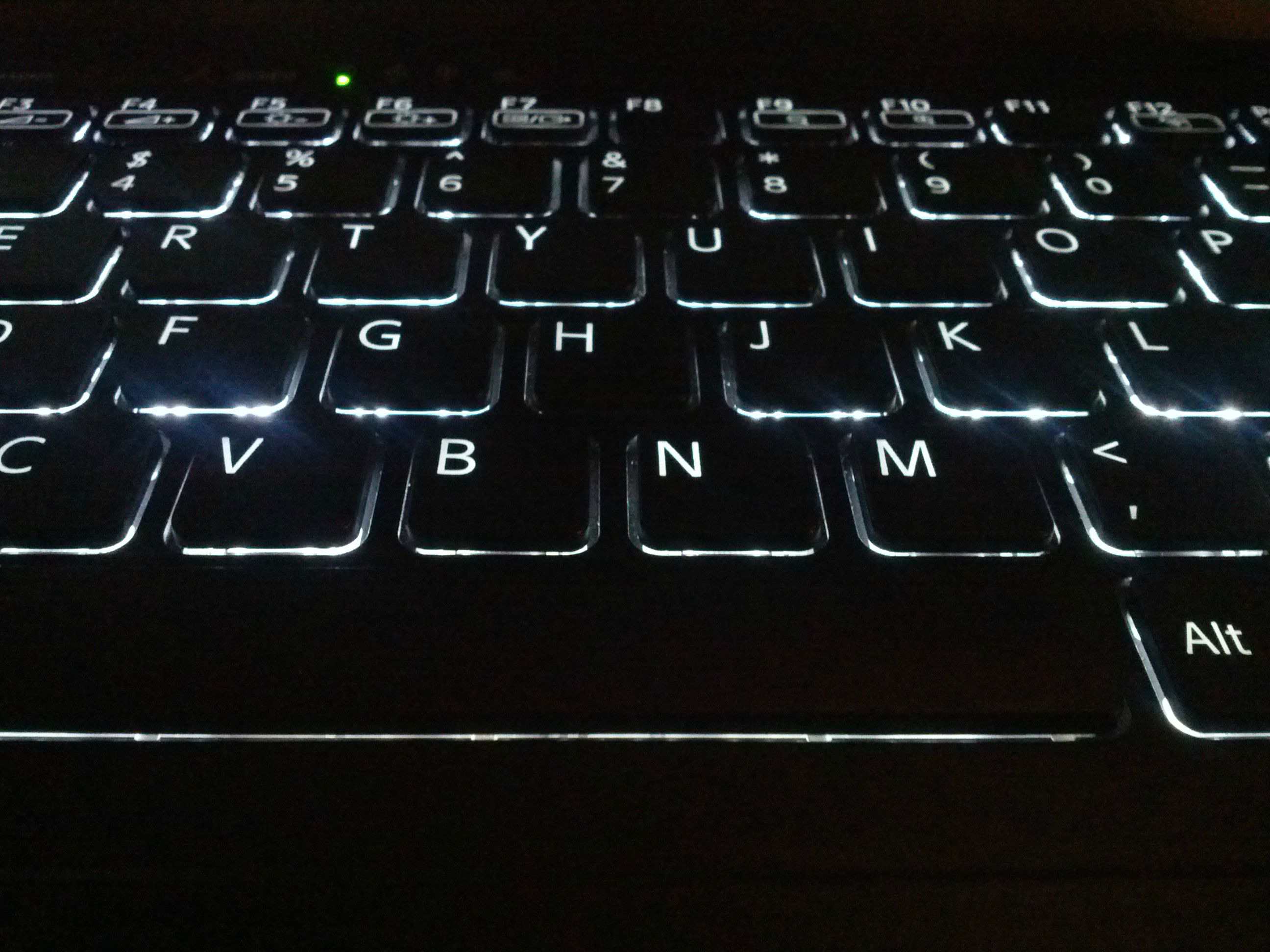
1. My keyboard looks like the following. Note the backlighting on the H key. The H key is lower set than the other keys. There is less key travel on the H key because of this. Does anyone else have this problem? Would it be possible to get Sony to replace the keyboard with the 1yr warranty, or are all models like this? I apologize for the large images
![[IMG]](images/storyImages/ARgGf.jpg)
![[IMG]](images/storyImages/7HiY4.jpg)
![[IMG]](images/storyImages/lF9Kn.jpg)
2. How does one go about "activating" the warranty? Or is this done the moment I turned on the S15 for the first time and had to fill in some Sony thing (don't remember exactly what). Or is it already activated upon my purchase?
3. How often should I turn the computer off and let it boot from fresh? I normally just put the computer to sleep and wake it up most of the time. I turn it off about once a week. Is that good or bad for the computer?
4. How do you guys clean your keyboard, where your palms go, and screen?
Any help with these is greatly appreciated.
Thanks.Attached Files:
-
-
When I switch from SPEED to STAMINA, my screen dims....I can't seem to eliminate this, I have tried Vaio Control, NVidia Panel, Intel Graphics panel....
Running in SPEED is everything is perfect, running in STAMINA mode the screen is dim....I'd rather just run full brightness.
Anyone know how to turn this feature off...its seems I've everything, Where's the setting for this? I figured it would be in VC display settings...HELP!
Edit: Nevermind...looks like a restart kick the settings in and now its stable....awesome laptop. -
PROBLEM SOLVED:
Intel 4000 driver build 2848 makes the flicker when running on battery. It's a very subtle flicker but it's there. Today I troubleshot the issue with Vaio CS for like 45 minutes. Sony has been notified about the driver and problem that is causing it (at least on Win8) and within two weeks they will take some action.
If you are experiencing small screen flicker/dimming when going from screen to a screen check if you have 2848 driver installed for Intel 4000. If so roll it back to any old one. -
Hi Guys
Had just one issue with the laptop and would like to ask if anyone had similar problem, 15 inch Vaio SVS.
Got a strange scratching noise while on 2.1 ALTEC speakers set. Similar to the noise when a hard drive's heads are working - but amplified by the speakers. Thought it could be resolved by changing stock HDD to SSD but the sound didn't disappear.
Strangely enough, the noise disappears when the internal speakers are used or the headphones are connected.
Possibly the problem is with speakers - but I didn't hear anything like that when connected to my previous ASUS laptop?
Thanks for your clues if any.
Besides that it's a perfect machine, especially the IPS display on 15". -
Tried that, but the website were i downloaded the Intel Rapid Start software from says it's only for a few Intel mobo systems,....it won't install,... ;-(
-
Which error do you get when you try to install it?
-
I'm still a bit worried about the noise in this clip (2nd half). Could anyone confirm this noise level? Or share any experiences? Thanks in advance!
-
Something like "This system is not suitable for this software product". It seems i have to prepare my SSD first and create a partition,....didn't know that,... Is this guide ok?
http://download.intel.com/support/motherboards/desktop/sb/rapid_start_technology_user_guide.pdf -
Use the following guide to create a USB stick with Win 7 installation. I used it to install a clean system on a new SSD - works flawlessly after and the guide is very detailed. Consider reading comments on the first page as well.
If you will not understand some parts, consider calling a tech-savvy friend "for consultation" just in case. -
Hmm, maybe that version 2.x is for the desktop systems only.
Try to download the 1.0.0.1015 which I used on my wife's Samsung.
Support for NP900X3C
Select the "Driver" from the left menu, then locate the intel rapid start technology from the list and download it.
I followed this guide (how to install the Intel Rapid Start on a new Windows installation):
http://forum.notebookreview.com/sam...x4b-c-guide-intel-rapid-start-technology.html
Ignore the Samsung software related steps and just disable the hibernate feature, delete the hibernate file if necessary and then install the intel Rapid Start from the zipped file you downloaded (you need to extract the files first):
1. After reinstalling Windows disable hibernation using the command "powercfg / hibernate off". This should delete the hibernation file hiberfil.sys (if it doesn't work see step 6).
2. Install Intel Rapid Start Tech
3. Reboot. Check if Disk Management shows that you have a Hibernation Partition.
4. Check that hiberfil.sys is not present in C:\ (step 1 should have deleted it). If it is still there then:
(a) Type "Command" in the search box on the start menu
(b) Right click on Command.com and select Run as Administrator
(c) Check if you are in the root folder of C (the prompt should be C:\> ). If not, type CD \.
(d) Type "del /AS hiberfil.sys
5. (optional) Follow the instructions above for enabling the timer.
I see no reason why it shouldn't work on the Sony, unless the driver from the Samsung page has a limited inf list. -
Yes, with priority to ventilation the fan is quite loud under load.
However, in normal operation with fan mode balanced or priority on silence there is no issue with fan noise.
At least that's my experience. -
I purchased a vaio S13 (SVS13125CA) that came with Win8 preinstalled 2 weeks ago and today I tested the webcam and found the quality to be really horrible.
During day time, its acceptable with little noise, however in a low-light condition (room light), the camera is extremely bad, the noise is all over the image even when I try to increase the brightness in the Windows 8 camera app. It seems the camera is not adjusting with the light condition. I want to know if anybody is facing the same issue, and if there is an alternative driver to fix this issue.
Thanks -
Thank you very much for your answer! So in office mode, with priority to silence, it's basically not hearable?
Did anyone test the tool "Notebook Fan Control" yet, which was mentioned some pages before? With that you can control the fans and even switch them off completely! -
I haven't yet but I'll try it ASAP.
I had a question of my own
Does anybody know where I can find a external case for the internal DVD drive which I replaced with a caddy and ssd? It should be available for delivery in Belgium please. -
Hi - I have got my new Sony 13P (with Win 8) 4 days back. I am excited to get this laptop and like it so far.
However, I have the below concerns. I would be extremely glad if someone can help with this-
1. The sound is really poor - comparable to sound on my Ipad. I was expecting this as I have read few posts in this thread before. Is there any way to increase the sound on this laptop?
2. The wireless connectivity drops off occasionally, and once off, it takes a laptop restart to connect back
3. The Image in Camera is very grainy. Any thoughts on where I can update webcam settings on this laptop to make it less grainy?
Thanks a ton in advance! Apologies if I am posting in wrong thread... -
I have the same questions as above.
+ one: where can I download the Wifi and Bluetooth manager for VAIO S1512. I know it has already been mentioned but I can't find the said post. -
1. Speakers are not good enough. I knew that but I never use them.
2. The wireless signal works fine for me both at home and work, always go with the latest drivers.
3. I'll let someone else response this but my first idea would be to turn on the lights in your room. That will probably help.
4. Sony : SVS1512S1ES updates | Download updates for SVS1512S1ES under Preinstalled Drivers and Utilities and select Windows 8. -
is there a guide for a Windows 8 Clean Install for the mid S-Series? Couldn't find anything.
edit: Found it. thx heywhitmarsch -
Anyone have an answer for me?
-
@birdbird
Warranty begins upon purchase = date of receipt.
About your problems with the keyboard. You should definitely contact your sales rep. I just tested mines and my "h" is lightened as the rest of the letters. I have a S13 though but it should be applicable to a S15-model.
greets -
Thank you for the reply.
About the keyboard. It was like that when I first got it. I asked about this before and didn't get a reply. I'm not quite sure what you mean by sales rep (as in call Sony Canada?) Do you think Sony would replace my keyboard? Or would they say no because they think I caused the problem? -
is there some way to install a msata III ssd in the sony s15?
-
The metal plate that makes up the top of the laptop is very slightly warped on yours
I would know because after dropping mine a couple of times leaving massive dents, half the keys look like that, some worse than others. You're wrong about it affecting key travel though , imo.
Sent from my GT-I9000 using Tapatalk 2 -
I have a S1512 and those keys (H and N) are also not highlighted.
Normal, I think
I have another problem
My processor usage is always pretty high (+/- 20%) on idle
Anyone know a solution?
-
nvm i'm trying impossible...
-
I see. But I'm pretty sure mine has less key travel. At the very least it takes a lot less pressure to type the "H" key.
So do you think Sony would replace it? -
Hi guys, I've been looking at this forum for hours and still can't decide if getting a new SVS1511GFYB for $820 is a great deal or if you have a better idea. This would be my 7th laptop, so have lots of experience, but can't tell if the color issues or heat issues are likely to be present in this model. A moment's advice would be greatly appreciated!
Thanks,
olzab -
Does anyone else have any vertical light banding on their S series? It is noticeable on white screens. The anti-glare coating on this laptop makes the vertical banding alot more visible as all screen have this issue but the more visible with this coating.
I went to Bestbuy and all of the screens have this issue, but not as visible with other manufacturer's coating. -
A trick to test the visible banding is to only look at the mouse cursor and move the mouse cursor horizontally across the screen, the banding would be visible once you do this...and remember to only look at the mouse cursor.
Patches of darkness would appear once this technique is performed.
PS: This page is an good to try this exercise, as it has an white background. -
Good deal if you ask me. Same machine is on amazon for 850 and other clearance sites for 899. you'll appreciate that it has windows 7 and if you're like most on this site, the unlocked BIOS is a bonus.
-
BUMP
Still not resolved, anyone has a sugestion for me please? :/ -
You've replaced the odd with a hdd/ssd? I have a S1512 as well and I had the exact same issue. I'm not aware of any fix to this problem so I put back in the odd. You might want to take a look at page 527 in this thread where this issue has been discussed
-
Yea i got one. Use search. Its not been resolved 100% because some can run the latest firmware fine however i had to roll my bios back one and the problem disappeared
Search for a post by me. There is a screw on the bottom of the laptop that is attached to a post right under the h. Loosening it helps
Sent from my SGH-I777 using Tapatalk 2 -
Thanks Mike, appreciate that a lot. Do you know if there's there anything I need to do to this model to enhance it out of the box? Should I grab a particular type of ram to max out the 2gb slot? Any other easy or cheap upgrades to plan on for this model or tricks to easily clean up or even differentiate bloatware from worthwhile software included? Etc.?
Thanks again for anybody's input. Vaio noob here.
olzab
Official 2012 Sony S Series Owners Thread
Discussion in 'VAIO / Sony Owners' Lounge Forum' started by Petrov, Jun 9, 2012.