 Problems? See this thread at archive.org.
View attachment Windows_8_Upgrade_Guide_EU1.pdfHi Russ
Sorry I've been away from the forum for a few days. I attach (if it has worked) the Sony guide and go to this page which will get you the Upgrade Kit.
I've given up on W8 for now and gone back to W7. Apart from not being able to access Bluetooth, my wifi kept disconnecting about every hour and saying no connections were available. I would like to use W8 but I do not know how to install it to make sure everything works as before. I need a simple guide but the Sony one is not good enough.
-
Hi everyone!
I have a Sony SVS1312C5E and did a clean install on it yesterday with a new ssd. I've run into a couple of problems. I can't seem to be able to regulate the fanspeed in vaio controlcenter anymore. Is there a fix for this? Another question: what are the hotkeys to turn on and off wifi and bluetooth?
I just tried to reinstall vaio control center, but now it wont install any more. It says that a newer version is already installed.
Would it help to put the hard drive back in and make a backup with vaio care to reinstall the drivers? -
Is anyone else experiencing usb 3.0 disconnects? I skimed some posts here but didn't find an answer.
Problem is as follows: externel HDD dock is connected through USB 3.0. While listening to music/watching movie i get sudden disconnects.
Checked if it's the cable, which is not the cause of the disconnects.
It must be some driver related problem in WIndows 7 ... -
Before
When login in Win 8, either after startup of from sleep, the WiFi wasn't quick enough I was getting error message with Outlook.
Installed the latest WAN drivers few days ago
Now
Can't get rid of the "Seatle Tower" picture (just before you enter your Win 8 paswword ) for about 5 seconds. Seems like the WiFi get connected first and then you can log in. (How can you change that picture by the way ?)
Consider this before upgrading, either the error message from Outlook or glaring at the Seatle Tower for 5 seconds every time... -
New Synaptics Touchpad driver 16.2.16.3 actually breaks fluid two finger scrolling, there is no inertia unless you really flick it.
Although it fixes left side swipe where you actually have to touch the side of the touch pad to switch apps instead of doing it by accident if you are always on the left side of the touchpad like me. -
Thanks for your responses. Sorry I didn't use the search feature but I think it really doesn't work right.
So all I should do is downgrade the BIOS?
Where can I find that?
Just google for it and download a random BIOS?
Isn't there an official Sony website for those things? -
Hmm, I finally decided to move over to Win8 too and although I've read all the guides on here, it still leaves me a bit confused as the Win8 drivers for *12* (new) model is quite different than if you select Win8 drivers for *11* model.. Yet the tutorial featured on this thread suggests using *12* drivers on *11*. Any particular reason for that?
Oh and I just found Win8 drivers for my model SVS1511C5E on Sony UK site -- and they' re different again.. Guess I should try with these. -
Just in case you don't follow the Orangegate thread but are still interested in the issue...
So my brand new Vaio had to go into the service shop because it was constantly restarting itself. It's been there for about a week. While she was there dropping it off, my wife mentioned the orange issues with the monitor. They had never heard of such an issue. They were shocked to hear about it and seem genuinely concerned. They have called 3 times to discuss the display and update on the progress of their attempts to find a solution. They are not taking it lightly, and I am confident that it's the first time the service shop themselves have heard about it. They have put the issue through to Sony Canada, and they in turn have put the issue through to Sony Japan.
As far as Sony is concerned, there is no fix for this at the moment. They are sending back my laptop since they've fixed the rebooting issues, but they are leaving my file open until they figure out a way to fix/replace the screen. They've read the forums and everything online and have personally seen the images posted and see that this is an issue. They have seen that there are red displays in the mix. They can not explain why, and assured us there are no different displays. There is one display that gets put in all of the S series.
Personally, I think the inconstancy of the displays is of more concern than the orangegate, because it doesn't sound intentional. If you have a red display, it sounds like you don't have a "fixed" display, as nobody has ever fixed the broken one. It sounds more like you were lucky enough to receive a defective product... that's messed up!
Through reading this thread, I am not sure how many of you have shown a human at Sony the issue. It seems like people have simply returned their computers or made phone calls, but not many that can make a difference have actually seen the issue themselves. I didn't think that showing it to the service center would achieve anything, but so far, they have been the most helpful and the most concerned about the issue so far. I am shocked considering the crappy service we received when purchasing the computer online.
I will keep this thread posted on any updates, but in the meantime, I suggest you take your computer to your local service shop and show them the problem in person. The number of people in the Orangegate thread and in this thread that are content with the orangegate suggests to me that enough people haven't complained about this issue to Sony themselves. So make sure you're doing your part by making sure someone can see it with their own eyes and raise a flag on the issue.
Fingers crossed that my next phone call from the service center is a positive one. -
Hey!
Does anyone know how to use the new Hyper-V with s13p i7 ? It does support virtualisation but i can't seem to get it to work :/
Edit: I figured it out and got it to work. Basicly this article explanes it throughly:But i can't figure out the unknown devices on Device manager (installed all drivers):
In addition the Card reader doesn't read cards even tho i have installed the driver and when i install Battery Care application it commands me to hibernate the machine saying my battery is broken.
Edit3: Is this normal i have 2 batterys?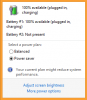
-
This 2nd battery is for the sheet battery you can buy with the laptop online or in a Sony Store.
-
Does anyone else have any vertical light banding on their S series? It is noticeable on white screens. The anti-glare coating on this laptop makes the vertical banding alot more visible as all screen have this issue but the more visible with this coating.
I went to Bestbuy and all of the screens have this issue, but not as visible with other manufacturer's coating.
Bump. -
A trick to test the visible banding is to only look at the mouse cursor and move the mouse cursor horizontally across the screen, the banding would be visible once you do this...and remember to only look at the mouse cursor.
Patches of darkness would appear once this technique is performed.
PS: This page is an good to try this exercise, as it has an white background. -
Question: How do you get the battery charging limited to 80%?
What software do i need? (Win 8 64bit, SVS13A1C5E ) -
The VAIO Control Center manages that.
-
There were not option there :/
Edit: Thank you so much <3<3<3 They magically appeared after i installed sony shared library thing
-
Hello guys,
Can anyone help me with my problem? I have 2012 Vaio S-series premium i5 3210m/gt640le combo (not bios-modded obviously) with Windows 8. Today I installed skyrim and tried to play it but all I got is terrible lagging. First 5 second game runs well but then it starts to lag like hell, totally unplayable. I don`t have a clue what causes this behaviour. I have clean-installed Windows 8 and I have all the necessary drivers. Latest Nvidia driver etc.
I´ve set GT 640le to default for Skyrim in Nvidia control bar. Also I run my laptop in high performance mode with speed switch turned on. Can anyone help me with this. I suppose that this laptop should run Skyrim at least on low settings without a terrible lag. Please help this is very annoying! -
Have you tried running the game, play and stop as soon as it gets bed, restart the game and then see.
I have this issue sometimes that I need to restart the game as if the first run is too get it ready for a gaming session. -
I have a question , can we change the screen of vaio Z 2012 to the vaio S 2012 ? because i think the difference between 13.1 inch and 13.3 inch is not too much and i love the screen quality of vaio Z 2012
-
Question: My temperatures on idle are: ~52, imo these are bad and i want to change thermal paste but here's the problem.
The ribbon cablles under the black film which is under hdd appear to be glued. I even tryed with force but i can't get them unplugged :/
Does this mean i can't change thermal paste atall? -
Are you referring to S13 or S15? That's a normal idle temperature for my S15, don't think you can get it much lower.
-
Yes, i am refering to S13P I compare these temps to my older laptop which was way cheaper acer (i7+ati). It had similar idle temps ~50 but after paste replacement they dropped by ~8 degree to 42 on idle.
Does s13p have thermal pad on it's gpu and paste on cpu ? -
The VAIO logo on the back of my laptop is starting to dig into the screen. Has anyone experienced this problem?
-
They are not glued, there is some sticky tape over the connectors which has to be removed first. Just pull it of carefully, then you can unlock the flatcables.
-
I have had my S Series for a few months now. My touch pad has been pretty lousy since day one but I didn't mind it too much. Now however, my touch pad has this issue where it thinks a finger is on it that really isn't. I have tried reinstaling drivers and nothing on the software end seems to be fixing this issue. At this point I am thinking it could be a hardware issue. Has anyone else experienced this or a similar touch pad issue?
-
Hmm... Strange, after reinstall of Sony Shared Library and Sony Firmware Extension Parser Device game seems to run well. Don´t really know what that was all about, but now it seems to work. Maybe corrupted installation or something? But still happy that everything work for now at least.
-
Hi Deaks2, thanks for uploading those pictures.
I am yet still not sure about buying the gold one or gunmetal.
Gold looks very nice, but I am still not that sure whether it looks good with those black keys once the computer is turned on (and thus the screen is no longer black). Especially with the backlit keyboard, I don't know whether the colours match together.
I would really really appreciate it if you could upload/ mail some more photos, with the desktop on the background (screen on) and the backlit keyboard on. Also I was wonderin about the lid: is it just as shiny as the gold on the inside of the laptop? Thanks a lot.
Greets from the Netherlands, Wouter
[email protected] -
Hi Deaks2, thanks for uploading those pictures.
I am yet still not sure about buying the gold one or gunmetal.
Gold looks very nice, but I am still not that sure whether it looks good with those black keys once the computer is turned on (and thus the screen is no longer black). Especially with the backlit keyboard, I don't know whether the colours match together.
I would really really appreciate it if you could upload/ mail some more photos, with the desktop on the background (screen on) and the backlit keyboard on. Also I was wonderin about the lid: is it just as shiny as the gold on the inside of the laptop? Thanks a lot.
Greets from the Netherlands, Wouter
[email protected] -
The machine is quite fast, this model has all HW max possible.
Win8 64 pro
No tuning, default installation.
================================================
SisoftSandra test:
Sony Vaio SVS 15112C5E
Klick to see results:
Details for Result ID Binx (Intel Core i7-3632QM CPU @ 2.20GHz; Intel Core Mobile DRAM Controller; 2x 6GB Nanya NT8GC64C8HB0NS; Hitachi HTS727550A9E364; Intel HD Graphics 4000; NVIDIA GeForce GT 640M LE) : SiSoftware Official Live Ranker
Score 3.689kPT
Individual Result
Result ID (Intel Core i7-3632QM CPU @ 2.20GHz; Intel Core Mobile DRAM Controller; 2x 6GB Nanya NT8GC64C8HB0NS; Hitachi HTS727550A9E364; Intel HD Graphics 4000; NVIDIA GeForce GT 640M LE)
Number of Devices / Threads 1 / 8
State Normal
Speed 3.093GHz
Performance vs. Speed (aka Speed Efficiency) 1.19kPT/GHz
Power 35.00W
Performance vs. Power (aka Power Efficiency) 0.11kPT/W
Capacity 12.000GB
Capacity vs. Power (aka Size Efficiency) 0.34GB/W
Price
Performance vs. Cost (aka Cost Efficiency)
Capacity vs. Cost (aka Size Efficiency) -
does anyone know if the vaio s 15 graphics card can be upgraded and whats the best one for it??? thanks
-
Hi, I need help! I made a wrond decision by upgrading my Vaio SVS15113FXS to Windows 8 with out create a Recovery Disk. The worst part is that, after some time running Windows 8, something happend and the PC never start again so the only way to restore it was to fully reinstall W8 from cero.
Now is working but I'm not able to install all the original software. Questions:
Is there any way to access the recovery data (I have no "D:" drive showed on my computer?
Is there any place to download the recovery disk/data?
Thanks for your support in advance! -
Hey guys, great thread!
Was wondering if you could help me with my new SVS151290X? I got it with the standard 7200RPM 750GB HDD and want to immediately switch it out with a samsung 840 pro SSD as soon as it arrives. However, how can I do this and preserve Windows 8 Pro with Fresh Start? I've heard you can clone the disks, but they have to both be connected to the motherboard, which I think is impossible unless you take out the ODD. Also, I heard it's a bad idea to clone the contents of a HDD to a SSD? (<---hearing stuff like this on the interwebs is what confuses/scares me about doing something as simple as switching HDDs) Also, someone else mentioned that purchasing the HDD rather than an SSD from the start was a big mistake because the PC is configured to work with the HDD and not the SDD. Such as bios not being optimized for an SSD and TRIM being turned off in windows among other things.
All this doom & gloom has put a real damper on the experience of owning a new Vaio
-
You can connect SSD through USB in external enclosure. That's what I did. And I cloned HDD to SSD (Crucial M4) just fine. Used Paragon Hard Disk Manager but other cloners should work.
-
Had the same issue here a month ago. I wanted a clean install pretty badly and ended up buying an extra licence of Win 8 to make it work. You could also borrow the Win 8 disk from a friend -> I don't have friends. http://forum.notebookreview.com/images/icons/icon10.gif
-
1. There are plenty SSd optimization guides. basicly you: turn off System restore/defrag/indexing/page file/hibernation and Enable write back caching and turnoff windows write-caching buffer flushing. It is questionable to disable prefetch or superfect in win8 - i didn't disable these.
2. enable trim:And now my problem:Code:fsutil behavior set disabledeletenotify 0
Is there video for s13p Disassembly? The one in the disassembly forum had invalid link and i really need help as i got stuck in the stage where i need to take out motherboard.
I think i created some air bubbles when i slightly tried to move MoBo as temps have risen by 5 degree :/
Goal is to change thermal pasta on the CPU. -
Hi All
Any news on bios mode for svs with win 8 ?? I would love to try this.
Cheers -
I'm looking at picking up the S15 model, but one question: as per Petrov's first post, the BIOS is only unlocked on the Win7 models, but not on the Win8 ones - is this correct? Are they otherwise identical? And does this mean I should try picking up a Win7 one from the Sony outlet store if I can? Thanks
-
I don't know why, but whenever I unplug my SVS13 Premium, my battery drops suddenly to around 95%. I unplug my laptop, wait like 10 minutes, and when I resume, my battery drops to around 95%. It doesn't matter how long I wait in between, it is always around 95%.
But I still achieve 3.5-4 hours of battery life. -
So can the graphics card to the sony vaio s be upgraded and to which one like whats best?? thanks
-
anybody have any advice to quiet the fans on the s15..
In a quiet room I can hear the fans running at idle. Very distracting -
Hello!
I have a question about a problem with the S13 Docking Station. Before I own the Station the S was connected via HDMI to my display. When I want to try to connect the Docking Station via HDMI the Laptop screen goes on and off and my display says "No HDMI Signal found". On VGA it works without a problem. I am not sure if this can be a Windows 8 problem? -
Does S13P use thermal paste or tab? All i see is black rubber between cpu and heatsink?
Thanks. -
Hi every body!
Finally, after some headache, I found that the recovery data was there, "hidden".
Yesterday I open the VAIO Care app, and start the recovery application and after some time my computer was like new. Now I'm working on reinstall the Windows 8 expecting to have no issues.
Oh, and I burn 6 DVD with the Recovery just in case... -
Hello,
got my sony vaio S15 two days ago.
It's specs are 4GB of RAM, graphic card 640M with 2GB, i7 QM, 640GB hdd (no ssd) and so on.
I must say that is quite a bit slow. Everything is a bit laggy.
And on windows score I get this results for istance:
Proc: 7,5
RAM: 5,9
Aero: 4,8
Graphic (for games it says): 6,7
HDD: 5,9
I guess the first one and the last are normal, since there is no SSD.
But what the hell about the graphic and the ram?
I tried to test both in stamina and speed mode.
Please answer fast because i need to decide whether return it.
EDIT
Running speccy I observed strange things:
RAM -> 4GB single channel ddr3 @ 665 Mhz ???
Graphic -> Nvidia bla bla (no ram) while Intel 4000 1800 MB of ram ?? -
Thats awesome soulbit, congrats. Did you luck out and avoid getting an orange-gate screen?
-
no. it's definitely an orange-gate screen.
But are my performance issues normal?? Did anyone of you could improve very much the speed by doing a fresh reinstall?
I did not download any driver... just updated what it said in the vaio care -
Hi soulbit, I'm about to place my order for the same notebook but your feedback is a little bit scary: orangegate not fixed and slow performance.... Have you ordered it from sony.it or bought from local store?
Grazie! -
Almost same S15 here. Started with a 4 Gb Ram, 640M 1Gb, i7 QM, 640 HDD
Had 7.7 / 5.9 /4.7 /6.5 / 5.9 after a fresh install
Then I slapped +8 Gb of RAM for $40 for a total of 12Gb
Had 7.7 / 7.7 / 5.8 / 6.5 / 5.9
Then I swaped the HDD for a ADATA SX900 SDD 240GB
Wow 7.7 / 7.7 / 5.8 / 6.5 / 7.7
A great machine very light for traveling with a 101 keyboards. The hell with the Orangegate, could not care less... otherwise this machine would be sould out everywhere ! -
I ordered it from Diwo.it and it is like buying it from sony.it, but it is pre-assembled. For about 1100 Eur instead of 1400.
Don't be scared, I believe this is just normal as nt123 just said.
Unfortunately the orange-gate is still here and the only advantages from the S13 is the bigger screen, higher resolution, full keyboard and the QuadCore.
I am thinking that maybe buying the s13 would be better... but the screen looks really something immense and I love it. Portability is surely better in the s13, same for battery life, but I don't know if the different processor is worth it.
I hope this sony could exploit the quadcore at his best... anyone has feedback for this? -
I got a new SVS15112C5e (or SVS1512C5E) with W8 preinstalled.
I don't think I have the orange-gate issue so for me this PC is beast.
I have:
- Intel®Core(TM)i7-3632QM,2,2GHz
- Windows 8 Pro
- 640 GB Serieel ATA (7200 rpm)
- ODD swapped with a Samsung 840 Series 256GB SSD
- 8 GB 1333 MHz DDR3L-SDRAM
- NVIDIA® GeForce® GT 640M LE 2GB
So the only thing that isn't factory-inserted is the SSD.
On the Windows Score I get reasonable scores except for the GPU (just as soulbit)

*screenshot is in Dutch
I think this is because it uses the integrated HD 4000 GPU instead of the more powerful GT 640.
Is there a way to trick the system too use the NVIDIA one instead of the HD one? -
I am happy for you. I have absolutely to get a new screen from sony, no way.
It seems that, no matter what graphic card you are using at the moment, Windows ALWAYS selects for the test the primary graphic card found in the system.
If there is a way, it is no use, since the only result would be a different number on the score and no else.
Official 2012 Sony S Series Owners Thread
Discussion in 'VAIO / Sony Owners' Lounge Forum' started by Petrov, Jun 9, 2012.


