 Problems? See this thread at archive.org.
Is that meant to be sarcastic? If so, I'm sorry for you but I'm just trying to help here by mentioning that the Orange-gate screen has indeed been resolved but that you have to be lucky to get one without it.
If not, following your reasoning ("Windows ALWAYS selects for the test the primary graphic card") that would mean that my HD4000 has a 6.5 rating for gaming but only 5,7 for dektop use.
That's just plain retarded.
I think at first it uses the HD4000 and as soon as graphics usage is high enough (between desktop and gaming test) it switches to the stronger NVIDIA card.
So I think it's just a matter of 'switching off' the HD card and making the NVIDIA card default.
Only thing now is to find how to do that.
-
Of course I was not. As you said, you must be lucky and you were. And more people get good IPS, more chances to get a better one for us don't you think?
I bought it in Italy, what about you?
In my case, desktop use is 4.8, while gaming is still 6.5 like you.
I believe that desktop is an overall score (while graphic is pure graphic calculation), which is based also on the graphic card set as primary into the system, which is the internal one.
EDIT:
thanks tmckenn2! -
Easy. Go to nvidia control panel and set it to prefer maximum performance in global settings. Reference the 640m bios mod thread for more info
Sent from my SGH-I777 using Tapatalk 2 -
HI
Is the sony vaio s15 (qci7, 8gb ram, ssd, gt640m le, windows 8) a good choice for a product designer like me, who uses illustrator, solidoworks and 3ds max 2013? i also use photoshop, but the colour acuracy is not very important for me....
thanks
Btw, how is the build quality of the vaio? -
Ok. I really like the build quality because I really like the finish and it is light and compact when closed. However, the linge of the screen bends a bit when you open it, plus other minor things that you won't notice until you see this video:
Sony VAIO S Series 15.5 Review Pt 1 Ivy Bridge 2012 - YouTube
plus its part 2.
For a designer it is a great choice for the screen it has, except two main points:
- orangegate
- uncommon photoshop issue you can see here in the last graph:
Sony Vaio S 1511, l'ultrasottile da 15 pollici da meno di 2 chili con DVD - Prestazioni generali - Pagina 7 - Tom's Hardware
it seems that application of photoshop filters on vaio is slower. But that's it, filters. It's a matter of processor usage.
I believe that any laptop with a good screen, very good processor, good graphic card can manage the job you do. But of course MAC is to be preferred if you want to spend about 600$ more. -
Thanks a lot... I dont know if i go to mac because i have to deal with solidworks and 3ds max... And those programs arent available to mac os.. :/ ... But is this vaio good on 3ds max and solidworks? Im in doubt wether i choose sony vaio s for about 1600 euros, or the thinkpad w530 for about 2200euros XD
I really like the vaio, but im afraid that the gpu could not handle very well with the programs i mencioned.... :/
Thanks again -
But when i go there:
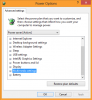
The Processor power management is missing.
I desperately need to turn off turbo boost.
Edit: Hyper-V has disabled that option and forces 100% cpu
Got it
Edit2: But i really would like to know, does it use thermal paste or pads? -
I find overall the Webcam really suck on the S151290...
I did a clean install, so in Device Manager I see a plain vanilla "Imaging Device" called USB2.0 Camera.
Is it the same for laptop out of the factory ? I am trying to get proper drivers but cannot find the real device name...
I did get some app from SVS1511x Win 7 area, but driver stay as USB2.0 Camera...
Any clue ? -
My question should have been, how does your webcam shows under Device Manager ?
-
I just bought a refurbished SVS1512 from amazon. I really like this device so far and it seems, that I don't suffer from the orangegate.
The only thing that bothers me is the cooler. It sounds as if it vibrates. If I put the device to sleep, the cooler seems to grind just before it stops.
Is this usual behaviour or shouldn't I hear the cooler in stamina mode?
I'd really could use some help to make a decision for just keeping the notebook, send it in for repair or back to amazon.
It was a warehouse deal offer and as far as the display seems fine, I would really like to keep it. On the other hand I wish it to be less audible in stamina mode.
The cooler seems to be as loud as the hard disk drive while on access... -
Alright, the clean install with all the drivers did not cause any improvement. Im talking a lot with the sony support lately and I am so annoyed and angry about them.
I did send my VAIO it in again and they changed the fan, the keybord and the part of the body which is around the keybord (don´t know the english word for that...). The noise level is exactly the same as before this "repair". I contacted them again and said, I want either a fully functioning device or my money back. Now they want me to prove, that the noise of my VAIO is extraordinary loud.
I don´t know how to prove. I tried to do some amateur-noise-measurment at home. Using the app Decibel Meter free on my brothers iPhone 4s I measured an average about 40dB for the VAIO. The room was not dead-quiet (well, it was realy quiet but not professionally prepared for noise measurements...), the baseline of this room was 34-35 dB. When I did the same measurement with my brothers MacBook pro 7,1 (the early 2011 model I think) and his machine did not change the baseline measurment at all (still 34-35 dB).
I would be grateful if someone with a quiet Vaio could try this at home and tell me his or her results. In this picture, you see how I set everything up (the stapler made sure, i had 15 centimeters between the vaio and the iphone. The phone is placed on this tissue box with a height of 7.5 cm, so it would not be disturbed by the vibrations of the HDD).
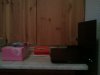
-
I got my Rapid Start back by installing the original Sony Windows setup on my SSD, but it doesn't work the way it should work: When i close the ;lid i hear the laptop power down and music (youtube for example) stops. After 30 seconds the laptop boots again and music starts to play,.....after 30 seconds the laptop powers down again. This behaviour continues untill the battery runs out. of power. What is wrong? I only found 1 possibility to enable or disable Rapid Start in Vaio Control Center, but maybe i should configure more? What is wrong?
Another annoying issue is a loud beep every whole hour! When the computer is on but idle i hear two loud beeps and the screen lights up,..... I already renamed the pi.wav but it doesn't solve my problem,...
Could somebody please help me solve these annoying problems? -
Fans should be silent! I had two 2012 S15 that I switched back and forth and one was dead silent you can actually hear air blowing out but not the fans and the other one was noisy as hell just like cooler is grinding into something even on "silent" mode.
So yes exchange it for another one. -
URGENT QUESTION NEVER ANSWERED:
I don't know why, but whenever I unplug my SVS13 Premium, my battery drops suddenly to around 95%. I unplug my laptop, wait like 10 minutes, and when I resume, my battery drops to around 95%. It doesn't matter how long I wait in between, it is always around 95%.
But I still achieve 3.5-4 hours of battery life.
Happy Holidays! -
So does anyone know if black ops 2 runs well on gt640 m le just curious.
-
I had the same problem. It disappeared as I changed something in the advanced power plan settings. In battery mode, I had set it up to never go to sleep. So I changed this to any option with "go to sleep after x minutes".
-
if Battlefield 3 runs well on that laptop, Black Ops 2 will have no problem at all running on the same machine.
-
Thx man, i'll try it out ;-)
-
I have no clue how but my sound just got f***ed up a day ago and I can't get it back to normal. I didn't do anything to it, neither I updated drivers unless they did automatically without any notification.
The sound just have so much reverb now my headphones sound like speakers in a big hall. It's bearable but annoying, and I don't think I can or want to adapt to it.
Have checked the settings in Dolby Home Theater and switched the modes without any audible differences. Could it have something to do with audio codecs? -
I heard about an issue, that pressure marks shaped like the vaio logo could appear on the display, when you carry the notebook in a backpack and there is any kind of pressure on it.
Is this issue a particular case or can it be frequently determined? -
Hello!
Issue; My vaio SVS13A2C5E backlit won't turn off, even tho i have set it to [ do not turn on ]
instead it will always activate when i type and sometimes it turns on and off itself with 10 second intervals which is really annoying.
Thank you. -
URGENT QUESTION NEVER ANSWERED:
I don't know why, but whenever I unplug my SVS13 Premium, my battery drops suddenly to around 95%. I unplug my laptop, wait like 10 minutes, and when I resume, my battery drops to around 95%. It doesn't matter how long I wait in between, it is always around 95%.
But I still achieve 3.5-4 hours of battery life.
Happy Holidays!
URGENT QUESTION, NEED ANSWERS -
Stop re posting its really annoying. If we knew we would tell you. That's a very specific problem only you have.
Sent from my SGH-I777 using Tapatalk 2 -
Ahh, so he was reposting. I thought I was going crazy somehow.
Sent from my SCH-I535 using Tapatalk 2 -
Are you running a fresh installed or factory installed windows?
-
Yes, fresh windows 8.
I managed to get everything else to work with installing mixed drivers from W7 & W8.
I'm not sure if this might be it, but Vaio keys it did not install saying that update is not intented for my laptop. -
Hey everyone, I have the S13p and I'm having some issues with the 640M LE having pretty poor performance after a clean install of Windows 8.
Around a month ago, I installed a 250GB Samsung 840 SSD and did a fresh install of Windows 8. Windows automatically recognized both graphics cards, but I installed the drivers from lenovo's website anyway. I noticed that when I installed some of the games that ran perfectly fine prior to the new install, I was getting pretty terrible performance.
At first I thought it was just because the computer was using the integrated graphics as opposed to the discrete one, regardless of the graphics switch being set to speed. So I went into the Nvidia control center and made sure the games I wanted to run used the discrete graphics. Unfortunately, I still have the same exact performance with poor frame rates. I'm afraid that only the integrated graphics are being used, but I'm not sure.
I've tried different drivers as well, including Nvidia's beta drivers, but I always get the same performance which leads me to believe that the discrete graphics are not being used. Have any of you been in the same situation? And if so, how did you fix this problem?
I'm frustrated because before I used to be able to play my games (Borderlands, Battlefield 3, Just Cause 2, etc.) perfectly fine, yet now they are unplayable because of low frame rates. I really want to buy games off the Steam Sale, but I'm afraid I won't be able to play any of them if the problem persists. Any help would be appreciated.
Thanks,
Jonny
EDIT: Strangely, after writing this post I restarted the computer as it said I needed an update, and now all my games run fine again... Not sure what happened but I'm not complaining! -
Have you tried graphics driver provided by Sony for Windows 8?
http://esupport.sony.com/US/p/swu-download.pl?mdl=SVS13A190X&upd_id=8111&os_group_id=24 -
Hi
I have read this tread a few weeks now and i wonder what batery life you experience with SVS15 on stamina mode. I myself only get about 2,5 h.
Do any of you have a tip how to increase battery life.
Ie, maybe tip regarding power plan?
T -
I've finally taken my S15 into proper use. Had to remove the realtek and dolby sound drivers though, they make everything sound like .
I'm in LOVE with the screen, everything looks so much nicer compared to my old crappy screen. Also really like windows 8, it's pretty usefull when you know the right key combinations, etc.
Few problems though:
1. Brightness of the screen keeps adjusting automatically, even when i've turned this OFF in the VAIO control center
2. When I try to uninstall the sony bloatware i get this Error Code: -5005 : 0x80070002, pretty annoying because i want to get rid of it
3. When i try to uninstall the pre-installed cyberlink's Power2Go it reports the file SKRSet.xml is missing, downloaded this file and put it in the folder but it still won't work
Any help would be really appreciated -
go to Intel's Graphics and Media Control Panel > Power > select "On battery" > turn off "Display Power Saving" (or something similar).
-
I found that on my s15 if I bend the computer a little bit the idle fan is quieter. Any idea what this could be?
-
I don't know if this is normal, but when I run GPU-z, or MSI Afterburner, my gt 640m le shows no dedicated ram usage. Could someone run these programs and see if the same thing happens? By the way, I have a S15.
Thanks. -
Sorry for reposting, but it would be very nice, if someone who uses his/her S15 as a mobile device for more than two months, could share his/her experience.
It's very important for my decision, either to send it back or to keep it. -
well ive been having mines for a month and a half and im a college student so big textbooks in my bag with my laptop but either way im careful not to lean on it because who would? so ive been fine im sure it can take normal amounts of pressure because im not ocd about it like there are gonna be times when i might lean on my bag which applies preasure to my laptop but just overall dont push it and don't abuse it because then something like what ur talking about is bound to happen.
-
why would u bend ur computer? and im not sure thats something really odd
-
I put my ear to the keyboard to hear the fan. I tried bending it a little to see if something may be warped making the fan louder.
For some reason it is quieter when I apply a bit of torsion.. -
Hey guys, I need help
I had my Sony S15 for Christmas yesterday and turned the power button on this morning.
It asked the langage I wanted, then formated and said this could take several hours.
Since 11AM this morning I have the Vaio black loading screen. It's been 8 hours and still loading.
Is it normal? O_O
It's a customized laptop I bought online at the Sony store.
EDIT: It's ok now, problem solved. I already love the laptop
-
Hello!
I got my Sony S15 since monday but I haven't been able to make a wireless connection to the internet. I can connect to the wireless device but the acces is 'limited', indicating that I can't connect the internet through this device.
However, my previous laptap (a Dell) is still able to connect to the internet using this router.
The reason I'm posting on this forum is because my girlfriend, who is also using a sony vaio (for almost 4 years), couldn't get acces as well. It seems that only the sony vaio laptops have this issue...
Can somebody help me?
Thank you! -
Hi
in resource monitor i can see cpu 0 to 7, cpu 0 is always over 80 % also in idle, when idle all other processors are almost 0% Can anybody explain this? -
Hi Everyone!
New guy here
I am thinking of buying Sony Vaio S15 and I have some questions that came up, before ordering it.
I am wondering if there is a possibility to install mSata SSD beside ordinary HDD or is there only way to install SSD inside just to put out HDD or ODD?
I am seeing on those photos at sony.com, that there is no fingerprint reader, is this true?
How does this educational discount works? Do I need to send to Sony any documents of my school?
Thank you guys and girls for all the answers.
Have a nice holidays.
T -
In the S15 there's only room for two drives (ODD included).
You get the laptop with a HDD or SSD and a DVD or Bluray drive.
If you choose to you can remove the ODD and put in a SSD or you can just swap the HDD for an SSD.
This has to be done by yourself
Fingerprint scanner is, I think, only for the black and silver edition of the S15. The standard white edition comes w/o the scanner.
Educational discount is only valid in the Sony's Educational Store.
I think you are from Slovenia (?) and this country doesn't have this kind of store.
You should see it in the right hand bottom corner of Sony's homepage

Try contacting Sony for this matter.
Happy holidays to you too -
Question For you all who installed a fresh copy of windows 7.
I grabbed the license key from the registry of the original factory win 7 install, so can I use any copy of windows 7 to perform a clean install? Or do I need to use a iso installer or?
Sent from my SCH-I535 using Tapatalk 2 -
THAT'S NOT YOUR LICENSE KEY! If it were that easy hackers would have no issues at all to find your key and use it without you noticing.
That key is an encrypted version of the actual key.
Just use one of these programs for finding (all) your license key(s).
14 Free Product Key Finder Programs
If you have Windows7 on DVD, any copy is good.
Else you should just find a genuine W7 iso and burn it on a DVD. -
Thanks Ngdm. I should have been clearer in stating that I used one of those programs.
And it's great to hear that I can use one of my existing win 7 dvd to use for a clean install.
Thanks!
Sent from my SCH-I535 using Tapatalk 2 -
Extra question:
How do I know that the 'stamina-speed' switch works? I have a 2GB Nvidia GT640M LE graphic card.
I don't notice a difference between de stamina and speed mode if I play a game .. -
Extra question:
How do I know that the 'stamina-speed' switch works? I have a 2GB Nvidia GT640M LE graphic card.
I don't notice a difference between de stamina and speed mode if I play a game .. -
If you installed all drivers correctly you should find an icon in your (hidden) taskbar as seen in this screenshot:
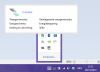
*This screenshot is in Dutch in my case
There it shows what mode you are in and what settings are applied.
EDIT:
Just read your previous problem and noticed you actually had the same problem as me.
Although I believe it has something to do with one of the many settings in the router I found a solution (temporarily working).
I just uninstalled all Network Adapters in Device Manager, restarted the PC and looked for the latest driver for my Intel Centrino Advanced N-6*** (ON THE INTEL WEBSITE, not the Sony one).
Since then I have had no problems whatsoever connecting to internet.
You should try it out with both laptops and then please let me know, I'm interested if this works with everyone. -
I'm not quite sure, if I should keep it. People, who reported about the issue, said that they used it as carefully as other notebooks before and used a case for travelling with it. Difficult decision...
Are there some more experiences about that issue?
Official 2012 Sony S Series Owners Thread
Discussion in 'VAIO / Sony Owners' Lounge Forum' started by Petrov, Jun 9, 2012.


